2023 CADILLAC LYRIC lock
[x] Cancel search: lockPage 227 of 424
Cadillac Lyriq Owner Manual (GMNA-Localizing-U.S./Canada-15644413) -
2023 - CRC - 2/23/22
226 Driving and Operating
Warning (Continued)
Do not use ACC when:
.On winding and hilly roads
or when the camera
sensor is blocked by snow,
ice, or dirt. The system
may not detect a vehicle
ahead. Keep the
windshield and headlamps
clean.
.When visibility is poor due
to rain, snow, fog, dirt,
insect residue, or dust;
when other foreign
objects obscure the
camera’s view; or when
the vehicle in front or
oncoming traffic causes
additional environmental
obstructions, such as road
spray. ACC performance is
limited under these
conditions.(Continued)
Warning (Continued)
.On slippery roads where
fast changes in tire
traction can cause
excessive wheel slip
.With extremely heavy
cargo loaded in the cargo
area or rear seat
.When towing a trailer
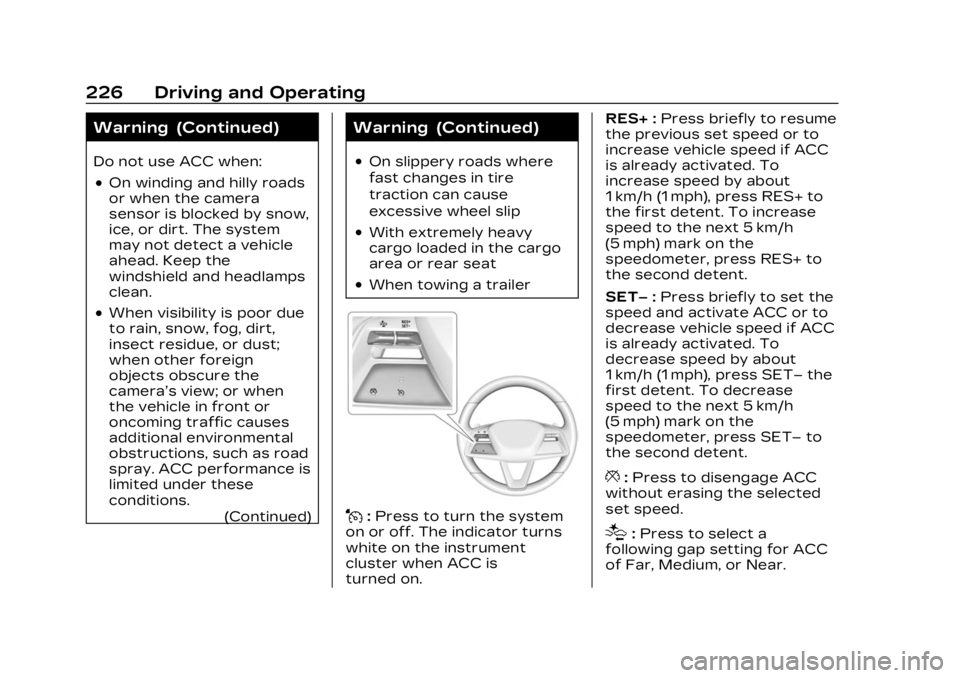
J:Press to turn the system
on or off. The indicator turns
white on the instrument
cluster when ACC is
turned on. RES+ :
Press briefly to resume
the previous set speed or to
increase vehicle speed if ACC
is already activated. To
increase speed by about
1 km/h (1 mph), press RES+ to
the first detent. To increase
speed to the next 5 km/h
(5 mph) mark on the
speedometer, press RES+ to
the second detent.
SET– :Press briefly to set the
speed and activate ACC or to
decrease vehicle speed if ACC
is already activated. To
decrease speed by about
1 km/h (1 mph), press SET– the
first detent. To decrease
speed to the next 5 km/h
(5 mph) mark on the
speedometer, press SET– to
the second detent.
*: Press to disengage ACC
without erasing the selected
set speed.
[: Press to select a
following gap setting for ACC
of Far, Medium, or Near.
Page 233 of 424

Cadillac Lyriq Owner Manual (GMNA-Localizing-U.S./Canada-15644413) -
2023 - CRC - 2/23/22
232 Driving and Operating
Warning (Continued)
braking when passing a
vehicle or performing a lane
change. Always be ready to
manually accelerate or brake
to complete the pass or lane
change.
Stationary or Very
Slow-Moving Objects
{Warning
ACC may not detect and
react to stopped or
slow-moving vehicles ahead
of you. For example, the
system may not brake for a
vehicle it has never detected
moving. This can occur in
stop-and-go traffic or when
a vehicle suddenly appears
due to a vehicle ahead
changing lanes. Your vehicle
may not stop and could
cause a crash. Use caution
when using ACC. Your (Continued)
Warning (Continued)
complete attention is always
required while driving and
you should be ready to take
action and apply the brakes.
Irregular Objects
Affecting ACC
ACC may have difficulty
detecting the following
objects:
.Vehicles with cargo
extending from the back end.
.Non-standard shaped
vehicles, such as vehicle
transport, vehicles with a
side car fitted, or horse
carriages.
.Objects that are close to the
front of your vehicle.
ACC Automatically
Disengages
ACC may automatically
disengage and the driver will
need to manually apply the
brakes to slow the vehicle if:
.The sensors are blocked.
.The Traction Control System
(TCS) or StabiliTrak/ESC
system has activated or
been disabled.
.There is a fault in the
system.
.The radar falsely reports
blockage when driving in a
desert or remote area with
no other vehicles or
roadside objects.
.A DIC message may display
to indicate that ACC is
temporarily unavailable.
The ACC indicator will turn
white when ACC is no longer
active.
In some cases, when ACC is
temporarily unavailable,
regular cruise control may be
used. See “Switching Between
ACC and Regular Cruise
Control” previously in this
section. Always consider
driving conditions before using
either cruise control system.
Page 237 of 424

Cadillac Lyriq Owner Manual (GMNA-Localizing-U.S./Canada-15644413) -
2023 - CRC - 2/23/22
236 Driving and Operating
.Press*.
.PressJ.
.Press the Regen On Demand
paddle.
Erasing Speed Memory
The ACC set speed is erased
from memory if
Jis pressed
or if the vehice is turned off.
Weather Conditions
Affecting ACC
System operation may be
limited under snow, heavy rain,
or road spray conditions.
Accessory Installations and
Vehicle Modifications
Do not install or place any
object around the front
camera windshield area that
would obstruct the front
camera view.
Do not install objects on top of
the vehicle that overhang and
obstruct the front camera,
such as a canoe, kayak,
or other items that can be
transported. Do not modify the hood,
headlamps, or fog lamps, as
this may limit the camera’s
ability to detect an object.
{Warning
Stickers or accessories
attached on or around the
front or rear fascia of your
vehicle can impair the radar
sensors resulting in vehicle
damage or personal injury.
Your vehicle could brake
suddenly. Do not attach
anything on or around the
front or rear fascia, including
the license plate, the
bumper, or the grille. Use
only GM genuine
accessories.
Do not attach anything to the
front or rear fascia as this may
interfere with the radar
sensor operation. Cleaning the Sensing System
The camera sensor on the
windshield behind the
rearview mirror, and the
sensors on the front of the
vehicle can become blocked by
snow, ice, dirt, mud, or debris.
This area needs to be cleaned
for ACC to operate properly.
If ACC will not operate, regular
cruise control may be
available. See
“Switching
Between ACC and Regular
Cruise Control” previously in
this section. Always consider
driving conditions before using
either cruise control system.
For cleaning instructions, see
“Washing the Vehicle” under
Exterior Care 0364.
Super Cruise
If equipped, Super Cruise can
steer to maintain lane position
under certain conditions on
Super Cruise-enabled roads
that are separated from
opposing traffic.
Page 246 of 424

Cadillac Lyriq Owner Manual (GMNA-Localizing-U.S./Canada-15644413) -
2023 - CRC - 2/23/22
Driving and Operating 245
Pay close attention to the road ahead to avoid these three increasing alerts:First Alert
.If the steering wheel light bar flashes green, the system has detected
that your head and eyes may not be directed toward the road.
.The flashing will stop when the system detects that your head and eyes
appear to be directed toward the road.
Second Alert
.If the steering wheel light bar flashes green for too long, Super Cruise
will alert the driver to take control of steering immediately by flashing
the light bar red. Also, either beeps will sound or the Safety Alert Seat
will vibrate. Touch the Settings icon on the infotainment home page.
Select “Vehicle” to display the list of available options and select
“Collision/Detection Systems.”
.Take over steering, then Super Cruise will disengage.
.To re-engage Super Cruise, press]. See “Using Super Cruise”
previously in this section.
Third Alert
.If the steering wheel light bar flashes red for too long, a voice command
will tell you to take control of the vehicle.
.Take control of the steering immediately; ACC and Super Cruise will
disengage.
.A DIC message will indicate that Super Cruise is locked out. Super
Cruise cannot be re-engaged until the vehicle is turned off and back on.
.Continued failure to take over steering will cause the vehicle to brake to
a stop and OnStar will be called. The brake lamps and hazard warning
flashers will come on.
.Take control of the vehicle and continue driving.
Page 254 of 424

Cadillac Lyriq Owner Manual (GMNA-Localizing-U.S./Canada-15644413) -
2023 - CRC - 2/23/22
Driving and Operating 253
Super Cruise Message Summary (cont'd)
Unavailable Sensor Can’t See Face Clearly.Sun is shining into the Driver Attention
System (DAS) camera.
.Dawn or dusk sun glare is on the
driver’s face.
.Cups, food, hands, or other objects are
obscuring the DAS view of the driver’s face.
.The steering column is pointed too high or
low for the DAS to see the driver. Adjust the
steering column or the seat if the message
occurs frequently.
Unavailable Looking Away From Road for
Too Long The DAS system detects that the driver is not
looking at the road.
Unavailable Driving Too Fast The vehicle is traveling faster than 137 km/h
(85 mph).
The maximum Super Cruise speed in curves will
vary based on how sharp the curve is. The
vehicle will automatically decrease speed if
needed.
Unavailable Driving in Exit Lane The Super Cruise system has detected that the
vehicle is in an exit lane.
Unavailable GPS Signal Lost
.There is poor reception in isolated areas.
.Reception is being blocked by buildings or
other large structures.
Page 255 of 424

Cadillac Lyriq Owner Manual (GMNA-Localizing-U.S./Canada-15644413) -
2023 - CRC - 2/23/22
254 Driving and Operating
Super Cruise Message Summary (cont'd)
Unavailable You Have Taken Vehicle Control.The brake pedal is being pressed.
.The Adaptive Cruise Control has been
canceled or turned off.
Unavailable Sensor Blocked Clear snow, ice, dirt, or other contaminants from the front and rear areas of the vehicle.
Unavailable Sharp Curve Some curves are too sharp to be navigated by the Super Cruise system. Super Cruise will be
available after the curve is traveled.
Super Cruise Unavailable Super Cruise is unavailable for reasons not described in other messages.
Super Cruise Locked Out See Owner’s Manual The driver did not take control of the vehicle when prompted by the Super Cruise system.
The Super Cruise system will be disabled until
the vehicle is turned off and back on.
Map Updates
Super Cruise map information
must be periodically updated
at least once every seven
months to determine whether
Super Cruise is available on
certain roads. See the
following website for Super
Cruise map open source compliance documentation,
including the license
information:
https://oss.veoneer.com/
Data Download
If the vehicle is equipped with
OnStar and has an active
service plan, additional data
may be collected through theOnStar system. This includes
information about: the
vehicle’s operation; a crash
involving the vehicle; the use
of the vehicle and its features;
and, in certain situations, the
location and approximate GPS
speed of the vehicle. Refer to
the OnStar Terms and
Page 257 of 424

Cadillac Lyriq Owner Manual (GMNA-Localizing-U.S./Canada-15644413) -
2023 - CRC - 2/23/22
256 Driving and Operating
Warning (Continued)
Under many conditions,
these systems will not:
.Detect children,
pedestrians, bicyclists,
or animals.
.Detect vehicles or objects
outside the area
monitored by the system.
.Work at all driving speeds.
.Warn you or provide you
with enough time to avoid
a crash.
.Work under poor visibility
or bad weather conditions.
.Work if the detection
sensor is not cleaned or is
covered by ice, snow, mud,
or dirt.
.Work if the detection
sensor is covered up, such
as with a sticker, magnet,
or metal plate.(Continued)
Warning (Continued)
.Work if the area
surrounding the detection
sensor is damaged or not
properly repaired.
Complete attention is
always required while
driving, and you should be
ready to take action and
apply the brakes and/or
steer the vehicle to avoid
crashes.
{Warning
Stickers or accessories
attached on or around the
front or rear fascia of your
vehicle can impair the radar
sensors resulting in vehicle
damage or personal injury.
Your vehicle could brake
suddenly. Do not attach
anything on or around the
front or rear fascia, including (Continued)
Warning (Continued)
the license plate, the
bumper, or the grille. Use
only GM genuine
accessories.
Audible Alert
Some driver assistance
features alert the driver of
obstacles by beeping. To view
available settings for this
feature, touch the Settings
icon on the infotainment home
page. Select “Vehicle”to
display the list of available
options and select “Comfort
and Convenience”.
Cleaning
Depending on vehicle options,
keep these areas of the
vehicle clean to ensure the
best driver assistance feature
performance. Driver
Information Center (DIC)
messages may display when
the systems are unavailable or
blocked.
Page 263 of 424

Cadillac Lyriq Owner Manual (GMNA-Localizing-U.S./Canada-15644413) -
2023 - CRC - 2/23/22
262 Driving and Operating
icon on the infotainment home
page. Select“Vehicle”to
display the list of available
options and select “Collision/
Detection Systems”.
The
Xbutton is used to turn
on or off the Park Assist,
which also turns on or off the
Backing Warning and Reverse
Automatic Braking (RAB) at
the same time. When the
system is turned off, a system
off message is shown on the
display. This message
disappears after a short
period of time.
Turn off Park Assist when
towing a trailer to prevent
unwanted beeps and when a
bike rack is attached to ensure
proper operation.
When the System Does Not
Seem to Work Properly
If a service message displays,
check the following conditions:
.The sensors may not be
clean. Keep the vehicle's
front and rear bumpers free of mud, dirt, snow, ice, and
slush. For cleaning
instructions, see Exterior
Care
0364.
.The Park Assist sensors may
be covered by frost or ice.
Frost or ice can form around
and behind the sensors and
may not always be seen; this
can occur after washing the
vehicle in cold weather. The
message may not clear until
the frost or ice has melted.
If a service message displays
and the above conditions do
not exist, take the vehicle to
your dealer for repairs.
If the Park Assist System does
not activate due to a
temporary condition, a system
off message is shown on the
display. This can occur under
the following conditions:
.The driver has disabled the
system.
.An object is currently
blocking the rear sensors
(for example, bike rack,
tailgate, trailer hitch, etc.). Once the object is removed,
Park Assist will return to
normal operation.
.The bumper is damaged.
Take the vehicle to your
dealer for repairs.
.Other conditions, such as
vibrations from a
jackhammer or the
compression of air brakes on
a very large truck, are
affecting system
performance.
Automatic Parking
Assist (APA)
Enhanced Automatic
Parking Assist (APA)
If equipped, under certain
conditions APA with Braking
can use sensors based on
sonar technology along the
vehicle’s front, rear and sides
to detect a parking spot, and
automatically park or unpark
the vehicle with some driver
assistance. The vehicle will
automatically maneuver into a