2023 CADILLAC LYRIC instrument panel
[x] Cancel search: instrument panelPage 190 of 424
Cadillac Lyriq Owner Manual (GMNA-Localizing-U.S./Canada-15644413) -
2023 - CRC - 2/23/22
Climate Controls 189
Caution (Continued)
with a razor blade or
anything else that is sharp.
This may damage the rear
window defogger grid and
affect the radio's ability to
pick up stations clearly. The
repairs would not be
covered by the vehicle
warranty.
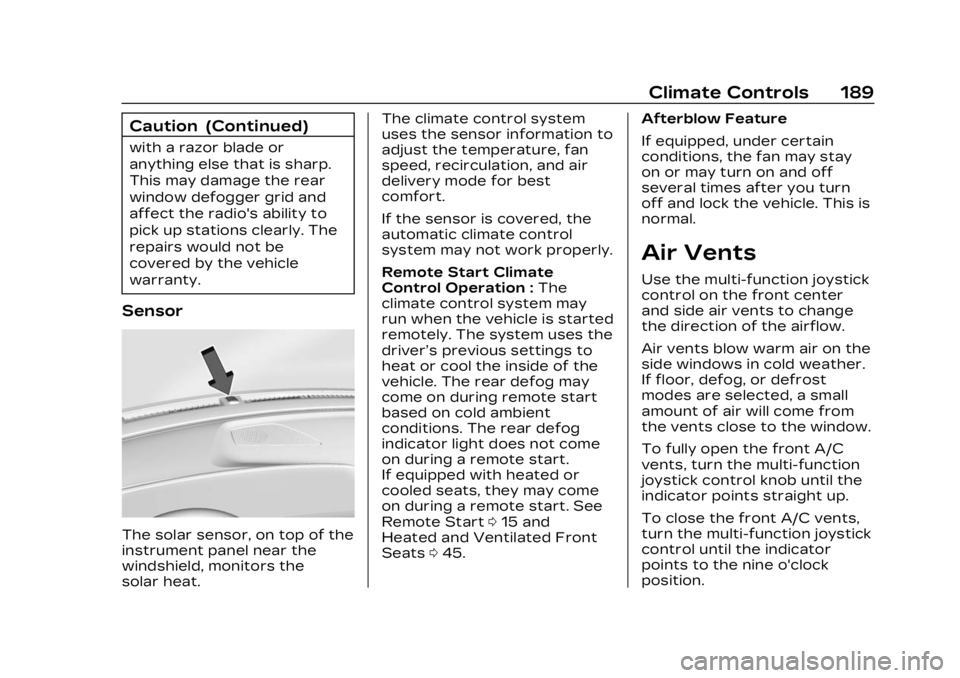
Sensor
The solar sensor, on top of the
instrument panel near the
windshield, monitors the
solar heat.The climate control system
uses the sensor information to
adjust the temperature, fan
speed, recirculation, and air
delivery mode for best
comfort.
If the sensor is covered, the
automatic climate control
system may not work properly.
Remote Start Climate
Control Operation :
The
climate control system may
run when the vehicle is started
remotely. The system uses the
driver’s previous settings to
heat or cool the inside of the
vehicle. The rear defog may
come on during remote start
based on cold ambient
conditions. The rear defog
indicator light does not come
on during a remote start.
If equipped with heated or
cooled seats, they may come
on during a remote start. See
Remote Start 015 and
Heated and Ventilated Front
Seats 045. Afterblow Feature
If equipped, under certain
conditions, the fan may stay
on or may turn on and off
several times after you turn
off and lock the vehicle. This is
normal.
Air Vents
Use the multi-function joystick
control on the front center
and side air vents to change
the direction of the airflow.
Air vents blow warm air on the
side windows in cold weather.
If floor, defog, or defrost
modes are selected, a small
amount of air will come from
the vents close to the window.
To fully open the front A/C
vents, turn the multi-function
joystick control knob until the
indicator points straight up.
To close the front A/C vents,
turn the multi-function joystick
control until the indicator
points to the nine o'clock
position.
Page 308 of 424

Cadillac Lyriq Owner Manual (GMNA-Localizing-U.S./Canada-15644413) -
2023 - CRC - 2/23/22
Vehicle Care 307
Vehicle Care
General Information
General Information . . . . . . 308
California PerchlorateMaterials
Requirements . . . . . . . . . . . . . 308
Accessories and Modifications . . . . . . . . . . . . . 308
Vehicle Checks
Doing Your OwnService Work . . . . . . . . . . . . . 309
Hood . . . . . . . . . . . . . . . . . . . . . . . . . . . 310
Underhood Compartment Overview . . . . . . . . . . . . . . . . . . . . 312
Cooling System . . . . . . . . . . . . . 313
Washer Fluid . . . . . . . . . . . . . . . . 314
Brakes . . . . . . . . . . . . . . . . . . . . . . . . . 315
Brake Fluid . . . . . . . . . . . . . . . . . . . 316
Battery - North America . . . . . . . . . . . . . . . . . . . . . . 317
Park Brake and P (Park) Mechanism Check . . . . . . . 320
Wiper Blade Replacement . . . . . . . . . . . . . . 320
Windshield Replacement . . . . . . . . . . . . . . . 321
Gas Strut(s) . . . . . . . . . . . . . . . . . . 321
Headlamp Aiming
Front Headlamp Aiming . . . . . . . . . . . . . . . . . . . . . . . 322
Bulb Replacement
Bulb Replacement . . . . . . . . . 323
LED Lighting . . . . . . . . . . . . . . . . 323
Electrical System
High Voltage Devices andWiring . . . . . . . . . . . . . . . . . . . . . . . 323
Electrical System Overload . . . . . . . . . . . . . . . . . . . . 323
Fuses and Circuit Breakers . . . . . . . . . . . . . . . . . . . . 325
Underhood Compartment Fuse Block . . . . . . . . . . . . . . . . . 326
Instrument Panel Fuse Block . . . . . . . . . . . . . . . . . . . . . . . . . 331
Wheels and Tires
Tires . . . . . . . . . . . . . . . . . . . . . . . . . . . 334
All-Season Tires . . . . . . . . . . . 335
Winter Tires . . . . . . . . . . . . . . . . 336
Self-Sealing Tires . . . . . . . . . 336
Low-Profile Tires . . . . . . . . . . 337
Tire Sidewall Labeling . . . . 337
Tire Designations . . . . . . . . . . 338
Tire Terminology andDefinitions . . . . . . . . . . . . . . . . . 339
Tire Pressure . . . . . . . . . . . . . . . 342 Tire Pressure Monitor
System . . . . . . . . . . . . . . . . . . . . . . 343
Tire Pressure Monitor Operation . . . . . . . . . . . . . . . . . . 344
Tire Inspection . . . . . . . . . . . . . 347
Tire Rotation . . . . . . . . . . . . . . . 348
When It Is Time for New
Tires . . . . . . . . . . . . . . . . . . . . . . . . . 349
Buying New Tires . . . . . . . . . 350
Different Size Tires and Wheels . . . . . . . . . . . . . . . . . . . . . . 352
Uniform Tire Quality Grading . . . . . . . . . . . . . . . . . . . . . 352
Wheel Alignment and Tire Balance . . . . . . . . . . . . . . . 354
Wheel Replacement . . . . . . 354
Tire Chains . . . . . . . . . . . . . . . . . . 355
If a Tire Goes Flat . . . . . . . . . 355
Jump Starting
Jump Starting - North America . . . . . . . . . . . . . . . . . . . . . 356
Towing the Vehicle
Transporting a DisabledVehicle . . . . . . . . . . . . . . . . . . . . . . 359
Recreational Vehicle Towing . . . . . . . . . . . . . . . . . . . . . . 362
Page 311 of 424
Cadillac Lyriq Owner Manual (GMNA-Localizing-U.S./Canada-15644413) -
2023 - CRC - 2/23/22
310 Vehicle Care
Warning (Continued)
.Allow the wheels to rotate
unexpectedly in either
direction regardless of
mode selection.
.Allow the wheels to rotate
in reaction to attempts to
rotate the tire(s) manually.
.Resist attempts to rotate
the wheels manually.
Before lifting the vehicle to
do your own service work,
turn the vehicle off or place
the vehicle in the Service
Mode. To place the vehicle in
Service Mode, with the
vehicle off and the brake
pedal not applied, press and
hold POWER for more than
five seconds.
{Warning
It can be dangerous to work
on your vehicle if you do not
have the proper knowledge, (Continued)
Warning (Continued)
service manual, tools,
or parts. Always follow
owner’s manual procedures
and consult the service
manual for your vehicle
before doing any
service work.
If doing some of your own
service work, use the proper
service manual. It tells you
much more about how to
service the vehicle than this
manual can. To order the
proper service manual, see
Publication Ordering
Information 0394.
This vehicle has an airbag
system. Before attempting to
do your own service work, see
Servicing the Airbag-Equipped
Vehicle 071.
Keep a record with all parts
receipts and list the mileage
and the date of any service
work performed. See
Maintenance Records 0381.
Hood
{Warning
Components under the hood
can get hot. To help avoid
the risk of burning
unprotected skin, never
touch these components
until they have cooled, and
always use a glove or towel
to avoid direct skin contact.
To open the hood: 1. Pull the hood release handle on the lower left side of the
instrument panel.
Page 332 of 424

Cadillac Lyriq Owner Manual (GMNA-Localizing-U.S./Canada-15644413) -
2023 - CRC - 2/23/22
Vehicle Care 331
Fuses Usage79 REAR HTD/SEAT 1
–
Rear Heated
Seat 1
80 FRT HTD/SEAT 2
–
Front Heated
Seat 2
81 OUT OF PRK
DSBL
–Out of
Park Disable
82 Wash Pump
(Front)
83 Camera Wash
Instrument Panel
Fuse Block
The instrument panel fuse
block is to the right of the
glove box.
To Access the Fuses: 1. Remove the panel, starting at the top.
2. Once the panel clips disengage, the tabs along
the bottom of the door can
disengage from the
instrument panel to remove
the door.
To reinstall the door, place the
bottom tabs into the slots, and
rotate the door into position,
engaging the clips.
See your dealer if additional
assistance is needed.
The vehicle may not be
equipped with all of the fuses
and features shown.
Page 333 of 424

Cadillac Lyriq Owner Manual (GMNA-Localizing-U.S./Canada-15644413) -
2023 - CRC - 2/23/22
332 Vehicle Care
Fuses UsageF1 –
F2 APO/CIGAR LTR –
Auxiliary Power
Outlet Instrument
Panel/Cigar
Lighter
F3 –
F4 USB PORT/APO AC 150W –
Universal Serial
Bus Port/Auxiliary
Power Outlet
Alternating
Current 150W
F5 STRG COL LOCK –RUN/CRANK
Steering
Column Lock
F6 ELM 1– Exterior
Lighting Module 1
F7 AMP-BASE –
Amplifier-Base
F8 RT DR LATCH –
Right Door Latch Fuses Usage
F9 LT DR LATCH –
Left Door Latch
F10 STRG COL POS MDL–Steering
Column Position
Module
F11 ACP 4 –ADAS
Compute
Platform 4
F12 –
F13 EUROPE-TRLR CON & ECP_E/
ECP_S/VICM –
RUN/CRANK
Europe –Trailer
Control and Elec-
trification Control
Processor
(Traction Power
Inverter 1 and 2)/
Vehicle Integration
Control Module
F14 HEADLAMPS –
RUN/CRANK
Headlamps Fuses Usage
F15 HDLP RT –
Headlamp Right
F16 STRG COL/ CLOCK SPRING –
Steering Column
Lock/Clock Spring
F17 SEAT FAN PASS & SEAT FAN
DRVR–RUN/
CRANK Seat Fan
Passenger and
Seat Fan Driver
F18 VCD & SRR –
Virtual Cockpit
Display and Short
Range Radar
Page 373 of 424

Cadillac Lyriq Owner Manual (GMNA-Localizing-U.S./Canada-15644413) -
2023 - CRC - 2/23/22
372 Vehicle Care
not use bleach or fabric
softener. Rinse thoroughly and
air dry before next use.
Caution
Do not attach a device with
a suction cup to the display.
This may cause damage and
would not be covered by the
vehicle warranty.
Instrument Panel, Leather,
Vinyl, Other Plastic
Surfaces, Low Gloss Paint
Surfaces, and Natural
Open Pore Wood
Surfaces
Use a soft bristle brush to
remove dust from knobs and
crevices on the instrument
cluster. Use a soft microfiber
cloth dampened with water to
remove dust and loose dirt.
For a more thorough cleaning,
use a soft microfiber cloth
dampened with a mild soap
and water solution.
Caution
Soaking or saturating
leather, especially
perforated leather, as well
as other interior surfaces,
may cause permanent
damage. Wipe excess
moisture from these
surfaces after cleaning and
allow them to dry naturally.
Never use heat, steam,
or spot removers. Do not
use liquids that contain
alcohol or solvents on
leather seats. Do not use
cleaners that contain
silicone or wax-based
products. Cleaners
containing these solvents
can permanently change the
appearance and feel of
leather or soft trim, and are
not recommended.
Do not use cleaners that
increase gloss, especially on
the instrument panel.
Reflected glare can decrease visibility through the
windshield under certain
conditions.
Caution
Use of air fresheners may
cause permanent damage to
plastics and painted
surfaces. If an air freshener
comes in contact with any
plastic or painted surface in
the vehicle, blot immediately
and clean with a soft cloth
dampened with a mild soap
solution. Damage caused by
air fresheners would not be
covered by the vehicle
warranty.
Cargo Cover and
Convenience Net
If equipped, wash with warm
water and mild detergent. Do
not use chlorine bleach. Rinse
with cold water, and then dry
completely.
Care of Seat Belts
Keep belts clean and dry.
Page 383 of 424

Cadillac Lyriq Owner Manual (GMNA-Localizing-U.S./Canada-15644413) -
2023 - CRC - 2/23/22
382 Technical Data
Technical Data
Vehicle Identification
Vehicle IdentificationNumber (VIN) . . . . . . . . . . . . . . 382
Service Parts Identification . . . . . . . . . . . . . . 382
Vehicle Data
Capacities andSpecifications . . . . . . . . . . . . . 383
Vehicle
Identification
Vehicle Identification
Number (VIN)
This legal identifier is in the
front corner of the instrument
panel, on the driver side of the
vehicle. It can be seen through
the windshield from outside.
The Vehicle Identification
Number (VIN) also appears on
the Vehicle Certification label
and certificates of title and
registration.
Service Parts
Identification
There may be a large barcode
on the certification label on
the center pillar that you can
scan for the following
information:
.Vehicle Identification
Number (VIN)
.Model designation
.Paint information
.Production options
If there is not a large barcode
on this label, then you will find
this same information on a
label inside of the trunk.
Page 386 of 424
Cadillac Lyriq Owner Manual (GMNA-Localizing-U.S./Canada-15644413) -
2023 - CRC - 3/2/22
Customer Information 385
service or parts manager,
contact the owner of your
dealership or the general
manager.
STEP TWO :If after
contacting a member of
dealership management, it
appears your concern cannot
be resolved by your dealership
without further help, in the
U.S., call the Cadillac Customer
Assistance Center at 1-800–
458–8006. In Canada, call the
Canadian Cadillac Customer
Care Centre at
1-888-446-2000.
We encourage you to call the
toll-free number in order to
give your inquiry prompt
attention. Have the following
information available to give
the Customer Assistance
representative:
.Vehicle Identification
Number (VIN). This is
available from the vehicle
registration or title, or the plate at the top left of the
instrument panel and visible
through the windshield.
.Dealership name and
location.
.Vehicle delivery date and
present mileage.
When contacting Cadillac,
remember that your concern
will likely be resolved at a
dealer's facility. That is why we
suggest following Step One
first.
STEP THREE —U.S.
Owners : Both General
Motors and your dealer are
committed to making sure you
are completely satisfied with
the new vehicle. However,
if you continue to remain
unsatisfied after following the
procedure outlined in
Steps One and Two, you can
file with the Better Business
Bureau (BBB) AUTO LINE
Program to enforce your
rights. The BBB AUTO LINE Program
is an out-of-court program
administered by BBB National
Programs, Inc. to settle
automotive disputes regarding
vehicle repairs or the
interpretation of the New
Vehicle Limited Warranty.
Although you may be required
to resort to this informal
dispute resolution program
prior to filing a court action,
use of the program is free of
charge and your case will
generally be heard within
40 days. If you do not agree
with the decision given in your
case, you may reject it and
proceed with any other venue
for relief available to you.
You may contact the BBB
AUTO LINE Program using the
toll-free telephone number or
write them at the following
address: