Page 190 of 424
Cadillac Lyriq Owner Manual (GMNA-Localizing-U.S./Canada-15644413) -
2023 - CRC - 2/23/22
Climate Controls 189
Caution (Continued)
with a razor blade or
anything else that is sharp.
This may damage the rear
window defogger grid and
affect the radio's ability to
pick up stations clearly. The
repairs would not be
covered by the vehicle
warranty.
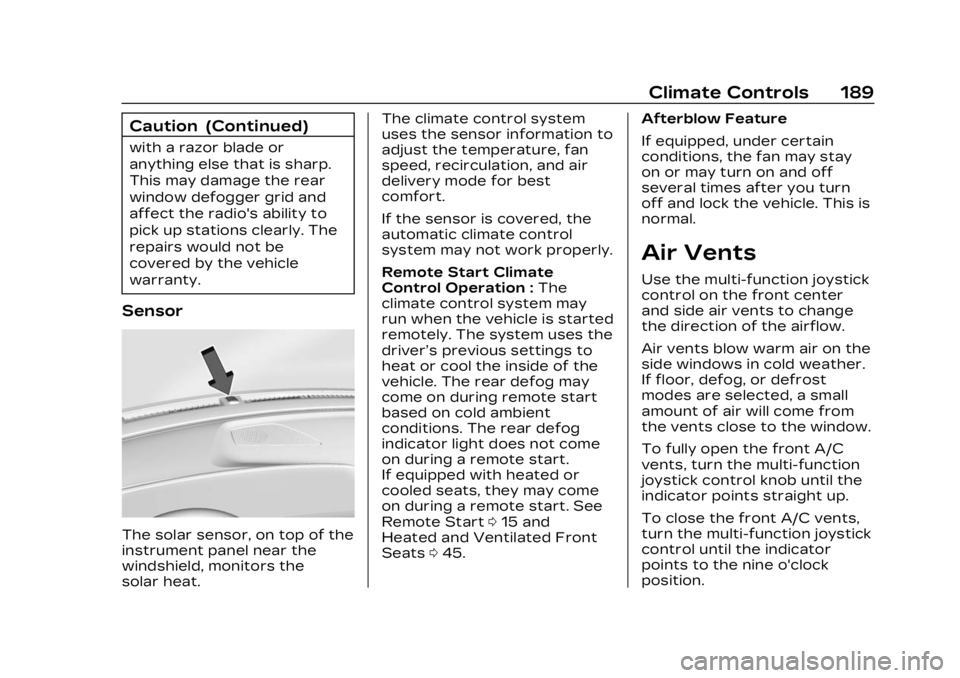
Sensor
The solar sensor, on top of the
instrument panel near the
windshield, monitors the
solar heat.The climate control system
uses the sensor information to
adjust the temperature, fan
speed, recirculation, and air
delivery mode for best
comfort.
If the sensor is covered, the
automatic climate control
system may not work properly.
Remote Start Climate
Control Operation :
The
climate control system may
run when the vehicle is started
remotely. The system uses the
driver’s previous settings to
heat or cool the inside of the
vehicle. The rear defog may
come on during remote start
based on cold ambient
conditions. The rear defog
indicator light does not come
on during a remote start.
If equipped with heated or
cooled seats, they may come
on during a remote start. See
Remote Start 015 and
Heated and Ventilated Front
Seats 045. Afterblow Feature
If equipped, under certain
conditions, the fan may stay
on or may turn on and off
several times after you turn
off and lock the vehicle. This is
normal.
Air Vents
Use the multi-function joystick
control on the front center
and side air vents to change
the direction of the airflow.
Air vents blow warm air on the
side windows in cold weather.
If floor, defog, or defrost
modes are selected, a small
amount of air will come from
the vents close to the window.
To fully open the front A/C
vents, turn the multi-function
joystick control knob until the
indicator points straight up.
To close the front A/C vents,
turn the multi-function joystick
control until the indicator
points to the nine o'clock
position.
Page 195 of 424

Cadillac Lyriq Owner Manual (GMNA-Localizing-U.S./Canada-15644413) -
2023 - CRC - 2/23/22
194 Driving and Operating
Acceleration/Braking/
Coasting
Avoid rapid accelerations and
decelerations.
Use cruise control when
appropriate.
Plan ahead for decelerations,
and coast whenever possible.
Do not rush to traffic signals,
and do not shift to N (Neutral)
to coast.
Use the One-Pedal Driving
feature when appropriate to
help recover energy during
coasting and braking.
One-Pedal mode recovers
more energy while coasting
and braking than D (Drive)
mode. See One-Pedal Driving
0214.
Use the steering wheel Regen
on Demand paddle during
deceleration to help recover
energy. See Regenerative
Braking 0220. Terrain and Vehicle Speed
Higher speeds and grade
changes use more energy and
can significantly reduce
electric range.
Climate Setting
Using the heat and air
conditioning systems
decreases the energy
available for electric driving.
Optimal energy efficiency is
achieved when the heat, air
conditioning, and fan are
turned off.
Use the heated and ventilated
seat features (if equipped)
instead of the climate control
system. Heating and
ventilating the seat uses less
energy than heating and
cooling the interior. See
Heated and Ventilated Front
Seats
045 and
Heated Rear Seats 049.
Use the Remote Start Climate
Control feature to heat or cool
the interior while the vehicle is
plugged in to use electricity from the electrical outlet
instead of using energy from
the battery. See Remote Start
0
15.
In hot weather, avoid parking
in direct sunlight. Use
sunshades inside the vehicle.
Keep the inside of the
windows clean to reduce
fogging. Turn off the front
defroster and rear defogger
when they are not needed.
Avoid driving with the
windows open at highway
speeds.
Use the Battery Gauge on the
Instrument Cluster to view the
effect of climate control
settings on your estimated
range. See Battery Gauge
(High Voltage) 0110.
Outside Temperature
On colder days, it is best to
plug in the vehicle overnight,
and then remote start the
vehicle.
Page 196 of 424
Cadillac Lyriq Owner Manual (GMNA-Localizing-U.S./Canada-15644413) -
2023 - CRC - 2/23/22
Driving and Operating 195
Allow the vehicle to warm up
for 20 minutes before driving.
Vehicle Charging/
Maintenance
Charging
Keep the vehicle plugged in,
even when fully charged, to
keep the battery temperature
ready for the next drive. This
is important when outside
temperatures are extremely
hot or cold.
If possible, use a level 2
(240 volt) high power charge
station for best results. This
allows the interior of the
vehicle and high voltage
battery to warm to optimal
temperature.
Maintenance
Always keep the tires properly
inflated and the vehicle
properly aligned.
The weight of excess cargo in
the vehicle affects efficiency
and range. Avoid carrying
more than is needed.Avoid unnecessary use of
electrical accessories. Power
used for functions other than
propelling the vehicle will
reduce the available range.
Using a rooftop carrier will
reduce efficiency due to
additional weight and drag.
Distracted Driving
Distraction comes in many
forms and can take your focus
from the task of driving.
Exercise good judgment and
do not let other activities
divert your attention away
from the road. Many local
governments have enacted
laws regarding driver
distraction. Become familiar
with the local laws in
your area.
To avoid distracted driving,
keep your eyes on the road,
keep your hands on the
steering wheel, and focus your
attention on driving.
.Do not use a mobile phone in
demanding driving situations.
Use a hands-free method to
place or receive necessary
phone calls.
.Watch the road. Do not read,
take notes, or look up
information on mobile
phones or other electronic
devices.
.Designate a front seat
passenger to handle
potential distractions.
.Become familiar with vehicle
features before driving, such
as programming favorite
radio stations and adjusting
climate control and seat
settings. Program all trip
information into any
navigation device prior to
driving.
.Wait until the vehicle is
parked to retrieve items that
have fallen to the floor.
.Stop or park the vehicle to
tend to children.
.Keep pets in an appropriate
carrier or restraint.