2023 ALFA ROMEO GIULIA check engine
[x] Cancel search: check enginePage 77 of 248

75
Brake Disc Temperature
When the symbol turns on, it indicates
an excessive temperature of the brake
discs. Let the breaking system cool
down by reducing the speed.
Driver Attention Assist (DAA) System
Activation — If Equpped
The DAA system detects indications that
the driver is feeling fatigued and
illuminates this warning that the driver
should pull over and take a break.
Stop to pause while driving, pulling the car over in
safe conditions.
Door Open
The telltale turns on when one or more
doors are not completely shut. An
acoustic signal is activated with the
doors open and the car moving.
Close the doors properly.
Power Steering Failure
If the telltale remains on, you may not
have steering assistance and the effort
required to operate the steering wheel
may be increased; steering is, however,
possible.
NOTE:
After the battery is disconnected, the steering
wheel must be re-initialized. The Power Steering
Failure light on the instrument panel will illumi -
nate to indicate this. To carry out this procedure,
simply turn the steering wheel all the way from
one end to the other, and then turn it back to the
central position.
Contact an authorized dealer as soon as possible.
Electronic Throttle Control (ETC) Warning
Light
This warning light, along with the related
message, signals a failure in the ETC.
If a failure is detected, the warning light
turns on while the engine is running.
Place the gear selector in the PARK (P) position
and the ignition in the off position: the warning
light should switch off. If the warning light stays
on with engine running, the vehicle can still be
driven.
If the warning light flashes with the engine
running, immediate intervention is required. A
loss of performance, irregular/high idling speed
or engine stopping might take place and the
vehicle may need to be towed.
Contact an authorized dealer as soon as possible
to have the failure eliminated.
Engine Coolant Temperature Too High
The telltale lights up when the engine
has overheated.
In normal driving conditions : stop the
car, turn off the engine and check that the coolant
level in the reservoir is not below the MIN mark.
In this case, wait for the engine to cool down, then
slowly and carefully open the cap, fill with coolant and check that the level is between the MIN and
MAX marks on the reservoir itself. Also check
visually for any fluid leaks. Contact an authorized
dealer if the telltale comes on when the engine is
started again.
If the vehicle is used under demanding conditions
(e.g. in high-performance driving):
slow down
and, if the warning light stays on, stop the vehicle.
Stop for two or three minutes with the engine
running and slightly accelerated to facilitate
better coolant circulation, then turn the engine
off. Check that the coolant level is correct as
described previously.
Hood Cap Not Properly Shut
The telltale turns on when the hood cap
is not properly closed, along with the
icon, an image of the vehicle with an
open hood cap appears on the display.
A buzzer is heard when the hood cap is open and
the vehicle is moving.
Close the hood properly.
Insufficient Engine Oil Level
The telltale turns on, along with the
related message on the display, to
indicate low engine oil level.
Contact an authorized dealer to have the system
checked.
Low Engine Oil Pressure
This telltale indicates low engine oil
pressure. If the telltale turns on while
driving, stop the vehicle and shut off the
engine as soon as possible. A chime will
sound when this telltale turns on. Do not operate
the vehicle until the cause is corrected. This telltale
does not indicate how much oil is in the engine.
CAUTION!
Driving the vehicle with this symbol on may
severely damage the gearbox, with resulting
breakage. The oil may also overheat: contact
with hot engine or with exhaust components
at high temperature could cause fires.
23_GA_OM_EN_USC_t.book Page 75
Page 78 of 248

GETTING TO KNOW YOUR INSTRUMENT PANEL
76
NOTE:
Do not use the vehicle until the failure has been
solved. The turning on of the telltale does not indi-
cate the amount of oil in the engine. The oil level
can be checked on the display upon entering the
vehicle and also by activating the “Oil level” func -
tion on the Information and Entertainment
System.
Contact an authorized dealer as soon as
possible.
Trunk Lid Not Properly Shut
The telltale turns on when the trunk lid
is not properly closed, along with the
icon, an image of the vehicle with an
open trunk lid appears on the display.
A buzzer is heard when the trunk lid is open and
the vehicle is moving.
Close the trunk lid properly.
AMBER SYMBOLS
Engine Immobilizer Failure/Break-In
Attempt
Engine Immobilizer System Failure The
telltale will illuminate to report a failure
of the Engine Immobilizer system.
Break-In Attempt The telltale will illuminate when
the ignition is cycled to ON position, to indicate a
possible break-in attempt detected by the alarm
system. Electronic Key Not Recognized
The telltale will
illuminate when the engine is started and the
electronic key is not recognized by the system.
Alarm System Failure The telltale will illuminate to
report an alarm system failure.
Contact an authorized dealer as soon as
possible.
Fuel Cut-Off Indicator Light
The telltale will illuminate after an
accident has occurred and the system
has shut the fuel off.
For reactivating the fuel cut-off system
Ú
page 144. If it is not possible to restore the fuel
supply, contact an authorized dealer.
Park Sensors System Failure
The telltale will illuminate when the
system has failed or is not available.
Contact an authorized dealer to have the system
checked.
Engine Oil Change Required —
If Equipped
The telltale is illuminated only for a
limited time.
NOTE:
After the first indication, each time the engine is
started the symbol will continue to illuminate as
described previously until the oil is changed. If the telltale flashes, this does not mean that
there is a fault on the vehicle, rather it simply
reports that it is now necessary to change the oil
as a result of regular use of the vehicle. The
deterioration of engine oil is accelerated by using
the vehicle for short drives, preventing the engine
from reaching operating temperature.
Contact an authorized dealer as soon as
possible.
Engine Oil Pressure Sensor Failure
The telltale will illuminate in the event of
engine oil pressure sensor failure.
Contact an authorized dealer as soon as
possible.
Engine Oil Level Sensor Failure
The telltale will illuminate in the event of
engine oil level sensor failure.
Contact an authorized dealer as soon as
possible.
CAUTION!
If the LOW ENGINE OIL PRESSURE symbol
switches on when driving, stop the engine
immediately and contact an authorized dealer.
CAUTION!
Deteriorated engine oil should be replaced as
soon as possible after the symbol is switched
on, and never more than 500 miles (805 km)
after it first switches on. Failure to observe the
above may result in severe damage to the
engine and invalidate the New Vehicle Limited
Warranty. When this symbol comes on, it does
not mean that the level of engine oil is low, so
if it flashes you do not need to top up the
engine oil.
23_GA_OM_EN_USC_t.book Page 76
Page 81 of 248
79
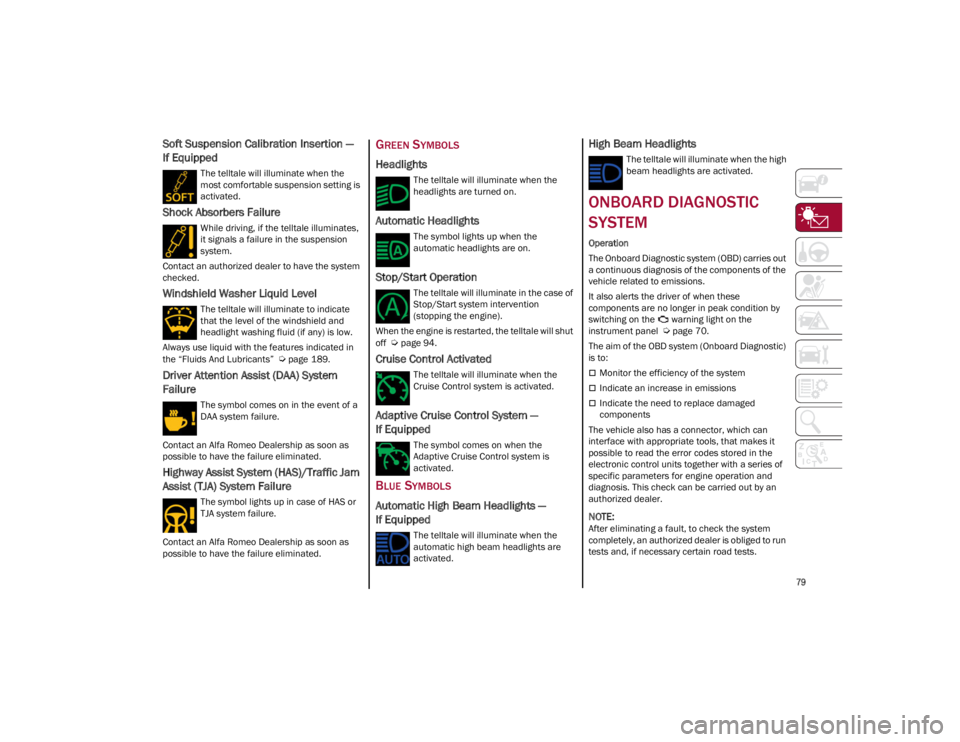
Soft Suspension Calibration Insertion —
If Equipped
The telltale will illuminate when the
most comfortable suspension setting is
activated.
Shock Absorbers Failure
While driving, if the telltale illuminates,
it signals a failure in the suspension
system.
Contact an authorized dealer to have the system
checked.
Windshield Washer Liquid Level
The telltale will illuminate to indicate
that the level of the windshield and
headlight washing fluid (if any) is low.
Always use liquid with the features indicated in
the “Fluids And Lubricants”
Ú
page 189.
Driver Attention Assist (DAA) System
Failure
The symbol comes on in the event of a
DAA system failure.
Contact an Alfa Romeo Dealership as soon as
possible to have the failure eliminated.
Highway Assist System (HAS)/Traffic Jam
Assist (TJA) System Failure
The symbol lights up in case of HAS or
TJA system failure.
Contact an Alfa Romeo Dealership as soon as
possible to have the failure eliminated.
GREEN SYMBOLS
Headlights
The telltale will illuminate when the
headlights are turned on.
Automatic Headlights
The symbol lights up when the
automatic headlights are on.
Stop/Start Operation
The telltale will illuminate in the case of
Stop/Start system intervention
(stopping the engine).
When the engine is restarted, the telltale will shut
off
Ú
page 94.
Cruise Control Activated
The telltale will illuminate when the
Cruise Control system is activated.
Adaptive Cruise Control System —
If Equipped
The symbol comes on when the
Adaptive Cruise Control system is
activated.
BLUE SYMBOLS
Automatic High Beam Headlights —
If Equipped
The telltale will illuminate when the
automatic high beam headlights are
activated.
High Beam Headlights
The telltale will illuminate when the high
beam headlights are activated.
ONBOARD DIAGNOSTIC
SYSTEM
Operation
The Onboard Diagnostic system (OBD) carries out
a continuous diagnosis of the components of the
vehicle related to emissions.
It also alerts the driver of when these
components are no longer in peak condition by
switching on the warning light on the
instrument panel
Ú
page 70.
The aim of the OBD system (Onboard Diagnostic)
is to:
Monitor the efficiency of the system
Indicate an increase in emissions
Indicate the need to replace damaged
components
The vehicle also has a connector, which can
interface with appropriate tools, that makes it
possible to read the error codes stored in the
electronic control units together with a series of
specific parameters for engine operation and
diagnosis. This check can be carried out by an
authorized dealer.
NOTE:
After eliminating a fault, to check the system
completely, an authorized dealer is obliged to run
tests and, if necessary certain road tests.
23_GA_OM_EN_USC_t.book Page 79
Page 82 of 248
GETTING TO KNOW YOUR INSTRUMENT PANEL
80
ONBOARD DIAGNOSTIC SYSTEM (OBD II)
C
YBERSECURITY
Your vehicle is required to have OBD II and a
connection port to allow access to information
related to the performance of your emissions
controls. Authorized service technicians may
need to access this information to assist with the
diagnosis and service of your vehicle and
emissions system.
EMISSIONS INSPECTION
AND MAINTENANCE
PROGRAMS
In some localities, it may be a legal requirement
to pass an inspection of your vehicle's emissions
control system. Failure to pass could prevent
vehicle registration.
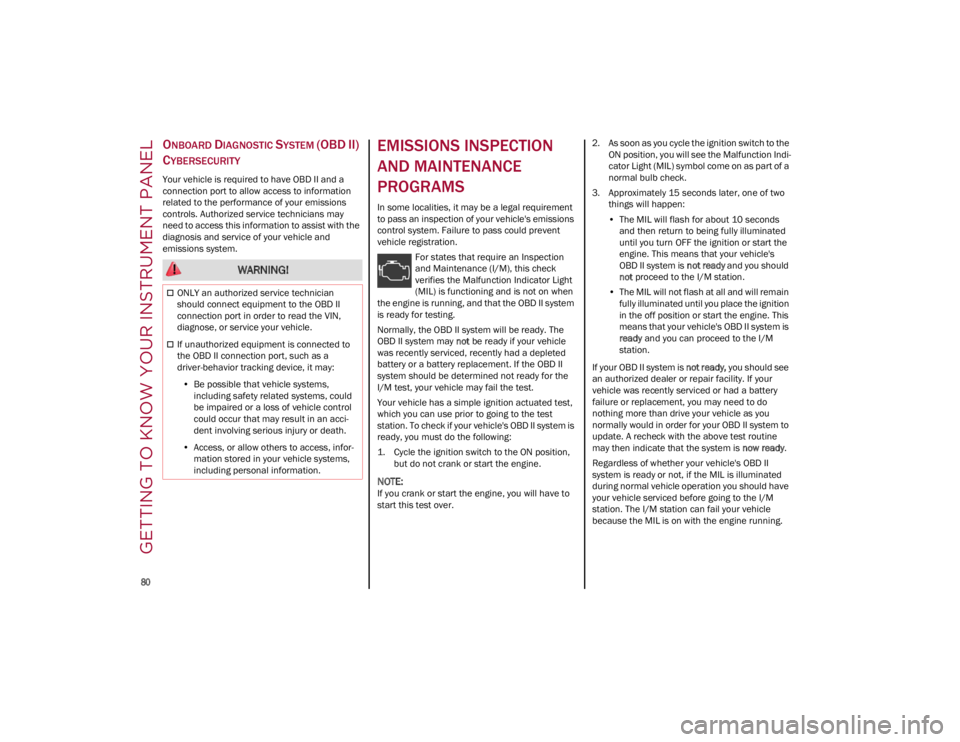
For states that require an Inspection
and Maintenance (I/M), this check
verifies the Malfunction Indicator Light
(MIL) is functioning and is not on when
the engine is running, and that the OBD II system
is ready for testing.
Normally, the OBD II system will be ready. The
OBD II system may not be ready if your vehicle
was recently serviced, recently had a depleted
battery or a battery replacement. If the OBD II
system should be determined not ready for the
I/M test, your vehicle may fail the test.
Your vehicle has a simple ignition actuated test,
which you can use prior to going to the test
station. To check if your vehicle's OBD II system is
ready, you must do the following:
1. Cycle the ignition switch to the ON position, but do not crank or start the engine.
NOTE:
If you crank or start the engine, you will have to
start this test over. 2. As soon as you cycle the ignition switch to the
ON position, you will see the Malfunction Indi -
cator Light (MIL) symbol come on as part of a
normal bulb check.
3. Approximately 15 seconds later, one of two things will happen:
• The MIL will flash for about 10 seconds
and then return to being fully illuminateduntil you turn OFF the ignition or start the engine. This means that your vehicle'sOBD II system is not ready and you should
not proceed to the I/M station.
• The MIL will not flash at all and will remain
fully illuminated until you place the ignition
in t
he off position or start the engine. This
means that your vehicle's OBD II system is ready and you can proceed to the I/M
station.
If your OBD II system is not ready, you should see
an authorized dealer or repair facility. If your
vehicle was recently serviced or had a battery
failure or replacement, you may need to do
nothing more than drive your vehicle as you
normally would in order for your OBD II system to
update. A recheck with the above test routine
may then indicate that the system is now ready.
Regardless of whether your vehicle's OBD II
system is ready or not, if the MIL is illuminated
during normal vehicle operation you should have
your vehicle serviced before going to the I/M
station. The I/M station can fail your vehicle
because the MIL is on with the engine running.
WARNING!
ONLY an authorized service technician
should connect equipment to the OBD II
connection port in order to read the VIN,
diagnose, or service your vehicle.
If unauthorized equipment is connected to
the OBD II connection port, such as a
driver-behavior tracking device, it may:
• Be possible that vehicle systems,
including safety related systems, couldbe impaired or a loss of vehicle controlcould occur that may result in an acci-dent involving serious injury or death.
• Access, or allow others to access, infor-
mation stored in your vehicle systems,including personal information.
23_GA_OM_EN_USC_t.book Page 80
Page 90 of 248
STARTING AND OPERATING
88
(Continued)
(Continued)
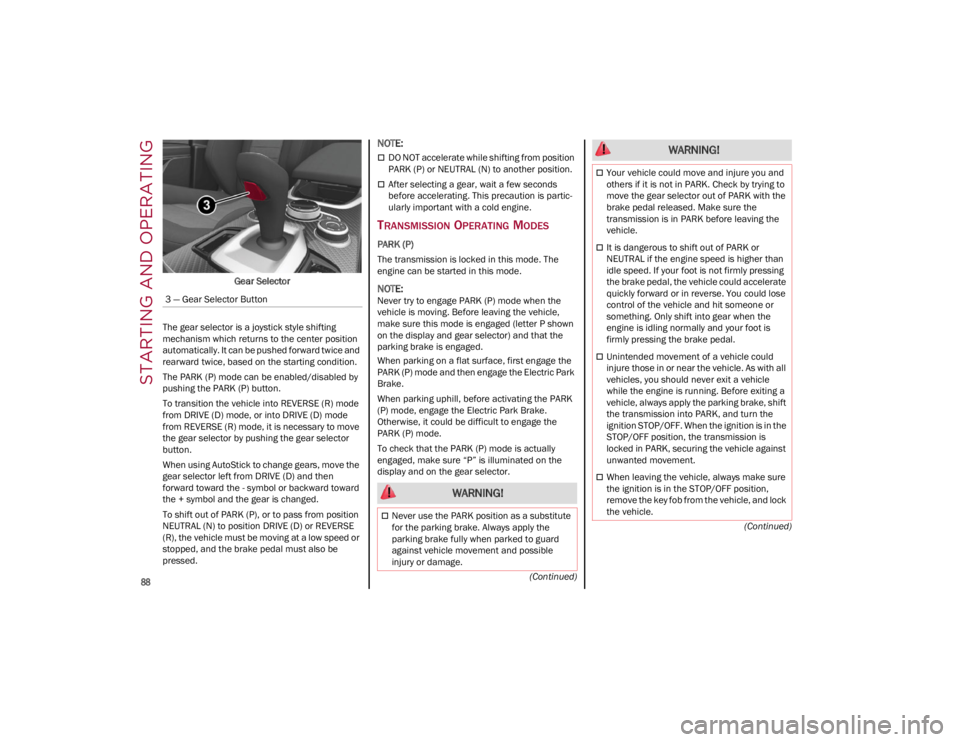
Gear Selector
The gear selector is a joystick style shifting
mechanism which returns to the center position
automatically. It can be pushed forward twice and
rearward twice, based on the starting condition.
The PARK (P) mode can be enabled/disabled by
pushing the PARK (P) button.
To transition the vehicle into REVERSE (R) mode
from DRIVE (D) mode, or into DRIVE (D) mode
from REVERSE (R) mode, it is necessary to move
the gear selector by pushing the gear selector
button.
When using AutoStick to change gears, move the
gear selector left from DRIVE (D) and then
forward toward the - symbol or backward toward
the + symbol and the gear is changed.
To shift out of PARK (P), or to pass from position
NEUTRAL (N) to position DRIVE (D) or REVERSE
(R), the vehicle must be moving at a low speed or
stopped, and the brake pedal must also be
pressed.
NOTE:
DO NOT accelerate while shifting from position
PARK (P) or NEUTRAL (N) to another position.
After selecting a gear, wait a few seconds
before accelerating. This precaution is partic -
ularly important with a cold engine.
TRANSMISSION OPERATING MODES
PARK (P)
The transmission is locked in this mode. The
engine can be started in this mode.
NOTE:
Never try to engage PARK (P) mode when the
vehicle is moving. Before leaving the vehicle,
make sure this mode is engaged (letter P shown
on the display and gear selector) and that the
parking brake is engaged.
When parking on a flat surface, first engage the
PARK (P) mode and then engage the Electric Park
Brake.
When parking uphill, before activating the PARK
(P) mode, engage the Electric Park Brake.
Otherwise, it could be difficult to engage the
PARK (P) mode.
To check that the PARK (P) mode is actually
engaged, make sure “P” is illuminated on the
display and on the gear selector.
3 — Gear Selector Button
WARNING!
Never use the PARK position as a substitute
for the parking brake. Always apply the
parking brake fully when parked to guard
against vehicle movement and possible
injury or damage.
Your vehicle could move and injure you and
others if it is not in PARK. Check by trying to
move the gear selector out of PARK with the
brake pedal released. Make sure the
transmission is in PARK before leaving the
vehicle.
It is dangerous to shift out of PARK or
NEUTRAL if the engine speed is higher than
idle speed. If your foot is not firmly pressing
the brake pedal, the vehicle could accelerate
quickly forward or in reverse. You could lose
control of the vehicle and hit someone or
something. Only shift into gear when the
engine is idling normally and your foot is
firmly pressing the brake pedal.
Unintended movement of a vehicle could
injure those in or near the vehicle. As with all
vehicles, you should never exit a vehicle
while the engine is running. Before exiting a
vehicle, always apply the parking brake, shift
the transmission into PARK, and turn the
ignition STOP/OFF. When the ignition is in the
STOP/OFF position, the transmission is
locked in PARK, securing the vehicle against
unwanted movement.
When leaving the vehicle, always make sure
the ignition is in the STOP/OFF position,
remove the key fob from the vehicle, and lock
the vehicle.
WARNING!
23_GA_OM_EN_USC_t.book Page 88
Page 126 of 248
STARTING AND OPERATING
124
(Continued)
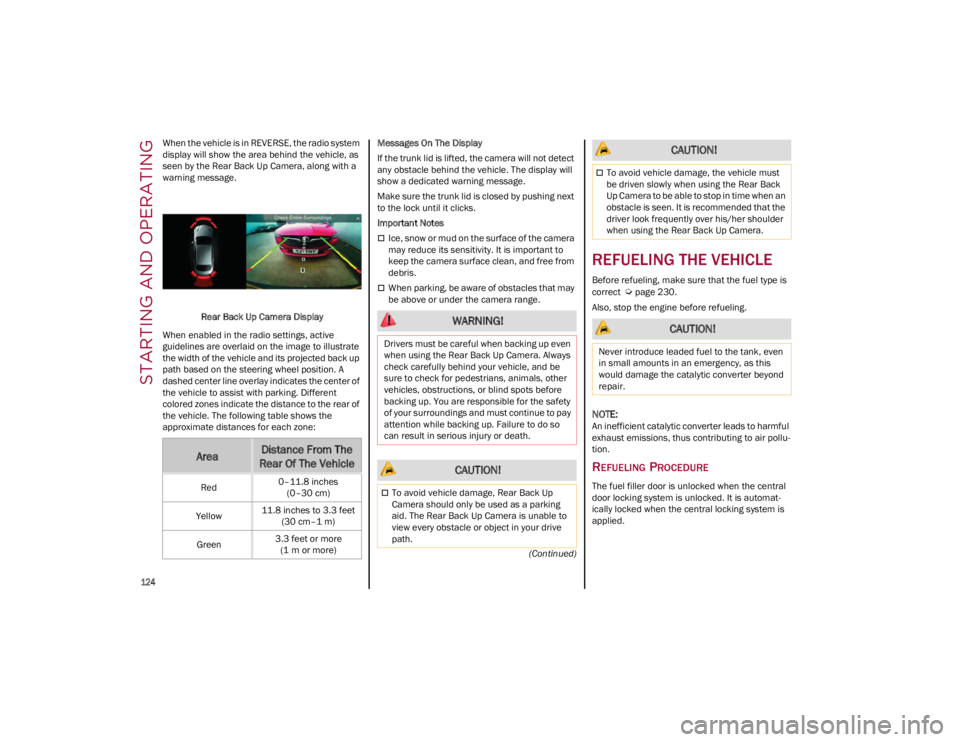
When the vehicle is in REVERSE, the radio system
display will show the area behind the vehicle, as
seen by the Rear Back Up Camera, along with a
warning message.
Rear Back Up Camera Display
When enabled in the radio settings, active
guidelines are overlaid on the image to illustrate
the width of the vehicle and its projected back up
path based on the steering wheel position. A
dashed center line overlay indicates the center of
the vehicle to assist with parking. Different
colored zones indicate the distance to the rear of
the vehicle. The following table shows the
approximate distances for each zone: Messages On The Display
If the trunk lid is lifted, the camera will not detect
any obstacle behind the vehicle. The display will
show a dedicated warning message.
Make sure the trunk lid is closed by pushing next
to the lock until it clicks.
Important Notes
Ice, snow or mud on the surface of the camera
may reduce its sensitivity. It is important to
keep the camera surface clean, and free from
debris.
When parking, be aware of obstacles that may
be above or under the camera range.
REFUELING THE VEHICLE
Before refueling, make sure that the fuel type is
correct
Ú
page 230.
Also, stop the engine before refueling.
NOTE:
An inefficient catalytic converter leads to harmful
exhaust emissions, thus contributing to air pollu -
tion.
REFUELING PROCEDURE
The fuel filler door is unlocked when the central
door locking system is unlocked. It is automat -
ically locked when the central locking system is
applied.
AreaDistance From The
Rear Of The Vehicle
Red 0–11.8 inches
(0–30 cm)
Yellow 11.8 inches to 3.3 feet
(30 cm–1 m)
Green 3.3 feet or more
(1 m or more)
WARNING!
Drivers must be careful when backing up even
when using the Rear Back Up Camera. Always
check carefully behind your vehicle, and be
sure to check for pedestrians, animals, other
vehicles, obstructions, or blind spots before
backing up. You are responsible for the safety
of your surroundings and must continue to pay
attention while backing up. Failure to do so
can result in serious injury or death.
CAUTION!
To avoid vehicle damage, Rear Back Up
Camera should only be used as a parking
aid. The Rear Back Up Camera is unable to
view every obstacle or object in your drive
path.
To avoid vehicle damage, the vehicle must
be driven slowly when using the Rear Back
Up Camera to be able to stop in time when an
obstacle is seen. It is recommended that the
driver look frequently over his/her shoulder
when using the Rear Back Up Camera.
CAUTION!
Never introduce leaded fuel to the tank, even
in small amounts in an emergency, as this
would damage the catalytic converter beyond
repair.
CAUTION!
23_GA_OM_EN_USC_t.book Page 124
Page 130 of 248
STARTING AND OPERATING
128
EXHAUST GAS
Exhaust emissions are very dangerous, and may
be lethal. They contain carbon monoxide, a
colorless, odorless gas which can cause fainting
and poisoning if inhaled.
To avoid inhaling carbon monoxide, take the
following measures:
Do not keep the engine running in closed
spaces.
If, for some reason (e.g. transporting bulky
loads), it is necessary to drive with the trunk
open, close all the windows and run the
climate control fan at maximum speed. DO
NOT activate air recirculation mode.
Should it be necessary to stay in the stationary
vehicle with engine running, adjust the
ventilation/heating system and operate the
fan in such a way that outside air will enter the
passenger compartment. Activate the
maximum fan speed.
Maintenance of the exhaust system provides the
best protection against leaks of carbon monoxide
into the passenger compartment.
Should an unusual noise from the exhaust
system or the presence of exhaust gas in the
passenger compartment be identified, or if the
underbody or rear section of the vehicle is
damaged, have the entire exhaust system and
bodywork areas checked to identify any
components which are broken, damaged, worn or
have moved from their correct fitting position. If
any of these things occur, contact an authorized
dealer. Open welding or loose connections may permit
exhaust gas to enter the passenger
compartment.
Check the exhaust system each time the vehicle
is raised for lubrication or oil change operations.
Replace the components if necessary, contact an
authorized dealer.
PERFORMANCE — QUADRIFOGLIO
This vehicle is equipped with an engine capable
of delivering exceptionally fast acceleration and
speed:
Peak power: 505 HP at 6500 RPM.
Peak torque: 443 ft-lb at 2500–5000 RPM.
Top speed: 191 mph (307 km/h).
Acceleration from 0 to 60 mph (0 to 100 km/h):
3.8 seconds.
For safe driving, it is essential, particularly during
the first days of use, to get to know the car by
driving carefully and gradually discovering its
performance. Driving On Race Tracks
Before driving on a track using a racing style, it is
necessary to:
Attend a race track driving course.
Check all liquid levels in the engine
compartment.
Have the car inspected at an authorized
dealer.
Remember that the car was not designed to be
driven exclusively on the race track and that this
use increases stress and component wear.
NOTE:
Quadrifoglio front brakes are equipped with NAO
type pads (Non-Asbestos Organic). These pads
are NOT suitable for high thermal loads (for
example track use).
23_GA_OM_EN_USC_t.book Page 128
Page 152 of 248

SAFETY
150
Air Bag System Components
Occupant Restraint Controller (ORC)
Air Bag Warning Light
Steering Wheel and Column
Instrument Panel
Knee Impact Bolsters
Driver and Front Passenger Air Bags
Seat Belt Buckle Switch
Supplemental Side Air Bags
Supplemental Knee Air Bags
Front and Side Impact Sensors
Seat Belt Pretensioners
Seat Track Position Sensors
Air Bag Warning Light
The Occupant Restraint Controller
(ORC) monitors the readiness of the
electronic parts of the air bag system
whenever the ignition switch is in the
START or ON/RUN position. If the ignition switch
is in the OFF position or in the ACC position, the
air bag system is not on and the air bags will not
inflate.
The ORC contains a backup power supply system
that may deploy the air bag system even if the
battery loses power or it becomes disconnected
prior to deployment.
The ORC turns on the Air Bag Warning Light in the
instrument panel for approximately four to eight
seconds for a self-check when the ignition switch
is first in the ON/RUN position. After the
self-check, the Air Bag Warning Light will turn off.
If the ORC detects a malfunction in any part of the
system, it turns on the Air Bag Warning Light, either momentarily or continuously. A single
chime will sound to alert you if the light comes on
again after initial startup.
The ORC also includes diagnostics that will
illuminate the instrument panel Air Bag Warning
Light if a malfunction is detected that could affect
the air bag system. The diagnostics also record
the nature of the malfunction. While the air bag
system is designed to be maintenance free, if any
of the following occurs, have an authorized dealer
service the air bag system immediately.
The Air Bag Warning Light does not come on
during the four to eight seconds when the
ignition switch is first in the ON/RUN position.
The Air Bag Warning Light remains on after the
four to eight-second interval.
The Air Bag Warning Light comes on intermit
-
tently or remains on while driving.
NOTE:
If the speedometer, tachometer, or any engine
related gauges are not working, the Occupant
Restraint Controller (ORC) may also be disabled.
In this condition the air bags may not be ready to
inflate for your protection. Have an authorized
dealer service the air bag system immediately.
Redundant Air Bag Warning Light
If a fault with the Air Bag Warning Light
is detected, which could affect the
Supplemental Restraint System (SRS),
the Redundant Air Bag Warning Light
will illuminate on the instrument panel. The
Redundant Air Bag Warning Light will stay on until
the fault is cleared. In addition, a single chime will
sound to alert you that the Redundant Air Bag
Warning Light has come on and a fault has been
detected. If the Redundant Air Bag Warning Light
comes on intermittently or remains on while
driving have an authorized dealer service the
vehicle immediately.
For additional information regarding the
Redundant Air Bag Warning Light, see
Ú
page 70.
Front Air Bags
This vehicle has front air bags and lap/shoulder
belts for both the driver and front passenger. The
front air bags are a supplement to the seat belt
restraint systems. The driver front air bag is
mounted in the center of the steering wheel. The
passenger front air bag is mounted in the
instrument panel, above the glove compartment.
The words “SRS AIRBAG” or “AIRBAG” are
embossed on the air bag covers.
WARNING!
Ignoring the Air Bag Warning Light in your
instrument panel could mean you won’t have
the air bag system to protect you in a collision.
If the light does not come on as a bulb check
when the ignition is first turned on, stays on
after you start the vehicle, or if it comes on as
you drive, have an authorized dealer service
the air bag system immediately.
23_GA_OM_EN_USC_t.book Page 150