2023 ACURA TLX park assist
[x] Cancel search: park assistPage 8 of 658

6
Quick Reference Guide
Quick Reference Guide
Visual Index
❚System Indicators
(P78)
❚Gauges (P97)
❚Multi-Information
Display
(P98)
❚Navigation System*
() See the Navigation System Manual
❚Audio/Information Screen (P214)
❚ (Vehicle Stability AssistTM (VSA ®) System
OFF) Button
(P405)
❚Parking Sensor System Button* (P497)
❚Safety Support Switch (P414, 423, 472)
❚Heated Windshield Button* (P161)
❚Brightness Control (P159)
❚Head-Up Display Buttons* (P112, 160)
❚Hazard Warning Button
❚Rear Defogger/Heated Door Mirror Button
(P161)
❚Climate Control System (P197)
❚True Touchpad Interface (P211)
❚ENGINE START/STOP Button (P146)
❚Steering Wheel Adjustments (P164)
❚Electric Parking Brake Switch (P484)
❚Trunk Opener (P136)
❚Auto Idle Stop OFF Button (P399)
❚Automatic Brake Hold Button (P489)
❚Front Seat Heater Buttons (P194)
❚Front Seat Ventilator Buttons* (P194)
23 ACURA TLX-31TGV6200.book 6 ページ 2022年8月4日 木曜日 午後1時59分
Page 81 of 658

79
uuIndicators u
Continued
Instrument Panel
M (sequential mode)
Indicator/Gear
Selection Indicator P. 83
Parking Brake and
Brake System
Indicator (Red)
Parking Brake and
Brake System
Indicator (Amber)
U.S.
Canada
U.S.
Canada Automatic Brake
Hold System Indicator
Automatic Brake Hold
IndicatorU.S.
Canada
*1 : When you set the power mode to ON, these indicators come on to indicate that system checks are being perf ormed. They go off a few seconds later or after the engine
has started. If an indicator does not come on or turn off, th ere may be a malfunction in the corresponding system. To resolve the issue, follow the instructions in the
owner's manual.
P. 80*1
Malfunction Indicator
Lamp
Charging System
Indicator
Anti-lock Brake System
(ABS ) Indicator
Seat Belt Reminder
Indicator
Low Fuel Indicator
(Amber)
Vehicle Stability AssistTM
(VSA®) System Indicator
Vehicle Stability Assist
TM
(VSA®) OFF Indicator
Supplemental Restraint
System Indicator
Auto High-Beam
Indicator
Low Tire Pressure/TPMS
Indicator Electric Power Steering
(EPS) System Indicator
Turn Signal and Hazard
Warning Indicators
Lights On Indicator
Maintenance Minder
Indicator
System Message Indicator
Super Handling-All Wheel
DriveTM (SH-AWD
®)
System Indicator*
Adaptive Cruise Control
(ACC) with Low Speed
Follow Indicator (Amber)
Lane Keeping Assist System
(LKAS) Indicator (Amber)
Safety Support Indicator
(Green/Gray)
P. 82
P. 82
P. 82
P. 83
P. 83*1 *1
P. 89
*1
*1
Shift Position Indicator P. 83
Transmission System
Indicator P. 84
Auto Idle Stop System
Indicator (Amber)
P. 85
P. 87
P. 87
P. 88
P. 88
P. 90
P. 89
*1
*1
*1
P. 89
*1 P. 88
P. 93
*1
P. 90
P. 92
P. 90
Immobilizer System
Indicator P. 91
Security System Alarm
Indicator P. 91
P. 92
P. 92
P. 93
P. 96
*1
Adaptive Cruise Control
(ACC) with Low Speed
Follow Indicator (White/
Green) P. 93
*1
Lane Keeping Assist
System (LKAS) Indicator
(White/Green) P. 93
*1 *1
*1 *1
Safety Support Indicator
(Amber)
P. 95
*1
Cruise Mode Indicator
(White/Green) P. 94
Auto Idle Stop OFF
Indicator P. 85
Auto Idle Stop Suspend
Indicator P. 86
*1
*1
Auto Idle Stop Indicator
(Green)
P. 85
*1
*1
High Beam Indicator P. 90
Fog Light Indicator* P. 90
* Not available on all models
23 ACURA TLX-31TGV6200.book 79 ページ 2022年8月4日 木曜日 午後1時59分
Page 158 of 658

uuOperating the Switches Around the Steering Wheel uAuto High-Beam
156
Controls
You can turn the auto high-beam system off. If you want to turn the system off or
on, set the power mode to ON, then carry out the following procedures while the
vehicle is stationary.
To turn the system off:
With the light switch is in AUTO, pull the lever
toward you and hold it for at least 40 seconds.
After the auto high-beam indicator light blinks
twice, release the lever.
To turn the system on:
With the light switch is in AUTO, pull the lever
toward you and hold it for at least 30 seconds.
After the auto high-beam indicator light blinks
once, release the lever.
■How to Turn Off the Auto High-Beam1 How to Use the Auto High-Beam
If the Some Driver Assist Systems Cannot
Operate: Camera Temperature Too High message
appears:
•Use the climate control system to cool down the
interior and, if necessary, also use defroster mode
with the airflow directed toward the camera.
•Start driving the vehicle to lower the windshield
temperature, which cool s down the area around
the camera.
If the Some Driver Assist Systems Cannot
Operate: Clean Front Windshield message
appears:
•Park your vehicle in a sa fe place, and clean the
windshield. If the message does not disappear after
you have cleaned the winds hield and driven for a
while, have your vehicle checked by a dealer.
1 How to Turn Off the Auto High-Beam
If you turn the au to high-beam system off, the system
does not operate until you turn the system on.
Park in a safe place before turning the system off or
on.
AUTO Position
23 ACURA TLX-31TGV6200.book 156 ページ 2022年8月4日 木曜日 午後1時59分
Page 365 of 658
Continued363
uuAcuraLink ®u
Features
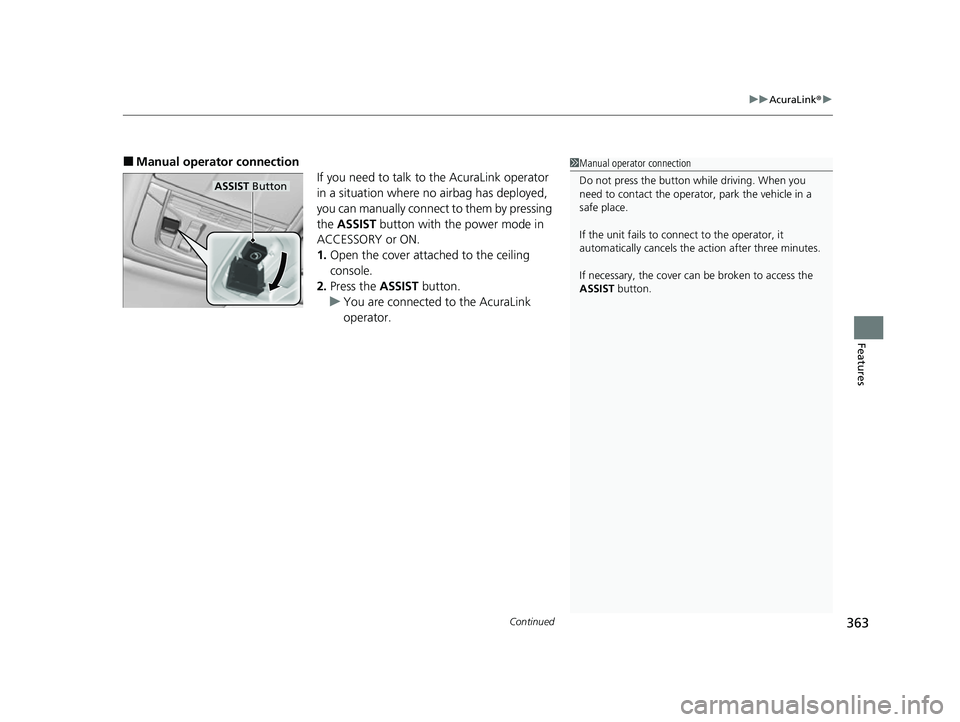
■Manual operator connection
If you need to talk to the AcuraLink operator
in a situation where no airbag has deployed,
you can manually connect to them by pressing
the ASSIST button with the power mode in
ACCESSORY or ON.
1. Open the cover attached to the ceiling
console.
2. Press the ASSIST button.
u You are connected to the AcuraLink
operator.1Manual operator connection
Do not press the button while driving. When you
need to contact the operato r, park the vehicle in a
safe place.
If the unit fails to connect to the operator, it
automatically cancels the action after three minutes.
If necessary, the cover can be broken to access the
ASSIST button.
ASSIST Button
23 ACURA TLX-31TGV6200.book 363 ページ 2022年8月4日 木曜日 午後1時59分
Page 369 of 658

367
Driving
This chapter discusses driving and refueling.
Before Driving................................... 368
Towing a Trailer ................................ 373
When Driving
Starting the Engine .......................... 374
Precautions While Driving................. 379
Automatic Transmission ................... 380
Shifting ............................................ 381
Acura Integrated Dynamics System... 390
Auto Idle Stop .................................. 397
Vehicle Stability AssistTM (VSA® ), aka
Electronic Stability Control (ESC),
System ........................................ 404
Agile Handling Assist ....................... 406 Super Handling-All Wheel Drive
TM (SH-
AWD® )*......................................... 407
Tire Pressure Monitoring System (TPMS)
with Tire Fill Assist .......................... 408
Tire Pressure Monitoring System (TPMS) - Required Federal Explanation ........... 410
Blind Spot Information System
*....... 412
AcuraWatchTM................................... 415
Collision Mitigati on Braking SystemTM
(CMBSTM) ....................................... 419
Adaptive Cruise Control (ACC) with Low Speed Follow ................................. 430
Lane Keeping Assist System (LKAS) .. 449 Traffic Jam Assist ............................. 458
Road Departure Miti
gation System... 470
Traffic Sign Recognition System ....... 475
Front Sensor Camera ....................... 481
Radar Sensor ................................... 483
Braking .............................................. 484
Parking Your Vehicle ........................ 494
Multi-View Rear Camera
*................ 505
Surround View Camera System*..... 507
Refueling ........................................... 515
Fuel Economy and CO
2 Emissions .... 518
Turbo Engine Vehicle ....................... 519
* Not available on all models
23 ACURA TLX-31TGV6200.book 367 ページ 2022年8月4日 木曜日 午後1時59分
Page 380 of 658

uuWhen Driving uStarting the Engine
378
Driving
1. Depress and hold the brake pedal, then press the ENGINE START/STOP button.
2. Keeping your right foot on the brake pedal, put the transmission into
(D. Select
(R when reversing.
3. With the parking brake applied, release the brake pedal and gently depress the
accelerator pedal.
u Make sure the parking brake and brake system indicator goes off.
2 Parking Brake P. 484
■Hill Start Assist System
Hill start assist keeps the brake engaged br iefly to help prevent the vehicle from
rolling on inclines as you move your fo ot from the brake pedal to the accelerator.
Put the transmission into
(D or (S when facing uphill, or (R when facing downhill,
then release the brake pedal.
You can turn the engine off when the vehicle is completely stopped.
1. Depress the brake pedal and change the shift position to
(P.
u Do not release the brake pedal until you have confirmed that
(P is shown on
the shift position indicator.
2. Press the ENGINE START/STOP button.
■Starting to Drive
■Stopping the Engine
1Starting to Drive
You can also release the parking brake by pulling the
electric parking brake sw itch while depressing the
brake pedal.
When facing downhill, you can start your vehicle
more smoothly by manually releasing it with the
electric parking brake switch than by releasing it with
the accelerator pedal.
The engine stops when th e transmission is taken out
of
( P before the ENGINE START/STOP button is
pressed. Follow step 1 when starting to drive.
When the engine was started using the keyless remote*
When the engine was started using the keyless remote*
When the engine was started in any case
1Hill Start Assist System
Hill start assist may not prevent the vehicle from
rolling downhill on a very steep or slippe ry slope, and
will not operate on small inclines.
Hill start assist will operate even when VSA ® is
switched off.
Hill start assist is not a replacement for the parking
brake.
* Not available on all models
23 ACURA TLX-31TGV6200.book 378 ページ 2022年8月4日 木曜日 午後1時59分
Page 414 of 658

412
uuWhen Driving uBlind Spot Information System*
Driving
Blind Spot Information System*
Is designed to detect vehicl es in specified alert zones adjacent to your vehicle,
particularly in harder to see areas commonly known as “blind spots.”
When the system detects vehi cles approaching from behind in adjacent lanes, the
appropriate indicator comes on for a few se conds, providing assistance when you
change lanes.
■How the system works
1 Blind Spot Information System*
Important Safety Reminder
Like all assistance systems, blind spot information
system has limitations. Over reliance on blind spot
information system may result in a collision.
The blind spot information system alert indicator may
not come on under the following conditions:
•A vehicle does not stay in the alert zone for more
than two seconds.
•A vehicle is parked in a side lane.
•The speed difference betw een your vehicle and the
vehicle you are passing is greater than 6 mph (10
km/h).
•An object not detected by the radar sensors
approaches or passes your vehicle.
•A vehicle running in the adjacent lane is a
motorcycle or other small vehicle.
3WARNING
Failure to visually confirm that it is safe to
change lanes before doing so may result in
a crash and serious injury or death.
Do not rely only on the blind spot
information system wh en changing lanes.
Always look in your mi rrors, to either side
of your vehicle, and behind you for other
vehicles before changing lanes.
●The transmission is in ( D or
(S.●Your vehicle speed is
between 20 mph (32 km/h)
and 100 mph (160 km/h)
Alert zone range
A: Approx. 1.6 ft. (0.5 m)
B: Approx. 10 ft. (3 m)
C: Approx. 10 ft. (3 m) Radar Sensors:
underneath the
rear bumper
corners
Alert Zone
A
B
C
* Not available on all models
23 ACURA TLX-31TGV6200.book 412 ページ 2022年8月4日 木曜日 午後1時59分
Page 460 of 658

458
uuAcuraWatchTMuTraffic Jam Assist
Driving
Traffic Jam Assist
The Traffic Jam Assist system uses a radar sensor mounted inside the front grille and
a camera mounted to the upper portion of the windshield to detect and monitor left
and right white (yellow) traffic lane line s as well as any vehicle ahead. Based on
inputs from the radar sensor and camera, th e system can adjust the speed of your
vehicle to maintain a set interval betwee n your vehicle and the one detected ahead.
It also can apply steering torque to keep yo ur vehicle in the center of the detected
lane when you are driving in heavy traffic.
■How Traffic Jam Assist works
If you are in heavy traffic and Adaptive Cruise Control with Low Speed Follow is
active, the Traffic Jam Assist system, upon detecting the traffic lane lines and a
vehicle ahead, will apply steering torque to help keep your vehicle in the center of
the lane.
The system adjusts the speed of your vehicl e to maintain a set interval between your
vehicle and the one detected ahead.
1 Traffic Jam Assist
3WARNING
Improper reliance on Traffic Jam Assist can
cause a crash resulting in injury or death.
Always maintain full control over your
vehicle even when this system is active. and
only use when on expressways or freeways.
Traffic Jam Assist is not an autonomous
driving system.
3WARNING
Failure to securely park vehicle when
stopped while Adaptive Cruise Control with
Low Speed Follow is active can allow the
vehicle to roll away, resulting in a crash
causing injury or death.
Never stop the vehicle and exit it without
placing it in Park and setting the parking
brake.
23 ACURA TLX-31TGV6200.book 458 ページ 2022年8月4日 木曜日 午後1時59分