2023 ACURA TLX car wash
[x] Cancel search: car washPage 17 of 658

15
Quick Reference Guide
Wipers and Washers
(P157)
*1:Models with automatic intermittent wipers
*2:Models without automatic intermittent wipers
Wiper/Washer Control Lever
MIST
OFF
AUTO
*1: Wiper speed varies
automatically
INT
*2: Low speed with
intermittent
LO : Low speed wipe
HI : High speed wipe
Pull toward
you to spray
washer fluid.
Adjustment Ring
(-: Low Sensitivity*1
: Lower speed, fewer sweeps*2
(+: High Sensitivity*1
: Higher speed, more sweeps*2
AUTO should always be turned OFF before
the following situations in order to prevent
severe damage to the wiper system:
●Cleaning the windshield●Driving through a car wash●No rain present
Steering Wheel (P164)
●To adjust, push the adjustment lever
down, adjust to the desired position, then
lock the lever back in place.
Models with automatic intermittent wipersUnlocking the Front
Doors from the Inside
(P133)
●Pull either front door inner handle to
unlock and open it at the same time.
23 ACURA TLX-31TGV6200.book 15 ページ 2022年8月4日 木曜日 午後1時59分
Page 126 of 658

uuLocking and Unlocking the Doors uLocking/Unlocking the Doors from the Outside
124
Controls
■Locking the doors and trunk
Touch the door lock sensor on the front or
rear
* door.
u Some exterior lights flash; the beeper
sounds; all the doors, fuel fill door and
trunk lock; and the security system sets.
1Using the Keyless Access System
•Do not leave the keyless remote in the vehicle
when you get out. Carry it with you.
•Even if you are not carrying the keyless remote, you
can lock/unlock the doors while someone else with
the remote is within range.
•The door may be unlocked if the door handle is
covered with water in heavy rain or in a car wash if
the keyless remote is within range.
•If you grip a front or rear* door handle or touch a
door lock sensor wearing gloves, the door sensor
may be slow to respon d or may not respond by
unlocking or locking the doors.
•After locking the door, you have up to 2 seconds
during which you can pull the door handle to
confirm whether the door is locked. If you need to
unlock the door immediately after locking it, wait
at least 2 seconds befo re gripping the handle,
otherwise the door will not unlock.
•The door may not open if you pull it immediately
after gripping the door handle. Grip the handle
again and confirm that th e door is unlocked before
pulling the handle.
•Even within the 32 inches (80 cm) radius, you may
not be able to lock/unl ock the doors with the
keyless remote if it is above or below the outside
handle.
•The keyless remote may not operate if it is too close
to the door and door glass.
Door Lock Sensor
* Not available on all models
23 ACURA TLX-31TGV6200.book 124 ページ 2022年8月4日 木曜日 午後1時59分
Page 160 of 658

uuOperating the Switches Around the Steering Wheel uWipers and Washers
158
Controls
When you push the lever down to AUTO, the
windshield wipers sweep once, and go into
the automatic mode.
The wipers operate intermittently, at low
speed, or at high speed and stop in
accordance with the am ount of rainfall the
rainfall sensor detects.
■AUTO sensitivity adjustment
When the wiper function is set to AUTO, you
can adjust the sensitivity of the rainfall sensor
(using the adjustment ring) so that wipers will
operate in accordance with your preference.
Sensor sensitivity
■Automatic Intermittent Wipers*1 Wipers and Washers
If the wipers st op operating due to an obstacle such
as the buildup of snow, park the vehicle in a safe
place.
Rotate the wipe r switch to OFF, and set the power
mode to ACCESSORY or VEHICLE OFF, then remove
the obstacle.
1 Automatic Intermittent Wipers*
The rainfall sensor is in the location shown below.
NOTICE
AUTO should always be turned OFF before the
following situations in order to prevent severe
damage to the wiper system:
•Cleaning the windshield•Driving through a car wash
•No rain present
Rainfall Sensor
Adjustment Ring
Low sensitivity
High sensitivity
* Not available on all models
23 ACURA TLX-31TGV6200.book 158 ページ 2022年8月4日 木曜日 午後1時59分
Page 388 of 658
![ACURA TLX 2023 Owners Manual uuWhen Driving uShifting
386
Driving
■If you want to keep the transmission in (N position [car wash mode]
With the engine running:
1. Press and hold the brake pedal.
2. Select
(N, then release the](/manual-img/32/58636/w960_58636-387.png "ACURA TLX 2023 Owners Manual uuWhen Driving uShifting
386
Driving
■If you want to keep the transmission in (N position [car wash mode]
With the engine running:
1. Press and hold the brake pedal.
2. Select
(N, then release the")
uuWhen Driving uShifting
386
Driving
■If you want to keep the transmission in (N position [car wash mode]
With the engine running:
1. Press and hold the brake pedal.
2. Select
(N, then release the button to display (N (Neutral) hold mode on the
multi-information display.
3. Press and hold
(N again for two seconds.
u This puts the vehicle in car wash mode which must be used when your vehicle
is pulled through a conveyor type automatic car wash where you or an
attendant do not remain in the vehicle.
If the ENGINE START/STOP button is pressed
after car wash mode has been activated, the
power mode will change to ACCESSORY and
a message will be displayed on the multi-
information display. u The gear position remains in
(N with the
power mode in ACCESSORY for 15
minutes, then, it automatically changes
to
(P and the power mode changes to
OFF.
u Manually press the ENGINE START/
STOP button cancels ACCESSORY
mode. The
(P indicator comes on and
the power mode changes to OFF. You
must always press the ENGINE START/
STOP button when car wash mode is no
longer needed.
1 If you want to keep the transmission in (N position [car wash
mode]
The transmission may not stay in
(N position while
the following indicators ar e on or when the message
below appears:
•Malfunction indicator lamp
•Transmission system indicator
•Charging system indicator•The 12 Volt Battery Charging System Problem.
Do Not Drive. message on the multi-information
display.
23 ACURA TLX-31TGV6200.book 386 ページ 2022年8月4日 木曜日 午後1時59分
Page 489 of 658

Continued487
uuBraking uBrake System
Driving
■Activating and deactivating the automatic parking brake feature
With the power mode in ON, carry out the following steps to either activate or
deactivate the automatic parking brake feature.
1. Put the transmission into
(P.
2. Without depressing the brake pedal, pres s and release the parking brake switch.
u Check that the Parking Brake and Brake System indicator (red) has come on.
3. Press and hold the parking brake switch. When you hear a beeping sound, release
the switch and within 3 seconds press and hold the switch again.
4. When you hear a sound indicating that the procedure is completed, release the
switch.
u Two beeps indicates that the feature has been activated.
u One beep indicates that the feature has been deactivated.
u When you have completed activating the feature, the parking brake will
remain applied after you turn off the engine.
u To confirm that the parkin g brake is applied, check if the Parking Brake and
Brake System indicator (red) is on.
If you need to temporarily deactivate the feature while putting your vehicle through
a conveyor type car wash or when having your vehicle towed. You can follow the
procedure explained below.
1. Depress the brake pedal and bring the vehicle to a stop.
2. Set the power mode to VEHICLE OFF and then within 2 seconds pull up the
parking brake switch.
u Activation and deactivation settings for the feature will not be affected.
u Before temporarily deactivating the feat ure, make sure to first turn off both
ACC with Low Speed Follow and the automatic brake hold system.
u To confirm that the parkin g brake is applied, check if the Parking Brake and
Brake System indicator (red) is on.
1 Parking Brake
In cold climates, the parking brake may freeze in
place if applied.
When parking the vehicle, chock the wheels and
make sure the automatic parking brake feature is
deactivated.
Also, when putting your vehicle through a conveyor-
type car wash or when ha ving your vehicle towed,
deactivate the automatic parking brake feature and
leave the parking brake released.
23 ACURA TLX-31TGV6200.book 487 ページ 2022年8月4日 木曜日 午後1時59分
Page 493 of 658
491
uuBraking uBrake System
Driving
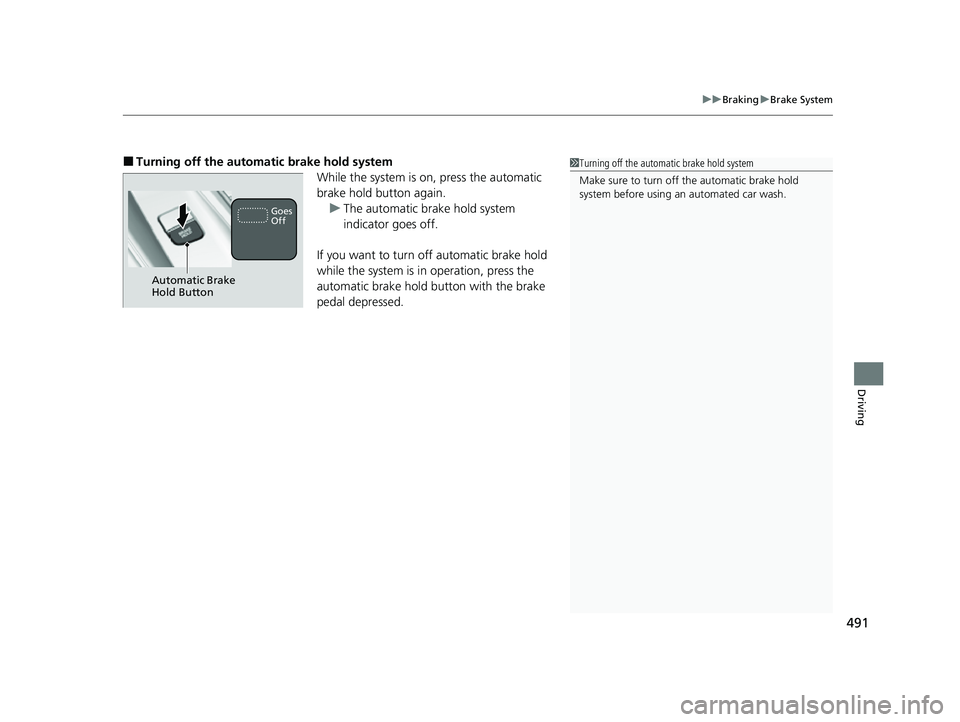
■Turning off the automa tic brake hold system
While the system is on, press the automatic
brake hold button again.u The automatic brake hold system
indicator goes off.
If you want to turn off automatic brake hold
while the system is in operation, press the
automatic brake hold button with the brake
pedal depressed.1 Turning off the automatic brake hold system
Make sure to turn off the automatic brake hold
system before using an automated car wash.
Automatic Brake
Hold Button
Goes
Off
23 ACURA TLX-31TGV6200.book 491 ページ 2022年8月4日 木曜日 午後1時59分
Page 523 of 658

521
Maintenance
This chapter discusses basic maintenance.
Before Performing MaintenanceInspection and Maintenance ............ 522
Safety When Performing Maintenance..... 523Parts and Fluids Used in Maintenance Service ........................................... 524
Maintenance Minder
TM..................... 525
Maintenance Under the Hood
Maintenance Items Under the Hood ..... 532Opening the Hood ........................... 534
Engine Compartment Cover ............. 535
Recommended Engine Oil ................ 536
Oil Check ......................................... 537
Adding Engine Oil ............................ 539
Changing the Engine Oil and Oil Filter.... 540Engine Coolant ........................ 544, 546
Transmission Fluid ............................ 548
Brake Fluid ....................................... 549
Refilling Window Washer Fluid......... 549
Replacing Light Bulbs ....................... 550
Checking and Maintaining Wiper
Blades .......................................... 552
Checking and Maintaining Tires
Checking Tires ................................. 555
Tire and Loading Information Label ...... 556Tire Labeling .................................... 556DOT Tire Quality Grading (U.S. Vehicles) .. 558
Wear Indicators ............................... 560
Tire Service Life ................................ 560
Tire and Wheel Replacement ........... 561
Tire Rotation .................................... 562
Winter Tires ..................................... 563
Battery ............................................... 564
Remote Transmitter Care Replacing the Remote Battery .......... 568
Climate Control System Maintenance.... 570CleaningInterior Care .................................... 571
Exterior Care.................................... 574
Accessories and Modifications................ 578
23 ACURA TLX-31TGV6200.book 521 ページ 2022年8月4日 木曜日 午後1時59分
Page 551 of 658
549
uuMaintenance Under the Hood uBrake Fluid
Maintenance
Brake Fluid
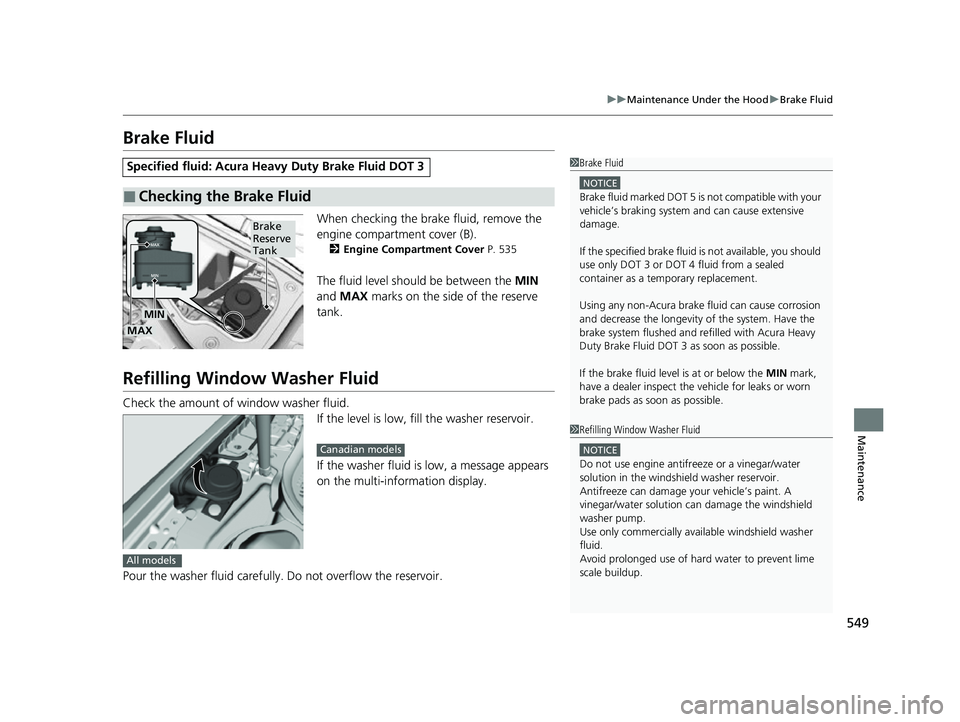
When checking the brake fluid, remove the
engine compartment cover (B).
2 Engine Compartment Cover P. 535
The fluid level should be between the MIN
and MAX marks on the side of the reserve
tank.
Refilling Window Washer Fluid
Check the amount of window washer fluid. If the level is low, fill the washer reservoir.
If the washer fluid is low, a message appears
on the multi-information display.
Pour the washer fluid carefully. Do not overflow the reservoir.
Specified fluid: Acura Heavy Duty Brake Fluid DOT 3
■Checking the Brake Fluid
1Brake Fluid
NOTICE
Brake fluid marked DOT 5 is not compatible with your
vehicle’s braking system and can cause extensive
damage.
If the specified br ake fluid is not av ailable, you should
use only DOT 3 or DOT 4 fluid from a sealed
container as a temporary replacement.
Using any non-Acura brake fl uid can cause corrosion
and decrease the longevity of the system. Have the
brake system flushed and re filled with Acura Heavy
Duty Brake Fluid DOT 3 as soon as possible.
If the brake fluid level is at or below the MIN mark,
have a dealer inspect the vehicle for leaks or worn
brake pads as soon as possible.
Brake
Reserve
Tank
MIN
MAX
1 Refilling Window Washer Fluid
NOTICE
Do not use engine antifreeze or a vinegar/water
solution in the windshield washer reservoir.
Antifreeze can damage y our vehicle’s paint. A
vinegar/water solution ca n damage the windshield
washer pump.
Use only commercially avai lable windshield washer
fluid.
Avoid prolonged use of hard water to prevent lime
scale buildup.
Canadian models
All models
23 ACURA TLX-31TGV6200.book 549 ページ 2022年8月4日 木曜日 午後1時59分