2023 ACURA TLX warning
[x] Cancel search: warningPage 463 of 658

Continued461
uuAcuraWatchTMuTraffic Jam Assist
Driving
■When a vehicle is traveling ahead
When a vehicle ahead of yours is detected entering the Traffic Jam Assist detection
area, Traffic Jam Assist adjusts the speed of your vehicle to maintain the selected
interval between your vehicle and the one ah ead. It also applies steering torque to
keep your vehicle in the ce nter of the detected lane.
■How Traffic Jam Assist Works1How Traffic Jam Assist Works
If your vehicle veers too far to the right or the left of
the white (yellow) traffic lane lines while Traffic Jam
Assist is active, deactivate Traffic Jam Assist and have
your vehicle checked by a dealer.
In some cases the system cannot properly detect the
traffic lane lines and, as a result, will not provide
steering assistance. 2 Traffic Jam Assist: Conditions and
limitations P. 465
If the driver takes his or her hands off the steering
wheel or does not adequate ly maintain control of
steering, the warning below will appear.
If the driver does not grip the steering wheel after the
warning above has repeatedly appeared, a warning
buzzer will sound and Traffi c Jam Assist will be
canceled.
You can have the head-up display
* show you the
current state of Traffic Jam Assist. 2 Head-Up Display
* P. 112
* Not available on all models
23 ACURA TLX-31TGV6200.book 461 ページ 2022年8月4日 木曜日 午後1時59分
Page 465 of 658

Continued463
uuAcuraWatchTMuTraffic Jam Assist
Driving
■When no vehicle is traveling ahead
If the vehicle detected ahead disappears from
the travel path of your vehicle (for example, it
changes lanes), Traffic Jam Assist will be
deactivated temporarily and your vehicle will
gradually accelerate until it reaches the set
speed, after which it will maintain that speed.1 How Traffic Jam Assist Works
If the vehicle detected ahead suddenly slows down,
or if another vehicle is de tected cutting in front of
yours, a warning buzzer will sound, and a warning in
the multi-information disp lay and head-up warning
*
will appear.
Depress the brake pedal and take direct control of
steering.
Beep
Head-up Warning*
The lane outlines and a vehicle
icon with a dotted-line contour
appear on the multi-
information display.
* Not available on all models
23 ACURA TLX-31TGV6200.book 463 ページ 2022年8月4日 木曜日 午後1時59分
Page 466 of 658
uuAcuraWatchTMuTraffic Jam Assist
464
Driving
To cancel Traffic Jam Assist, yo u can do any of the following:
• Press the button.
• Press the LKAS button.
• When the ACC with Low Speed Follow is deactivated.
■When Traffic Jam Assist may au tomatically be suspended when:
The system is temporarily canceled automatically under the following circumstances.
• The system fails to detect lane lines.
• The vehicle ahead of you cannot be detected.
• The steering wheel is turned quickly.
• You fail to steer the vehicle.
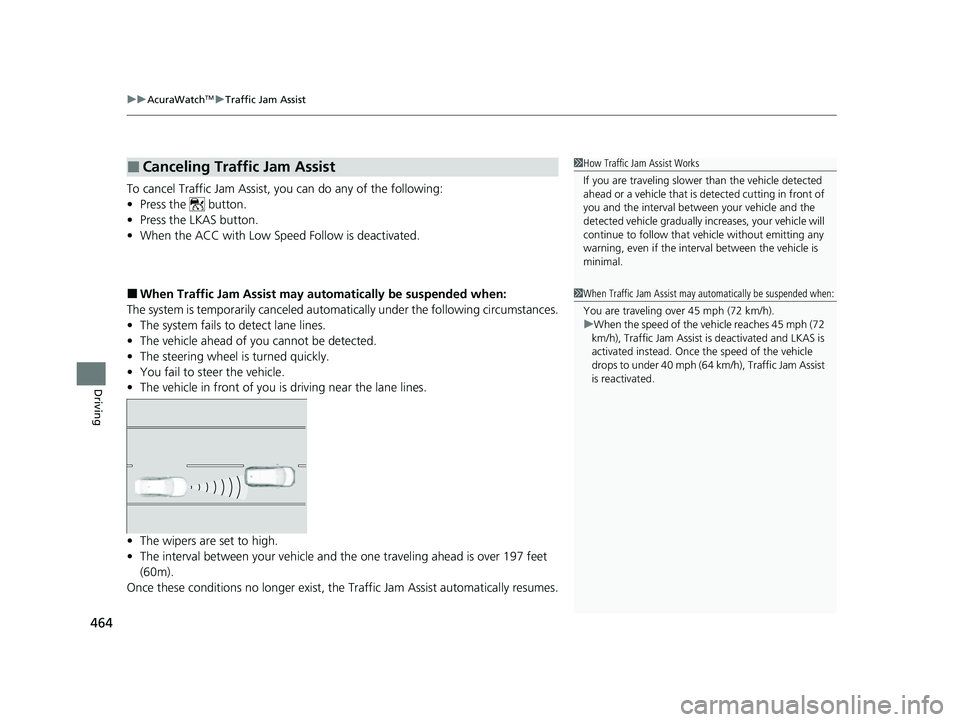
• The vehicle in front of you is driving near the lane lines.
• The wipers are set to high.
• The interval between your vehicle and th e one traveling ahead is over 197 feet
(60m).
Once these conditions no longer exist, the Traffic Jam Assist automatically resumes.
■Canceling Traffic Jam Assist1How Traffic Jam Assist Works
If you are traveling slower than the vehicle detected
ahead or a vehicle that is de tected cutting in front of
you and the interval betw een your vehicle and the
detected vehicle gradually increases, your vehicle will
continue to follow that vehicle without emitting any
warning, even if the interv al between the vehicle is
minimal.
1 When Traffic Jam Assist may automatically be suspended when:
You are traveling over 45 mph (72 km/h).
u When the speed of the vehicle reaches 45 mph (72
km/h), Traffic Jam Assist is deactivated and LKAS is
activated instead. Once the speed of the vehicle
drops to under 40 mph (64 km/h), Traffic Jam Assist
is reactivated.
23 ACURA TLX-31TGV6200.book 464 ページ 2022年8月4日 木曜日 午後1時59分
Page 474 of 658

uuAcuraWatchTMuRoad Departure Mitigation System
472
Driving
When you turn the Road Departure Mitigation
on and off, do the following.
1. Press the safety support switch.
2. Roll the right selector wheel to the
symbol and push it.
u The message appears on the multi-
information display when the system
turns on or off.
u A check mark appears in the box and the
color of the symbol changes green
when the system is on. The check mark
disappears and the color of the
symbol changes gray when the system is
off.
The Road Departure Mitigation is in the
previously selected on (checked) or off
(unchecked) setting each time you start the
engine.
■Road Departure Mitigation On and Off1 Road Departure Mitigation On and Off
When you have selected Warning Only from the
customized options using the audio/information
screen, the system does not operate the steering
wheel and braking. 2 Customized Features P. 302
You can change the settin gs for the Road Departure
Mitigation system.
If LKAS is off, the message below may appear if the
system has determined that there is a possibility of
your vehicle crossing over detected lane markings.
2 Customized Features P. 302
In the following case, a beeper sounds, a message
related to the ACC with Low Speed Follow appears
on the multi-information display, and the braking
function controlled by the Road Departure Mitigation
system is canceled.
•The vehicle has repeatedly applied the brakes to
maintain the set speed (for example, you are
descending a long slope).
Right Selector Wheel
Safety Support Switch
23 ACURA TLX-31TGV6200.book 472 ページ 2022年8月4日 木曜日 午後1時59分
Page 491 of 658

Continued489
uuBraking uBrake System
Driving
Keeps the brake applied after releasing the brake pedal until the accelerator pedal is
pressed. You can use this system while th e vehicle is temporarily stopped, like at
traffic lights and in heavy traffic.
■Automatic Brake Hold1 Automatic Brake Hold
3WARNING
Activating the automatic brake hold system
on steep hills or slippery roads may still
allow the vehicle to move if you remove
your foot from the brake pedal.
If a vehicle unexpectedly moves, it may
cause a crash resulting in serious injury or
death.
Never activate the automatic brake hold
system or rely on it to keep a vehicle from
moving when stopped on a steep hill or
slippery roads.
3WARNING
Using the automatic brake hold system to
park the vehicle may result in the vehicle
unexpectedly moving.
If a vehicle moves unexpectedly, it may
cause a crash, resulting in serious injury or
death.
Never leave the vehicle when braking is
temporarily kept by automatic brake hold
and always park the vehicle by putting the
transmission in
( P and applying the parking
brake.
■Turning on the system
Fasten your seat belt
properly, then start the
engine. Press the
automatic brake hold
button.
●The automatic brake
hold system indicator
comes on. The system
is turned on.
■Activating the system
Depress the brake pedal
to come to a complete
stop. The transmission
must not be in
( P or (R.●The automatic brake
hold indicator comes
on. Braking is kept for
up to 10 minutes.
●Release the brake
pedal after the
automatic brake hold
indicator comes on.
■Canceling the system
Depress the accelerator
pedal while the
transmission is in a
position other than
( P
or ( N. The system is
canceled and the vehicle
starts to move.
●The automatic brake
hold indicator goes
off. The system
continues to be on.
Accelerator
Pedal
Brake PedalAutomatic Brake
Hold Button
Comes
On
Comes On
OnOn
U.S.
Canada Comes
On
Comes
On
On
U.S.
Canada
23 ACURA TLX-31TGV6200.book 489 ページ 2022年8月4日 木曜日 午後1時59分
Page 492 of 658
uuBraking uBrake System
490
Driving
■The system automatically cancels when:
• You engage the parking brake.
• You depress the brake pedal and put the transmission into
(P or (R.
■The system automatically cancels and the parking brake is applied when:
• Braking is kept for more than 10 minutes.
• The driver’s seat belt is unfastened.
• The engine is turned off.
• There is a problem with au tomatic brake hold system.
1Automatic Brake Hold
While the system is activated, you can turn off the
engine or park the ve hicle through the same
procedure as you normally do. 2 When Stopped P. 494
Whether the system is on, or the system is activated,
the automatic brake hold turn s off once the engine is
off.
You may hear an operating noi se if the vehicle moves
while the automatic brake hold system is in
operation.
3WARNING
When using the automatic brake hold,
keep your foot on the brake pedal until the
automatic brake hold indicator comes on.
If the vehicle unexpectedly moves, it may
cause a crash resulting in serious injury or
death.
Release your foot from the brake pedal
after the automatic brake hold indicator
comes on.
23 ACURA TLX-31TGV6200.book 490 ページ 2022年8月4日 木曜日 午後1時59分
Page 496 of 658

494
Driving
Parking Your Vehicle
When Stopped
1.Depress the brake pedal firmly an d come to a complete stop.
2. With the brake pedal depressed, press the electric parking brake switch slowly,
but fully.
3. Change the shift position to
(P.
u Do not release the brake pedal until you have confirmed that
(P is shown on
the shift position indicator.
4. Turn off the engine.
u The parking brake and brake system indicator goes off in about 30 seconds.
Always set the parking brake, in particular if you are parked on an incline.
1 Parking Your Vehicle
Do not park your vehicle near flammable objects,
such as dry grass, oil, or timber.
Heat from the exhaust can cause a fire.
3WARNING
The vehicle can roll aw ay if left unattended
without confirming that Park is engaged.
A vehicle that rolls away could cause a crash
resulting in serious injury or death.
Always keep your foot on the brake pedal
until you have confirmed that
( P is shown
on the shift posi tion Indicator.
1When Stopped
After shutting off the engi ne, you may hear certain
noises coming from the vehicle. Here’s the lowdown:
•Noise from Under Vehicle: This noise is caused by
the vacuum pump inside the fuel evaporation
leakage check module (ELCM).
Depending on conditions, the pump will come on for
about 15 minutes about 5 to 10 hours after engine
shutoff. This noise is ju st normal vehicle operation
and don’t indicate a vehicle problem.
3.0 L engine models
23 ACURA TLX-31TGV6200.book 494 ページ 2022年8月4日 木曜日 午後1時59分
Page 503 of 658

Continued501
uuParking Your Vehicle uCross Traffic Monitor*
Driving
The system activates when:
• The power mode is in ON.
• The Cross Traffic Monitor is turned on.
2 Cross Traffic Monitor On and Off P. 504
•The transmission is in (R.
• Your vehicle is moving at 3 mph (5 km/h) or
lower.
When a vehicle is detected approaching from a rear corner, Cross Traffic Monitor
alerts you with a buzzer and a displayed warning.
The system will not detect a vehicle that approaches from directly behind your
vehicle, nor will it provide alerts about a detected vehicle when it moves directly
behind your vehicle.
The system does not provide alerts for a vehicle that is moving away from your
vehicle, and it may alert for pedestrians, bicycles, or stationary objects.
■How the System Works1 Cross Traffic Monitor*
Cross Traffic Monitor may not detect or may delay
alerting an approaching vehi cle, or may alert without
an approaching vehicle under the following
conditions:
•An obstacle, such as a nother vehicle and a wall,
near your vehicle’s rear bumper, is blocking the
radar sensor’s scope.
•Your vehicle is moving at the speed of about 3 mph
(5 km/h) or higher.
•A vehicle is approaching at the speed other than
between about 6 mph (10 km/h) and 16 mph (25
km/h).
•The system picks up external interference such as
other radar sensors from an other vehicle or strong
radio wave transmitted fr om a facility nearby.
•Either corner of the rear bumper is covered with
snow, ice, mud or dirt.
•When there is bad weather.
•Your vehicle is on an incline.
•Your vehicle is tilted due to a heavy load in the rear.•Your vehicle is reversing towards a wall, a pole, a
vehicle, and so on.
•The rear bumper or the sensors have been
improperly repaired or the rear bumper has been
deformed.
Have your vehicle checked by a dealer.
Radar sensors:
Underneath the rear bumper
corners
* Not available on all models
23 ACURA TLX-31TGV6200.book 501 ページ 2022年8月4日 木曜日 午後1時59分