Page 93 of 658
91
uuIndicators u
Continued
Instrument Panel
IndicatorNameOn/BlinkingExplanation
Immobilizer
System Indicator
●Blinks if the immobilizer system cannot
recognize the key information.•Blinks - You cannot start the engine. Set the
power mode to VEHICLE OFF, then select the ON
mode again.
Depress and hold the brake pedal before setting
the power mode to ON.
• Repeatedly blinks - The system may be
malfunctioning. Have your vehicle checked by a
dealer.
• Do not attempt to alter this system or add other
devices to it. Electrical problems can occur.
Security System
Alarm Indicator
●Blinks when the security system alarm has
been set.
2 Security System Alarm P. 139
IndicatorCanadian models
Indicator
23 ACURA TLX-31TGV6200.book 91 ページ 2022年8月4日 木曜日 午後1時59分
Page 94 of 658
92
uuIndicators u
Instrument Panel
IndicatorNameOn/BlinkingExplanation
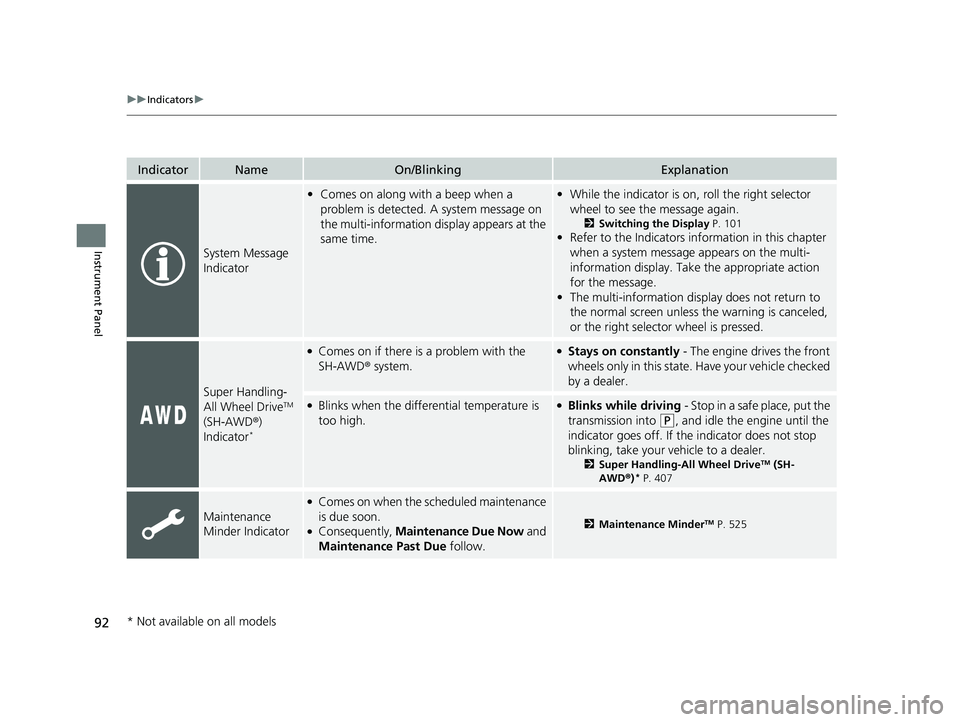
System Message
Indicator
•Comes on along with a beep when a
problem is detected. A system message on
the multi-information display appears at the
same time.•While the indicator is on, roll the right selector
wheel to see the message again.
2 Switching the Display P. 101
•Refer to the Indicators in formation in this chapter
when a system message appears on the multi-
information display. Take the appropriate action
for the message.
• The multi-information disp lay does not return to
the normal screen unless the warning is canceled,
or the right selector wheel is pressed.
Super Handling-
All Wheel DriveTM
(SH-AWD ®)
Indicator
*
●Comes on if there is a problem with the
SH-AWD ® system.●Stays on constantly - The engine drives the front
wheels only in this state. Have your vehicle checked
by a dealer.
●Blinks when the differential temperature is
too high.●Blinks while driving - Stop in a safe place, put the
transmission into
(P, and idle the engine until the
indicator goes off. If th e indicator does not stop
blinking, take your ve hicle to a dealer.
2Super Handling-All Wheel DriveTM (SH-
AWD® )* P. 407
Maintenance
Minder Indicator
●Comes on when the scheduled maintenance
is due soon.
●Consequently, Maintenance Due Now and
Maintenance Past Due follow.2Maintenance MinderTM P. 525
* Not available on all models
23 ACURA TLX-31TGV6200.book 92 ページ 2022年8月4日 木曜日 午後1時59分
Page 95 of 658

93
uuIndicators u
Continued
Instrument Panel
IndicatorNameOn/BlinkingExplanation
Adaptive Cruise
Control (ACC)
with Low Speed
Follow Indicator
(Amber)
●Comes on if there is a problem with ACC
with Low Speed Follow.●Comes on while driving - Have your vehicle
checked by a dealer.
●Indicator may come on temporarily when the
Maximum Load Limit is exceeded.
●ACC with Low Speed Follow has been
automatically canceled.
●Make sure the total load is within the Maximum
Load Limit.
2 Maximum Load Limit P. 371●Stays on constantly - Have your vehicle checked
by a dealer.
●Comes on if the ACC is deactivated
temporarily after the battery has been
disconnected, then re-connected.●Drive a short distance at more than 12 mph (20
km/h). The indicator should go off. If it does not,
have your vehicle checked by a dealer.
Adaptive Cruise
Control (ACC)
with Low Speed
Follow Indicator
(White/Green)●Lights up in white when you press the
button.
●Lights up in green when you press the
RES/+ button or SET/- button.2Adaptive Cruise Control (ACC) with Low
Speed Follow P. 430
Lane Keeping
Assist System
(LKAS) Indicator
(Amber)●Comes on if there is a problem with the
LKAS.●Stays on constantly - Have your vehicle checked
by a dealer.
Lane Keeping
Assist System
(LKAS) Indicator
(White/Green)●Lights up in white when you press the LKAS
button.
●Lights up in green when the LKAS is in
operation.2 Lane Keeping Assist System (LKAS) P. 449
23 ACURA TLX-31TGV6200.book 93 ページ 2022年8月4日 木曜日 午後1時59分
Page 96 of 658

94
uuIndicators u
Instrument Panel
IndicatorNameOn/BlinkingExplanation
Cruise Mode
Indicator (White/
Green)●Lights up in white when you change to
cruise mode.
●Lights up in green when you have set a
speed for cruise control.
2 To Switch ACC with Low Speed Follow to
Cruise Control P. 445
Safety Support
Indicator (Amber)
●Comes on if there is a problem with the
Road Departure Mitigation system, CMBSTM,
or blind spot information system*.
●Stays on constantly - Have your vehicle checked
by a dealer.
●Indicator may come on temporarily when the
Maximum Load Limi t is exceeded.●Make sure the total load is within the Maximum
Load Limit.
2 Maximum Load Limit P. 371●Stays on constantly - Have your vehicle checked
by a dealer.
●Comes on if the Road Departure Mitigation
system and CMBSTM are deactivated
temporarily after the battery has been
disconnected and then re-connected.
●Drive a short distance at more than 12 mph (20
km/h). The indicator should go off. If it does not,
have your vehicle checked by a dealer.
* Not available on all models
23 ACURA TLX-31TGV6200.book 94 ページ 2022年8月4日 木曜日 午後1時59分
Page 97 of 658

95
uuIndicators u
Continued
Instrument Panel
IndicatorNameOn/BlinkingExplanation
Safety Support
Indicator (Amber)
●Comes on when the Road Departure
Mitigation system and/or CMBSTM shuts itself
off.
●Indicator may come on temporarily when passing
through an enclosed space, such as a tunnel.
●The area around the radar sensor is blocked by dirt,
mud, etc. Stop your vehicle in a safe place and wipe
the debris off with a soft cloth. Indicator may take
some time to go off after the radar sensor is
cleaned.
●Have your vehicle checked by a dealer if the
indicator does not go off even after you have
cleaned the radar sensor.
2 Radar Sensor P. 483
●Stays on - The temperature inside the camera is
too high.
Use the climate control sy stem to cool down the
camera.
The system activates when the temperature inside
the camera cools down.
2 Front Sensor Camera P. 481
●Stays on - The area around the camera is blocked
by dirt, mud, etc. Stop yo ur vehicle in a safe place
and wipe the debris off with a soft cloth.
●Have your vehicle checked by a dealer if the
indicator and message are still displayed even after
you have cleaned the ar ea around the camera.
2Front Sensor Camera P. 481
23 ACURA TLX-31TGV6200.book 95 ページ 2022年8月4日 木曜日 午後1時59分
Page 98 of 658

96
uuIndicators u
Instrument Panel
IndicatorNameOn/BlinkingExplanation
Safety Support
Indicator (Amber)
●Comes on when mud, snow, or ice has
accumulated in the vicinity of the blind spot
information system sensor.
●Comes on when the temperature of the
blind spot information system sensor is high.
●Comes on while driving - Something may be
interfering with the blind spot information system
sensor. Check the vicinity of the blind spot
information system sensor and remove any
obstacles.
●The system will return to normal when the
temperature cools down.
2 Blind Spot Information System* P. 412
Safety Support
Indicator (Green/
Gray)
●Lights up in green when the Road Departure
Mitigation system, CMBSTM, and blind spot
information system* are on.●Lights up in green an d gray when the Road
Departure Mitigation system, CMBSTM, or
blind spot information system*, or any two
of these systems are off.
●Lights up in gray when the Road Departure
Mitigation system, CMBSTM, and blind spot
information system* are off.
2 Road Departure Mitigation On and Off P. 472
2 CMBSTM On and Off P. 423
2 Blind spot information System On and Off
P. 414
Models with blind spot information system
* Not available on all models
23 ACURA TLX-31TGV6200.book 96 ページ 2022年8月4日 木曜日 午後1時59分
Page 100 of 658
98
uuGauges and Displays uMulti-Information Display
Instrument Panel
Multi-Information Display
The multi-information display shows inform ation such as the estimated travelable
distance and fuel economy of the vehicle. It also displays messages such as warnings
and other helpful information.
When a warning message displays, please check the message and contact a dealer
to have the vehicle inspected if necessary . Please refer to the pages below if the
Engine Oil Pressure Low , Engine Temperature Too Hot or Slow Down!
Reduced Stopping Power message is displayed.
2If the Engine Oil Pressure Low Warning Appears P. 614
2 Overheating P. 611
2 If the Slow Down! Reduced Stopping Power Warning Appears P. 615
Shows the total number of miles or kilometers that your vehicle has accumulated.
■Sub Display
■Odometer
OdometerOutside Temperature
Compass
*
Dynamic Mode
* Not available on all models
23 ACURA TLX-31TGV6200.book 98 ページ 2022年8月4日 木曜日 午後1時59分
Page 106 of 658

uuGauges and Displays uMulti-Information Display
104
Instrument Panel
You can check if there are any active warning messages.
Shows the remaining oil life and Maintenance Minder
TM.
2 Maintenance MinderTM P. 525
Shows each tire’s pressure.
2Tire Pressure Monitoring System (TPMS) with Tire Fill Assist P. 408
Enables you to show another unit on the
multi-information display, head-up display*
and audio/information screen and set the
displayed measurements to read in either
miles and mph or km and km/h.
Press the right selector wheel when you select
the Speed/Distance Units on the multi-
information display. Roll the right selector
wheel to select the unit and press it. After this,
a confirmation screen will appear for a few
seconds.
■Warning
■Maintenance
■Tire Pressure Monitor
■Speed/Distance Units
1 Warning
If there are multiple warnings, you can move the right
selector wheel to the right or left to see other
warnings.
1 Tire Pressure Monitor
The following colors indicate the state of tire
pressure:
•Green: Within tire pressure regulation.
•Amber: Above or Below ti re pressure regulation.•White: There is a problem with the system.
* Not available on all models
23 ACURA TLX-31TGV6200.book 104 ページ 2022年8月4日 木曜日 午後1時59分

