Page 73 of 658
Continued71
uuChild Safety uSafety of Infants and Small Children
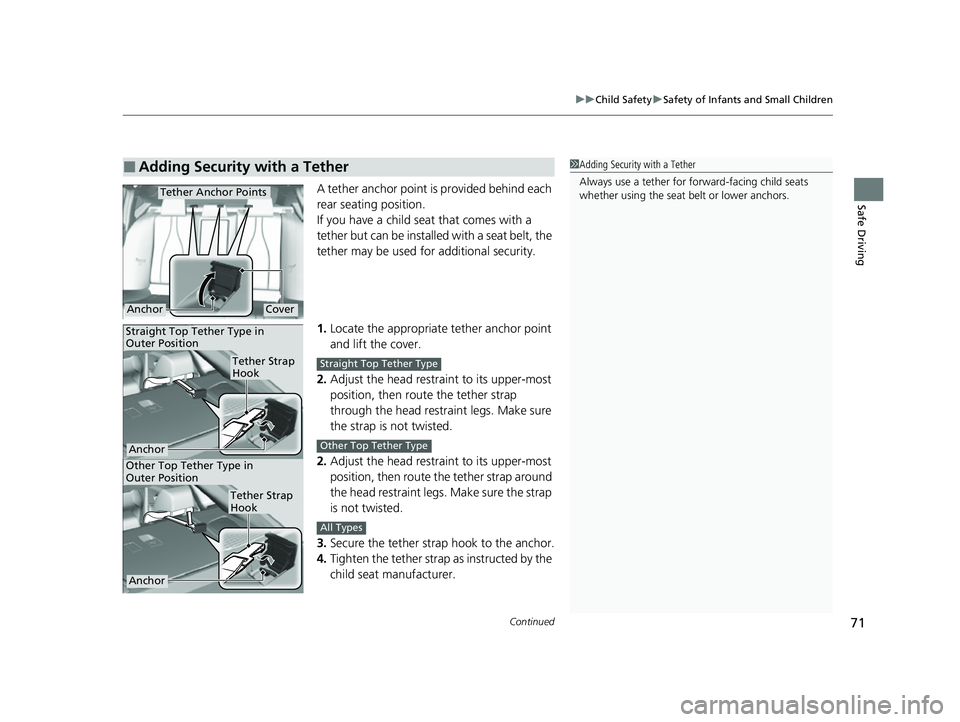
Safe DrivingA tether anchor point is provided behind each
rear seating position.
If you have a child s eat that comes with a
tether but can be installed with a seat belt, the
tether may be used for additional security.
1. Locate the appropriate tether anchor point
and lift the cover.
2. Adjust the head restra int to its upper-most
position, then route the tether strap
through the head restraint legs. Make sure
the strap is not twisted.
2. Adjust the head restra int to its upper-most
position, then route the tether strap around
the head restraint legs. Make sure the strap
is not twisted.
3. Secure the tether strap hook to the anchor.
4. Tighten the tether strap as instructed by the
child seat manufacturer.
■Adding Security with a Tether1Adding Security with a Tether
Always use a tether for forward-facing child seats
whether using the seat belt or lower anchors.
Tether Anchor Points
CoverAnchor
Other Top Tether Type in
Outer Position
Anchor
Tether Strap
Hook
Tether Strap
Hook
Anchor
Straight Top Tether Type in
Outer Position
Straight Top Tether Type
Other Top Tether Type
All Types
23 ACURA TLX-31TGV6200.book 71 ページ 2022年8月4日 木曜日 午後1時59分
Page 76 of 658
uuChild Safety uSafety of Larger Children
74
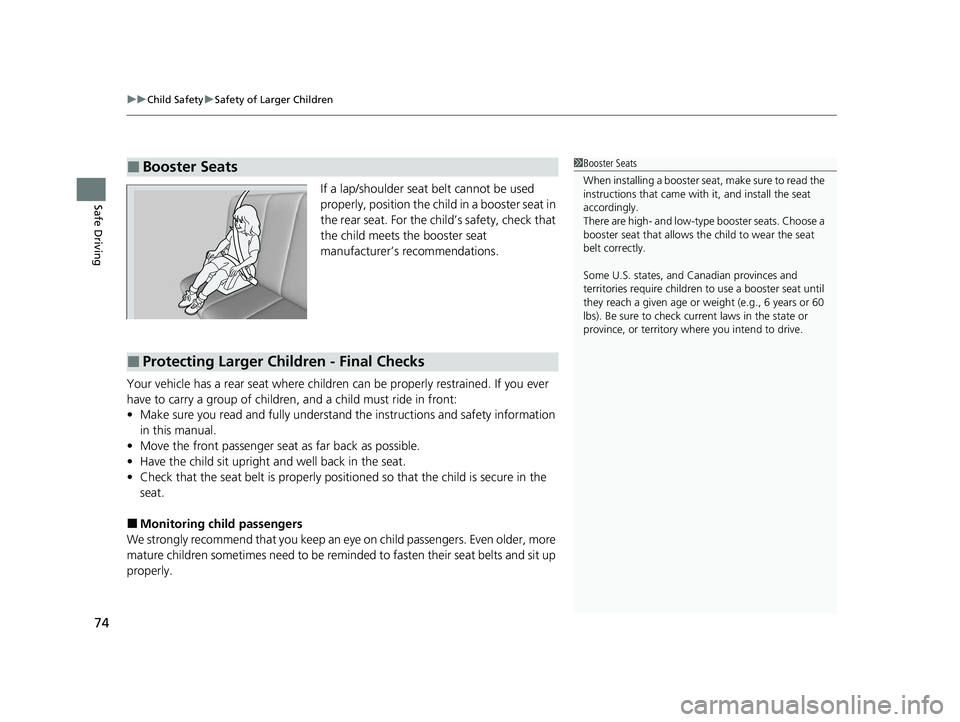
Safe DrivingIf a lap/shoulder seat belt cannot be used
properly, position the child in a booster seat in
the rear seat. For the ch ild’s safety, check that
the child meets the booster seat
manufacturer’s recommendations.
Your vehicle has a rear seat where children can be properly restrained. If you ever
have to carry a group of children, and a child must ride in front:
• Make sure you read and fully understand the instructions and safety information
in this manual.
• Move the front passenger seat as far back as possible.
• Have the child sit upright and well back in the seat.
• Check that the seat belt is properly positi oned so that the child is secure in the
seat.
■Monitoring child passengers
We strongly recommend that you keep an eye on child passengers. Even older, more
mature children sometimes need to be remind ed to fasten their seat belts and sit up
properly.
■Booster Seats1 Booster Seats
When installing a booster seat , make sure to read the
instructions that came with it, and install the seat
accordingly.
There are high- and low-type booster seats. Choose a
booster seat that allows the child to wear the seat
belt correctly.
Some U.S. states, and Canadian provinces and
territories require children to use a booster seat until
they reach a given age or weight (e.g., 6 years or 60
lbs). Be sure to check current laws in the state or
province, or territory where you intend to drive.
■Protecting Larger Children - Final Checks
23 ACURA TLX-31TGV6200.book 74 ページ 2022年8月4日 木曜日 午後1時59分
Page 119 of 658

117
Controls
This chapter explains how to operate the various controls necessary for driving.
Clock.................................................. 118
Locking and Unlocking the Doors
Key .................................................. 120
Low Keyless Remote Signal Strength ... 122
Locking/Unlocking the Doors from the Outside .......................................... 123
Locking/Unlocking the Doors from the Inside ............................................. 132
Childproof Door Locks ..................... 134
Auto Door Locking/Unlocking .......... 135
Opening and Closing the Trunk ....... 136
Security System ................................ 139
Immobilizer System .......................... 139
Security System Alarm ...................... 139 Windows
........................................... 142
Moonroof .......................................... 145
Operating the Switches Around the Steering Wheel ENGINE START/STOP Button............. 146
Turn Signals ..................................... 149
Light Switches.................................. 150
Fog Lights
*...................................... 153
ChicaneTM Daytime Running Lights ... 153
Auto High-Beam .............................. 154
Wipers and Washers ........................ 157
Brightness Control ........................... 159
Rear Defogger/Heated Door Mirror Button .. 161Driving Position Memory System ...... 162 Adjusting the Steering Wheel .......... 164
Mirrors ............................................... 165
Interior Rearview Mirror ................... 165
Power Door Mirrors ......................... 166
Seats .................................................. 168
Front Seats ...................................... 168
Interior Convenience Items .............. 180
Interior Lights .................................. 180
Storage Items .................................. 182
Climate Control System Using Automatic Climate Control .... 197
Automatic Climate Control Sensors ... 201
* Not available on all models
23 ACURA TLX-31TGV6200.book 117 ページ 2022年8月4日 木曜日 午後1時59分
Page 167 of 658
165
Controls
Mirrors
Interior Rearview Mirror
Adjust the angle of the rearview mirror when you are sitting in the correct driving
position.
When you are driving after dark, the
automatic dimming rearview mirror and
power door mirrors reduce the glare from
headlights behind you. Press the button to
turn this function on and off. When activated,
the indicator comes on.
■Automatic Dimming Power Door Mirrors* and Rearview
Mirror
1 Mirrors
Keep the inside and out side mirrors clean and
adjusted for best visibility.
Adjust the mirrors befo re you start driving.
2 Front Seats P. 168
1Automatic Dimming Power Door Mirrors* and Rearview Mirror
The auto dimming function cancels when the
transmission is in
( R.
Button/Indicator
* Not available on all models
23 ACURA TLX-31TGV6200.book 165 ページ 2022年8月4日 木曜日 午後1時59分
Page 170 of 658

168
Controls
Seats
Front Seats
Adjust the driver’s seat as far back as possible
while allowing you to maintain full control of
the vehicle. You should be able to sit upright,
well back in the seat and be able to
adequately press the pedals without leaning
forward, and grip the steering wheel
comfortably. The passenger’s seat should be
adjusted in a similar manner, so that it is as far
back from the front airbag in the dashboard
as possible.
■Adjusting the front power seats
1Seats
Always make seat adjustments before driving.
1Front Seats
The National Highway Traffic Safety Administration
and Transport Cana da recommend that drivers allow
at least 10 inches (25 cm) between the center of the
steering wheel and the chest.
3WARNING
Sitting too close to a front airbag can result
in serious injury or death if the front
airbags inflate.
Always sit as far back from the front
airbags as possible while maintaining
control of the vehicle.
Move back.
Allow sufficient
space.
■Adjusting the Seat Positions
Horizontal Position
Adjustment
Height Adjustment Seat-back Angle
Adjustment Mode Selector
*
2 Seat Control
Interface* P. 170
* Not available on all models
23 ACURA TLX-31TGV6200.book 168 ページ 2022年8月4日 木曜日 午後1時59分
Page 171 of 658
169
uuSeats uFront Seats
Continued
Controls
■Lumbar Support Adjustment Switch
Press the top: To move the lumbar support
up.
Press the bottom: To move the lumbar
support down.
Press the front: To increase the entire
lumbar support.
Press the rear: To decrease the entire lumbar
support.
Lumbar Support
Adjustment Switch
Models without mode selector
23 ACURA TLX-31TGV6200.book 169 ページ 2022年8月4日 木曜日 午後1時59分
Page 172 of 658
uuSeats uFront Seats
170
Controls
Press the mode selector up or down to display seat adjustment information on the
audio/information screen, and then use the adjustment switch to adjust the lumbar
support, bolster support or thigh support.
■Seat Control Interface*1 Seat Control Interface*
The image of each adjustment mode displayed on the
audio/information screen:
Lumbar support
Bolster support
Thigh support
* Not available on all models
23 ACURA TLX-31TGV6200.book 170 ページ 2022年8月4日 木曜日 午後1時59分
Page 173 of 658
Continued171
uuSeats uFront Seats
Controls
1. Press the mode selector up or down to select the lumbar support adjustment
mode, bolster support adjustment mode or thigh support adjustment mode.
2. Press the adjustment switch as follow.
To adjust the lumbar support:
Press the top: To move the lumbar support
up.
Press the bottom: To move the lumbar
support down.
Press the front: To increase the entire
lumbar support.
Press the rear: To decrease the entire lumbar
support.
To adjust the bolster support:
Press the front: To increase the bolster
support.
Press the rear: To decrease the bolster
support.1 Seat Control Interface*
The lumbar support, bolster support and thigh
support can be adjusted even when the power mode
is in VEHICLE OFF. However, the adjusting mode
display does not come on with the power mode in
VEHICLE OFF.
Adjustment Switch
Mode Selector
Adjustment
Switch
* Not available on all models
23 ACURA TLX-31TGV6200.book 171 ページ 2022年8月4日 木曜日 午後1時59分


