Page 160 of 658

uuOperating the Switches Around the Steering Wheel uWipers and Washers
158
Controls
When you push the lever down to AUTO, the
windshield wipers sweep once, and go into
the automatic mode.
The wipers operate intermittently, at low
speed, or at high speed and stop in
accordance with the am ount of rainfall the
rainfall sensor detects.
■AUTO sensitivity adjustment
When the wiper function is set to AUTO, you
can adjust the sensitivity of the rainfall sensor
(using the adjustment ring) so that wipers will
operate in accordance with your preference.
Sensor sensitivity
■Automatic Intermittent Wipers*1 Wipers and Washers
If the wipers st op operating due to an obstacle such
as the buildup of snow, park the vehicle in a safe
place.
Rotate the wipe r switch to OFF, and set the power
mode to ACCESSORY or VEHICLE OFF, then remove
the obstacle.
1 Automatic Intermittent Wipers*
The rainfall sensor is in the location shown below.
NOTICE
AUTO should always be turned OFF before the
following situations in order to prevent severe
damage to the wiper system:
•Cleaning the windshield•Driving through a car wash
•No rain present
Rainfall Sensor
Adjustment Ring
Low sensitivity
High sensitivity
* Not available on all models
23 ACURA TLX-31TGV6200.book 158 ページ 2022年8月4日 木曜日 午後1時59分
Page 321 of 658

319
uuCustomized Features u
Continued
Features
*1:Default SettingSetup Group
Customizable Features DescriptionSelectable Settings
Vehicle Lighting
SetupAccent Light Brightness
*Changes the brightness level of the
interior accent lighting.
Link to
Illumination*1/
Max /
High /Mid/ Low/Off
Accent Light Theme
*
Changes the theme of the interior
accent lighting.
2 Lighting area of the accent light
P. 394
Dynamic Mode*1
See other selectable
settings on the screen.
Interior Ligh t Dimming Time Changes the length of time the interior
lights stay on after you close the doors. 15 sec
/30 sec
*1/60
sec
Headlight Auto Off Timer Changes the length of time the
exterior lights stay on after you close
the driver’s door. 0 sec
/15 sec
*1/30 sec /
60 sec
Auto Interior Illumination
Sensitivity Changes the sensitivity of the
brightness of the instrument panel
when the headlight switch is in
AUTO
position. Min/
Low/ Mid
*1/
High /Max
Auto Headligh t On with
Wiper On Causes the headlights to come on
when the headlight switch is in the
AUTO
position and the wipers are
used several times within a certain
number of intervals. On
*1/
Off
Auto Light Sensitivity
*Changes the timing for the headlights
to come on. Min/
Low/ Mid*1/
High /Max
* Not available on all models
23 ACURA TLX-31TGV6200.book 319 ページ 2022年8月4日 木曜日 午後1時59分
Page 453 of 658
Continued451
uuAcuraWatchTMuLane Keeping Assist System (LKAS)
Driving
The system can be used when th e following conditions are met.
• The lane in which you are driving has detectable lane markers on both sides, and
your vehicle is in the center of the lane.
• The vehicle is traveling between about 45 and 90 mph (72 and 145 km/h).
• You are driving on a straight or slightly curved road.
• The turn signals are off.
• The brake pedal is not depressed.
• The wipers are not in contin uous high speed operation.
■How to activate the system
1.Press the LKAS button.
u LKAS indicator (white) and lane outlines
appear on the multi-information display.
The system is ready to use.
■When the System can be Used1When the System can be Used
If the vehicle drifts toward ei ther left or right lane line
due to the system applying torque, turn off the LKAS
and have your vehicle checked by a dealer.
LKAS Button
(white)
23 ACURA TLX-31TGV6200.book 451 ページ 2022年8月4日 木曜日 午後1時59分
Page 455 of 658
Continued453
uuAcuraWatchTMuLane Keeping Assist System (LKAS)
Driving
■The system operatio n is suspended if
you:
• Turning the wipers to continuous high
speed operation.
u Both LO and INT mode or OFF will
resume LKAS.
• Decrease the vehicle speed to about 40
mph (64 km/h) or less.
u Increasing the vehicle speed to about 45
mph (72 km/h) or more resumes the
LKAS.
• Depress the brake pedal.
u The LKAS resumes and starts detecting
the lane lines again once you release the
brake pedal.1The system operation is suspended if you:
You can change the setting for the LKAS.
LKAS suspended beep ON and OFF can be selected.
2 Customized Features P. 302
When the LKAS is suspended,
the lane lines on the multi-
information display change to
lane outlines, and the beeper
sounds (if activated). (white) is on.
23 ACURA TLX-31TGV6200.book 453 ページ 2022年8月4日 木曜日 午後1時59分
Page 466 of 658
uuAcuraWatchTMuTraffic Jam Assist
464
Driving
To cancel Traffic Jam Assist, yo u can do any of the following:
• Press the button.
• Press the LKAS button.
• When the ACC with Low Speed Follow is deactivated.
■When Traffic Jam Assist may au tomatically be suspended when:
The system is temporarily canceled automatically under the following circumstances.
• The system fails to detect lane lines.
• The vehicle ahead of you cannot be detected.
• The steering wheel is turned quickly.
• You fail to steer the vehicle.
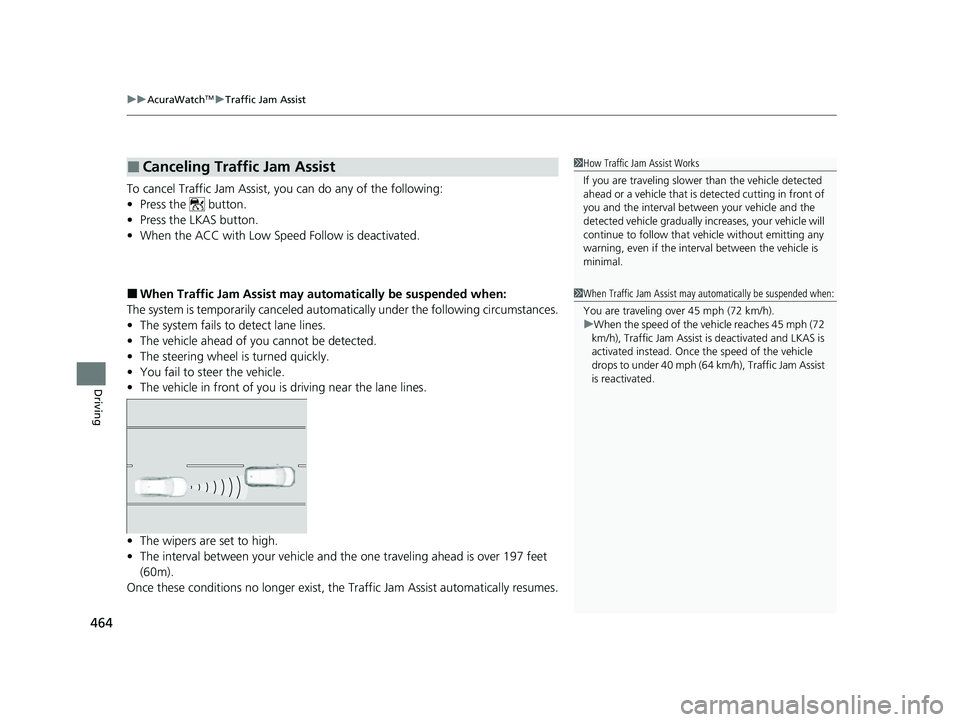
• The vehicle in front of you is driving near the lane lines.
• The wipers are set to high.
• The interval between your vehicle and th e one traveling ahead is over 197 feet
(60m).
Once these conditions no longer exist, the Traffic Jam Assist automatically resumes.
■Canceling Traffic Jam Assist1How Traffic Jam Assist Works
If you are traveling slower than the vehicle detected
ahead or a vehicle that is de tected cutting in front of
you and the interval betw een your vehicle and the
detected vehicle gradually increases, your vehicle will
continue to follow that vehicle without emitting any
warning, even if the interv al between the vehicle is
minimal.
1 When Traffic Jam Assist may automatically be suspended when:
You are traveling over 45 mph (72 km/h).
u When the speed of the vehicle reaches 45 mph (72
km/h), Traffic Jam Assist is deactivated and LKAS is
activated instead. Once the speed of the vehicle
drops to under 40 mph (64 km/h), Traffic Jam Assist
is reactivated.
23 ACURA TLX-31TGV6200.book 464 ページ 2022年8月4日 木曜日 午後1時59分
Page 473 of 658
Continued471
uuAcuraWatchTMuRoad Departure Mitigation System
Driving
The system activates when all of the following conditions are met:
• The vehicle is traveling between about 45 and 90 mph (72 and 145 km/h).
• The vehicle is on a straight or slightly curved road.
• The turn signals are off.
• The brake pedal is not depressed.
• The wipers are not in contin uous high speed operation.
• The system makes a determination that th e driver is not actively accelerating,
braking, or steering.
■How the System Activates1 How the System Activates
The Road Departure Mi tigation system may
automatically shut off and the safety support
indicator (amber) co mes and stays on.
2 Indicators P. 78
Road Departure Mi tigation system function can be
impacted when the vehicle is:
•Not driven within a traffic lane.
•Driven on the inside edge of a curve, or outside of
a lane.
•Driven in a narrow lane.
23 ACURA TLX-31TGV6200.book 471 ページ 2022年8月4日 木曜日 午後1時59分
Page 536 of 658
534
uuMaintenance Under the Hood uOpening the Hood
Maintenance
Opening the Hood
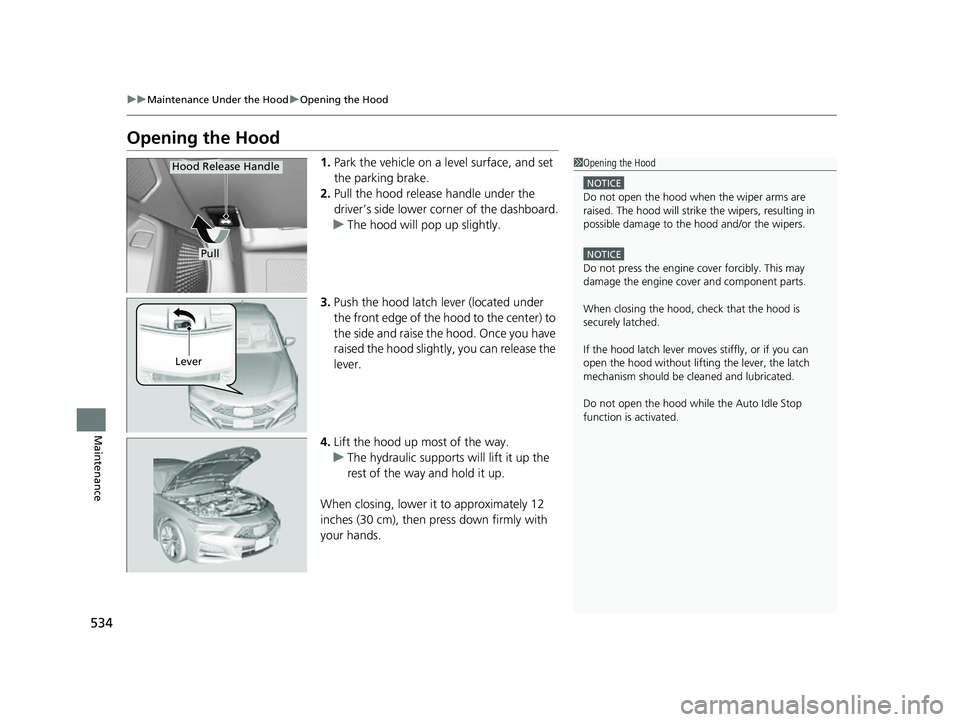
1. Park the vehicle on a level surface, and set
the parking brake.
2. Pull the hood release handle under the
driver’s side lower co rner of the dashboard.
u The hood will pop up slightly.
3. Push the hood latch lever (located under
the front edge of the hood to the center) to
the side and raise the hood. Once you have
raised the hood slightly, you can release the
lever.
4. Lift the hood up most of the way.
u The hydraulic supports will lift it up the
rest of the way and hold it up.
When closing, lower it to approximately 12
inches (30 cm), then pr ess down firmly with
your hands.1 Opening the Hood
NOTICE
Do not open the hood when the wiper arms are
raised. The hood will strike the wipers, resulting in
possible damage to the hood and/or the wipers.
NOTICE
Do not press the engine cover forcibly. This may
damage the engine cover and component parts.
When closing the hood, check that the hood is
securely latchedM
If the hood latch lever moves stiffly, or if you can
open the hood without lifti ng the lever, the latch
mechanism should be cl eaned and lubricatedM
Do not open the hood while the Auto Idle Stop
function is activated.
Pull
Hood Release Handle
Lever
23 ACURA TLX-31TGV6200.book 534 ページ 2022年8月4日 木曜日 午後1時59分
Page 577 of 658
Continued575
uuCleaning uExterior Care
Maintenance
• Make sure to follow the instructions indicated on the automated car wash.
• Fold in the door mirrors.
• For models equipped with automatic inte rmittent wipers, turn the wipers off.
• Do not use an automated car wash.
• Keep sufficient distance between the cleaning nozzle and the vehicle body.
• Take particular care around the windows. Standing too close may cause water to
enter the vehicle interior.
• Do not spray high pressure water directly into the engine compartment. Instead,
use low pressure water and a mild detergent.
• Do not spray water directly onto the ca mera or the area around it. Water may
enter the lens and cause th e camera to malfunction.
■Using an Automated Car Wash
■Using High Pressure Cleaners
1Using an Automated Car Wash
When using an automated car wash that pulls the
vehicle through with a conveyor, make sure the
transmission in
( N position.
2 If you want to keep the transmission in
(N
position [car wash mode] P. 386
NOTICE
Never run the vehicle through a conveyor-style car
wash or use any type of motorized cleaning device.
Doing so could damage the vehicle and the paint.
Always wash the vehicle by hand with a mild car
wash detergent and plenty of water.
Models with PMC emblem on the console
Models with PMC emblem on the console
23 ACURA TLX-31TGV6200.book 575 ページ 2022年8月4日 木曜日 午後1時59分