Page 385 of 713
383
uuCustomized Features u
Continued
Features
*1:Default SettingSetup Group Customizable Features
Description Selectable Settings
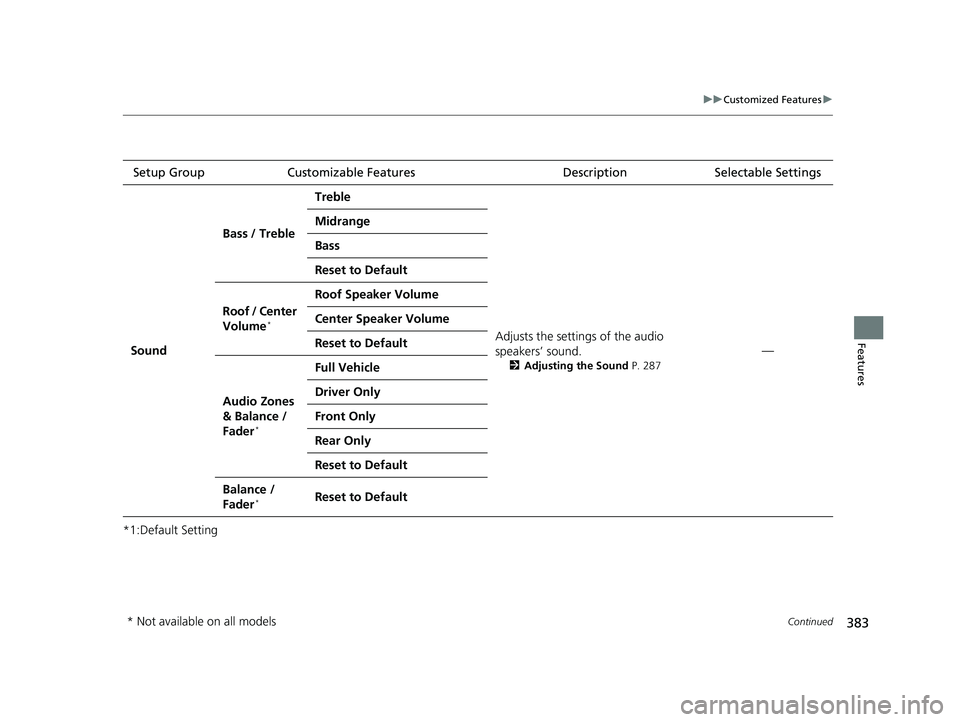
Sound Bass / Treble
Treble
Adjusts the settings of the audio
speakers’ sound.
2Adjusting the Sound P. 287
—
Midrange
Bass
Reset to Default
Roof / Center
Volume
*
Roof Speaker Volume
Center Speaker Volume
Reset to Default
Audio Zones
& Balance /
Fader
*
Full Vehicle
Driver Only
Front Only
Rear Only
Reset to Default
Balance /
Fader*Reset to Default
* Not available on all models
23 ACURA RDX-31TJB6400.book 383 ページ 2022年8月4日 木曜日 午後1時51分
Page 386 of 713
384
uuCustomized Features u
Features
*1:Default SettingSetup Group Customizable Features Description Selectable Settings
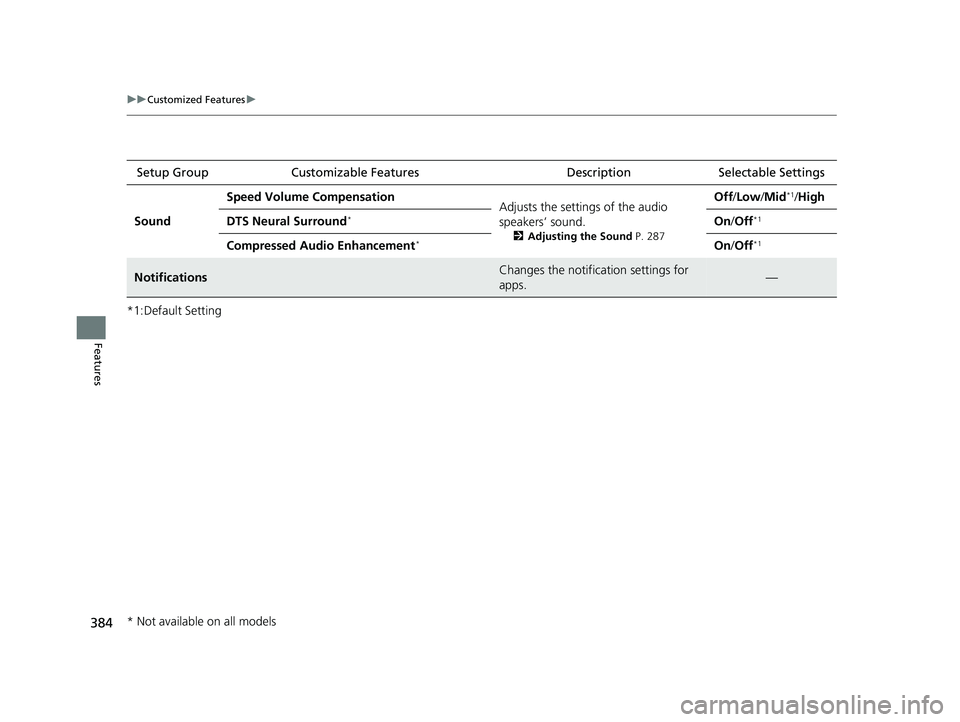
Sound Speed Volume Compensation
Adjusts the settings of the audio
speakers’ sound.
2Adjusting the Sound P. 287
Off/Low /Mid*1/High
DTS Neural Surround
*On /Off*1
Compressed Audio Enhancement*On /Off*1
NotificationsChanges the notification settings for
apps.—
* Not available on all models
23 ACURA RDX-31TJB6400.book 384 ページ 2022年8月4日 木曜日 午後1時51分
Page 387 of 713
385
uuCustomized Features uDefaulting All the Settings
Features
Defaulting All the Settings
Reset all the menu and customized settings as the factory defaults.
1.Press the (home) button.
2. Select Settings .
3. Select System.
4. Select Factory Data Reset .
u A confirmation message appears on the
screen.
5. Select Continue to reset the settings.
6. Select Reset to reset the settings.
u The system w ill reboot.
1. Press the (home) button.
2. Select Settings .
3. Select Vehicle .
4. Select Reset to Default .
5. Select Reset.
■Defaulting System Settings
1Defaulting All the Settings
When you transfer the vehicle to a third party, reset
all settings to default a nd delete all personal data.
If you perform Factory Data Reset , it will reset the
preinstalled apps to their factory default.
■Defaulting Vehicle Settings
23 ACURA RDX-31TJB6400.book 385 ページ 2022年8月4日 木曜日 午後1時51分
Page 397 of 713
Continued395
uuBluetooth ® HandsFreeLink ®u HFL Menus
Features
■Bluetooth ® setup
You can turn Bluetooth® function on and off.
1. Press the (home) button.
2. Select Settings .
3. Select Connections .
4. Select Bluetooth .
5. Select Options .
6. Select On.
■Phone Setup
1Bluetooth ® setup
If there is an active connection to Appl e CarPlay or
Android Auto, this se tting is unavailable.
23 ACURA RDX-31TJB6400.book 395 ページ 2022年8月4日 木曜日 午後1時51分
Page 398 of 713

uuBluetooth ® HandsFreeLink ®u HFL Menus
396
Features
■To pair a cell phone (when there is no
phone paired to the system)
1. Press the (home) button.
2. Select Phone .
3. Select Connect Phone .
4. Make sure your phone is in search or
discoverable mode, then select + Connect
New Device .
u HFL automatically becomes discoverable.
5. Select the HandsFreeLink when it appears
on your phone.
u If HFL does not appear, select Search for
Devices.
6. The system gives you a pairing code on the
audio/information screen.
u Confirm if the pairing code on the screen
and your phone match.
This may vary by phone.
u After confirming pairing, may be
required to confirm Bluetooth®
operation depending on phone. Select
Continue with Bluetooth.
7. The device options sc reen appears, then
select Continue .
u You can enable/disable the AcuraLink
Assist and Phone Data Collection on
the screen. Both default settings are
Enable .1Phone Setup
Your Bluetooth -compatible phone must be paired to
the system before you ca n make and receive hands-
free calls.
Phone Pairing Tips:
•You cannot pair your phone while the vehicle is
moving.
•Up to six phones can be paired.
•Your phone’s battery may dr ain faster when it is
paired to the system.
Once you have paired a phone, you can see it
displayed on the screen with one or more icons on
the right side.
These icons indicate the following: : The phone is compatible with Bluetooth® Audio.
: The phone can be used with HFL.
: The phone is compatib le with Apple CarPlay.
: The phone is compatible with Android Auto.
If there is an active connection to Appl e CarPlay or
Android Auto, pairing of additional Bluetooth®
compatible devices is unavailable.
Enable Smart Sharing pop-up
Smart Sharing to share phone data with Acura. You
can change the AcuraLink Assist and Phone Data
Collection settings later by se lecting the device in
the Phone Menu screen and then Options.
For detailed information of all data shared visit https://
acuralink.acura.com/#/acuralinkLegalTerms
23 ACURA RDX-31TJB6400.book 396 ページ 2022年8月4日 木曜日 午後1時51分
Page 400 of 713
uuBluetooth ® HandsFreeLink ®u HFL Menus
398
Features
■To delete a paired phone
1. Go to the Phone Menu screen.
2Phone Menu screen P. 394
2.Select Change Connected Phone .
3. Select a phone you want to delete.
4. Select Options.
5. Select Delete Device .
6. A confirmation message appears on the
screen. Select Delete.
1To delete a paired phone
You can also delete a pair ed phone by the following
procedure.
1. Press the (home) button.
2. Select Settings .
3. Select Connections .
4. Select Bluetooth .
5. Select a phone you want to delete.
6. Select Options .
7. Select Delete Device .
8. A confirmation message appears on the screen.
Select Delete .
If there is an active conne ction to Android Auto, you
cannot delete a paired phone.
23 ACURA RDX-31TJB6400.book 398 ページ 2022年8月4日 木曜日 午後1時51分
Page 483 of 713

Continued481
uuWhen Driving uBlind Spot Information System
Driving
When you turn the blind spot information
system on and off, do the following.
1. Press the safety support switch.
2. Roll the right selector wheel to the
symbol and push it.
u The message appears on the multi-
information display when the system
turns on or off.
u A check mark appears in the box and the
color of the symbol changes green
when the system is on. The check mark
disappears and the color of the
symbol changes gray when the system is
off.
The blind spot information system is in the
previously selected on (checked) or off
(unchecked) setting eac h time you start the
engine.
■Blind Spot Information System On and Off1 Blind Spot Information System
You can also select the sa fety support content from
the multi-information display.
2 Multi-Information Display P. 137
You can change the settings for the blind spot
information system. 2 Customized Features P. 359
Safety Support Switch
Right Selector Wheel
23 ACURA RDX-31TJB6400.book 481 ページ 2022年8月4日 木曜日 午後1時51分
Page 550 of 713

uuBraking uBrake System
548
Driving
■Activating and deactivating the au tomatic parking brake feature
With the power mode in ON, carry out the following steps to either activate or
deactivate the automatic parking brake feature.
1. Put the transmission into
(P.
2. Without depressing the brake pedal, press and release the parking brake switch.
u Check that the Parking Brake and Brake System indicator (red) has come on.
3. Press and hold the parking brake switch. When you hear a beeping sound, release
the switch and within 3 seconds press and hold the switch again.
4. When you hear a sound indicating that the procedure is completed, release the
switch.
u Two beeps indicates that the feature has been activated.
u One beep indicates that the feature has been deactivated.
u When you have completed activating the feature, the parking brake will
remain applied after you turn off the engine.
u To confirm that the parking brake is ap plied, check if the Parking Brake and
Brake System indicator (red) is on.
If you need to temporarily deactivate the feature while putting your vehicle through
a conveyor type car wash or when having your vehicle towed. You can follow the
procedure explained below.
1. Depress the brake pedal and bring the vehicle to a stop.
2. Set the power mode to VEHICLE OFF and then within 2 seconds pull up the
parking brake switch.
u Activation and deactivation settings fo r the feature will not be affected.
u Before temporarily deactivating the feat ure, make sure to first turn off both
ACC with Low Speed Follow and th e automatic brake hold system.
u To confirm that the parking brake is ap plied, check if the Parking Brake and
Brake System indicator (red) is on.
1 Parking Brake
In cold climates, the parking brake may freeze in
place if applied.
When parking the vehicle, chock the wheels and
make sure the automatic parking brake feature is
deactivated.
Also, when putting your vehicle through a conveyor-
type car wash or when ha ving your vehicle towed,
deactivate the automatic parking brake feature and
leave the parking brake released.
23 ACURA RDX-31TJB6400.book 548 ページ 2022年8月4日 木曜日 午後1時51分