Page 510 of 713

uuAcuraWatchTMuAdaptive Cruise Control (ACC) with Low Speed Follow
508
Driving
■A vehicle detected ahead is within ACC with Low Speed Follow range and
slows to a stop Your vehicle also stops, automatically. The
Stopped message appears on the multi-
information display.
When the vehicle ahead of you starts again, if
you press the RES/+/SET/– switch up or
down, or depress the accelerator pedal, ACC
with Low Speed Follow will operate again
within the previously set speed.
If no vehicle is ahead of you before you
resume driving, depressing the accelerator
pedal will resume operation of ACC with Low
Speed Follow within the prior set speed.1 A vehicle detected ahead is within ACC with Low Speed Follow
range and slows to a stop
3WARNING
Exiting a vehicle that has been stopped
while the ACC with Low Speed Follow
system is operating can result in the vehicle
moving without operator control.
A vehicle that moves without operator
control can cause a crash, resulting in
serious injury or death.
Never exit a vehicle when the vehicle is
stopped by ACC with Low Speed Follow.
(green)
(green)
23 ACURA RDX-31TJB6400.book 508 ページ 2022年8月4日 木曜日 午後1時51分
Page 511 of 713

Continued509
uuAcuraWatchTMuAdaptive Cruise Control (ACC) with Low Speed Follow
Driving
The system may automatically shut off u nder certain conditions. Some examples of
these conditions are listed below. Othe r conditions may reduce some of the ACC
with Low Speed Follow functions.
2 Front Sensor Camera P. 541
2 Radar Sensor P. 543
■Environmental conditions
Driving in bad weather (r ain, fog, snow, etc.).
■Roadway conditions
Driving on a snowy or wet roadway (obscured lane marking, vehicle tracks, reflected
lights, road spra y, high contrast).
■Vehicle conditions
• The outside of the windshield is blocked by dirt, mud, leaves, wet snow, etc.
• An abnormal tire or wheel condition (inco rrect sizes, varied sizes or construction,
improperly inflated, compact spare tire
*, etc.).
• The camera temperature gets too high.
• The parking brake is applied.
• The radar sensor cover is dirty.
• The vehicle is tilted due to a heavy load or suspension modifications.
• Tire chains are installed.
• The vehicle is towing a trailer.
■ACC with Low Speed Follow Conditions and Limitations1ACC with Low Speed Follow Conditions and Limitations
If you need the radar sensor to be repaired, or
removed, or the radar se nsor cover is strongly
impacted, turn off the system by pressing the
button and take your vehicle to a dealer.
Have your vehicle checked by a dealer if you find any
unusual behavior of the system (e.g., the warning
message appears too frequently).
If the front of the vehicle is impacted in any of the
following situations, the ra dar sensor may not work
properly. Have your vehi cle checked by a dealer:
•The vehicle mounted onto a bump, curb, chock,
embankment, etc.
•You drive the vehicle where water is deep.
•Your vehicle has a frontal collision.
* Not available on all models
23 ACURA RDX-31TJB6400.book 509 ページ 2022年8月4日 木曜日 午後1時51分
Page 512 of 713
510
uuAcuraWatchTMuAdaptive Cruise Control (ACC) with Low Speed Follow
Driving
■Detection limitations
• A vehicle suddenly crosses in front of you.
• The interval between your vehicle and the vehicle ahead of you is too short.
• A vehicle cuts in front of you at a slow speed, and it brakes suddenly.
• You accelerate rapidly and approach the vehicle ahead of you at high speed.
• The vehicle ahead of you is a motorcycle, bicycle, mobility scooter, or other small
vehicle.
• There are animals in front of your vehicle.
• You drive on a curved or winding or undulating road that makes it difficult for the
sensor to properly detect a vehicle in front of you.
• The speed difference between your vehicl e and a vehicle in front of you is
significantly large.
• An oncoming vehicle suddenly comes in front of you.
• Your vehicle abruptly crosses over in front of an oncoming vehicle.
23 ACURA RDX-31TJB6400.book 510 ページ 2022年8月4日 木曜日 午後1時51分
Page 513 of 713
511
uuAcuraWatchTMuAdaptive Cruise Control (ACC) with Low Speed Follow
Continued
Driving
• Driving through a narrow metal bridge.
• The vehicle ahead of you brakes suddenly.
• The vehicle ahead of yo u has a unique shape.
• Your vehicle or the vehicle ahead of you is driving on one edge of the lane.
Sensor detects upper section
of an empty carrier truck. Panel truck, tanker
truck, etc.
23 ACURA RDX-31TJB6400.book 511 ページ 2022年8月4日 木曜日 午後1時51分
Page 514 of 713

uuAcuraWatchTMuAdaptive Cruise Control (ACC) with Low Speed Follow
512
Driving
Increase or decrease the vehicle speed using the RES/+/SET/– switch on the steering
wheel.
• Each time you press the switch up or do wn, the vehicle speed is increased or
decreased by about 1 mph or 1 km/h accordingly.
• If you keep the switch pressed up or down, the vehicle speed increases or
decreases by about 5 mph or 5 km/h accordingly.
■To Adjust the Vehicle Speed1 To Adjust the Vehicle Speed
If a vehicle detected ahead is going at a speed slower
than your increased set speed, ACC with Low Speed
Follow may not accelerate y our vehicle. This is to
maintain the set interval between your vehicle and
the vehicle ahead.
You can switch the displayed set speed
measurements on the multi- information display or
audio/information screen between mph and km/h. 2 Speedometer P. 136
2 Customized Features P. 359
When you depress the accelerator pedal and then
press down and release the SET/– switch, the current
speed of the vehicle is set.
To increase speed
To decrease speed
23 ACURA RDX-31TJB6400.book 512 ページ 2022年8月4日 木曜日 午後1時51分
Page 515 of 713
513
uuAcuraWatchTMuAdaptive Cruise Control (ACC) with Low Speed Follow
Continued
Driving
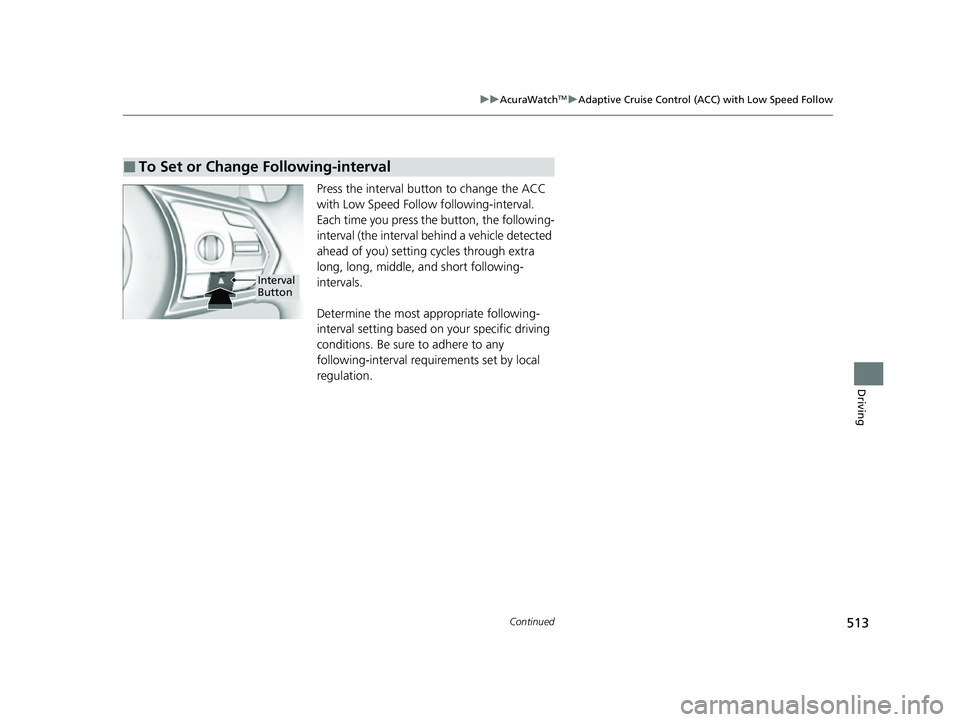
Press the interval button to change the ACC
with Low Speed Follow following-interval.
Each time you press th e button, the following-
interval (the interval behind a vehicle detected
ahead of you) setting cycles through extra
long, long, middle, and short following-
intervals.
Determine the most appropriate following-
interval setting based on your specific driving
conditions. Be sure to adhere to any
following-interval requirements set by local
regulation.
■To Set or Change Following-interval
Interval
Button
23 ACURA RDX-31TJB6400.book 513 ページ 2022年8月4日 木曜日 午後1時51分
Page 516 of 713
514
uuAcuraWatchTMuAdaptive Cruise Control (ACC) with Low Speed Follow
Driving
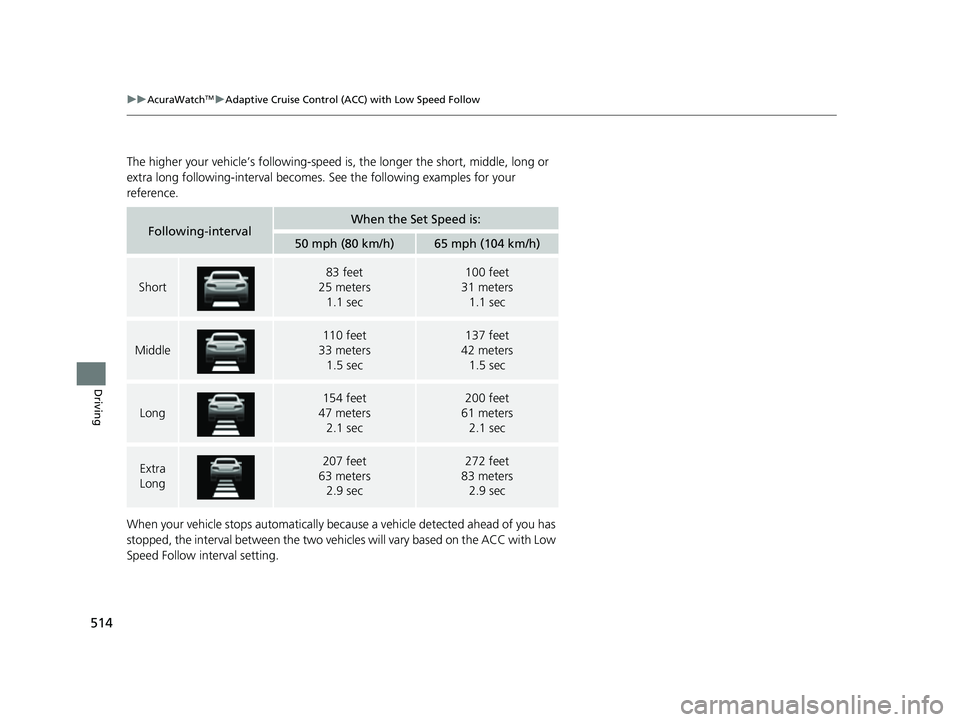
The higher your vehicle’s following-speed is, the longer the short, middle, long or
extra long following-interval becomes. See the following examples for your
reference.
When your vehicle stops automatically beca use a vehicle detected ahead of you has
stopped, the interval between the two vehi cles will vary based on the ACC with Low
Speed Follow interval setting.
Following-intervalWhen the Set Speed is:
50 mph (80 km/h)65 mph (104 km/h)
Short
83 feet
25 meters
1.1 sec100 feet
31 meters
1.1 sec
Middle
110 feet
33 meters
1.5 sec137 feet
42 meters
1.5 sec
Long
154 feet
47 meters 2.1 sec200 feet
61 meters 2.1 sec
Extra
Long207 feet
63 meters 2.9 sec272 feet
83 meters 2.9 sec
23 ACURA RDX-31TJB6400.book 514 ページ 2022年8月4日 木曜日 午後1時51分
Page 517 of 713

Continued515
uuAcuraWatchTMuAdaptive Cruise Control (ACC) with Low Speed Follow
Driving
To cancel ACC with Low Speed Follow, do any
of the following:
• Press the CANCEL button.
u The indicator (green) on the multi-
information display changes to the
indicator (white).
• Press the button.
u indicator (green) goes off.
• Depress the brake pedal while the vehicle is
moving forward.
u The indicator (green) on the multi-
information display changes to the
indicator (white).
■To Cancel1To Cancel
Resuming the prior set speed: After you have
canceled ACC with Low Speed Follow, you can
activate the ACC with Low Speed Follow with the
prior set speed displayed on the multi-information
display (in gray) by pressing the RES/+ /SET/– switch
up even if the vehicle is stopped.
When you turn the ACC with Low Speed Follow off
by pressing the CANCEL button or depressing the
brake pedal, the prior set speed is displayed on the
multi-information display in gray.
When pressing the RES/+/SET/– switch, the ACC
with Low Speed Follow is activated with displayed
speed.
If the indicator (white) is displayed and you press
the RES/+ /SET/– switch up, but no prior set speed (in
gray) is displayed, the sp eed will be set to your
vehicle's current speed.
CANCEL
Button
Button
23 ACURA RDX-31TJB6400.book 515 ページ 2022年8月4日 木曜日 午後1時51分