2023 ACURA RDX towing
[x] Cancel search: towingPage 511 of 713

Continued509
uuAcuraWatchTMuAdaptive Cruise Control (ACC) with Low Speed Follow
Driving
The system may automatically shut off u nder certain conditions. Some examples of
these conditions are listed below. Othe r conditions may reduce some of the ACC
with Low Speed Follow functions.
2 Front Sensor Camera P. 541
2 Radar Sensor P. 543
■Environmental conditions
Driving in bad weather (r ain, fog, snow, etc.).
■Roadway conditions
Driving on a snowy or wet roadway (obscured lane marking, vehicle tracks, reflected
lights, road spra y, high contrast).
■Vehicle conditions
• The outside of the windshield is blocked by dirt, mud, leaves, wet snow, etc.
• An abnormal tire or wheel condition (inco rrect sizes, varied sizes or construction,
improperly inflated, compact spare tire
*, etc.).
• The camera temperature gets too high.
• The parking brake is applied.
• The radar sensor cover is dirty.
• The vehicle is tilted due to a heavy load or suspension modifications.
• Tire chains are installed.
• The vehicle is towing a trailer.
■ACC with Low Speed Follow Conditions and Limitations1ACC with Low Speed Follow Conditions and Limitations
If you need the radar sensor to be repaired, or
removed, or the radar se nsor cover is strongly
impacted, turn off the system by pressing the
button and take your vehicle to a dealer.
Have your vehicle checked by a dealer if you find any
unusual behavior of the system (e.g., the warning
message appears too frequently).
If the front of the vehicle is impacted in any of the
following situations, the ra dar sensor may not work
properly. Have your vehi cle checked by a dealer:
•The vehicle mounted onto a bump, curb, chock,
embankment, etc.
•You drive the vehicle where water is deep.
•Your vehicle has a frontal collision.
* Not available on all models
23 ACURA RDX-31TJB6400.book 509 ページ 2022年8月4日 木曜日 午後1時51分
Page 531 of 713

529
uuAcuraWatchTMuLane Keeping Assist System (LKAS)
Driving
• When objects on the road (curb, guard rail, pylons, etc.) are recognized as white
(or yellow) lines.
• Driving on roads with double lines.
■Vehicle conditions
• Headlight lenses are dirty or the h eadlights are not properly adjusted.
• The outside of the windshield is streaked or blocked by dirt, mud, leaves, wet
snow, etc.
• The inside of the windshield is fogged.
• The camera temperature gets too high.
• An abnormal tire or wheel condition (inco rrect sizes, varied sizes or construction,
improperly inflated, compact spare tire
*, etc.).
• The vehicle is tilted due to a heavy load or suspension modifications.
• The vehicle is towing a trailer.
Lane void of lines at exit or
interchange
* Not available on all models
23 ACURA RDX-31TJB6400.book 529 ページ 2022年8月4日 木曜日 午後1時51分
Page 536 of 713

534
uuAcuraWatchTMuRoad Departure Mitigation System
Driving
■Roadway conditions
• Driving on a snowy or wet roadway (obs cured lane marking, vehicle tracks,
reflected lights, road spray, high contrast).
• Driving on a road with temporary lane markings.
• Faint, multiple, or varied lane markings are visible on the roadway due to road
repairs or old lane markings.
• The roadway has merging, split, or crossing lines (e.g., such as at an intersection
or crosswalk).
• The lane markings are extremely narrow, wide, or changing.
• The vehicle in front of you is driving near the lane lines.
• The road is hilly or the vehicle is approaching the crest of a hill.
• Driving on rough or unpaved roads, or over bumpy surfaces.
• When objects on the road (curb, guard rail, pylons, etc.) are recognized as white
(or yellow) lines.
• Driving on roads with double lines.
■Vehicle conditions
• Headlight lenses are dirty or the headlights are not properly adjusted.
• The outside of the windshield is streake d or blocked by dirt, mud, leaves, wet
snow, etc.
• The inside of the windshield is fogged.
• The camera temperature gets too high.
• An abnormal tire or wheel condition (incorre ct sizes, varied sizes or construction,
improperly inflated, compact spare tire
*, etc.).
• The vehicle is tilted due to a heav y load or suspension modifications.
• When tire chains are installed.
• The vehicle is towing a trailer.
* Not available on all models
23 ACURA RDX-31TJB6400.book 534 ページ 2022年8月4日 木曜日 午後1時51分
Page 560 of 713

uuParking Your Vehicle uParking Sensor System*
558
Driving
■Parking sensor system on and off
With the power mode in ON, press the
parking sensor system button to turn on or off
the system. The indicator in the button comes
on when the system is on.
The front center and front corner sensors start
to detect an obstacle wh en the transmission is
in any position other than
(Por (R, and the
vehicle speed is less than 5 mph (8 km/h).
The front corner, rear center and rear corner
sensors start to detect an obstacle when the
transmission is in
(R, and the vehicle speed is
less than 5 mph (8 km/h).
1 Parking Sensor System*
Do not put any accessories on or around the sensors.
u If you put any accessorie s (such as a towing hitch
or bicycle rack) on or around the rear sensors, the
system may activate if it detects these accessories as
an obstacle. In this case, turn off the rear sensor. 2Turning off All Rear Sensors P. 560
1Parking sensor system on and off
When you set the power mode to ON, the system will
be in the previously selected condition.
If the rear sensors are turned off when using the
parking sensor system, the Low Speed Braking
Control System will not activate while reversing. 2 Low Speed Braking Control
* P. 497
* Not available on all models
23 ACURA RDX-31TJB6400.book 558 ページ 2022年8月4日 木曜日 午後1時51分
Page 591 of 713
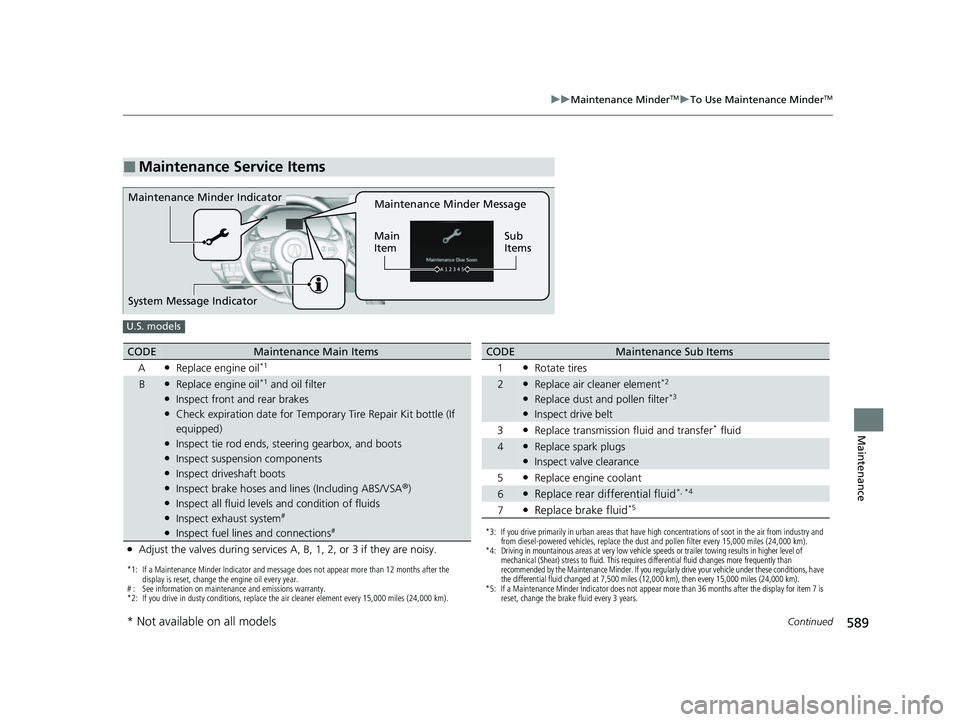
589
uuMaintenance MinderTMuTo Use Maintenance MinderTM
Continued
Maintenance
■Maintenance Service Items
Maintenance Minder Message
Main
Item Sub
ItemsMaintenance Minder Indicator
System Message Indicator
U.S. models
*1: If a Maintenance Minder Indicator and message does not appear more than 12 months after the
display is reset, change the engine oil every year.
# : See information on maintenance and emissions warranty.
*2: If you drive in dusty conditions, replace the air cleaner element every 15,000 miles (24,000 km).
CODEMaintenance Main Items
A
●Replace engine oil*1
B●Replace engine oil*1 and oil filter●Inspect front and rear brakes●Check expiration date for Temporary Tire Repair Kit bottle (If
equipped)
●Inspect tie rod ends, steering gearbox, and boots●Inspect suspension components●Inspect driveshaft boots●Inspect brake hoses and lin es (Including ABS/VSA®)●Inspect all fluid levels and condition of fluids●Inspect exhaust system#
●Inspect fuel lines and connections#
●Adjust the valves during services A, B, 1, 2, or 3 if they are noisy.
*3: If you drive primarily in urban areas that have high concentrations of soot in the air from industry and
from diesel-powered vehicles, replace the dust and pollen filter every 15,000 miles (24,000 km).
*4: Driving in mountainous areas at very low vehicle speeds or trailer towing results in higher level of mechanical (Shear) stress to fluid. This requires differential fluid changes more frequently than
recommended by the Maintenance Minder. If you regularly drive your vehicle under these conditions, have
the differential fluid changed at 7,500 miles (12,000 km), then every 15,000 miles (24,000 km).
*5: If a Maintenance Minder Indicator does not appear more than 36 months after the display for item 7 is reset, change the brake fluid every 3 years.
CODEMaintenance Sub Items
1
●Rotate tires
2●Replace air cleaner element*2
●Replace dust and pollen filter*3
●Inspect drive belt
3
●Replace transmission fluid and transfer* fluid
4●Replace spark plugs●Inspect valve clearance
5
●Replace engine coolant
6●Replace rear differential fluid*, *4
7●Replace brake fluid*5
* Not available on all models
23 ACURA RDX-31TJB6400.book 589 ページ 2022年8月4日 木曜日 午後1時51分
Page 592 of 713

590
uuMaintenance MinderTMuTo Use Maintenance MinderTM
Maintenance
Canadian models
*1: If a Maintenance Minder Indicator and message does not appear more than 12 months after the
display is reset, change the engine oil every year.
*2: If you drive in dusty conditions, replace every 24,000 km (15,000 miles).
*3: If you drive primarily in urban areas that have high concentrations of soot in the air from industry and
from diesel-powered vehicles, replace every 24,000 km (15,000 miles).
*4: Driving in mountainous areas at very low vehicle speeds or trailer towing results in higher level of mechanical (Shear) stress to fluid. This requires differential fluid changes more frequently than
recommended by the Maintenance Minder.
If you regularly drive your vehicle under these conditions, have the differential fluid changed at 12,000
km (7,500 miles), then every 24,000 km (15,000 miles).
*5: If a Maintenance Minder Indicator does not appear more than 36 months after the display for item 7 is reset, change the brake fluid every 3 years.
# : See information on maintenance and emissions warranty.
CODEMaintenance Main Items
A
●Replace engine oil*1
0●Replace engine oil*1 and oil filter
●Adjust the valves during services A, 0, 9, 1, 2, or 3 if they are noisy.
CODEMaintenance Sub Items
1
●Rotate tires
2●Replace air cleaner element*2
●Replace dust and pollen filter*3
●Inspect drive belt
3
●Replace transmission fl uid and transfer fluid
4●Replace spark plugs●Inspect valve clearance
5
●Replace engine coolant
6●Replace rear differential fluid*4
7●Replace brake fluid*5
9●Service front and rear brakes●Inspect these items:
•Tie rod ends, steeri ng gearbox, and boots
•Suspension components
•Driveshaft boots
•Brake hoses and lines (including ABS/VSA®)
•All fluid levels and condition of fluids
•Exhaust system#
•Fuel lines and connections#
23 ACURA RDX-31TJB6400.book 590 ページ 2022年8月4日 木曜日 午後1時51分
Page 641 of 713

639
Handling the Unexpected
This chapter explains how to handle unexpected troubles.
Tools.................................................. 640
If a Tire Goes Flat
Changing a Flat Tire ......................... 641
Temporarily Repairi ng a Flat Tire....... 649
Handling of the Jack ......................... 663
Engine Does Not Start Checking the Engine ........................ 664
If the Keyless Remote Battery is Weak ...665
Emergency Engine Stop ................... 666
Vehicles with a compact spare tire
Vehicles with temporary tire repair kit
Models with temporary tire repair kit
If the Battery Is DeadJump Starting Procedure .................. 667
Overheating ...................................... 669
Indicator, Coming On/Blinking
If the Engine Oil Pressure Low Warning
Appears ............................................. 671
If the Charging System Indicator Comes On .. 672If the Malfunction Indicator Lamp Comes On or Blinks ................................... 672
If the Brake System Indicator (Red) Comes On or Blinks ....................................... 673
If the Electric Power Steering (EPS) System
Indicator Comes On ........................... 674
If the Brake System Indicator (Red) Comes On or Blinks at the Same Time When the Brake
System Indicator (Amber) Comes On .....675
If the Low Tire Pressure/TPMS Indicator Comes On or Blinks ....................... 676
If the Transmission System Indicator Blinks along with the Warning Message .... 677
Fuses .................................................. 678
Emergency Towing ........................... 685
If You Cannot Unlock the Fuel Fill Door.. 686If You Cannot Open the Tailgate .... 687
Refueling ........................................... 688
23 ACURA RDX-31TJB6400.book 639 ページ 2022年8月4日 木曜日 午後1時51分
Page 644 of 713

uuIf a Tire Goes Flat uChanging a Flat Tire
642
Handling the Unexpected
1. Push the rear edge of the handle on the
floor lid and open the lid.
2. Push the tabs to open the tool box lid.
3. Take the jack, wheel nut wrench, and jack
handle bar out of the tool box.
■Getting Ready to Replace the Flat Tire1Changing a Flat Tire
NOTICE
Do not use the jack if it doesn’t work properly. Call
your dealer or a prof essional towing service.
The wheel nut wrench supplied with your vehicle is
specially adapted to fit th e holder shaft. Do not use
any other tool.
Handle
Tool Box Lid
Tab
Tool Box
23 ACURA RDX-31TJB6400.book 642 ページ 2022年8月4日 木曜日 午後1時51分