2023 ACURA RDX A 7 9 code
[x] Cancel search: A 7 9 codePage 389 of 713
387
uuHomeLink ® Universal Transceiver uTraining HomeLink
Continued
Features
Training HomeLink
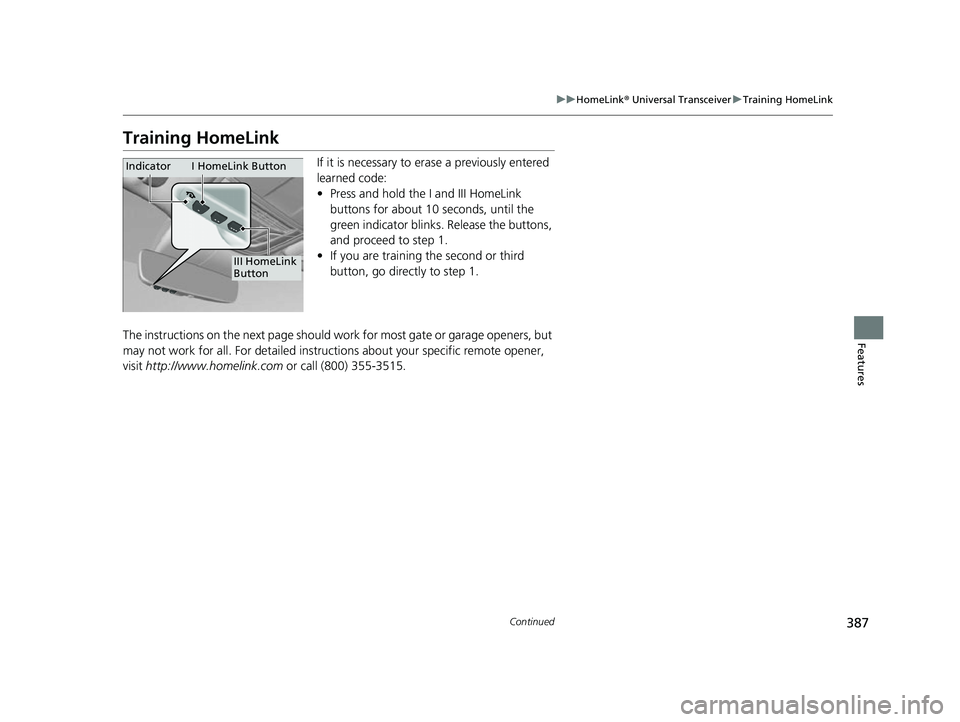
If it is necessary to er ase a previously entered
learned code:
• Press and hold the I and III HomeLink
buttons for about 10 seconds, until the
green indicator blinks. Release the buttons,
and proceed to step 1.
• If you are training the second or third
button, go directly to step 1.
The instructions on the next page should work for most gate or garage openers, but
may not work for all. For detailed instructions about your specific remote opener,
visit http://www.homelink.com or call (800) 355-3515.
III HomeLink
Button
Indicator I HomeLink Button
23 ACURA RDX-31TJB6400.book 387 ページ 2022年8月4日 木曜日 午後1時51分
Page 390 of 713

uuHomeLink ® Universal Transceiver uTraining HomeLink
388
Features
■Programming a Button1Training HomeLink
Reprogramming a Button
If you want to retrain a programmed button for a
new device, you do not ha ve to erase all button
memory. You can replace the existing memory code
using this procedure:
Erasing Button Memory
To erase programming from the buttons, press and hold
the two outside HomeLink buttons until the HomeLink
indicator changes from
orange to rapidly flashing green.
This should take about 10 seconds. You should erase all
programming before selling the vehicle.
Operating
To operate, simply press and release the programmed
HomeLink button. Activati on will now occur for the
trained device.
Questions
For questions or comments, visit
www.HomeLink.com , www.youtube.com/
HomeLinkGentex , or by calling the HomeLink Hotline
(North America only) at (800) 355-3515.
HomeLink® is a registered tra demark of Gentex
Corporation.
2.
1. Press and hold the desired HomeLink button until
the HomeLink indi
cator begins to slowly flash
orange . This should take about 20 seconds.
Release the HomeLink button and position the
remote transmitter you wish to link 1 - 3 inches
(3 - 8 cm) from the Home Link button you want to
program, then follow steps 3 - 6 under
“programming a button.”
Training
CompleteHomeLink LED is
continuously on green .
YES
YES
1.Position the remote transmitter you wish to link 1 to 3 inches (3 - 8 cm) from the
HomeLink® button you want to program.
3b.Canadian Garage Door Opener
A. Press and release the HomeLink
button. Press, hold and release the
button on the remote every 2 secs.
Does the HomeLink indicator (LED)
change from slowly flashing orange to
rapidly flashing or continuously on
green ? The process should take less
than 60 seconds.
NO
2. Press and hold the desired HomeLink butt on. Is the HomeLink indicator (LED) slowly
flashing orange ?
NO
3a.Hold the button on the remote
transmitter. Does HomeLink indicator
(LED) change from slowly flashing
orange to rapidly flashing green or
continuously on green? The process
should take less than 60 seconds.
5. Press and hold the HomeLink button again.
HomeLink indicator rapidly flashes
green .
5a.The remote has a rolling code. Press the
“learn” button on th e remote-controlled
device (e.g. garage door opener).6. Press and hold the HomeLink button
again.
The remote-controll ed device should
operate.
Training Complete
5b.Within 30 secs, press and hold the
programmed HomeLink button for 2
secs.
4.Press and hold the programmed HomeLink
button for about a second. Does the device
(garage door opener) work?
23 ACURA RDX-31TJB6400.book 388 ページ 2022年8月4日 木曜日 午後1時51分
Page 398 of 713

uuBluetooth ® HandsFreeLink ®u HFL Menus
396
Features
■To pair a cell phone (when there is no
phone paired to the system)
1. Press the (home) button.
2. Select Phone .
3. Select Connect Phone .
4. Make sure your phone is in search or
discoverable mode, then select + Connect
New Device .
u HFL automatically becomes discoverable.
5. Select the HandsFreeLink when it appears
on your phone.
u If HFL does not appear, select Search for
Devices.
6. The system gives you a pairing code on the
audio/information screen.
u Confirm if the pairing code on the screen
and your phone match.
This may vary by phone.
u After confirming pairing, may be
required to confirm Bluetooth®
operation depending on phone. Select
Continue with Bluetooth.
7. The device options sc reen appears, then
select Continue .
u You can enable/disable the AcuraLink
Assist and Phone Data Collection on
the screen. Both default settings are
Enable .1Phone Setup
Your Bluetooth -compatible phone must be paired to
the system before you ca n make and receive hands-
free calls.
Phone Pairing Tips:
•You cannot pair your phone while the vehicle is
moving.
•Up to six phones can be paired.
•Your phone’s battery may dr ain faster when it is
paired to the system.
Once you have paired a phone, you can see it
displayed on the screen with one or more icons on
the right side.
These icons indicate the following: : The phone is compatible with Bluetooth® Audio.
: The phone can be used with HFL.
: The phone is compatib le with Apple CarPlay.
: The phone is compatible with Android Auto.
If there is an active connection to Appl e CarPlay or
Android Auto, pairing of additional Bluetooth®
compatible devices is unavailable.
Enable Smart Sharing pop-up
Smart Sharing to share phone data with Acura. You
can change the AcuraLink Assist and Phone Data
Collection settings later by se lecting the device in
the Phone Menu screen and then Options.
For detailed information of all data shared visit https://
acuralink.acura.com/#/acuralinkLegalTerms
23 ACURA RDX-31TJB6400.book 396 ページ 2022年8月4日 木曜日 午後1時51分
Page 589 of 713

587
uuMaintenance MinderTMuTo Use Maintenance MinderTM
Continued
Maintenance
■Maintenance Minder Messages on the Multi-Information
Display
Maintenance MessageOil Life DisplayExplanationInformation
—
When you select the Maintenance
screen, it displays codes for
maintenance items due at the next
engine oil change, along with the
percentage of engine oil life
remaining.
—
Maintenance Due Soon15%The remaining engine oil life is 15 to 6
percent. Once you switch the display
by rolling the right selector wheel, this
message will go off.The engine oil is approaching the end
of its service life, and the maintenance
items should be inspected and serviced
soon.
23 ACURA RDX-31TJB6400.book 587 ページ 2022年8月4日 木曜日 午後1時51分
Page 591 of 713
589
uuMaintenance MinderTMuTo Use Maintenance MinderTM
Continued
Maintenance
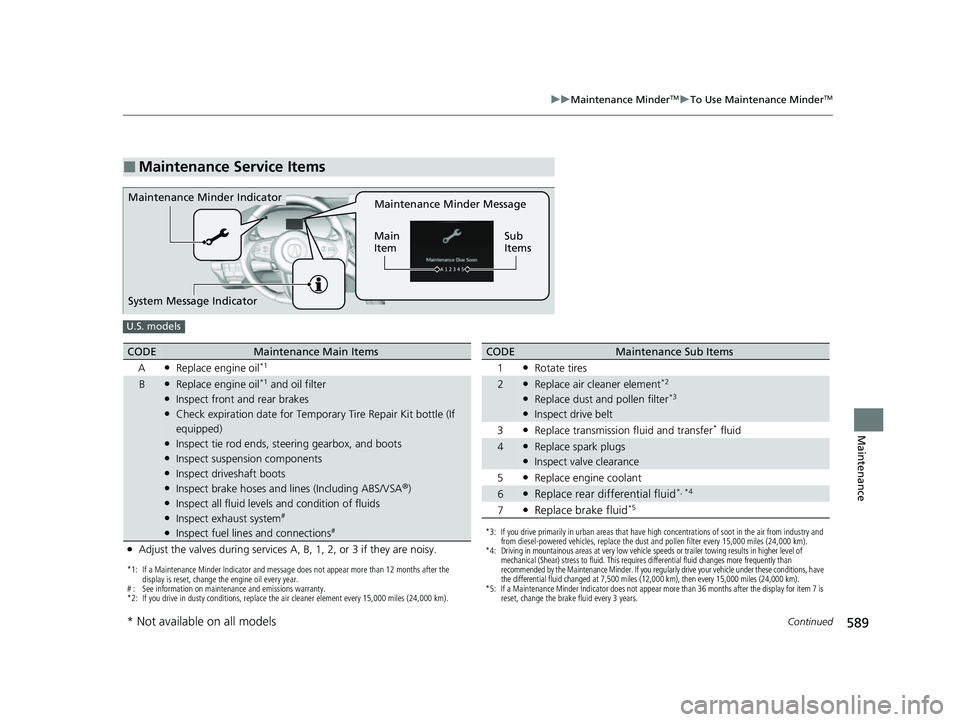
■Maintenance Service Items
Maintenance Minder Message
Main
Item Sub
ItemsMaintenance Minder Indicator
System Message Indicator
U.S. models
*1: If a Maintenance Minder Indicator and message does not appear more than 12 months after the
display is reset, change the engine oil every year.
# : See information on maintenance and emissions warranty.
*2: If you drive in dusty conditions, replace the air cleaner element every 15,000 miles (24,000 km).
CODEMaintenance Main Items
A
●Replace engine oil*1
B●Replace engine oil*1 and oil filter●Inspect front and rear brakes●Check expiration date for Temporary Tire Repair Kit bottle (If
equipped)
●Inspect tie rod ends, steering gearbox, and boots●Inspect suspension components●Inspect driveshaft boots●Inspect brake hoses and lin es (Including ABS/VSA®)●Inspect all fluid levels and condition of fluids●Inspect exhaust system#
●Inspect fuel lines and connections#
●Adjust the valves during services A, B, 1, 2, or 3 if they are noisy.
*3: If you drive primarily in urban areas that have high concentrations of soot in the air from industry and
from diesel-powered vehicles, replace the dust and pollen filter every 15,000 miles (24,000 km).
*4: Driving in mountainous areas at very low vehicle speeds or trailer towing results in higher level of mechanical (Shear) stress to fluid. This requires differential fluid changes more frequently than
recommended by the Maintenance Minder. If you regularly drive your vehicle under these conditions, have
the differential fluid changed at 7,500 miles (12,000 km), then every 15,000 miles (24,000 km).
*5: If a Maintenance Minder Indicator does not appear more than 36 months after the display for item 7 is reset, change the brake fluid every 3 years.
CODEMaintenance Sub Items
1
●Rotate tires
2●Replace air cleaner element*2
●Replace dust and pollen filter*3
●Inspect drive belt
3
●Replace transmission fluid and transfer* fluid
4●Replace spark plugs●Inspect valve clearance
5
●Replace engine coolant
6●Replace rear differential fluid*, *4
7●Replace brake fluid*5
* Not available on all models
23 ACURA RDX-31TJB6400.book 589 ページ 2022年8月4日 木曜日 午後1時51分
Page 592 of 713

590
uuMaintenance MinderTMuTo Use Maintenance MinderTM
Maintenance
Canadian models
*1: If a Maintenance Minder Indicator and message does not appear more than 12 months after the
display is reset, change the engine oil every year.
*2: If you drive in dusty conditions, replace every 24,000 km (15,000 miles).
*3: If you drive primarily in urban areas that have high concentrations of soot in the air from industry and
from diesel-powered vehicles, replace every 24,000 km (15,000 miles).
*4: Driving in mountainous areas at very low vehicle speeds or trailer towing results in higher level of mechanical (Shear) stress to fluid. This requires differential fluid changes more frequently than
recommended by the Maintenance Minder.
If you regularly drive your vehicle under these conditions, have the differential fluid changed at 12,000
km (7,500 miles), then every 24,000 km (15,000 miles).
*5: If a Maintenance Minder Indicator does not appear more than 36 months after the display for item 7 is reset, change the brake fluid every 3 years.
# : See information on maintenance and emissions warranty.
CODEMaintenance Main Items
A
●Replace engine oil*1
0●Replace engine oil*1 and oil filter
●Adjust the valves during services A, 0, 9, 1, 2, or 3 if they are noisy.
CODEMaintenance Sub Items
1
●Rotate tires
2●Replace air cleaner element*2
●Replace dust and pollen filter*3
●Inspect drive belt
3
●Replace transmission fl uid and transfer fluid
4●Replace spark plugs●Inspect valve clearance
5
●Replace engine coolant
6●Replace rear differential fluid*4
7●Replace brake fluid*5
9●Service front and rear brakes●Inspect these items:
•Tie rod ends, steeri ng gearbox, and boots
•Suspension components
•Driveshaft boots
•Brake hoses and lines (including ABS/VSA®)
•All fluid levels and condition of fluids
•Exhaust system#
•Fuel lines and connections#
23 ACURA RDX-31TJB6400.book 590 ページ 2022年8月4日 木曜日 午後1時51分
Page 617 of 713

615
uuChecking and Maintaining Tires uTire and Loading Information Label
Continued
Maintenance
Tire and Loading Information Label
The label attached to the driver’s doorj amb provides necessary tire and loading
information.
Tire Labeling
The tires that came on your vehicle have a
number of markings. Those you should be
aware of are described as shown.
Whenever tires are replaced, they should be replaced with tires of the same size.
1Tire and Loading Information Label
The tire and loading informat ion label attached to the
driver’s doorjamb contains:
aThe number of people your vehicle can carry.
bThe total weight your vehicle can carry. Do not
exceed this weight.
cThe original tire sizes for front, rear, and spare.
dThe proper cold tire pressure for front, rear, and
spare.
Label
Example
Example Tire Size
Tire
Identification
Number (TIN)
Maximum
Tire Load
Maximum
Tire Pressure
Tire Size
■Tire Sizes
1 Tire Sizes
Following is an example of tire size with an
explanation of what each component means.
P235/60 R18 102T
P: Vehicle type (P indi cates passenger vehicle).
235: Tire width in millimeters.
60: Aspect ratio (the tire’s section height as a
percentage of its width).
R: Tire construction code (R indicates radial).
18: Rim diameter in inches.
102: Load index (a numerical code associated with
the maximum load the tire can carry).
T: Speed symbol (an alphabe tical code indicating the
maximum speed rating).
23 ACURA RDX-31TJB6400.book 615 ページ 2022年8月4日 木曜日 午後1時51分
Page 618 of 713

uuChecking and Maintaining Tires uTire Labeling
616
Maintenance
The tire identification number (TIN) is a gr oup of numbers and letters that look like
the example in the side co lumn. TIN is located on the sidewall of the tire.
Cold Tire Pressure – The tire air pressure when the vehicle has been parked for at
least three hours or driven less than 1 mile (1.6 km).
Load Rating – Means the maximum load that a ti re is rated to carry for a given
inflation pressure.
Maximum Inflation Pressure – The maximum tire air pressure that the tire can
hold.
Maximum Load Rating – Means the load rating for a tire at the maximum
permissible inflation pr essure for that tire.
Recommended Inflation Pressure – The cold tire inflation pressure recommended
by the manufacturer.
Treadwear Indicators (TWI) – Means the projections within the principal grooves
designed to give a visual indication of the degrees of wear of the tread.
■Tire Identification Number (TIN)
■Glossary of Tire Terminology
1 Tire Identification Number (TIN)
DOT B97R FW6X 2209
DOT: This indicates that the tire meets all
requirements of the U.S. Department of
Transportation.
B97R: Manufacturer’s identification mark.
FW6X: Tire type code.
22 09: Date of manufacture.
Year
Week
23 ACURA RDX-31TJB6400.book 616 ページ 2022年8月4日 木曜日 午後1時51分