Page 603 of 713
601
uuMaintenance Under the Hood uEngine Coolant
Maintenance
1. Make sure the engine and radiator are
cool.
2. Remove the engine compartment cover.
2 Engine Compartment Cover P. 594
3.Turn the radiator cap 1/8 turn counter-
clockwise and relieve any pressure in the
cooling system.
4. Push down and turn the radiator cap
counterclockwise to remove it.
5. The coolant level should be up to the base
of the filler neck. Add coolant if it is low.
6. Put the radiator cap back on, and tighten it
fully.
■Radiator1Radiator
NOTICE
Pour the fluid slowly and ca refully so you do not spill
any. Clean up any spills immediately; they can
damage components in the engine compartment.
3WARNING
Removing the radiator cap while the
engine is hot can cause the coolant to spray
out, seriously scalding you.
Always let the engine and radiator cool
down before removing the radiator cap.Radiator Cap
23 ACURA RDX-31TJB6400.book 601 ページ 2022年8月4日 木曜日 午後1時51分
Page 609 of 713
607
uuReplacing Light Bulbs uChicaneTM Taillights, Brake and Rear Side Marker Lights
Maintenance
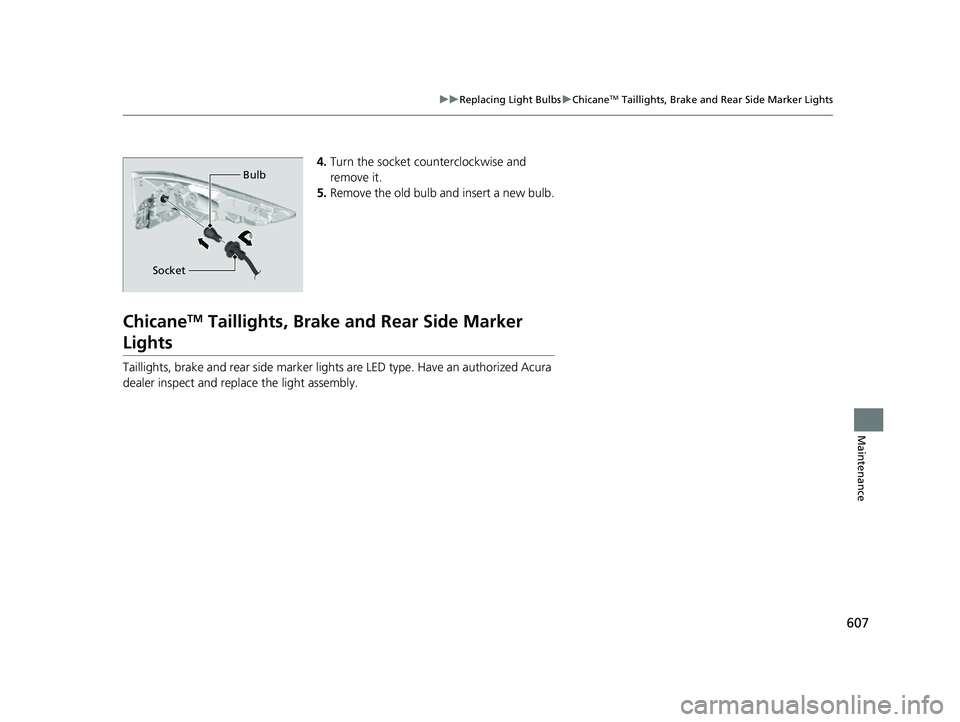
4. Turn the socket counterclockwise and
remove it.
5. Remove the old bulb and insert a new bulb.
ChicaneTM Taillights, Brake a nd Rear Side Marker
Lights
Taillights, brake and rear side marker ligh ts are LED type. Have an authorized Acura
dealer inspect and replace the light assembly.
Bulb
Socket
23 ACURA RDX-31TJB6400.book 607 ページ 2022年8月4日 木曜日 午後1時51分
Page 613 of 713
611
uuChecking and Maintaining Wiper Blades uChanging the Front Wiper Blade Rubber
Maintenance
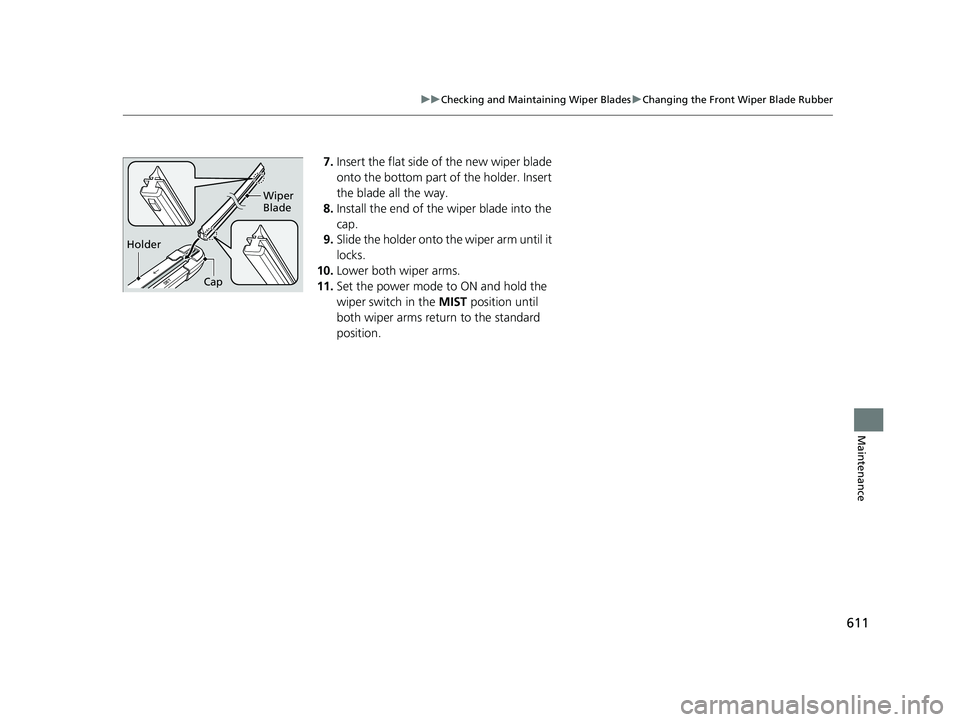
7. Insert the flat side of the new wiper blade
onto the bottom part of the holder. Insert
the blade all the way.
8. Install the end of the wiper blade into the
cap.
9. Slide the holder onto th e wiper arm until it
locks.
10. Lower both wiper arms.
11. Set the power mode to ON and hold the
wiper switch in the MIST position until
both wiper arms return to the standard
position.
Holder Wiper
Blade
Cap
23 ACURA RDX-31TJB6400.book 611 ページ 2022年8月4日 木曜日 午後1時51分
Page 625 of 713

623
Maintenance
Battery
Checking the Battery
The condition of the battery is monitored by a
sensor located on the negative terminal of the
battery. If there is a problem with this sensor,
the multi-information display will display a
warning message. If this happens, have your
vehicle inspected by a dealer.
Check the battery termi nals for corrosion
monthly.
If your vehicle’s battery is disconnected or goes dead:
• The audio system is disabled.
2 Audio System Theft Protection P. 257
•The clock resets.
2 Clock P. 154
•The immobilizer system needs to be reset.
2 Immobilizer System Indicator P. 99
1Battery
WARNING: Battery post, terminals,
and related accessories contain lead
and lead compounds.
Wash your hands after handling.
When you find corrosion, cl ean the battery terminals
by applying a baking powder and water solution.
Clean the terminals with a damp towel. Cloth/towel
dry the battery. Coat the terminals with grease to
help prevent future corrosion.
When replacing the battery, the replacement must be
of the same specifications.
Consult a dealer for more information.
3WARNING
The battery gives off explosive hydrogen
gas during normal operation.
A spark or flame can cause the battery to
explode with enough force to kill or
seriously hurt you.
When conducting any battery
maintenance, wear prot ective clothing and
a face shield, or have a skilled technician do
it.
Battery
Canadian models only
23 ACURA RDX-31TJB6400.book 623 ページ 2022年8月4日 木曜日 午後1時51分
Page 632 of 713

uuCleaning uInterior Care
630
Maintenance
Wipe using a glass cleaner.
The driver’s floor mat hooks over floor
anchors, which keep the mat from sliding
forward.
Do not put any additional floor mats on
top of the anchored mat.
■Cleaning the Window
■Floor Mats
1 Cleaning the Window
Wires are mounted to the in side of the rear window.
Wipe along the same direct ion as the wires with a
soft cloth so as not to damage them.
Be careful not to spill fluids, such as water or glass
cleaner, on or around the co ver of both the electrical
components around the rearview mirror.
1Floor Mats
If you use any floor mats that were not originally
provided with your vehicle, make sure they are
designed for your specific ve hicle, fit correctly, and
are securely anchored by the floor anchors.
Position any rear seat floor mats properly. If not
properly positioned, the floor mats can interfere with
the front seat functions.
Lock Unlock
Example
23 ACURA RDX-31TJB6400.book 630 ページ 2022年8月4日 木曜日 午後1時51分
Page 634 of 713

632
uuCleaning uExterior Care
Maintenance
Exterior Care
Dust off the vehicle body after you drive. Regularly inspect your vehicle for scratches
on painted surfaces. A scratch on a painted surface can result in body rust. If you
find a scratch, promptly repair it.
Wash the vehicle regularly. Wash more frequently when driving in the following
conditions:
• If driving on roads with road salt.
• If driving in coastal areas.
• If tar, soot, bird droppings, insects, or tree sap are stuck to painted surfaces.
■Washing the Vehicle1Washing the Vehicle
Do not spray water into the air intake vents. It can
cause a malfunction.
Lock the doors when washing the vehicle.
Do not spray water onto the fuel fill door directly. A
high-pressure spray ma y cause it to open.
Do not spray water onto the capless unit when the
fuel fill door is open. It ca n cause damage to the fuel
system or engine.
If you need to lift the wiper arms away from the
windshield, first set the wiper arms to the
maintenance position. 2 Changing the Front Wiper Blade Rubber
P. 609
Air Intake Vents
23 ACURA RDX-31TJB6400.book 632 ページ 2022年8月4日 木曜日 午後1時51分
Page 641 of 713

639
Handling the Unexpected
This chapter explains how to handle unexpected troubles.
Tools.................................................. 640
If a Tire Goes Flat
Changing a Flat Tire ......................... 641
Temporarily Repairi ng a Flat Tire....... 649
Handling of the Jack ......................... 663
Engine Does Not Start Checking the Engine ........................ 664
If the Keyless Remote Battery is Weak ...665
Emergency Engine Stop ................... 666
Vehicles with a compact spare tire
Vehicles with temporary tire repair kit
Models with temporary tire repair kit
If the Battery Is DeadJump Starting Procedure .................. 667
Overheating ...................................... 669
Indicator, Coming On/Blinking
If the Engine Oil Pressure Low Warning
Appears ............................................. 671
If the Charging System Indicator Comes On .. 672If the Malfunction Indicator Lamp Comes On or Blinks ................................... 672
If the Brake System Indicator (Red) Comes On or Blinks ....................................... 673
If the Electric Power Steering (EPS) System
Indicator Comes On ........................... 674
If the Brake System Indicator (Red) Comes On or Blinks at the Same Time When the Brake
System Indicator (Amber) Comes On .....675
If the Low Tire Pressure/TPMS Indicator Comes On or Blinks ....................... 676
If the Transmission System Indicator Blinks along with the Warning Message .... 677
Fuses .................................................. 678
Emergency Towing ........................... 685
If You Cannot Unlock the Fuel Fill Door.. 686If You Cannot Open the Tailgate .... 687
Refueling ........................................... 688
23 ACURA RDX-31TJB6400.book 639 ページ 2022年8月4日 木曜日 午後1時51分
Page 646 of 713
644
uuIf a Tire Goes Flat uChanging a Flat Tire
Handling the Unexpected
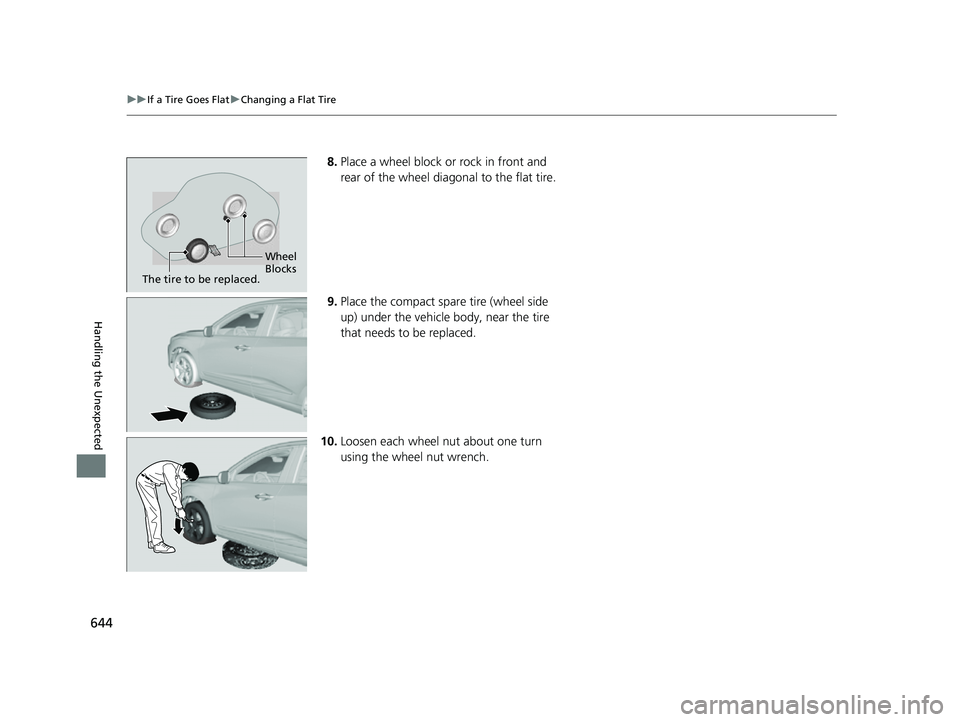
8. Place a wheel block or rock in front and
rear of the wheel diagonal to the flat tire.
9. Place the compact spare tire (wheel side
up) under the vehicle body, near the tire
that needs to be replaced.
10. Loosen each wheel nut about one turn
using the wheel nut wrench.
Wheel
Blocks
The tire to be replaced.
23 ACURA RDX-31TJB6400.book 644 ページ 2022年8月4日 木曜日 午後1時51分