Page 201 of 740
199
uuSeats uHead Restraints
Controls
Head restraints can be removed for cleaning or repair.
To remove a head restraint:
Pull the restraint up as far as it will go. Then, push the release button and pull the
restraint up and out.
To reinstall a head restraint:
Insert the legs back in place, then adjust the head restraint to an appropriate height
while pressing the release button. Pull up on the restraint to make sure it is locked
in position.
■Removing and Reinstalling the Front Head Restraints1 Removing and Reinstalling the Front Head Restraints
3WARNING
Failure to reinstall or correctly reinstall, the
head restraints can result in severe injury
during a crash.
Always replace the he ad restraints before
driving.
23 ACURA INTEGRA-313S56000_03.book 199 ページ 2022年3月18日 金曜日 午前11時47分
Page 203 of 740

201Continued
Controls
Interior Convenience Items
Interior Lights
■ON
The interior lights come on regardless of
whether the doors are open or closed.
■Door activated
The interior lights come on in the following
situations:
• When any doors are opened.
• You unlock the driver’s door.
• When the power mode is set to VEHICLE
OFF.
■OFF
The interior lights remain off regardless of
whether the doors are open or closed.
■Interior Light Switches1 Interior Light Switches
In the door activated position, the interior lights fade
out and go off about 30 se conds after the doors are
closed.
The lights go off after about 30 seconds in the
following situations:
•When you unlock the driver’s door but do not open
it.
•When you set the power mode to VEHICLE OFF but
do not open a door.
You can change the interi or lights dimming time.
2 Vehicle Settings
* P. 126
2 Customized Features P. 359
The interior lights go off im mediately in the following
situations:
•When you lock the driver’s door.
•When you close the driver’s door in ACCESSORY
mode.
•When you set the power mode to ON.
To avoid draining the ba ttery, do not leave the
interior light on for an extended length of time when
the engine is off.
If you leave any of the doors open in VEHICLE OFF
mode, the interior light s go off after about 15
minutes.
Door Activated
Position
Door Activated
Position
ONOFF
ONOFF
Front
Rear
* Not available on all models
23 ACURA INTEGRA-313S56000_03.book 201 ページ 2022年3月18日 金曜日 午前11時47分
Page 211 of 740
209
uuInterior Convenience Items uStorage Items
Controls
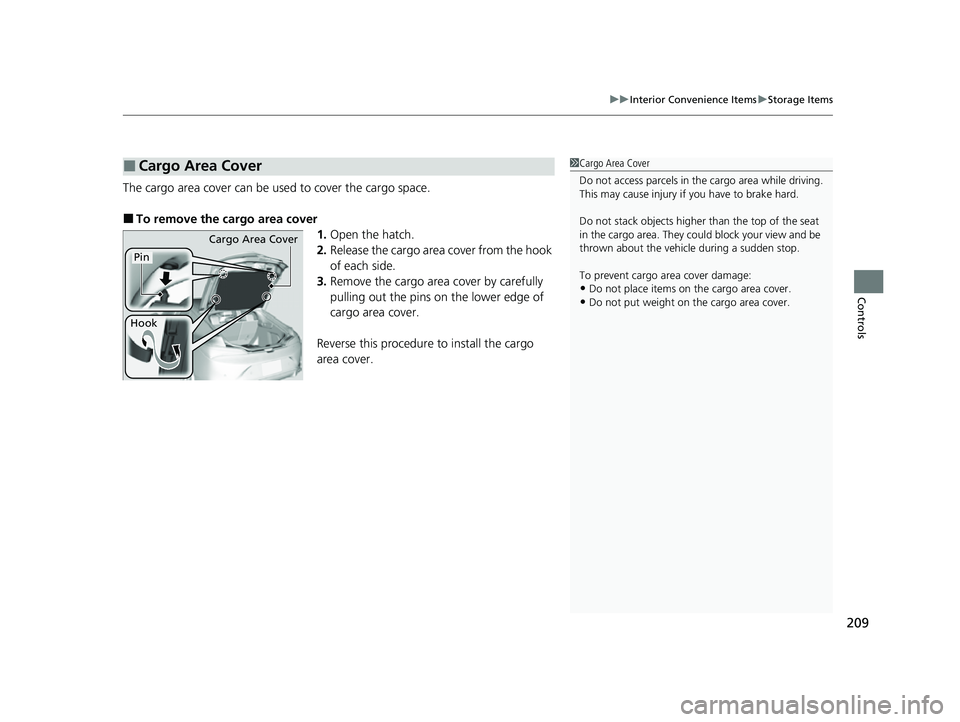
The cargo area cover can be used to cover the cargo space.
■To remove the cargo area cover
1.Open the hatch.
2. Release the cargo area cover from the hook
of each side.
3. Remove the cargo area cover by carefully
pulling out the pins on the lower edge of
cargo area cover.
Reverse this procedure to install the cargo
area cover.
■Cargo Area Cover1 Cargo Area Cover
Do not access parcels in the cargo area while driving.
This may cause injury if you have to brake hard.
Do not stack objects higher than the top of the seat
in the cargo area. They could block your view and be
thrown about the vehicle during a sudden stop.
To prevent cargo area cover damage:
•Do not place items on the cargo area cover.
•Do not put weight on the cargo area cover.
Cargo Area Cover
Pin
Hook
23 ACURA INTEGRA-313S56000_03.book 209 ページ 2022年3月18日 金曜日 午前11時47分
Page 236 of 740

234
Features
Audio System Basic Operation
To use the audio system, the power mode must be in ACCESSORY or ON.
Use the selector knob or MENU button to
access some audio functions.
Press to switch between the normal and
extended display fo r some functions.
Selector knob: Rotate left or right to scroll
through the available choices. Press to set
your selection.
MENU button: Press to display the menu
screen. (Back) button: Press to go back to the
previous display.
Models with 7-in. Color Touchscreen1 Audio System Basic Operation
These indications are used to show how to operate
the selector knob.
Rotate to select.
Press to enter.
Menu Items 2 Adjust Clock P. 142
2 Adjusting the Sound P. 235
2 Display Setup P. 236
2 Customized Features P. 351
Press the buttons on the steering wheel to change
any audio setting. 2 Audio Remote Controls P. 230
Touchscreen operation
•Use simple gestures - in cluding touching, swiping
and scrolling - to operate certain audio functions.
•Some items may be grayed out during driving to
reduce the potential for distraction.
•You can select them when the vehicle is stopped.•Wearing gloves may limit or prevent touchscreen
response.
You can change the touchs creen sensitivity setting.
2 Customized Features P. 351
(Back)
Button
Selector Knob
MENU Button
Menu Display
23 ACURA INTEGRA-313S56000_03.book 234 ページ 2022年3月18日 金曜日 午前11時47分
Page 265 of 740
263
uuAudio System Basic Operation uAudio/Information Screen
Continued
Features
■Trip Computer
Displays the trip computer information.
• Current Drive tab: Displays the current trip information.
• Trip A /Trip B tab: Displays information for the current and three previous drives.
The information is stored ever y time you reset Trip A/B.
To reset the Trip A/B, select Settings, then select Delete Trip History .
To change the setting of how to reset Trip A/B, select Settings, then select “Trip A”
Reset Timing or “Trip B” Reset Timing .
■System Updates
Updates the software version of the audio system.
2 System Updates P. 272
■Clock
Displays the clock.
■Compass
Displays the compass screen.
■Smart Shortcuts
Displays the Smart Shortcuts screen.
2Smart Shortcuts P. 309
■Display Mode
Displays the brightness bar.
■Alexa*
Displays the Alexa screen.
2Alexa Built-In* P. 280
* Not available on all models
23 ACURA INTEGRA-313S56000_03.book 263 ページ 2022年3月18日 金曜日 午前11時47分
Page 266 of 740

uuAudio System Basic Operation uAudio/Information Screen
264
Features
You can change, store, and delete the wa llpaper on the audio/information screen.
■Import wallpaper
You can import up to 11 images, one at a time, for wallpaper from a USB flash drive.
1.Connect the USB flash drive to the USB
port.
2 USB Port(s) P. 227
2.Press the button.
3. Select Clock.
4. Select Settings .
5. Select Clock Faces.
6. Select Add More .
u The image of the pictures stored in the
USB flash drive are displayed on the list.
7. Select a desired picture to import.
u Multiple pictures can be selected at the
same time.
8. Select OK.
u The selected pictures are displayed.
9. Select Transfer .
u It will return to the clock wallpaper
setting screen.
■Wallpaper Setup1Wallpaper Setup
The wallpaper you set up on Clock Faces cannot be
displayed on the driver information interface.
•When importing wallpaper files, the image must be
in the USB flash drive’s root directory.
Images in a folder cannot be imported.
•The file name must be less than 64 bytes.
•The file format of the im age that can be imported
is BMP (bmp) or JPEG (jpg).
•The individual file size limit is 10 MB.
•The maximum image size is 4,096 × 2,304 pixels. If
the image size is less than 1,280 × 720 pixels, the
image is displayed in the middle of the screen with
the extra area appearing in black.
•If the USB flash drive doe s not have any pictures,
the No files detected message appears.
23 ACURA INTEGRA-313S56000_03.book 264 ページ 2022年3月18日 金曜日 午前11時47分
Page 267 of 740
Continued265
uuAudio System Basic Operation uAudio/Information Screen
Features
■Select wallpaper
1. Press the button.
2. Select Clock.
3. Select Settings .
4. Select Clock Faces.
5. Select a desired picture to set.
u The preview is displayed on the screen.
6. Select Save.
u The clock screen which the wallpa per has been set is displayed.
■To view wallpaper once it is set
1. Press the button.
2. Select Clock.
■Delete wallpaper
1. Press the button.
2. Select Clock.
3. Select Settings .
4. Select Clock Faces.
5. Select Delete Photos .
6. Select a desired picture to delete.
u Multiple pictures can be selected at the same time.
7. Select OK.
u The selected pictures are displayed.
8. Select Delete .
u It will return to the cloc k wallpaper setting screen.
1Wallpaper Setup
You cannot delete the initial imported wallpapers.
23 ACURA INTEGRA-313S56000_03.book 265 ページ 2022年3月18日 金曜日 午前11時47分
Page 275 of 740
273
uuAudio System Basic Operation uSystem Updates
Continued
Features
The following settings can be set.
• Automatic Download
• Version Status
• Connection Setup
• Automatic Update
*
•Update History
■Automatic download settings
Use the following procedure to change to the automatic download setting.
1. Press the button.
2. Select System Updates .
u If System Updates is not displayed on the home screen, select All Apps.
3. Select Settings .
4. Select Automatic Download .
5. Select the access point, then select Allow.
u If you do not want to system update automatically, select Block.
■View a version and update status
Use the following procedure to confirm the version and update status.
1. Press the button.
2. Select System Updates .
u If System Updates is not displayed on the home screen, select All Apps.
3. Select Settings .
4. Select Version Status .
■System Updates Settings
* Not available on all models
23 ACURA INTEGRA-313S56000_03.book 273 ページ 2022年3月18日 金曜日 午前11時47分