Page 110 of 740
108
uuGauges and Displays uDriver Information Interface (Left Side Area)
Instrument Panel
Driver Information Interface (Left Side Area)
Shows the current mode for audio and phone information, etc.
2 Audio Remote Controls P. 230
2 Bluetooth ® HandsFreeLink ® P. 383, 403
Shows the clock.
■Clock1 Clock
You can adjust the time manually and change the
clock display to show the 12 hour clock or 24 hour
clock. 2 Clock P. 142
You can choose whether the clock is displayed on the
driver information interface. 2 Customize Display P. 109
23 ACURA INTEGRA-313S56000_03.book 108 ページ 2022年3月18日 金曜日 午前11時47分
Page 112 of 740
110
uuGauges and Displays uDriver Information Interface (Left Side Area)
Instrument Panel
■Turn the displaying on the left side area on and off
You can select whether the current audio information and clock appear on the left
side area. 1.Roll the left selector wheel until Customize
display is selected, then press the left
selector wheel.
2. Roll the left selector wheel to scroll to select
Audio & clock , then press the left selector
wheel.
3. Roll the left selector wheel to scroll to select
your desired settings, then press the left
selector wheel.
23 ACURA INTEGRA-313S56000_03.book 110 ページ 2022年3月18日 金曜日 午前11時47分
Page 132 of 740

130
uuGauges and Displays uDriver Information Interface (Right Side Area)
Instrument Panel
*1:Default Setting Setup Group Customizable Features
Description Selectable Settings
Keyless access
setup
Door unlock modeChanges which doors unlock when you grab the driver’s
door handle.Driver door only*1/All
doors
Keyless access light
flashCauses some exterior lights to flash when you unlock/
lock the doors.ON*1/ OFF
Keyless access beepCauses the beeper to soun d when you unlock/lock the
doors.ON*1/ OFF
Remote start system
ON/OFF*Turns the remote engine start feature on and off.ON*1/OFF
Lighting setup
Auto high-beamTurns the auto high-beam on and off.ON*1/OFF
Interior light dimming
timeChanges the length of time the interior lights stay on
after you close the doors.60sec /30sec*1/15sec
Headlight auto off
timerChanges the length of time the exterior lights stay on
after you close the driver’s door.60sec /30sec /15sec*1/0sec
Auto light sensitivity*Changes the timing for the headlights to come on.Max/High/ Mid*1/Low /Min
Auto headlight ON
with wiper ONChanges the settings for th e wiper operation when the
headlights automatically come on while the headlight
switch is in the AUTO position.
ON*1/OFF
* Not available on all models
23 ACURA INTEGRA-313S56000_03.book 130 ページ 2022年3月18日 金曜日 午前11時47分
Page 133 of 740
131
uuGauges and Displays uDriver Information Interface (Right Side Area)
Continued
Instrument Panel
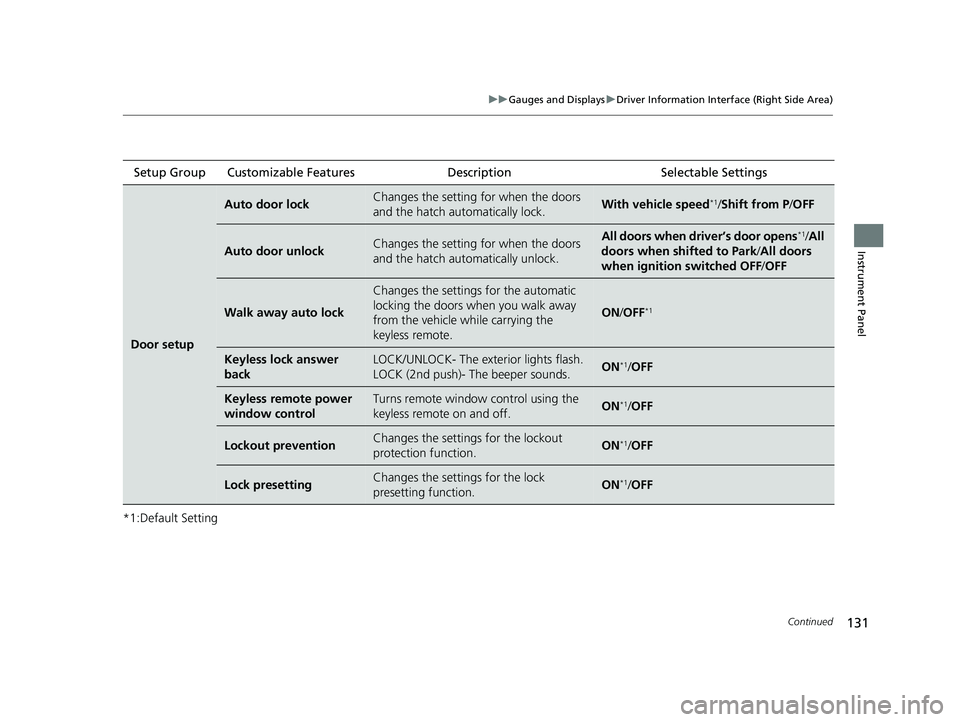
*1:Default SettingSetup Group Customizable Features
Description Selectable Settings
Door setup
Auto door lockChanges the setting for when the doors
and the hatch automatically lock.With vehicle speed*1/Shift from P/ OFF
Auto door unlockChanges the setting for when the doors
and the hatch automatically unlock.All doors when driver’s door opens*1/All
doors when shifted to Park /All doors
when ignition switched OFF /OFF
Walk away auto lock
Changes the settings for the automatic
locking the doors when you walk away
from the vehicle while carrying the
keyless remote.
ON /OFF*1
Keyless lock answer
backLOCK/UNLOCK- The exte rior lights flash.
LOCK (2nd push)- The beeper sounds.ON*1/ OFF
Keyless remote power
window controlTurns remote window control using the
keyless remote on and off.ON*1/ OFF
Lockout preventionChanges the settings for the lockout
protection function.ON*1/OFF
Lock presettingChanges the settings for the lock
presetting function.ON*1/OFF
23 ACURA INTEGRA-313S56000_03.book 131 ページ 2022年3月18日 金曜日 午前11時47分
Page 140 of 740
uuGauges and Displays uHead-Up Display*
138
Instrument Panel
■Adjusting the head-up display brightness
Roll the right selector wheel to scroll to select HUD brightness, then press the right
selector wheel.
Brighten: Roll the right selector wheel up.
Dim : Roll the right selector wheel down.
Press the right selector wheel to exit.
■Adjusting the head-up display height
Roll the right selector wheel to scroll to select HUD height, then press the right
selector wheel.
Raise the head-up display : Roll the right selector wheel up.
Lower the head-up display : Roll the right selector wheel down.
Press the right selector wheel to exit.1 Adjusting the head-up display height
When you unlock and open the driver’s door with a
remote transmitter or keyless access system, the
head-up display adjusts auto matically to one of the
two preset positions.
23 ACURA INTEGRA-313S56000_03.book 138 ページ 2022年3月18日 金曜日 午前11時47分
Page 143 of 740

141
Controls
This chapter explains how to operate the various controls necessary for driving.
Clock.................................................. 142
Locking and Unlocking the Doors Key .................................................. 144
Low Keyless Remote Signal Strength 146
Locking/Unlocking the Doors from the Outside .......................................... 147
Locking/Unlocking the Doors from the Inside ............................................. 158
Childproof Door Locks ..................... 160
Auto Door Locking/Unlocking .......... 161
Hatch ................................................. 162
Security System
Immobilizer System .......................... 165 Security System Alarm...................... 165
Windows ........................................... 168
Moonroof .......................................... 171
Operating the Switches Around the Steering Wheel ENGINE START/STOP Button............. 172
Turn Signals ..................................... 175
Light Switches.................................. 176
Fog Lights
*...................................... 179
ChicaneTM Daytime Running Lights ... 179
Auto High-Beam .............................. 180
Wipers and Washers ........................ 183
Rear Defogger/Heated Door Mirror Button ........................................ 185
Driving Position Memory System*..... 186
Adjusting the Steering Wheel .......... 188
Mirrors Interior Rearview Mirror ................... 189
Power Door Mirrors ......................... 190
Seats .................................................. 191
Interior Convenience Items .............. 201
Climate Control System Using Automatic Climate Control .... 218
Automatic Climate Control Sensors......223
* Not available on all models
23 ACURA INTEGRA-313S56000_03.book 141 ページ 2022年3月18日 金曜日 午前11時47分
Page 144 of 740
142
Controls
Clock
Adjusting the Clock
You can adjust the time in the clock display with the power mode in ON.
1. Press the MENU button.
2. Select Clock Settings.
3. Select Automatic Time , then select OFF.
4. Select Set Time.
5. Select 12H/24H to change 12 or 24 hour
clock.
6. Select or .
7. Select Set to set the time.
■Adjusting the Time
1Adjusting the Clock
The clock is automatically updated through the audio
system.
You can also select and enter with the LIST / SELECT
(List / Selector) knob in stead of the touch panel.
Models with 7-in. Color Touchscreen
MENU Button
Models with 7-in. Color Touchscreen
34
23 ACURA INTEGRA-313S56000_03.book 142 ページ 2022年3月18日 金曜日 午前11時47分
Page 145 of 740
143
uuClock uAdjusting the Clock
Controls
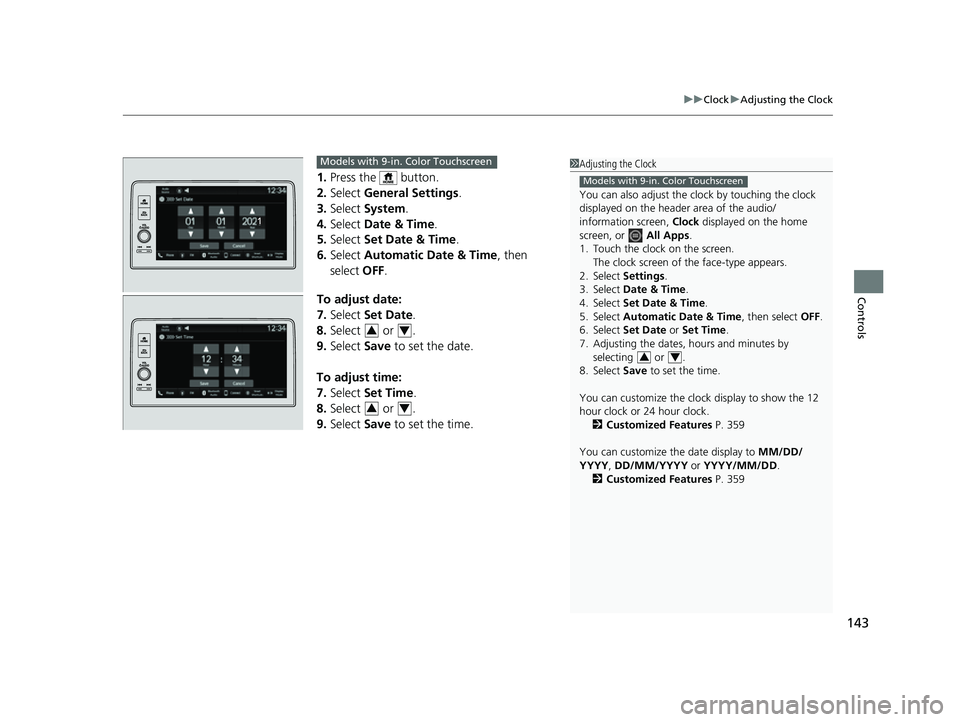
1. Press the button.
2. Select General Settings .
3. Select System.
4. Select Date & Time .
5. Select Set Date & Time .
6. Select Automatic Date & Time , then
select OFF.
To adjust date:
7. Select Set Date.
8. Select or .
9. Select Save to set the date.
To adjust time:
7. Select Set Time.
8. Select or .
9. Select Save to set the time.
1Adjusting the Clock
You can also adjust the clock by touching the clock
displayed on the header area of the audio/
information screen, Clock displayed on the home
screen, or All Apps.
1. Touch the clock on the screen. The clock screen of the face-type appears.
2. Select Settings .
3. Select Date & Time .
4. Select Set Date & Time .
5. Select Automatic Date & Time , then select OFF.
6. Select Set Date or Set Time.
7. Adjusting the dates, hours and minutes by selecting or .
8. Select Save to set the time.
You can customize the clock display to show the 12
hour clock or 24 hour clock. 2 Customized Features P. 359
You can customize the date display to MM/DD/
YYYY , DD/MM/YYYY or YYYY/MM/DD .
2 Customized Features P. 359
Models with 9-in. Color Touchscreen
34
Models with 9-in. Color Touchscreen
34
34
23 ACURA INTEGRA-313S56000_03.book 143 ページ 2022年3月18日 金曜日 午前11時47分


