Page 228 of 740
226
Features
Audio System
About Your Audio System
The audio system features AM/FM radio and SiriusXM ® Radio service*. It can also
play USB flash drives, iPod, iPhone and Bluetooth® devices.
You can operate the audio system from the buttons and switches on the panel, the
remote controls on the steering wheel, or the icons on the touchscreen interface.1About Your Audio System
SiriusXM ® Radio
* is available on a subscription basis
only. For more information on SiriusXM ® Radio*,
contact a dealer. 2 General Information on the Audio System
P. 330
SiriusXM ® Radio
* is available in the United States and
Canada, except Ha waii, Alaska, and Puerto Rico.
SiriusXM ®
* is a registered tra demark of SiriusXM
Radio, Inc.
State or local laws may prohibit the operation of
handheld electronic devi ces while operating a
vehicle.
Remote Controls iPod
USB Flash Drive
* Not available on all models
23 ACURA INTEGRA-313S56000_03.book 226 ページ 2022年3月18日 金曜日 午前11時47分
Page 229 of 740
227
uuAudio System uUSB Port(s)
Continued
Features
USB Port(s)
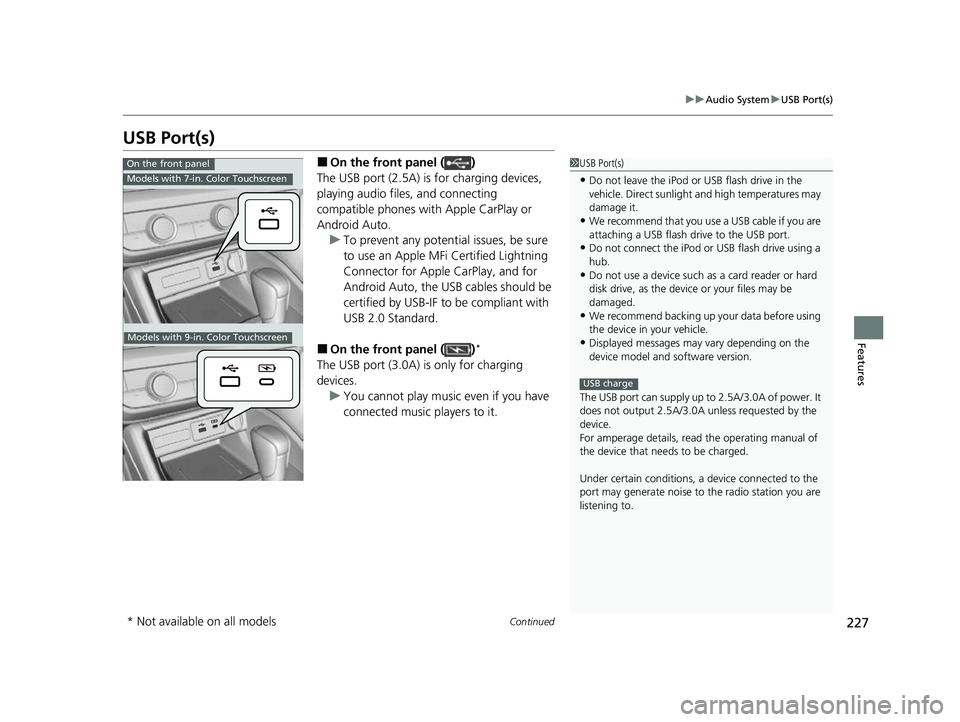
■On the front panel ( )
The USB port (2.5A) is for charging devices,
playing audio files, and connecting
compatible phones with Apple CarPlay or
Android Auto. u To prevent any potenti al issues, be sure
to use an Apple MFi Certified Lightning
Connector for Apple CarPlay, and for
Android Auto, the USB cables should be
certified by USB-IF to be compliant with
USB 2.0 Standard.
■On the front panel ( )*
The USB port (3.0A) is only for charging
devices. u You cannot play music even if you have
connected music players to it.
1USB Port(s)
•Do not leave the iPod or USB flash drive in the
vehicle. Direct sunlight and high temperatures may
damage it.
•We recommend that you us e a USB cable if you are
attaching a USB flash drive to the USB port.
•Do not connect the iPod or USB flash drive using a
hub.
•Do not use a device such as a card reader or hard
disk drive, as the device or your files may be
damaged.
•We recommend backing up yo ur data before using
the device in your vehicle.
•Displayed messages may vary depending on the
device model and software version.
The USB port can supply up to 2.5A/3.0A of power. It
does not output 2.5A/3.0A unless requested by the
device.
For amperage details, read the operating manual of
the device that ne eds to be charged.
Under certain condi tions, a device connected to the
port may generate noise to the radio station you are
listening to.
USB charge
On the front panel
Models with 7-in. Color Touchscreen
Models with 9-in. Color Touchscreen
* Not available on all models
23 ACURA INTEGRA-313S56000_03.book 227 ページ 2022年3月18日 金曜日 午前11時47分
Page 230 of 740
228
uuAudio System uUSB Port(s)
Features
■On the back of the console
compartment*
The USB ports (2.5A) are only for charging
devices.
u You cannot play music even if you have
connected music players to them.
On the back of the console
compartment
Models with 9-in. Color Touchscreen
* Not available on all models
23 ACURA INTEGRA-313S56000_03.book 228 ページ 2022年3月18日 金曜日 午前11時47分
Page 231 of 740
229
uuAudio System uAudio System Theft Protection
Features
Audio System Theft Protection
The audio system is disabled when it is disconnected from the power source, such as
when the battery is disconnected or goes dead. In certain conditions, the system
may display a code entry screen. If this occurs, reactivate the audio system.
■Reactivating the audio system
1. Set the power mode to ON.
2. Turn on the audio system.
3. Press and hold the VOL/ AUDIO (Volume/Power) knob for more than two
seconds.
u The audio system is reac tivated when the audio co ntrol unit establishes a
connection with the vehicl e control unit. If the control unit fails to recognize
the audio unit, you must go to a deal er and have the audio unit checked.
23 ACURA INTEGRA-313S56000_03.book 229 ページ 2022年3月18日 金曜日 午前11時47分
Page 232 of 740

230
uuAudio System uAudio Remote Controls
Features
Audio Remote Controls
Allow you to operate the audio system while driving. The information is shown on
the driver information interface.
VOL
(+/VOL(- (Volume) Switch
Press Up: To increase the volume.
Press Down: To decrease the volume.
/ (Seek/Skip) Buttons
• When listening to the radio
Press : To select the next preset radio station.
Press : To select the previous preset radio station.
Press and hold : To select the next strong station.
Press and hold : To select the previous strong station.
• When listening to an iPod, USB flash drive, Bluetooth® Audio, or Smartphone
Connection
Press : To skip to the next song.
Press : To go back to the beginning of the current or previous song.
• When listening to a USB flash drive or Bluetooth® Audio
Press and hold : To skip to the next folder/group.
Press and hold : To go back to the previous folder/group.
1Audio Remote Controls
Some modes appear only when an appropriate
device or medium is used.
Depending on the Bluetooth® device you connect,
some functions may not be available.Models with 7-in. Color Touchscreen
/ (Seek/Skip) Buttons
Left
Selector
Wheel
VOL(+/VOL(- (Volume) Switch
23 ACURA INTEGRA-313S56000_03.book 230 ページ 2022年3月18日 金曜日 午前11時47分
Page 233 of 740
231
uuAudio System uAudio Remote Controls
Continued
Features
Left Selector Wheel
Roll up or down:
FM
AM
To cycle through the modes, roll up or down and
then press the left selector wheel:
Bluetooth
USB
Apps
(Apple CarPlay/Android Auto)
Phone
Back
Customize display
23 ACURA INTEGRA-313S56000_03.book 231 ページ 2022年3月18日 金曜日 午前11時47分
Page 234 of 740
232
uuAudio System uAudio Remote Controls
Features
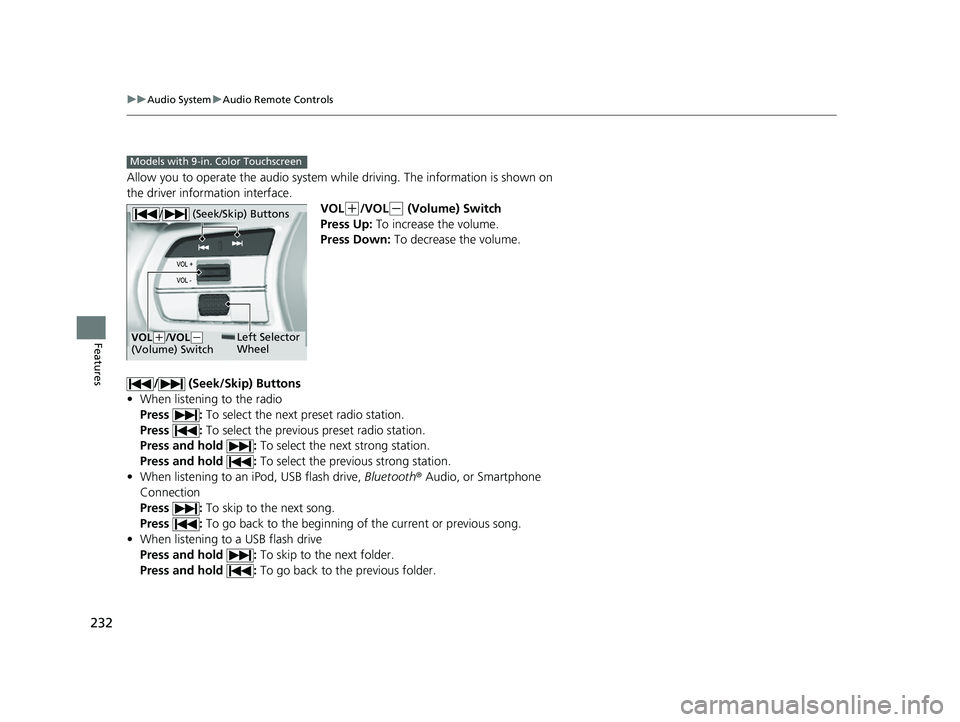
Allow you to operate the audio system while driving. The information is shown on
the driver information interface.
VOL
(+/VOL(- (Volume) Switch
Press Up: To increase the volume.
Press Down: To decrease the volume.
/ (Seek/Skip) Buttons
• When listening to the radio
Press : To select the next preset radio station.
Press : To select the previous preset radio station.
Press and hold : To select the next strong station.
Press and hold : To select the previous strong station.
• When listening to an iPod, USB flash drive, Bluetooth® Audio, or Smartphone
Connection
Press : To skip to the next song.
Press : To go back to the beginning of the current or previous song.
• When listening to a USB flash drive
Press and hold : To skip to the next folder.
Press and hold : To go back to the previous folder.
Models with 9-in. Color Touchscreen
/ (Seek/Skip) Buttons
Left Selector
WheelVOL(+/VOL(-
(Volume) Switch
23 ACURA INTEGRA-313S56000_03.book 232 ページ 2022年3月18日 金曜日 午前11時47分
Page 235 of 740
233
uuAudio System uAudio Remote Controls
Features
Left Selector Wheel
Roll up or down:
Back
Phone
FM
AM
SXM
To cycle through the modes, roll up or down and
then press the left selector wheel:
Customize display
Bluetooth
USB
Apps
(Apple CarPlay/Android Auto)
Alexa*
* Not available on all models
23 ACURA INTEGRA-313S56000_03.book 233 ページ 2022年3月18日 金曜日 午前11時47分


