Page 111 of 740
Continued109
uuGauges and Displays uDriver Information Interface (Left Side Area)
Instrument Panel
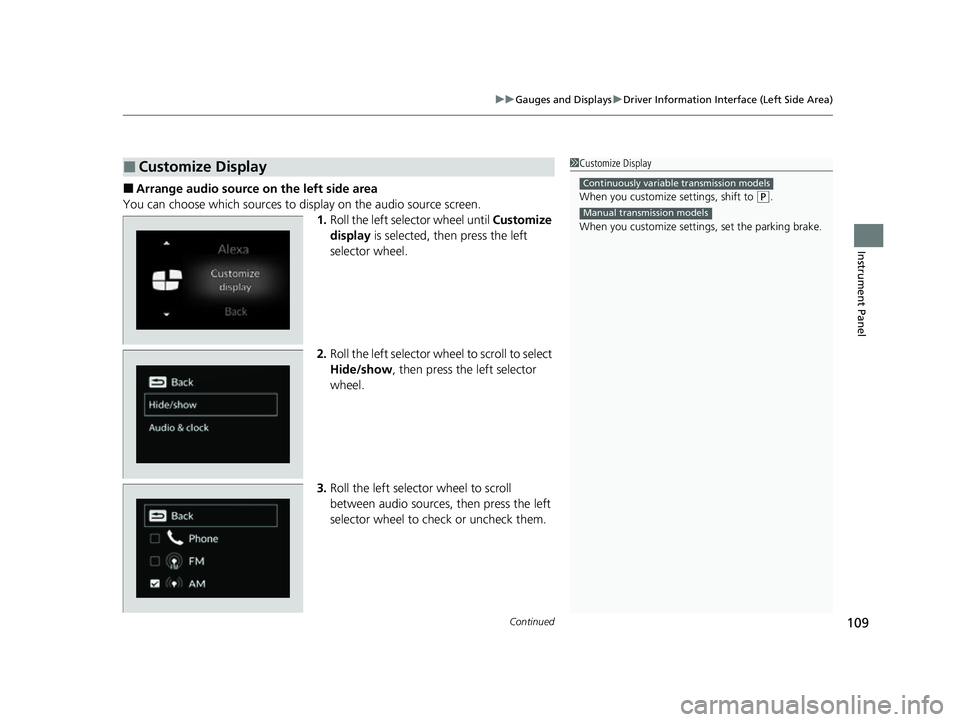
■Arrange audio source on the left side area
You can choose which sources to display on the audio source screen. 1.Roll the left selector wheel until Customize
display is selected, then press the left
selector wheel.
2. Roll the left selector wheel to scroll to select
Hide/show , then press the left selector
wheel.
3. Roll the left selector wheel to scroll
between audio sources, then press the left
selector wheel to check or uncheck them.
■Customize Display1Customize Display
When you customize settings, shift to
(P.
When you customize setti ngs, set the parking brake.
Continuously variable transmission models
Manual transmission models
23 ACURA INTEGRA-313S56000_03.book 109 ページ 2022年3月18日 金曜日 午前11時47分
Page 127 of 740

Continued125
uuGauges and Displays uDriver Information Interface (Right Side Area)
Instrument Panel
■Arrange content on the right side area
You can choose which contents to display on the right side area. 1.Press the right selector wheel when you
select the Gauge display settings on the
driver information interface.
2. Roll the right selector wheel to scroll to
select Hide/show , then press the right
selector wheel.
3. Roll the right selector wheel to scroll
between contents, then press the right
selector wheel to check or uncheck them.
You can check if there are any active warning messages.
■Gauge Display Settings1 Arrange content on the right side area
Contents that are gray ca nnot be removed from the
right side area.
When you customize settings, shift to
( P.
When you customize setti ngs, set the parking brake.
Continuously variable transmission models
Manual transmission models
■Warnings1Warnings
If there are multiple warnings, you can roll the right
selector wheel to see other warnings.
23 ACURA INTEGRA-313S56000_03.book 125 ページ 2022年3月18日 金曜日 午前11時47分
Page 174 of 740

172
Controls
Operating the Switches Around the Steering Wheel
ENGINE START/STOP Button
*1:Manual transmission models
■Changing the Power Mode1ENGINE START/STOP Button
ENGINE START/STOP Button Operating Range
You can start the engine when the keyless remote is
inside the vehicle.
The engine may also start if the keyless remote is
close to the door or window, ev en if it is outside the
vehicle.
ON mode:
The ENGINE START/STOP button is on (in red), if the
engine is running.
If the battery of the keyless remote is getting low, the
engine may not start when you push the ENGINE
START/STOP button. If the engi ne does not start,
refer to the following link.
2 If the Keyless Remote Battery is Weak
P. 691
Operating Range
Continuously Variable Transmission Manual Transmission
VEHICLE OFF (LOCK)
The button is off.
The steering wheel is locked
*1.
The power to all electrical
components is turned off.
Press the button without the
transmission in
( P.
Press the button with the
transmission in
( P. Press the button.
Without pressing
the clutch pedal
Without pressing
the brake pedal ACCESSORY
The button blinks (in red).
Operate the audio system and
other accessories in this position.
ON
The button blinks (in red).
All electrical components can be
used.
Put the transmission into (P.
23 ACURA INTEGRA-313S56000_03.book 172 ページ 2022年3月18日 金曜日 午前11時47分
Page 175 of 740

Continued173
uuOperating the Switches Around the Steering Wheel uENGINE START/STOP Button
Controls
If you leave the vehicle for 30 to 60 minutes with the transmission in (P
(continuously variable transmission) and the power mode in ACCESSORY, the
vehicle automatically goes into the mode similar to VEHICLE OFF (LOCK) to avoid
draining the battery.
When in this mode:
The steering wheel does not lock. You cannot lock or unlock doors with the remote
transmitter or the keyless access system. Press the ENGINE START/STOP button
twice to switch the mode to VEHICLE OFF (LOCK).
If you open the driver’s door when the power mode is in ACCESSORY, a warning
beep sounds.
■Automatic Power Off
■Power Mode Reminder
1 ENGINE START/STOP Button
If the power mode does not change from VEHICLE
OFF to ACCESSORY, press the ENGINE START/STOP
button while moving the st eering wheel left and
right. The steering wheel will unlock, allowing the
mode to change.
Do not leave the power mode in ACCESSORY or ON
when you get out.
Manual transmission models
Manual transmission models
23 ACURA INTEGRA-313S56000_03.book 173 ページ 2022年3月18日 金曜日 午前11時47分
Page 178 of 740

176
uuOperating the Switches Around the Steering Wheel uLight Switches
Controls
Light Switches
Rotating the light switch turns the lights on
and off, regardless of the power mode
setting.
■High beams
Push the lever forward until you hear a click.
■Low beams
When in high beams, pull the lever back to
return to low beams.
■Flashing the high beams
Pull the lever back, and release it.
■Lights off
Turn the lever to OFF either when:
• The shift lever is in
(P (continuously
variable transmission).
• The parking brake is applied.
To turn the lights on ag ain, turn the lever to
OFF to cancel the lights off mode. Even if you
do not cancel the lights off mode, the lights
come on automatically when:
• The transmission is taken out of
(P
(continuously variable transmission) and the
parking brake is released.
• The vehicle starts to move.
■Manual Operation1Light Switches
If you leave the power mode in VEHICLE OFF while
the lights are on, a chime sounds when the driver’s
door is opened.
When the lights are on, the lights on indicator in the
instrument pane l will be on.
2 Lights On Indicator P. 93
Do not leave the lights on when the engine is off
because it will cause the battery to discharge.
If you sense that the le vel of the headlights is
abnormal, have the vehicl e inspected by a dealer.
Turns on parking lights, side
marker, tail, and rear license
plate lights
Turns on headlights, side
marker, parking lights, tail, and
rear license plate lights
High Beams
Flashing the high beams
Low Beams
23 ACURA INTEGRA-313S56000_03.book 176 ページ 2022年3月18日 金曜日 午前11時47分
Page 189 of 740

187
uuOperating the Switches Around the Steering Wheel uDriving Position Memory System*
Controls
1. Set the power mode to ON. Adjust the
driver’s seat to the desired position.
2. Press the SET button.
u The memory button i ndicator lights will
come on.
3. Press the memory button
(1 or (2 within
five seconds of pressing the SET button.
u Once the seat position has been
memorized, you will hear the double-
beep.
1. Put the transmission into
(P.
2. Press a memory button (
(1 or (2).
1. Apply the parking brake.
2. Press a memory button (
(1 or (2).
The seat will automatically move to the
memorized position.
■Storing a Position in Memory1 Storing a Position in Memory
After you press the SET button, the storing operation
will be canceled when:
•You do not press the memory button within five
seconds.
•You readjust the seat position before the double-
beep.
•You set the power mode to any position except
ON.
SET Button
Memory Button 1
Memory Button 2
■Recalling the Stored Position1 Recalling the Stored Position
The seat will st op moving if you:
•Press the SET button or memory button (1 or (2.
•Adjust the seat position.
•Put the transmission into a position other than (P
(continuously variable transmission).
•Release the parking brake (manual transmission).
Memory ButtonsContinuously variable transmission models
Manual transmission models
23 ACURA INTEGRA-313S56000_03.book 187 ページ 2022年3月18日 金曜日 午前11時47分
Page 222 of 740
uuClimate Control System uUsing Automatic Climate Control
220
Controls
Pressing the (windshield defroster) button
turns the air conditioning system on and
automatically switches th e system to fresh air
mode.
Press the button again to turn off, the
system returns to the previous settings.
■Defrosting the Windshield and Windows1 Defrosting the Windshield and Windows
For your safety, make sure you have a clear view
through all the windows before driving.
Do not set the temperatur e near the upper or lower
limit.
When cold air hits the windshield, the outside of the
windshield may fog up.
If you press the button during Auto Idle Stop, the
engine restarts automatically.
To defog during the Auto Idle Stop, restart the
engine as follows.
1. Make sure the shift lever is in
( N.
2. Press the button.
Manual transmission models
Models with SYNC button
Models without SYNC button
23 ACURA INTEGRA-313S56000_03.book 220 ページ 2022年3月18日 金曜日 午前11時47分
Page 255 of 740

Continued253
uuAudio System Basic Operation uApple CarPlay
Features
After you have connected your iPhone to the system via the front USB, use the
following procedure to set up Apple CarPlay. Use of Apple CarPlay will result in the
transmission of certain user and vehicle information (such as vehicle location, speed,
and status) to your iPhone to enhance the Apple CarPlay experience. You will need
to consent to the sharing of this info rmation on the audio/information screen.
■Connecting Apple CarPlay Using the USB Cable to the USB Port
1. Connect the iPhone to the USB port using the USB cable.
2 USB Port(s) P. 227
uThe confirmation screen will be displayed.
2. Select Yes.
u If you do not want to connect Apple CarPlay, select No.
You may change the consent settings under the Smartphone Settings menu.
■Setting Up Apple CarPlay1Setting Up Apple CarPlay
Only initialize Apple CarP lay when you are safely
parked.
When Apple CarPlay first detects your iPhone, you
will need to set up your iPhone. Refer to the
instruction manual that came with your iPhone.
You can use the following procedure to disconnect or
delete the devices conn ecting Apple CarPlay:
Press the MENU button
Select Smartphone Settings Apple CarPlay
Select device
Use of user and vehicle information
The use and handling of user and vehicle information
transmitted to/from your iP hone by Apple CarPlay is
governed by the Apple iOS terms and conditions and
Apple’s Privacy Policy.
■Enabling Apple CarPlay
23 ACURA INTEGRA-313S56000_03.book 253 ページ 2022年3月18日 金曜日 午前11時47分