2022 VOLKSWAGEN T-ROC acc
[x] Cancel search: accPage 6 of 502

In the engine compartment
Fuse box cover Changing fuses
Lever for adjusting the steering column position Steering wheel
Light switch Vehicle lighting
Turn signal and main beam lever Vehicle lighting
With switches and buttons for the driver assist systems Button for driver assist systemsDriver
assist systems
Vents Heating and air conditioning system
Instrument cluster Instrument cluster
With warning and indicator lamps Symbols in instrument cluster
Lever for wipers and washers Wipers
With buttons for operating the menus Instrument cluster
Controls on the multifunction steering wheel:
Operating driver assist systems Operating using the multifunction steering wheelDriver assist
systems
Audio, navigation
Opening the telephone menu or accepting telephone calls
Volume adjustment
Activating voice control (no function in some models)
Horn
Location of the driver front airbag Airbag system
Ignition lock Starting and stopping the engine
Pedals Pedals
Page 14 of 502

Introduction
This chapter contains information on the followingsubjects:
Analogue instrument cluster
Rev counter
Digital instrument cluster (Active Info Display)
Displays
Instrument cluster menus
Service menu
Driving data display (multifunction display)
Warning and information messages
Driver Alert System (recommendation for rest breaks)
Dynamic Road Sign Display (Sign Assist)
Time
Lap timer
Fuel gauge
Coolant temperature display
Service interval display
The vehicle is equipped either with an analogue or a digital instrument cluster (Active Info Display).
When you start the engine after the 12-volt battery has been totally discharged or changed, you may
find that system settings (time, date, personal convenience settings and programming) have been
changed or deleted. Check and correct the settings as necessary once the 12-volt vehicle battery has
been sufficiently charged.
WARNING
Accidents and injuries can occur if the driver is distracted.
Never press the buttons on the instrument cluster while the vehicle is in motion.
Any settings for the instrument cluster display and displays in the Infotainment system should be
made only when the vehicle is stationary in order to reduce the risk of accidents and serious injuries.
Page 15 of 502
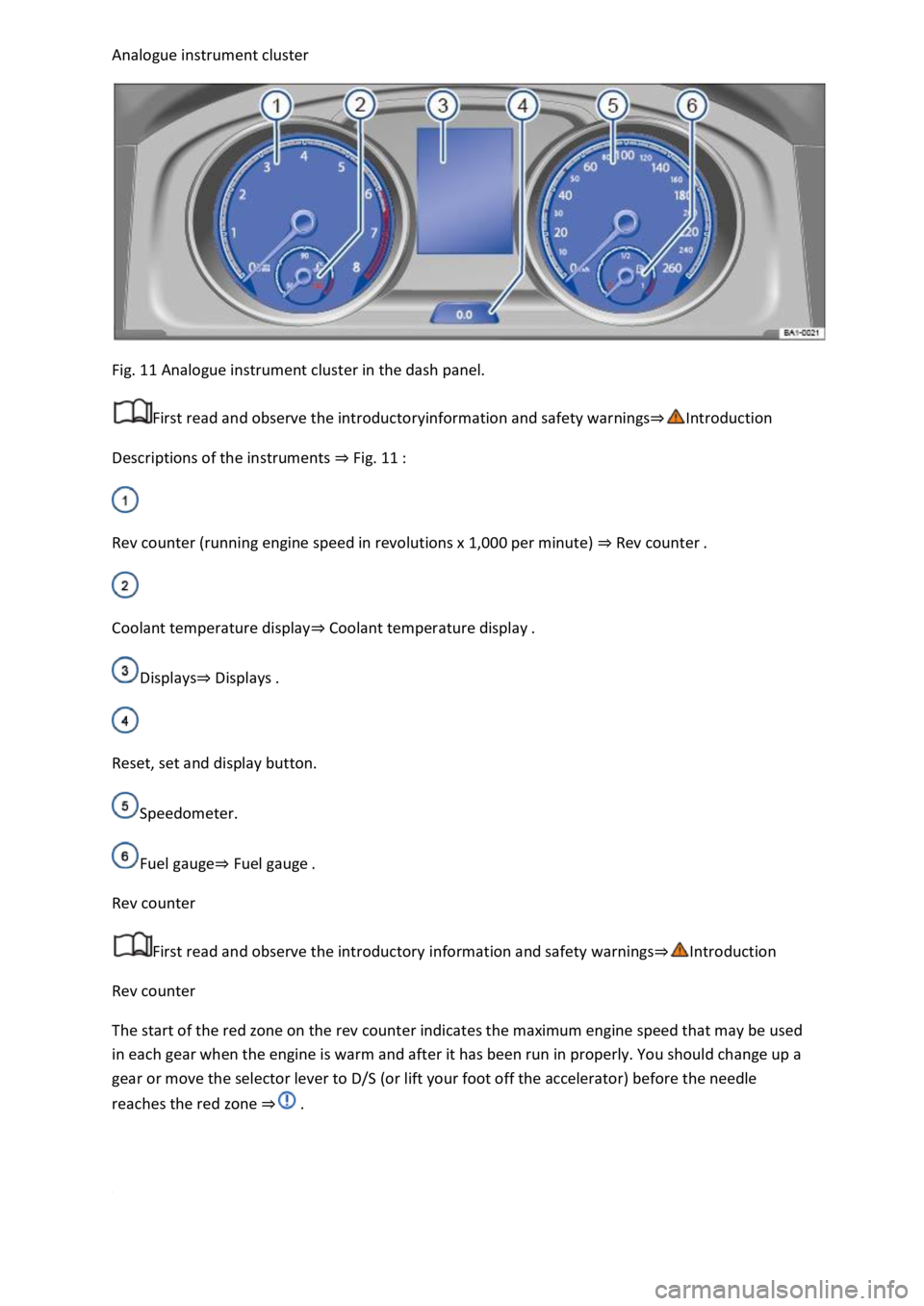
Fig. 11 Analogue instrument cluster in the dash panel.
First read and observe the introductoryinformation and safety warnings
Descriptions of the instruments Fig. 11
Rev counter (running engine speed in revolutions x 1,000 per minute) Rev counter
Coolant temperature displayCoolant temperature display
DisplaysDisplays
Reset, set and display button.
Speedometer.
Fuel gaugeFuel gauge
Rev counter
First read and observe the introductory information and safety warnings
Rev counter
The start of the red zone on the rev counter indicates the maximum engine speed that may be used
in each gear when the engine is warm and after it has been run in properly. You should change up a
gear or move the selector lever to D/S (or lift your foot off the accelerator) before the needle
reaches the red zone
Page 17 of 502

Various, topic-specific information profiles can be selected via the Active Info Display menu option in
the vehicle settings of the Infotainment system Vehicle settings menu
information profile, the Active Info Display shows additional information in the centre of the round
instruments, or the round instruments are hidden and the additional information is displayed across
the whole width of the display. The following information profiles are available:
Gear. Digital display of the current gear or selected position.
Speed. Digital display of the speed.
Consumption. Graphic representation of current consumption and digital display of average
consumption.
Range. Digital display of the remaining range.
Dynamic Road Sign Display. Display of recognised road signs.
Distance travelled. Digital display of the distance covered.
Time of arrival information. Digital display of the remaining driving time, distance to the destination
and estimated time of arrival.
Acceleration. Graphic representation of longitudinal and lateral acceleration.
Assist systems. Graphic representation of various assist systems.
Height. Digital display of the current height above sea level.
Navigation. Graphic representation of arrow navigation.
Compass. Digital compass display.
Audio. Digital display of current audio playback.
The number and functions of the available information profiles can differ depending on the vehicle
equipment.
Navigation map in the Active Info Display
With some vehicle equipment levels, the Active Info Display is able to display a detailed map. To
display this map, select the Navigation menu item in the instrument cluster Instrument cluster
menus
The navigation map can be shown in two sizes. With the larger map size, the navigation map is
displayed over the entire width of the display. To select the preferred map size:
Press the button on the multifunction steering wheel Instrument cluster menusto switch
between map sizes as required.
Page 21 of 502

system.
If several warnings are present, the symbols will appear for several seconds, one after another. The
symbols will continue to appear until the faults are rectified.
If warning messages about malfunctions are displayed when the ignition is switched on, it may not
be possible to adjust some settings as described, or the information display may appear differently.
If this is the case, take the vehicle to a qualified workshop to have the malfunctions rectified.
Instrument cluster menus
First read and observe the introductoryinformation and safety warnings
The content and layout of the menus and displays depend on the vehicle electronics and the level of
vehicle equipment.
A qualified workshop can program and modify other functions depending on the vehicle equipment
level. Volkswagen recommends using a Volkswagen dealership for this purpose.
Some menu options can be accessed only when the vehicle is stationary.
Driving dataDriving data di
Assist systems.
Lane Assist on/off Lane keeping system (Lane Assist)
Front Assist on/off Area monitoring system (Front Assist)
Blind Spot Monitor on/off Blind Spot Monitor
ACC (display only) Adaptive Cruise Control (ACC)
Views1)Digital instrument cluster (Active Info Display)
Navigation Infotainment system,.
Audio Infotainment system,.
Telephone Infotainment system,.
Vehicle statusWarning and information messa
Lap timerLap timer
Personalisation (user selection)Personalisation
1) Only in vehicles with an Active Info Display.
Service menu
Page 24 of 502
rocker switch on the wiper lever or the
or buttons on the multifunction steering wheel. Then press the or button or
wait a few seconds. The speed is now saved and the warning is activated.
To deactivate, press the or button again. The stored speed will be deleted.
The speed warning can be adjusted within a range of 30 km/h (18 mph) to 250 km/h (155 mph).
Some settings can be saved in the user accounts for personalisation and therefore change
automatically when the user account is changed Personalis
1) Varies depending on the instrument cluster version.
2) Not available in all countries.
Warning and information messages
First read and observe the introductoryinformation and safety warnings
The system runs a check on certain components and functions in the vehicle when the ignition is
switched on or while the vehicle is in motion. Malfunctions are indicated by red and yellow warning
symbols with information messages on the instrument cluster display Symbols in instrument
cluster
messages and symbols can vary depending on the version of the instrument cluster.
In addition, a list of current malfunctions can be opened manually. To open the list, select the
Vehicle status or Vehicle menu Instrument cluster menus
Priority 1 warning (red)The symbol flashes or lights up (sometimes together with a signal tone).
Do not drive on! Danger. Check the fault and correct the cause. Seek expert assistance if
necessary.Priority 2 warning (yellow)The symbol flashes or lights up (sometimes together with a
signal tone). Malfunctions and insufficient service fluids can damage the vehicle and cause it to
break down. Check the fault as soon as possible. Seek expert assistance if necessary.Information
messageInformation about various vehicle procedures and conditions.
With some equipment levels, some settings and displays may also appear in the Infotainment
system.
If several warnings are present, the symbols will appear for several seconds, one after another. The
symbols will continue to appear until the faults are rectified.
If warning messages about malfunctions are displayed when the ignition is switched on, it may not
be possible to adjust some settings as described, or the information display may appear differently.
If this is the case, take the vehicle to a qualified workshop to have the malfunctions rectified.
Page 26 of 502

Towing a heavy/long trailer.
The driver is distracted.
The Driver Alert System is reset in the following situations:
The ignition is switched off.
The driver seat belt is unfastened and the driver door is opened.
The vehicle has been stationary for longer than 15 minutes.
The Driver Alert System is automatically reset in the event of an extended period of driving at slow
speeds (speed less than 60 km/h (37 mph)). When the speed is increased again, the system
evaluates the driving behaviour once more.
WARNING
The intelligent technology used in the Driver Alert System cannot overcome the laws of physics, and
functions only within the limits of the system. Do not let the extra convenience afforded by the
Driver Alert System tempt you into taking any risks when driving. During a long trip, plan regular and
sufficient breaks.
The driver is responsible at all times for their fitness to drive.
Never drive a vehicle when you are tired.
The system cannot always detect the driver's level of alertness. Observe the information in the
Function limitations section.
In certain situations, the system may wrongly interpret intentional driving manoeuvres as a lack of
alertness from the driver.
No urgent warning will be given in the event of the phenomenon known as microsleep.
Observe the information in the instrument cluster display and act according to the commands.
The Driver Alert System has been developed for use only while driving on motorways and good
roads.
If there is a system fault, go to a qualified workshop and have the system checked.
Page 27 of 502
Dynamic Road Sign Display (Sign Assist)
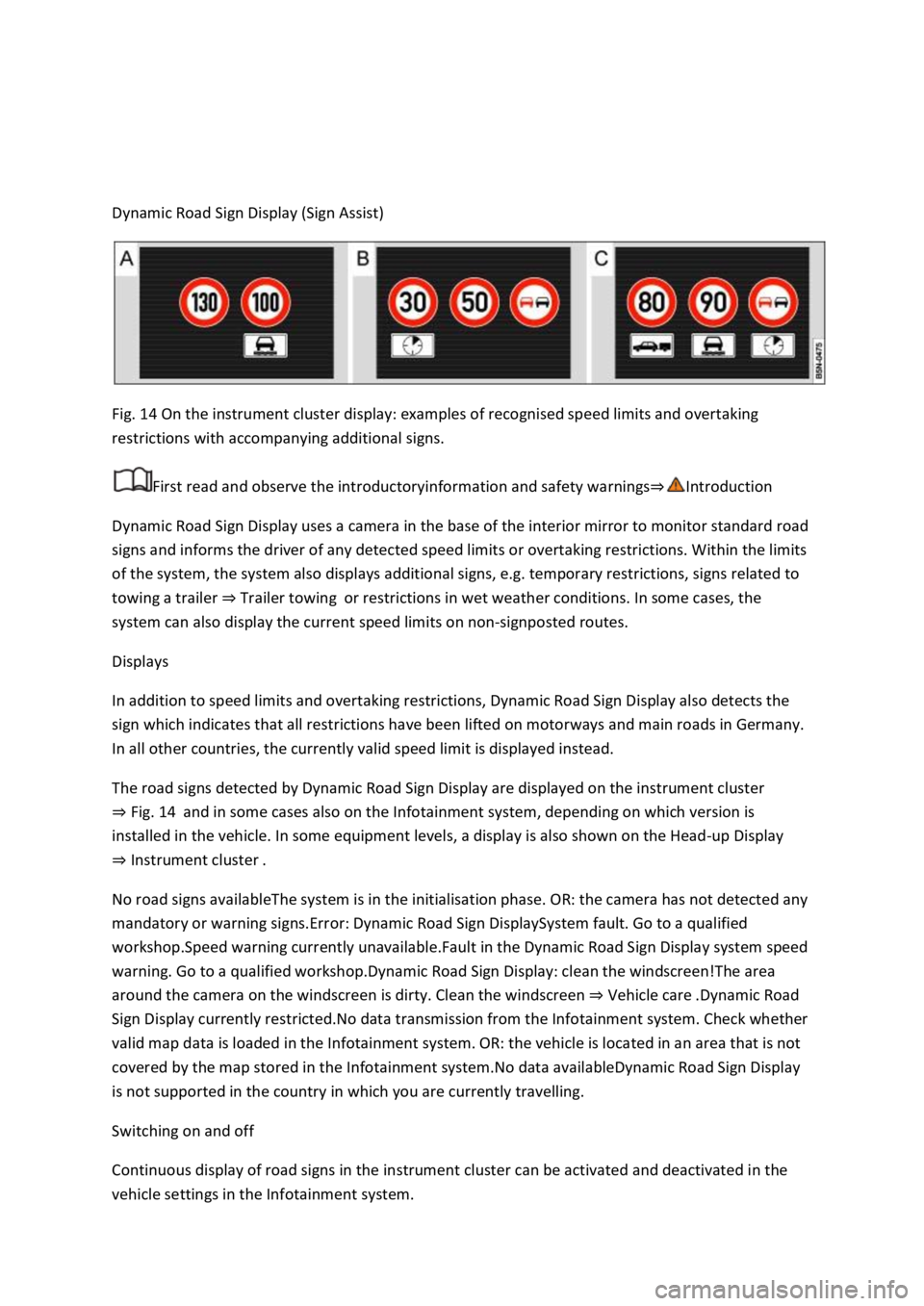
Fig. 14 On the instrument cluster display: examples of recognised speed limits and overtaking
restrictions with accompanying additional signs.
First read and observe the introductoryinformation and safety warnings
Dynamic Road Sign Display uses a camera in the base of the interior mirror to monitor standard road
signs and informs the driver of any detected speed limits or overtaking restrictions. Within the limits
of the system, the system also displays additional signs, e.g. temporary restrictions, signs related to
towing a trailer Trailer towingor restrictions in wet weather conditions. In some cases, the
system can also display the current speed limits on non-signposted routes.
Displays
In addition to speed limits and overtaking restrictions, Dynamic Road Sign Display also detects the
sign which indicates that all restrictions have been lifted on motorways and main roads in Germany.
In all other countries, the currently valid speed limit is displayed instead.
The road signs detected by Dynamic Road Sign Display are displayed on the instrument cluster
Fig. 14and in some cases also on the Infotainment system, depending on which version is
installed in the vehicle. In some equipment levels, a display is also shown on the Head-up Display
Instrument cluster
No road signs availableThe system is in the initialisation phase. OR: the camera has not detected any
mandatory or warning signs.Error: Dynamic Road Sign DisplaySystem fault. Go to a qualified
workshop.Speed warning currently unavailable.Fault in the Dynamic Road Sign Display system speed
warning. Go to a qualified workshop.Dynamic Road Sign Display: clean the windscreen!The area
around the camera on the windscreen is dirty. Clean the windscreen Vehicle care
Sign Display currently restricted.No data transmission from the Infotainment system. Check whether
valid map data is loaded in the Infotainment system. OR: the vehicle is located in an area that is not
covered by the map stored in the Infotainment system.No data availableDynamic Road Sign Display
is not supported in the country in which you are currently travelling.
Switching on and off
Continuous display of road signs in the instrument cluster can be activated and deactivated in the
vehicle settings in the Infotainment system.