2022 TOYOTA SIENNA HYBRID rear camera
[x] Cancel search: rear cameraPage 3 of 600
3TABLE OF CONTENTS
1
2
3
4
5
6
7
8
9
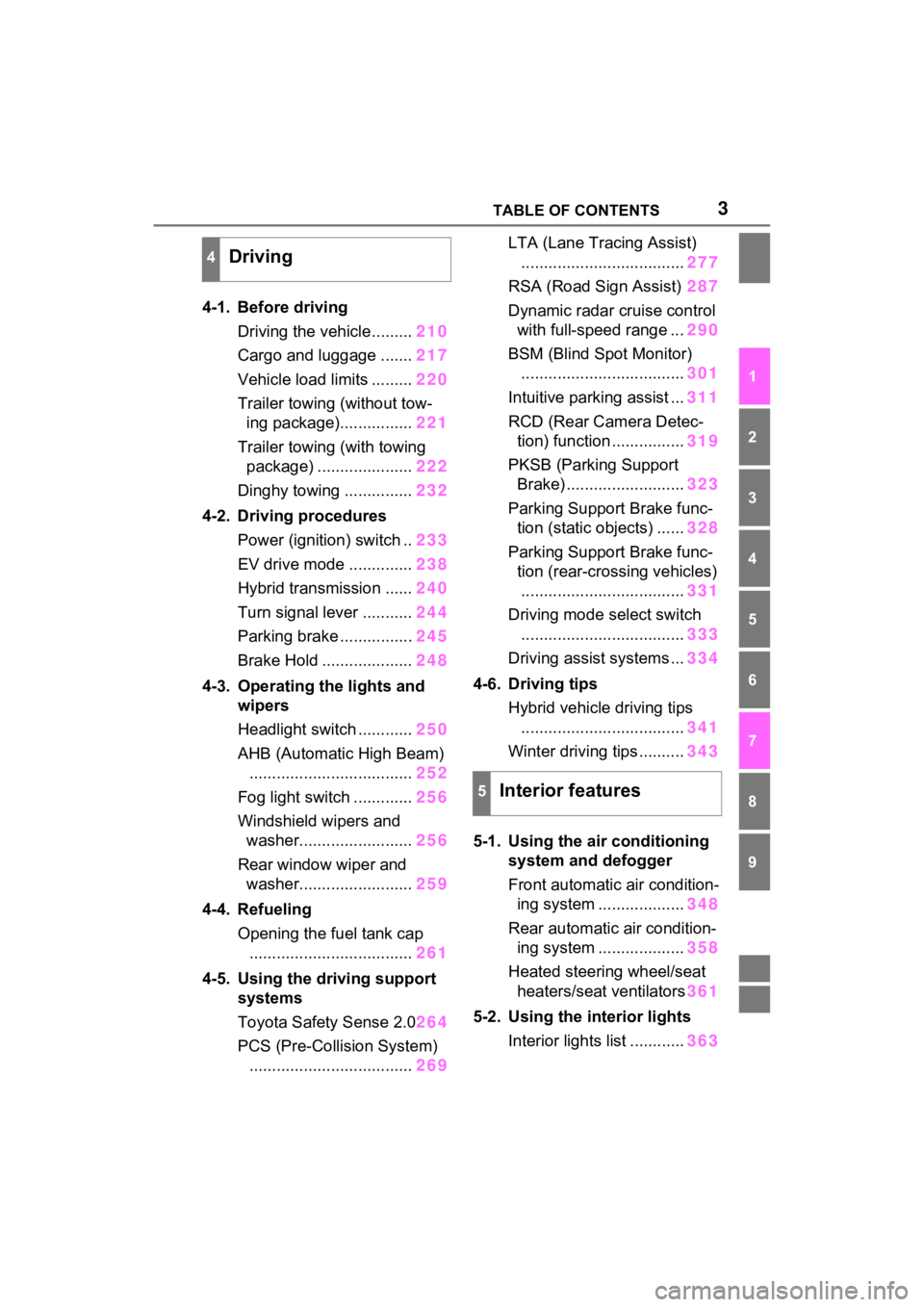
4-1. Before drivingDriving the vehicle......... 210
Cargo and luggage ....... 217
Vehicle load limits ......... 220
Trailer towing (without tow- ing package)................ 221
Trailer towing (with towing package) ..................... 222
Dinghy towing ............... 232
4-2. Driving procedures Power (ignition) switch .. 233
EV drive mode .............. 238
Hybrid transmission ...... 240
Turn signal lever ........... 244
Parking brake ................ 245
Brake Hold .................... 248
4-3. Operating the lights and wipers
Headlight switch ............ 250
AHB (Automatic High Beam) .................................... 252
Fog light switch ............. 256
Windshield wipers and washer......................... 256
Rear window wiper and washer......................... 259
4-4. Refueling Opening the fuel tank cap.................................... 261
4-5. Using the driving support
systems
Toyota Safety Sense 2.0 264
PCS (Pre-Collision System) .................................... 269LTA (Lane Tracing Assist)
.................................... 277
RSA (Road Sign Assist) 287
Dynamic radar cruise control with full-speed range ... 290
BSM (Blind Spot Monitor) .................................... 301
Intuitive parking assist ... 311
RCD (Rear Camera Detec- tion) function ................ 319
PKSB (Parking Support Brake) .......................... 323
Parking Support Brake func- tion (static objects) ...... 328
Parking Support Brake func- tion (rear-crossing vehicles).................................... 331
Driving mode s elect switch
.................................... 333
Driving assist systems ... 334
4-6. Driving tips Hybrid vehicle driving tips.................................... 341
Winter driving tips .......... 343
5-1. Using the ai r conditioning
system and defogger
Front automatic air condition- ing system ................... 348
Re ar automatic air condition-
i n
g system ................... 358
Heated steering wheel/seat heaters/seat ventilators 361
5-2. Using the interior lights Interior lights list ............ 363
4Driving
5Interior features
Page 23 of 600
23Pictorial index
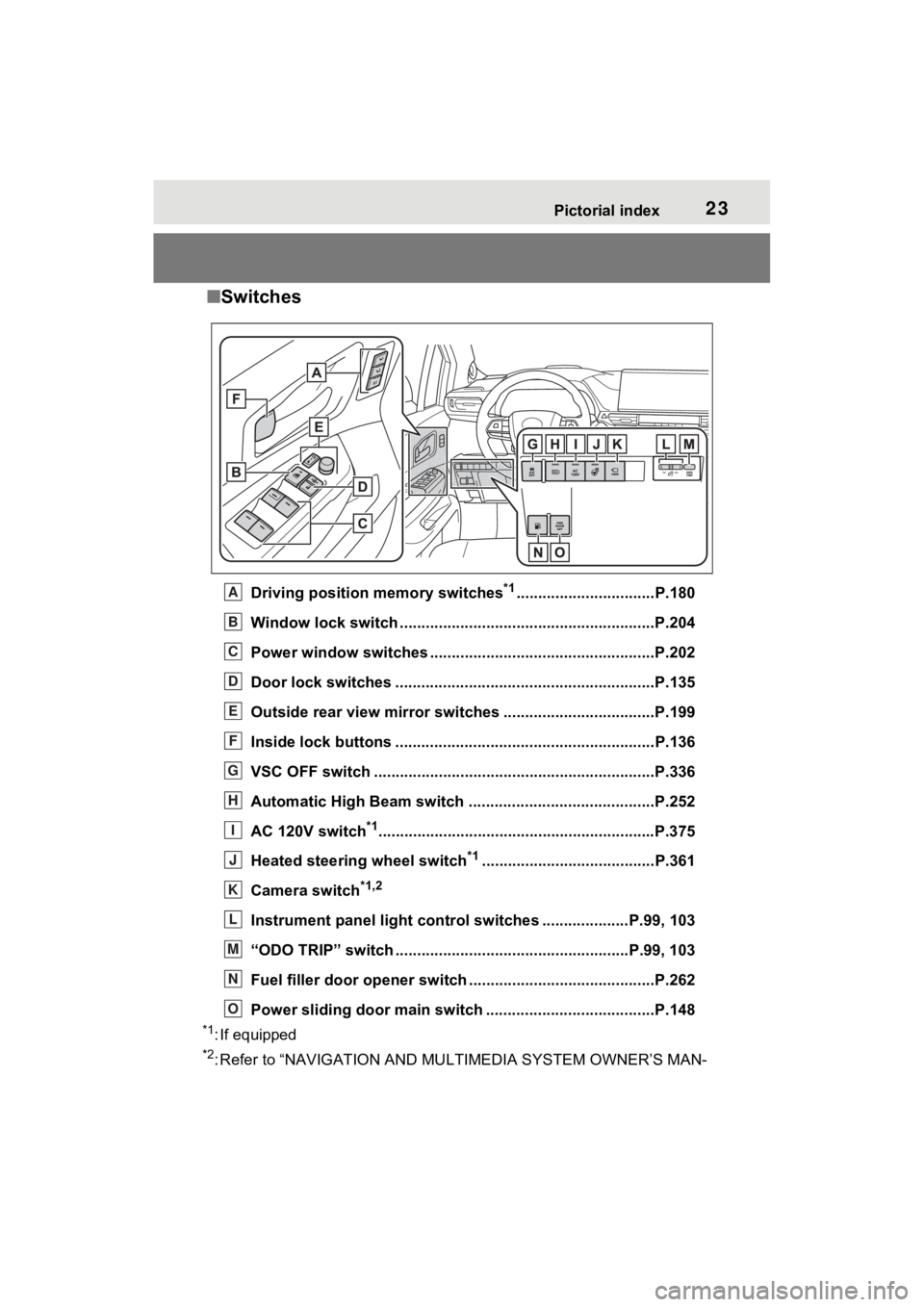
■Switches
Driving position memory switches*1................................P.180
Window lock switch ............................................. ..............P.204
Power window switches ....... .............................................P.202
Door lock switches ............................................................P.135
Outside rear view mirror swi tches ...................................P.199
Inside lock buttons ............................................ ................P.136
VSC OFF switch .................................................................P.336
Automatic High Beam switch ..................................... ......P.252
AC 120V switch
*1............................................................... .P.375
Heated steering wheel switch
*1........................................P.361
Camera switch
*1,2
Instrument panel light control switches ....................P.99 , 103
“ODO TRIP” switch .............................................. ........P.99, 103
Fuel filler door opener swi tch ...........................................P.262
Power sliding door main switch ................................. ......P.148
*1: If equipped
*2: Refer to “NAVIGATION AND MULTIMEDIA SYSTEM OWNER’S MAN-
A
B
C
D
E
F
G
H
I
J
K
L
M
N
O
Page 115 of 600
1152-1. Instrument cluster
2
Vehicle status information and indicators
Select to change each notification
method used to warn the driver
when the system recognizes
excess speed, no overtaking and
no-entry sign.
• “Notification Level”
Select to change e ach notification
level used to warn the driver when
the system recognizes a speed limit
sign.
RCD (Rear Camera
Detection) (if equipped)
( P.319)
• RCD (Rear Camera Detection)
on/off
Select to enable/disable the RCD
function.
•“Volume”
Select to change the RCD buzzer
volume.
■ Vehicle Settings
PSD (Power Sliding
Doors) ( P.137)
Select to set up the following items.
• “Left Hands Free PSD” (if
equipped)
Select to enable/disable the left-
hand power sliding door kick sen-
sor.
• “Right Hands F ree PSD” (if
equipped)
Select to enable/d isable the right-
hand power sliding door kick sen-
sor.
• “Left PSD Alert Volume”
Select to set the volume of the
buzzer which sounds when the left-
hand power sliding door system operates.
• “Right PSD Alert Volume”
Select to set the volume of the
buzzer which sounds when the
right-hand power sliding door sys-
tem operates.
PBD (Power Back Door)
(if equipped) ( P.153)
Select to set up t he following items.
• PBD (Power Back Door) on/off
Select to enable/disable the power
back door system.
• “Hands Free”
Select to enable/disable the kick
sensor.
• “PBD Opening Adjustment”
Select the open position when
power back door is fully open.
•“Volume”
Select to set the volume of the
buzzer which sounds when the
power back door system operates.
Rear Seat Reminder
( P.134)
Select to enable/disable the rear
seat reminder function.
“TPWS Setting” (Tire Pres-
sure Warning System)
( P.424)
• “Setting Pressure”
Select to initialize the tire pressure
warning system.
• “Identifying Each Wheel & Posi- tion”
Select to register the ID codes of
the tire pressure se nsors to the tire
pressure warning system.
Page 190 of 600
1893-4. Adjusting the steering wheel and mirrors
3
Before driving
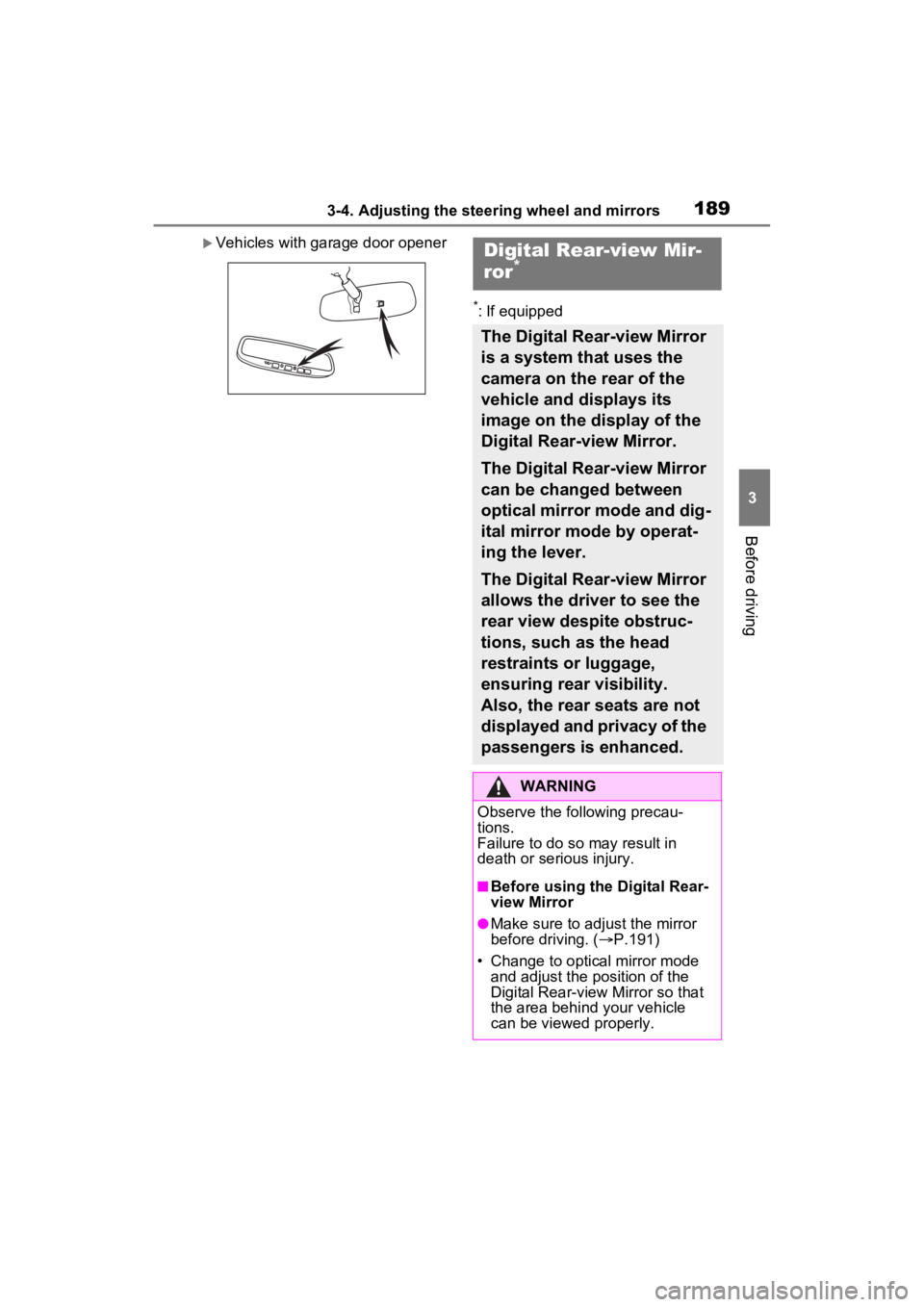
Vehicles with garage door opener
*: If equipped
Digital Rear-view Mir-
ror*
The Digital Rear-view Mirror
is a system that uses the
camera on the rear of the
vehicle and displays its
image on the display of the
Digital Rear-view Mirror.
The Digital Rear-view Mirror
can be changed between
optical mirror mode and dig-
ital mirror mode by operat-
ing the lever.
The Digital Rear-view Mirror
allows the driver to see the
rear view despite obstruc-
tions, such as the head
restraints or luggage,
ensuring rear visibility.
Also, the rear seats are not
displayed and privacy of the
passengers is enhanced.
WARNING
Observe the following precau-
tions.
Failure to do so may result in
death or serious injury.
■Before using the Digital Rear-
view Mirror
●Make sure to adjust the mirror
before driving. ( P.191)
• Change to optical mirror mode and adjust the position of the
Digital Rear-view Mirror so that
the area behind your vehicle
can be viewed properly.
Page 191 of 600
1903-4. Adjusting the steering wheel and mirrors
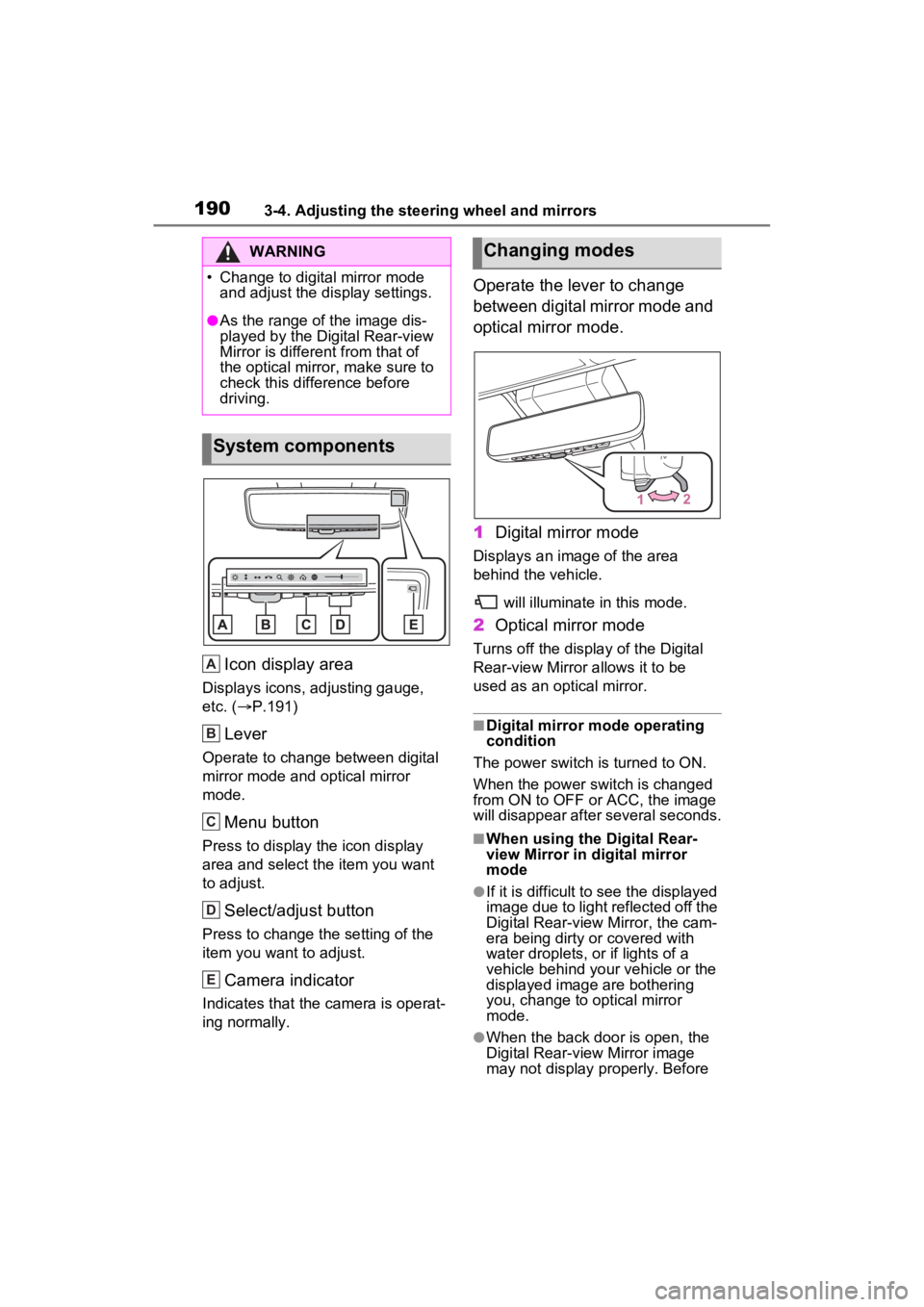
Icon display area
Displays icons, adjusting gauge,
etc. (P.191)
Lever
Operate to change between digital
mirror mode and optical mirror
mode.
Menu button
Press to display the icon display
area and select the item you want
to adjust.
Select/adjust button
Press to change the setting of the
item you want to adjust.
Camera indicator
Indicates that the camera is operat-
ing normally.
Operate the lever to change
between digital mirror mode and
optical mirror mode.
1 Digital mirror mode
Displays an ima ge of the area
behind the vehicle.
will illuminate in this mode.
2Optical mirror mode
Turns off the display of the Digital
Rear-view Mirror allows it to be
used as an optical mirror.
■Digital mirror mode operating
condition
The power switch is turned to ON.
When the power switch is changed
from ON to OFF or ACC, the image
will disappear after several seconds.
■When using the Digital Rear-
view Mirror in d igital mirror
mode
●If it is difficult to see the displayed
image due to light reflected off the
Digital Rear-view Mirror, the cam-
era being dirty or covered with
water droplets, or if lights of a
vehicle behind your vehicle or the
displayed image are bothering
you, change to optical mirror
mode.
●When the back door is open, the
Digital Rear-view Mirror image
may not display properly. Before
WARNING
Page 195 of 600
1943-4. Adjusting the steering wheel and mirrors
■Cleaning the mirror surface
If the mirror surface is dirty, the
image on the display may be dif-
ficult to see.
Clean the mirror surface gently
using a soft dry cloth.
■Cleaning the camera
If the camera lens is dirty or cov-
ered with foreign matter, such
as water droplets, snow, mud,
etc., the displayed image may
not be clear. In this case, rinse
the camera lens with a large
quantity of water and then wipe
it clean with a soft cloth damp-
ened with water.
Dirt on the camera lens can be
cleaned by operating the dedi-
cated camera cleaning washer.
( P.259)
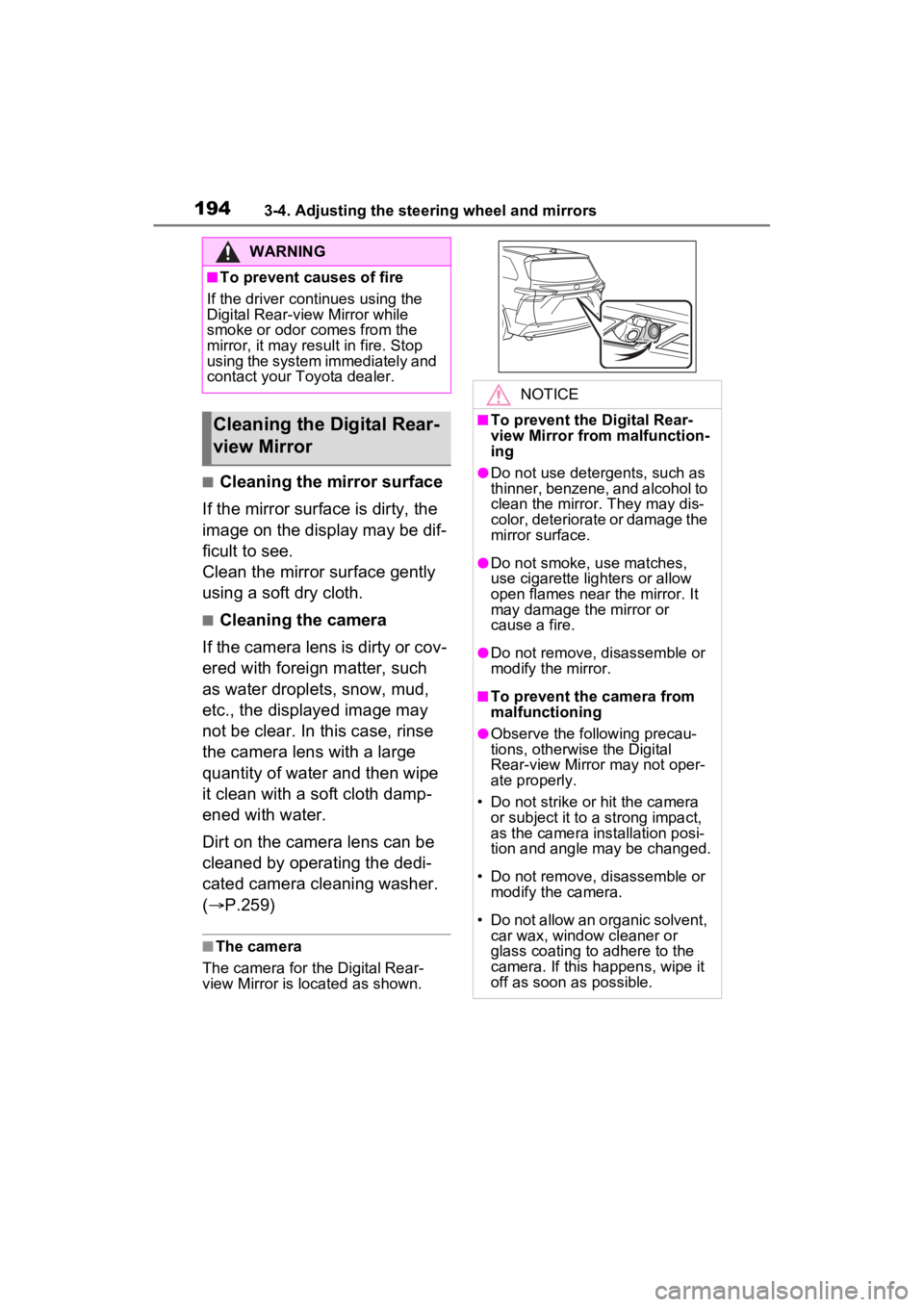
■The camera
The camera for the Digital Rear-
view Mirror is located as shown.
WARNING
■To prevent causes of fire
If the driver continues using the
Digital Rear-view Mirror while
smoke or odor comes from the
mirror, it may res ult in fire. Stop
using the system immediately and
contact your Toyota dealer.
Cleaning the D igital Rear-
view Mirror
NOTICE
■To prevent the Digital Rear-
view Mirror from malfunction-
ing
●Do not use detergents, such as
thinner, benzene, and alcohol to
clean the mirror. They may dis-
color, deteriorate or damage the
mirror surface.
●Do not smoke, use matches,
use cigarette lighters or allow
open flames near the mirror. It
may damage the mirror or
cause a fire.
●Do not remove, d isassemble or
modify the mirror.
■To prevent the camera from
malfunctioning
●Observe the fo llowing precau-
tions, otherwise the Digital
Rear-view Mirror may not oper-
ate properly.
• Do not strike or hit the camera or subject it to a strong impact,
as the camera installation posi-
tion and angle may be changed.
• Do not remove, disassemble or modify the camera.
• Do not allow an organic solvent, car wax, window cleaner or
glass coating to adhere to the
camera. If this happens, wipe it
off as soon as possible.
Page 197 of 600
1963-4. Adjusting the steering wheel and mirrors
SymptomLikely causeSolution
The image is difficult to
see.
The mirror surface is
dirty.Clean the mirror surface
gently, using a soft dry
cloth.
Sunlight or headlights
are shining directly into
the Digital Rear-view
Mirror.
Change to optical mirror
mode.
(If the light is coming
through the moon roof [if
equipped], close the
sunshade.)
• T h e v e h i c l e i s i n a d a r k area.
• The vehicle is near a TV tower, broadcast-
ing station, electric
power plant, or other
location where strong
radio waves or electri-
cal noise may be pres-
ent.
• The temperature around the camera is
extremely high/low.
• The ambient tempera- ture is extremely low.
• It is raining or humid.
• Sunlight or headlights are shining directly into
the camera lens.
• The vehicle is under fluorescent lights,
sodium lights, mer-
cury lights, etc.
• Exhaust gas is obstructing the cam-
era.
Change to optical mirror
mode.
(Change back to digital
mirror mode when the
conditions have
improved.)
Page 210 of 600
209
4
4
Driving
Driving
4-1. Before drivingDriving the vehicle....... 210
Cargo and luggage ..... 217
Vehicle load limits ....... 220
Trailer towing (without tow- ing package).............. 221
Trailer towing (with towing package) ................... 222
Dinghy towing ............. 232
4-2. Driving procedures Power (ignition) switch 233
EV drive mode ............ 238
Hybrid transmission .... 240
Turn signal lever ......... 244
Parking brake .............. 245
Brake Hold .................. 248
4-3. Operating the lights and wipers
Headlight switch .......... 250
AHB (Automatic High Beam)........................ 252
Fog light switch ........... 256
Windshield wipers and washer....................... 256
Rear window wiper and washer....................... 259
4-4. Refueling Opening the fuel tank cap.................................. 2614-5. Using the dr
iving support
systems
Toyota Safety Sense 2.0 .................................. 264
PCS (Pre-Collision System) .................................. 269
LTA (Lane Tracing Assist) .................................. 277
RSA (Road Sign Assist) .................................. 287
Dynamic radar cruise con- trol with full-speed range
.................................. 290
BSM (Blind Spot Monitor) .................................. 301
Intuitive parking assist . 311
RCD (Rear Camera Detec- tion) function .............. 319
PKSB (Parking Support Brake) ........................ 323
Parking Support Brake func- tion (static objects) .... 328
Parking Support Brake func- tion (rear-crossing vehi-
cles) ........................... 331
Driving mode select switch .................................. 333
Driving assist systems. 334
4-6. Driving tips Hybrid vehicle driving tips.................................. 341
Winter driving tips........ 343