Page 87 of 592
87
Instrument cluster2
SEQUOIA_OM_USA_OM0C047U2. Instrument cluster
Warning lights and indicators .......................... 88
Gauges and meters ............ 94
Multi-information display ..... 98
Fuel consumption information ...................... 104
Page 90 of 592
902. Instrument cluster
SEQUOIA_OM_USA_OM0C047U
*1: These lights turn on when the engine switch is turned to ON to indicate thata system check is being performed. They will turn off after the engine is
started, or after a few seconds. There may be a malfunction in a system if
the lights do not come on, or do not turn off. Have the vehicle inspected by
your Toyota dealer.
*2: The light illuminates on the multi-information display.
*3: The light comes on to indicate a malfunction.
Low fuel level warning
light ( P. 474)*1
Tire pressure warning
light (P. 474)
*1
Seat belt reminder light
(P. 474)*1
Master warning light
(P. 474)
Page 94 of 592
942. Instrument cluster
SEQUOIA_OM_USA_OM0C047U
Gauges and meters
Tachometer
Displays the engine speed in revolutions per minute
Engine oil pressure gauge
Displays the engine oil pressure
Outside temperature display
Displays the outside temperature within the range of -40 °F (-40 °C) to
122 °F (50 °C). Low outside temperature indicator comes on when the
ambient temperature is 37 ° F (3 °C) or lower.
Multi-information display
Presents the driver with a variety of vehicle data ( P. 98)
Displays warning messages in case of a malfunction ( P. 481)
Vo l t m e t e r
Displays the charge state
Speedometer
Displays the vehicle speed
Odometer/Trip meter switching and trip meter resetting button
P. 9 5
Fuel gauge
Displays the quantity of fuel remaining in the tank
The displayed content may differ depending on the type of
meter.
Page 99 of 592
992. Instrument cluster
2
Instrument cluster
SEQUOIA_OM_USA_OM0C047U■
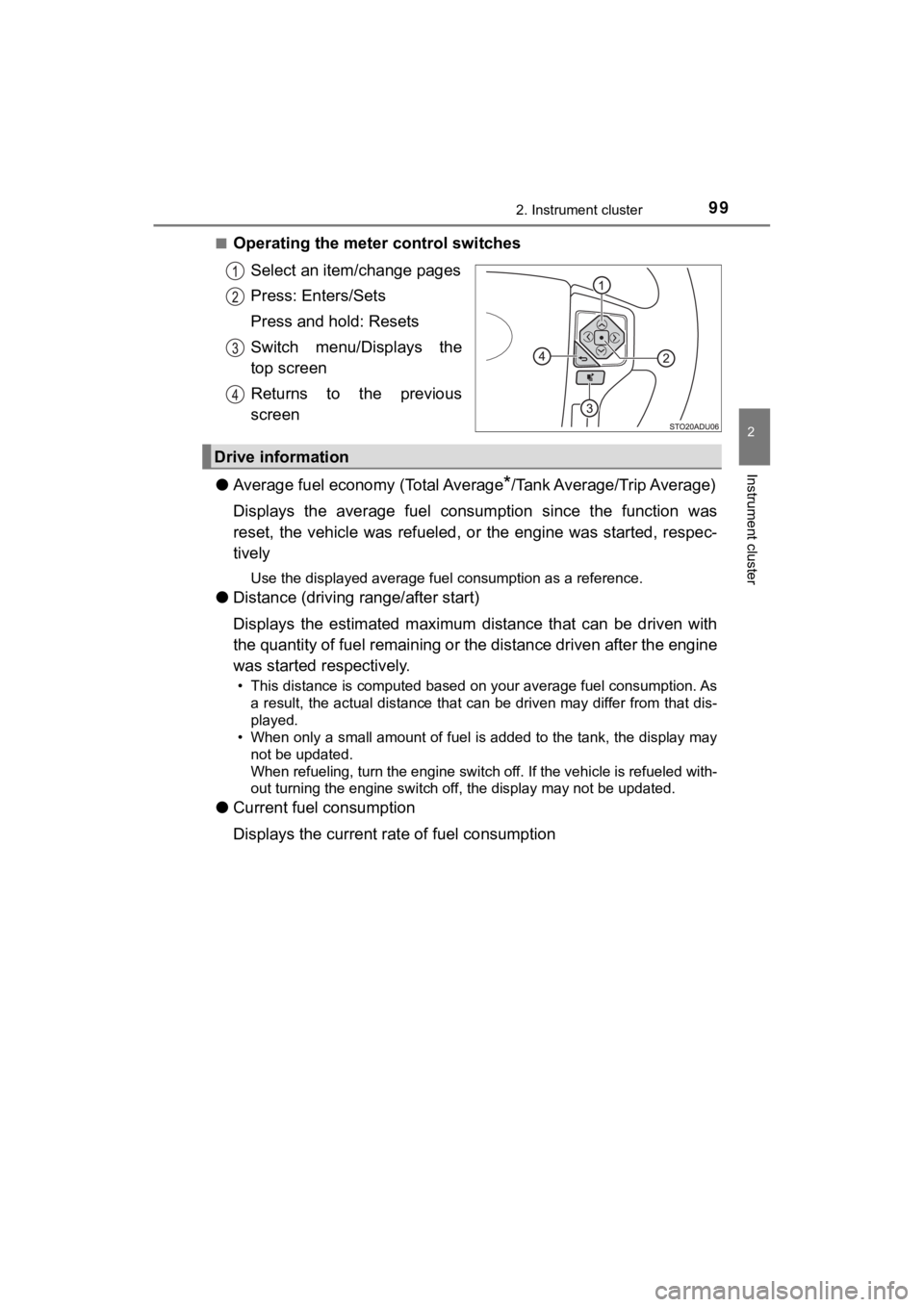
Operating the meter control switches
Select an item/change pages
Press: Enters/Sets
Press and hold: Resets
Switch menu/Displays the
top screen
Returns to the previous
screen
● Average fuel economy (Total Average
*/Tank Average/Trip Average)
Displays the average fuel consum ption since the function was
reset, the vehicle was refueled , or the engine was started, res pec-
tively
Use the displayed average fuel consumption as a reference.
● Distance (driving range/after start)
Displays the estimated maximum distance that can be driven with
the quantity of fuel remaining or the distance driven after the engine
was started respectively.
• This distance is computed based on your average fuel consumpti on. As
a result, the actual distance that can be driven may differ fro m that dis-
played.
• When only a small amount of fuel is added to the tank, the dis play may
not be updated.
When refueling, turn the engine switch off. If the vehicle is r efueled with-
out turning the engine switch off, the display may not be updat ed.
●Current fuel consumption
Displays the current rat e of fuel consumption
Drive information
Page 101 of 592
1012. Instrument cluster
2
Instrument cluster
SEQUOIA_OM_USA_OM0C047U
●Vehicle Settings
•Brightness ( P. 552)
Select to set up the BSM (Blind Spot Monitor) outside rear view mirror
indicators brightness.
•RCTA volume ( P. 552)
Select to set up the RCTA (Rear Cross Traffic Alert) sensitivit y.
• Maintenance system (U.S.A. only)
Select to reset the message after the required maintenance is p er-
formed. (P. 408)
● Meter settings
• Language
Select to change the language on the display.
•Units
Select to change the unit of measure for fuel consumption and t empera-
ture.
• Switch settings
You can register 1 screen as the top screen. To register, press and hold
while the desired screen is displayed.
• Drive information 1 and 2
Select to select up to 2 items that will be displayed on a Driv e informa-
tion screen, up to 2 Drive information screens can be set.
• Pop-up display
Select to set the following pop-up displays, which may appear i n some
situations, on/off. • Instrument panel brightness adjustment display
• Route guidance display of the navigation system-linked system (if
equipped)
• Incoming call display of the hands-free phone system
• Accent color
Select to change the accent colors on the screen, such as the c ursor
color.
• Default settings
Registered or changed meter settings will be deleted or returne d to their
default setting.
Page 102 of 592

1022. Instrument cluster
SEQUOIA_OM_USA_OM0C047U
■Setting items
●“Vehicle Settings” and “Meter Settings” setting items are not s electable
during driving and cannot be operated.
Also, the settings screen is temporarily canceled in the follow ing situations.
• A warning message is displayed.
• The vehicle starts off.
● Settings for functions not equipped to the vehicle are not disp layed.
● When a function is turned off, the related settings for that fu nction are not
selectable.
■ Pop-up display
In some situations, such as when a switch operation is performe d, a pop-up
display will be temporarily displayed on the multi-information display.
■ When disconnecting and reco nnecting battery terminals
The drive information will be reset.
■ Trip Summary display
When the engine switch is turned off, each of the following wil l be displayed
on the multi-information display, and will extinguish after approximately
30 seconds.
● Distance traveled
● Average fuel economy
● Driving range
■ Tire inflation pressure
●It may take a few minutes to display the tire inflation pressur e after the
engine switch is turned to ON. It may also take a few minutes t o display the
tire inflation pressure after inflation pressure has been adjusted.
● “---” may be displayed if the tire position information cannot be determined
due to unfavorable radio wave conditions.
● Tire inflation pressure changes with temperature. The displayed values may
also be different from the values measured using a tire pressur e gauge.
■ Liquid crystal display
Small spots or light spots may appear on the display. This phen omenon is
characteristic of liquid crystal displays, and there is no prob lem continuing to
use the display.
Page 104 of 592
1042. Instrument cluster
SEQUOIA_OM_USA_OM0C047U
Fuel consumption information
Press the “APPS” button, and then select “Eco” on the screen.
■Trip information
If the “Past Record” screen is displayed, select “Trip Informat ion”.
Resetting the consumption
data
Average vehicle speed since
the engine was started
Elapsed time since the
engine was started
Fuel consumption in the past
15 minutes
Cruising range ( P. 105)
Current fuel consumption
Average fuel consumption for the past 15 minutes is divided by
color into past averages and averages attained since the engine
switch was last turned to ON. Use the displayed average fuel co n-
sumption as a reference.
These images are examples only.
The fuel consumption information can be displayed on the navi-
gation system or multimedia system screen.
Display the trip information or past record screen
Fuel consumption
Page 105 of 592

1052. Instrument cluster
2
Instrument cluster
SEQUOIA_OM_USA_OM0C047U■
Past record
If the “Trip Information” screen is displayed, select “Past Record”.
Resetting the past record
data
Best recorded fuel consump-
tion
Average fuel consumption (if
equipped)
Previous fuel consumption
record
Update the average fu el consumption data
The average fuel consumption history is divided by color into p ast
averages and the average fuel con sumption since the last updated.
Use the displayed average fuel consumption as a reference.
These images are examples only.
■ Resetting the data
The fuel consumption data can be deleted by selecting “Clear”.
■ Updating the past record data
Update the average fuel consumption by selecting “Update” to me asure the
current fuel consumption again.
■ Cruising range
Displays the estimated maximum distance that can be driven with the quan-
tity of fuel remaining.
This distance is computed based on your average fuel consumptio n. As a
result, the actual distance that can be driven may differ from that displayed.


