2022 TOYOTA RAV4 HYBRID cruise control
[x] Cancel search: cruise controlPage 273 of 752
2734-5. Using the driving support systems
4
Driving
When depressing the acceler-
ator pedal
When constant speed control
mode is selected, your vehicle
will maintain a set speed without
controlling the vehicle-to-vehi-
cle distance. Select this mode
only when vehicle-to-vehicle dis-
tance control mode does not
function correctly due to a dirty
radar, etc.
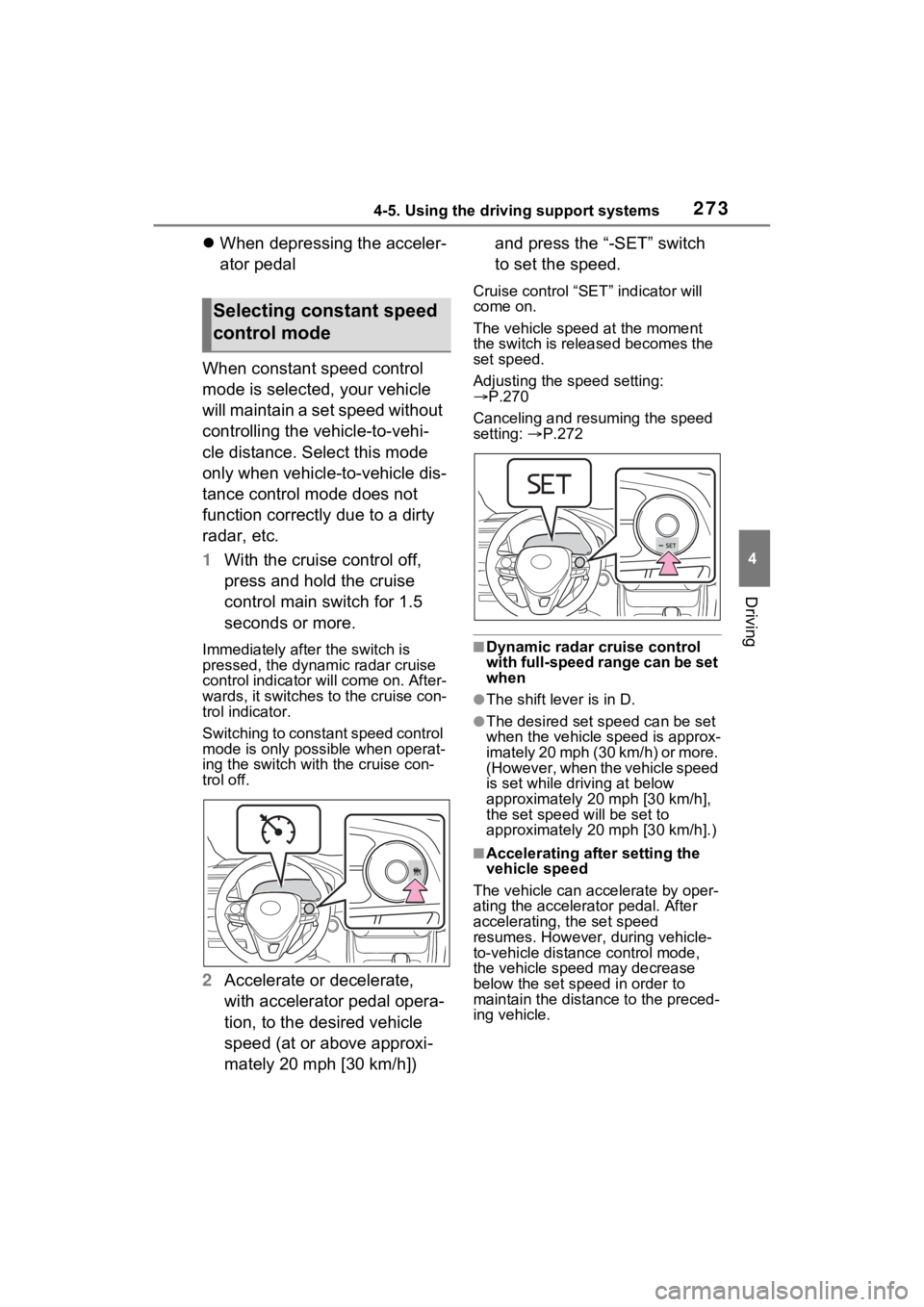
1 With the cruise control off,
press and hold the cruise
control main switch for 1.5
seconds or more.
Immediately after the switch is
pressed, the dynamic radar cruise
control indicator will come on. After-
wards, it switches to the cruise con-
trol indicator.
Switching to constant speed control
mode is only possible when operat-
ing the switch wit h the cruise con-
trol off.
2 Accelerate or decelerate,
with accelerator pedal opera-
tion, to the desired vehicle
speed (at or above approxi-
mately 20 mph [30 km/h]) and press the “-SET” switch
to set the speed.
Cruise control “SET” indicator will
come on.
The vehicle speed at the moment
the switch is released becomes the
set speed.
Adjusting the speed setting:
P.270
Canceling and resuming the speed
setting: P.272
■Dynamic radar cruise control
with full-speed range can be set
when
●The shift lever is in D.
●The desired set speed can be set
when the vehicle speed is approx-
imately 20 mph (30 km/h) or more.
(However, when the vehicle speed
is set while driving at below
approximately 20 mph [30 km/h],
the set speed w ill be set to
approximately 20 mph [30 km/h].)
■Accelerating after setting the
vehicle speed
The vehicle can a ccelerate by oper-
ating the accelera tor pedal. After
accelerating, the set speed
resumes. However, during vehicle-
to-vehicle distance control mode,
the vehicle speed may decrease
below the set speed in order to
maintain the distance to the preced-
ing vehicle.
Selecting constant speed
control mode
Page 274 of 752

2744-5. Using the driving support systems
■When the vehicle stops while
follow-up cruising
●Pressing the “+RES” switch while
the vehicle ahead stops will
resume follow-up cruising if the
vehicle ahead starts off within
approximately 3 seconds after the
switch is pressed.
●If the vehicle ahead starts off
within 3 seconds after your vehicle
stops, follow-up cruising will be
resumed.
■Automatic cancelation of vehi-
cle-to-vehicle distance control
mode
Vehicle-to-vehicle distance control
mode is automatically canceled in
the following situations.
●VSC is activated.
●TRAC is activated for a period of
time.
●When the VSC or TRAC system is
turned off.
●The sensor cannot detect cor-
rectly because i t is covered in
some way.
●When the brake control or output
restriction control of a driving sup-
port system operates.
(For example: Pre-Collision Sys-
tem, Drive-Start Control)
●The parking brake is operated.
●The vehicle is stopped by system
control on a steep incline.
●The following are detected when
the vehicle has been stopped by
system control:
• The driver is not wearing a seat
belt.
• The driver’s door is opened.
• The vehicle has been stopped for about 3 minutes
If vehicle-to-vehicle distance control
mode is automatically canceled for
any reasons other than the above,
there may be a malfunction in the
system. Contact your Toyota dealer.
■Automatic cancelation of con-
stant speed control mode
Constant speed control mode is
automatically cance led in the follow-
ing situations:
●Actual vehicle speed is more than
approximately 10 mph (16 km/h)
below the set vehicle speed.
●Actual vehicle speed falls below
approximately 20 mph (30 km/h).
●VSC is activated.
●TRAC is activated for a period of
time.
●W h en t he V S C o r T RA C sys te m is
turned off.
●When the brake control or output
restriction control of a driving sup-
port system operates.
(For example: Pre-Collision Sys-
tem, Drive-Start Control)
If constant speed control mode is
automatically canceled for any rea-
sons other than the above, there
may be a malfunction in the system.
Contact your Toyota dealer.
■Brake operation
A brake operation sound may be
heard and the brake pedal response
may change, but these are not mal-
functions.
■Warning messages and buzzers
for dynamic radar cruise con-
trol with full-speed range
Warning messages and buzzers are
used to indicate a system malfunc-
tion or to inform the driver of the
need for caution while driving. If a
warning message is shown on the
multi-information display, read the
message and follow the instructions.
( P.242, 635)
■When the sensor may not be
correctly detecting the vehicle
ahead
In the case of the following and
depending on the conditions, oper-
ate the brake pedal when decelera-
Page 636 of 752

6368-2. Steps to take in an emergency
port systems such as PCS (Pre-
Collision system) or the dynamic
radar cruise control with full-speed
range is operating. If a warning
message is shown, be sure to
decelerate the vehicle or follow an
instruction show n on the multi-
information display.
• A warning message is shown
when Brake Override System
operates. ( P.184)
• A warning message is shown
when Drive-Start Control or Park-
ing Support Brake (if equipped)
( P.189, 295) operates. Follow
the instructions o n the multi-infor-
mation display.
●If a message about an operation
of the power switch is shown (if
equipped)
An instruction for operation of the
power switch is shown when the
incorrect procedure for starting the
hybrid system is performed or the
power switch is operated incorrectly.
Follow the instructions shown on the
multi-information display to operate
the power switch again.
●If a message abou t a shift lever
operation is shown
To prevent the shift lever from being
operated incorrectly or the vehicle
from moving unexpectedly, a mes-
sage that requires shifting the shift
lever may be sho wn on the multi-
information display. In that case, fol-
low the instruction of the message
and shift the shift lever.
●If a message or image about an
open/close state of a part or
replenishment of a consumable is
shown
Confirm the part indicated by the
multi-information display or a warn-
ing light, and then perform the cop-
ing method such as closing the
open door or replenishing a con- sumable.
■If a message that indicates the
need for visiting your Toyota
dealer is displayed
The system or part shown on the
multi-information di splay is malfunc-
tioning. Have the vehicle inspected
by your Toyota dea ler immediately.
■If a message that indicates the
need for referring to Owner’s
Manual is displayed
●If “Engine Coolant Temp High” is
shown, follow the instructions
( P.659).
●If the following messages are
shown, there may be a malfunc-
tion.
Immediately have the vehicle
inspected by your Toyota dealer.
• “Hybrid System Malfunction”
• “Check Engine”
• “Hybrid Battery System Malfunc-
tion”
• “Accelerator System Malfunction”
• “Smart Key System Malfunction”
●If the following messages are
shown, there may be a malfunc-
tion.
Immediately stop the vehicle in a
safe place and contact your Toyota
dealer. Continuing to drive the vehi-
cle may be dangerous.
• “Oil Pressure Low”
• “Braking Power Low”
●If “Maintenance Required for Trac-
tion Battery Cooling Parts See
Owner’s Manual” is shown, the fil-
ter may be clogged, the air intake
vent may be blocked, or there may
be a gap in the duct. Therefore,
perform the follo wing correction
procedure.
• If the air intake vent or filter of the hybrid battery (traction battery)
are dirty, perform the procedures
on P.593 to clean them.
• If the warning message is shown when the air intake vent and filter
of the hybrid battery (traction bat-
Page 638 of 752

6388-2. Steps to take in an emergency
■If “Maintenance Required Visit
Your Dealer” is shown
Indicates that all maintenance is
required to correspond to the driven
distance on the maintenance sched-
ule
*.
Comes on approximately 5000
miles (8000 km) after the message
has been reset. (The indicator will
not work properly unless the mes-
sage has been reset.)
Perform the necessary mainte-
nance. Please reset the message
after the maintenance is performed.
( P.561)
*: Refer to the separate “Scheduled
Maintenance Guide” or “Owner’
Manual Supplement” for the main-
tenance interval applicable to your
vehicle.
■If a message that indicates the
malfunction of front camera is
displayed
The following sys tems may be sus-
pended until the pr oblem shown in
the message is resolved. ( P.242,
624)
●PCS (Pre-Collis ion System)
●LTA (Lane Tracing Assist)
●AHB (Automatic High Beam)
●RSA (Road Sign Assist)*
●Dynamic radar cruise control with
full-speed range
*: If equipped
■If a message that indicates the
malfunction of radar sensor is
displayed
The following sys tems may be sus-
pended until the pr oblem shown in
the message is resolved. ( P.242,
P.624)
●PCS (Pre-Collis ion System)
●LTA (Lane Tracing Assist)
●Dynamic radar cruise control with
full-speed range
■If “Radar Cruise Control
Unavailable See Owner’s Man-
ual” is shown
The dynamic radar cruise control
with full-speed range system is sus-
pended temporarily or until the prob-
lem shown in the message is
resolved. (causes and coping meth-
ods: P.242)
■If “Radar Cruise Control
Unavailable” is shown
The dynamic radar cruise control
with full-speed range system cannot
be used temporarily. Use the sys-
tem when it becomes available
again.
■Warning buzzer
P.632
WARNING
■If a warning light comes on or
a warning buzzer sounds
when a warning message is
shown on the multi-informa-
tion display
P.633
NOTICE
■“High Power Consumption
Partial Limit On AC/Heater
Operation” is frequently
shown
There is a possible malfunction
relating to the charging system or
the 12-volt battery may be deteri-
orating. Have the vehicle
inspected by your Toyota dealer.
Page 647 of 752
6478-2. Steps to take in an emergency
8
When trouble arises
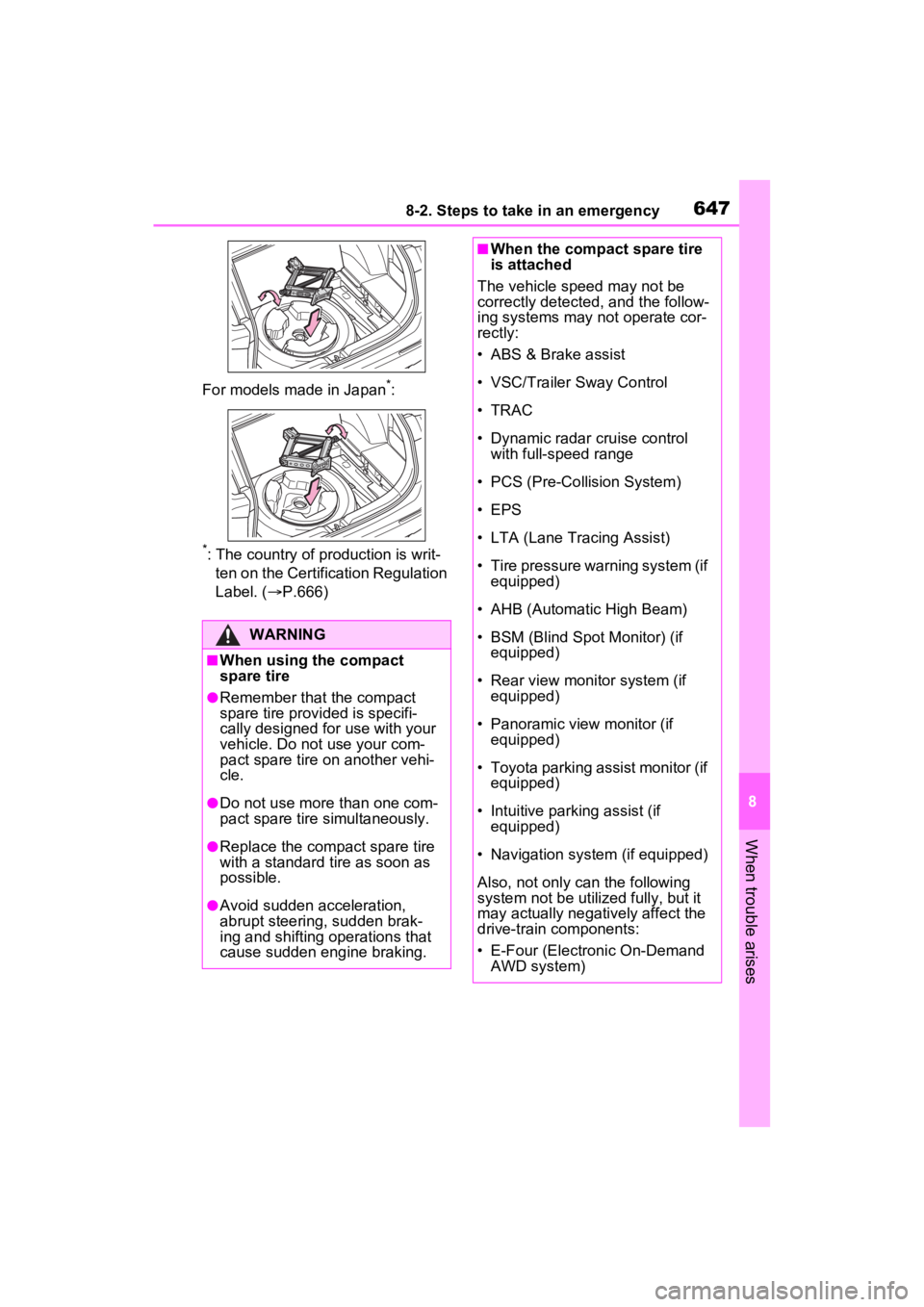
For models made in Japan*:
*: The country of production is writ-
ten on the Certific ation Regulation
Label. ( P.666)
WARNING
■When using the compact
spare tire
●Remember that the compact
spare tire provided is specifi-
cally designed for use with your
vehicle. Do not use your com-
pact spare tire on another vehi-
cle.
●Do not use more than one com-
pact spare tire simultaneously.
●Replace the compact spare tire
with a standard tire as soon as
possible.
●Avoid sudden acceleration,
abrupt steering, sudden brak-
ing and shifting operations that
cause sudden engine braking.
■When the compact spare tire
is attached
The vehicle speed may not be
correctly detected, and the follow-
ing systems may not operate cor-
rectly:
• ABS & Brake assist
• VSC/Trailer Sway Control
• TRAC
• Dynamic radar cruise control with full-speed range
• PCS (Pre-Collision System)
• EPS
• LTA (Lane Tracing Assist)
• Tire pressure warning system (if equipped)
• AHB (Automatic High Beam)
• BSM (Blind Spot Monitor) (if equipped)
• Rear view monitor system (if equipped)
• Panoramic view monitor (if equipped)
• Toyota parking assist monitor (if equipped)
• Intuitive parking assist (if equipped)
• Navigation system (if equipped)
Also, not only c an the following
system not be utilized fully, but it
may actually negatively affect the
drive-train components:
• E-Four (Electronic On-Demand
AWD system)
Page 721 of 752

Alphabetical Index721
Instrument panel light control94, 100
BSM (Blind Spot Monitor) ...... 276 Blind Spot Monitor function .. 280
Rear Cross Traffic Alert function........................................... 283
C
Care Aluminum wheels ................. 554
Exterior ................................. 554
Interior .................................. 557
Seat belts ............................. 557
Cargo capacity ............... 190, 193
Cargo hooks ........................... 531
Chains ..................................... 371
Child-protectors ..................... 128
Child restraint s ystem ............. 52
Fixed with a LATCH system ... 61
Fixed with a seat belt ............. 56
Front passenger occupant clas- sification system ................... 45
Points to remember ................ 52
Riding with children ................ 51
Types of child restraint system installation met hod ............... 54
Using an anchor bracket ........ 63
Child safety ............................... 51 12-volt battery precautions . 576, 658
Airbag precautions ................. 40
Back door precautions ......... 129
Child restraint system............. 54
Heated steering wheel and seat
heater precautions ............. 521
How your child should wear the seat belt................................ 32
Moon roof precau tions ......... 175
Panoramic moon roof precau- tions.................................... 179
Power window lock switch.... 173
Power window precautions .. 172 Rear door child-protectors ....128
Removed key battery precau-
tions ....................................602
Seat belt extender precautions .............................................32
Seat belt precautions..............31
Seat heater precautions .......521
Cleaning ..........................554, 557 Aluminum wheels .................554
Exterior .................................554
Interior ..................................557
Radar sensor ........................240
Seat belts .............................557
Clock ..................................95, 100
Coat hooks ..............................545
Command list ..........................463
Condenser ............. ..................573
Connected Service s ...............499
Console box ............................528
Consumption screen ..............111
Convenience Services (Sugges- tion function).........................110
Coolant Checking ..............................572
Preparing and checking before winter ..................................369
Warning light ........................625
Cooling system .......................572 Hybrid system overheating ...659
Cruise control Dynamic radar cruise control with full-speed range ..........265
Cup holders.............................528
Current fuel consumption......113
Current fuel economy ............103
Curtain shield airbags ..............35
Customizable featu res ...........687
D
Daytime running light system225
Replacing light bulbs ............607
DCM .................500, 502, 503, 506
Page 722 of 752

722Alphabetical Index
Deck board .............................. 531
DefoggerOutside rear view mirrors ..... 516
Rear window ........................ 516
Windshield............................ 516
Digital Rear-view Mirror ......... 160
Dimensions ............................. 666
Dinghy towing ........................ 203
Display BSM (Blind Spot Monitor)..... 277
Consumption screen ............ 111
Drive information .................. 106
Driving information ............... 103
Dynamic radar cruise control with full-speed range .......... 265
Energy monitor ..................... 111
Intuitive parking assist .......... 287
LTA (Lane Tracing Assist).... 258
Multi-information display ...... 101
RCTA ................................... 277
Warning messages .............. 635
Do-it-yourself maintenance . 561, 565
Door lock Back door ............................. 129
Side doors ............................ 123
Smart key system................. 143
Wireless remote control ....... 120
Doors Automatic door locking and unlocking system................ 128
Back door ............................. 129
Door glasses ........................ 171
Door lock .............................. 123
Open door warning buzzer ... 127
Outside rear view mirrors ..... 169
Rear door child-protectors.... 128
Side doors ............................ 123
Drive information ................... 106
Driver’s seat belt reminder light ............................................... 631
Driver’s seat position memory ...............................................151
Driving position memory .......151
Memory recall function .........153
Drive-Start Control (DSC) Sudden start restraint control189
Driving Break-in tips .........................184
Correct posture .......................29
Driving mode select switch ...358
Hybrid Electric Vehicle driving tips ......................................367
Procedures ...........................183
Winter drive tips....................369
Driving informatio n display ...103
Driving mode select switch ...358
Driving position memory .......151 Memory recall function .........153
Driving support system informa- tion display............................105
DSC (Drive-Start Control) Sudden start restraint control189
Dynamic radar cruise control with full-speed rangeFunction................................265
Warning message . ...............635
E
ECB (Electronically Controlled
Brake System).......................361
Eco drive mode .......................358
EDR (Event data recorder) .......10
E-Four (Electronic On-Demand AWD system) ........................362
Elapsed time ...........................106
Electric motor Location ..................................72
Specification .........................668
Electric Power Steering (EPS) Function................................362
Warning light ........................626
Electronically Controlled Brake System (ECB) ........................361
Page 727 of 752

Alphabetical Index727
Meters .............................. 92, 96
Multi-information display ...... 101
Settings ........................ 107, 688
Units ............................. 109, 689
Warning lights ................ 87, 624
Warning messages ...... 110, 635
Meter control switches .......... 102
Microphone ............................. 472
Mirrors Digital Rear-view Mirror........ 160
Inside rear view mirror.......... 158
Outside rear view mirror defog-gers .................................... 516
Outside rear view mirrors ..... 169
Vanity mirrors ....................... 536
Mobile Assistant .. ................... 467
Connectable devices and avail- able functions ..................... 467
Mobile Assistant operation ... 467
Moon roof Door lock linked moon roof oper-ation ................................... 174
Jam protection function ........ 174
Operation ............................. 174
Warning message ................ 175
Multi-information display Audio system-linked display . 106
Changing the display............ 102
Convenience Services (Sugges-tion function)............... 110, 689
Display contents ................... 101
Driving information display ... 103
Driving support system informa- tion display ......................... 105
Dynamic radar cruise control with full-speed range .......... 265
Hybrid System Indicator ... 93, 98
Intuitive parking assist-sensor ........................................... 287
Language ..................... 109, 689
LTA (Lane Tracing Assist).... 258
Menu icons ........................... 102 Meter control switches..........102
Navigation system-linked display
...........................................106
PCS (Pre-Collisio n System) .244
Pop-up display..............109, 689
Settings ........................107, 688
Tire pressure ...... ..................581
Units .............................109, 689
Vehicle information display...106
Warning message display ....110
Warning messages ...............635
N
Navigation system-linked display
...............................................106
Noise from under ve hicle...........8
Normal mode...........................358
O
Odometer.............................92, 96
Odometer and trip meter display “ODO TRIP” switch ...........94, 99
“ODO TRIP” switch ............94, 99
Oil Engine oil..............................668
Opener Back door .....................131, 133
Hood .....................................567
Outer foot lights Replacing light bulbs ............607
Wattage ................................674
Outside rear view mirrors ......169 Adjusting and folding ............169
BSM (Blind Spot M onitor) .....277
Outside rear view mirror defog- gers ....................................516
Outside temperature display .93, 99
Overheating.............................659