2022 TOYOTA PROACE VERSO Charge
[x] Cancel search: ChargePage 166 of 360

166
WARNI NG
If your vehicle has an automatic gearbox, do not try to start the engine by pushing the vehicle.
Drive selector (Electric)
The drive selector is a pulse selector with a regenerative braking function.The drive selector provides traction control based on the driving style, the road profile and the vehicle load.With regenerative braking activated, it also manages engine braking when the accelerator pedal is released.
P.ParkButton for parking the vehicle: the front wheels are locked (the button lights up to indicate that it is activated).
R.ReverseTo engage reverse gear, with your foot on the brake pedal.
N.NeutralTo move the vehicle with the ignition off and so allow it to free-wheel.For more information on Free-wheeling, refer to the corresponding section.
D.Drive (automatic forward gear)
B.Brake (regenerative braking)Button for changing to Drive/automatic forward gear mode with regenerative braking function (the button lights up to indicate that it is activated).
Information displayed on
the instrument panel
When the ignition is switched on, the drive selector status is displayed on the instrument panel:P: Park.R: Reverse.N: Neutral.D: Drive (automatic forward gear).B: Brake (automatic forward gear with regenerative braking function activated).
Operation
► Move the selector by pressing it forwards (N or R) or rearwards (N or D) once or twice, passing the point of resistance if necessary.For example, to change from P to R (with your foot on the brake pedal), either push forwards twice without passing the point of resistance or push just once, passing the point of resistance.
Regenerative braking
With the Brake function and when decelerating
The Brake function emulates engine braking, slowing the vehicle with no need to depress the brake pedal. The vehicle slows more quickly when the driver releases the accelerator pedal.The energy recovered when the accelerator pedal is released is then used to partially recharge the traction battery, thereby increasing the vehicle's driving range.
WARNI NG
The resulting deceleration of the vehicle does not cause the brake lamps to come on.
► From mode D, press button B to activate/deactivate the function (the button lights up when
the function is activated).D on the instrument panel is replaced with B.The system status is saved when the ignition is switched off.
Page 167 of 360
167
Driving
6
WARNI NG
In some situations (e.g. battery full, extreme temperatures), the amount of regenerative braking may be temporarily limited, resulting in less deceleration.The driver must remain alert to traffic conditions and must always be ready to use the brake pedal.
With the brake pedal
When the brake pedal is depressed, the intelligent braking system automatically recovers some of the energy and uses it to recharge the traction battery.This energy recovery also reduces use of the brake pads, thereby limiting their wear.
NOTIC E
The driver may experience a different sensation when depressing the brake pedal compared to a vehicle without regenerative braking.
Driving modes (Electric)
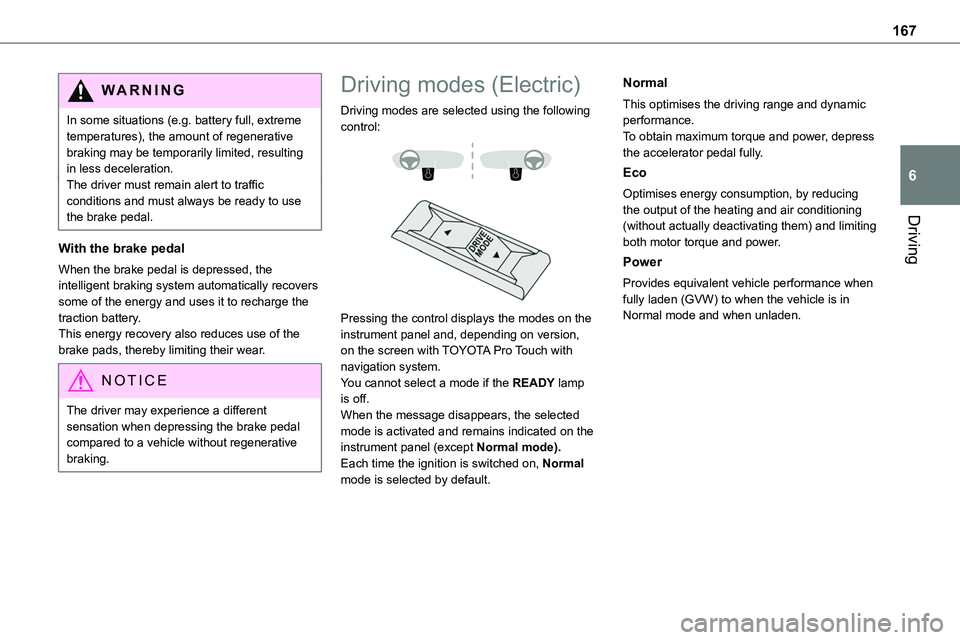
Driving modes are selected using the following control:
Pressing the control displays the modes on the instrument panel and, depending on version, on the screen with TOYOTA Pro Touch with navigation system.You cannot select a mode if the READY lamp is off.When the message disappears, the selected mode is activated and remains indicated on the instrument panel (except Normal mode).Each time the ignition is switched on, Normal mode is selected by default.
Normal
This optimises the driving range and dynamic performance.To obtain maximum torque and power, depress the accelerator pedal fully.
Eco
Optimises energy consumption, by reducing the output of the heating and air conditioning
(without actually deactivating them) and limiting both motor torque and power.
Power
Provides equivalent vehicle performance when fully laden (GVW) to when the vehicle is in Normal mode and when unladen.
Page 168 of 360

168
Stop & Start
The Stop & Start function puts the engine temporarily into standby - STOP mode - during phases when the vehicle is stopped (red lights, queues, etc.). The engine restarts automatically - START mode - as soon as the driver wishes to move off again.Primarily designed for urban use, the function
is intended to reduce fuel consumption and exhaust emissions as well as the noise level when stationary.The function does not affect the functionalities of the vehicle, in particular the braking.
WARNI NG
Driving on flooded roadsBefore entering into a flooded area, it is strongly recommended that you deactivate the Stop & Start system.For more information on Driving recommendations, particularly on flooded roads, refer to the corresponding section.
Deactivation/Reactivation
With audio system
► To deactivate or reactivate the system, press this button.The indicator lamp is lit when the system is deactivated.
With touch screen
The settings are changed via the vehicle configuration menu.
WARNI NG
If the system has been deactivated in STOP mode, the engine restarts immediately.
NOTIC E
The system is reactivated automatically
whenever the engine is started by the driver.
Operation
Main conditions for operation
– The driver’s door must be closed.– The sliding side door must be closed.– The driver's seat belt must be fastened.– The state of charge of the battery must be sufficient.– The temperature of the engine must be within
its nominal operating range.– The outside temperature must be between 0°C and 35°C.
Putting the engine into standby
(STOP mode)
The engine automatically enters standby mode as soon as the driver indicates their intention to stop.With a manual gearbox: at speeds below 12 mph (20 km/h) or with the vehicle stationary (depending on engine), with the gear lever in neutral and the clutch pedal released.With an automatic gearbox: with the brake pedal depressed or the gear selector in position N, with the vehicle stationary.
Time counter
A time counter adds up the time spent in standby during the journey. It is reset to zero every time the ignition is switched on.
Page 201 of 360

201
Practical information
7
WARNI NG
An electric vehicle’s power train can become hot during use and after switching off the ignition.Observe the warning messages shown on labels, particularly inside the flap.All work on or modifications to the vehicle’s electrical system (including the traction
battery, connectors, orange cables and other components visible from the interior or exterior) is strictly prohibited - risk of severe burns or potentially fatal electric shock (short-circuit/electrocution)!In the event of a problem, always contact any authorized Toyota retailer or Toyota authorized repairer, or any reliable repairer.
WARNI NG
This label is intended solely for use by firefighters and maintenance services in the event of any work on the vehicle.No other person must touch the device shown on this label.
WARNI NG
In the event of an accident or impact to the vehicle’s underbodyIn these situations, the electrical circuit or the traction battery can be seriously damaged.Stop as soon as it is safe to do so and switch off the ignition.Contact any authorized Toyota retailer or Toyota authorized repairer, or any reliable repairer.
WARNI NG
In the event of exposure to a fireImmediately exit and evacuate all passengers from the vehicle. Never attempt to fight the fire yourself - risk of electrocution!You must immediately contact the emergency services, informing them that the incident involves an electric vehicle.
WARNI NG
When washingBefore washing the vehicle, always check that the charging flap is closed correctly.Never wash the vehicle while the battery is on charge.
WARNI NG
High-pressure washingTo avoid damaging the electrical components, it is expressly prohibited to use high-pressure washing in the engine compartment or under the body.Do not use a pressure greater than 80 bar when washing the bodywork.
WARNI NG
Never allow water or dust to enter the connector or charging nozzle - risk of electrocution or fire!Never connect / disconnect the charging nozzle or cable with wet hands - risk of electrocution!
Page 202 of 360
202
Traction battery
This battery stores the energy that powers the electric motor and the thermal comfort equipment in the passenger compartment. It is discharged during use, and must therefore be regularly recharged. There is no need to wait for the traction battery to fall to its reserve level before recharging.Battery life may vary according to the type of
driving, the route, thermal comfort equipment usage and battery component ageing.
NOTIC E
The traction battery ageing process is influenced by multiple factors, including climate conditions, the distance travelled and how often it has been fast-charged.
WARNI NG
In the event of damage to the traction batteryIt is strictly prohibited to work on the vehicle yourself.Do not touch liquids coming from the battery, and in the event of skin contact with these products, wash abundantly with water and contact a doctor as soon as possible.Contact any authorized Toyota retailer or Toyota authorized repairer, or any reliable
repairer to have the system checked.
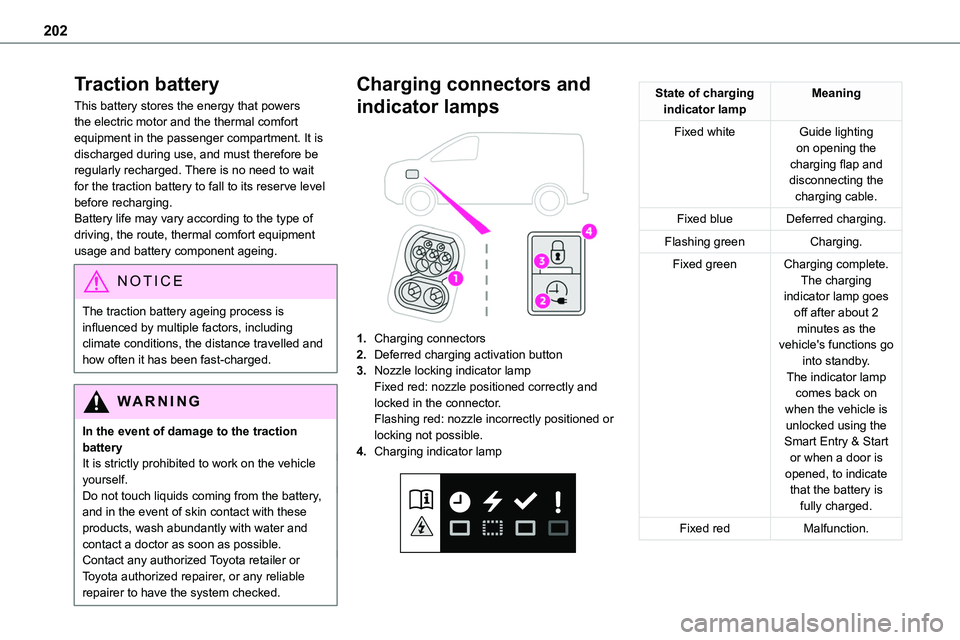
Charging connectors and
indicator lamps
1.Charging connectors
2.Deferred charging activation button
3.Nozzle locking indicator lampFixed red: nozzle positioned correctly and locked in the connector.Flashing red: nozzle incorrectly positioned or
locking not possible.
4.Charging indicator lamp
State of charging indicator lampMeaning
Fixed whiteGuide lighting on opening the charging flap and disconnecting the charging cable.
Fixed blueDeferred charging.
Flashing greenCharging.
Fixed greenCharging complete.The charging indicator lamp goes off after about 2 minutes as the vehicle's functions go into standby.The indicator lamp comes back on when the vehicle is unlocked using the Smart Entry & Start or when a door is opened, to indicate that the battery is fully charged.
Fixed redMalfunction.
Page 203 of 360
203
Practical information
7
WARNI NG
Do not dismantle or modify the charging connector - risk of electrocution and/or fire!Contact any authorized Toyota retailer or Toyota authorized repairer, or any reliable repairer.
Charging cables, sockets
and chargers
The charging cable supplied with the vehicle (depending on version) is compatible with the electrical systems in the country of sale. When
travelling abroad, check the compatibility of local electrical systems with the charging cable.A full range of charging cables is available from your dealer.Contact any authorized Toyota retailer or Toyota authorized repairer, or any reliable repairer for more information and to obtain suitable charging cables.
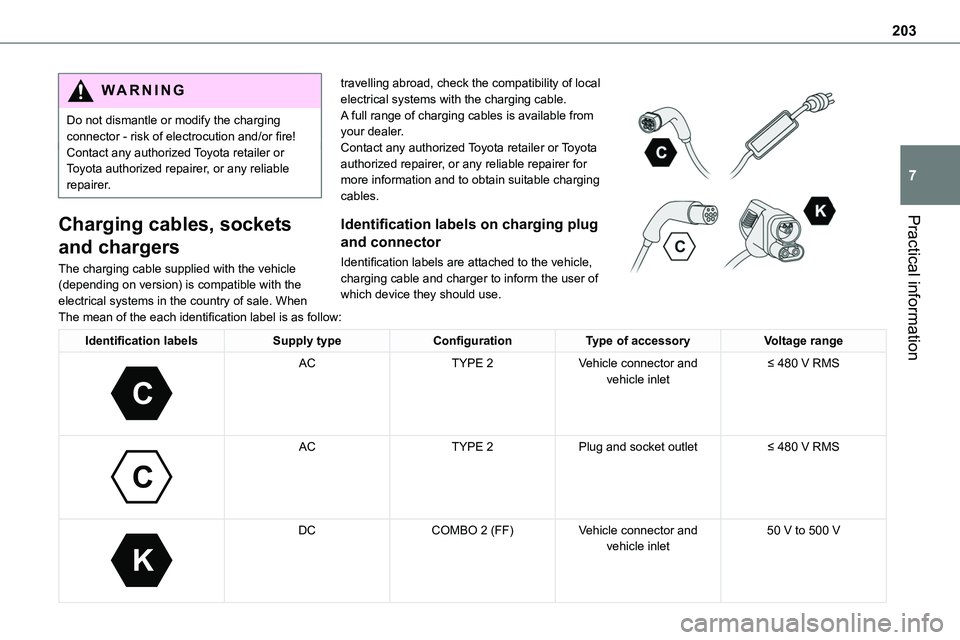
Identification labels on charging plug
and connector
Identification labels are attached to the vehicle, charging cable and charger to inform the user of which device they should use.
The mean of the each identification label is as follow:
Identification labelsSupply typeConfigurationType of accessoryVoltage range
C
ACTYPE 2Vehicle connector and vehicle inlet≤ 480 V RMS
C
ACTYPE 2Plug and socket outlet≤ 480 V RMS
K
DCCOMBO 2 (FF)Vehicle connector and vehicle inlet50 V to 500 V
Page 204 of 360

204
Standard charging, mode 2
Domestic socket(domestic charging - alternating current (AC))
Mode 2 with a standard socket: 10 A maximum charging current.
Mode 2 with a Green'Up socket: 16 A maximum charging current.To have this type of socket installed, call a professional installer.
Specific domestic charging cable - mode 2 (AC)
Identification label C on the charging connector (vehicle side).
WARNI NG
Specific domestic charging cable (mode 2)You must not damage the cable.In the event of damage, do not use it and contact any authorized Toyota retailer or Toyota authorized repairer, or any reliable repairer to replace it.
Control unit (mode 2)
POWERGreen: electrical connection established; charging can begin.CHARGEFlashing green: charging in progress or temperature pre-conditioning activated.
Fixed green: charging complete.FAULTRed: fault; charging not permitted or must be stopped immediately. Check that everything
is connected correctly and that the electrical system is not faulty.If the indicator lamp does not go off, contact any authorized Toyota retailer or Toyota authorized repairer, or any reliable repairer.Upon plugging the charging cable into a domestic socket, all of the indicator lamps come on briefly.If no indicator lamps come on, check the
domestic socket's circuit-breaker:– If the circuit-breaker has tripped, contact a professional to check that the electrical system is compatible and/or carry out any necessary repairs.– If the circuit-breaker has not tripped, stop using the charging cable and contact any authorized Toyota retailer or Toyota authorized repairer, or any reliable repairer.
Control unit label - Recommendations
Refer to the handbook before use.
1.Incorrect use of this charging cable may result in fire, property damage and serious injury or death by electrocution!
2.Always use a correctly earthed power socket, protected by a 30 mA residual current device.
Page 206 of 360

206
POWERCHARGEFAULTSymbolDescription
Not connected to the power supply or power is not available from the infrastructure.
(green)
(green)
(red)
The control unit is currently performing a self-test.
(green)
Connected only to the infrastructure or to the infrastructure and to the Electric Vehicle (EV) but no charging in progress.
(green)
(green)
Connected to the power supply and to the Electric Vehicle (EV).The EV is on charge or in a temperature pre-conditioning sequence.
(green)
(green)
Connected to the power supply and to the Electric Vehicle (EV).The EV is waiting for charging or the charging of the EV is completed.
(red)
Control unit malfunction. No charging allowed.If an error indicator reappears after a manual reset, the control unit must be checked by any authorized Toyota retailer or Toyota authorized repairer, or any reliable repairer before the next charge.
(green)
(green)
(red)
The control unit is in diagnostic mode.