2022 TOYOTA MIRAI ESP
[x] Cancel search: ESPPage 139 of 556
1394-3. Adjusting the seats
Owners Manual_USA_M62084_en
4
Before driving
If 2 or more keys are in the vehi-
cle, the driving position cannot
be canceled properly.
1 Turn the power switch to ON.
2 Check that the shift position
is in P.
3 While pressing the “SET” but-
ton, press and hold the door
lock switch (either lock or
unlock) until the buzzer
sounds twice.
If the button could not be canceled,
the buzzer sounds continuously for
approximately 3 seconds.
■Recalling the dr iving position
using the memory recall func-
tion
●Different driving positions can be
registered for each electronic key.
Therefore, the driving position that
is recalled may be different
depending on the key being car-
ried.
●If a door other th an the driver’s
door is unlocked with the smart
key system, the dr iving position
cannot be recalled. In this case,
press the driving position button
which has been set.
■Customization
Some functions can be customized.
( P.498)
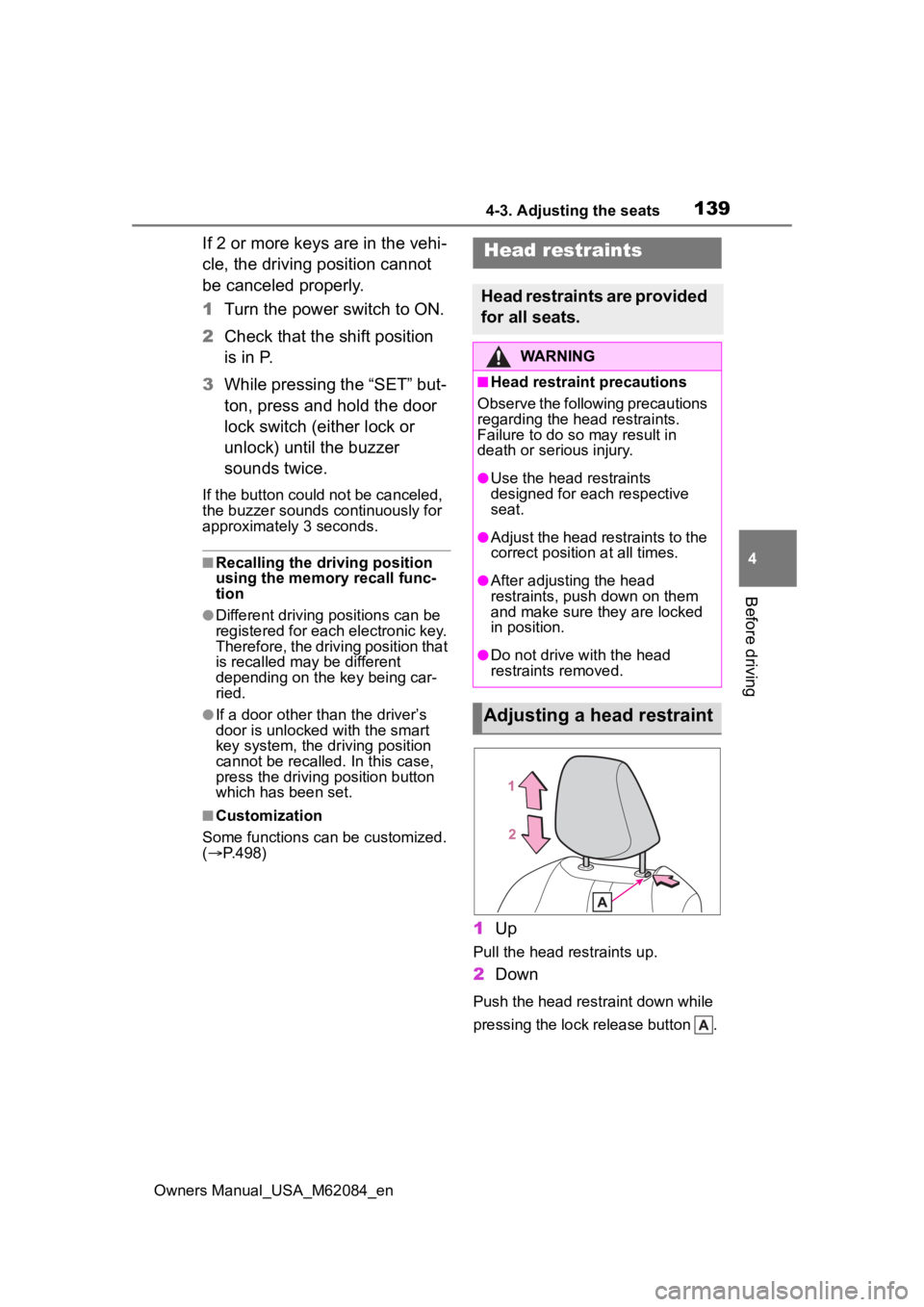
1 Up
Pull the head restraints up.
2Down
Push the head restraint down while
pressing the lock release button .
Head restraints
Head restraints are provided
for all seats.
WARNING
■Head restraint precautions
Observe the following precautions
regarding the head restraints.
Failure to do so may result in
death or serious injury.
●Use the head restraints
designed for each respective
seat.
●Adjust the head restraints to the
correct position at all times.
●After adjusting the head
restraints, push down on them
and make sure they are locked
in position.
●Do not drive with the head
restraints removed.
Adjusting a head restraint
Page 143 of 556
1434-4. Adjusting the steering wheel and mirrors
Owners Manual_USA_M62084_en
4
Before driving
*: If equipped
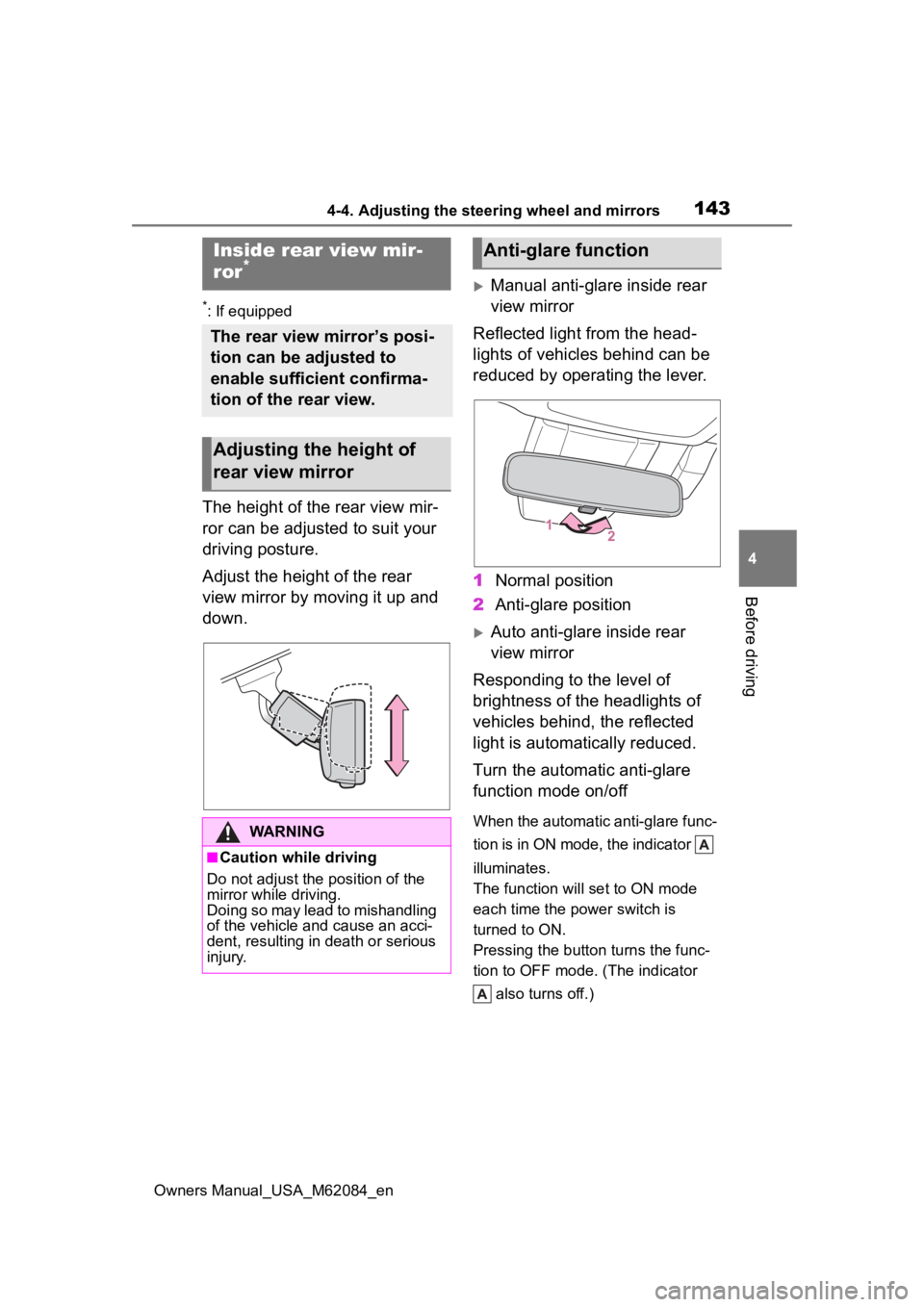
The height of the rear view mir-
ror can be adjusted to suit your
driving posture.
Adjust the height of the rear
view mirror by moving it up and
down.
Manual anti-glare inside rear
view mirror
Reflected light from the head-
lights of vehicles behind can be
reduced by operating the lever.
1 Normal position
2 Anti-glare position
Auto anti-glare inside rear
view mirror
Responding to the level of
brightness of the headlights of
vehicles behind, the reflected
light is automatically reduced.
Turn the automatic anti-glare
function mode on/off
When the automatic anti-glare func-
tion is in ON mode, the indicator
illuminates.
The function will set to ON mode
each time the power switch is
turned to ON.
Pressing the button turns the func-
tion to OFF mode. (The indicator also turns off.)
Inside rear view mir-
ror*
The rear view mirror’s posi-
tion can be adjusted to
enable sufficient confirma-
tion of the rear view.
Adjusting the height of
rear view mirror
WARNING
■Caution while driving
Do not adjust the position of the
mirror while driving.
Doing so may lead to mishandling
of the vehicle and cause an acci-
dent, resulting in death or serious
injury.
Anti-glare function
Page 144 of 556

1444-4. Adjusting the steering wheel and mirrors
Owners Manual_USA_M62084_en
■To prevent sensor error (vehi-
cles with an auto anti-glare
inside rear view mirror)
To ensure that the sensors operate
properly, do not touch or cover
them.
*: If equipped
Digital Rear view Mir-
ror*
The Digital Rearview Mirror
is a system that uses the
camera on the rear of the
vehicle and displays its
image on the display of the
Digital Rearview Mirror.
The Digital Rearview Mirror
can be changed between
optical mirror mode and dig-
ital mirror mode by operat-
ing the lever.
The Digital Rearview Mirror
allows the driver to see the
rear view despite obstruc-
tions, such as the head
restraints, luggage or rear
sunshade (if equipped)
ensuring rear visibility.
Also, the rear seats are not
displayed and privacy of the
passengers is enhanced.
WARNING
Observe the following precau-
tions.
Failure to do so may result in
death or serious injury.
■Before using the Digital Rear-
view Mirror
●Make sure to adjust the mirror
before driving. ( P.146)
• Change to optical mirror mode and adjust the position of the
Digital Rearview Mirror so that
the area behind your vehicle
can be viewed properly.
Page 147 of 556
1474-4. Adjusting the steering wheel and mirrors
Owners Manual_USA_M62084_en
4
Before driving
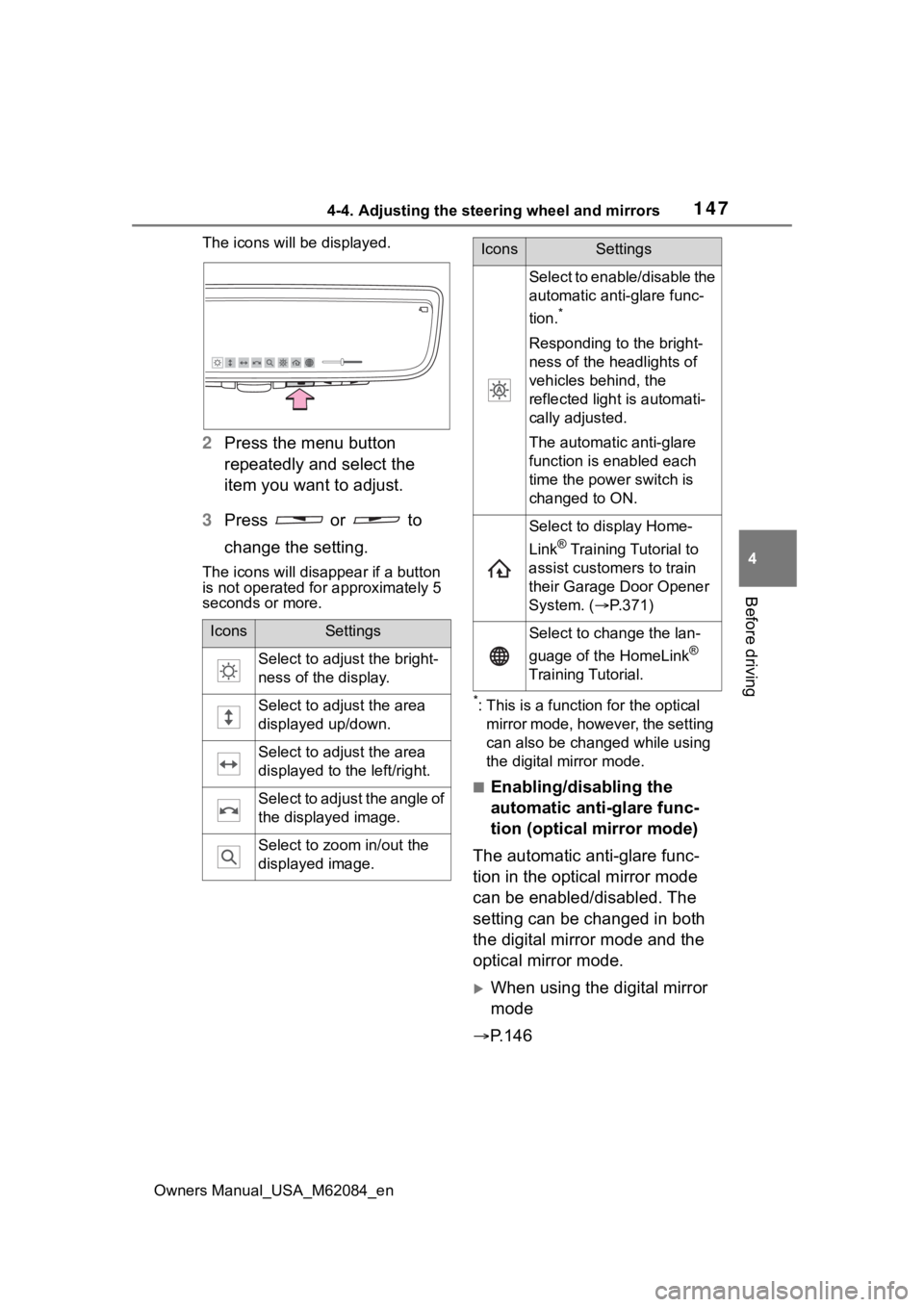
The icons will be displayed.
2 Press the menu button
repeatedly and select the
item you want to adjust.
3 Press or to
change the setting.
The icons will disapp ear if a button
is not operated fo r approximately 5
seconds or more.
*: This is a functi on for the optical
mirror mode, however, the setting
can also be changed while using
the digital mirror mode.
■Enabling/disabling the
automatic anti-glare func-
tion (optical mirror mode)
The automatic anti-glare func-
tion in the optical mirror mode
can be enabled/disabled. The
setting can be changed in both
the digital mirror mode and the
optical mirror mode.
When using the digital mirror
mode
P.146
IconsSettings
Select to adjust the bright-
ness of the display.
Select to adjust the area
displayed up/down.
Select to adjust the area
displayed to the left/right.
Select to adjust the angle of
the displayed image.
Select to zoom in/out the
displayed image.
Select to enable/disable the
automatic anti-glare func-
tion.
*
Responding to the bright-
ness of the headlights of
vehicles behind, the
reflected light is automati-
cally adjusted.
The automatic anti-glare
function is enabled each
time the power switch is
changed to ON.
Select to display Home-
Link
® Training Tutorial to
assist customers to train
their Garage Door Opener
System. ( P.371)
Select to change the lan-
guage of the HomeLink
®
Training Tutorial.
IconsSettings
Page 148 of 556

1484-4. Adjusting the steering wheel and mirrors
Owners Manual_USA_M62084_en
When using the optical mirror
mode
1 Press the menu button.
The icons will be displayed.
2Press the menu button
repeatedly and select .
The setting display will be dis-
played.
3Press or to
enable (“ON”)/disable
(“OFF”) the automatic anti-
glare function.
The icons will disappear if a button
is not operated fo r approximately 5
seconds or more.
■Adjusting the display (digital
mirror mode)
●If the displayed image is adjusted,
it may appear distorted. This is not
a malfunction.
●If the brightness of the Digital
Rearview Mirror is set too high, it
may cause eye strain. Adjust the
Digital Rearvie w Mirror to an
appropriate brightness. If your
eyes become tired, change to
optical mirror mode.
●The brightness of the Digital Rear-
view Mirror will ch ange automati-
cally according to the brightness
of the area in front of your vehicle.
■To prevent the light sensors
from malfunctioning
To prevent the light sensors from
malfunctioning, do not touch or
cover them.
WARNING
Observe the following precau-
tions.
Failure to do so may result in
death or serious injury.
■While driving
●Do not adjust the position of the
Digital Rearview Mirror or adjust
the display settings while driv-
ing.
Stop the vehicle and operate
the Digital Rearview Mirror con-
trol switches.
Failure to do so may cause a
steering wheel operation error,
resulting in an unexpected acci-
dent.
●Always pay attention to the
vehicle’s surroundings.
The size of the vehicles and other
objects may look different when in
digital mirror mode and optical
mirror mode.
When backing up, make sure to
directly check the safety of the
area around your vehicle, espe-
cially behind the vehicle.
Additionally, if a vehicle
approaches from the rear in the
dark, such as at night, the sur-
rounding area may appear dim.
Page 157 of 556
1574-5. Opening, closing the windows
Owners Manual_USA_M62084_en
4
Before driving
5 Release the power window
switch for a m oment, resume
pushing the switch in the one-
touch opening direction, and
hold it there for a pproximately 4
seconds or more.
6 Pull and hold the power window
switch in the one-touch closing
direction again. After the side
window is completely closed,
continue holding the switch for a
further 1 second or more.
If you release the switch while the
window is moving, start again from
the beginning.
If the window reverses and cannot
be fully closed or opened, have the
vehicle inspected by your Toyota
dealer.
■Door lock linked window opera-
tion
●The power windows can be
opened and closed using the
mechanical key.
* ( P.469)
●The power windows can be
opened using the wireless remote
control.
* ( P.121)
*: These settings must be custom-
ized at your Toyota dealer.
■Power windows open warning
buzzer
A buzzer sounds and a message is
shown on the multi -information dis-
play in the instrument cluster when
the power switch is turned off and
the driver’s door is opened with the
power windows open.
■Customization
Some functions can be customized.
( P.498)
WARNING
Observe the following precau-
tions.
Failure to do so m ay result in
death or serious injury.
■Closing the windows
●The driver is responsible for all
the power window operations,
including the operation for the
passengers. In order to prevent
accidental operation, especially
by a child, do not let a child
operate the power windows. It is
possible for children and other
passengers to have body parts
caught in the power window.
Also, when ridin g with a child, it
is recommended to use the win-
dow lock switch. ( P.158)
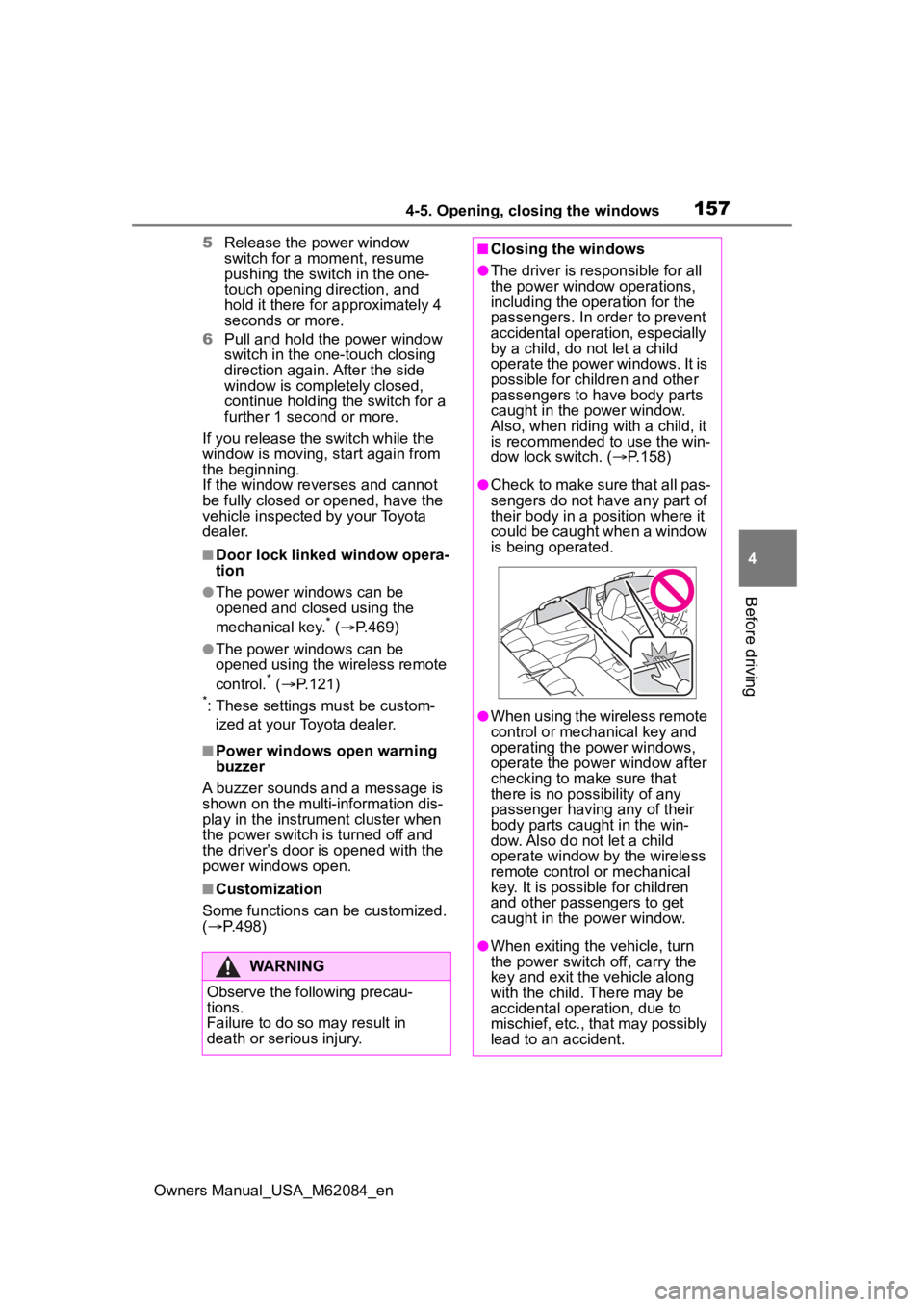
●Check to make sure that all pas-
sengers do not have any part of
their body in a position where it
could be caught when a window
is being operated.
●When using the wireless remote
control or mechanical key and
operating the power windows,
operate the power window after
checking to make sure that
there is no possibility of any
passenger having any of their
body parts caug ht in the win-
dow. Also do not let a child
operate window by the wireless
remote control or mechanical
key. It is possib le for children
and other passengers to get
caught in the power window.
●When exiting the vehicle, turn
the power switch off, carry the
key and exit the vehicle along
with the child. There may be
accidental operation, due to
mischief, etc., that may possibly
lead to an accident.
Page 162 of 556

1625-1. Before driving
Owners Manual_USA_M62084_en
■Driving in the rain
●Drive carefully when it is raining,
because visibility will be reduced,
the windows may become fogged-
up, and the road will be slippery.
●Drive carefully whe n it starts to
rain, because the road surface will
be especially slippery.
●Refrain from high speeds when
driving on an expressway in the
rain, because there may be a
layer of water between the tires
and the road surface, preventing
the steering and brakes from
operating properly.
■ECO Accelerator Guidance
( P.102)
Eco-friendly driving may be
achieved more easily by staying
within the zone of Eco acceleration.
Also, by staying w ithin the zone of
Eco acceleration, i t will be easier to
obtain a good Eco score.
●When starting off:
Gradually depress the accelerator
pedal to stay withi n the zone of Eco
acceleration and accelerate to the
desired speed. By refraining from
excessive acceleration, a good eco
start score will be obtained.
●When driving:
After accelerating to the desired
speed, release the accelerator
pedal and drive at a stable speed
while staying within the zone of Eco
acceleration. By staying within the
zone of Eco acceleration, a good
eco cruise score will be obtained.
●When stopping:
By starting to release the accelera-
tor pedal early before decelerating,
a good eco stop score will be
obtained.
■Restraining the fuel cell system
output (Brake Override System)
●When the accelera tor and brake
pedals are depressed at the same
time, the fuel cell system output
may be restrained.
●A warning message is displayed
on the multi-information display
and head-up display (if equipped)
while the system is operating.
( P.446)
■Breaking in your new Toyota
To extend the life of the vehicle,
observing the following precautions
is recommended:
●For the first 186 miles (300 km):
Avoid sudden stops.
●For the first 621 miles (1000 km):
• Do not drive at extremely high speeds.
• Avoid sudden acceleration.
• Do not drive continuously in low gears.
• Do not drive at a constant speed for extended periods.
■Drum-in-disc type parking
brake system
Your vehicle has a drum-in-disc type
parking brake system. This type of
brake system needs bedding-down
of the brake shoes periodically or
whenever the par king brake shoes
and/or drum are replaced. Have
your Toyota dealer perform the bed-
ding down operation.
■Operating your v ehicle in a for-
eign country
Comply with the relevant vehicle
registration laws and confirm the
availability of the correct fuel.
( P.483)
WARNING
Observe the following precau-
tions.
Failure to do so may result in
death or serious injury.
Page 163 of 556

1635-1. Before driving
Owners Manual_USA_M62084_en
5
Driving
WARNING
■When starting the vehicle
Always keep your foot on the
brake pedal while stopped with
the “READY” indicator is illumi-
nated. This prevents the vehicle
from creeping.
■When driving the vehicle
●Do not drive if y ou are unfamil-
iar with the location of the brake
and accelerator pedals to avoid
depressing the wrong pedal.
• Accidentally depressing the accelerator pedal instead of the
brake pedal will result in sudden
acceleration that may lead to an
accident.
• When backing up, you may twist your body around, leading to dif-
ficulty in operating the pedals.
Make sure to operate the pedals
properly.
• Make sure to keep a correct driving posture even when mov-
ing the vehicle only slightly. This
allows you to depress the brake
and accelerator pedals properly.
• Depress the brake pedal using your right foot. Depressing the
brake pedal using your left foot
may delay respon se in an emer-
gency, resulting in an accident.
●The driver should pay extra
attention to pedes trians as this
vehicle is powered only by an
electric motor (traction motor).
As there is no engine noise, the
pedestrians may misjudge the
vehicle’s movement. Even with
the acoustic vehicle alerting
system activate, d rive with care
as pedestrians in the vicinity
may still not notice the vehicle if
the surrounding area is noisy.
●During normal driving, do not
turn off the fuel cell system.
Turning the fuel cell system off
while driving will not cause loss
of steering or braking control,
however, power assist to the
steering will be lost. This will
make it more difficult to steer
smoothly, so you should pull
over and stop the vehicle as
soon as it is safe to do so.
In the event of a n emergency,
such as if it becomes impossible
to stop the vehicle in the normal
way: P. 4 3 2
●Using the brakes continuously
may cause the brakes to over-
heat and lose effectiveness
when driving down a steep hill.
●Do not adjust the positions of
the steering wheel, the seat, or
the inside or outside rear view
mirrors while driving.
Doing so may result in a loss of
vehicle control.
●Always check that all passen-
gers’ arms, heads or other parts
of their body are not outside the
vehicle.
●Do not drive in excess of the
speed limit. Even if the legal
speed limit permits it, do not
drive over 85 mph (140 km/h)
unless your vehicle has high-
speed capability tires. Driving
over 85 mph (140 km/h) may
result in tire fa ilure, loss of con-
trol and possible injury. Be sure
to consult a tire dealer to deter-
mine whether the tires on your
vehicle are high-speed capabil-
ity tires or not before driving at
such speeds.
■When driving on slippery
road surfaces
●Sudden braking, acceleration
and steering may cause tire
slippage and reduce your ability
to control the vehicle.