2022 TOYOTA HIGHLANDER change time
[x] Cancel search: change timePage 358 of 568
3585-2. Using the air conditioning system and defogger
*: If equipped
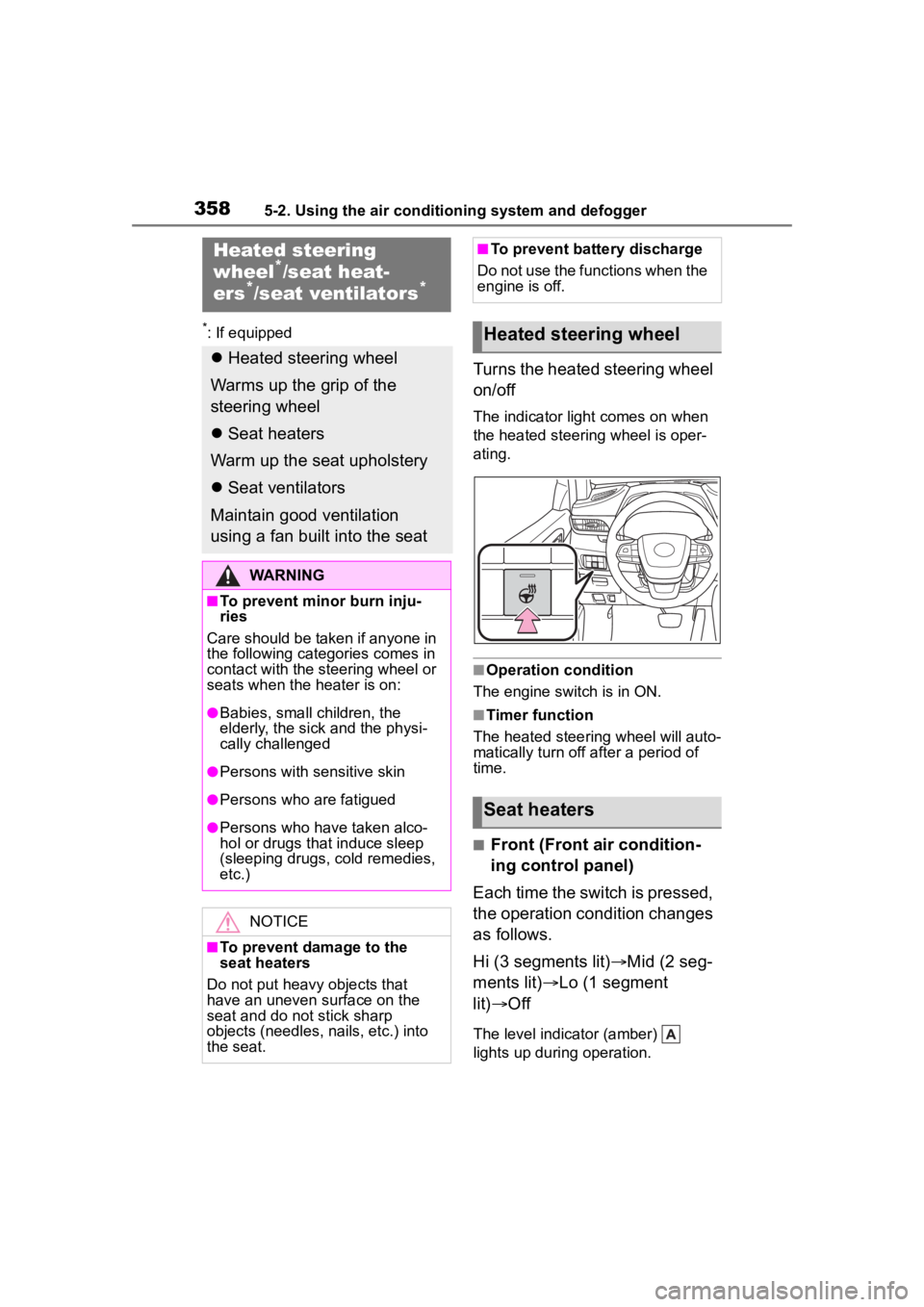
Turns the heated steering wheel
on/off
The indicator light comes on when
the heated steering wheel is oper-
ating.
■Operation condition
The engine switch is in ON.
■Timer function
The heated steering wheel will auto-
matically turn off after a period of
time.
■Front (Front air condition-
ing control panel)
Each time the switch is pressed,
the operation condition changes
as follows.
Hi (3 segments lit) Mid (2 seg-
ments lit) Lo (1 segment
lit) Off
The level indicator (amber)
lights up during operation.
Heated steering
wheel*/seat heat-
ers*/seat ventilators*
Heated steering wheel
Warms up the grip of the
steering wheel
Seat heaters
Warm up the seat upholstery
Seat ventilators
Maintain good ventilation
using a fan built into the seat
WARNING
■To prevent minor burn inju-
ries
Care should be taken if anyone in
the following categories comes in
contact with the steering wheel or
seats when the heater is on:
●Babies, small children, the
elderly, the sick and the physi-
cally challenged
●Persons with sensitive skin
●Persons who are fatigued
●Persons who have taken alco-
hol or drugs that induce sleep
(sleeping drugs, cold remedies,
etc.)
NOTICE
■To prevent damage to the
seat heaters
Do not put heavy objects that
have an uneven surface on the
seat and do not stick sharp
objects (needles, nails, etc.) into
the seat.
■To prevent battery discharge
Do not use the functions when the
engine is off.
Heated steering wheel
Seat heaters
Page 359 of 568
3595-2. Using the air conditioning system and defogger
5
Interior features
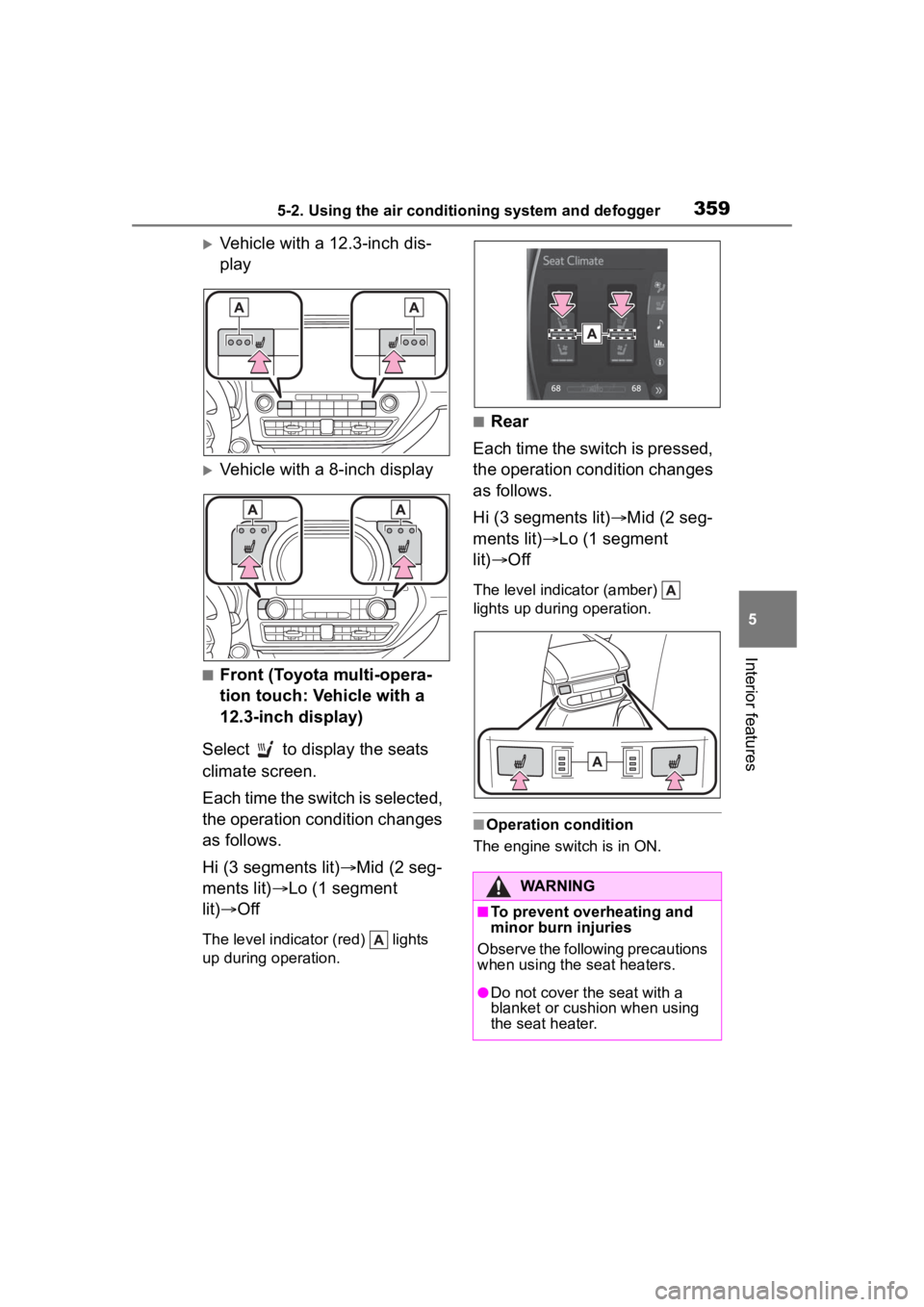
Vehicle with a 12.3-inch dis-
play
Vehicle with a 8-inch display
■Front (Toyota multi-opera-
tion touch: Vehicle with a
12.3-inch display)
Select to display the seats
climate screen.
Each time the switch is selected,
the operation condition changes
as follows.
Hi (3 segments lit) Mid (2 seg-
ments lit) Lo (1 segment
lit) Off
The level indicator (red) lights
up during operation.
■Rear
Each time the switch is pressed,
the operation condition changes
as follows.
Hi (3 segments lit) Mid (2 seg-
ments lit) Lo (1 segment
lit) Off
The level indicator (amber)
lights up during operation.
■Operation condition
The engine switch is in ON.
WARNING
■To prevent overheating and
minor burn injuries
Observe the following precautions
when using the seat heaters.
●Do not cover the seat with a
blanket or cushion when using
the seat heater.
Page 360 of 568
3605-2. Using the air conditioning system and defogger
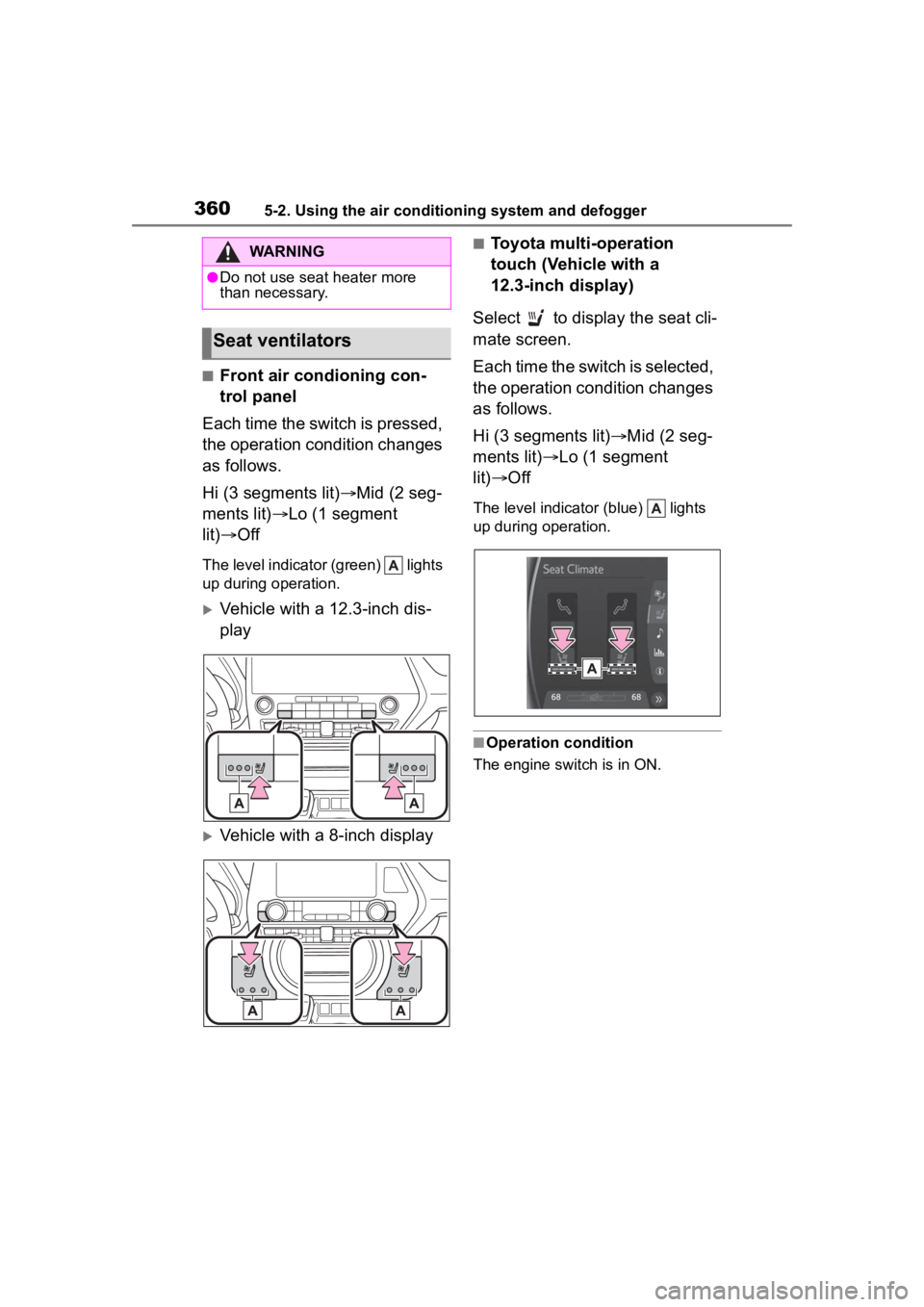
■Front air condioning con-
trol panel
Each time the switch is pressed,
the operation condition changes
as follows.
Hi (3 segments lit) Mid (2 seg-
ments lit) Lo (1 segment
lit) Off
The level indicator (green) lights
up during operation.
Vehicle with a 12.3-inch dis-
play
Vehicle with a 8-inch display
■Toyota multi-operation
touch (Vehicle with a
12.3-inch display)
Select to display the seat cli-
mate screen.
Each time the switch is selected,
the operation condition changes
as follows.
Hi (3 segments lit) Mid (2 seg-
ments lit) Lo (1 segment
lit) Off
The level indicator (blue) lights
up during operation.
■Operation condition
The engine switch is in ON.
WARNING
●Do not use seat heater more
than necessary.
Seat ventilators
Page 376 of 568
3765-5. Using the other interior features
Blinks (orange) 3 times
repeatedly
Blinks (orange) 4 times
repeatedly
■The wireless charger can be
operated when
The engine switch is in ACC or ON.
■Portable devices that can be
charged
●Portable devices compatible with
the Qi wireless charging standard
can be charged by the wireless charger. However, compatibility
with all devices which meet the Qi
wireless charging standard is not
guaranteed.
●The wireless char
ger is designed
to supply low power electricity (5
W or less) to a cellular phone,
smartphone, or other portable
device.
■If a cover or accessory is
attached to the portable device
Do not charge a portable device if a
cover or accessory w hich is not Qi
compatible is atta ched. Depending
on the type of cover and/or acces-
sory attached, it m ay not be possi-
ble to charge the portable device. If
the portable device is placed on the
charging area and does not charge,
remove the cover and/or accesso-
ries.
■If interference is heard in AM
radio broadcasts while
charging
Turn off the wireless charger and
check if the noise is reduced. If
noise is reduced, press and hold the
power supply switch of the wireless
charger for 2 se conds. The fre-
quency of the wireless charger is
changed and noise may be
reduced. When the frequency is
changed, the operation indicator
light will blink (orange) 2 times.
■Charging precautions
●If the electronic key cannot be
detected in the cabin, charging
cannot be performed. When a
door is opened and closed,
charging may be temporarily sus-
pended.
●While charging, the wireless char-
ger and the portable device will
become warm. This is not a mal-
function. If a portable device
becomes warm while charging
and charging stops due to the pro-
tection function of the portable
device, wait unt il the portable
device cools dow n and charge it
Suspected
causesMeasure
Vehicle to
charger com-
munication
failure.
Contact your Toy-
ota dealer.
Suspected
causesMeasure
A foreign
object exists
between the
portable
device and
charging area.
Remove the for-
eign object.
Portable
device is not
positioned
properly on the
charging area.Move the portable
device toward the
center of the
charging area.
Suspected
causesMeasure
The tempera-
ture of the
wireless char-
ger is exces-
sively high.Stop charging
immediately and
continue charging
after a while.
Page 421 of 568

4216-3. Do-it-yourself maintenance
6
Maintenance and care
operate properly.
• If non-genuine Toyota wheels are used.
• A tire has been replaced with a tire that is not an OE (Original
Equipment) tire.
• A tire has been replaced with a tire that is not of the specified size.
• Tire chains, etc. are equipped.
• An auxiliary-supported run-flat tire
is equipped.
• If a window tint that affects the
radio wave signals is installed.
• If there is a lot of snow or ice on the vehicle, particularly around the
wheels or wheel housings.
• If the tire inflation pressure is extremely higher than the speci-
fied level.
• If the spare tire is in a location subject to poor radio wave signal
reception.
*
• If wheel without the tire pressure
warning valve and transmitter is
used.
• If the ID code on the tire pressure warning valves and transmitters is
not registered in the tire pressure
warning computer.
*: Vehicles with full-size spare tire
only
●Performance may be affected in
the following situations.
• Near a TV tower, electric power plant, gas station, radio station,
large display, airpo rt or other facil-
ity that generates strong radio
waves or electrical noise
• When carrying a portable radio, cellular phone, cordless phone or
other wireless communication
device
●If tire position information is not
correctly displayed due to the
radio wave conditions, the display
may be corrected by driving and
changing the radio wave condi-
tions.
●When the vehicle is parked, the
time taken for the warning to start
or go off could be extended.
●When tire inflation pressure
declines rapidly for example when
a tire has burst, the warning may
not function.
■Warning performance of the tire
pressure warning system
The warning of the tire pressure
warning system w ill change in
accordance with the conditions
under which it was initialized. For
this reason, the system may give a
warning even if th e tire pressure
does not reach a low enough level,
or if the pressure is higher than the
pressure that was adjusted to when
the system was initialized.
Page 426 of 568
4266-3. Do-it-yourself maintenance
●After performing initialization, the
tire pressure warning light blinks
for 1 minute then stays on while
driving.
If the inflation pressure of each tire
is still not displayed, have the vehi-
cle inspected by your Toyota dealer.
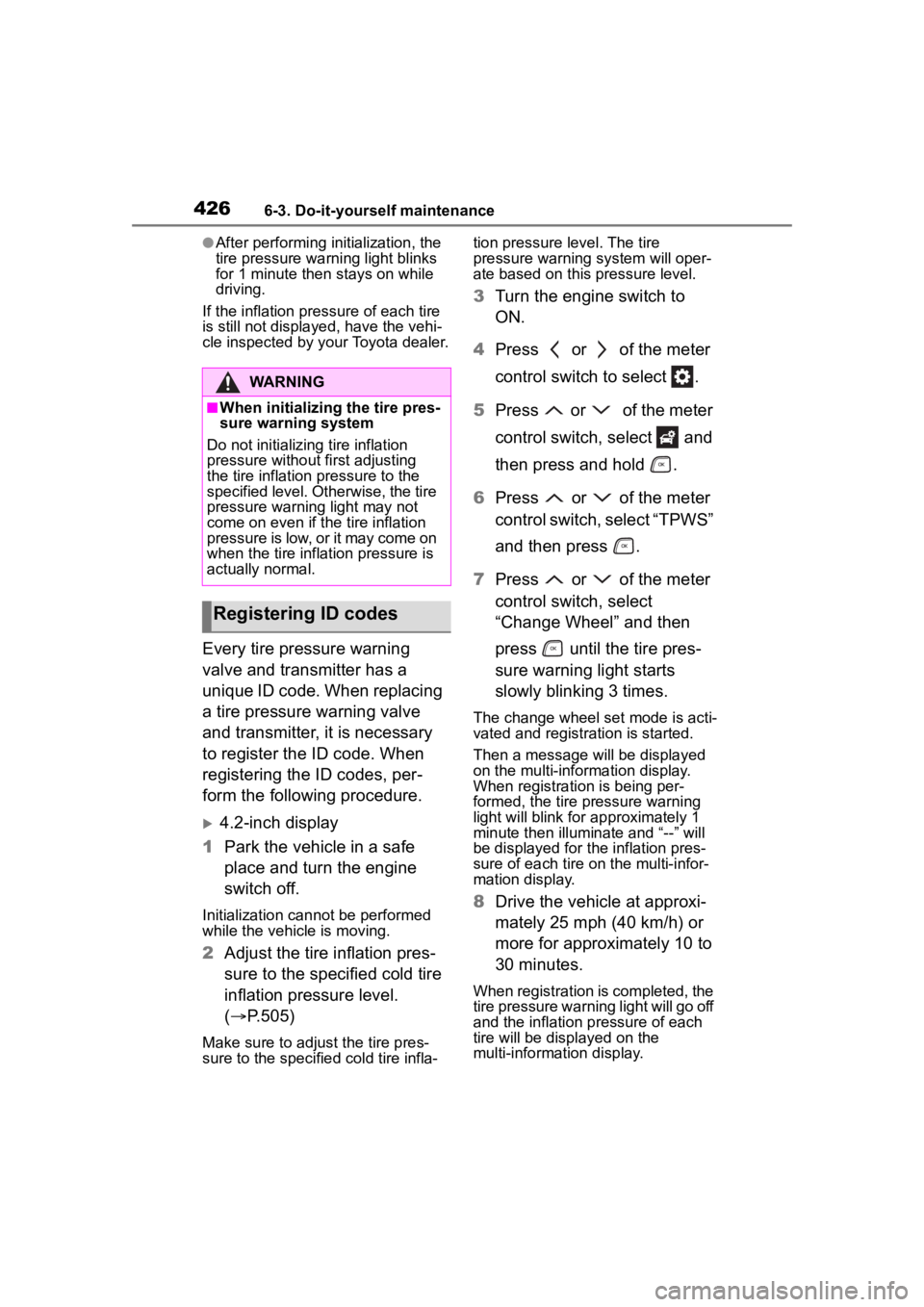
Every tire pressure warning
valve and transmitter has a
unique ID code. When replacing
a tire pressure warning valve
and transmitter, it is necessary
to register the ID code. When
registering the ID codes, per-
form the following procedure.
4.2-inch display
1 Park the vehicle in a safe
place and turn the engine
switch off.
Initialization cannot be performed
while the vehicle is moving.
2Adjust the tire inflation pres-
sure to the specified cold tire
inflation pressure level.
( P.505)
Make sure to adjust the tire pres-
sure to the specifie d cold tire infla- tion pressure level. The tire
pressure warning system will oper-
ate based on this
pressure level.
3Turn the engine switch to
ON.
4 Press or of the meter
control switch to select .
5 Press or of the meter
control switch, select and
then press and hold .
6 Press or of the meter
control switch, select “TPWS”
and then press .
7 Press or of the meter
control switch, select
“Change Wheel” and then
press until the tire pres-
sure warning light starts
slowly blinking 3 times.
The change wheel set mode is acti-
vated and registra tion is started.
Then a message will be displayed
on the multi-information display.
When registration is being per-
formed, the tire pressure warning
light will blink for approximately 1
minute then illuminate and “--” will
be displayed for the inflation pres-
sure of each tire on the multi-infor-
mation display.
8 Drive the vehicle at approxi-
mately 25 mph (40 km/h) or
more for approximately 10 to
30 minutes.
When registration is completed, the
tire pressure warni ng light will go off
and the inflation pressure of each
tire will be disp layed on the
multi-information display.
WARNING
■When initializing the tire pres-
sure warning system
Do not initializing tire inflation
pressure without first adjusting
the tire inflation pressure to the
specified level. Otherwise, the tire
pressure warning light may not
come on even if the tire inflation
pressure is low, or it may come on
when the tire inflation pressure is
actually normal.
Registering ID codes
Page 427 of 568

4276-3. Do-it-yourself maintenance
6
Maintenance and care
Even if the vehicle is not driven at
approximately 25 mph (40 km/h) or
more, registration can be com-
pleted by driving for a long time.
However, if registration does not
complete after driving for 1 hour or
more, perform the procedure again
from the beginning.
9 Initialize the tire pressure
warning system. ( P.424)
7-inch display
1 Park the vehicle in a safe
place and turn the engine
switch off.
Initialization cannot be performed
while the vehicle is moving.
2Adjust the tire inflation pres-
sure to the specified cold tire
inflation pressure level.
( P.505)
Make sure to adjust the tire pres-
sure to the specifie d cold tire infla-
tion pressure level. The tire
pressure warning system will oper-
ate based on this pressure level.
3 Turn the engine switch to
ON.
4 Press or of the meter
control switch to select .
5 Press or of the meter
control switch, select and
then press and hold .
6 Press or of the meter
control switch, select “TPWS”
and then press .
7 Press or of the meter
control switch, select
“Change Wheel” and then press until the tire pres-
sure warning light starts
slowly blinking 3 times.
The change wheel set mode is acti-
vated and registra
tion is started.
Then a message will be displayed
on the multi-information display.
When registration is being per-
formed, the tire pressure warning
light will blink for approximately 1
minute then illumi nate and “--” will
be displayed for the inflation pres-
sure of each tire o n the multi-infor-
mation display.
8 Drive the vehicle at approxi-
mately 25 mph (40 km/h) or
more for approximately 10 to
30 minutes.
When registration is completed, the
tire pressure warni ng light will go off
and the inflation pressure of each
tire will be disp layed on the
multi-information display.
Even if the vehicle is not driven at
approximately 25 mph (40 km/h) or
more, registration can be com-
pleted by driving for a long time.
However, if registration does not
complete after driving for 1 hour or
more, perform the p rocedure again
from the beginning.
9 Initialize the tire pressure
warning system. ( P.424)
■When registering ID codes
●ID code registrati on is performed
while driving at a vehicle speed of
approximately 25 mph (40 km/h)
or more.
●Before performing ID code regis-
tration, make sure that no wheels
with tire pressure warning valve
and transmitters installed are near
the vehicle.
●Make sure to initi alize the tire
pressure warning system after
Page 468 of 568

4687-2. Steps to take in an emergency
■If “Engine Stopped Steering
Power Low” is displayed
This message is displayed if the
engine is stopped while driving.
When steering wheel operations are
heavier than usual, grip the steering
wheel firmly and operate it using
more force th an usual.
■If “Shift to P when Parked” is
displayed
This message is displayed when the
driver’s door is opened without turn-
ing the engine switch off with the
shift lever in any position other than
P. Change the shift lever to P.
■If “Auto Power OFF to Conserve
Battery” is displayed
Power was cut off due to the auto-
matic power off function. Next time
when starting the engine, increase
the engine speed slightly and main-
tain that level for approximately 5
minutes to recha rge the battery.
■If “Headlight System Malfunc-
tion Visit Your Dealer” is dis-
played
The following systems may be mal-
functioning. Have the vehicle
inspected by your Toyota dealer
immediately.
●The LED headlight system (if AFS
[Adaptive Front-lighting System]
equipped)
●AFS (Adaptive Fr ont-lighting Sys-
tem) (if equipped)
●The automatic headlight leveling
system (if equipped)
●Automatic High Beam
■If “Radar Cruise Control
Unavailable” is displayed
The dynamic radar cruise control
with full-speed range system cannot
be used temporarily. Use the system
when it becomes available again.
■If a message that indicates the
malfunction of front camera is
displayed
The following systems may be sus-
pended until the problem shown in
the message is resolved. (P.233,
462)
●PCS (Pre-Collision system)
●LTA (Lane Tracing Assist)
●Automatic High Beam
●RSA (Road Sign Assist) (if
equipped)
●Dynamic radar cruise control with
full-speed range
■If a message that indicates the
malfunction of radar sensor is
displayed
The following systems may be sus-
pended until the problem shown in
the message is resolved. (P.233,
462)
●PCS (Pre-Collision system)
●LTA (Lane Tracing Assist)
●Dynamic radar cruise control with
full-speed range
■If “AWD System Overheated
Switching to 2WD Mode” or
“AWD System Overheated 2WD
Mode Engaged” is displayed
This message may be displayed
when driving under extremely high
load conditions.
Drive the vehicle at low speeds or
stop the vehicle in a safe place with
the engine running until the mes-
sage is cleared.
If the message is not cleared, have
the vehicle inspected by your Toyota
dealer.
■If “Check Fuel Cap” is dis-
played
The fuel tank cap is not properly
installed. Correctly install the fuel
tank cap.