2022 TOYOTA GR SUPRA parking brake
[x] Cancel search: parking brakePage 21 of 356

212-1. QUICK REFERENCE
2
QUICK REFERENCE
6VSC OFF button
7 Toyota Supra Safety button
8 Parking brake
Toyota Supra Command
includes a large number of func-
tions. These functions can be
operated via controller and,
depending on the equipment
version, via touch screen or
voice activation system.
■Activating the voice activa-
tion system
1 Press the button on the
steering wheel.
2 Wait for the signal.
3 Say the command.
If no other commands are possi-
ble, operate the function via Toy-
ota Supra Command.
■Terminating the voice acti-
vation system
Toyota Supra Command
Concept
Buttons on the Controller
ButtonFunction
Opens the main menu.
Opens the Communica- tion menu.
Opens the Media/Radio menu.
Opens destination input menu for navigation.
Opens navigation map.
Opens the previous dis-
play.
Opens the Options menu.
Voice activation
The symbol on the
Control Display indi-
cates that voice activa-
tion system is active.
Press the button on the
steering wheel or ›Can-
cel‹.
Page 25 of 356

252-1. QUICK REFERENCE
2
QUICK REFERENCE
Command.
• Compatible iPhone, iPhone 5 or later with iOS 7.1 or later.
• Corresponding mobile wire- less contract.
• Bluetooth, Wi-Fi, and Siri voice operation are switched
on on the iPhone.
Via Toyota Supra Command:
1 "My Vehicle"
2 "System settings"
3 "Mobile devices"
4 "Settings"
5 Select the following setting:
• "Bluetooth®"
• Corresponding mobile wire- less contract.
Pair iPhone via Bluetooth with
the vehicle.
Select CarPlay as the function: "Apple CarPlay"
The iPhone is connected to the
vehicle and displayed in the
device list. 1
Depress the brake pedal.
2 Press the Start/Stop button.
1 Engage selector lever posi-
tion P with the vehicle
stopped.
2 Press the Start/Stop button.
The engine is switched off.
3Set the parking brake.
The Auto Start/Stop function
switches the engine off automat-
ically while stationary to save
fuel. The engine starts automati-
cally under the following precon-
ditions:
• By releasing the brake pedal.
Functional requirements
Switching on Bluetooth and
CarPlay
Pairing iPhone with CarPlay
In transit
Driving
Drive-ready state
Switching on drive-ready
state
Switching off drive-ready
state
Auto Start/Stop function
Page 26 of 356
262-1. QUICK REFERENCE
The LED and indicator light go
out.
The parking brake is released.
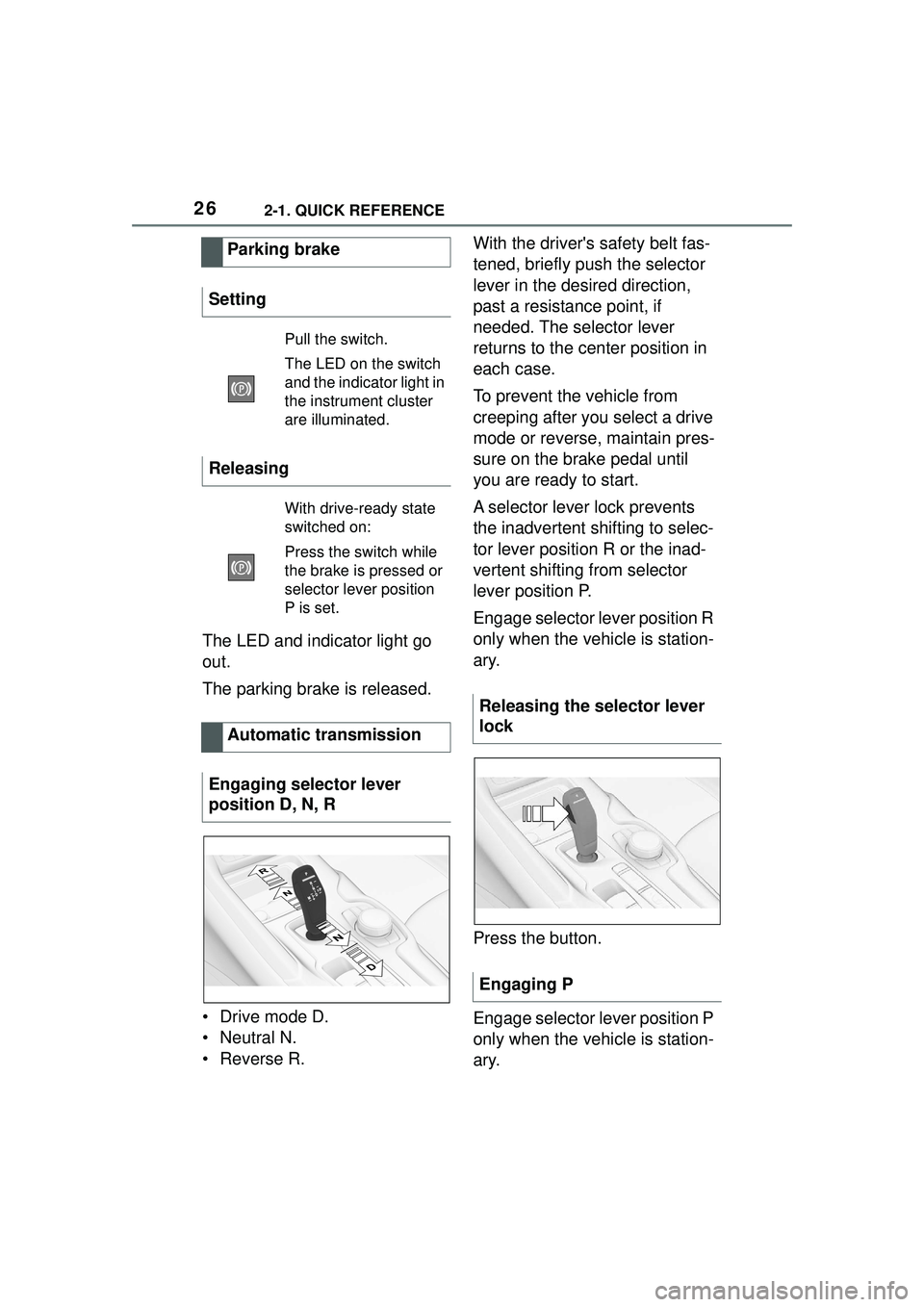
• Drive mode D.
• Neutral N.
•Reverse R.With the driver's safety belt fas-
tened, briefly push the selector
lever in the desired direction,
past a resistance point, if
needed. The selector lever
returns to the center position in
each case.
To prevent the vehicle from
creeping after you select a drive
mode or reverse, maintain pres-
sure on the brake pedal until
you are ready to start.
A selector lever lock prevents
the inadvertent shifting to selec-
tor lever position R or the inad-
vertent shifting from selector
lever position P.
Engage selector lever position R
only when the vehicle is station-
ary.
Press the button.
Engage selector lever position P
only when the vehicle is station-
ary.
Parking brake
Setting
Pull the switch.
The LED on the switch
and the indica tor light in
the instrument cluster
are illuminated.
Releasing
With drive-ready state
switched on:
Press the switch while
the brake is pressed or
selector lever position
P is set.
Automatic transmission
Engaging selector lever
position D, N, R
Releasing the selector lever
lock
Engaging P
Page 32 of 356
322-1. QUICK REFERENCE
Via Toyota Supra Command:
1"Toyota Supra Connect"
2 "Toyota Supra Assistance"
3 "Roadside assistance"
A voice connection is established.
The Concierge offers informa-
tion on events, gas stations or
hotels, and provides phone
numbers and addresses. Many
hotels can be booked directly by
the Concierge.
Via Toyota Supra Command:
1"Toyota Supra Connect"
2 "Toyota Supra Assistance"
3 "Concierge"
A voice connection to the Con-
cierge is established.
Remote maintenance are ser-
vices that help to maintain vehi-
cle mobility.
Remote maintenance can com-
prise the following services:
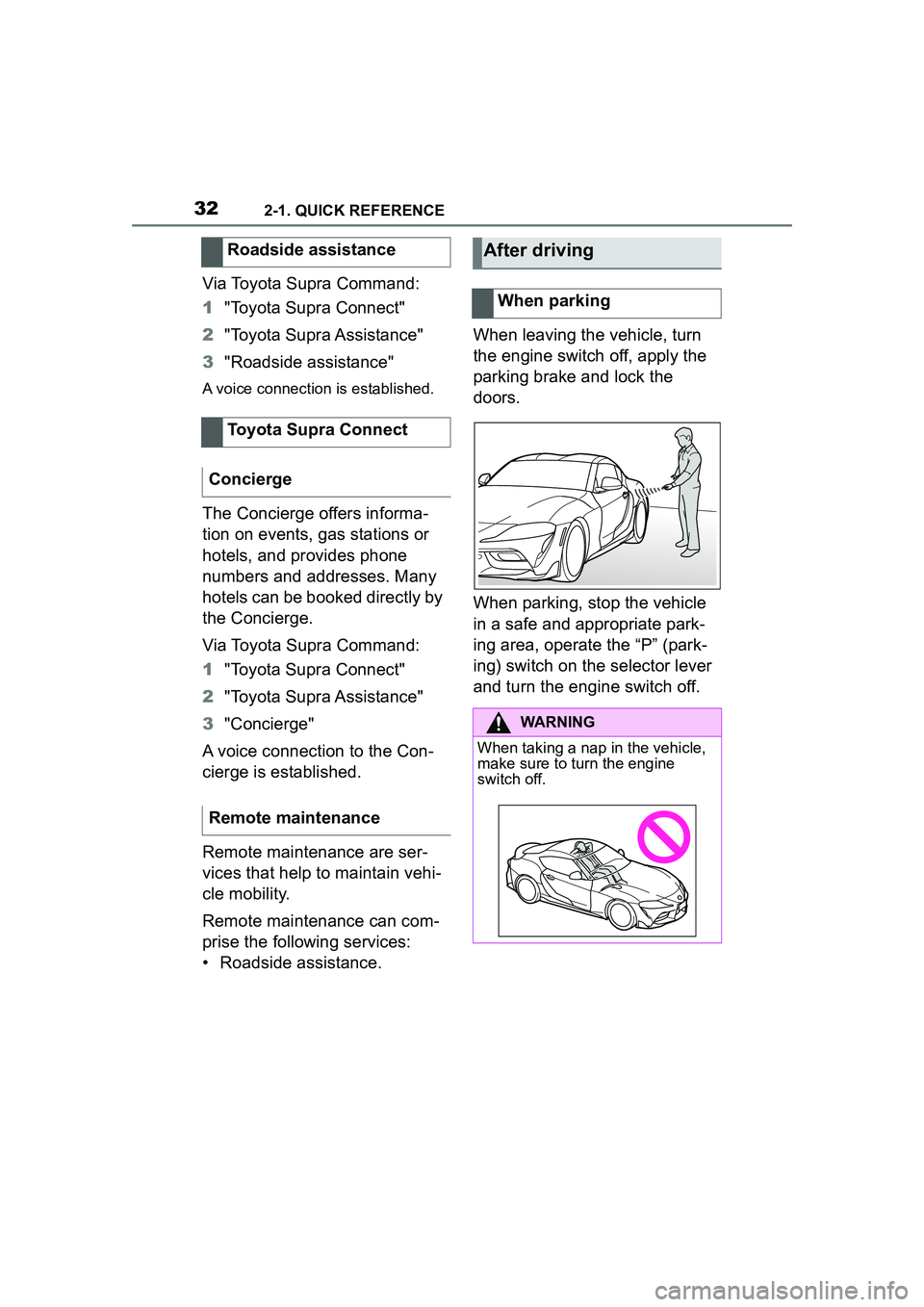
• Roadside assistance. When leaving the vehicle, turn
the engine switch off, apply the
parking brake and lock the
doors.
When parking, stop the vehicle
in a safe and appropriate park-
ing area, operate the “P” (park-
ing) switch on the selector lever
and turn the engine switch off.
Roadside assistance
Toyota Supra Connect
Concierge
Remote maintenance
After driving
When parking
WARNING
When taking a nap in the vehicle,
make sure to turn the engine
switch off.
Page 39 of 356
393-1. CONTROLS
3
CONTROLS
9 Parking brake P.119
10 Automatic transmission
selector lever P.126 11
Switch drive-ready
state on/off P.115
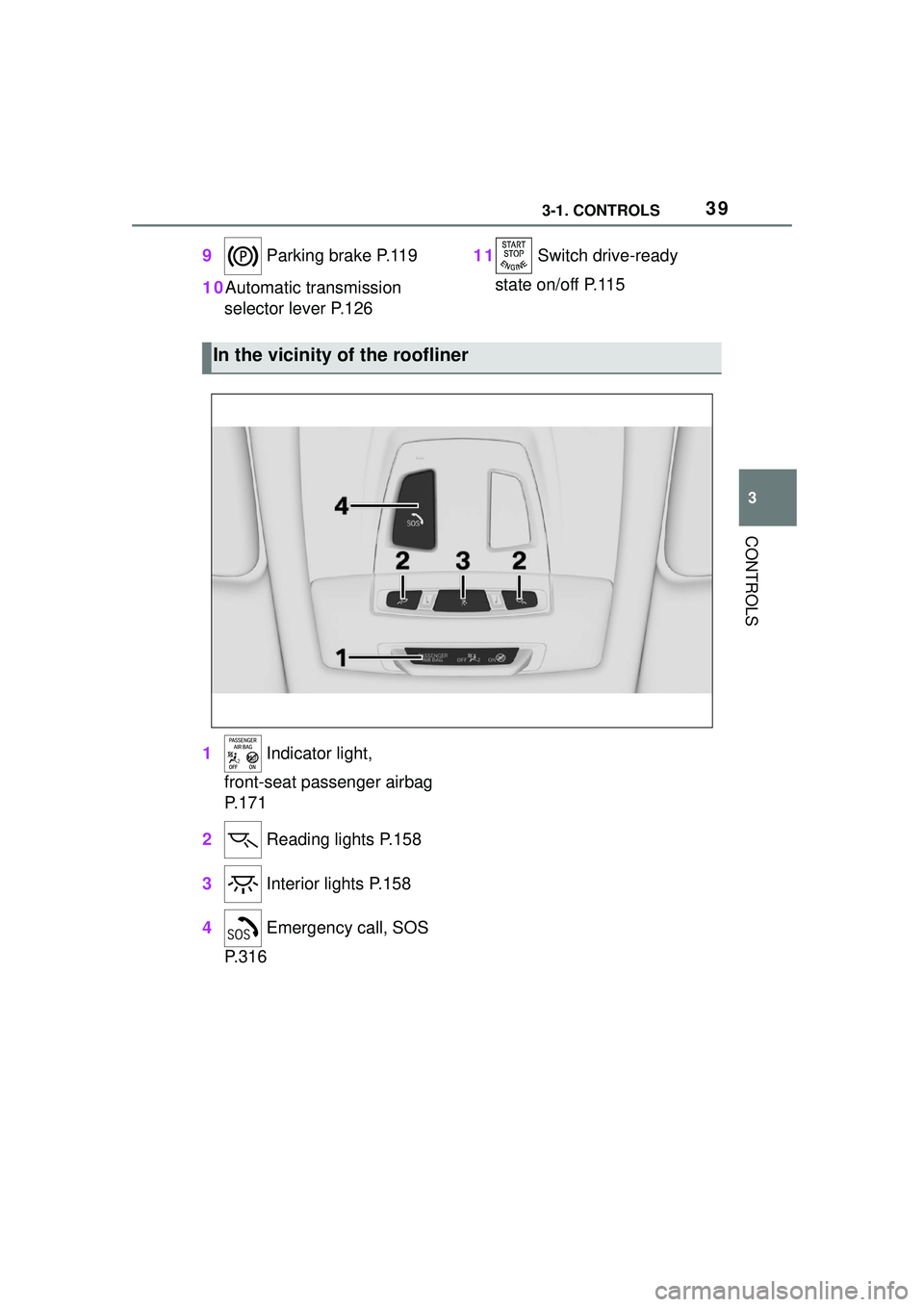
1 Indicator light,
front-seat passenger airbag
P.171
2 Reading lights P.158
3 Interior lights P.158
4 Emergency call, SOS
P.316
In the vicinity of the roofliner
Page 45 of 356

453-1. CONTROLS
3
CONTROLS
1Depress the brake pedal.
2 Press the Start/Stop button. The ignition is activated auto-
matically for a brief time and is
stopped as soon as the engine
starts.
Most of the indicator/warning
lights in the instrument cluster
light up for a varied length of
time.
Depending on the engine condi-
tion, the full drive power may not
be available for approximately
30 seconds after starting the
engine. In this case, the vehicle
will not accelerate as usual.
READY in the instrument cluster
indicates that drive-ready state
is switched on.
1
Engage selector lever posi-
tion P with the vehicle
stopped.
2 Press the Start/Stop button.
The engine is switched off. The
vehicle switches into standby state.
3Set the parking brake.
WARNING
An unsecured vehicle can begin
to move and possibly roll away.
There is a risk of an accident.
Before exiting, secure the vehicle
against rolling.
In order to ensure that the vehicle
is secured against rolling away,
follow the following:
• Set the parking brake.
• On uphill grades or on a down-
hill slope, turn the front wheels
in the direction of the curb.
• On uphill grades or on a down- hill slope, also secure the vehi-
cle, for instance with a wheel
chock.
NOTICE
In the case of repeated starting
attempts or repeated starting in
quick succession, the fuel is not
burned or is inadequately burned.
The catalytic converter can over-
heat. There is a risk of damage to
property. Avoid repeated starting
in quick succession.
Switching on drive-ready
state
Concept
Drive-ready state
is switched on via
the Start/Stop but-
ton:
Automatic transmission
Gasoline engine
Display in the instrument
cluster
Switching off drive-ready
state
Page 78 of 356

783-1. CONTROLS
1Unlocking
2 Locking
3 Unlocking the trunk lid
4 Panic mode, pathway lighting
The behavior of the vehicle when unlocking with the remote
control depends on the following
settings, refer to page 90, for
unlocking and locking:
• If only the driver's door and
the fuel filler flap or all access
to the vehicle will be
unlocked.
• If the unlocking of the vehicle is confirmed with a light signal
or a sound signal.
• If the welcome light, refer to page 155, is switched on
when the vehicle is being
unlocked.
• If the exterior mirrors are automatically folded out and
in when the vehicle is
unlocked and locked.
• If the driver's seat is set to the last position saved in the
driver's profile. P.65
If, due to the settings, only the
driver's door and fuel filler flap
were unlocked, press the button
on the remote control again to
unlock the other vehicle access
points.
In addition, the following func-
tions are executed:
• If a driver profile, refer to page 65, was assigned to the
remote control, this driver pro-
file will be activated and the
settings that are stored in it
WARNING
Unattended children or animals in
the vehicle can cause the vehicle
to move and endanger them-
selves and traffic, for instance due
to the following actions:
• Pressing the Start/Stop button.
• Releasing the parking brake.
• Opening and closing the doors or windows.
• Engaging selector lever position
N.
• Using vehicle equipment.
There is a risk of accidents or inju-
ries. Do not leave children or ani-
mals unattended in the vehicle.
Take the remote control with you
when exiting and lock the vehicle.
Overview
Unlocking
General information
Unlocking the vehicle
Press the button on the
remote control.
Page 111 of 356

1113-1. CONTROLS
3
CONTROLS
After using a child restraint sys-
tem on the front passenger seat,
ensure that the front, knee, and
side airbags on the front pas-
senger side are deactivated. For
automatic deactivation of front-
seat passenger airbags, refer to
page 170.
The right place for chil-
dren
Safety information
WARNING
Unattended children or animals in
the vehicle can cause the vehicle
to move and endanger them-
selves and traffic, for instance due
to the following actions:
●Pressing the Start/Stop button.
●Releasing the parking brake.
●Opening and closing the doors
or windows.
●Engaging selector lever position
N.
●Using vehicle equipment.
There is a risk of accidents or inju-
ries. Do not leave children or ani-
mals unattended in the vehicle.
Take the remote control with you
when exiting and lock the vehicle.
WARNING
A heated vehicle may result in
death to persons, especially chil-
dren and animals. There is a risk
of injuries or danger to life. Do not
leave persons, especially chil-
dren and animals unattended in
the vehicle.
WARNING
Exposure to intense sunlight can
cause child restraint systems and
their components to become very
hot. Persons may sustain burn
injuries when touching the hot
components. There is a risk of
injury. Do not expose the child
restraint system to direct sunlight
or cover where necessary. If nec-
essary, let the child restraint sys-
tem cool down before transporting
a child. Do not leave children
unattended in the vehicle.
Children on the front pas-
senger seat
General information
Safety information
WARNING
Active front-seat passenger air-
bags can injure a child in a child
restraint system when the airbags
are activated. There is a risk of
injury. Make sure that the
front-seat passenger airbags are
deactivated and that the PAS-
SENGER AIRBAG OFF indicator
light lights up.