Page 496 of 664
4966-3. Do-it-yourself maintenance
CAMRY_U
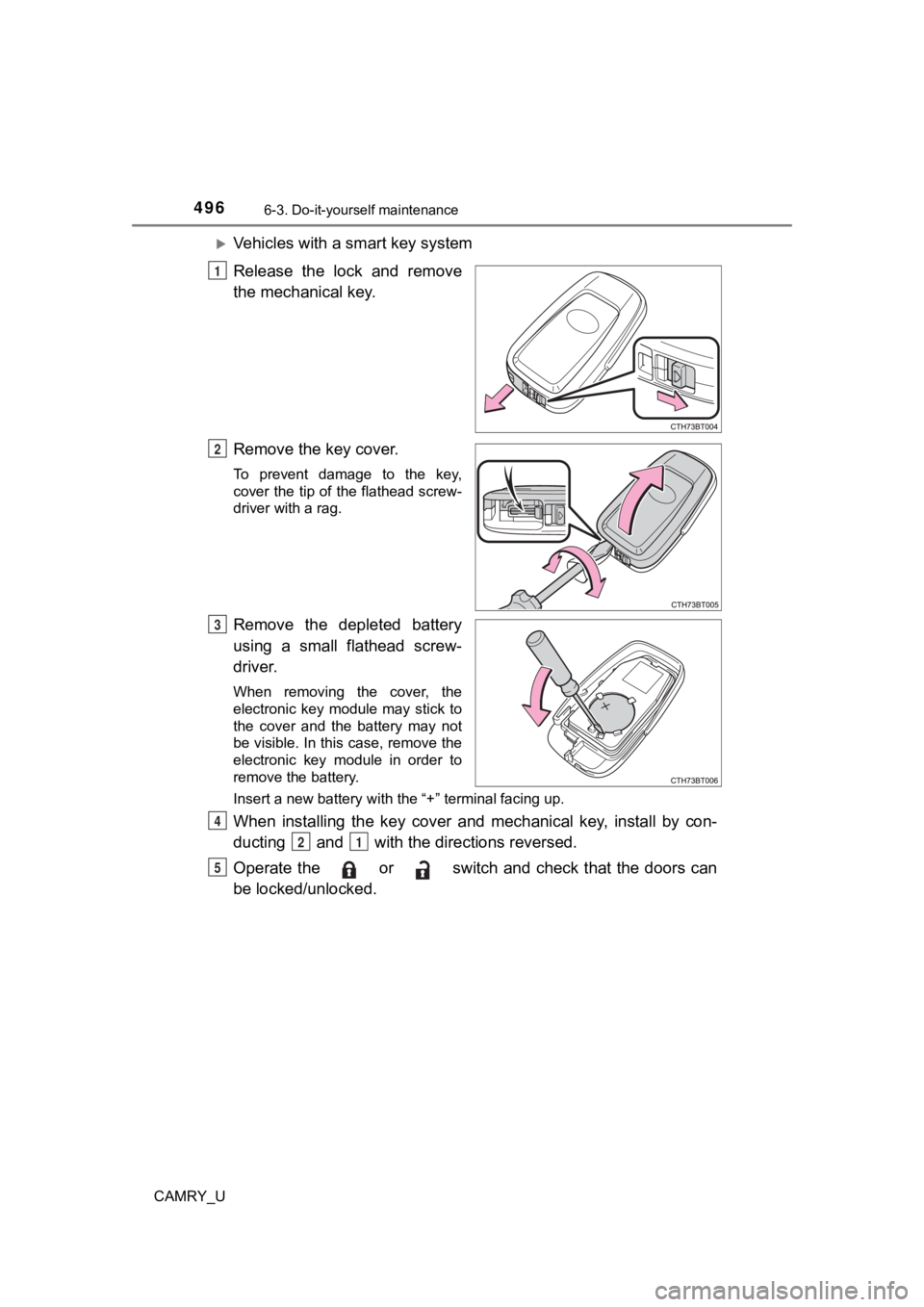
Vehicles with a smart key system
Release the lock and remove
the mechanical key.
Remove the key cover.
To prevent damage to the key,
cover the tip of the flathead screw-
driver with a rag.
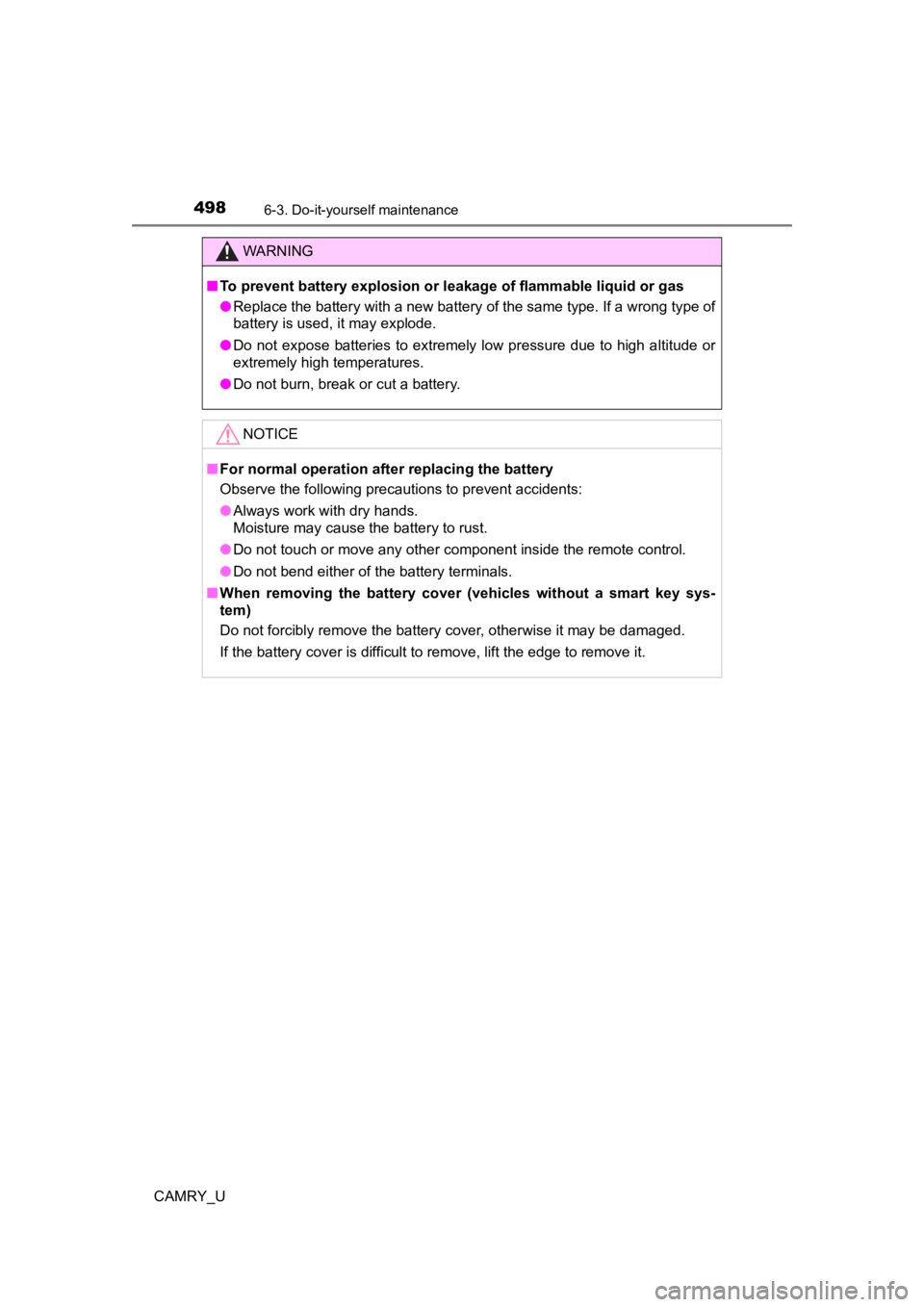
Remove the depleted battery
using a small flathead screw-
driver.
When removing the cover, the
electronic key module may stick to
the cover and the battery may not
be visible. In this case, remove the
electronic key module in order to
remove the battery.
Insert a new battery with the “+” terminal facing up.
When installing the key cover and mechanical key, install by con-
ducting and with the directions reversed.
Operate the or switch and check that the doors can
be locked/unlocked.
1
2
3
4
21
5
Page 497 of 664
4976-3. Do-it-yourself maintenance
CAMRY_U
6
Maintenance and care
■When replacing the key battery
Be careful not to lose the battery or any other small parts.
■ Use a CR2032 lithium battery
●Batteries can be purchased at your Toyota dealer, local electrical appliance
shops or camera stores.
● Replace only with the same or equivalent type recommended by the manu-
facturer.
● Dispose of used batteries according to local laws.
■ If the key battery is depleted
The following symptoms may occur:
●The smart key system (if equipped) and wireless remote control will not
function properly.
● The operational range will be reduced.
WARNING
■ Battery precautions
Observe the following precautions. Failure to do so may result in death or
serious injury.
● Do not swallow the battery. Doing so may cause chemical burns.
● Vehicles without a smart key system: A coin battery or button b attery is
used in the key. If a battery is swallowed, it may cause severe chemical
burns in as little as 2 hours and may result in death or seriou s injury.
● Vehicles with a smart key system: A coin battery or button battery is used
in the electronic key. If a battery is swallowed, it may cause severe chemi-
cal burns in as little as 2 hours and may result in death or serious injury.
● Keep away new and removed batteries from children.
● Vehicles without a smart key system: If the cover cannot be firmly closed,
stop using the key and stow the key in the place where children cannot
reach, and then contact your Toyota dealer.
● Vehicles with a smart key system: If the cover cannot be firmly closed,
stop using the electronic key and stow the key in the place where children
cannot reach, and then contact your Toyota dealer.
● If you accidentally swallow a battery or put a battery into a part of your
body, get emergency medical attention immediately.
Page 498 of 664
4986-3. Do-it-yourself maintenance
CAMRY_U
WARNING
■To prevent battery explosion or leakage of flammable liquid or gas
● Replace the battery with a new battery of the same type. If a w rong type of
battery is used, it may explode.
● Do not expose batteries to extremely low pressure due to high altitude or
extremely high temperatures.
● Do not burn, break or cut a battery.
NOTICE
■For normal operation after replacing the battery
Observe the following precautions to prevent accidents:
● Always work with dry hands.
Moisture may cause the battery to rust.
● Do not touch or move any other component inside the remote cont rol.
● Do not bend either of the battery terminals.
■ When removing the battery cover (vehicles without a smart key sys-
tem)
Do not forcibly remove the battery cover, otherwise it may be damaged.
If the battery cover is difficult to remove, lift the edge to remove it.
Page 515 of 664
515
7When trouble arises
CAMRY_U7-1. Essential information
Emergency flashers .......... 516
If your vehicle has to be stopped in
an emergency ................. 517
If the vehicle is submerged or water
on the road is rising ........ 519
7-2. Steps to take in an emergency
If your vehicle needs to be towed ..................... 520
If you think something is wrong .......................... 526
Fuel pump shut off system ............................ 527
If a warning light turns on or a warning
buzzer sounds ................ 528
If a warning message is displayed ..................... 538
If you have a flat tire.......... 543
If the engine will not start ................................. 557
If the electronic key does not operate properly
(vehicles with a
smart key system) ........... 559
If the vehicle battery is discharged ................... 562
If your vehicle overheats ........................ 567
If the vehicle becomes stuck ............................... 570
Page 540 of 664

5407-2. Steps to take in an emergency
CAMRY_U
■Warning messages
The warning messages explained below may differ from the actual messages
according to operation conditions and vehicle specifications.
■ System warning lights
The master warning light does not come on or flash in the following cases.
Instead, a separate system warning light will come on along wit h a message
shown on the multi-information display.
● Malfunction in the ABS
The ABS warning light comes on. ( P. 528)
● Malfunction in the tire pressure warning system
The tire pressure warning light comes on. ( P. 531)
● Remaining fuel level is low
The low fuel level warning light comes on. ( P. 531)
■ If a message instructing to refer to the Owner’s Manual is disp layed
● If the following messages are shown, there may be a malfunction .
Immediately stop the vehicle in a safe place and contact your T oyota dealer.
Continuing to drive the vehicle may be dangerous.
• “Low Braking Power Stop in a Safe Place See Owner’s Manual”
• “Oil Pressure Low Stop in a Safe Place See Owner’s Manual”
• “Charging System Malfunction Stop in a Safe Place See Owner’s Man-
ual”
● If the following message is shown, there may be a malfunction.
Immediately have the vehicle inspected by your Toyota dealer.
• “Smart Key System Malfunction See Owner’s Manual”
● If “Engine Coolant Temp High Stop in a Safe Place See Owner’s M anual” is
displayed, follow the instructions accordingly. ( P. 567)
■ If “Shift to P Before Exiting Vehicle” is shown
Message is displayed when the driver’s door is opened without t urning the
engine switch off with the shift lever in any position other th an P.
Shift the shift lever to P.
■ If “Auto Power Off to Con serve Battery” is displayed
This message is displayed when the power was cut off due to the automatic
power off function.
The next time the engine is started, increase the engine speed slightly and
maintain it at that speed for approximately 5 minutes to rechar ge the battery.
Page 557 of 664
5577-2. Steps to take in an emergency
CAMRY_U
7
When trouble arises
One of the following may be the cause of the problem:
● There may not be sufficient fuel in the vehicle’s tank.
Refuel the vehicle.
● The engine may be flooded.
Try to restart the engine again following correct starting proc edures.
( P. 209, 211)
● There may be a malf unction in the engine immobilizer system.
( P. 80)
One of the following may be the cause of the problem:
● The battery may be discharged. ( P. 562)
● The battery terminal connecti ons may be loose or corroded.
The engine starting system may be malfunctioning due to an elec trical
problem such as electronic key battery depletion or a blown fus e.
However, an interim measure is a vailable to start the engine.
( P. 558)
If the engine will not star t
If the engine will not start eve n though correct starting proce -
dures are being followed ( P. 209, 211), consider each of the fol-
lowing points:
The engine will not start even t hough the starter motor operates
normally.
The starter motor turns over slowly, the interior lights and he ad-
lights are dim, or the horn does not sound or sounds at a low
volume.
The starter motor does not turn over (vehicles with a smart key
system)
Page 558 of 664
5587-2. Steps to take in an emergency
CAMRY_U
One of the following may be the cause of the problem:
● One or both of the battery t erminals may be disconnected.
● The battery may be discharged. ( P. 562)
● There may be a malfunction in the steering lock system (vehicles
with a smart key system).
Contact your Toyota dealer if the problem cannot be repaired, o r if repair
procedures are unknown.
When the engine does not start, the following steps can be used as an
interim measure to start the engine if the engine switch is fun ctioning
normally:
Set the parking brake.
Shift the shift lever to P.
Turn the engine switch to ACCESSORY mode.
Press and hold the engine switch for about 15 seconds while
depressing the brake pedal firmly.
Even if the engine can be start ed using the above steps, the sy stem
may be malfunctioning. Have the vehicle inspected by your Toyot a
dealer.
The starter motor does not turn over, the interior lights and h ead-
lights do not turn on, o r the horn does not sound.
Emergency start function (vehicles with a smart key system)
1
2
3
4
Page 559 of 664

5597-2. Steps to take in an emergency
CAMRY_U
7
When trouble arises
■Doors
Using the mechanical key (P.
142) in order to perform the fol-
lowing operations (driver’s door
only):
Locks all doors
Closes the windows and the
moon roof
*1 or panoramic
moon roof
*1 (turn and hold)*2
Unlocks the door
Turning the key rearward unlocks the driver's door. Turning the key once
again unlocks the other doors.
Opens the windows and the moon roof*1 or panoramic moon
roof
*1 (turn and hold)*2
*1: If equipped
*2: This setting must be customized at your Toyota dealer.
If the electronic key does not operate properly
(vehicles with a smar t key system)
If communication between the electronic key and vehicle is
interrupted ( P. 163) or the electronic key cannot be used
because the battery is depleted, the smart key system and wire-
less remote control cannot be used. In such cases, the doors
and trunk can be opened and the engine can be started by fol-
lowing the procedure below.
Locking and unlocking the doors, unlocking the trunk and key
linked functions
1
2
3
4