Page 336 of 664

3364-5. Using the driving support systems
CAMRY_U
Front corner sensors
Front center sensors
Rear corner sensors
Rear center sensors
Press
/ of the meter control switches, select .
Press
/ of the meter control switches, select .
Press of the meter control switch.
When the intuitive parking assist function is disabled, the int uitive parking
assist OFF indicator ( P. 91) illuminates.
To re-enable the system, select on the multi-information display, select and turn it on.
If the system is disabled, it will remain off even if the engine switch is
turned to IGNITION ON mode after the engine switch has been turned off.
Intuitive parking assist
: If equipped
The distance from your vehicle to nearby objects when parallel
parking or maneuvering into a garage is measured by the sen-
sors and communicated via the multi-information display and a
buzzer. Always check the surro unding area when using this sys-
tem.
Types of sensors
1
2
3
4
Turning the intuitive parking assist on/off
1
2
3
Page 343 of 664
3434-5. Using the driving support systems
4
Driving
CAMRY_U●
If the front of the vehicle is raised or lowered due to the car ried load
● If the orientation of a sensor has been changed due to a collis ion or other
impact
● The vehicle is approaching a tall or curved curb
● Driving close to columns (H-shaped steel beams, etc.) in multi- story parking
garages, construction sites, etc.
● If the vehicle cannot be driven in a stable manner, such as whe n the vehicle
has been in an accident or is malfunctioning
● When a tire chains or compact spare tire is used
●
On an extremely bumpy road, on an
incline, on gravel, or on grass
Page 357 of 664

3574-5. Using the driving support systems
4
Driving
CAMRY_U■
Situations in which the syst em may not operate properly
● Some pedestrians, such as the following, may not be detected by the rear
camera detection function, preventing the function from operati ng properly:
• Pedestrians who are squatting
• Pedestrians who are lying down
• Pedestrians who are running
• Pedestrians who suddenly enter the detection area
• Pedestrians riding a bicycle, skateboard, or other light vehic le
• Pedestrians wearing unusual clothing, such as a costume
• Pedestrians whose body is partially hidden by a cart or other object
• Pedestrians which are obscured by darkness, such as at night
● In some situations, such as the following, pedestrians may not be detected
by the rear camera detection function, preventing the function from operat-
ing properly:
• When backing up in inclement weather (rain, snow, fog, etc.)
• When the rear camera is obscured (dirt, snow, ice, etc. are at tached) or
scratched
• When a very bright light, such as the sun, or the headlights o f another
vehicle, shines directly into the rear camera
• When backing up in a place where the surrounding brightness ch anges
suddenly, such as at the entrance or exit of a garage or underg round
parking lot
• When backing up in a dim environment such as during dusk or in an
underground parking lot
• When the camera position and direction are deviated
• When a towing hook is attached
• When water droplets are flowing on the camera lens
• When the vehicle height is extremely changed (nose up, nose do wn)
• When tire chains is used
Page 381 of 664

381
5Interior features
CAMRY_U5-1. Using the air conditioning
system and defogger
Manual air conditioning system............................. 382
Automatic air conditioning system (without “SYNC”
button) ............................. 387
Automatic air conditioning system (with “SYNC”
button) ............................. 394
Heated steering wheel/ seat heaters/
seat ventilators ................ 402
5-2. Using the interior lights Interior lights list ................ 405
• Interior lights ................. 406
• Personal lights .............. 407
5-3. Using the storage features
List of storage features ..... 409
• Glove box...................... 410
• Console box .................. 410
• Coin holder ................... 410
• Bottle holders ................ 411
• Cup holders .................. 412
• Auxiliary boxes.............. 413
• Open tray ...................... 414
Trunk features ................... 415 5-4. Other interior features
Other interior features ....... 416
• Sun visors ..................... 416
• Vanity mirrors................ 416
• Power outlet .................. 417
• USB charging ports....... 418
• Wireless charger ........... 420
• Armrest ......................... 430
• Assist grips ................... 430
• Coat hooks.................... 431
Garage door opener.......... 432
Page 432 of 664
4325-4. Other interior features
CAMRY_U
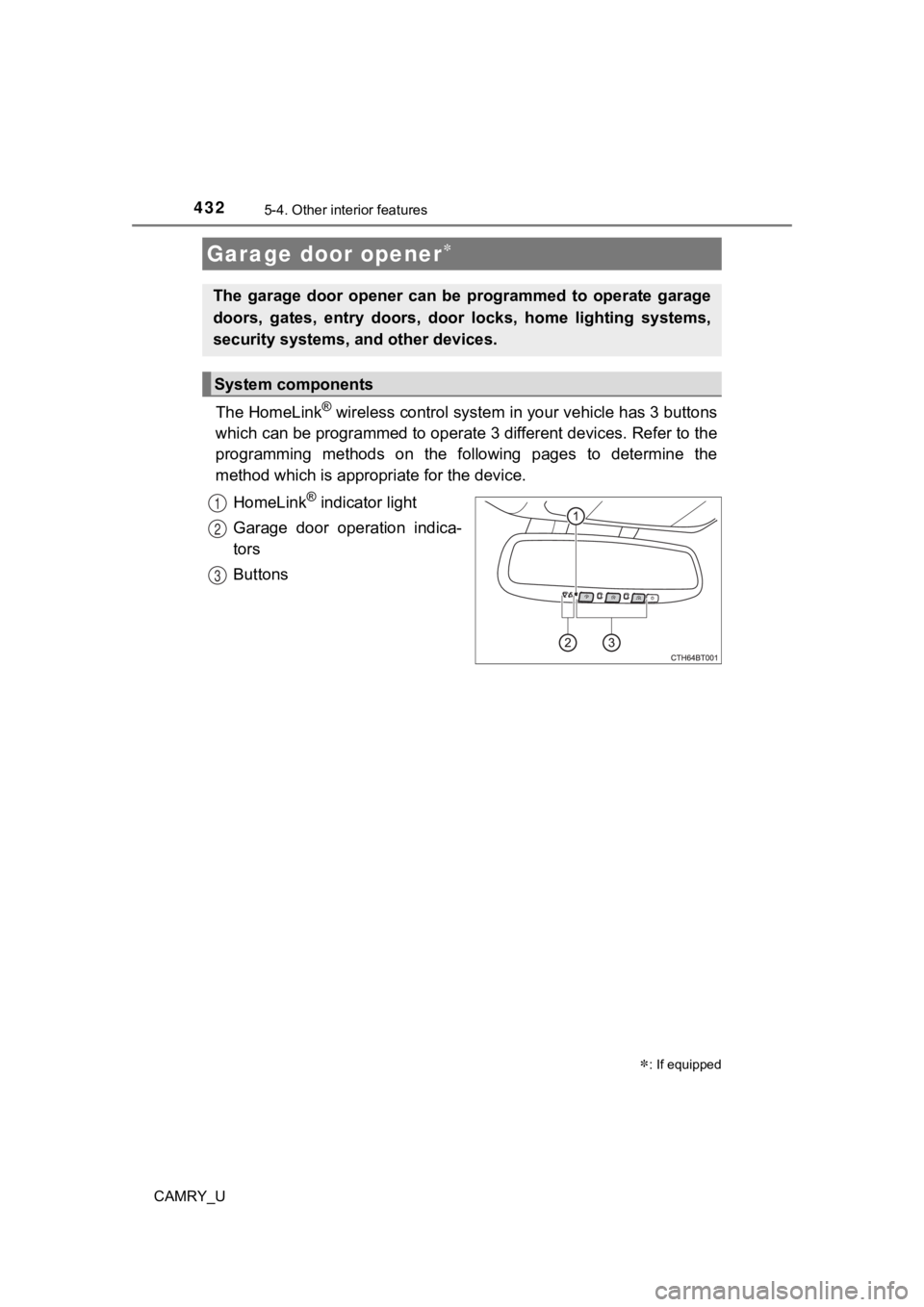
The HomeLink® wireless control system in your vehicle has 3 buttons
which can be programmed to operate 3 different devices. Refer to the
programming methods on the following pages to determine the
method which is approp riate for the device.
HomeLink
® indicator light
Garage door operation indica-
tors
Buttons
Garage door opener
: If equipped
The garage door opener can be programmed to operate garage
doors, gates, entry doors, door locks, home lighting systems,
security systems, and other devices.
System components
1
2
3
Page 433 of 664
4335-4. Other interior features
CAMRY_U
5
Interior features
■Before programming the HomeLink®
●During programming, it is possible that garage doors, gates, or
other devices may operate. For this reason, make sure that peo-
ple and objects are clear of the garage door or other devices t o
prevent injury or other potential harm.
● It is recommended that a new battery be placed in the remote
control transmitter for mo re accurate programming.
● Garage door opener motors manufactured after 1995 may be
equipped with rolling code pro tection. If this is the case, you may
need a stepladder or other sturdy, safe device to reach the
“Learn” or “Smart” button on the garage door opener motor.
■HomeLink® programming procedure
The programming procedures
can also be found at the follow-
ing URL.
Website: www.homelink.com/
toyota
For support, contact customer
support at the following.
Help Line: 1-800-355-3515
Page 435 of 664
4355-4. Other interior features
CAMRY_U
5
Interior features
Test the HomeLink® operation by pressing the newly pro-
grammed button and observi ng the indicator light:
● Indicator light illuminates: Progr amming of a fixed code device
has completed. The garage door or other device should operate
when a HomeLink
® button is pressed and released.
● Indicator light flashes rapidly: The garage door opener motor o r
other device is equipped with a rolling code. To complete pro-
gramming, firmly press and hold the HomeLink
® button for 2 sec-
onds then release it.
● If the garage door or other device does not operate, proceed to
“Programming a rol ling code system”.
Repeat the steps above to program another device for any of the
remaining HomeLink
® buttons.
■Programming a rolling code system
2 or more people may be necessary to complete rolling code pro-
gramming.
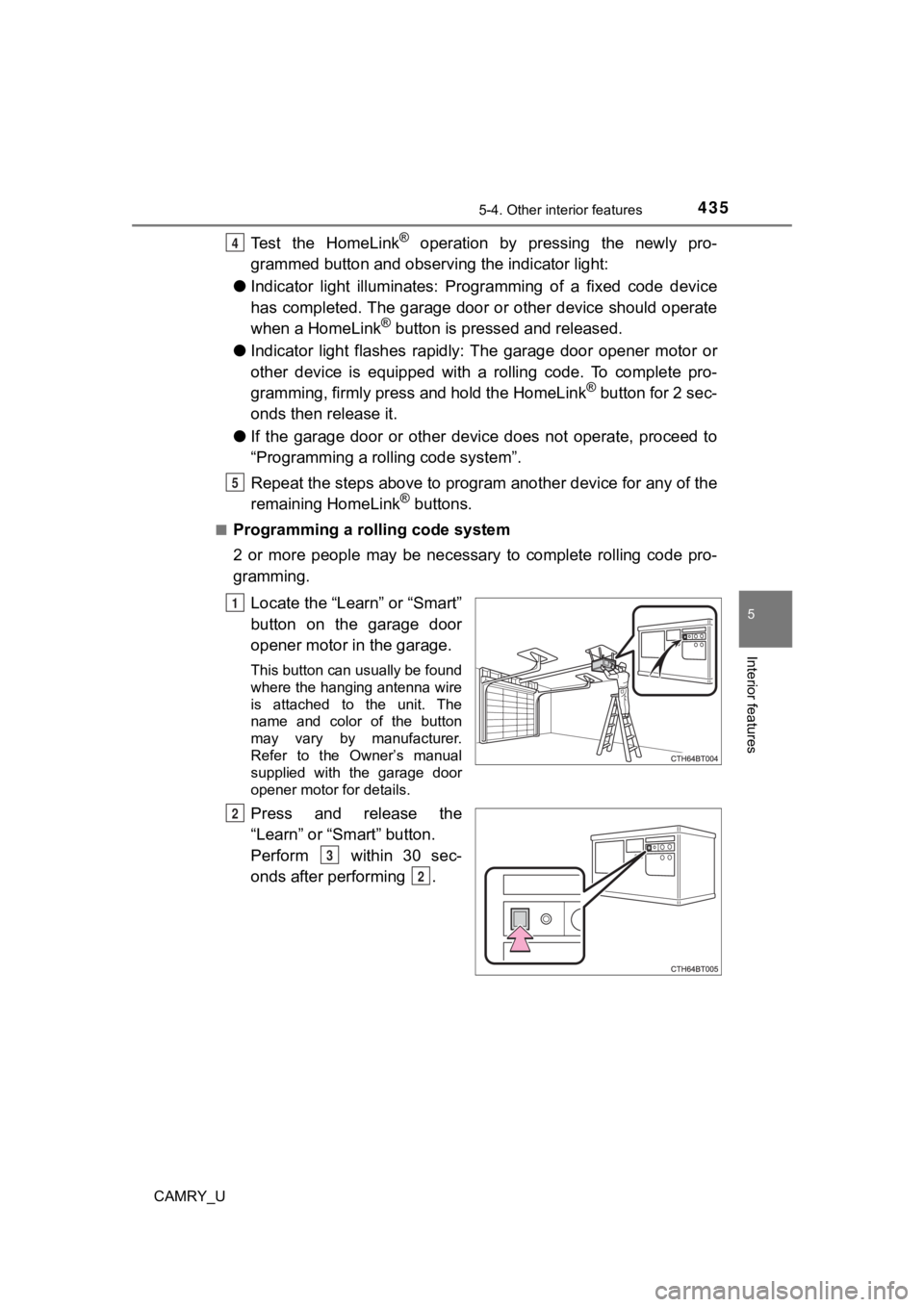
Locate the “Learn” or “Smart”
button on the garage door
opener motor in the garage.
This button can usually be found
where the hanging antenna wire
is attached to the unit. The
name and color of the button
may vary by manufacturer.
Refer to the Owner’s manual
supplied with the garage door
opener motor for details.
Press and release the
“Learn” or “Smart” button.
Perform within 30 sec-
onds after performing .
4
5
1
2
3
2
Page 436 of 664
4365-4. Other interior features
CAMRY_U
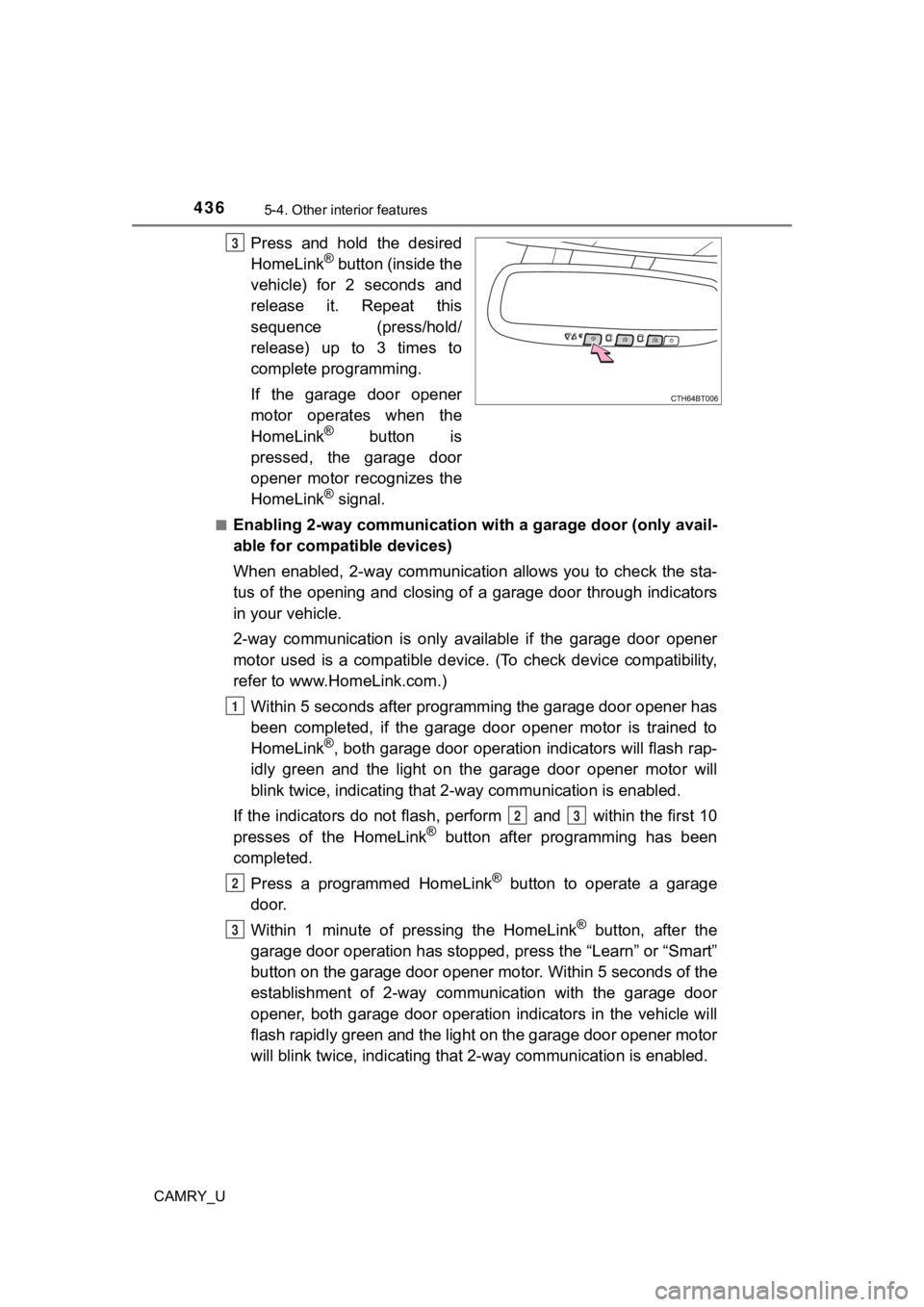
Press and hold the desired
HomeLink® button (inside the
vehicle) for 2 seconds and
release it. Repeat this
sequence (press/hold/
release) up to 3 times to
complete programming.
If the garage door opener
motor operates when the
HomeLink
® button is
pressed, the garage door
opener motor recognizes the
HomeLink
® signal.
■Enabling 2-way communication with a garage door (only avail-
able for compatible devices)
When enabled, 2-way communication allows you to check the sta-
tus of the opening and closing of a garage door through indicat ors
in your vehicle.
2-way communication is only available if the garage door opener
motor used is a compatible device. (To check device compatibility,
refer to www.HomeLink.com.)
Within 5 seconds after programming the garage door opener has
been completed, if the garage door opener motor is trained to
HomeLink
®, both garage door operation indicators will flash rap-
idly green and the light on the garage door opener motor will
blink twice, indicating that 2 -way communication is enabled.
If the indicators do not flash, perform and within the first 10
presses of the HomeLink
® button after programming has been
completed.
Press a programmed HomeLink
® button to operate a garage
door.
Within 1 minute of pressing the HomeLink
® button, after the
garage door operation has stopped, press the “Learn” or “Smart”
button on the garage door opener motor. Within 5 seconds of the
establishment of 2-way commu nication with the garage door
opener, both garage door operation indicators in the vehicle wi ll
flash rapidly green and the light on the garage door opener mot or
will blink twice, indicating that 2- way communication is enabled.
3
1
23
2
3