2022 TOYOTA BZ4X battery
[x] Cancel search: batteryPage 132 of 674

130
Owners Manual_Europe_M42D76_en
2-2. Charging
dures of the DC charger.
5 Operate the DC charger and
start the charging.
Follow the handling procedures of the DC charger to start charging.
Charging starts after a system check is
done.
6 Confirm that the charging indi-
cator on the charging port lights
up.
When the charging indicator is not lit, charging has not started.
Stop the charging in accordance to the
handling procedures of the DC charger when it is desired to interrupt the DC charging.
■Charging time may increase
P. 1 2 0
■When the DC charging connector cannot be inserted into the DC charging inlet
P. 1 1 0
■If a message indicating vehicle
error on the DC charger side is dis- played
Even if a message indicating vehicle
error on the DC charger side (ex. vehicle error found, vehicle error occurred, etc.) is displayed, there is no vehicle fault but
possibly a communication error between the DC charger and vehicle. In this case, there may be terminal damage (bad
contact) in the DC charging connector. If there is no error with the vehicle, contact the facility manager of the DC charger.
■During DC charging
●The current charging condition can be checked on the multi-information dis-
play.
●The actual charging time may differ
from that displayed on the DC charger during charging.
●There may be occasions the radio cannot be heard due to noise occur-rence during DC charging
●As the battery approaches full charge, the charging speed will decrease and
it will take longer to complete charging.
●The time to complete charging may change, or charging may stop before reaching the upper limit of the charge
capacity, due to the remaining charge of the traction battery, the outside tem-perature, the specifications of the
charger (stand), etc.
●It is recommended to avoid frequent
DC charging to prevent a decline in the traction battery capacity.
●Quickly move from the DC charging space for other users after the DC charging is completed.
■How to set the DC charging power
You can change the DC charging power limit on the multi-information display or multimedia.
●Setting operations on multi-informa-tion display
Page 135 of 674

133
2
Owners Manual_Europe_M42D76_en
2-2. Charging
Electric Vehicle system
1Operate the DC charger to stop
the charging.
DC charging connector will be unlocked automatically when charging is com-
pleted.
2 Remove the DC charging con-
nector.
The DC charging connector shape and
treatment will differ depending on the type of DC charger. Perform the opera-tions in accordance to handling proce-
dures of the DC charger.
Return the removed DC charging con- nector to its original position.
3 Close the AC charging inlet cap
and close the DC charging inlet
cap, and then close the charging
port lid.
■When DC charging cannot be
stopped
If charging cannot be stopped from the DC charger side due to a malfunction,
etc.
You can also stop DC charging by pressing the door unlock button (on the
electronic key, or driver’s door) three times at 1 to 2 seconds intervals.
■If the DC charging connector can-not be unlocked
P. 1 1 1
■After DC charging
Even if the traction battery is charged to the upper limit value that is set, the level
of charge displayed on the DC charger may be lower than the actual one.
NOTICE
■When using DC charging
Make sure to follow the handling pro-
cedures of the DC charger. If the pro- cedures are not followed properly, the vehicle and the DC charger may be
damaged.
After charging
NOTICE
■Caution after DC charging
●Be sure to attach the DC charging inlet cap to the DC charging inlet
and then close the charging port lid after removing the DC charging connector from the inlet. If the DC
charging inlet cap is not closed, for- eign materials may get into the inlet and the EV system may be mal-
functioning.
Page 136 of 674

134
Owners Manual_Europe_M42D76_en
2-2. Charging
■Calendar settings
Charging schedule is performed accord- ing to the date and time shown on the multi-information display. Refer to the
“Settings display” ( P.178)
If the calendar settings check screen is displayed when an attempt was made to
register a charge schedule, check that the correct date is set. If it is incorrect, be sure to correct it.
If the calendar information is wrong, the charging schedule function will not oper-ate normally.
When registering the charging
schedule, the following settings can
be changed.
■Select the charging mode
One of the two following charging
modes can be selected.
“Start”
Starts charging at the set time* and
finishes charging when fully
charged.
“Start-Stop”
AC charging is performed accord-
ing to the set start time and stop
time.*
*: There might be a slight error in the
timing when charging starts due to
the state of the traction battery.
■Repeated setting
The periodic charging schedule can
be set by selecting your desired
day of the week. Select one or
more day of the week to do the
charging schedule.
■Turning “Charge Now” on and
off
To start charging without changing
the charging schedule setting, turn
“Charge Now” on to temporarily
cancel the charging schedule and
enable charging after connecting
the AC charging connector.*
*: If the charging connector is removed
during charging while the charging
schedule is registered and “Charge
Now” is on, “Charge Now” turns off.
■“Next Event”
Of the registered charging sched-
ules, the closest charging schedule
after the current time is called the
“Next Event”.
For charging schedule, AC
charging will be performed accord-
ing to the Next Event.
The charging schedule can be reg-
istered on the multi-information dis-
play or multimedia.
Multi-information display opera-
tion: P. 1 3 6
Using the charging
schedule function
AC charging can be carried out
at the desired time by register-
ing the charging schedule.
Settings of the charging
schedule function
Registering the charging
schedule
Page 137 of 674

135
2
Owners Manual_Europe_M42D76_en
2-2. Charging
Electric Vehicle system
Multimedia operation: P. 1 4 0
■Charging schedule
●The charging schedule cannot be set while driving.
●A maximum of 15 charging schedules can be registered.
If the charging mode is set to “Start-
Stop” and the start time and stop time are set to the same time, charging will be performed for 24 hours from the start
time.
The charging schedule function can not be used when using DC charging.
■To make sure that the charging
schedule function operates cor- rectly
Check the following items.
●Adjust the clock to the correct time ( P.178)
●The calendar is set to the correct date ( P.178)
●Check that the power switch is turned off
●After registering the charging sched-ule, connect the AC charging connec-
tor
The charging start time is determined
based on the charging schedule at the
time that the AC charging connector
was connected.
●Connect the AC charging connector
before the start time
When the charging mode is set to
“Start”, if you connect the AC charging
connector after the set start time, the
next charging schedule will be refer-
enced.
When the charging mode is “Start-Stop”,
if you connect the AC charging connec-
tor after the start time, charging will start
immediately and charging will be per-
formed until the stop time.
●After connecting the AC charging con- nector, check that the charging indica-tor of the charging port flashes
( P. 9 7 )
●Do not use an socket that has a power
cut off function (including a timer func- tion)
Use an socket that constantly supplies
electricity. For sockets where the power
is cut off due to a timer function, etc.,
charging may not be carried out accord-
ing to plan if the power is cut off during
the set time.
■When the AC charging connector remains connected to the vehicle
●When the charging mode is set to “Start”, even if multiple consecutive
charging schedules are registered, the next charge will not be carried out according to the charging schedule
until the AC charging connector is removed and reconnected after charging completes. Also, when the
traction battery is fully charged, charging according to the charging schedule will not be carried out.
●If the charging stop time is reached before the traction battery is fully
charged and the charging mode is set to “Start-Stop”, the nearest charging schedule after the stop time is
updated as the next charging sched- ule, and charging is repeated until the battery is fully charged.
■When charging schedules are
ignored
When the following operations are per- formed while the charging schedule is
Page 138 of 674

136
Owners Manual_Europe_M42D76_en
2-2. Charging
on standby, charging schedule is tempo-
rarily canceled and charging is started.
●When the Remote Air Conditioning
System ( P.427) is operated
●When turning “My Room Mode” on
( P.145)
●When turning “Charge Now” on
( P.139, 144)
●When an operation that temporarily
cancel charging using the charging schedule ( P.123)
■Battery heater (P.114)/“Battery Cooler” ( P. 1 1 5 )
Depending on the temperature of the traction battery, the traction battery heater or traction battery cooler may be
activated and the charging indicator may light up while the timer is waiting for charging.
When operating charging schedule,
use the meter control switches.
Meter control switches ( P.176)
Multi-information display
■Registering the charging
schedule
1 Press or of the meter
control switches to select .
2 Press or of the meter
control switches to select “Vehi-
cle Settings”, and then press
and hold .
3 Press or of the meter
control switches to select
“Charging Settings”, and then
press .
The “Charging Settings” screen will be displayed.
4 Press or of the meter
control switches to select
“Charging Schedule”, and then
press .
The “Charging Schedule” screen will be displayed.
5 Press or of the meter
control switches to select
“Scheduled Events”, and then
press .
The “Scheduled Events” screen will be displayed.
Setting operations on multi-
information display
Page 142 of 674
140
Owners Manual_Europe_M42D76_en
2-2. Charging
■When charging schedule setting operations are canceled
When the vehicle is in the following con- ditions, charging schedule setting oper-ations are canceled.
●The power switch is operated before the settings are confirmed
●The vehicle starts off
●A display with a higher priority than that of the charging schedule setting is shown
For details on how to operate the
audio system screen, refer to “Mul-
timedia owner’s manual”.
Setting operations related to the
charging schedule are performed
on the “Charging schedule” screen.
■Displaying the “Charging
schedule” screen
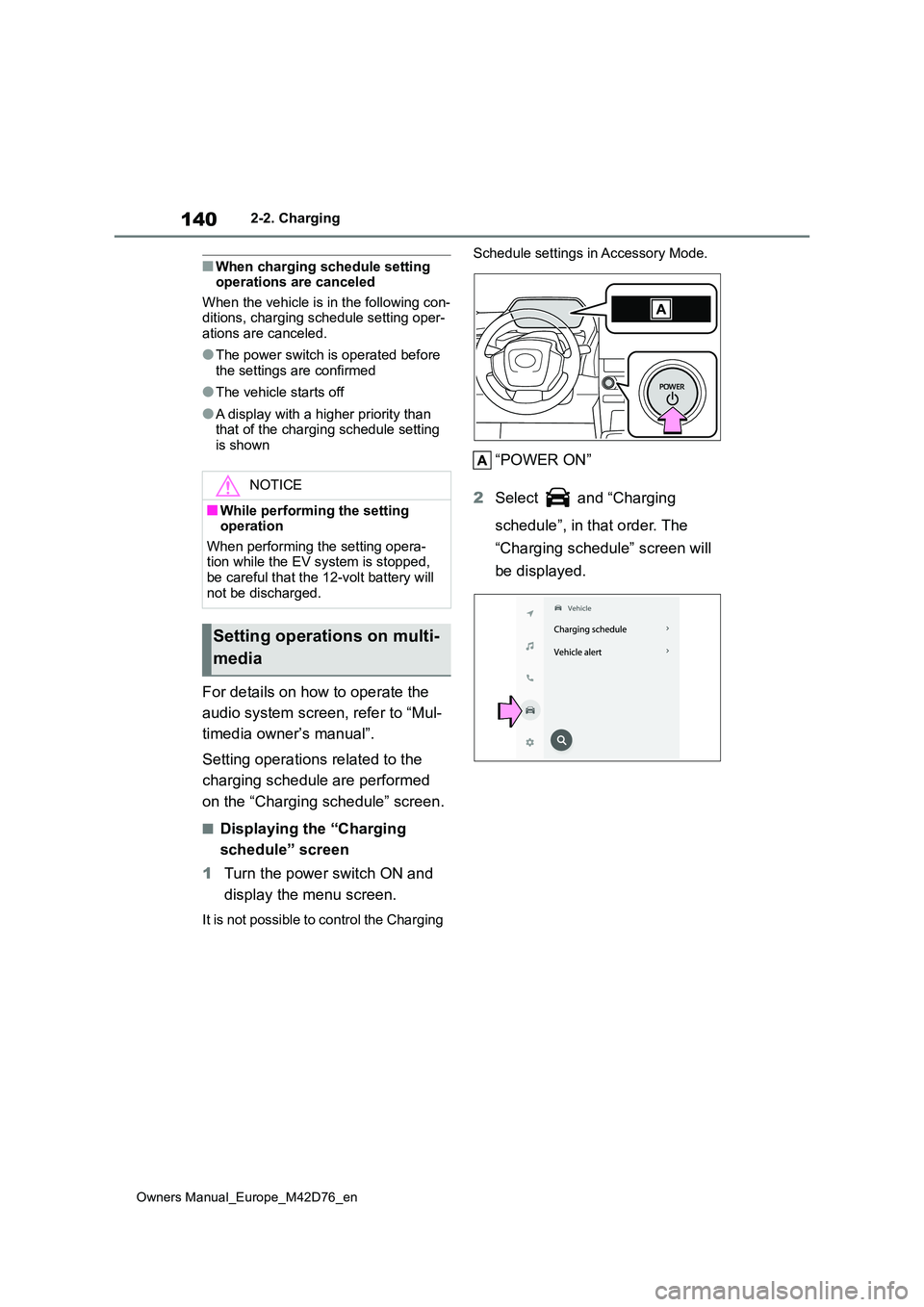
1 Turn the power switch ON and
display the menu screen.
It is not possible to control the Charging
Schedule settings in Accessory Mode.
“POWER ON”
2 Select and “Charging
schedule”, in that order. The
“Charging schedule” screen will
be displayed.
NOTICE
■While performing the setting operation
When performing the setting opera- tion while the EV system is stopped, be careful that the 12-volt battery will
not be discharged.
Setting operations on multi-
media
Page 146 of 674
144
Owners Manual_Europe_M42D76_en
2-2. Charging
the calendar.
■Turning “Charge now” on
1 Display the “Charging sched-
ule” screen. ( P. 1 4 0 )
2 Press “Charge now”.
Each time the button is pressed,
“Charge now” switches between on
and off.
After setting operations are com-
plete, charging starts when the AC
charging connector is connected.
■Changing Next Event
If the multimedia customize content
“ACC customize” is not set to OFF,
the ending screen will not be dis-
played.If it is this case, check the
settings of the multimedia.
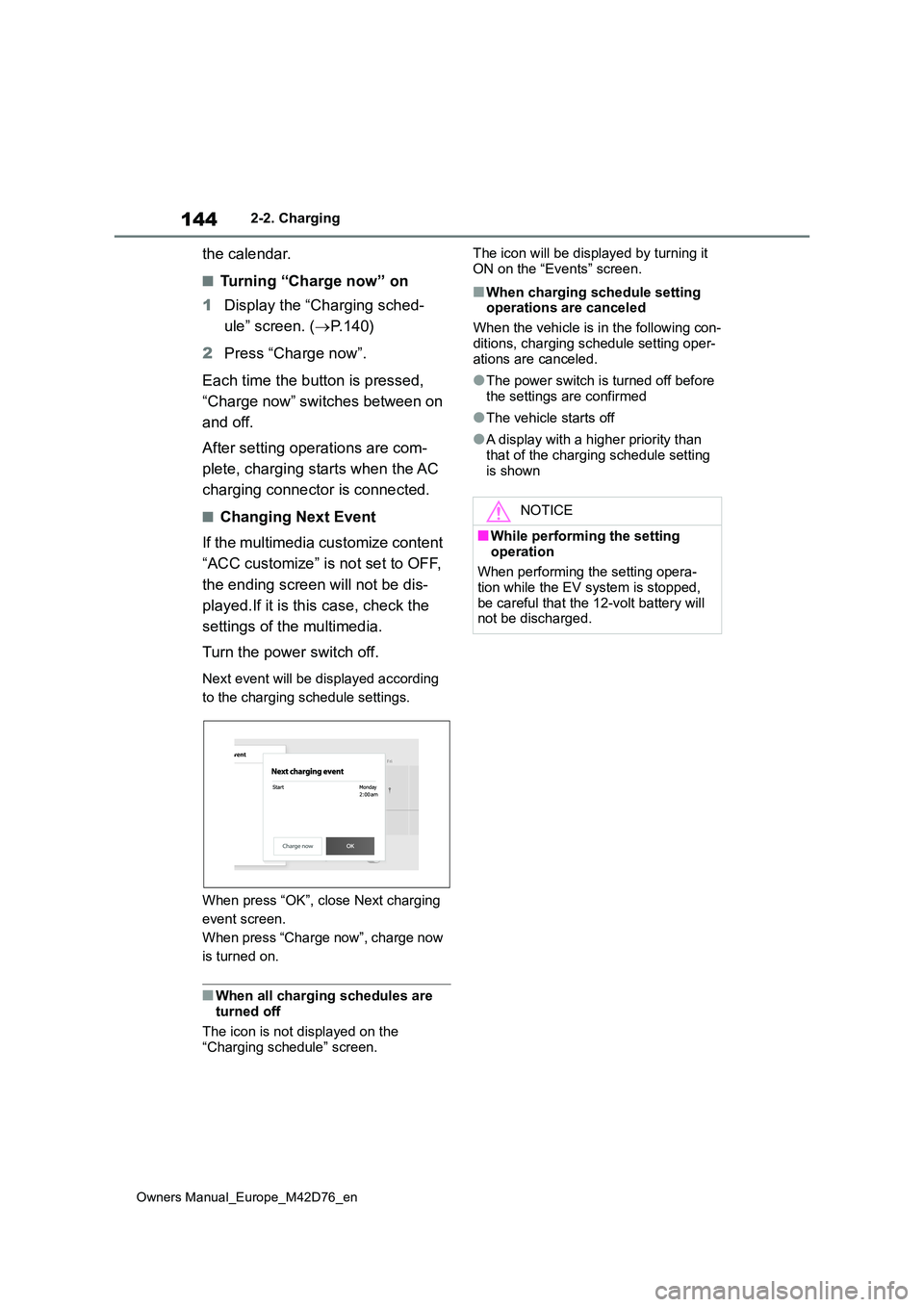
Turn the power switch off.
Next event will be displayed according
to the charging schedule settings.
When press “OK”, close Next charging
event screen.
When press “Charge now”, charge now
is turned on.
■When all charging schedules are turned off
The icon is not displayed on the
“Charging schedule” screen.
The icon will be displayed by turning it
ON on the “Events” screen.
■When charging schedule setting operations are canceled
When the vehicle is in the following con-
ditions, charging schedule setting oper- ations are canceled.
●The power switch is turned off before the settings are confirmed
●The vehicle starts off
●A display with a higher priority than
that of the charging schedule setting is shown
NOTICE
■While performing the setting
operation
When performing the setting opera- tion while the EV system is stopped,
be careful that the 12-volt battery will not be discharged.
Page 148 of 674

146
Owners Manual_Europe_M42D76_en
2-2. Charging
Mode”.
■Meter display while charging
After turning the power switch to ON while charging, the power switch auto-matically turns off if My Room Mode is
not selected within approximately 100 seconds.
■When using My Room Mode the fol-lowing may occur
●When the remaining charge of the traction battery drops to the lower
limit, the air conditioning system auto- matically stops. In that case, the air conditioning system can not operate
until the remaining charge of the trac- tion battery increases. Turn off the power switch once, then use My
Room Mode after the remaining charge of the traction battery increases.
●If the doors are unlocked while using My Room mode, the AC charging con-
nector will be unlocked and My Room mode will be stopped. To use My Room mode again, perform the opera-
tion to start it. ( P.145) In addition, when using AC charger at the public charging station, it is necessary to
perform the operation to start the charger before using My Room mode.
●The charging time of the traction bat-tery gets longer.
●Noise may be heard from the radio depending on conditions of the radio
wave.
●The surrounding area of the onboard traction battery charger in the motor
compartment may become hot.
●The electric power steering system
warning light (yellow) may turn on, but this is not a malfunction.
■Using My Room Mode during DC charging
When using My Room mode during DC charging, the state of charge completion will be lower than when not using My
Room Mode.
■When “My Room Mode” is used while the traction battery is fully charged
When the power switch is turned on
while the traction battery is fully charged
and the charging connector that sup-
plies power is connected, “Charging
Port Lid is Open” is displayed on the
multi-information display. In this case,
press on the meter control switches
to display the setting screen of “My
Room Mode”, and then select “My
Room Mode”.
When “My Room Mode” is used while
the traction battery is fully charged, the electric power of the traction battery may be consumed. In this case,
charging may be performed again.
■Warning message display
When trying to start My Room Mode or My Room Mode is being used , if a message
is displayed on the multi-information display, refer to the cor responding table and perform the appropriate correction procedures.
MessageCorrection procedure
“Traction Battery is too Low
for “My Room Mode””
There is no remaining charge of the traction battery to
start My Room Mode. Wait until the remaining charge
of the traction battery increases, start My Room Mode.