2022 TOYOTA BZ4X TRANS
[x] Cancel search: TRANSPage 447 of 674

445
6
Owners Manual_Europe_M42D76_en
6-4. Using the other interior features
Interior features
The USB Type-C charging ports
are used to supply 3 A of electricity
at 5 V to external devices.
The USB Type-C charging ports
are for charging only. They are not
designed for data transfer or other
purposes.
Depending on the external device,
it may not charge properly. Refer to
the manual included with the device
before using a USB charging port.
Refer to “Multimedia owner’s man-
ual” for USB Type-A information.
■Using the USB Type-C
charging ports
Center console
Rear
■The USB Type-C charging ports can be used when
The power switch is in ACC or ON.
■Situations in which the USB Type-C charging ports may not operate correctly
●If a device which consumes more than 3 A at 5 V is connected
●If a device designed to communicate with a personal computer, such as a
USB memory device, is connected
●If the connected external device is
turned off (depending on device)
●If the temperature inside the vehicle is
high, such as after the vehicle has
NOTICE
■When power outlet is not in use
To avoid damaging the power outlet,
close the power outlet lid when the power outlet is not in use.Foreign objects or liquids that enter
the power outlet may cause a short circuit.
■To prevent 12-volt battery dis-charge
Do not use the power outlet longer
than necessary when the EV system is off.
■To prevent incorrect operation of the vehicle
When turning the power switch off,
make sure to disconnect accessories designed for charging, such as porta-ble chargers, power banks, etc. from
the power outlets.
If such an accessory is left connected, the following may occur:
●The doors will not be able to be locked.
●The opening screen will be dis-played on the multi-information dis-
play.
●The interior lights, instrument panel
lights, etc. will illuminate.
USB Type-C charging ports
Page 454 of 674

452
Owners Manual_Europe_M42D76_en
6-4. Using the other interior features
Fold down the armrest for use.
NOTICE
• A case or cover attached with an uneven or tilted surface, so that the
charging side is not flat
• Thick decorations
• Accessories, such as finger rings, straps, etc.
●When the portable device is in con-tact with, or is covered by any of the
following metallic objects:
• A card that has metal on it, such as
aluminum foil, etc.
• A pack of cigarettes that includes
aluminum foil
• A wallet or bag that is made of
metal
•Coins
• A heating pad
• CDs, DVDs or other media
• A metal accessory
• A case or cover made of metal
●Electric wave type wireless remote controls are being used nearby
●The electronic key is not inside the vehicle
●2 or more portable devices are placed on the charging tray at the same time
If charging is abnormal or the opera- tion indicator light continues to flash
for any other reason, the wireless charger may be malfunctioning. Con-tact any authorized Toyota retailer or
Toyota authorized repairer, or any reli- able repairer.
■To prevent malfunctions and data corruptions
●When charging, bringing a credit, or
other magnetic card, or magnetic storage media close to the charge area may clear any stored data due
to magnetic influence. Also, do not bring a wristwatch or other preci-sion instrument close to the charge
area since doing so may cause it to malfunction.
●Do not charge with a non-contact IC card such as a transportation sys-tem IC card inserted between the
charging side of a portable device and the charge area. The IC chip may become extremely hot and
damage the portable device or IC card. Be especially careful not to charge a portable device inside a
case or cover with a non-contact IC card attached.
●Do not leave portable devices inside the vehicle. The inside of the vehicle can become hot in extreme
heat, which could cause a malfunc- tion.
■If the smartphone OS has been updated
If the smartphone OS has been
updated to a newer version, its charging specifications may have changed significantly.
For details, check the information on the manufacturer’s website.
■To prevent 12-volt battery dis-charge
Do not use the wireless charger for a
long period of time when the EV sys- tem is stopped.
Armrest
Page 480 of 674
478
Owners Manual_Europe_M42D76_en
7-3. Do-it-yourself maintenance
transmitters to detect low tire infla-
tion pressure before serious prob-
lems arise.
The tire pressure warning system
of this vehicle adopts a 2-type
warning system.
When “Adjust Pressure” is dis-
played (Normal Warning)
A warning with the tire pressure warn-
ing light and warning buzzer when
there is an unknown level of low tire
pressure with the appearance of the tire
due to natural air leakage as well as the
pressure lowering due to changes in
the pressure according to the outside
temperature.
When “Immediately Check tyre
when Safe” is displayed (Emer-
gency Warning)
A warning with the tire pressure warn-
ing light and warning buzzer when
there is a known level of low tire pres-
sure with the appearance of the tire due
to pressure suddenly lowering.
However, the system may not be able
to detect sudden tire ruptures (bursting,
etc.).
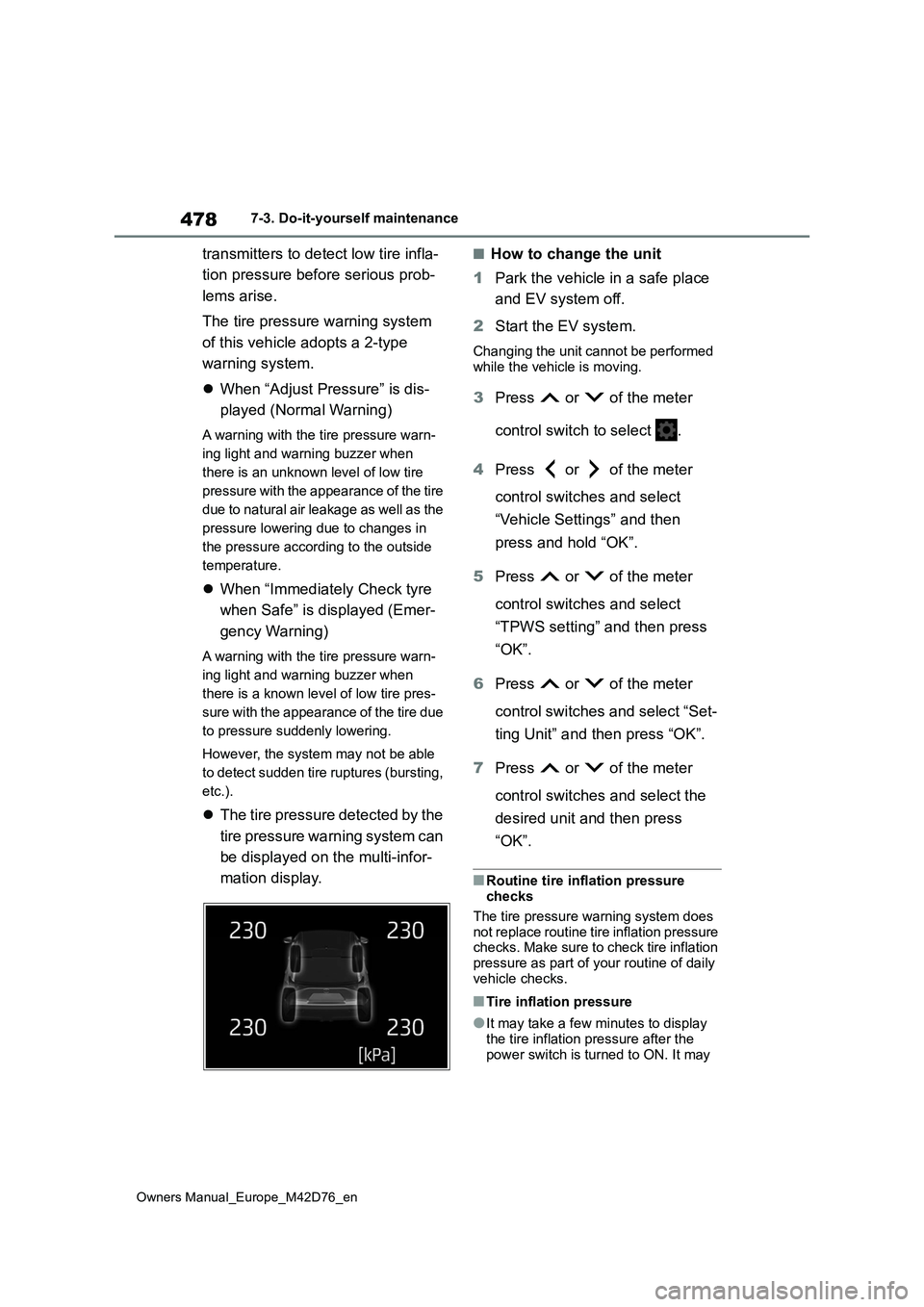
The tire pressure detected by the
tire pressure warning system can
be displayed on the multi-infor-
mation display.
■How to change the unit
1 Park the vehicle in a safe place
and EV system off.
2 Start the EV system.
Changing the unit cannot be performed
while the vehicle is moving.
3 Press or of the meter
control switch to select .
4 Press or of the meter
control switches and select
“Vehicle Settings” and then
press and hold “OK”.
5 Press or of the meter
control switches and select
“TPWS setting” and then press
“OK”.
6 Press or of the meter
control switches and select “Set-
ting Unit” and then press “OK”.
7 Press or of the meter
control switches and select the
desired unit and then press
“OK”.
■Routine tire inflation pressure checks
The tire pressure warning system does
not replace routine tire inflation pressure checks. Make sure to check tire inflation pressure as part of your routine of daily
vehicle checks.
■Tire inflation pressure
●It may take a few minutes to display
the tire inflation pressure after the power switch is turned to ON. It may
Page 481 of 674

479
7
Owners Manual_Europe_M42D76_en
7-3. Do-it-yourself maintenance
Maintenance and care
also take a few minutes to display the
tire inflation pressure after inflation pressure has been adjusted.
●Tire inflation pressure changes with temperature.The displayed values may also be dif-
ferent from the values measured using a tire pressure gauge.
■Situations in which the tire pres-sure warning system may not oper-
ate properly
●In the following cases, the tire pres-
sure warning system may not operate properly.• If non-genuine Toyota wheels are
used. • A tire has been replaced with a tire that is not an OE (Original Equipment)
tire. • A tire has been replaced with a tire that is not of the specified size.
• Tire chains etc. are equipped. • If a window tint that affects the radio wave signals is installed.
• If there is a lot of snow or ice on the vehicle, particularly around the wheels or wheel housings.
• If the tire inflation pressure is extremely higher than the specified level.
• If wheels without tire pressure warning valves and transmitters are used.• If the ID code on the tire pressure
warning valves and transmitters is not registered in the tire pressure warning computer.
●Performance may be affected in the following situations.
• Near a TV tower, electric power plant, gas station, radio station, large dis-play, airport or other facility that gen-
erates strong radio waves or electrical noise• When carrying a portable radio, cellu-
lar phone, cordless phone or other wireless communication device
If tire position information is not correctly
displayed due to the radio wave condi-
tions, the display may be corrected by
driving and changing the radio wave
conditions.
●When the vehicle is parked, the time taken for the warning to start or go off could be extended.
●When tire inflation pressure declines rapidly for example when a tire has
burst, the warning may not function.
When replacing tires or wheels, tire
pressure warning valves and trans-
mitters must also be installed.
When new tire pressure warning valves
and transmitters are installed, new ID
codes must be registered in the tire
pressure warning computer and the tire
pressure warning system must be ini-
tialized. ( P.484)
■When replacing the tires and wheels
If the ID code of the tire pressure warn-
ing valve and transmitter is not regis- tered, the tire pressure warning system will not work properly. After driving for
about 10 minutes, the tire pressure warning light blinks for 1 minute and
stays on to indicate a system malfunc- tion.
Installing tire pressure warn-
ing valves and transmitters
Page 482 of 674
480
Owners Manual_Europe_M42D76_en
7-3. Do-it-yourself maintenance
■When rotating the tires
It is necessary to register the posi-
tion of each wheel after performing
a tire rotation.
Wheel position registration can be
performed by oneself. Wheel posi-
tion registration is performed by
driving forward with moderate left
and right turns. However, depend-
ing on the driving conditions and
driving environment, registration
may take some time to complete.
■Registration of the tire posi-
tion
1 Park the vehicle in a safe place
and stop the EV system for 15
minutes or more.
2 Start the EV system (P.243)
Registration cannot be performed while the vehicle is moving.
3 Press or of the meter
control switches and select .
4 Press or of the meter
control switches and select
“Vehicle Settings”, and then
press and hold the “OK”.
5 Press or of the meter
control switches and select
“TPWS Setting”, and then press
“OK”.
6 Press or of the meter
control switches and select
“Tyre Rotation”, and then press
“OK”.
NOTICE
■Repairing or replacing tires, wheels, tire pressure warning
valves, transmitters and tire valve caps
●When removing or fitting the
wheels, tires or the tire pressure warning valves and transmitters, contact any authorized Toyota
retailer or Toyota authorized repairer, or any reliable repairer as the tire pressure warning valves
and transmitters may be damaged if not handled correctly.
●Make sure to install the tire valve caps. If the tire valve caps are not installed, water could enter the tire
pressure warning valves and the tire pressure warning valves could be bound.
●When replacing tire valve caps, do not use tire valve caps other than
those specified. The cap may become stuck.
■To avoid damage to the tire pres-sure warning valves and trans-mitters
When a tire is repaired with liquid sealants, the tire pressure warning valve and transmitter may not operate
properly. If a liquid sealant is used, contact any authorized Toyota retailer or Toyota authorized repairer, or any
reliable repairer or other qualified ser- vice shop as soon as possible. After use of liquid sealant, make sure to
replace the tire pressure warning valve and transmitter when repairing or replacing the tire.
Registration of the position
of each wheel after perform-
ing a tire rotation
Page 486 of 674

484
Owners Manual_Europe_M42D76_en
7-3. Do-it-yourself maintenance
■Tire inflation pressure setting pro-
cedure (Setting using the current tire inflation pressure)
●If the power switch is turned off while setting the tire inflation pressure, the next time the power switch is turned to
ON, the setting procedure will resume and it will not be necessary to restart the procedure.
●If the tire inflation pressure setting procedure is started unnecessarily,
adjust the tire inflation pressure to the specified level with the tires cold and then perform setting by selecting a
specified tire inflation pressure, or per- form the tire inflation pressure setting procedure with the current tire inflation
pressure.
■If the tire inflation pressure cannot be set properly
●Normally, the tire inflation pressure setting procedure can be completed in 2 or 3 minutes.
●If the tire pressure warning light does not blink 3 times when starting the tire
inflation pressure setting procedure, the procedure may not have started. Perform the procedure again from the
beginning.
●If tire inflation pressure setting proce-
dure cannot be completed after per- forming the above procedure, contact by any authorized Toyota retailer or
Toyota authorized repairer, or any reli- able repairer.
■When the registering ID codes
The tire pressure warning valve
and transmitter is equipped with a
unique ID code.
When new tire pressure warning
valves and transmitters are
installed, new ID codes must be
registered in the tire pressure warn-
ing computer.
■How to registration ID code
1 Park the vehicle in a safe place,
wait for approximately 15 min-
utes.
2 Start the EV system. (P.243)
The ID code registration procedure
cannot be performed while the vehicle is moving.
3 Press or of the meter
control switches and select .
4 Press or of the meter
control switches and select
“Vehicle Settings”, and then
press and hold the “OK”.
5 Press or of the meter
control switches and select
“TPWS Setting”, and then press
“OK”.
6 Press or of the meter
control switches and select
“Tyre Set Switching”, and then
press “OK”.
WARNING
■When setting using the current
tire inflation pressure
Make sure to adjust the tire inflation pressure of each tire to the appropri-
ate level before performing tire pres- sure setting. Otherwise, the tire pressure warning light may not illumi-
nate even if the tire inflation pressure drops or may illuminate even though the tire inflation pressure is normal.
Registering ID codes
Page 488 of 674

486
Owners Manual_Europe_M42D76_en
7-3. Do-it-yourself maintenance
●ID codes can be registered by your-
self, but depending on the driving con- ditions and driving environment, registration may take some time to
complete.
●When using a wheel set which all of
the ID codes have already been regis- tered, the wheel set can be changed in a short amount of time.
■If ID codes are not registered prop-
erly
●In the following situations, ID code
registration may take longer than usual to be completed or may not be possible.
• When the vehicle has not been parked for approximately 15 minutes or more before being driven
• Vehicle is not driven at approximately 40 km/h (25 mph) or more• Vehicle is driven on unpaved roads
• Vehicle is driven near other vehicles and system cannot recognize tire pressure warning valves and transmit-
ters of your vehicle over those of other vehicles• Wheel with tire pressure warning
valve and transmitter installed is inside or near the vehicle
●If the vehicle is reversed during regis-tration, all data collected until then will be cleared. Perform driving again.
●If registration does not complete after driving for 1 hour or more, perform the
ID code registration procedure again from the beginning.
●If the tire pressure warning light does not blink 3 times when starting ID code registration procedure, the pro-
cedure may not have started. Perform the procedure again from the begin-ning.
●If ID codes cannot be registered even when performing the above proce-
dure, contact any authorized Toyota retailer or Toyota authorized repairer, or any reliable repairer.
To cancel ID code registration after
it has been started, select “Register
New Valve/ID” again on the multi-
information display.
If ID code registration has been
canceled, the tire pressure warning
light will turn off.
If the warning light does not turn off,
ID code registration may not have
been cancelled correctly. To cancel
registration, select “Register New
Valve/ID” again on the multi-infor-
mation display.
Your vehicle is equipped with a tire
pressure warning system with a
function to register two sets of ID
codes. This allows for registration
of a second wheel set, for example
a winter set.
The wheel set can be changed
only if a second wheel set has
been registered to the system. If
a second wheel set has not been
registered, message will be dis-
played and it will not be possible
to change to the selected wheel
set.
ID codes can be registered by
yourself.
Only a change between both
registered wheel set is possible,
mixing between these wheel sets
Canceling ID code registra-
tion
Selecting wheel set
Page 494 of 674

492
Owners Manual_Europe_M42D76_en
7-3. Do-it-yourself maintenance
1Remove any dirt or foreign mat-
ter from the wheel contact sur-
face.
If foreign matter is on the wheel contact
surface, the wheel bolts may loosen while the vehicle is in motion, causing
WARNING
■Replacing a flat tire
●Do not touch the disc wheels or the
area around the brakes immedi- ately after the vehicle has been driven.
After the vehicle has been driven the disc wheels and the area around the brakes will be extremely
hot. Touching these areas with hands, feet or other body parts while changing a tire, etc. may
result in burns.
●Failure to follow these precautions
could cause the wheel bolts to loosen and the tire to fall off, result-ing in death or serious injury.
• Never apply oil or grease to the
wheel bolts or their contact surface
on the wheel .
Doing so may cause the wheel
bolts to be tightened excessively,
leading to damage to the wheel
bolts, the threaded portion the
wheel bolts install to , or the
wheel.
Also, the wheel bolts may come
loose, possibly leading to the wheel
coming off, causing a serious acci-
dent.
If oil or grease is attached to either
of these parts, remove it.
●When installing a wheel, use the
same wheel bolts that were removed with the wheel. Also, do not use any wheel bolts other than
Toyota genuine wheel bolts.
• If a wheel bolt hole in a wheel or the threads of a wheel bolt or the wheel hub are deformed, cracked, rusty or
otherwise damaged, have the vehi- cle inspected by any authorized Toyota retailer or Toyota authorized
repairer, or any reliable repairer.
■When tightening the wheel bolts
Do not tighten the wheel bolts exces- sively.Doing so may cause the wheel bolts,
the threads of the wheel hub, or the wheel to be damaged.
■Replacing a flat tire for vehicles with power back door
In cases such as when replacing tires,
make sure to cancel the power back door system ( P.202). Failure to do so may cause the back door to oper-
ate unintentionally if the power back door switch is accidentally touched, resulting in hands and fingers being
caught and injured.
NOTICE
■Repairing or replacing tires, wheels, tire pressure warning
valves, transmitters and tire valve caps
P. 4 8 0
Installing the tire