2022 TOYOTA AVALON belt
[x] Cancel search: beltPage 203 of 572

2034-2. Driving procedures
4
Driving
■When the parking brake is set automatically while the system is holding
the brakes
Perform any of the following operations to release the parking brake.
● Depress the accelerator pedal. (The parking brake will not be released auto-
matically if the seat belt is not fastened.)
● Operate the parking brake switch with the brake pedal depressed .
Make sure that the parking brake indicator light goes off. ( P. 198)
■ When an inspection at your Toyota dealer is necessary
When the brake hold standby indicator (green) does not illumina te even when
the brake hold switch is pressed with the brake hold system ope rating condi-
tions met, the system may be malfunctioning. Have the vehicle inspected at
your Toyota dealer.
■ Warning messages and buzzers
Warning messages and buzzers are used to indicate a system malfunction or
to inform the driver of the need for caution. If a warning message is shown on
the multi-information display, read the message and follow the instructions.
■ If the brake hold operated indicator flashes
P. 457
WARNING
■When the vehicle is on a steep incline
When using the brake hold system on a steep incline, exercise caution. The
brake hold function may not hold the vehicle in such a situatio n.
■ When stopped on a slippery road
The system cannot stop the vehicle when the gripping ability of the tires has
been exceeded. Do not use the system when stopped on a slippery road.
NOTICE
■When parking the vehicle
The brake hold system is not designed for use when parking the vehicle for
a long period of time. Turning the engine switch off while the system is hold-
ing the brake may release the brake, which would cause the vehi cle to
move. When operating the engine switch, depress the brake pedal, shift the
shift lever to P and set the parking brake.
Page 275 of 572

2754-5. Using the driving support systems
4
Driving
■Dynamic radar cruise control wi th full-speed range can be set when
● The shift lever is in D.
● The desired set speed can be set when the vehicle speed is approximately
20 mph (30 km/h) or more.
(However, when the vehicle speed is set while driving at below approxi-
mately 20 mph [30 km/h], the set speed will be set to approximately 20 mph
[30 km/h].)
■ Accelerating after setting the vehicle speed
The vehicle can accelerate by operating the accelerator pedal. After acceler-
ating, the set speed resumes. However, during vehicle-to-vehicl e distance
control mode, the vehicle speed may decrease below the set spee d in order
to maintain the distance to the preceding vehicle.
■ When the vehicle stops while follow-up cruising
●Pressing the “+ RES” switch while the vehicle ahead stops will resume fol-
low-up cruising if the vehicle ahead starts off within approxim ately 3 sec-
onds after the switch is pressed.
● If the vehicle ahead starts off within 3 seconds after your vehicle stops, fol-
low-up cruising will be resumed.
■ Automatic cancelation of vehicle-to-vehicle distance control mo de
Vehicle-to-vehicle distance control mode is automatically cance led in the fol-
lowing situations.
● VSC is activated.
● TRAC is activated for a period of time.
● When the VSC or TRAC system is turned off.
● The sensor cannot detect correctly because it is covered in some way.
● When the brake control or output restriction control of a driving support sys-
tem operates. (For example: Pre -Collision System, Drive-Start Control)
● The parking brake is operated.
● The vehicle is stopped by system control on a steep incline.
● The following are detected when the vehicle has been stopped by system
control:
• The driver is not wearing a seat belt.
• The driver’s door is opened.
• The vehicle has been stopped for about 3 minutes
If vehicle-to-vehicle distance control mode is automatically ca nceled for any
reasons other than the above, there may be a malfunction in the system.
Contact your Toyota dealer.
Page 390 of 572

3906-1. Maintenance and care
■Caring for leather areas
Toyota recommends cleaning the interior of the vehicle at least twice a year to
maintain the quality of the vehicle's interior.
■ Shampooing the carpets
There are several commercial foaming-type cleaners available. U se a sponge
or brush to apply the foam. Rub in overlapping circles. Do not use water.
Wipe dirty surfaces and let them dry. Excellent results are obt ained by keep-
ing the carpet as dry as possible.
■ Seat belts
Clean with mild soap and lukewarm water using a cloth or sponge . Also
check the belts periodically for excessive wear, fraying or cut s.
WARNING
■ Water in the vehicle
● Do not splash or spill liquid in the vehicle.
Doing so may cause electrical components, etc., to malfunction or catch
fire.
● Do not get any of the SRS components or wiring in the vehicle interior wet.
(P. 38)
An electrical malfunction may cause the airbags to deploy or no t function
properly, resulting in death or serious injury.
● Vehicles with wireless charger:
Do not let the wireless charger ( P. 366) get wet. Failure to do so may
cause the charger to become hot and cause burns or could cause electric
shock resulting in death or serious injury.
■ Cleaning the interior (especially instrument panel)
Do not use polish wax or polish cleaner. The instrument panel m ay reflect
off the windshield, obstructing the driver’s view and leading to an accident,
resulting in death or serious injury.
Page 396 of 572
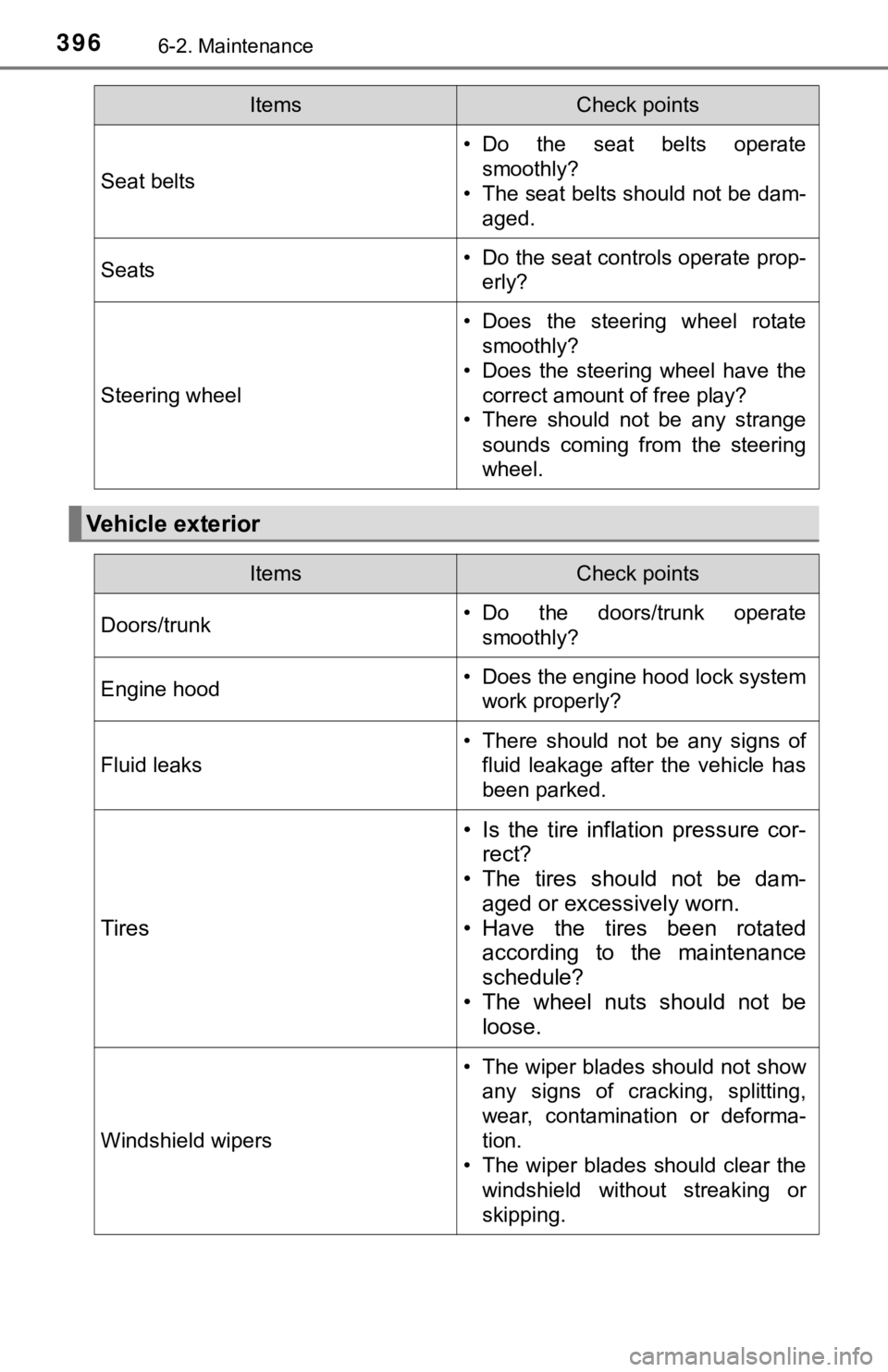
3966-2. Maintenance
Seat belts
• Do the seat belts operatesmoothly?
• The seat belts should not be dam- aged.
Seats• Do the seat controls operate prop-erly?
Steering wheel
• Does the steering wheel rotatesmoothly?
• Does the steering wheel have the correct amount of free play?
• There should not be any strange
sounds coming from the steering
wheel.
Vehicle exterior
ItemsCheck points
ItemsCheck points
Doors/trunk• Do the doors/trunk operatesmoothly?
Engine hood• Does the engine hood lock systemwork properly?
Fluid leaks
• There should not be any signs offluid leakage after the vehicle has
been parked.
Tires
• Is the tire inflation pressure cor-rect?
• The tires should not be dam-
aged or excessively worn.
• Have the tires been rotated according to the maintenance
schedule?
• The wheel nuts should not be loose.
Windshield wipers
• The wiper blades should not show
any signs of cracking, splitting,
wear, contamination or deforma-
tion.
• The wiper blades should clear the windshield without streaking or
skipping.
Page 400 of 572

4006-3. Do-it-yourself maintenance
WARNING
The engine compartment contains many mechanisms and fluids that may
move suddenly, become hot, or become electrically energized. To avoid death
or serious injury, observe the following precautions.
■ When working on the engine compartment
● Keep hands, clothing and tools away from the moving fan and engine
drive belt.
● Be careful not to touch the engine, radiator, exhaust manifold, etc. right
after driving as they may be hot. Oil and other fluids may also be hot.
● Do not leave anything that may burn easily, such as paper and r ags, in the
engine compartment.
● Do not smoke, cause sparks or expose an open flame to fuel or t he bat-
tery. Fuel and battery fumes are flammable.
● Be extremely cautious when working on the battery. It contains poisonous
and corrosive sulfuric acid.
■ When working near the electric cooling fan or radiator grille
Be sure the engine switch is off. With the engine switch in IGNITION ON
mode, the electric cooling fan may automatically start to run if the air condi-
tioning is on and/or the coolant temperature is high. ( P. 409)
■ Safety glasses
Wear safety glasses to prevent flying or falling material, fluid spray, etc.
from getting in your eyes.
NOTICE
■If you remove the air cleaner filter
Driving with the air cleaner filter removed may cause excessive engine wear
due to dirt in the air.
Page 426 of 572

4266-3. Do-it-yourself maintenance
WARNING
■When inspecting or replacing tires
Observe the following precautions to prevent accidents.
Failure to do so may cause damage to parts of the drive train as well as
dangerous handling characteristics, which may lead to an accide nt
resulting in death o r serious injury.
●Do not mix tires of different ma kes, models or tread patterns.
Also, do not mix tires of remarkably different treadwear.
●Do not use tire sizes other th an those recommended by Toyota.
●Do not mix differently constructed tires (radial, bias-belted o r bias-ply
tires).
●Do not mix summer, all season and snow tires.
●Do not use tires that have been used on another vehicle.
Do not use tires if you do not kn ow how they were used previously.
■When initializing the tire pressure warning system
Do not initialize the tire press ure warning system without firs t adjusting
the tire inflation pressure to t he specified level. Otherwise, the tire pres-
sure warning light may not come on even if the tire inflation p ressure is
low, or it may come on when the tire inflation pressure is actu ally nor-
mal.
Page 452 of 572

4527-2. Steps to take in an emergency
When using a flat-bed truck to transport the vehicle, use tire strapping
belts. Refer to the owner's manual of the flat-bed truck for the tire
strapping method.
In order to suppress vehicle movement during transportation, se t the
parking brake and turn the engine switch off.
NOTICE
■ Towing with a sling-type truck
Do not tow with a sling-type truck to prevent body damage.
2WD models
AWD models
Using a flatbed truck
Page 456 of 572

4567-2. Steps to take in an emergency
(U.S.A.)
(Canada)
Malfunction indicator lamp Indicates a malfunction in:
• The electronic engine control system;
• The electronic throttle control system; or
• The electronic automatic transmission control system
Have the vehicle inspected by your Toyota dealer
immediately.
SRS warning light (warning buzzer)
Indicates a malfunction in:
• The SRS airbag system;
• The front passenger occupant classification system; or
• The seat belt pretensioner system
Have the vehicle inspected by your Toyota dealer
immediately.
(U.S.A.)
(Canada)
ABS warning light (warning buzzer) Indicates a malfunction in:
• The ABS; or
• The brake assist system
Have the vehicle inspected by your Toyota dealer
immediately.
Inappropriate pedal operation warning light (warning
buzzer)
*1
When a buzzer sounds:
Indicates a malfunction in:
• The Brake Override System
• The Drive-Start Control
• The Intelligent Clearance Sonar (if equipped) is operat-
ing ( P. 303)
Have the vehicle inspected by your Toyota dealer
immediately.
• Indicates that the shift position was changed and Drive- Start Control was operated while depressing the accel-
erator pedal.
Momentarily release th e accelerator pedal.
When a buzzer does not sound:
Indicates that the accelerator and brake pedals are being
depressed simultaneously, and the Brake Override Sys-
tem is operating.
Release the accelerator pedal and depress the brake
pedal.
Warning lightWarning light/Details/Actions