2022 TOYOTA AVALON ABS
[x] Cancel search: ABSPage 328 of 572

3284-5. Using the driving support systems
◆ABS (Anti-lock Brake System)
Helps to prevent wheel lock when the brakes are applied suddenl y,
or if the brakes are applied while driving on a slippery road surface
◆Brake assist
Generates an increased level of braking force after the brake p edal
is depressed when the system de tects a panic stop situation
◆VSC (Vehicle Stability Control)
Helps the driver to control skidding when swerving suddenly or
turning on slippery road surfaces.
◆Enhanced VSC (Enhanced Vehicle Stability Control)
Provides cooperative control of the ABS, TRAC, VSC and EPS.
Helps to maintain directional stability when swerving on slippe ry
road surfaces by controlling steering performance.
◆TRAC (Traction Control)
Helps to maintain drive power and prevent the drive wheels from
spinning when starting the vehicl e or accelerating on slippery roads
◆Active Cornering Assist (ACA) (if equipped)
Helps to prevent the vehicle from sliding to the outer side by per-
forming inner wheel brake control when attempting to accelerate
while turning
◆Hill-start assist control
Helps to reduce the backward movement of the vehicle when start -
ing on an uphill
Driving assist systems
To keep driving safety and perf ormance, the following systems
operate automatically in respon se to various driving situations.
Be aware, however, that these systems are supplementary and
should not be relied upon too heav ily when operating the vehi-
cle.
Page 329 of 572

3294-5. Using the driving support systems
4
Driving
◆EPS (Electric Power Steering)
Employs an electric motor to reduce the amount of effort needed to
turn the steering wheel
◆Adaptive Variable Suspension System (if equipped)
By independently controlling the damping force of the shock
absorbers for each of the 4 wheels according to the road and dr iv-
ing conditions, this system helps riding comfort with superior vehi-
cle stability, and helps good vehicle posture ( P. 3 2 4 )
◆The Secondary Collision Brake
When the SRS airbag sensor detects a collision and the system
operates, the brakes and stop li ghts are automatically controlled to
reduce the vehicle speed and hel p reduce the possibility of further
damage due to a secondary collision.
◆Dynamic Torque Control AWD system (if equipped)
Automatically switches from fron t-wheel drive to all-wheel drive
(AWD) according to the driving conditions, helping to ensure re li-
able handling and stability. Ex amples of conditions where the s ys-
tem will switch to AWD are when cornering, going uphill, starting off
or accelerating, and when the road surface is slippery due to s now,
rain, etc.
The slip indicator light will flash
while the TRAC/VSC systems are
operating.
When the TRAC/VSC systems are operating
Page 332 of 572

3324-5. Using the driving support systems
■Sounds and vibrations caused by the ABS, brake assist, VSC, TRA C and
hill-start assist control systems
● A sound may be heard from the engine compartment when the brake pedal
is depressed repeatedly, when the engine is started or just aft er the vehicle
begins to move. This sound does not indicate that a malfunction has
occurred in any of these systems.
● Any of the following conditions may occur when the above system s are
operating. None of these indicates that a malfunction has occur red.
• Vibrations may be felt through the vehicle body and steering.
• A motor sound may be heard also after the vehicle comes to a s top.
• The brake pedal may pulsate slightly after the ABS is activate d.
• The brake pedal may move down slightly after the ABS is activa ted.
■ EPS operation sound
When the steering wheel is operated, a motor sound (whirring so und) may be
heard. This does not indicate a malfunction.
■ Active Cornering Assist operation sounds and vibrations
When the Active Cornering Assist is operated, operation sounds and vibra-
tions may be generated from the brake system, but this is not a malfunction.
■ Automatic reactivation of TRAC and VSC systems
After turning the TRAC and VSC systems off, the systems will be automati-
cally re-enabled in the following situations:
● When the engine switch is turned off
● If only the TRAC system is turned off, the TRAC will turn on wh en vehicle
speed increases
If both the TRAC and VSC systems are turned off, automatic re-e nabling will
not occur when vehicle speed increases.
■ Operating conditions of Active Cornering Assist
The system operates when the following occurs.
●TRAC/VSC can operate
● The driver is attempting to accelerate while turning
● The system detects that the vehicle is sliding to the outer sid e
● The brake pedal is released
■ Secondary Collision Brake operating conditions
The system operates when the SRS airbag sensor detects a collis ion while
the vehicle is in motion.
However, the system does not operate in any of the following si tuations.
● The vehicle speed is below 6 mph (10 km/h)
● Components are damaged
Page 334 of 572

3344-5. Using the driving support systems
WARNING
■The ABS does not operate effectively when
● The limits of tire gripping performance have been exceeded (such as
excessively worn tires on a snow covered road).
● The vehicle hydroplanes while driving at high speed on wet or s lick roads.
■ Stopping distance when the ABS is operating may exceed that of nor-
mal conditions
The ABS is not designed to shorten the vehicle’s stopping distance. Always
maintain a safe distance from the vehicle in front of you, especially in the
following situations:
● When driving on dirt, gravel or snow-covered roads
● When driving with tire chains
● When driving over bumps in the road
● When driving over roads with potholes or uneven surfaces
■ TRAC/VSC may not operate effectively when
Directional control and power may not be achievable while driving on slip-
pery road surfaces, even if the TRAC/VSC system is operating.
Drive the vehicle carefully in conditions where stability and p ower may be
lost.
■ Active Cornering Assist does not operate effectively when
● Do not overly rely on Active Cornering Assist. Active Cornering Assist may
not operate effectively when accelerating down slopes or driving on slip-
pery road surfaces.
● When Active Cornering Assist frequently operates, Active Cornering
Assist may temporarily stop operating to:
• Ensure proper operation of the brakes, TRAC and VSC.
• Prevent the brakes from overheating.
Page 335 of 572

3354-5. Using the driving support systems
4
Driving
WARNING
■Hill- start assist control does not operate effectively when
● Do not overly rely on hill-start assist control. Hill-start assist control may
not operate effectively on steep inclines and roads covered wit h ice.
● Unlike the parking brake, hill-st art assist control is not intended to hold the
vehicle stationary for an extended period of time. Do not attempt to use
hill-start assist control to hold the vehicle on an incline, as doing so may
lead to an accident.
■ When the TRAC/VSC is activated
The slip indicator light flashes. Always drive carefully. Reckless driving may
cause an accident. Exercise particular care when the indicator light flashes.
■ When the TRAC/VSC systems are turned off
Be especially careful and drive at a speed appropriate to the r oad condi-
tions. As these are the systems to help ensure vehicle stability and driving
force, do not turn the TRAC/VSC systems off unless necessary.
■ Replacing tires
Make sure that all tires are of the specified size, brand, trea d pattern and
total load capacity. In addition, make sure that the tires are inflated to the
recommended tire inflation pressure level.
The ABS, TRAC and VSC systems will not function correctly if different tires
are installed on the vehicle.
Contact your Toyota dealer for further information when replaci ng tires or
wheels.
■ Handling of tires and the suspension
Using tires with any kind of problem or modifying the suspensio n will affect
the driving assist systems, and may cause a system to malfunction.
■ Secondary Collision Brake
Do not rely solely upon the Secondary Collision Brake. This system is
designed to help reduce the possibility of further damage due to a second-
ary collision, however, that effect changes according to variou s conditions.
Overly relying on the system may result in death or serious inj ury.
Page 410 of 572

4106-3. Do-it-yourself maintenance
■Checking fluid level
The brake fluid level should be
between the “MAX” and “MIN”
lines on the tank.“MAX”
“MIN”
■Adding fluid
Make sure to check the fluid ty pe and prepare the necessary ite m.
■Brake fluid can absorb moisture from the air
Excess moisture in the brake fluid can cause a dangerous loss o f braking effi-
ciency. Use only newly opened brake fluid.
Brake fluid
1
2
Fluid type SAE J1703 or FMVSS No.116 DOT 3 brake fluid
SAE J1704 or FMVSS No.116 DOT 4 brake fluid
ItemClean funnel
WARNING
■
When filling the reservoir
Take care as brake fluid can harm your hands and eyes and damage
painted surfaces.
If fluid gets on your hands or in your eyes, flush the affected area with clean
water immediately.
If you still experience discomfort, see a doctor.
NOTICE
■ If the fluid level is low or high
It is normal for the brake fluid level to go down slightly as the brake pads
wear out or when the fluid level in the accumulator is high.
If the reservoir needs frequent refilling, there may be a serious problem.
Page 438 of 572
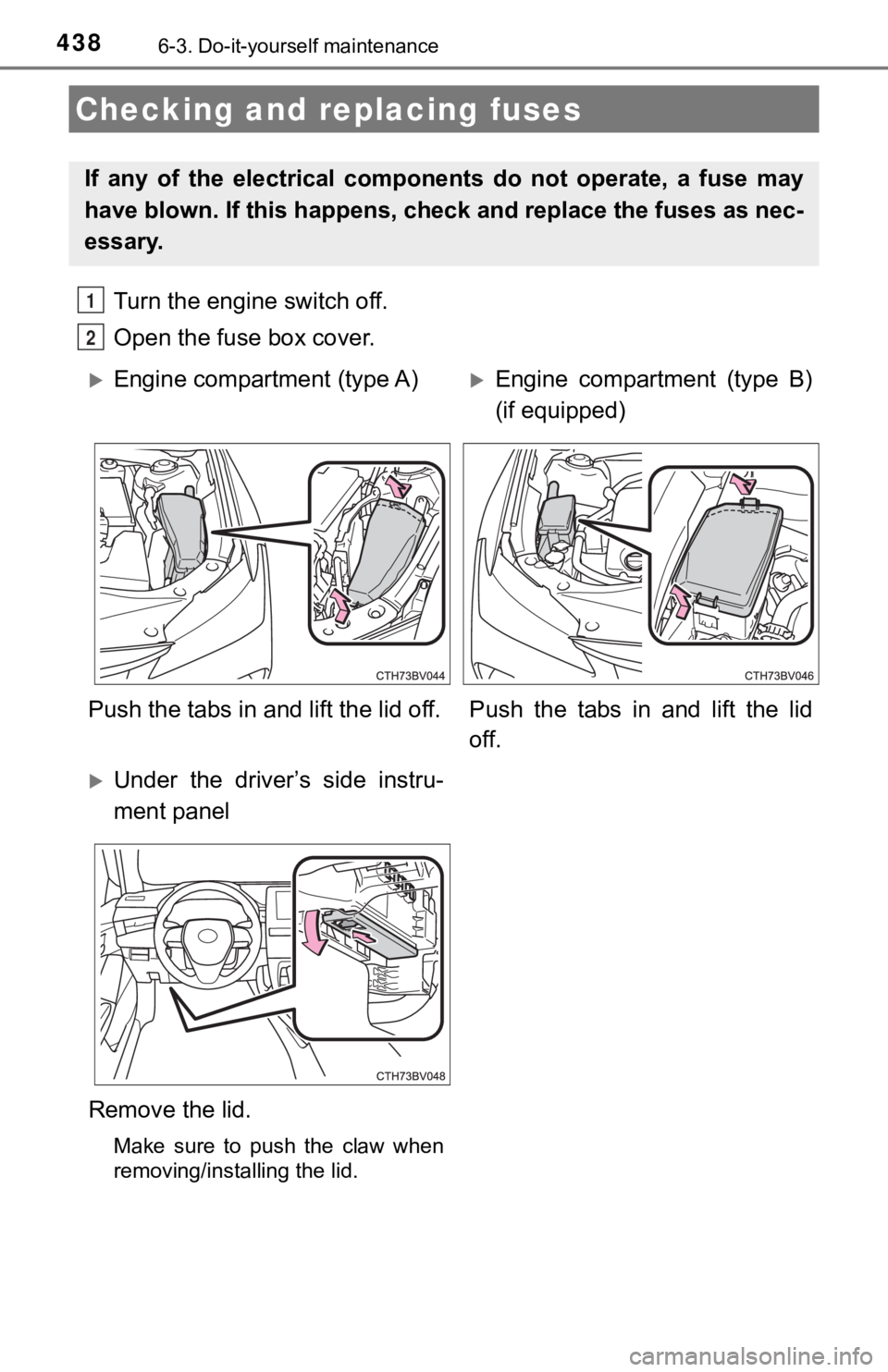
4386-3. Do-it-yourself maintenance
Turn the engine switch off.
Open the fuse box cover.
Checking and replacing fuses
If any of the electrical components do not operate, a fuse may
have blown. If this happens, check and replace the fuses as nec-
essary.
1
2
Engine compartment (type A)Engine compartment (type B)
(if equipped)
Push the tabs in and lift the lid off. Push the tabs in and lift the lid
off.
Under the driver’s side instru-
ment panel
Remove the lid.
Make sure to push the claw when
removing/installing the lid.
Page 456 of 572

4567-2. Steps to take in an emergency
(U.S.A.)
(Canada)
Malfunction indicator lamp Indicates a malfunction in:
• The electronic engine control system;
• The electronic throttle control system; or
• The electronic automatic transmission control system
Have the vehicle inspected by your Toyota dealer
immediately.
SRS warning light (warning buzzer)
Indicates a malfunction in:
• The SRS airbag system;
• The front passenger occupant classification system; or
• The seat belt pretensioner system
Have the vehicle inspected by your Toyota dealer
immediately.
(U.S.A.)
(Canada)
ABS warning light (warning buzzer) Indicates a malfunction in:
• The ABS; or
• The brake assist system
Have the vehicle inspected by your Toyota dealer
immediately.
Inappropriate pedal operation warning light (warning
buzzer)
*1
When a buzzer sounds:
Indicates a malfunction in:
• The Brake Override System
• The Drive-Start Control
• The Intelligent Clearance Sonar (if equipped) is operat-
ing ( P. 303)
Have the vehicle inspected by your Toyota dealer
immediately.
• Indicates that the shift position was changed and Drive- Start Control was operated while depressing the accel-
erator pedal.
Momentarily release th e accelerator pedal.
When a buzzer does not sound:
Indicates that the accelerator and brake pedals are being
depressed simultaneously, and the Brake Override Sys-
tem is operating.
Release the accelerator pedal and depress the brake
pedal.
Warning lightWarning light/Details/Actions