2022 TOYOTA AVALON HYBRID high beam
[x] Cancel search: high beamPage 3 of 584

3
1
9 7 6
5
4
3
2
8
4-1. Before drivingDriving the vehicle ............. 186
Cargo and luggage............ 194
Vehicle load limits ............. 197
Trailer towing..................... 198
Dinghy towing.................... 199
4-2. Driving procedures Power (ignition) switch ...... 200
EV drive mode................... 206
Hybrid transmission........... 209
Turn signal lever................ 215
Parking brake .................... 216
Brake Hold ........................ 220
4-3. Operating the lights and wipers
Headlight switch ................ 222
AHB (Automatic High Beam) ............................. 226
Windshield wipers and washer ............................ 230
4-4. Refueling Opening the fuel tank cap .................................. 234 4-5. Using the driving
support systems
Toyota Safety Sense 2.5+ ...................... 239
PCS (Pre-Collision System) ........................... 246
LTA (Lane Tracing Assist).............................. 261
RSA (Road Sign Assist) .... 276
Dynamic radar cruise control with full-speed
range ............................... 281
BSM (Blind Spot Monitor) ........................... 297
• BSM function ................. 301
• RCTA function ............... 304
Rear Camera Detection function (vehicles with
panoramic view
monitor) ........................... 309
Intuitive parking assist ....... 313
Intelligent Clearance Sonar (ICS) ..................... 321
Driving mode select switches........................... 342
Driving assist systems ....... 344
4-6. Driving tips Hybrid vehicle driving tips ................................... 351
Winter driving tips .............. 354
4Driving
Page 18 of 584
18Pictorial index
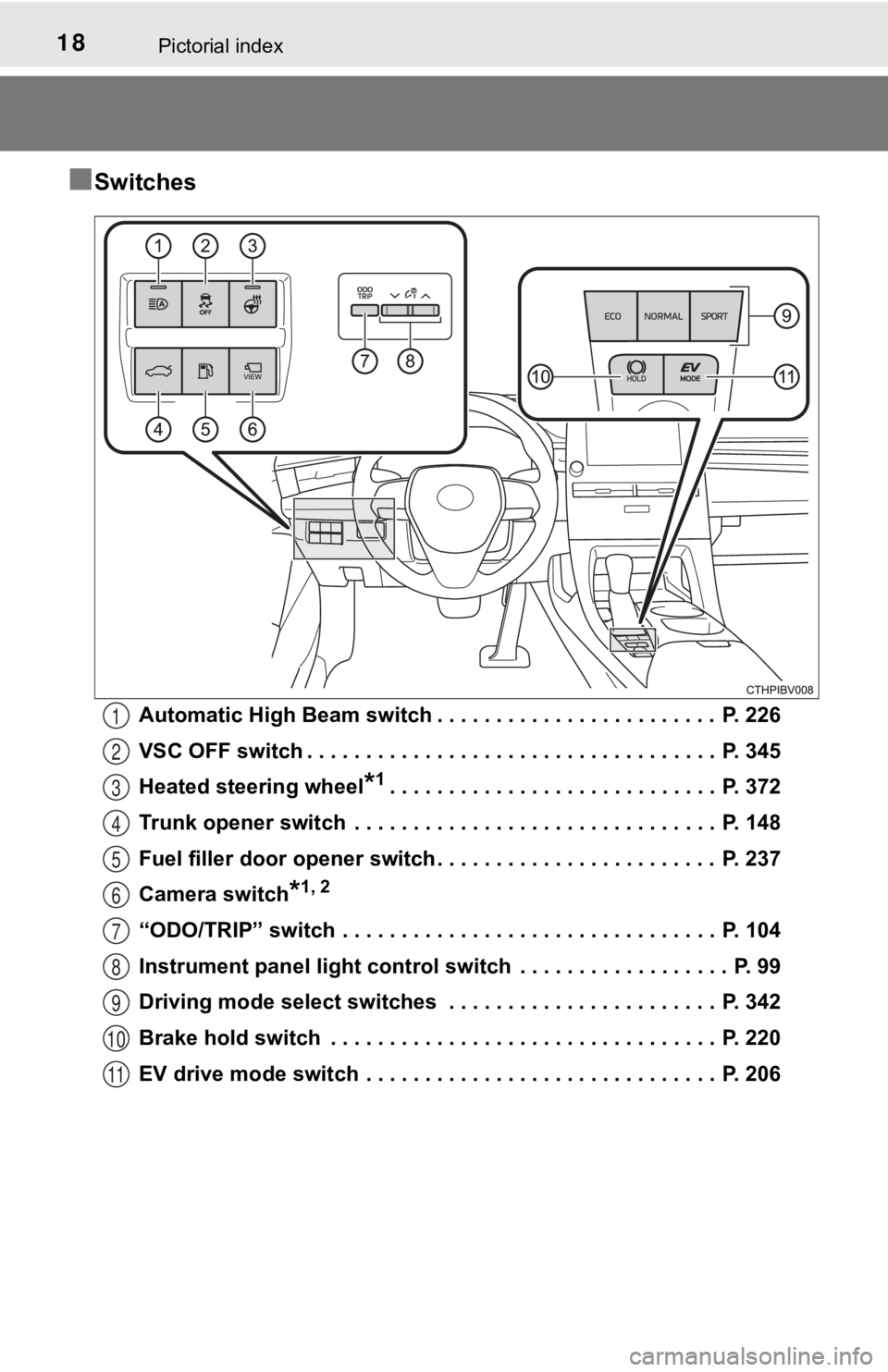
■Switches
Automatic High Beam switch . . . . . . . . . . . . . . . . . . . . . . . . P. 226
VSC OFF switch . . . . . . . . . . . . . . . . . . . . . . . . . . . . . . . . . . . P. 345
Heated steering wheel
*1. . . . . . . . . . . . . . . . . . . . . . . . . . . . P. 372
Trunk opener switch . . . . . . . . . . . . . . . . . . . . . . . . . . . . . . . P. 148
Fuel filler door opener switch . . . . . . . . . . . . . . . . . . . . . . . . P. 237
Camera switch
*1, 2
“ODO/TRIP” switch . . . . . . . . . . . . . . . . . . . . . . . . . . . . . . . . P. 104
Instrument panel light control s witch . . . . . . . . . . . . . . . . . . P. 99
Driving mode select switches . . . . . . . . . . . . . . . . . . . . . . . P. 342
Brake hold switch . . . . . . . . . . . . . . . . . . . . . . . . . . . . . . . . . P. 220
EV drive mode switch . . . . . . . . . . . . . . . . . . . . . . . . . . . . . . P. 206
1
2
3
4
5
6
7
8
9
10
11
Page 95 of 584
952. Instrument cluster
2
Instrument cluster
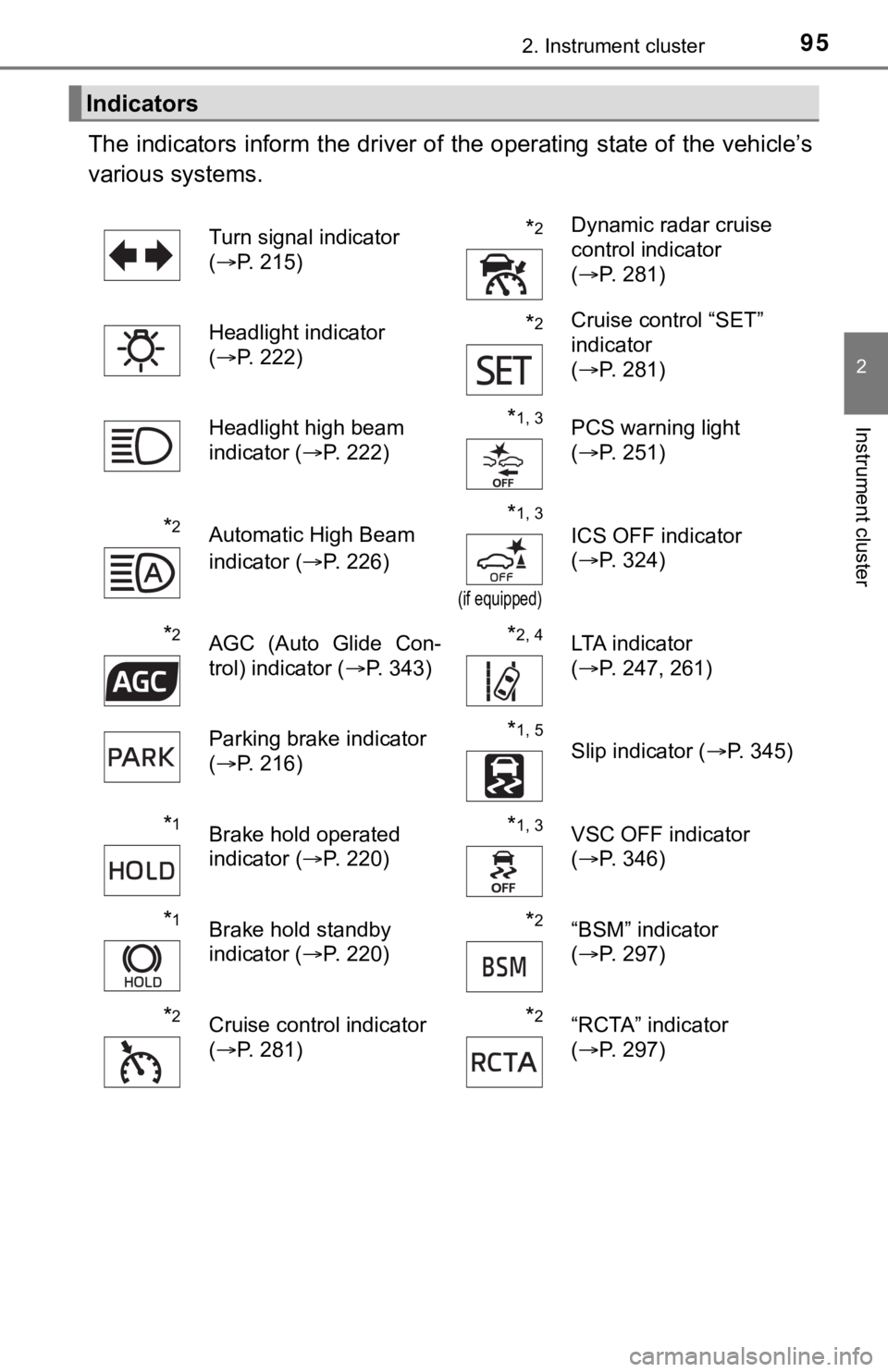
The indicators inform the driver of the operating state of the vehicle’s
various systems.
Indicators
Turn signal indicator
( P. 215)*2Dynamic radar cruise
control indicator
(P. 281)
Headlight indicator
( P. 222)
*2Cruise control “SET”
indicator
(P. 281)
Headlight high beam
indicator ( P. 222)
*1, 3PCS warning light
(P. 251)
*2Automatic High Beam
indicator ( P. 226)*1, 3
(if equipped)
ICS OFF indicator
(P. 324)
*2AGC (Auto Glide Con-
trol) indicator ( P. 343)*2, 4LTA indicator
(P. 247, 261)
Parking brake indicator
( P. 216)
*1, 5
Slip indicator ( P. 345)
*1Brake hold operated
indicator (P. 220)*1, 3VSC OFF indicator
(P. 346)
*1Brake hold standby
indicator ( P. 220)*2“BSM” indicator
(P. 297)
*2Cruise control indicator
(P. 281)*2“RCTA” indicator
(P. 297)
Page 185 of 584

185
4Driving
4-1. Before drivingDriving the vehicle ............. 186
Cargo and luggage ........... 194
Vehicle load limits ............. 197
Trailer towing..................... 198
Dinghy towing ................... 199
4-2. Driving procedures Power (ignition) switch ...... 200
EV drive mode .................. 206
Hybrid transmission........... 209
Turn signal lever................ 215
Parking brake .................... 216
Brake Hold ........................ 220
4-3. Operating the lights and wipers
Headlight switch ................ 222
AHB (Automatic High Beam) ............................. 226
Windshield wipers and washer ............................ 230
4-4. Refueling Opening the fuel tank cap .................................. 234 4-5. Using the driving
support systems
Toyota Safety Sense 2.5+...................... 239
PCS (Pre-Collision System)........................... 246
LTA (Lane Tracing Assist) ............................. 261
RSA (Road Sign Assist) ............................. 276
Dynamic radar cruise control with full-speed
range............................... 281
BSM (Blind Spot Monitor)........................... 297
• BSM function ................ 301
• RCTA function .............. 304
Rear Camera Detection function (vehicles with
panoramic view
monitor)........................... 309
Intuitive parking assist....... 313
Intelligent Clearance Sonar (ICS) ..................... 321
Driving mode select switches .......................... 342
Driving assist systems ...... 344
4-6. Driving tips Hybrid vehicle driving tips .................................. 351
Winter driving tips ............. 354
Page 222 of 584
2224-3. Operating the lights and wipers
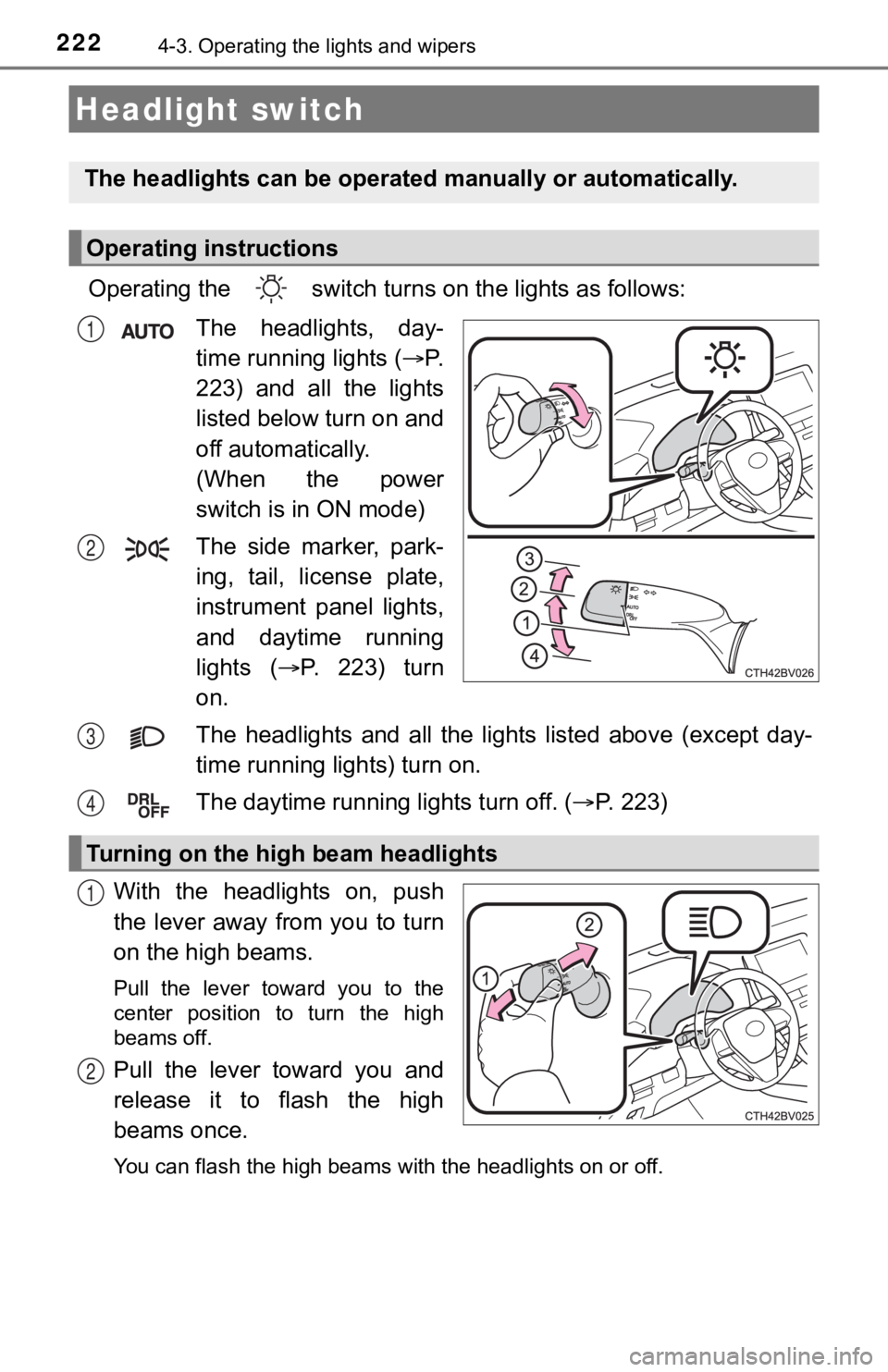
Operating the switch turns on the lights as follows:
The headlights, day-
time running lights
( P.
223) and all the lights
listed below turn on and
off automatically.
(When the power
switch is in ON mode)
The side marker, park-
ing, tail, license plate,
instrument panel lights,
and daytime running
lights ( P. 2 2 3 ) t u r n
on.
The headlights and all the li ghts listed above (except day-
time running lights) turn on.
The daytime running lights turn off.
( P. 223)
With the headlights on, push
the lever away from you to turn
on the high beams.
Pull the lever toward you to the
center position to turn the high
beams off.
Pull the lever toward you and
release it to flash the high
beams once.
You can flash the high beams with the headlights on or off.
Headlight switch
The headlights can be operated manually or automatically.
Operating instructions
1
2
Turning on the high beam headlights
3
4
1
2
Page 223 of 584
2234-3. Operating the lights and wipers
4
Driving
●When the steering wheel or turn signal lever is operated while the
headlights are on (lo w beam), a cornering light will turn on and light
up the direction of movement of the vehicle. The cornering ligh ts
are designed to ensur e excellent visibility when making a turn at an
intersection.
However, when vehicle speed is approximately 93 mph (150 km/h) or
higher, the cornering lights will not turn on.
● When the shift position is in R while the headlights are on (lo w
beam), both cornering lights will turn on. This is designed to
enhance visibilit y when parking.
■Daytime running light system
●Type A:
The daytime running lights illuminate using the same lights as the low beam
headlights and illuminate dimmer than the low beam headlights.
Type B:
The daytime running lights illuminate using the same lights as the parking
lights and illuminate brighter than the parking lights.
● To make your vehicle more visible to other drivers during dayti me driving,
the daytime running lights turn on automatically when all of the following
conditions are met. (The daytime running lights are not designe d for use at
night.)
• The hybrid system is starting
• The parking brake is released
• The headlight switch is in the or
* position
*: When the surroundings are bright
The daytime running lights remain on after they illuminate, even if the parking
brake is set again.
● Daytime running lights can be turned off by operating the switc h.
● Compared to turning on the headlights, the daytime running ligh t system
offers greater durability and consumes less electricity, so it can help improve
fuel economy.
■ Cornering lights (if equipped)
When the cornering lights are on for more than 30 minutes, they will turn off
automatically.
Cornering light s (if equipped)
Page 226 of 584

2264-3. Operating the lights and wipers
Turn the headlight switch in the or position.
Press the Automatic High
Beam switch.
When the headlight switch lever is
in the low beam position, the AHB
system will be enabled and the
AHB indicator will illuminate.
AHB (Automatic High Beam)
The Automatic High Beam uses a camera sensor located behind
the upper portion of the windshield to assess the brightness of
the lights of vehicles ahead, streetlights, etc., and automatically
turns the high beams on or off as necessary.
WARNING
■Limitations of the Automatic High Beam
Do not overly rely on the Automatic High Beam. Always drive safely, taking
care to observe your surroundings and turning the high beams on or off
manually if necessary.
■ To prevent incorrect operation of the Automatic High Beam syste m
Do not overload the vehicle.
Activating the Automatic High Beam
1
2
Page 227 of 584
2274-3. Operating the lights and wipers
4
Driving
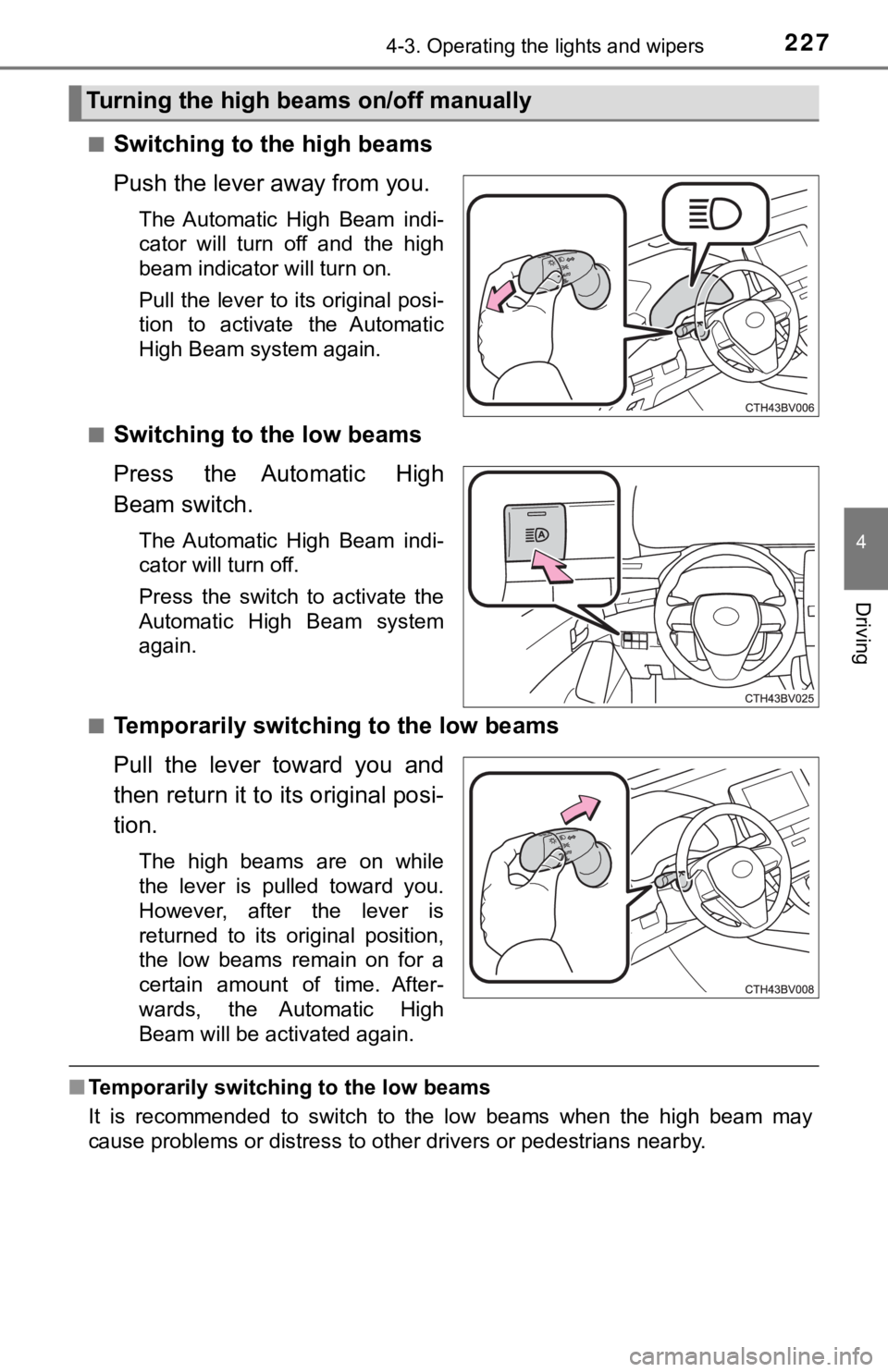
■Switching to the high beams
Push the lever away from you.
The Automatic High Beam indi-
cator will turn off and the high
beam indicator will turn on.
Pull the lever to its original posi-
tion to activate the Automatic
High Beam system again.
■
Switching to the low beams
Press the Automatic High
Beam switch.
The Automatic High Beam indi-
cator will turn off.
Press the switch to activate the
Automatic High Beam system
again.
■
Temporarily switching to the low beams
Pull the lever toward you and
then return it to its original posi-
tion.
The high beams are on while
the lever is pulled toward you.
However, after the lever is
returned to its original position,
the low beams remain on for a
certain amount of time. After-
wards, the Automatic High
Beam will be activated again.
■ Temporarily switchi ng to the low beams
It is recommended to switch to the low beams when the high beam may
cause problems or distress to other drivers or pedestrians near by.
Turning the high beams on/off manually