2022 TOYOTA AVALON HYBRID steering wheel
[x] Cancel search: steering wheelPage 176 of 584

1763-4. Adjusting the steering wheel and mirrors
WARNING
■Important points while driving
Observe the following precautions while driving.
Failure to do so may result in loss of control of the vehicle and cause an
accident, resulting in death or serious injury.
● Do not adjust the mirrors while driving.
● Do not drive with the mirrors folded.
● Both the driver and passenger side mirrors must be extended and properly
adjusted before driving.
■ When a mirror is moving
To avoid personal injury and mirror malfunction, be careful not to get your
hand caught by the moving mirror.
■ When the mirror defoggers are operating
Do not touch the rear view mirror surfaces, as they can become very hot
and burn you.
Page 189 of 584

1894-1. Before driving
4
Driving
WARNING
Observe the following precautions.
Failure to do so may result in death or serious injury.
■When starting the vehicle
Always keep your foot on the brake pedal while stopped with the “READY”
indicator is illuminated. This prevents the vehicle from creepi ng.
■ When driving the vehicle
● Do not drive if you are unfamiliar with the location of the brake and accel-
erator pedals to avoid depressing the wrong pedal.
• Accidentally depressing the accelerator pedal instead of the b rake
pedal will result in sudden acceleration that may lead to an accident.
• When backing up, you may twist your body around, leading to a diffi-
culty in operating the pedals. Make sure to operate the pedals properly.
• Make sure to keep a correct driving posture even when moving t he
vehicle only slightly. This allows you to depress the brake and accelera-
tor pedals properly.
• Depress the brake pedal using your right foot. Depressing the brake
pedal using your left foot may delay response in an emergency, result-
ing in an accident.
● The driver should pay extra attention to pedestrians when the v ehicle is
powered only by the electric motor (traction motor). As there i s no engine
noise, the pedestrians may misjudge the vehicle’s movement.
● Do not drive the vehicle over or stop the vehicle near flammable materials.
The exhaust system and exhaust gases can be extremely hot. Thes e hot
parts may cause a fire if there is any flammable material nearby.
● During normal driving, do not turn off the hybrid system. Turning the hybrid
system off while driving will not cause loss of steering or braking control,
however, power assist to the steering will be lost. This will m ake it more
difficult to steer smoothly, so you should pull over and stop t he vehicle as
soon as it is safe to do so.
In the event of an emergency, such as if it becomes impossible to stop the
vehicle in the normal way: P. 471
● Use engine braking (downshift) to maintain a safe speed when driving
down a steep hill.
Using the brakes continuously may cause the brakes to overheat and lose
effectiveness. ( P. 210)
● Do not adjust the display, the positions of the steering wheel, the seat, or
the inside or outside rear view mirrors while driving.
Doing so may result in a loss of vehicle control.
● Always check that all passengers’ arms, heads or other parts of their body
are not outside the vehicle.
Page 193 of 584

1934-1. Before driving
4
Driving
NOTICE
■When driving the vehicle
● Do not depress the accelerator and brake pedals at the same tim e during
driving, as this may restrain the hybrid system output.
● Do not use the accelerator pedal or depress the accelerator and brake
pedals at the same time to hold the vehicle on a hill.
■ When parking the vehicle
Always set the parking brake and shift the shift lever to P. Failure to do so
may cause the vehicle to move or the vehicle may accelerate sud denly if
the accelerator pedal is accidentally depressed.
■ Avoiding damage to vehicle parts
● Do not turn the steering wheel fully in either direction and ho ld it there for
an extended period of time.
Doing so may damage the power steering motor.
● When driving over bumps in the road, drive as slowly as possible to avoid
damaging the wheels, underside of the vehicle, etc.
■ If you get a flat tire while driving
A flat or damaged tire may cause the following situations. Hold the steering
wheel firmly and gradually depress the brake pedal to slow down the vehi-
cle.
● It may be difficult to control your vehicle.
● The vehicle will make abnormal sounds or vibrations.
● The vehicle will lean abnormally.
Information on what to do in case of a flat tire ( P. 494)
■ When encountering flooded roads
Do not drive on a road that has flooded after heavy rain etc. D oing so may
cause the following serious damage to the vehicle:
● Engine stalling
● Short in electrical components
● Engine damage caused by water immersion
In the event that you drive on a flooded road and the vehicle i s flooded, be
sure to have your Toyota dealer check the following:
● Brake function
● Changes in quantity and quality of oil and fluid used for the engine, hybrid
transmission, etc.
● Lubricant condition for the bearings and suspension joints (where possi-
ble), and the function of all joints, bearings, etc.
Page 203 of 584
2034-2. Driving procedures
4
Driving
●If a message related to start-up is shown on the multi-informat ion display,
read the message and follow the instructions.
■ Steering lock
After turning the power switch off and opening and closing the doors, the
steering wheel will be locked due to the steering lock function . Operating the
power switch again automatically cancels the steering lock.
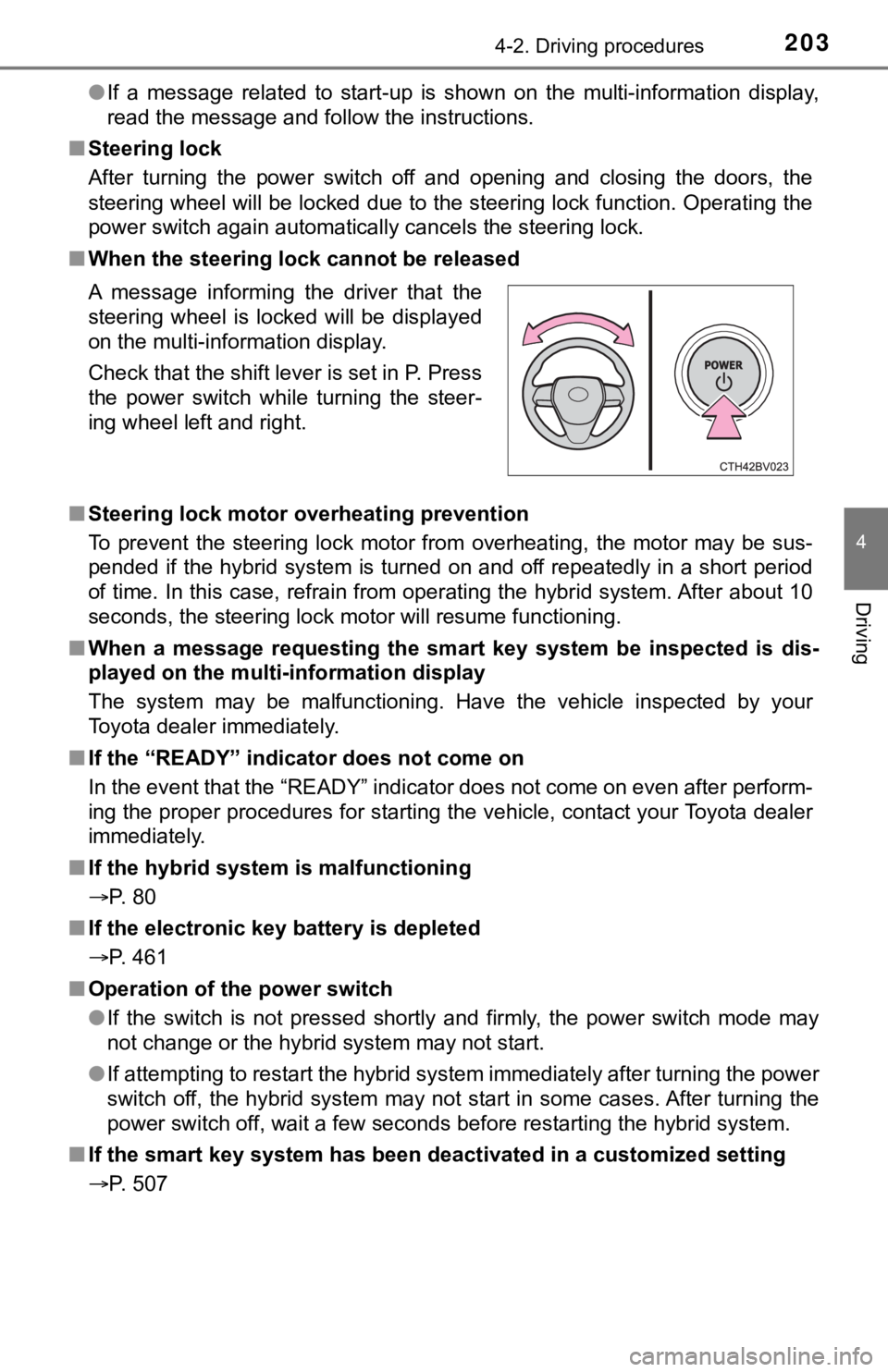
■ When the steering lock cannot be released
■ Steering lock motor overheating prevention
To prevent the steering lock motor from overheating, the motor may be sus-
pended if the hybrid system is turned on and off repeatedly in a short period
of time. In this case, refrain from operating the hybrid system . After about 10
seconds, the steering lock motor will resume functioning.
■ When a message requesting the smart key system be inspected is dis-
played on the multi-information display
The system may be malfunctioning. Have the vehicle inspected by your
Toyota dealer immediately.
■ If the “READY” indicator does not come on
In the event that the “READY” indicator does not come on even a fter perform-
ing the proper procedures for starting the vehicle, contact you r Toyota dealer
immediately.
■ If the hybrid system is malfunctioning
P. 80
■ If the electronic key battery is depleted
P. 461
■ Operation of the power switch
●If the switch is not pressed shortly and firmly, the power switch mode may
not change or the hybrid system may not start.
● If attempting to restart the hybrid system immediately after tu rning the power
switch off, the hybrid system may not start in some cases. After turning the
power switch off, wait a few seconds before restarting the hybrid system.
■ If the smart key system has been d eactivated in a customized setting
P. 507 A message informing the driver that the
steering wheel is locked will be displayed
on the multi-information display.
Check that the shift lever is set in P. Press
the power switch while turning the steer-
ing wheel left and right.
Page 223 of 584

2234-3. Operating the lights and wipers
4
Driving
●When the steering wheel or turn signal lever is operated while the
headlights are on (lo w beam), a cornering light will turn on and light
up the direction of movement of the vehicle. The cornering ligh ts
are designed to ensur e excellent visibility when making a turn at an
intersection.
However, when vehicle speed is approximately 93 mph (150 km/h) or
higher, the cornering lights will not turn on.
● When the shift position is in R while the headlights are on (lo w
beam), both cornering lights will turn on. This is designed to
enhance visibilit y when parking.
■Daytime running light system
●Type A:
The daytime running lights illuminate using the same lights as the low beam
headlights and illuminate dimmer than the low beam headlights.
Type B:
The daytime running lights illuminate using the same lights as the parking
lights and illuminate brighter than the parking lights.
● To make your vehicle more visible to other drivers during dayti me driving,
the daytime running lights turn on automatically when all of the following
conditions are met. (The daytime running lights are not designe d for use at
night.)
• The hybrid system is starting
• The parking brake is released
• The headlight switch is in the or
* position
*: When the surroundings are bright
The daytime running lights remain on after they illuminate, even if the parking
brake is set again.
● Daytime running lights can be turned off by operating the switc h.
● Compared to turning on the headlights, the daytime running ligh t system
offers greater durability and consumes less electricity, so it can help improve
fuel economy.
■ Cornering lights (if equipped)
When the cornering lights are on for more than 30 minutes, they will turn off
automatically.
Cornering light s (if equipped)
Page 249 of 584

2494-5. Using the driving support systems
4
Driving
WARNING
■Pre-collision braking
● When the pre-collision braking function is operating, a large a mount of
braking force will be applied.
● If the vehicle is stopped by the operation of the pre-collision braking func-
tion, the pre-collision braking function operation will be canceled after
approximately 2 seconds. Depress the brake pedal as necessary.
● The pre-collision braking function may not operate if certain operations are
performed by the driver. If the accelerator pedal is being depressed
strongly or the steering wheel is being turned, the system may determine
that the driver is taking evasive action and possibly prevent the pre-colli-
sion braking function from operating.
● In some situations, while the pre-collision braking function is operating,
operation of the function may be canceled if the accelerator pedal is
depressed strongly or the steering wheel is turned and the syst em deter-
mines that the driver is taking evasive action.
● If the brake pedal is being depressed, the system may determine that the
driver is taking evasive action and possibly delay the operation timing of
the pre-collision braking function.
■ Emergency steering assist
● As emergency steering assist operation will be canceled when th e system
determines that lane departure prevention function has been completed.
● Emergency steering assist may not operate or may be cancel in the follow-
ing cases as the system may determine the driver is taking acti ons.
• If the accelerator pedal is being depressed strongly, the steering wheel is being operated sharply, the brake pedal is being depressed o r the
turn signal lever is being operated. In this case, the system m ay deter-
mine that the driver is taking evasive action and the emergency steering
assist may not operate.
• In some situations, while the emergency steering assist is ope rating,
operation of the function may be canceled if the accelerator pe dal is
depressed strongly, the steeri ng wheel is operated sharply or t he brake
pedal is being depressed and the system determines that the dri ver is
taking evasive action.
• When the emergency steering assist is operating, if the steering wheel
is held firmly or is operated in the opposite direction to that which the
system is generating torque, the function may be canceled.
Page 253 of 584
2534-5. Using the driving support systems
4
Driving
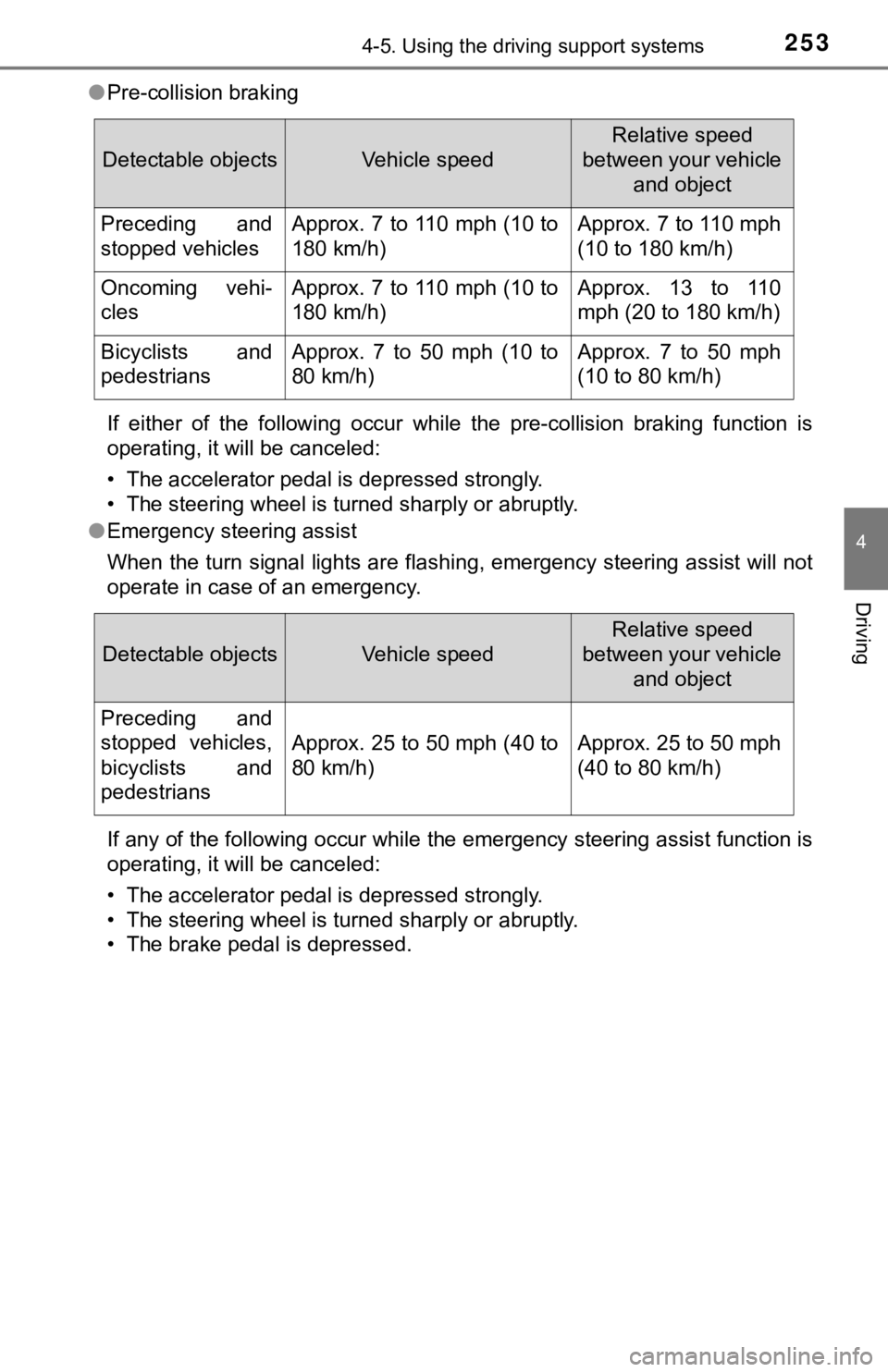
●Pre-collision braking
If either of the following occur while the pre-collision brakin g function is
operating, it will be canceled:
• The accelerator pedal is depressed strongly.
• The steering wheel is turned sharply or abruptly.
● Emergency steering assist
When the turn signal lights are flashing, emergency steering as sist will not
operate in case of an emergency.
If any of the following occur while the emergency steering assi st function is
operating, it will be canceled:
• The accelerator pedal is depressed strongly.
• The steering wheel is turned sharply or abruptly.
• The brake pedal is depressed.
Detectable objectsVehicle speed
Relative speed
between your vehicle and object
Preceding and
stopped vehiclesApprox. 7 to 110 mph (10 to
180 km/h)Approx. 7 to 110 mph
(10 to 180 km/h)
Oncoming vehi-
clesApprox. 7 to 110 mph (10 to
180 km/h)Approx. 13 to 110
mph (20 to 180 km/h)
Bicyclists and
pedestriansApprox. 7 to 50 mph (10 to
80 km/h)Approx. 7 to 50 mph
(10 to 80 km/h)
Detectable objectsVehicle speed
Relative speed
between your vehicle and object
Preceding and
stopped vehicles,
bicyclists and
pedestrians
Approx. 25 to 50 mph (40 to
80 km/h)Approx. 25 to 50 mph
(40 to 80 km/h)
Page 259 of 584
2594-5. Using the driving support systems
4
Driving
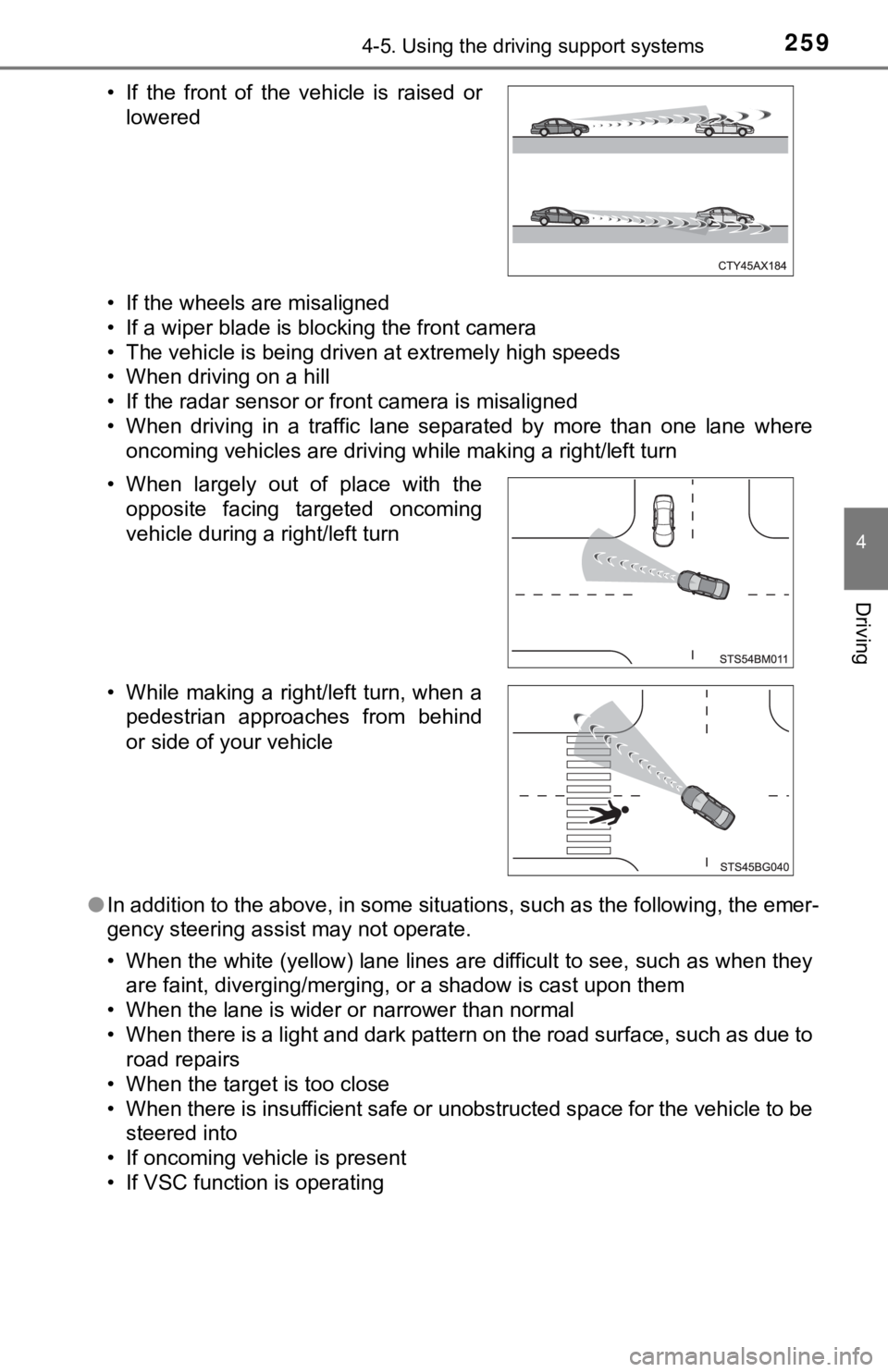
• If the wheels are misaligned
• If a wiper blade is blocking the front camera
• The vehicle is being driven at extremely high speeds
• When driving on a hill
• If the radar sensor or front camera is misaligned
• When driving in a traffic lane separated by more than one lane where
oncoming vehicles are driving while making a right/left turn
● In addition to the above, in some situations, such as the follo wing, the emer-
gency steering assist may not operate.
• When the white (yellow) lane lines are difficult to see, such as when they
are faint, diverging/merging, or a shadow is cast upon them
• When the lane is wider or narrower than normal
• When there is a light and dark pattern on the road surface, su ch as due to
road repairs
• When the target is too close
• When there is insufficient safe or unobstructed space for the vehicle to be
steered into
• If oncoming vehicle is present
• If VSC function is operating • If the front of the vehicle is raised or lowered
• When largely out of place with the opposite facing targeted oncoming
vehicle during a right/left turn
• While making a right/left turn, when a pedestrian approaches from behind
or side of your vehicle