2022 TOYOTA AVALON HYBRID ESP
[x] Cancel search: ESPPage 44 of 584
441-1. For safe use
■SRS airbag deployment conditions (SRS side and curtain shield a irbags)
● The SRS side and curtain shield airbags will deploy in the even t of an
impact that exceeds the set threshold level (the level of force corresponding
to the impact force produced by an approximately 3300 lb. [1500 kg] vehicle
colliding with the vehicle cabin from a direction perpendicular to the vehicle
orientation at an approximate speed of 12 - 18 mph [20 - 30 km/ h]).
● Both SRS curtain shield airbags may deploy in the event of a severe side
collision.
● Both SRS curtain shield airbags will deploy in the event of veh icle rollover.
● Both SRS curtain shield airbags may also deploy in the event of a severe
frontal collision.
■ Conditions under which the SRS ai rbags may deploy (inflate), other than
a collision
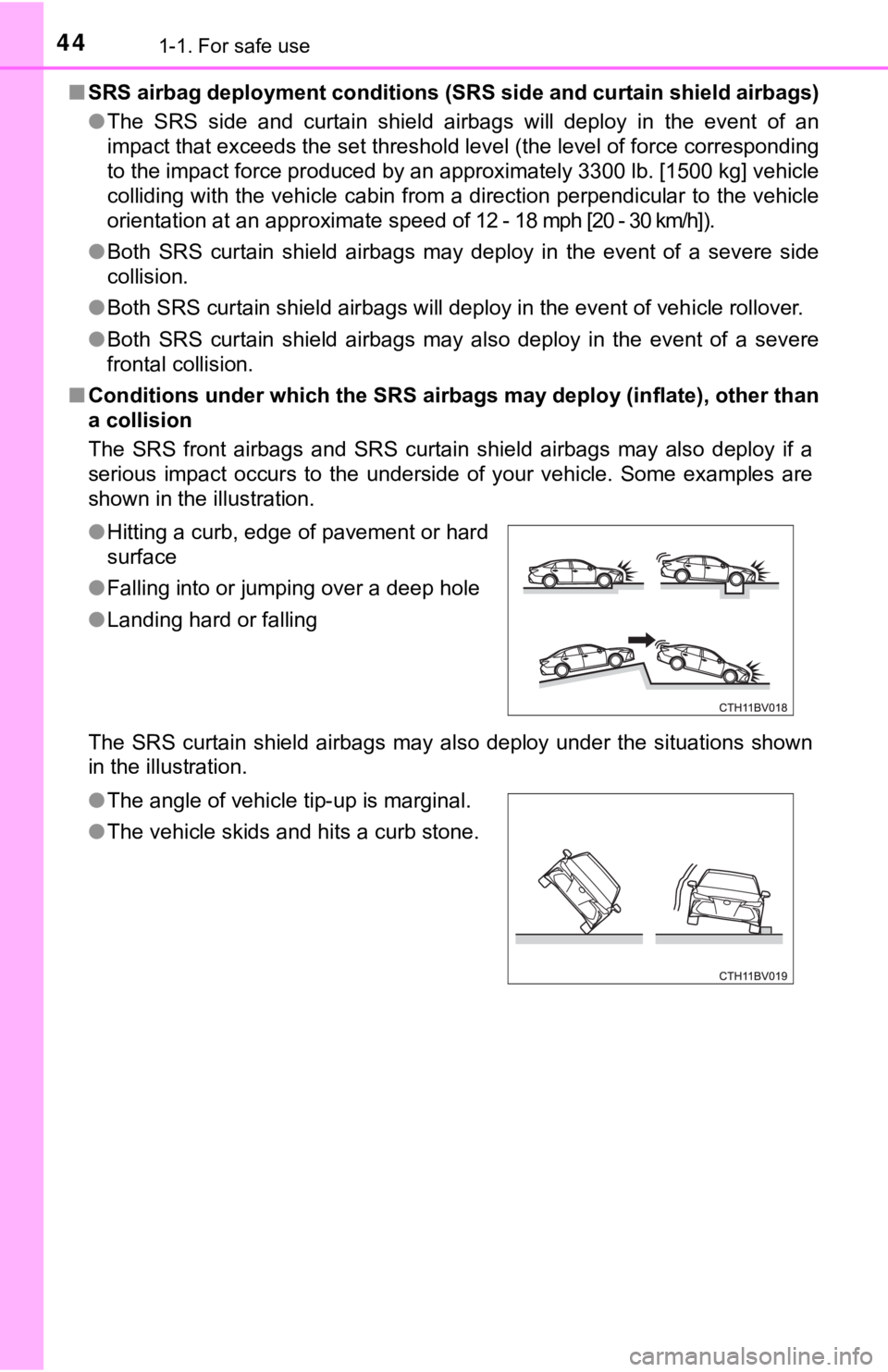
The SRS front airbags and SRS curtain shield airbags may also d eploy if a
serious impact occurs to the underside of your vehicle. Some ex amples are
shown in the illustration.
The SRS curtain shield airbags may also deploy under the situat ions shown
in the illustration. ● Hitting a curb, edge of pavement or hard
surface
● Falling into or jumping over a deep hole
● Landing hard or falling
● The angle of vehicle tip-up is marginal.
● The vehicle skids and hits a curb stone.
Page 69 of 584

69
1
For safety and security
1-2. Emergency assistance
■System componentsMicrophone
LED light indicators
“SOS” button
Safety Connect
Safety Connect is a subscription-based telematics service that
uses Global Positioning System ( GPS) data and embedded cel-
lular technology to provide saf ety and security features to sub -
scribers. Safety Connect is s upported by Toyota’s designated
response center, which operates 24 hours per day, 7 days per
week.
Safety Connect service is avai lable by subscription on select,
telematics hardware -equipped vehicles.
By using the Safety Connect service, you are agreeing to be
bound by the Telematics Subscription Service Agreement and
its Terms and Conditions, as in e ffect and amended from time to
time, a current copy of which is available at Toyota.com in the
United States, Toyotapr.com in Puerto Rico and Toyota.ca in
Canada. All use of the Safety Connect service is subject to suc h
then-applicable Terms and Conditions.
1
2
3
Page 70 of 584

701-2. Emergency assistance
■Services
Subscribers have the following Safety Connect services available:
● Automatic Collision Notification
*
Helps drivers receive necessary response from emergency ser-
vice providers. ( P. 7 2 )
*: U.S. Patent No. 7,508,298 B2
● Stolen Vehicle Location
Helps drivers in the eve nt of vehicle theft. (P. 72)
● Emergency Assistanc e Button (“SOS”)
Connects drivers to response-center support. ( P. 7 2 )
● Enhanced Roadside Assistance
Provides drivers various on-road assistance. (P. 7 2 )
■Subscription
After you have signed the Telemati cs Subscription Service Agree-
ment and are enrolled, you c an begin receiving services.
A variety of subscription terms are available for purchase. Con tact
your Toyota dealer, call the following appropriate Customer Exp eri-
ence Center or push the “SOS” button in your vehicle for furthe r
subscription details. • The United States 1-800-331-4331
• Canada 1-888-869-6828
• Puerto Rico 1-877-855-8377
Page 71 of 584

711-2. Emergency assistance
1
For safety and security
■Safety Connect Services Information
●Phone calls using the vehicle’s Bluetooth® technology will not be possible
when Safety Connect is active and in use.
● Safety Connect is available beginning Fall 2009 on select Toyot a models (in
the contiguous United States only). Contact with the Safety Con nect
response center is dependent upon the telematics device being i n operative
condition, cellular connection availability, and GPS satellite signal reception,
which can limit the ability to reach the response center or rec eive emer-
gency service support. Enrollment and Telematics Subscription S ervice
Agreement are required. A variety of subscription terms are ava ilable;
charges vary by subscription term selected and location.
● Automatic Collision Notification, Emergency Assistance and Stolen Vehicle
Location are available in the United States, including Hawaii a nd Alaska,
Puerto Rico and Canada, and Enhanced Roadside Assistance are av ailable
in the United States, Puerto Rico and Canada.
● Automatic Collision Notification, Emergency Assistance, Stolen Vehicle and
Enhanced Road Assistance are not available in the U.S. Virgin I slands.
For vehicles first sold in the U.S. Virgin Islands, no Safety C onnect services
will function in or outside the U.S. Virgin Islands.
● Safety Connect services are not subject to section 255 of the T elecommuni-
cations Act and the device is not TTY compatible.
■ Languages
The Safety Connect response center will offer support in multip le languages.
The Safety Connect system will offer voice prompts in English, Spanish, and
French. Please indicate your language of choice when enrolling.
■ When contacting the response center
You may be unable to contact the response center if the network is busy.
When the power switch is turned to ON mode, the red indicator l ight
comes on for 2 seconds then turns off. Afterward, the green ind icator
light comes on, indicating t hat the service is active.
The following indicator light patterns indicate specific system usage
conditions:
● Green indicator light on = Active service
● Green indicator light flashing = Safety Connect call in process
● Red indicator light (except at vehicle start-up) = System malfunction
(contact your Toyota dealer)
● No indicator light (off) = Saf ety Connect service not active
Safety Connect LED light Indicators
Page 72 of 584

721-2. Emergency assistance
■Automatic Collision Notification
In case of either airbag deployment or severe rear-end collision, the
system is designed to automatically call the response center. T he
responding agent receives the v ehicle’s location and attempts to
speak with the vehicl e occupants to assess the level of emergency.
If the occupants are unable to communicate, the agent automati-
cally treats the call as an emergency, contacts the nearest eme r-
gency services provider to descr ibe the situation, and requests that
assistance be sent to the location.
■Stolen Vehicle Location
If your vehicle is stolen, Safety Connect can work with local author-
ities to assist them in locating and recovering the vehicle. Af ter filing
a police report, call the Customer Experience Center at 1-800-3 31-
4331 in the United States, 1-877-8 55-8377 in Puerto Rico or 1-888-
869-6828 in Canada, and follow the prompts for Safety Connect t o
initiate this service.
In addition to assisting law enforcement with recovery of a sto len
vehicle, Safety-Connect-equipped vehicle location data may, und er
certain circumstances, be shared with third parties to locate y our
vehicle. Further information is a vailable at Toyota.com in the United
States, Toyotapr.com in Puerto Rico and Toyota.ca in Canada.
■Emergency Assistance Button (“SOS”)
In the event of an emergency on t he road, push the “SOS” button to
reach the Safety Connect respons e center. The answering agent
will determine your vehicle’s loca tion, assess the emergency, and
dispatch the necessary assistanc e required.
If you accidentally press the “SOS” button, tell the response-c enter
agent that you are not experiencing an emergency.
■
Enhanced Roadside Assistance
Enhanced Roadside As sistance adds GPS data to the already
included warranty-based Toyota roadside service.
Subscribers can press the “SOS” button to reach a Safety Connec t
response-center agent, who can he lp with a wide range of needs,
such as: towing, flat tire, fuel delivery, etc. For a description of the
Enhanced Roadside Assistance se rvices and their limitations,
please see the Safety Connect Te rms and Conditions, which are
available at Toyota.com in the United States, Toyotapr.com in
Puerto Rico and Toyota.ca in Canada.
Safety Connect services
Page 81 of 584

811-3. Hybrid system
1
For safety and security
■If a warning light comes on, a warning message is displayed, or the 12-
volt battery is disconnected
The hybrid system may not start. In this case, try to start the system again. If
the “READY” indicator does not come on, contact your Toyota dea ler.
■ Running out of fuel
When the vehicle has run out of fuel and the hybrid system cann ot be started,
refuel the vehicle with at least enough gasoline to make the lo w fuel level
warning light ( P. 481) go off. If there is only a small amount of fuel, the
hybrid system may not be able to start. (The standard amount of fuel is about
2.3 gal. [8.8 L, 1.9 Imp. gal.] when the vehicle is on a level surface. This value
may vary when the vehicle is on a slope. Add extra fuel when th e vehicle is
inclined.)
■ Electromagnetic waves
●High voltage parts and cables on hybrid vehicles incorporate el ectromag-
netic shielding, and therefore emit approximately the same amou nt of elec-
tromagnetic waves as conventional gasoline powered vehicles or home
electronic appliances.
● Your vehicle may cause sound interference in some third party-p roduced
radio parts.
■ Hybrid battery ( traction battery)
The hybrid battery (traction battery) has a limited service life. The lifespan of
the hybrid battery (traction battery) can change in accordance with driving
style and driving conditions.
■ Starting the hybrid system in a n extremely cold environment
When the hybrid battery (traction battery) is extremely cold (b elow approxi-
mately -22°F [-30°C]) under the influence of the outside temper ature, it may
not be possible to start the hybrid system. In this case, try to start the hybrid
system again after the temperature of the hybrid battery (traction battery)
increases due to the outside temperature increase etc.
Page 120 of 584

1202. Instrument cluster
Displays suggestions to the driver in the following situations. To select
a response to a displayed suggestion, use the meter control swi tches.
The suggestion function can be turned on/off.
(Customizable features:P. 548)
■
Suggestion to turn off the headlights
If the headlights are left on for a certain amount of time afte r the
power switch has been turned off, if the headlight switch is in the
“AUTO” position, a suggestion m essage will be displayed asking if
you wish to turn the headlights off. To turn the headlights off , select
“Yes”.
If a front door is opened after the power switch is turned off, this sugges-
tion message will not be displayed.
Suggestion function
Page 122 of 584
1222. Instrument cluster
WARNING
■Caution for use while driving
● When operating the multi-information display while driving, pay extra
attention to the safety of the area around the vehicle.
● Do not look continuously at the multi-information display while driving as
you may fail to see pedestrians, objects on the road, etc. ahea d of the
vehicle.
■ The information display at low temperatures
Allow the interior of the vehicle to warm up before using the liquid crystal
information display. At extremely low temperatures, the information display
monitor may respond slowly, and display changes may be delayed.
For example, there is a lag between the driver’s shifting and the new gear
number appearing on the display. This lag could cause the drive r to down-
shift again, causing rapid and excessive engine braking and pos sibly an
accident resulting in death or injury.
■ Cautions during setting up the display
As the hybrid system needs to be running during setting up the display,
ensure that the vehicle is parked in a place with adequate vent ilation. In a
closed area such as a garage, exhaust gases including harmful c arbon
monoxide (CO) may collect and enter the vehicle. This may lead to death or
a serious health hazard.
NOTICE
■ While setting up the display
To prevent 12-volt battery discharge, ensure that the hybrid sy stem is oper-
ating while setting up the display features.