Page 325 of 616

3254-5. Using the driving support systems
4
Driving
4RUNNER (U)■
Automatic system cancelation
In the following situations, the system will cease operation an d a buzzer will
sound to alert the driver. The Cr awl Control indicator will flash until the system
is turned off completely.
● When the shift lever is shifted to P or N
● When the front-wheel drive control lever or switch is shifted to H4
● When the driver’s door is opened
● When the system is malfunctioning
● When the brake system overheats
Stop the vehicle in a safe place. (There is no problem with continuing normal
driving.)
● When the automatic transmission system overheats
Stop the vehicle in a safe place until the automatic transmission fluid tem-
perature warning light goes off.
■ Sounds and vibrations caused by the Crawl Control system
● A sound may be heard from the engine compartment when the engine is
started or just after the vehicle begins to move. This sound do es not indicate
that a malfunction has occurred in Crawl Control system.
● Either of the following conditions may occur when the Crawl Control system
is operating. None of these indicates that a malfunction has occurred.
• Vibrations may be felt through the vehicle body and steering.
• A motor sound may be heard after the vehicle comes to a stop.
■ When there is a malfunction in the system
Warning lights and/or warning messages will turn on. ( P. 486, 497)
WARNING
■When using Crawl Control
● Do not overly rely on Crawl Control. This function does not ext end the
vehicle’s performance limitations. Always check the terrain tho roughly and
drive safely.
● The recommended speed modes for the listed terrains ( P. 324) are only
a reference. The selected mode may not be suitable to actual off-road con-
ditions due to factors such as the type or unevenness of the te rrain or the
degree of incline. Check the actual terrain thoroughly and drive safely.
● After activating Crawl Control, make sure that the Crawl Control indicator
comes on. If the indicator flashes, the vehicle is not under system control.
■ Conditions under which the syst em may not operate correctly
When driving on the following surfaces, the system may not be able to
maintain a fixed low speed, which may result in an accident:
● Extremely steep inclines
● Extremely uneven surfaces
● Snow-covered roads, or other slippery surfaces
Page 326 of 616
3264-5. Using the driving support systems
4RUNNER (U)
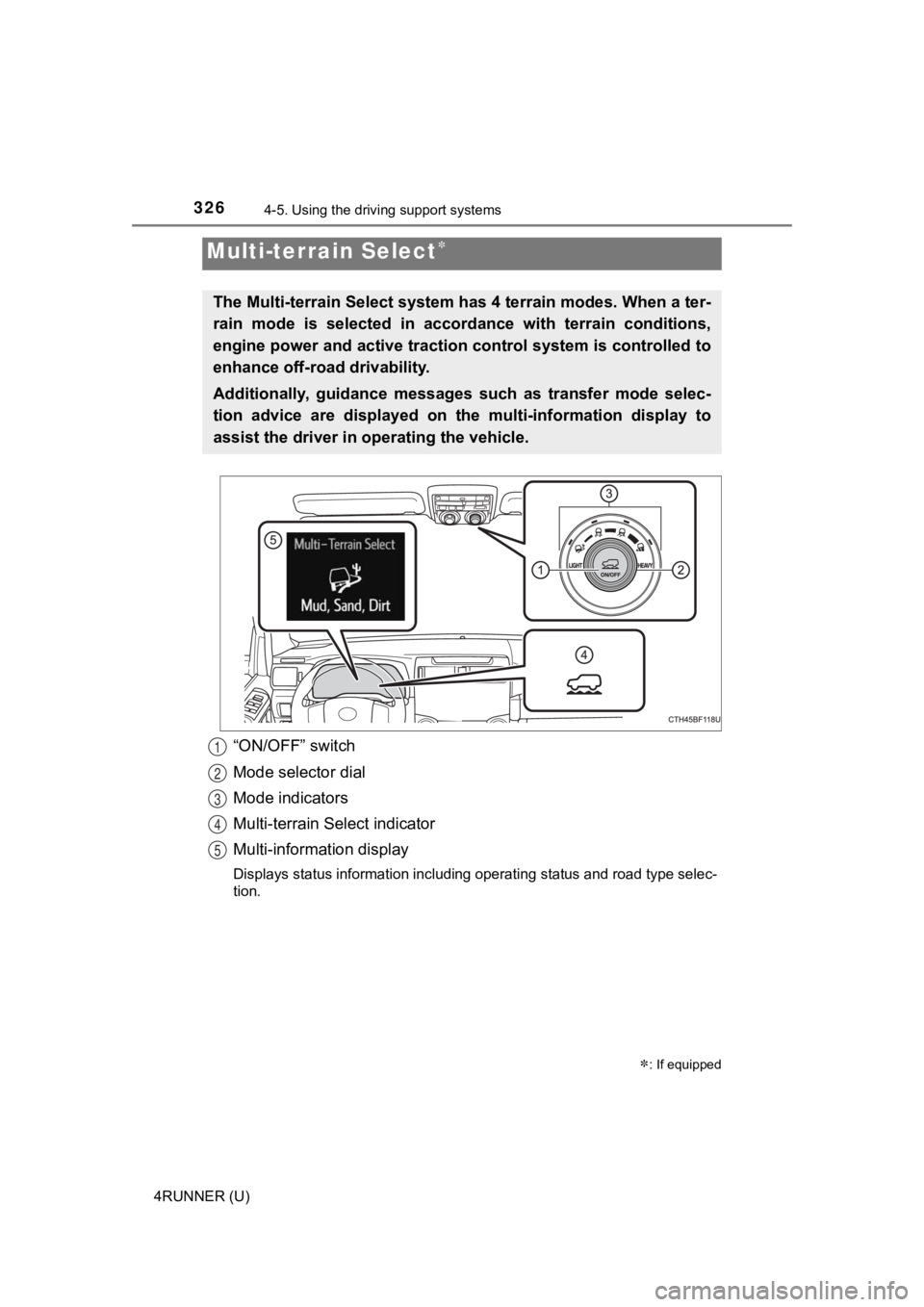
“ON/OFF” switch
Mode selector dial
Mode indicators
Multi-terrain Select indicator
Multi-information display
Displays status information including operating status and road type selec-
tion.
Multi-terrain Select
: If equipped
The Multi-terrain Select system has 4 terrain modes. When a ter -
rain mode is selected in accor dance with terrain conditions,
engine power and active traction control system is controlled t o
enhance off-road drivability.
Additionally, guidance messages such as transfer mode selec-
tion advice are displayed on the multi-information display to
assist the driver in ope rating the vehicle.
1
2
3
4
5
Page 335 of 616
3354-5. Using the driving support systems
4
Driving
4RUNNER (U)
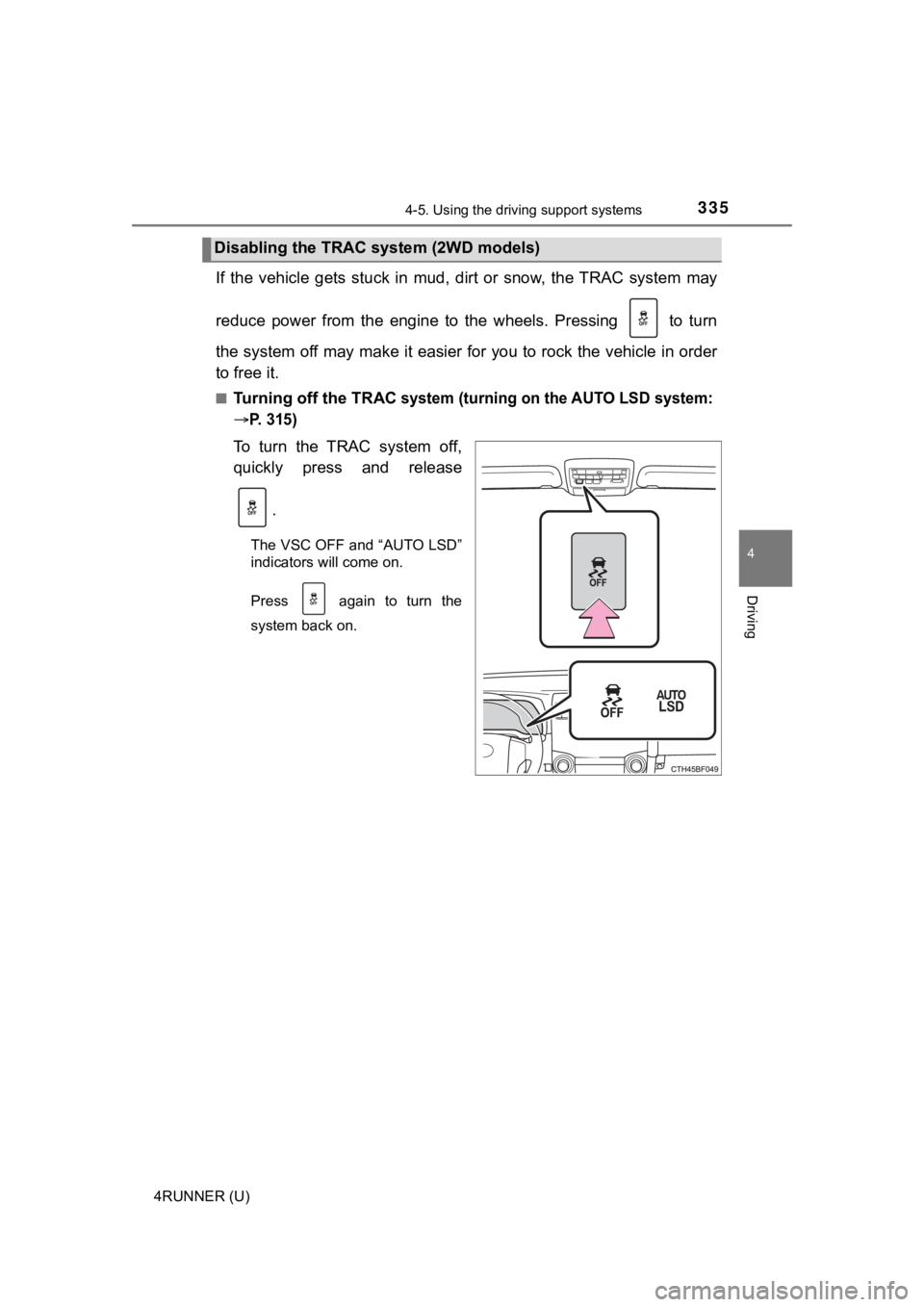
If the vehicle gets stuck in mud, dirt or snow, the TRAC system may
reduce power from the engine to the wheels. Pressing to turn
the system off may make it easier for you to rock the vehicle i n order
to free it.
■Turning off the TRAC system (turning on the AUTO LSD system:
P. 315)
To turn the TRAC system off,
quickly press and release
.
The VSC OFF and “AUTO LSD”
indicators will come on.
Press again to turn the
system back on.
Disabling the TRAC system (2WD models)
Page 336 of 616
3364-5. Using the driving support systems
4RUNNER (U)■
Turning off TRAC, VSC and Tr
ailer Sway Control systems
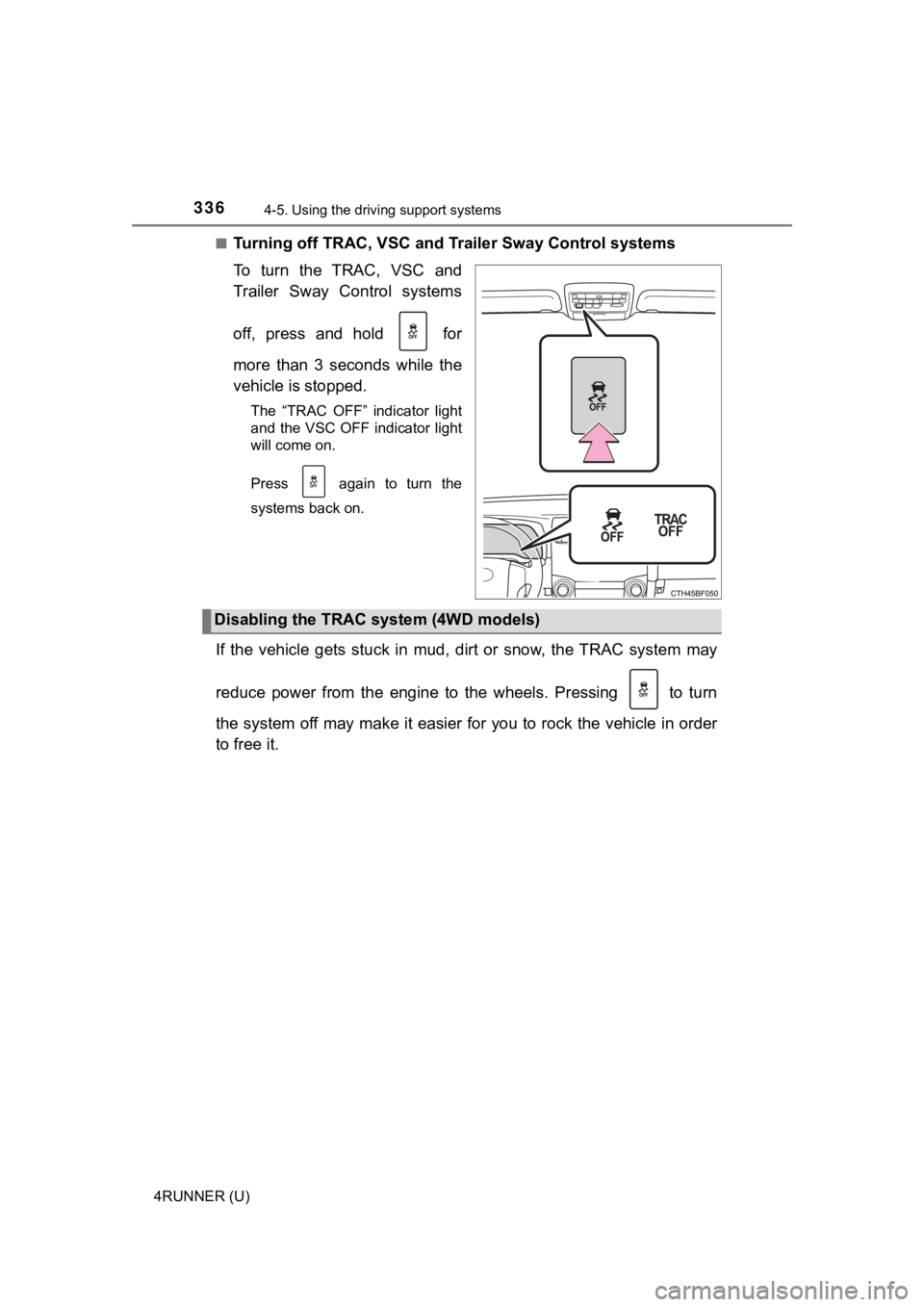
To turn the TRAC, VSC and
Trailer Sway Control systems
off, press and hold for
more than 3 seconds while the
vehicle is stopped.
The “TRAC OFF” indicator light
and the VSC OFF indicator light
will come on.
Press again to turn the
systems back on.
If the vehicle gets stuck in mud, dirt or snow, the TRAC system may
reduce power from the engine to the wheels. Pressing to turn
the system off may make it easier for you to rock the vehicle i n order
to free it.
Disabling the TRAC system (4WD models)
Page 339 of 616

3394-5. Using the driving support systems
4
Driving
4RUNNER (U)■
Sounds and vibrations caused by the ABS, Multi Terrain ABS (if
equipped), brake assist, VSC, Trailer Sway Control, TRAC and hi ll-start
assist control systems
● A sound may be heard from the engine compartment when the brake pedal
is depressed repeatedly, when the engine is started or just aft er the vehicle
begins to move. This sound does not indicate that a malfunction has
occurred in any of these systems.
● Any of the following conditions may occur when the above system s are
operating. None of these indicates that a malfunction has occur red.
• Vibrations may be felt through the vehicle body and steering.
• A motor sound may be heard also after the vehicle comes to a s top.
• The brake pedal may pulsate slightly after the ABS or Multi Te rrain ABS is
activated.
• The brake pedal may move down slightly after the ABS or Multi Te r r a i n
ABS is activated.
■ Automatic reactivation of TRAC, Trailer Sway Control and VSC sy stems
After turning the TRAC, Trailer Sway Control and VSC systems of f, the sys-
tems will be automatically re-enabled in the following situatio ns:
● When the engine switch is turned off
● 2WD models: If the AUTO LSD system is turned on, the VSC, TRAC and
Trailer Sway Control systems will turn on when vehicle speed in creases
● 4WD models: If only the TRAC system is turned off, the TRAC wil l turn on
when vehicle speed increases
If both the TRAC and VSC systems are turned off, automatic re-enabling will
not occur when vehicle speed increases.
Page 342 of 616
342
4RUNNER (U)
4-6. Driving tips
●Use fluids that are appropriate t o the prevailing outside tempera-
tures. • Engine oil
• Engine coolant
• Washer fluid
● Have a service technician inspec t the condition of the battery.
● Have the vehicle fitted with four snow tires or purchase a set of tire
chains for the rear tires.
Ensure that all tires are the same size and brand, and that chains match
the size of the tires.
Winter driving tips
Carry out the necessary preparations and inspections before
driving the vehicle in winter. Always drive the vehicle in a ma n-
ner appropriate to the prevailing weather conditions.
Preparation for winter
Page 345 of 616

3454-6. Driving tips
4
Driving
4RUNNER (U)
WARNING
■Driving with snow tires
Observe the following precautions to reduce the risk of accidents.
Failure to do so may result in a loss of vehicle control and ca use death or
serious injury.
● Use tires of the specified size.
● Maintain the recommended level of air pressure.
● Do not drive in excess of 75 mph (120 km/h), regardless of the type of
snow tires being used.
● Use snow tires on all, not just some wheels.
■ Driving with tire chains
Observe the following precautions to reduce the risk of accidents.
Failure to do so may result in the vehicle being unable to be d riven safely,
and may cause death or serious injury.
● Do not drive in excess of the speed limit specified for the tir e chains being
used, or 30 mph (50 km/h), whichever is lower.
● Avoid driving on bumpy road surfaces or over potholes.
● Avoid sudden acceleration, abrupt steering, sudden braking and shifting
operations that cause sudden engine braking.
● Slow down sufficiently before entering a curve to ensure that vehicle con-
trol is maintained.
NOTICE
■Repairing or replacing snow tires
Request repairs or replacement of snow tires from Toyota dealer s or legiti-
mate tire retailers.
This is because the removal and attachment of snow tires affect s the opera-
tion of the tire pressure warning valves and transmitters.
■ Fitting tire chains
The tire pressure warning valves and transmitters may not funct ion correctly
when tire chains are fitted.
Page 350 of 616

3504-6. Driving tips
4RUNNER (U)
NOTICE
■To prevent water damage
Take all necessary safety measures to ensure that water damage to the
engine or other components does not occur.
● Water entering the engine air intake will cause severe engine damage.
● Water entering the automatic transmission will cause deterioration in shift
quality, locking up of your transmission accompanied by vibration, and ulti-
mately damage.
● Water can wash the grease from wheel bearings, causing rusting and pre-
mature failure, and may also enter the differentials, transmission and
transfer case, reducing the gear oil’s lubricating qualities.
■ When you drive through water
If driving through water, such as when crossing shallow streams , first check
the depth of the water and the bottom of the riverbed for firmn ess. Drive
slowly and avoid deep water.
■ Inspection after off-road driving
● Sand and mud that has accumulated in brake drums and around bra ke
discs may affect braking efficiency and may damage brake system compo-
nents.
● Always perform a maintenance inspection after each day of off-r oad driv-
ing that has taken you through rough terrain, sand, mud, or wat er. For
scheduled maintenance information, refer to the “Scheduled Maintenance
Guide” or “Owner’s Manual Supplement”.