2022 SUZUKI GRAND VITARA Ignition system
[x] Cancel search: Ignition systemPage 161 of 482

3-21
OPERATING YOUR VEHICLE
54P00-01E
Gearshift indicator
61MM0A133
(1) Gearshift indicator
In the following cases, the gearshift indica-
tor is indicated on the information display
when the ignition switch is in “ON” position
or the ignition mode is “ON”.
• When the gearshift lever is in a position
other than “N” (Neutral).
• For vehicles equipped with the cruise
control, when the system is not in use.The electronic control system monitors
driving conditions (such as vehicle speed
and/or engine revolution), and it shows
which gear position is appropriate for your
driving with the indication on the display.
If the UP/DOWN arrow and a gear position
other than what is currently selected are
indicated on the display while driving, we
recommend that you shift the gear up or
down to indicated position. This is the
appropriate gear position for a driving con-
dition that reduces the over revolution and
stress to the engine, and improves fuel
consumption.
For details on how to use the transaxle,
refer to “Using transaxle” in this section.NOTE:
• The gearshift indicator is not indicated
when the gear position is in “N” (Neu-
tral).
• If you depress the clutch pedal while UP/
DOWN arrow is indicated, the indication
will disappear.
• In ordinary driving, UP arrow will disap-
pear when you release your foot from
the accelerator pedal.
If your vehicle is equipped with the adap-
tive cruise control and while it is working,
however, UP/DOWN arrow may be indi-
cated continuously depending on driv-
ing conditions. It means that the
indicated gear position is appropriate for
the current cruising speed.
• The indication of gearshift indicator tim-
ing may differ depending on the vehicle
condition and/or driving situation even in
the same vehicle speed and engine rev-
olution.
• If any of the electrical systems such as
the radar brake support system or the
ESP
® is working, the gearshift indicator
will disappear temporarily.
(1)
EXAMPLE
WA R N I N G
The gearshift indicator is designed to
indicate the appropriate gear position
for your driving, however, this indica-
tor does not relieve the driver of any
responsibility to operate gear
changes attentively.
To drive safely, do not focus your
attention on the gearshift indicator,
pay attention to your driving situation
and shift up or down if necessary.
Page 163 of 482

3-23
OPERATING YOUR VEHICLE
54P00-01E
Four-mode 4WD system
(if equipped)
54P000305
(1) Driving mode switch
The four-mode 4WD system enables you
to select the driving mode according to
driving conditions by operating the driving
mode switch.
Driving modes
AUTO
This mode prioritizes fuel economy in typi-
cal driving conditions. The system
switches the driving mode to 4WD if it
detects wheel spin.SPORT
This mode is appropriate for sporty driving.
The system apportions torque to promote
cornering performance.
SNOW
This mode is appropriate for snowy,
unpaved, and other slippery surfaces. This
mode enhances traction during accelera-
tion on slippery surfaces, and enables sta-
ble cornering on slippery surfaces.
LOCK
This mode is for extricating the car from
snow, mud or sand.
Driving mode switch operation
Operate the driving mode switch according
to the appropriate procedure described
below.
How to turn on driving mode switch
The driving mode switch will activate when
the ignition switch is in “ON” position or the
ignition mode is “ON”.
61MM0B005
Selecting AUTO mode
Push “PUSH AUTO” part (2) of the driving
mode switch.
Selecting SPORT mode
Turn the dial (3) of the driving mode switch
clockwise to “SPORT” position.
Selecting SNOW mode
Turn the dial (3) of the driving mode switch
counterclockwise to “SNOW” position.
Selecting LOCK mode
When the vehicle speed is less than 60
km/h (37 mph) and the SNOW mode is
selected, push “LOCK” part (4) of the driv-
ing mode switch.
NOTE:
If the vehicle speed exceeds about 60 km/h
in the LOCK mode, the driving mode
changes to the SNOW mode automatically.
Even when the vehicle speed reduces, on
LOCKPUSH
AUTOSNOWSPORT
DRIVEMODESELECT
(1)
EXAMPLE
LOCKPUSH
AUTO
SNOWSPORT
DRIVEMODESELECT
(3)
(4)(2)
EXAMPLE
Page 164 of 482

3-24
OPERATING YOUR VEHICLE
54P00-01E
the other hand, the driving mode does not
return to the LOCK mode automatically. You
should select the LOCK mode according to
the driving conditions.
NOTE:
• The information display shows current
driving mode.
• When the ignition switch is turned to
“ON” position or the engine switch is
pressed to change the ignition mode to
“ON”, the AUTO mode is selected auto-
matically.
• The driving mode switch can be oper-
ated when the vehicle is either stopped
or moving.
• Check that the front wheels are in the
straight ahead position when operating
the driving mode switch.
• While making turns or accelerating and
decelerating, operating the driving mode
switch, turning the ignition switch to
“ACC” or “LOCK” position or pressing
the engine switch to change the ignition
mode to “ACC” or “LOCK” may cause a
shock, but this is not a system malfunc-
tion.
• When you operate your vehicle under
conditions that involve wheel spin, such
as driving off-road in the sand or water
or when a wheel has run off the road, the
difference in the amount of revolution
between front wheels and rear wheels
increases (wheels run idle). If this state
continues, the oil temperature of the
driving system parts increases. The 4WD warning light warns of this
condition by blinking. At the same time,
the information display shows this mes-
sage: “AWD SYSTEM HIGH TEMP
AWD IS OFF”.
57L30042
When the 4WD warning light blinks, park
the vehicle at a safe place and run the
engine idle. After a while, the 4WD warn-
ing light will go out and the system will
resume.
Warning and indicator messages
The information display shows the warning
and indicator message when the four-
mode 4WD system is operated, or has a
problem.
NOTICE
• Note that 4WD vehicles are not all-
around vehicles. Observe the fol-
lowing instructions when driving
your vehicle.
– Do not drive through water such
as by crossing a river.
– Do not drive continuously in
places such as sand and mud
where front wheels tend to race.
– When any wheel is in the air for
such reason as running off the
road, do not race it needlessly.
(Continued)
NOTICE
(Continued)
• If the 4WD warning light comes on
or blinks when driving, there may
be something wrong with the four-
mode 4WD system. Have the sys-
tem inspected by an authorized
SUZUKI dealer.
NOTICE
Unevenly worn tires can cause prob-
lems with the 4WD system. Rotate the
tires according to the maintenance
schedule. Refer to “Tires” and “Main-
tenance schedule” in “INSPECTION
AND MAINTENANCE” section for
proper tire rotation procedure.
Page 169 of 482

3-29
OPERATING YOUR VEHICLE
54P00-01E
ENG A-STOP system
(engine auto stop start
system) (if equipped)
The ENG A-STOP system (engine auto
stop start system) automatically stops and
restarts the engine without operating the
ignition switch or the engine switch when
the vehicle is stopped, such as at a traffic
signal or in a traffic jam, to reduce exhaust
gases and fuel consumption.
• When the vehicle will be stopped for a
long time or when you will leave the
vehicle unattended, turn the ignition
switch to “LOCK” position or press the
engine switch to stop the engine.
NOTE:
If your vehicle is equipped with the auto air
conditioning system, you can change the
auto engine stop condition via the informa-
tion display. Refer to “Information display”
in “BEFORE DRIVING” section.
72M2042
The ENG A-STOP system is automatically
activated when the ignition switch is turned
to “ON” position or the engine switch is
pressed to change the ignition mode to
“ON”.
The system activation also requires the fol-
lowing conditions:
• Driver’s seat belt is fastened.
• Driver’s door is closed.
• Engine hood is closed.
For more details, refer to the explanation
below.
WA R N I N G
• Do not get out of the vehicle when
the engine is stopping by the ENG
A-STOP system. If the driver’s seat
belt is unfastened and the driver’s
door is opened, the engine will
stall.
• When the engine does not restart
automatically even if you operate it
properly, start the engine using the
ignition switch or engine switch.
– Continuously stopping on the
road may result in rear crash.
– In case the vehicle moves, the
steering and braking operation
will require more efforts.
NOTICE
Only use the vehicle battery types
that have been approved by SUZUKI
vehicle manufacturer, otherwise you
could damage your vehicle, and the
ENG A-STOP system could not be
available. If a vehicle battery has to
be replaced, consult your authorized
SUZUKI dealer.
Page 200 of 482

3-60
OPERATING YOUR VEHICLE
54P00-01E
When dirt is detected on the sensor
cover
If the message (4) does not disappear,
perform the following procedure.
1) Find a safe place to park and change
the ignition switch to “LOCK” position or
the ignition mode to “LOCK” (OFF) by
pressing the engine switch.
2) Clean the sensor cover with a soft
cloth.
3) Change the ignition switch to “ON”
position or the ignition mode to “ON” by
pressing the engine switch.
4) Check that the message (4) appears for
about 3 seconds and then disappears.
• If you clean the sensor cover and drive
the vehicle, but the message (4) appears
again, there might be another problem.
Contact an authorized SUZUKI dealer
for further assistance.NOTE:
In the following situations, the radar brake
support system warning light (3) may come
on, the message (4) may appear and the
radar brake support system may be deacti-
vated automatically, even if there is no dirt
on the sensor cover.
• In a tunnel
• A road where there are concrete walls
on both sides
• A road where there are metal fences on
one side
• Around overpasses or grade separated
crossings
• When there is bad weather such as
heavy rain or snow
• A road where there are puddles
In these situations, the radar brake support
system is stop functioning temporarily,
because millimeter-waves emanating from
the radar sensor cause diffused reflection
and a position of the vehicle in front of you
cannot be detected correctly.
If you drive the vehicle for about 2 minutes
after the above situations have improved,
these indicator and message will turn off
and the radar brake support system will
turn back on.
Page 208 of 482
3-68
OPERATING YOUR VEHICLE
54P00-01E
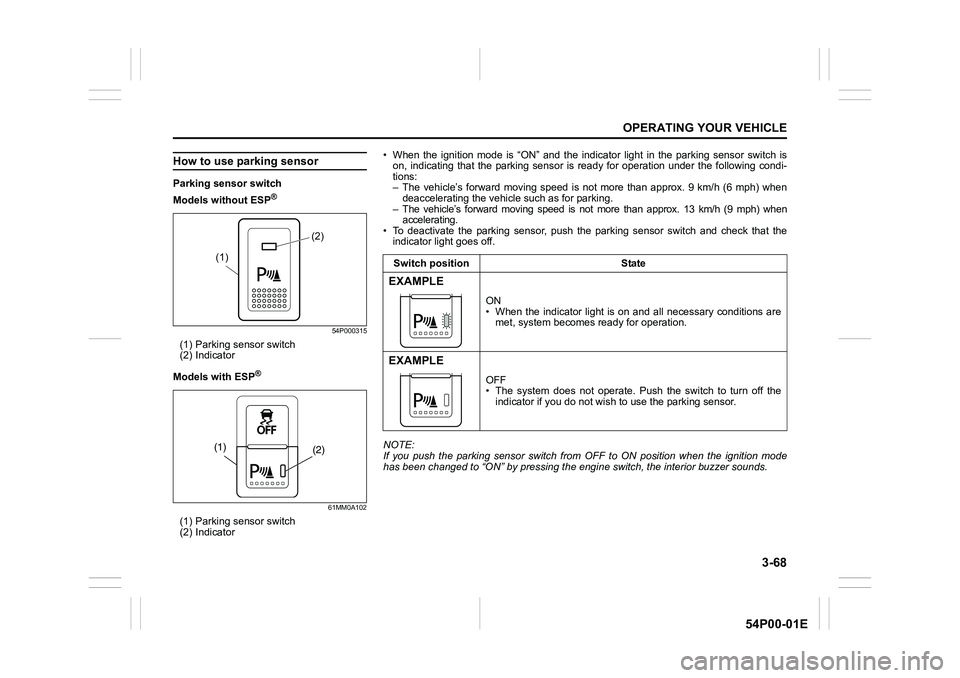
How to use parking sensor
Parking sensor switch
Models without ESP
®
54P000315
(1) Parking sensor switch
(2) Indicator
Models with ESP
®
61MM0A102
(1) Parking sensor switch
(2) Indicator
(2)
(1)
(2) (1)
• When the ignition mode is “ON” and the indicator light in the parking sensor switch is
on, indicating that the parking sensor is ready for operation under the following condi-
tions:
– The vehicle’s forward moving speed is not more than approx. 9 km/h (6 mph) when
deaccelerating the vehicle such as for parking.
– The vehicle’s forward moving speed is not more than approx. 13 km/h (9 mph) when
accelerating.
• To deactivate the parking sensor, push the parking sensor switch and check that the
indicator light goes off.
NOTE:
If you push the parking sensor switch from OFF to ON position when the ignition mode
has been changed to “ON” by pressing the engine switch, the interior buzzer sounds.Switch position State
EXAMPLE
ON
• When the indicator light is on and all necessary conditions are
met, system becomes ready for operation.
EXAMPLE
OFF
• The system does not operate. Push the switch to turn off the
indicator if you do not wish to use the parking sensor.
Page 211 of 482

3-71
OPERATING YOUR VEHICLE
54P00-01E
Rearview camera
(if equipped)
When the gearshift lever is shifted to “R”
position while the ignition switch is in “ON”
position or the ignition mode is “ON”, the
rearview camera system automatically
shows the view behind the vehicle on the
display.
Rearview camera location
54P000316
(1) Rearview camera
The rearview camera is installed beside
the license plate light.
WA R N I N G
The distance viewed in the rearview
camera may differ from the actual
distance according to the condition
of road or the load the vehicle is car-
rying. Since the camera display area
is also limited, backing up by only
looking at the display may cause an
accident or a crash with an object.
The rearview camera cannot replace
the driver’s attention. The driver
alone is responsible for parking and
similar driving maneuvers.
• Use the rearview camera only to
provide driving assistance.
• Always drive carefully confirming
the safety of the rear and the sur-
rounding conditions by looking
directly with your eyes and using
the rear view mirror.
• Check that the tailgate is securely
closed when backing up.
NOTICE
If you use the rearview camera for a
long time when the ignition switch is
in “ON” position or the ignition mode
is “ON”, but the engine is not run-
ning, the battery may discharge.
Do not leave the ignition switch in
“ON” position or the ignition mode
“ON” for a long time when the engine
is not running.
NOTICE
The rearview camera is a precision
instrument. If you strike the camera,
it may be broken and cause damage
resulting in a catch fire or a malfunc-
tion.
• Do not strike the camera.
• Do not remove snow or mud on the
camera lens with a stick.
(1)
EXAMPLE
Page 212 of 482

3-72
OPERATING YOUR VEHICLE
54P00-01E
NOTE:
If body wax gets on the camera lens, wipe
off the wax with a clean cloth dampened
with mild detergent diluted with water, and
then wipe the lens with a dry cloth.
How to use rearview camera
1) Turn the ignition switch to “ON” position
or press the engine switch to change
the ignition mode to “ON”.
2) Shift the gearshift lever in “R” position.
• The display automatically shows the
view behind the vehicle.
• When the gearshift lever is shifted
from “R” to another gearshift lever
position, the display returns to the
previous display.
NOTE:
The rearview camera display has first pri-
ority in any display mode. However, the
rearview camera display does not show
the rear view while the system is initializ-
ing.
Display range of rearview camera
The rearview camera display shows the
area behind the rear end of the tailgate.
The display cannot show objects which are
close to the bumper or under the bumper.
The rearview camera display cannot show
obstacles which are higher than the cam-
era. Upper parts of tall objects such as
road signs cannot be viewed on the dis-
play.Display range of rearview camera
54P000369
54P000370
(1) Display range
NOTICE
If water enters the rearview camera, it
may cause a malfunction or catch
fire.
Do not use high pressure water
around the camera.
NOTICE
This lens is hard coated to prevent
damage or discoloration. Damage or
discoloration of lens may obscure
the image.
• Do not use a brush to clean lens.
• Do not use alcohol, benzene or
thinner to clean the lens.
• Do not use wax on the camera lens.
(1)
EXAMPLE
(1)
EXAMPLE