Page 3 of 148

PURPOSE OF THIS GUIDE
WELCOME................. 4
IMPORTANT SAFETY
INFORMATION.............. 4
OWNER’S RESOURCES....... 4
IN CASE OF EMERGENCY..... 5
TOWING YOUR ALL-WHEEL
DRIVE SUBARU............. 6
ENTRY AND EXIT
KEYLESS ENTRY............ 7
KEYLESS ACCESS WITH
PUSH BUTTON START....... 9
POWER REAR GATE (PRG)....11
INSTRUMENT PANEL........14
GAUGES AND WARNING
LIGHTS
COMBINATION METER.......16
WARNING AND INDICATOR
LIGHTS....................17
CONTROLS
INSTRUMENT PANEL
SWITCHES (LOWER LEFT).....18
AUDIO CONTROLS...........18
ADVANCED ADAPTIVE
CRUISE CONTROL..........19
i/SET SWITCH...............19
VIEW/ENTER SWITCH........20LIGHT CONTROLS...........20
TURN SIGNALS.............21
WINDSHIELD WIPERS........22
REAR WINDOW WIPER.......23
ONE-TOUCH INTERIOR
LIGHTING..................23
OVERHEAD CONSOLE........24
GETTING COMFORTABLE
SEATING...................26
TILT AND TELESCOPIC
STEERING COLUMN.........29
POWER EXTERIOR MIRRORS . . 30
REAR VIEW MIRROR.........31
CABIN VIEW MIRROR.........32
POWER WINDOWS..........32
POWER MOONROOF........33
CLIMATE CONTROL..........34
ACCESSORY CONNECTIONS . . 40
OPERATING THE VEHICLE
IGNITION SWITCH...........41
PUSH-BUTTON IGNITION
SWITCH...................41
STARTING THE VEHICLE......41
DRIVING THE VEHICLE.......42
ELECTRONIC PARKING
BRAKE (EPB)...............43
X-MODE
®..................45
TURNING OFF THE VEHICLE...46
TABLE OF CONTENTS
Page 4 of 148

REFUELING
FUEL FILLER LID............47
FUEL SPECIFICATIONS
AND CAPACITY..............47
PASSENGER/CARGO AREAS
ACCESSING THE THIRD-ROW . 48
EXITING THE THIRD-ROW.....48
FOLDING THE REAR SEATS...49
CHILD SAFETY LOCKS.......50
LATCH/ANCHOR............51
REAR SEAT REMINDER.......51
CARGO COVER.............52
SPARE TIRE................53
JACK AND TOOLS...........54
ENGINE COMPARTMENT
HOOD PROP................55
2.4 L ENGINE...............56
ADDITIONAL SPECIFICATIONS
NEW VEHICLE BREAK-IN......57
ENGINE OIL................57
ENGINE OIL CAPACITY.......57
ROOF RAIL CAPACITY.......58
TRAILER TOWING CAPACITY . . 58
TIRE PRESSURE MONITORING
SYSTEM (TPMS).............59
STARLINK OVERVIEW
OVERVIEW OF YOUR
MULTIMEDIA SYSTEM........61
BUTTONS..................61
TOUCHSCREEN.............63
STEERING WHEEL
CONTROLS.................64
VOICE RECOGNITION........64
STARLINK HOME
HOME SCREEN ICONS.......67
REARRANGING ICONS.......67
ADDING SHORTCUTS........68
DRIVER PROFILE
CREATING A DRIVER
PROFILE...................69
MULTIMEDIA
RADIO.....................71
MEDIA.....................72
PHONE
PAIRING A PHONE...........73
MAKING A CALL.............73
RECEIVING A CALL..........74
TEXT MESSAGES............75
APPS
SUBARU STARLINK®
IN-VEHICLE APPS...........76
SUBARU STARLINK®
MOBILE APP................78
MYSUBARU................79
MAPS (if equipped)
MAPS OVERVIEW............80
CREATING HOME AND
WORK PROFILES............80
STARLINK SAFETY AND
SECURITY
SAFETY AND SECURITY
OVERVIEW.................81
ENROLLMENT..............82
MYSUBARU INTEGRATION....82
SUBARU STARLINK
®
WI-FI HOTSPOT.............83
SETTINGS AND UPDATES
SETTINGS AND UPDATES
OVERVIEW.................84
SOUND....................85
PHONE....................85
MAPS/NAVIGATION..........86
CLOCK....................87
EYESIGHT
EYESIGHT®OVERVIEW.......90
OPERATION................91
FUNCTIONS................91
STEERING WHEEL
CONTROLS.................97
EYESIGHT
®ASSIST MONITOR
(EAM).....................99
LANE DEPARTURE WARNING
AND PRE-COLLISION BRAKING
SYSTEM OFF SWITCHES.....100
TABLE OF CONTENTS
2
Page 5 of 148
DRIVER ASSIST
TECHNOLOGIES
REAR-VISION CAMERA......101
FRONT VIEW MONITOR.....101
BLIND SPOT DETECTION (BSD) /
REAR CROSS TRAFFIC ALERT
(RCTA)...................102
HIGH BEAM ASSIST (HBA)...103
STEERING RESPONSIVE
HEADLIGHTS (SRH).........103
REVERSE AUTOMATIC
BRAKING (RAB)............103
CARE AND LIMITATIONS
STEREO CAMERA
PRECAUTIONS.............104
WINDSHIELD GLASS AND
DASHBOARD..............104
FRONT VIEW
ASCENT..................105
EYESIGHT DISCLAIMER
EYESIGHT®DISCLAIMER....106
HOW TO APPENDIX
HOW TO OVERVIEW.........107
MEMORY HEIGHT..........108
MEMORY DRIVER’S SEAT....110
BLUETOOTH
®PAIRING......111
ANDROID AUTO™..........119
APPLE CARPLAY
®..........121
WI-FI.....................122
MAPS....................125
FIRMWARE AND SOFTWARE
UPDATES.................133
INDEX.....................134
TABLE OF CONTENTS
3
Page 19 of 148
WARNING AND INDICATOR LIGHTS
Redlights indicate immediate attention is required. Some examples are:
Seatbelt warning Door open Brake system
Yellowlights indicate caution. Some examples are:
Low fuelEngine low oil level
warning lightTire pressure
warning light
Greenandbluelights are for information. Some examples are:
Headlight
indicator lightAuto Vehicle Hold ONHigh beam
indicator light
GAUGES AND WARNING LIGHTS
17
Page 28 of 148
SEATING
Manual Seats
1Forward/Backward:Pull
the lever below the seat up
and slide the seat forward or
backward. Release the lever
and make sure the seat is
locked into place.
2Seat Height (Driver’s Seat):
Pulling up or pushing down
on the lever will raise or
lower the seat cushion.
3Recline Seatback:Pull the
lever up to adjust the
seatback. Release the lever
and make sure the seatback
is locked into place.
Manual Seat Levers
GETTING COMFORTABLE
26
Page 29 of 148
Power Driver’s Seat(if equipped)
1Seat Position:Moving the
switch forward or backward
will adjust the seat in that
direction. Pulling up or
pushing down on the back of
the switch will adjust the
seat height up or down.
Pulling up or pushing down
on the front of the switch will
adjust the angle of the seat
cushion.
2Recline Seatback:Moving
the top of the switch forward
or backward will adjust the
angle of the seatback.
3Lumbar Support
(if equipped):Pressing the
front of the switch will
increase support. Pressing
the rear of the switch will
decrease support.
4Thigh Extension
(if equipped):Pull up on the
lever below the seat cushion
to adjust the length.
Power Seat Controls
Thigh Extension
GETTING COMFORTABLE
27
Page 30 of 148
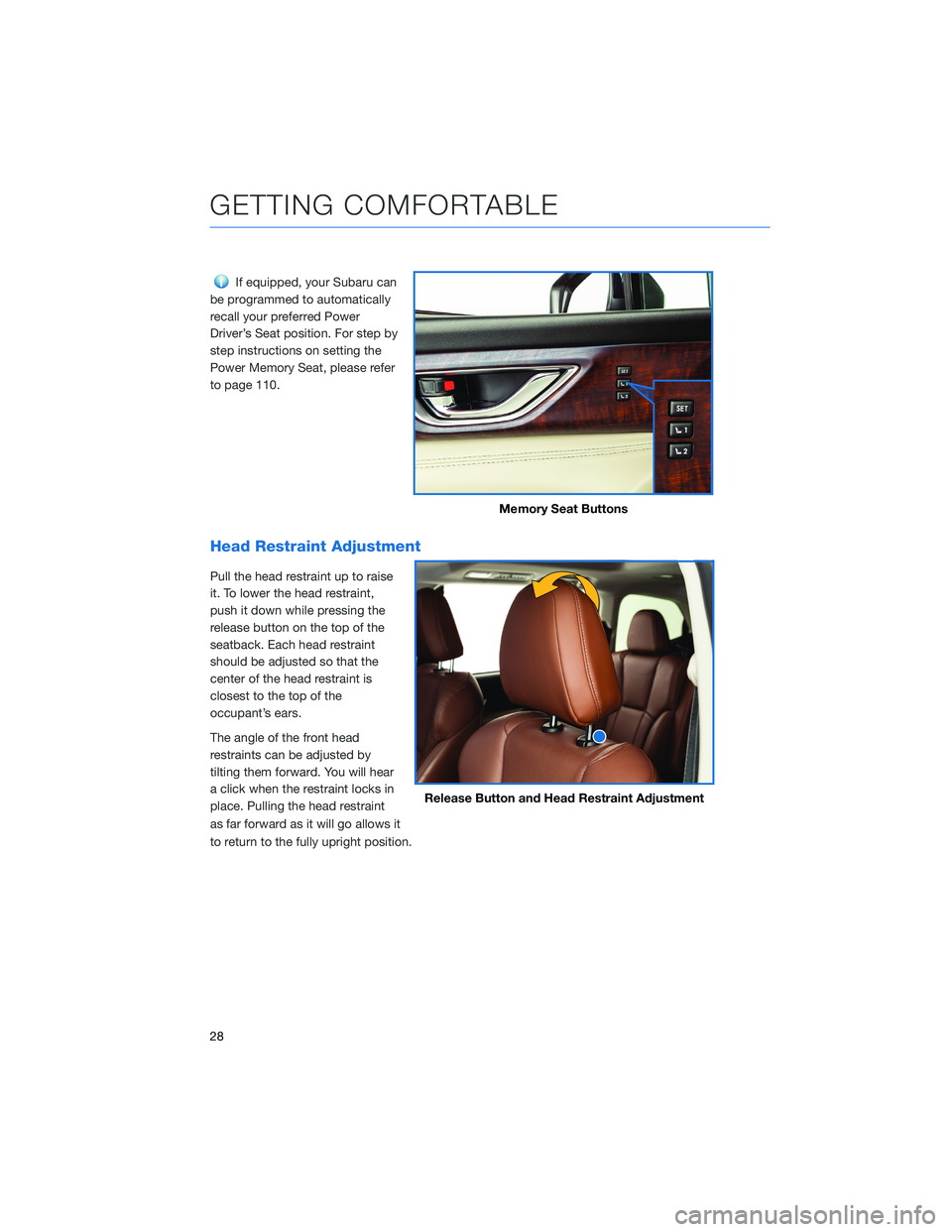
If equipped, your Subaru can
be programmed to automatically
recall your preferred Power
Driver’s Seat position. For step by
step instructions on setting the
Power Memory Seat, please refer
to page 110.
Head Restraint Adjustment
Pull the head restraint up to raise
it. To lower the head restraint,
push it down while pressing the
release button on the top of the
seatback. Each head restraint
should be adjusted so that the
center of the head restraint is
closest to the top of the
occupant’s ears.
The angle of the front head
restraints can be adjusted by
tilting them forward. You will hear
a click when the restraint locks in
place. Pulling the head restraint
as far forward as it will go allows it
to return to the fully upright position.
Memory Seat Buttons
Release Button and Head Restraint Adjustment
GETTING COMFORTABLE
28
Page 31 of 148
Seatbelt Adjuster
To keep yourself comfortable and
safe, always position the seatbelt
adjuster so the shoulder belt
passes over the middle of your
shoulder without touching your
neck. Pull the tab out and slide
the adjuster up or down to set the
position. Release the tab and
make sure the adjuster is locked
in place.
TILT AND TELESCOPIC STEERING COLUMN
You can adjust both the height
and lengthwise position of the
steering wheel. Pull the lever on
the steering column down firmly
to unlock, and then adjust the
position of the steering wheel.
Push the lever firmly back up to
lock the steering wheel in place.
Seatbelt Adjustment Tab
Steering Column Unlock
GETTING COMFORTABLE
29