2022 RAM 1500 instrument cluster
[x] Cancel search: instrument clusterPage 326 of 496
324SAFETY
Automatic Trailer Detection
There are two modes of operation for the detection
of the trailer length:
Automatic Mode — When “Auto Mode” is
selected, the system will use the blind spot
sensors to automatically determine the pres -
ence and length of a trailer. The presence of a
trailer will be detected using the blind spot radar
within 90 seconds of forward movement of the
vehicle. The vehicle must be moving above
6 mph (10 km/h) to activate the feature. Once
the trailer has been detected, the system will
default to the maximum blind spot zone until the
length has been verified. You will see “Auto” in
the instrument panel cluster .
Maximum Mode — When “Max Mode” is
selected, the system will default to the
maximum blind spot zone regardless of what
size trailer is attached .
NOTE:Selected setting is stored when the ignition is
placed in the OFF position. To change this setting,
it must be selected through the Uconnect Settings
Ú page 234. Trailer Length Detection
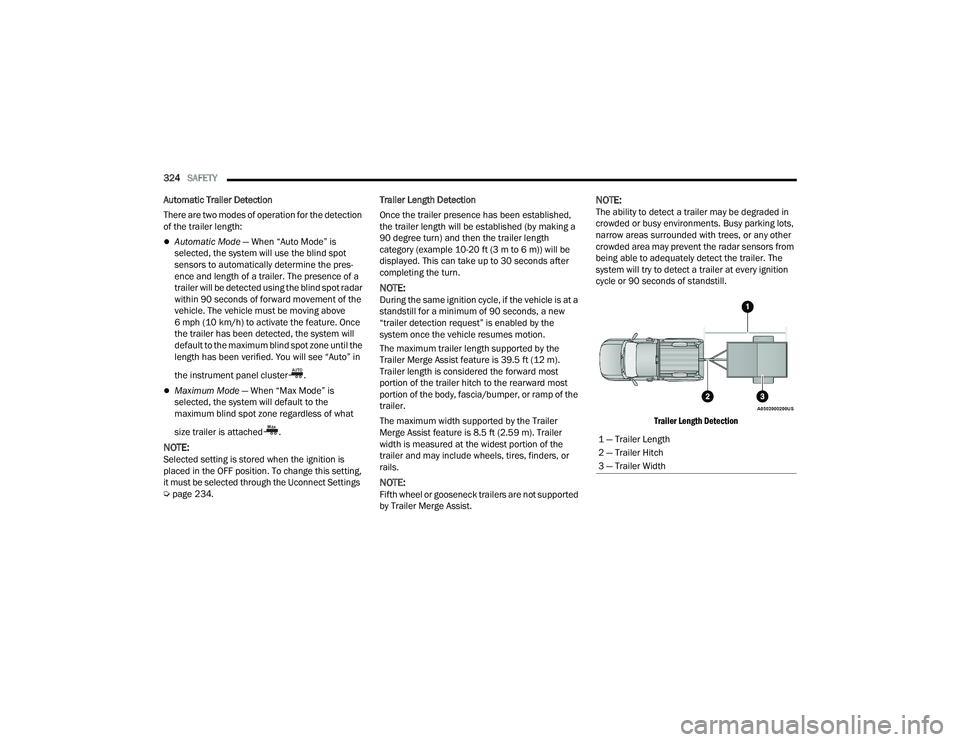
Once the trailer presence has been established,
the trailer length will be established (by making a
90 degree turn) and then the trailer length
category (example 10-20 ft (3 m to 6 m)) will be
displayed. This can take up to 30 seconds after
completing the turn.
NOTE:During the same ignition cycle, if the vehicle is at a
standstill for a minimum of 90 seconds, a new
“trailer detection request” is enabled by the
system once the vehicle resumes motion.
The maximum trailer length supported by the
Trailer Merge Assist feature is 39.5 ft (12 m).
Trailer length is considered the forward most
portion of the trailer hitch to the rearward most
portion of the body, fascia/bumper, or ramp of the
trailer.
The maximum width supported by the Trailer
Merge Assist feature is 8.5 ft (2.59 m). Trailer
width is measured at the widest portion of the
trailer and may include wheels, tires, finders, or
rails.
NOTE:Fifth wheel or gooseneck trailers are not supported
by Trailer Merge Assist.
NOTE:The ability to detect a trailer may be degraded in
crowded or busy environments. Busy parking lots,
narrow areas surrounded with trees, or any other
crowded area may prevent the radar sensors from
being able to adequately detect the trailer. The
system will try to detect a trailer at every ignition
cycle or 90 seconds of standstill.
Trailer Length Detection
1 — Trailer Length
2 — Trailer Hitch
3 — Trailer Width
22_DT_OM_EN_USC_t.book Page 324
Page 327 of 496

SAFETY325
Trailer length will be identified and placed into one
of the following categories:
Trailer length up to 10 ft (3 m) — Blind spot zone
will be adjusted to 10 ft (3 m) .
Trailer length between 10 ft to 20 ft (3 m to 6 m) — Blind spot zone will be adjusted to 20 ft
(6 m) .
Trailer length between 20 ft to 30 ft (6 m to 9 m) — Blind spot zone will be adjusted to 30 ft
(9 m) .
Trailer length between 30 ft and 39.5 ft (9 m to
12 m) — Blind spot zone will be adjusted to Max
distance .
NOTE:Trailer length is determined within +/- 3 ft (1 m) of
actual length. Trailers that are the same size as the
category limit, 10/20/30 ft (3/6/9 m), could be
subject to being placed in the category above or
below the correct one.
Trailer Merge Warning
Trailer Merge Warning is the extension of the blind
spot function to cover the length of the trailer, plus
a safety margin, to warn the driver when there is a
vehicle in the adjacent lane. The driver is alerted by
the illumination of the BSM warning light located in the outside mirror on the side the other vehicle is
detected on. In addition, an audible (chime) alert
will be heard and radio volume will be reduced
Ú
page 322.
NOTE:
The Trailer Merge Alert system DOES NOT alert
the driver about rapidly approaching vehicles
that are outside the detection zones.
The Blind Spot Monitoring (BSM) system may
experience drop outs (blinking on and off) of the
side mirror warning indicator lamps when a
motorcycle or any small object remains at the
side of the vehicle for extended periods of time
(more than a couple of seconds).
Crowded areas such as parking lots, neighbor -
hoods, etc. may lead to an increased amount of
false alerts. This is normal operation.
FORWARD COLLISION WARNING (FCW)
W
ITH MITIGATION — IF EQUIPPED
FCW with Mitigation provides the driver with
audible warnings, visual warnings (within the
instrument cluster display), and may apply a brake
jerk to warn the driver when it detects a potential
frontal collision. The warnings and limited braking
are intended to provide the driver with enough time
to react, avoid or mitigate the potential collision.
NOTE:FCW monitors the information from the forward
looking sensors as well as the Electronic Brake
Controller (EBC), to calculate the probability of a
forward collision. When the system determines
that a forward collision is probable, the driver will
be provided with audible and visual warnings as
well as a possible brake jerk warning.
If the driver does not take action based upon these
progressive warnings, then the system will provide
a limited level of active braking to help slow the
vehicle and mitigate the potential forward collision.
If the driver reacts to the warnings by braking and
the system determines that the driver intends to
avoid the collision by braking but has not applied
sufficient brake force, the system will compensate
and provide additional brake force as required.
WARNING!
The Blind Spot Monitoring system is only an aid
to help detect objects in the blind spot zones.
The BSM system is not designed to detect
pedestrians, bicyclists, or animals. Even if your
vehicle is equipped with the BSM system, always
check your vehicle’s mirrors, glance over your
shoulder, and use your turn signal before
changing lanes. Failure to do so can result in
serious injury or death.
6
22_DT_OM_EN_USC_t.book Page 325
Page 328 of 496

326SAFETY
If a FCW with Mitigation event begins at a speed
below 32 mph (52 km/h), the system may provide
the maximum braking possible to mitigate the
potential forward collision. If the Forward Collision
Warning with Mitigation event stops the vehicle
completely, the system will hold the vehicle at
standstill for two seconds and then release the
brakes.
FCW Message
When the system determines a collision with the
vehicle in front of you is no longer probable, the
warning message will be deactivated Úpage 480.
NOTE:
The minimum speed for FCW activation is
3 mph (5 km/h).
The FCW alerts may be triggered on objects
other than vehicles such as guardrails or sign
posts based on the course prediction. This is
expected and is a part of normal FCW activation
and functionality.
It is unsafe to test the FCW system. To prevent
such misuse of the system, after four Active
Braking events within a key cycle, the Active
Braking portion of FCW will be deactivated until
the next key cycle.
The FCW system is intended for on-road use
only. If the vehicle is taken off-road, the FCW
system should be deactivated to prevent unnec -
essary warnings to the surroundings.
FCW may not react to irrelevant objects such as
overhead objects, ground reflections, objects
not in the path of the vehicle, stationary objects
that are far away, oncoming traffic, or leading
vehicles with the same or higher rate of speed.
FCW will be disabled like ACC, with the unavail -
able screens.
Turning FCW On Or Off
The FCW button is located in the Uconnect display
in the control settings Ú page 234.
To turn the FCW system on, press the forward
collision button once.
To turn the FCW system off, press the forward
collision button once.
NOTE:
When the FCW is “on”, this allows the system to
warn the driver of a possible collision with the
vehicle in front.
When the FCW is “off”, this prevents the system
from warning the driver of a possible collision
with the vehicle in front. If the FCW is set to “off”,
“FCW OFF” will be displayed in the instrument
cluster display.
WARNING!
Forward Collision Warning (FCW) is not intended
to avoid a collision on its own, nor can FCW
detect every type of potential collision. The driver
has the responsibility to avoid a collision by
controlling the vehicle via braking and steering.
Failure to follow this warning could lead to
serious injury or death.
22_DT_OM_EN_USC_t.book Page 326
Page 329 of 496

SAFETY327
When FCW status is set to “Only Warning”, this
prevents the system from providing limited
active braking, or additional brake support if the
driver is not braking adequately in the event of
a potential frontal collision.
When FCW status is set to “Warning and
Braking”, this allows the system to warn the
driver of a possible collision with the vehicle in
front using audible/visual warnings and it
applies autonomous braking.
The FCW system state is defaulted to “Full On”
from one ignition cycle to the next. If the system
is turned off, it will reset to “Full On” when the
vehicle is restarted.
FCW Braking Status And Sensitivity
The FCW Sensitivity and Active Braking status are
programmable through the Uconnect system
Úpage 234.
Far
When the sensitivity of FCW is set to the
“Far” setting and the system status is “Only
Warning”, this allows the system to warn the
driver of a possible more distant collision
with the vehicle in front using audible/
visual warnings.
More cautious drivers that do not mind
frequent warnings may prefer this setting.
Medium
When the sensitivity of FCW is set to the
“Medium” setting and the system status is
“Only Warning”, this allows the system to
warn the driver of a possible collision with
the vehicle in front using audible/visual
warnings.
Near
When the sensitivity of FCW is set to the
“Near” setting and the system status is
“Only Warning”, this allows the system to
warn the driver of a possible closer collision
with the vehicle in front using audible/
visual warnings.
This setting provides less reaction time than
the “Far” and “Medium” settings, which
allows for a more dynamic driving experi -
ence.
More dynamic or aggressive drivers that
want to avoid frequent warnings may prefer
this setting.
FCW Limited Warning
If the instrument cluster displays “ACC/FCW
Limited Functionality” or “ACC/FCW Limited
Functionality Clean Front Windshield”
momentarily, there may be a condition that limits
FCW functionality. Although the vehicle is still
driveable under normal conditions, the active
braking may not be fully available. Once the
condition that limited the system performance is
no longer present, the system will return to its full
performance state. If the problem persists, see an
authorized dealer.
Service FCW Warning
If the system turns off, and the instrument cluster
displays:
ACC/FCW Unavailable Service Required
Cruise/FCW Unavailable Service Required
This indicates there is an internal system fault.
Although the vehicle is still drivable under normal
conditions, have the system checked by an
authorized dealer.
Pedestrian Emergency Braking
(PEB) — If Equipped
PEB is a subsystem of the FCW system that
provides the driver with audible and visual
warnings in the instrument cluster display, and
may apply automatic braking when it detects a
potential frontal collision with a pedestrian.
6
22_DT_OM_EN_USC_t.book Page 327
Page 330 of 496

328SAFETY
If a PEB event begins at a speed below 37 mph
(60 km/h), the system may provide braking to
mitigate the potential collision with a pedestrian. If
the PEB event stops the vehicle completely, the
system will hold the vehicle at a standstill for two
seconds and then release the brakes. When the
system determines a collision with the pedestrian
in front of you is no longer probable, the warning
message will be deactivated.
The minimum speed for PEB activation is 3 mph
(5 km/h). Turning PEB On Or Off
NOTE:The default status of PEB is “On.” This allows the
system to warn you of a possible frontal collision
with the pedestrian.
The PEB button is located in the Uconnect display
in the controls settings Ú
page 234.
To turn the PEB system off, push the Pedestrian
Emergency Braking button once.
To turn the PEB system back on, push the
Pedestrian Emergency Braking button again.
Changing the PEB status to “Off” deactivates the
system, so no warning or active braking will be
available in case of a possible frontal collision with
the pedestrian.
NOTE:The PEB system will retain the last setting selected
by the driver after ignition shut down.
TIRE PRESSURE MONITORING SYSTEM
(TPMS)
TPMS will warn the driver of a low tire pressure
based on the vehicle recommended cold placard
pressure.
NOTE:The TPMS Warning Light will illuminate in the
instrument cluster and a chime will sound when
tire pressure is low in one or more of the four active
road tires. In addition, the instrument cluster will
display a graphic showing the pressure values of
each tire with the low tire pressure values in a
different color, or the Uconnect radio will display a
TPMS message; when this occurs you must
increase the tire pressure to the recommended
cold placard pressure in order for the TPMS
Warning Light to turn off.
The tire pressure will vary with temperature by
about 1 psi (7 kPa) for every 12°F (6.5°C). This
means that when the outside temperature
decreases, the tire pressure will decrease. Tire
pressure should always be set based on cold
inflation tire pressure. This is defined as the tire
pressure after the vehicle has not been driven for
at least three hours, or driven less than 1 mile
(1.6 km) after a three hour period. The cold tire
inflation pressure must not exceed the maximum
inflation pressure molded into the tire sidewall.
The tire pressure will also increase as the vehicle
is driven — this is normal and there should be no
adjustment for this increased pressure.
See Ú page 444 on how to properly inflate the
vehicle’s tires.
WARNING!
Pedestrian Emergency Braking (PEB) is not
intended to avoid a collision on its own, nor can
PEB detect every type of potential collision with
a pedestrian. The driver has the responsibility to
avoid a collision by controlling the vehicle via
braking and steering. Failure to follow this
warning could lead to serious injury or death.
22_DT_OM_EN_USC_t.book Page 328
Page 332 of 496

330SAFETY
The TPMS is not a substitute for proper tire
maintenance, and it is the driver’s responsibility
to maintain correct tire pressure using an accu -
rate tire pressure gauge, even if underinflation
has not reached the level to trigger illumination
of the TPMS Warning Light.
Seasonal temperature changes will affect tire
pressure, and the TPMS will monitor the actual
tire pressure in the tire.
Tire Pressure Monitoring System Display
The Tire Pressure Monitoring System (TPMS) uses
wireless technology with wheel rim mounted
electronic sensors to monitor tire pressure levels.
Sensors, mounted to each wheel as part of the
valve stem, transmit tire pressure readings to the
receiver module.
NOTE:It is particularly important for you to check the tire
pressure in all of the tires on your vehicle monthly
and to maintain the proper pressure.
The TPMS consists of the following components:
Receiver module
Four Tire Pressure Monitoring System sensors
Various Tire Pressure Monitoring System
messages, which display in the instrument
cluster
Tire Pressure Monitoring System Warning Light
Tire Pressure Monitoring System Low
Pressure Warnings
The Tire Pressure Monitoring System
(TPMS) Warning Light will illuminate in
the instrument cluster and a chime will
sound when tire pressure is low in one or
more of the four active road tires. In addition, the
instrument cluster will display a graphic showing
the pressure values of each tire with the low tire
pressure values in a different color. An "Inflate to
XX" message will also be displayed.
Low Tire Pressure Display
Should this occur, you should stop as soon as
possible and inflate the tires with a low pressure
condition (those in a different color in the
instrument cluster graphic) to the vehicle’s
recommended cold placard pressure inflation
value as shown in the "Inflate to XX" message.
Once the system receives the updated tire
pressures, the system will automatically update,
the graphic display in the instrument cluster will
return to its original color, and the Tire Pressure
Monitoring System Warning Light will turn off. The
vehicle may need to be driven for up to 20 minutes
above 15 mph (24 km/h) in order for the TPMS to
receive this information.
22_DT_OM_EN_USC_t.book Page 330
Page 333 of 496

SAFETY331
NOTE:When filling warm tires, the tire pressure may need
to be increased up to an additional 4 psi (28 kPa)
above the recommended cold placard pressure in
order to turn the Tire Pressure Monitoring System
Warning Light off.
Service TPMS Warning
If a system fault is detected, the Tire Pressure
Monitoring System (TPMS) Warning Light will flash
on and off for 75 seconds and then remain on
solid. The system fault will also sound a chime. In
addition, the instrument cluster will display a
"SERVICE TPM SYSTEM" message for a minimum
of five seconds and then display dashes (--) in
place of the pressure value to indicate which
sensor is not being received.
If the ignition switch is cycled, this sequence will
repeat, providing the system fault still exists. If the
system fault no longer exists, the Tire Pressure
Monitoring System Warning Light will no longer
flash, and the "SERVICE TPM SYSTEM" message
will no longer display, and a pressure value will
display in place of the dashes. A system fault can
occur due to any of the following:
Signal interference due to electronic devices or
driving next to facilities emitting the same radio
frequencies as the Tire Pressure Monitoring
System sensors
Installing aftermarket window tinting that
contains materials that may block radio wave
signals
Accumulation of snow or ice around the wheels
or wheel housings
Using tire chains on the vehicle
Using wheels/tires not equipped with TPMS
sensors
A system fault may occur due to an incorrect TPMS
sensor location condition. When a system fault
occurs due to an incorrect TPMS sensor location,
the Tire Pressure Monitoring System (TPMS)
Warning Light will flash on and off for 75 seconds
and then remain on solid. The system fault will also
sound a chime. In addition, the instrument cluster
will display a Tire Pressure Temporarily Unavailable
message in place of the tire pressure display
screen. If the ignition switch is cycled, this
sequence will repeat, providing the system fault
still exists. If the system fault no longer exists, the
“Tire Pressure Monitoring System Warning Light”
will no longer flash and the tire pressure display
screen will be displayed showing the tire pressure
values the correct locations. Vehicles With Non-Matching Full Size Spare Or
Compact Spare
The non-matching full size spare or compact
spare tire does not have a TPMS sensor. There
-
fore, the TPMS will not monitor the pressure in
the non-matching full size spare or compact
spare tire.
If you install the non-matching full size spare or
compact spare tire in place of a road tire that
has a pressure below the low-pressure warning
limit, upon the next ignition switch cycle, the Tire
Pressure Monitoring System (TPMS) Warning
Light and a “LOW TIRE” message will remain on
and a chime will sound. In addition, the graphic
in the instrument cluster will still display a pres -
sure value in a different color and an “Inflate to
XX” message.
After driving the vehicle for up to 20 minutes
above 15 mph (24 km/h), the Tire Pressure
Monitoring System (TPMS) Warning Light will
flash on and off for 75 seconds and then remain
on solid. In addition, the instrument cluster will
display a "SERVICE TPM SYSTEM" message for a
minimum of five seconds and then display
dashes (--) in place of the pressure value.
6
22_DT_OM_EN_USC_t.book Page 331
Page 334 of 496

332SAFETY
For each subsequent ignition switch cycle, a
chime will sound, the Tire Pressure Monitoring
System (TPMS) Warning Light will flash on and
off for 75 seconds and then remain on solid,
and the instrument cluster will display a
"SERVICE TPM SYSTEM" message for a
minimum of five seconds and then display
dashes (--) in place of the pressure value.
Once you repair or replace the original road tire
and reinstall it on the vehicle in place of the
non-matching full size spare or compact spare,
the TPMS will update automatically. In addition,
the Tire Pressure Monitoring System (TPMS)
Warning Light will turn off and the graphic in the
instrument cluster will display a new pressure
value instead of dashes (--), as long as no tire
pressure is below the low-pressure warning limit
in any of the four active road tires. The vehicle
may need to be driven for up to 20 minutes
above 15 mph (24 km/h) in order for the TPMS
to receive this information.
Tire Fill Alert
This feature notifies the user when the placard tire
pressure is attained while inflating or deflating the
tire.
You may choose to disable or enable the Tire Fill
Alert feature through use of the Uconnect Settings
in the radio.
NOTE:
Only one tire can be filled at a time when using
the Tire Fill Alert system.
The Tire Fill Alert feature cannot be entered if an
existing TPMS fault is set to “active” or if the
system is in deactivation mode (if equipped).
The system will be activated when a positive
increase in tire pressure is detected by the TPMS
while inflating the tire. The ignition must be in the
RUN mode, with the transmission in PARK.
NOTE:It is not required to have the engine running to
enter Tire Fill Alert mode.
The hazard lamps will come on to confirm the
vehicle is in Tire Fill Alert mode.
When Tire Fill Alert mode is entered, the tire
pressure display screen will be displayed in the
instrument cluster.
If the hazard lamps do not come on while inflating
the tire, the TPMS sensor may be out of range
preventing the TPMS sensor signal from being
received. In this case, the vehicle may need to be
moved either forward or backward slightly to exit
the null spot. Operation:
The horn will sound once to let the user know
when to stop filling the tire, when it reaches
recommended pressure.
The horn will sound three times if the tire is over
-
filled and will continue to sound every five
seconds if the user continues to inflate the tire.
The horn will sound once again when enough air
is let out to reach proper inflation level.
The horn will also sound three times if the tire is
then underinflated and will continue to sound
every five seconds if the user continues to
deflate the tire.
Trailer Tire Pressure Monitoring System
(TTPMS) — If Equipped
The Trailer Tire Pressure Monitoring System
(TTPMS) is a feature that displays the trailer tire
pressure values and warns the driver of a low tire
pressure event based on the driver’s set target tire
pressure value, through TTPMS settings found in
the radio.
The TTPMS monitors the pressure of each tire and
warns the driver through the instrument cluster,
when either a low tire pressure condition falls
below 25% of the driver’s set pressure or if a
system malfunction occurs. The instrument cluster
will display the actual tire pressure or dashes for
each of the trailer tires in the correct trailer
position, based on trailer configuration.
22_DT_OM_EN_USC_t.book Page 332