2022 PEUGEOT PARTNER navigation
[x] Cancel search: navigationPage 5 of 324

3
Contents
Memorising speeds 150
Active Safety Brake with Collision Risk Alert and
Intelligent emergency braking assistance
150
Active lane departure warning system 153
Blind spot monitoring 156
Distraction detection 158
Parking sensors 159
Reversing Camera 161
Surround Rear Vision 162
Visiopark 1 165
Park Assist 167
7Practical informationCompatibility of fuels 172
Refuelling 172
Misfuel prevention (Diesel) 173
Charging system (Electric) 174
Charging the traction battery (Electric) 181
Energy economy mode 185
Snow chains 186
Very cold climate screen 186
Towing device 187
Overload indicator 188
Roof bars / Roof rack 189
Bonnet 190
Engine compartment 191
Checking levels 191
Checks 194
AdBlue® (BlueHDi) 195
Free-wheeling 197
Advice on care and maintenance 198
8In the event of a breakdownRunning out of fuel (Diesel) 200
Tool kit 200
Temporary puncture repair kit 202
Spare wheel 204
Changing a bulb 207
Fuses 212
12
V battery
/ Accessory battery 212
Towing 216
9Technical dataDimensions 219
Engine technical data and towed loads 225
Petrol engine 226
Diesel engine 227
Electric motor 233
Identification markings 234
10Touch screen BLUETOOTH audio systemFirst steps 235
Steering mounted controls 235
Menus 236
Radio 237
DAB (Digital Audio Broadcasting) radio 238
Media 239
Telephone 240
Settings 242
Frequently asked questions 242
11PEUGEOT Connect RadioFirst steps 245
Steering mounted controls 246
Menus 247
Applications 248
Radio 248
DAB (Digital Audio Broadcasting) radio 250
Media 250
Telephone 251
Settings 254
Frequently asked questions 256
12PEUGEOT Connect NavFirst steps 258
Steering mounted controls 259
Menus 259
Voice commands 261
Navigation 264
Connected navigation 267
Applications 269
Radio 272
DAB (Digital Audio Broadcasting) radio 273
Media 273
Telephone 275
Settings 277
Frequently asked questions 279
13Event data recorders
■
Alphabetical index
http://q-r.to/bagGl9
Access to additional videos
Page 14 of 324

12
Instruments
1. Fuel gauge (Petrol or Diesel)
Charge level indicator (Electric)
2. Digital speedometer (mph or km/h)
READY indicator lamp (Electric)
3. Gear shift indicator (arrow and recommended
gear) (Petrol or Diesel)
Selector position and gear on automatic
gearbox (Petrol or Diesel)
Drive selector position
Driving mode selected (other than " Normal"
mode):
–
"Eco"
–
"Power" (Electric)
4. Total distance recorder (miles or km)
5. Cruise control/speed limiter setting
Display of speed limit signs 6.
Personalisable area: current media, driving
aids, navigation (depending on equipment),
current trip information (driving range,
consumption, average speed), coolant
temperature
7. Remaining range (miles or km)
8. Rev counter (x 1,000 rpm) (Petrol or Diesel)
Power indicator (Electric)
9. Traction battery charge level
percentage (Electric)
Displays
For certain functions that have indicator lamps
for both operation and deactivation, there is only
one dedicated location.
Permanent information
In the standard display, the instrument panel
shows:
–
in fixed locations:
•
Information related to the gearbox and gear
shift indicator (Petrol or Diesel).
•
Information related to the drive selector
.
•
Fuel gauge (Petrol or Diesel).
•
Range (Petrol or Diesel).
•
Coolant temperature indicator (Petrol or
Diesel).
•
Charge level and range indicator (Electric).
•
Power indicator (Electric).
•
Driving mode.
•
Status or alert messages displayed
temporarily
.
–
in variable locations:
• Warning lamps.
• Digital speedometer .
•
T
otal distance recorder.
Optional information
Depending on the selected display mode and
active features, additional information may be
displayed:
–
Rev counter (Petrol or Diesel).
–
T
rip computer.
–
Driving aid functions.
–
Speed limiter or cruise control.
–
Media currently playing.
–
Navigation instructions.
–
Analogue speedometer
.
–
Engine information (Power-meters) in Power
(Electric) mode.
–
Energy flows (Electric).
Personalising the instrument panel
Depending on version, the appearance of the
instrument panel can be modified (colour and/or
display mode).
Display language and units
These depend on the touch screen
settings.
When travelling abroad, the speed must be
shown in the official units of the country you
are driving in (mph, miles or km/h, km).
As a safety measure, these adjustments must be carried out with the vehicle
stationary.
Page 15 of 324

13
Instruments
1Choice of display colour (Petrol or Diesel)
Depending on version, the instrument panel
display colour depends on the colour scheme
chosen in the touch screen.
The settings are changed via the Settings touch screen menu.
Choosing the display mode
In each mode, specific types of information are
displayed on the instrument panel.
► Turn the thumbwheel on the left of the
steering wheel to display and scroll through the
various modes on the instrument panel.
►
Press the thumbwheel to confirm the mode.
If you do not press the thumbwheel, the selected
display mode is automatically applied after a few
moments.
Display modes
– "Dials": standard display of analogue and
digital speedometers, total distance recorder
and: •
fuel gauge, coolant temperature indicator
and rev counter (Petrol or Diesel). •
battery charge level indicator and power
indicator (Electric).
–
"Navigation": specific display, showing current
navigation information (map and instructions).
– "Driving": specific display, showing
information relating to active driving aid systems.
– "Minimum": 2D display with digital
speedometer, total distance recorder and: •
fuel gauge and coolant temperature indicator
(Petrol or Diesel).
•
battery charge level indicator (Electric).
–
"Energy": specific display, showing a visual
representation of the vehicle’s energy flows
(Electric).
– "Personal 1"/"Personal 2": display showing
information selected by the driver in the central
part of the instrument panel.
Configuring a "Personal" display mode
With PEUGEOT Connect Radio► Press Settings in the banner of the
touch screen.
► Select " Configuration ".
► Select "Instrument panel
personalisation".
With PEUGEOT Connect Nav
► Press Settings in the banner of the
touch screen.
►
Select "
OPTIONS".
► Select " Instrument panel
personalisation".
►
Select "
Personal 1" or "Personal 2".
► Select the type of information using the scroll
arrows on the touch screen: •
"Default" (empty).
•
"Trip computer".
•
"Media".
•
"Accessories consumption" (depending on
version).
•
"Rev counter" (Petrol or Diesel).
If the "Default" type of information is
selected, "Personal 1" or "Personal 2"
are no longer shown in the list of display
modes.
►
Confirm to save and exit.
"
Personal" mode is displayed immediately.
The information is displayed immediately on the
instrument panel if the corresponding display
mode is selected.
The type of information selected in "Personal 1" mode is not available in
"Personal 2" mode.
Warning and indicator
lamps
Displayed as symbols, the warning and indicator
lamps inform the driver of the occurrence of a
malfunction (warning lamps) or of the operating
status of a system (operation or deactivation
indicator lamps). Certain lamps light up in two
ways (fixed or flashing) and/or in several colours.
Page 31 of 324

29
Instruments
1– Air conditioning system controls (depending
on version).
For safety reasons, always stop the
vehicle before performing operations
that require sustained attention.
Some functions are not accessible while
driving.
Recommendations
Do not use pointed objects on the touch screen.
Do not touch the touch screen with wet hands.
Use a soft, clean cloth to clean the touch screen.
Main controls
With the ignition off: system start-up
With the engine running: mute
Left knob: volume adjustment (rotation)/
direct access to the Media menu (press)
Right knob: air flow adjustment (rotation)/direct
access to the Climate menu (press)
Access to menus
Return to the previous screen or confirm
After a few moments with no action on
the second page, the first page is
displayed automatically.
Menus
Radio
Media
Climate
Settings for temperature, air flow, etc.
For more information on Manual air
conditioning , refer to the corresponding section.
Telephone
Driving
Activation, deactivation and settings for
certain functions.
Settings
Main system settings.
For more information about the menus,
refer to the sections describing the audio
and telematics systems.
Touch screen
This system gives access to the following elements:
–
Permanent display of the time and outside
temperature (a blue warning lamp appears if
there is a risk of ice).
–
V
ehicle functions and equipment setting
menus.
–
Audio system and telephone controls and
display of related information.
– Display of visual manoeuvring aid functions
– Internet services and display of related
information.
–
Navigation system controls and
display
of related information (depending on
version).
For safety reasons, always stop the
vehicle before performing operations
that require sustained attention.
Some functions are not accessible while
driving.
Recommendations
This screen uses capacitive sensing technology.
– Do not use pointed objects on the touch
screen.
–
Do not touch the touch screen with wet hands.
–
Use a soft, clean cloth to clean the touch
screen.
Principles
► Use the buttons on each side of the touch
screen to access the menus, then press the
buttons that appear on the touch screen.
Some menus may display across two pages:
press the "OPTIONS" button to access the
second page.
After a few moments with no action on the second page, the first page is
displayed automatically.
Page 32 of 324

30
Instruments
To deactivate/activate a function, select "OFF"
or "ON".
Configuring a function
Access to additional information on the function
Confirm
Return to the previous page or confirm
Menus
Press the touch screen with three fingers
to show all of the menu buttons.
For more information about the menus,
refer to the sections describing the audio
and telematics systems.
Radio/Media
Navigation (Depending on equipment)
Driving or Vehicle (Depending on
equipment)
Activation, deactivation and settings for certain
functions.
The functions are organised in 2 tabs: " Driving
functions" and "Vehicle settings".
Telephone
Applications Display of available connected services.
Energy (with PEUGEOT Connect Nav)
Access the specific Electric functions
(energy flow, consumption statistics, deferred
charge) organised in the corresponding 3 tabs.
or
Settings
Main settings for the audio system and
touch screen.
Audio system on/off Volume adjustment/mute
Upper bar
Certain information is displayed permanently in
the upper bar of the touch screen:
–
T
ime and outside temperature (a blue warning
lamp appears if there is a risk of ice).
–
Reminder of information from the
RadioMedia
and Telephone menus and
navigation instructions (depending on
equipment).
–
Notifications.
– Access to the Settings.
Energy menu
This menu is only available with PEUGEOT
Connect Nav .
Depending on version, this is accessible either:
– directly, by pressing the button near the
touch screen.
– via the Applications menu.
Flow
The page displays a real-time representation of
the electric drive train’s operation.
1.Active driving mode
2. Electric motor
3. Estimated traction battery charge level
4. Energy flows
The energy flows have a specific colour for each
type of driving:
A. Blue: energy consumption
B. Green: energy recovery
Statistics
This page shows electrical energy consumption
statistics.
– Blue bar chart: directly consumed energy
supplied by the traction battery .
Page 141 of 324

139
Driving
6When reverse gear is engaged, an audible
signal (long beep) indicates that the sensors
may be dirty.
A front or rear impact to the vehicle can
upset the sensors’ settings, which is not
always detected by the system: distance
measurements may be distorted.
The sensors do not systematically detect
obstacles that are too low (pavements, studs)
or too thin (trees, posts, wire fences).
Certain obstacles located in the sensors’ blind
spots may not be detected or may no longer
be detected during the manoeuvre.
Certain materials (fabrics) absorb sound
waves: pedestrians may not be detected.
Maintenance
Clean the bumpers and door mirrors and
the field of vision of the cameras regularly.
When washing your vehicle at high pressure,
direct the spray from at least 30
cm away
from the sensors and cameras.
Mats/Pedal trims
The use of mats or pedal trims not
approved by PEUGEOT may interfere with
the operation of the speed limiter or cruise
control.
To avoid any risk of jamming the pedals:
–
Ensure that the mat is secured correctly
.
–
Never fit one mat on top of another
.
Units of speed
Ensure that the units of speed displayed
on the instrument panel (mph or km/h) are
those for the country you are driving in.
If this is not the case, when the vehicle is
stationary, set the display to the required
units of speed so that it complies with what is
authorised locally.
In case of doubt, contact a PEUGEOT dealer
or a qualified workshop.
Road signs recognition
For more information, refer to the
General recommendations on the use
of driving and manoeuvring aids .
This system displays the maximum speed
authorised locally on the instrument panel, using:
–
Speed limit signs detected by the camera.
–
Speed limit information from the navigation
system’
s mapping. –
Signs indicating a shared traffic zone detected
by the camera.
Sign detected Suggested speed (calculated)
Entry into a shared traffic zoneExample:
Without PEUGEOT
Connect Nav
10 mph or 20
km/h
(depending on
the units on the
instrument panel) With PEUGEOT Connect Nav
Display of the speed
in force in the country you are driving in.
–
Some supplementary traffic signs detected by
the camera.
Page 142 of 324

140
Driving
Supplementary
traffic sign detected Display of
the speed
associated with
the supplementary traffic sign
Speed limit when raining
Examples:
If the wiper control stalk is in the
"intermittent wipe"
or "automatic wipe" position (in order
to activate the rain sensor):
68 mph (110
km/h)
(for example)
Speed limit when towing
If an approved towing device is fixed to the vehicle:
56 mph (90
km/h)
(for example)
Speed limit
applicable over a certain distance Example:
43 mph (70 km/h)
(for example)
Supplementary
traffic sign detected Display of
the speed
associated with
the supplementary traffic sign
Speed limit for
vehicles with a gross vehicle
weight or gross
train weight less than 3.5 tonnes
56 mph (90 km/h)
(for example)
Speed limit in case of snow
Example:
If the outside
temperature is below 3°C:
19 mph (30
km/h)
(for example)
with a "snowflake" symbol
Speed limit at
certain times of the day
Example:
19 mph (30 km/h)
(for example)
with a "clock" symbol
Navigation mapping should be regularly
updated in order to receive accurate
speed limit information from the system.
The units for the speed limit (mph or km/h) depend on the country you are
driving in.
This should be taken into account to ensure
you observe the speed limit.
For the system to work properly when
changing countries, the speed unit of the
instrument panel must match that of the
country you are driving in.
Automatic sign reading is a driving aid system and does not always display the
correct speed limits.
The speed limit signs present on the road
always take priority over those displayed by
the system.
The system is designed to detect signs that
conform to the Vienna Convention on road
signs.
Specific speed limits, such as those for
heavy goods vehicles, are not displayed.
The display of the speed limit on the
instrument panel is updated when passing
a speed limit sign intended for cars (light
vehicles).
Activation/Deactivation
By default, the system is automatically activated
at every engine start.
Page 249 of 324
247
PEUGEOT Connect Radio
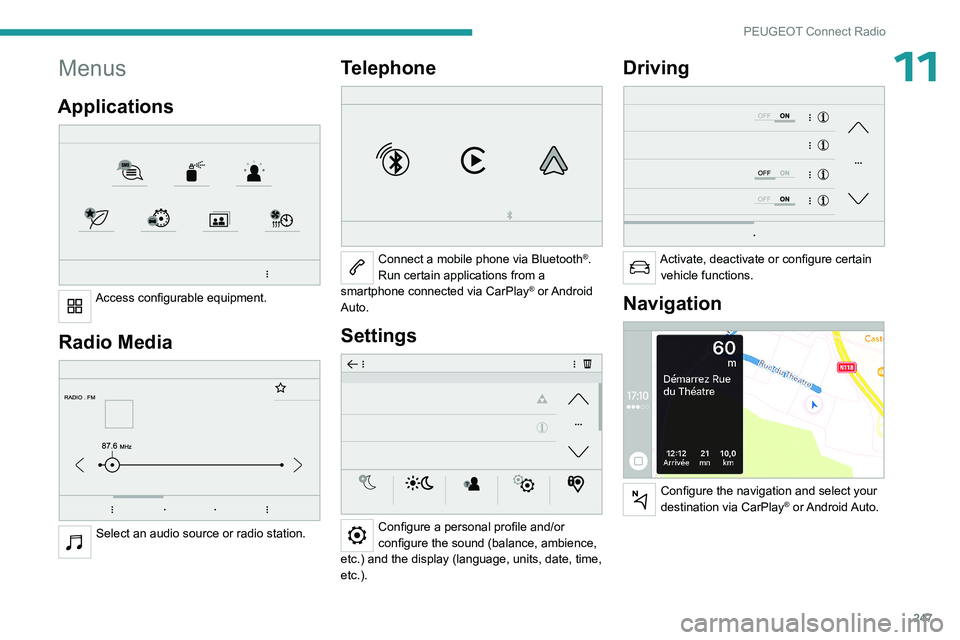
11Menus
Applications
Access configurable equipment.
Radio Media
Select an audio source or radio station.
Telephone
Connect a mobile phone via Bluetooth®.
Run certain applications from a
smartphone connected via CarPlay
® or Android
Auto.
Settings
Configure a personal profile and/or
configure the sound (balance, ambience,
etc.) and the display (language, units, date, time,
etc.).
Driving
Activate, deactivate or configure certain vehicle functions.
Navigation
Configure the navigation and select your
destination via CarPlay® or Android Auto.