2022 NISSAN SENTRA light sensor
[x] Cancel search: light sensorPage 135 of 528
10. Release Parking Brake
11. Low Fuel
12. Loose Fuel Cap
13. Engine Oil Service due in–––km
14. Low Washer Fluid (if so equipped)
15. Tire Pressure Low - Add Air
16. Door/ Trunk Open
17. Timer Alert —Time for a break?
18. Low outside temperature indicator
19. Power will turn off to save the battery
20. Power turned off to save the battery
21. Reminder: Turn OFF Headlights
22. Headlight System Error See Owner’sManual (if so equipped)
23. Parking Sensor Error: See Owner’s Manual
24. Driver Attention Alert— Take a Break?
25. Driver Attention Alert Malfunction
26. Malfunction: See Owner’s Manual
27. Unavailable: Side Radar Obstruction
28. Malfunction (if so equipped) 29. Shipping Mode On Push Storage Fuse
30. Intelligent Cruise Control (ICC) indica-
tors (if so equipped)
31. CVT (AT) Malfunction Service now (if so equipped)
32. CVT (AT) hot Power reduced (if so equipped)
33. Chassis Control System Error: See Owner’s Manual (if so equipped)
34. Not Available System Malfunction
35. Not Available Front Radar Blocked
36. Currently not available (if so equipped)
37. Not Available Poor Road Conditions (if so equipped)
38. Unavailable: High Cabin Temperature
39. Rear Door Alert is activated
40. Check Rear Seat For All Articles
41. Rear seat belt reminder
42. Rotate Steering Wheel and Push Start Switch
43. No Key Press and hold to Stop Engine
44. Speed Limit Sign (if so equipped)
45. Brightness indicator 46. Engine Stalled Stop safely
47. Engine Malfunction Power reduced Ser-
vice now
48. Engine Malfunction Service now
49. Engine hot Power reduced
No Key Detected
This warning appears when the Intelligent
Key is lef t outside the vehicle with the igni-
tion switch in the ON position. Make sure
the Intelligent Key is inside the vehicle.
For additional information, refer to “NISSAN
Intelligent Key®” in the “Pre-driving checks
and adjustments” section of this manual.
Key ID Incorrect
This warning appears when the ignition
switch is placed from the OFF position and
the Intelligent Key is not recognized by the
system. You cannot start the engine with
an unregistered key.
For additional information, refer to “NISSAN
Intelligent Key®” in the “Pre-driving checks
and adjustments” section of this manual.
Instruments and controls2-45
Page 146 of 528
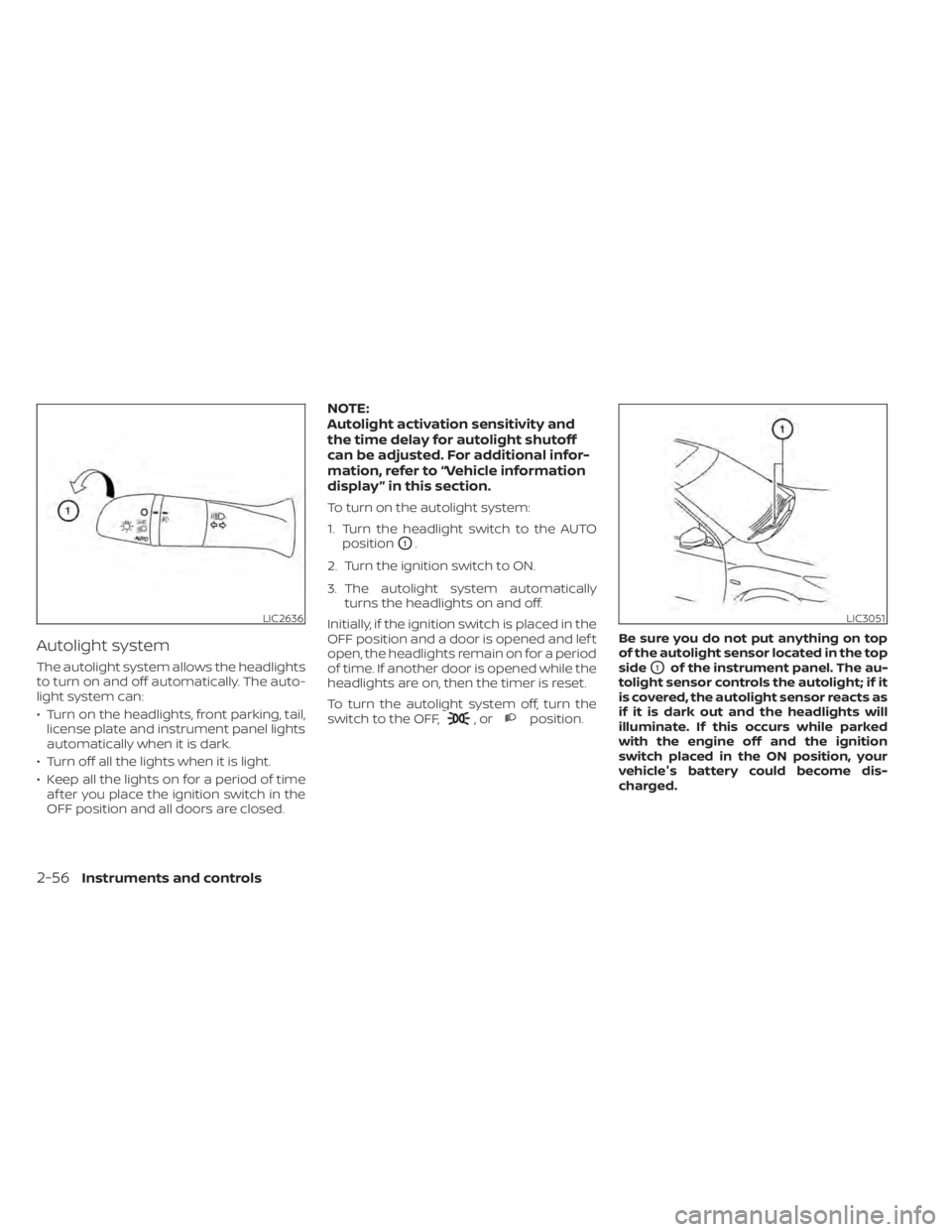
Autolight system
The autolight system allows the headlights
to turn on and off automatically. The auto-
light system can:
• Turn on the headlights, front parking, tail,license plate and instrument panel lights
automatically when it is dark.
• Turn off all the lights when it is light.
• Keep all the lights on for a period of time af ter you place the ignition switch in the
OFF position and all doors are closed.
NOTE:
Autolight activation sensitivity and
the time delay for autolight shutoff
can be adjusted. For additional infor-
mation, refer to “Vehicle information
display ” in this section.
To turn on the autolight system:
1. Turn the headlight switch to the AUTO position
O1.
2. Turn the ignition switch to ON.
3. The autolight system automatically turns the headlights on and off.
Initially, if the ignition switch is placed in the
OFF position and a door is opened and lef t
open, the headlights remain on for a period
of time. If another door is opened while the
headlights are on, then the timer is reset.
To turn the autolight system off, turn the
switch to the OFF,
,orposition. Be sure you do not put anything on top
of the autolight sensor located in the top
side
O1of the instrument panel. The au-
tolight sensor controls the autolight; if it
is covered, the autolight sensor reacts as
if it is dark out and the headlights will
illuminate. If this occurs while parked
with the engine off and the ignition
switch placed in the ON position, your
vehicle's battery could become dis-
charged.
LIC3051
2-56Instruments and controls
Page 149 of 528
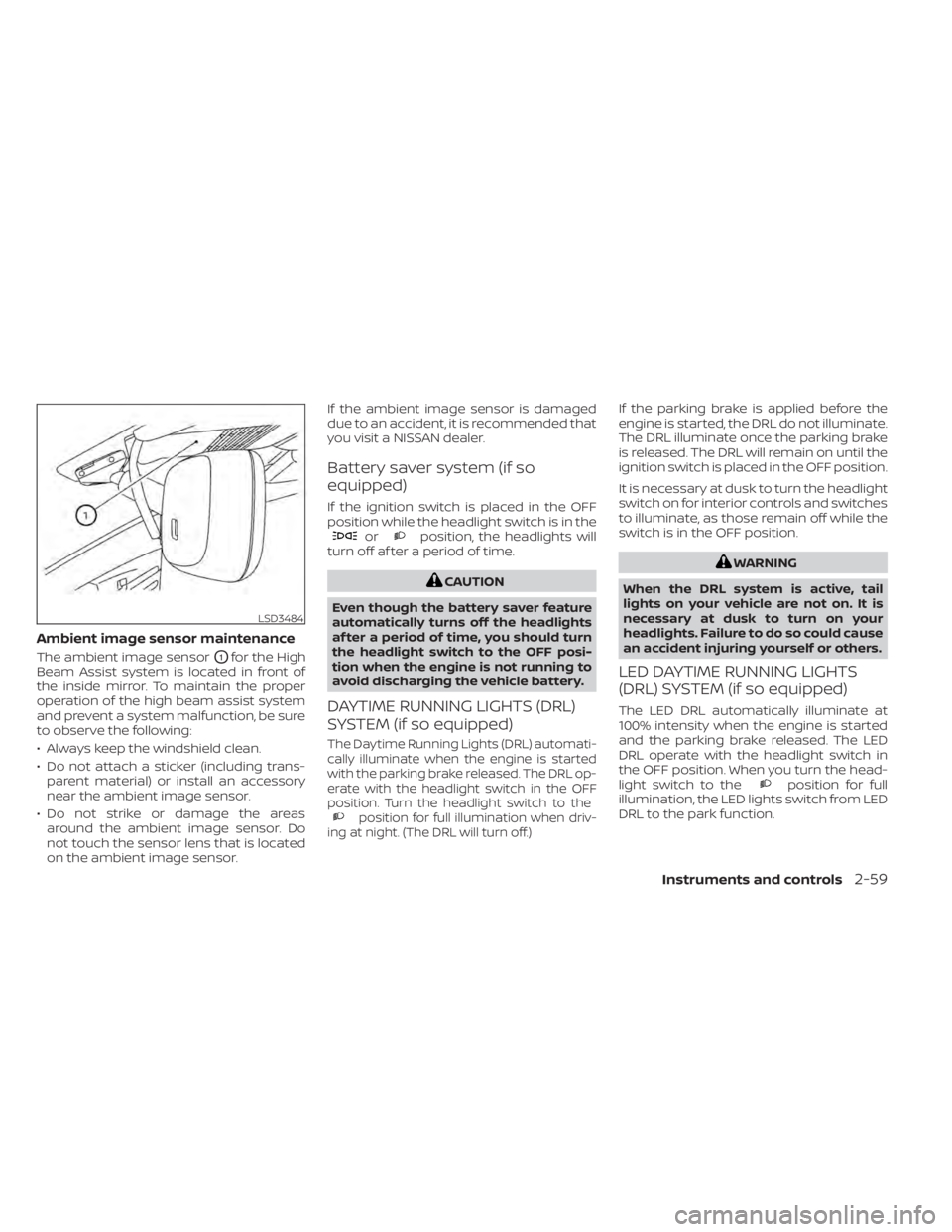
Ambient image sensor maintenance
The ambient image sensorO1for the High
Beam Assist system is located in front of
the inside mirror. To maintain the proper
operation of the high beam assist system
and prevent a system malfunction, be sure
to observe the following:
• Always keep the windshield clean.
• Do not attach a sticker (including trans- parent material) or install an accessory
near the ambient image sensor.
• Do not strike or damage the areas around the ambient image sensor. Do
not touch the sensor lens that is located
on the ambient image sensor. If the ambient image sensor is damaged
due to an accident, it is recommended that
you visit a NISSAN dealer.
Battery saver system (if so
equipped)
If the ignition switch is placed in the OFF
position while the headlight switch is in the
orposition, the headlights will
turn off af ter a period of time.
position for full illumination when driv-
ing at night. (The DRL will turn off.)
If the parking brake is applied before the
engine is started, the DRL do not illuminate.
The DRL illuminate once the parking brake
is released. The DRL will remain on until the
ignition switch is placed in the OFF position.
It is necessary at dusk to turn the headlight
switch on for interior controls and switches
to illuminate, as those remain off while the
switch is in the OFF position.
position for full
illumination, the LED lights switch from LED
DRL to the park function.
LSD3484
Page 200 of 528
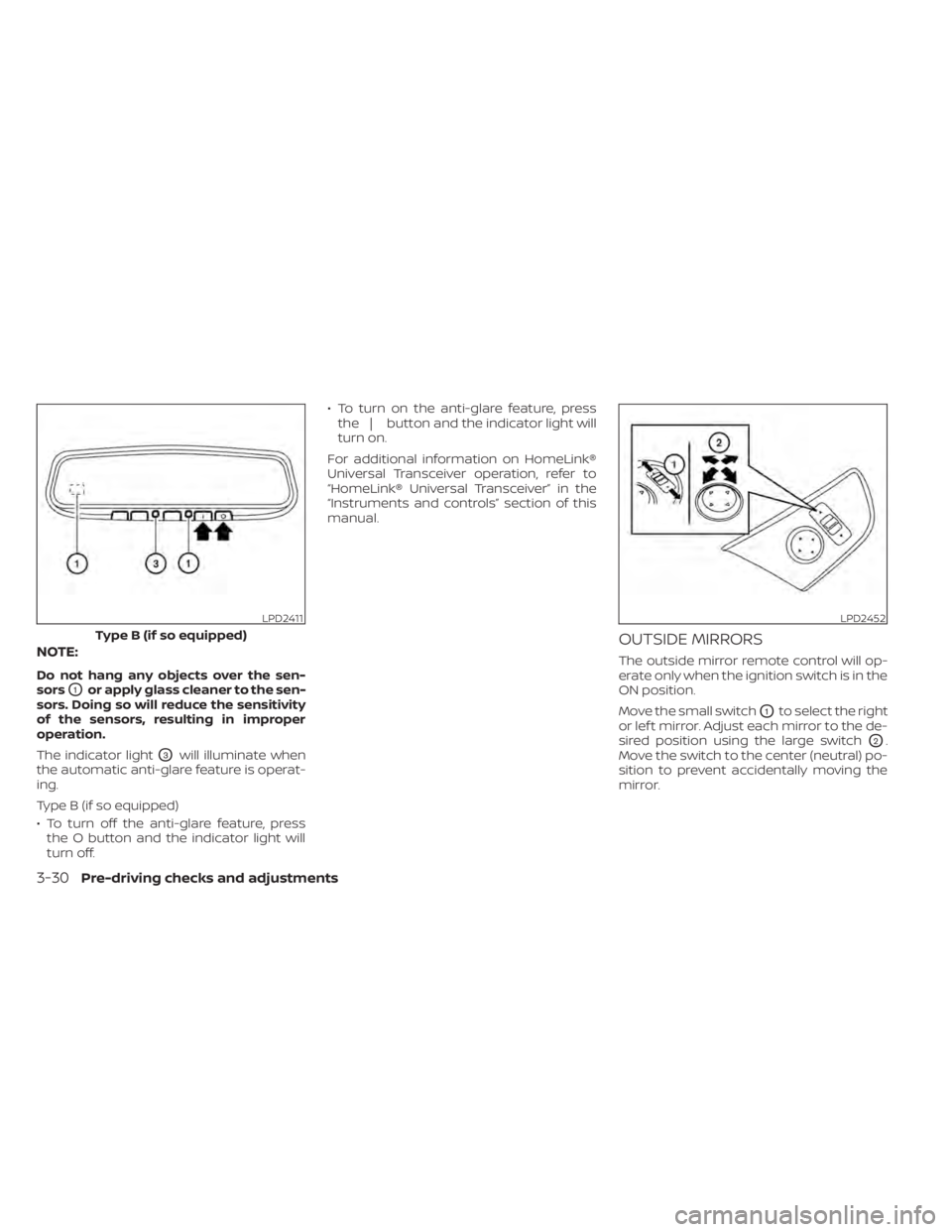
NOTE:
Do not hang any objects over the sen-
sors
O1or apply glass cleaner to the sen-
sors. Doing so will reduce the sensitivity
of the sensors, resulting in improper
operation.
The indicator light
O3will illuminate when
the automatic anti-glare feature is operat-
ing.
Type B (if so equipped)
• To turn off the anti-glare feature, press the O button and the indicator light will
turn off. • To turn on the anti-glare feature, press
the | button and the indicator light will
turn on.
For additional information on HomeLink®
Universal Transceiver operation, refer to
“HomeLink® Universal Transceiver” in the
“Instruments and controls” section of this
manual.
OUTSIDE MIRRORS
The outside mirror remote control will op-
erate only when the ignition switch is in the
ON position.
Move the small switch
O1to select the right
or lef t mirror. Adjust each mirror to the de-
sired position using the large switch
O2.
Move the switch to the center (neutral) po-
sition to prevent accidentally moving the
mirror.
LPD2411
Type B (if so equipped)
3-30Pre-driving checks and adjustments
Page 293 of 528
•If the low tire pressure warning light
illuminates while driving, avoid sud-
den steering maneuvers or abrupt
braking, reduce vehicle speed, pull
off the road to a safe location and
stop the vehicle as soon as possible.
Driving with under-inflated tires may
permanently damage the tires and
increase the likelihood of tire failure.
Serious vehicle damage could occur
and may lead to an accident and
could result in serious personal in-
jury. Check the tire pressure for all
four tires. Adjust the tire pressure to
the recommended COLD tire pres-
sure shown on the Tire and Loading
Information label to turn the low tire
pressure warning light off. If you have
a flat tire, replace it with a spare tire
as soon as possible. (For additional
information on changing a flat tire,
refer to “Flat tire” in the “In case of
emergency ” section of this manual.) •
When replacing a wheel without the
TPMS such as the spare tire, when a
spare tire is mounted or a wheel is
replaced, the TPMS will not function
and the low tire pressure warning
light will flash for approximately 1
minute. The light will remain on af ter
1 minute. Have your tires replaced
and/or TPMS reset as soon as pos-
sible. It is recommended that you
visit a NISSAN dealer for this service.
• Replacing tires with those not origi-
nally specified by NISSAN could af-
fect the proper operation of the
TPMS.
• Do not inject any tire liquid or aerosol
tire sealant into the tires, as this may
cause a malfunction of the tire pres-
sure sensors.
CAUTION
Do not place metalized film or any
metal parts (antenna, etc.) on the win-
dows. This may cause poor reception of
the signals from the tire pressure sen-
sors, and the TPMS will not function
properly. Some devices and transmitters may tem-
porarily interfere with the operation of the
TPMS and cause the low tire pressure
warning light to illuminate.
Some examples are:
• Facilities or electric devices using similar
radio frequencies are near the vehicle.
• If a transmitter set to similar frequencies is being used in or near the vehicle.
• If a computer (or similar equipment) or a DC/AC converter is being used in or near
the vehicle.
The low tire pressure warning light may
illuminate in the following cases:
• If the vehicle is equipped with a wheel and tire without TPMS.
• If the TPMS has been replaced and the ID has not been registered.
• If the wheel is not originally specified by NISSAN.
FCC Notice:
For USA:
This device complies with Part 15 of the
FCC Rules. Operation is subject to the fol-
lowing two conditions: (1) This device
may not cause harmful interference, and
Starting and driving5-7
Page 323 of 528
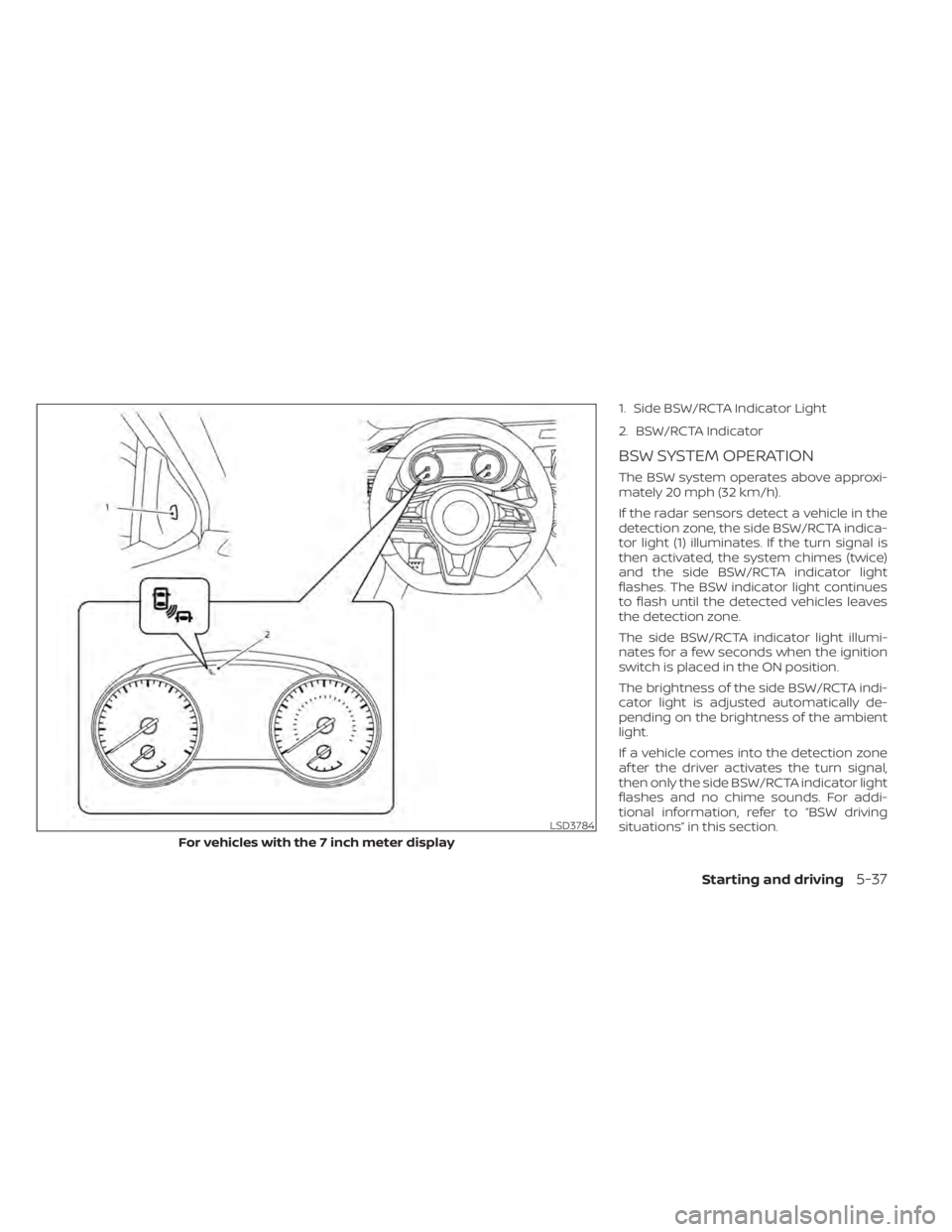
1. Side BSW/RCTA Indicator Light
2. BSW/RCTA Indicator
BSW SYSTEM OPERATION
The BSW system operates above approxi-
mately 20 mph (32 km/h).
If the radar sensors detect a vehicle in the
detection zone, the side BSW/RCTA indica-
tor light (1) illuminates. If the turn signal is
then activated, the system chimes (twice)
and the side BSW/RCTA indicator light
flashes. The BSW indicator light continues
to flash until the detected vehicles leaves
the detection zone.
The side BSW/RCTA indicator light illumi-
nates for a few seconds when the ignition
switch is placed in the ON position.
The brightness of the side BSW/RCTA indi-
cator light is adjusted automatically de-
pending on the brightness of the ambient
light.
If a vehicle comes into the detection zone
af ter the driver activates the turn signal,
then only the side BSW/RCTA indicator light
flashes and no chime sounds. For addi-
tional information, refer to “BSW driving
situations” in this section.
LSD3784
For vehicles with the 7 inch meter display
Starting and driving5-37
Page 328 of 528
Another vehicle approaching
from behind
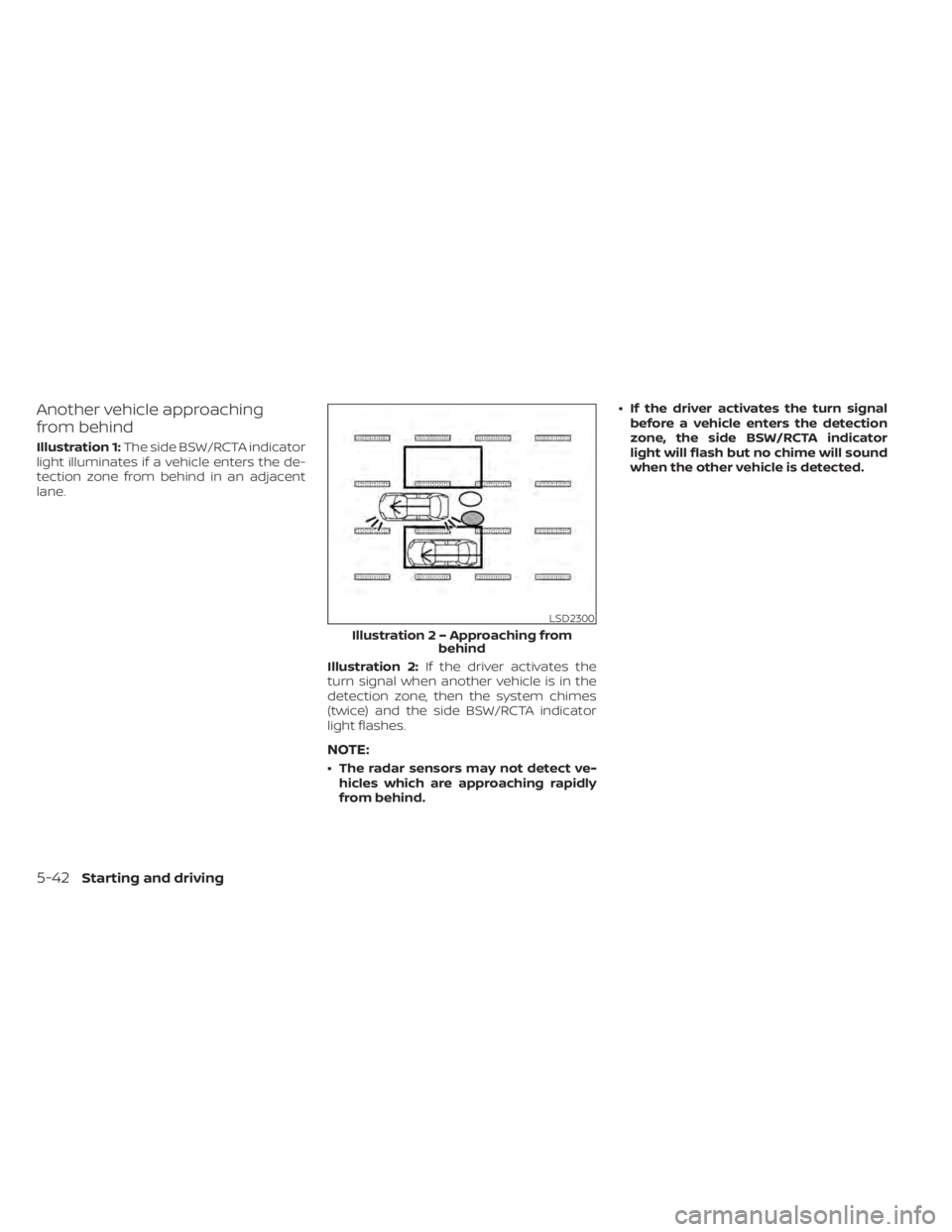
Illustration 1:The side BSW/RCTA indicator
light illuminates if a vehicle enters the de-
tection zone from behind in an adjacent
lane.
Illustration 2:If the driver activates the
turn signal when another vehicle is in the
detection zone, then the system chimes
(twice) and the side BSW/RCTA indicator
light flashes.
NOTE:
• The radar sensors may not detect ve- hicles which are approaching rapidly
from behind. • If the driver activates the turn signal
before a vehicle enters the detection
zone, the side BSW/RCTA indicator
light will flash but no chime will sound
when the other vehicle is detected.
Page 329 of 528
Overtaking another vehicle
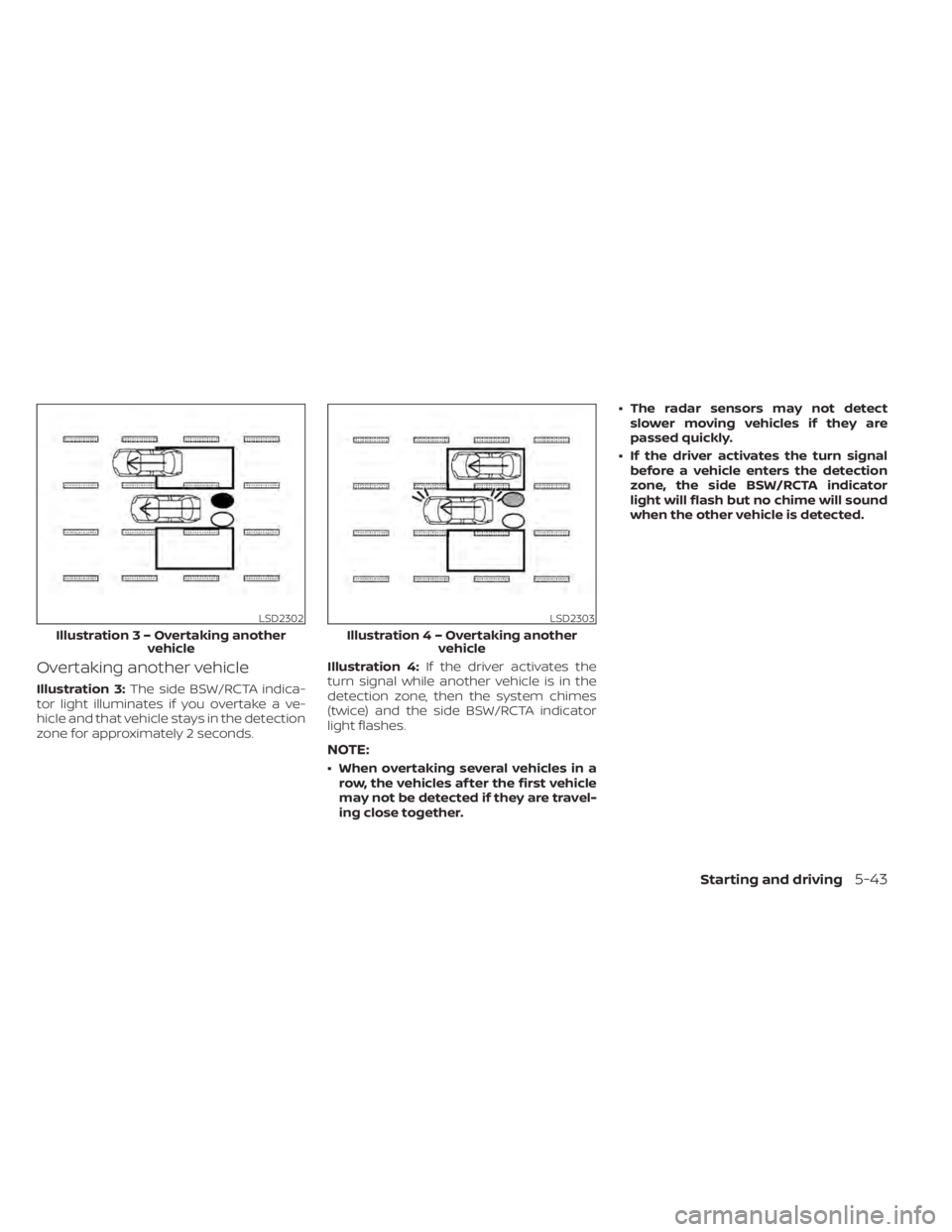
Illustration 3:The side BSW/RCTA indica-
tor light illuminates if you overtake a ve-
hicle and that vehicle stays in the detection
zone for approximately 2 seconds. Illustration 4:
If the driver activates the
turn signal while another vehicle is in the
detection zone, then the system chimes
(twice) and the side BSW/RCTA indicator
light flashes.
NOTE:
• When overtaking several vehicles in a row, the vehicles af ter the first vehicle
may not be detected if they are travel-
ing close together. • The radar sensors may not detect
slower moving vehicles if they are
passed quickly.
• If the driver activates the turn signal before a vehicle enters the detection
zone, the side BSW/RCTA indicator
light will flash but no chime will sound
when the other vehicle is detected.
Starting and driving5-43