2022 NISSAN PATHFINDER ECO mode
[x] Cancel search: ECO modePage 174 of 647

Have the system checked. It is recom-
mended that you visit a NISSAN dealer for
this service.
AWD Error: See Owner’s Manual
This warning appears when the 4-Wheel
Drive (4WD) system is not functioning prop-
erly while the engine is running. Reduce
vehicle speed and have your vehicle
checked by a NISSAN dealer as soon as
possible. For additional information, see
“Intelligent 4x4 (I-4x4)” (P. 5-171).
AWD High Temp. Stop Vehicle
This warning appears when the oil tem-
perature of the powertrain parts will in-
crease due to the difference in rotation be-
tween the front and rear wheels is large
(wheel slip), such as when driving the ve-
hicle on rough roads, through sand or mud,
or freeing a stuck vehicle. If this warning is
displayed, stop the vehicle with the engine
idling, as soon as it is safe to do so. In these
cases, the 4WD changes to 2WD to protect
the powertrain parts. Then if the warning
turns off, you can continue 4WD driving.
Tire Size Incorrect See Owner’s
Manual
This warning may appear if there is a large
difference between the diameters of the
front and rear wheels. Pull off the road in a
safe area, with the engine idling. Check that
all the tire sizes, brand, construction and
tread patterns are the same, that the tire
pressure is correct and that the tires are
not excessively worn. If you have any prob-
lems, please change tires or adjust to the
correct tire pressure. Do not select the
SNOW or SAND or MUD/RUT (if so equipped)
mode with the Drive Mode Selector and do
not drive fast. For additional information,
see “Intelligent 4x4 (I-4x4)” (P. 5-171).
Automatic Emergency
Braking (AEB) with
Pedestrian Detection
system warning indicator
This warning appears when the ignition
switch is placed in the ON position.
This warning appears when the AEB with
Pedestrian Detection system is set to OFF
in the vehicle information display.
If the warning appears when the AEB with
Pedestrian Detection system is on, it may
indicate that the system is unavailable. For
additional information, see “AutomaticEmergency Braking (AEB) with Pedestrian
Detection” (P. 5-136).
Automatic Emergency
Braking (AEB) with
Pedestrian Detection
emergency warning
indicator
This indicator appears along, with an au-
dible warning, when the system detects
the possibility of a forward collision.
For additional information, see “Automatic
Emergency Braking (AEB) with Pedestrian
Detection” (P. 5-136).
Blind Spot Warning
(BSW)/Intelligent Blind
Spot Intervention (I-BSI)
indicator
This indicator appears when the BSW or
I-BSI system is unavailable.
For additional information, see “Blind Spot
Warning (BSW)” (P. 5-49) or “Intelligent Blind
Spot Intervention (I-BSI)” (P. 5-62).
Cruise control indicator
This indicator shows the cruise control sys-
tem status.
Instruments and controls2-67
Page 222 of 647

first. When the switch is pushed again, the
moonroof will open fully.)
When the moonroof switch is pushed to
the CLOSE position
O4, the moonroof will
automatically close. When the sunshade
switch is pushed to the CLOSE position
O2,
the sunshade will close. (If the sunshade
starts to close from the position between
full and half open, the sunshade will stop
half. When the switch is pushed again, the
sunshade will close fully. However, if the
moonroof is open or tilted up, the sun-
shade will not close beyond half.)
To stop the sunshade or moonroof during
the operation, push the moonroof switch
to either of the OPEN
O1,O3, CLOSEO2,O4
or UPO5position.
Tilting the moonroof
To tilt up the moonroof, push the moonroof
switch to the UP position
O5. To tilt down
the moonroof, push the switch to the
CLOSE position
O4.
Comfort mode
This is the position used when driving with
the moonroof open. When driving with the
moonroof fully open, wind noise may be
very loud. Use the comfort mode position
when driving.
Auto-reverse function
WARNING
There are some small distances imme-
diately before the closed position
which cannot be detected. Make sure
that all passengers have their hands,
etc., inside the vehicle before closing
the moonroof and sunshade.
The auto-reverse function enables the
moonroof and sunshade to automatically
reverse when something is caught in the
moonroof and sunshade as it is closing.
When the control unit detects an obstacle,
the moonroof and sunshade will open
immediately.
Depending on the environment or driving
conditions, the auto-reverse function may
activate if an impact or load similar to
something being caught in the moonroof
and sunshade occurs.
If the auto-reverse function activates con-
secutively or the battery is discharged, the
moonroof and sunshade may not close
properly. In this case, push and hold the
switch to the CLOSE position
O4to close
the moonroof.
If the moonroof switch does not
operate
If the moonroof and sunshade do not op-
erate properly, perform the following pro-
cedure to initialize the operation system.
1. If the moonroof and sunshade are open, close them fully by repeatedly pushing
the moonroof switch to the CLOSE
O2
andO4position.
2. Push and hold the moonroof switch to the CLOSE
O4position for 10 seconds.
3. Af ter the moonroof and sunshade move slightly to the closed position and
then move back a little, release the
moonroof switch.
4. Push and hold the moonroof switch to the CLOSE
O4position, and the glass
and shade will move.
5. Release the moonroof switch. Then the moonroof and sunshade will fully open
and then fully close.
6. Check if the moonroof switch operates normally.
Instruments and controls2-115
Page 229 of 647

• Position the hand-held transmitter1-3in(26 - 76 mm) away from the HomeLink®
surface. Hold the transmitter in that posi-
tion for up to 15 seconds. If HomeLink® is
not programmed within that time, try
holding the transmitter in another posi-
tion – keeping the indicator light in view at
all times.
If you have any questions or are having
difficulty programming your HomeLink®
buttons, refer to the HomeLink® web site at:
www.homelink.com or call 1-800-355-3515.
CLEARING THE PROGRAMMED
INFORMATION
The following procedure clears the pro-
grammed information from both buttons.
Individual buttons cannot be cleared. How-
ever, individual buttons can be repro-
grammed. For additional information, see
“Reprogramming a single HomeLink® but-
ton” (P. 2-122).
To clear all programming:
1. Press and hold the two outer HomeLink® buttons until the indicator light begins to
flash in approximately 10 seconds. Do
not hold for longer than 20 seconds.
2. Release both buttons. HomeLink® is now in the programming
mode and can be programmed at any
time beginning with “Programming
HomeLink®” - Step 1.
REPROGRAMMING A SINGLE
HOMELINK® BUTTON
To reprogram a HomeLink® Universal
Transceiver button, complete the following:
1. Press and hold the desired HomeLink®
button. DO NOT release the button.
2. The indicator light will begin to flash af- ter 20 seconds. Without releasing the
HomeLink® button, proceed with “Pro-
gramming HomeLink®” - Step 1.
For questions or comments, contact
HomeLink® at: www.homelink.com or
1–800–355–3515 (except Mexico).
The HomeLink® Universal Transceiver but-
ton has now been reprogrammed. The new
device can be activated by pressing the
HomeLink® button that was just pro-
grammed. This procedure will not affect any
other programmed HomeLink® buttons.
IF YOUR VEHICLE IS STOLEN
If your vehicle is stolen, you should change
the codes of any non-rolling code device
that has been programmed into
HomeLink®. Consult the Owner's Manual of
each device or call the manufacturer or
dealer of those devices for additional
information.
When your vehicle is recovered, you will
need to reprogram the HomeLink® Uni-
versal Transceiver with your new trans-
mitter information.
FCC Notice:
For USA:
This device complies with Part 15 of the
FCC Rules. Operation is subject to the fol-
lowing two conditions: (1) This device
may not cause harmful interference, and
(2) this device must accept any interfer-
ence received, including interference
that may cause undesired operation.
NOTE:
Changes or modifications not expressly
approved by the party responsible for
compliance could void the user’s author-
ity to operate the equipment.
2-122Instruments and controls
Page 246 of 647

• Switching the Auto Room Lamp featureto the OFF position in the “Vehicle Set-
tings” menu on the vehicle information
display. For additional information, see
“Vehicle information display 7 inch (18 cm)
Type A” (P. 2-22) or “Vehicle information
display 12.3 inch (31 cm) Type B” (P. 2-45).
For additional information, see “Interior
lights” (P. 2-116).
Opening windows
The Intelligent Key allows you to simultane-
ously open windows equipped with auto-
matic operation.
All doors must be closed and the key must
be outside the vehicle.
To open the windows, press and hold the
button on the Intelligent Key for lon-
ger than 3 seconds af ter all doors are
unlocked.
The door windows will open while pressing
the
button on the Intelligent Key.
To interrupt opening of the windows, re-
lease the
button.
Releasing the rear lif tgate (if so
equipped)
The rear lif tgate can be opened and closed
by performing the following:
• Press the
button for longer than 1
second to open the rear lif tgate.
• Press the
button again for longer
than 1 second to close the rear lif tgate.
When the
button is pressed during
the open or close process the lif tgate will
stop. When pressed again, the lif tgate will
reverse and go in the opposite direction.
Using the panic alarm
If you are near your vehicle and feel threat-
ened, you may activate the panic alarm to
call attention by pressing and holding the
button on the Intelligent Key for lon-
ger than 0.5 seconds.
The panic alarm and headlights will stay on
for a period of time.
The panic alarm stops when:
• It has run for a period of time.
• Any button is pressed on the Intelligent Key. • The lock sensor on the driver or passen-
ger door is pushed and the Intelligent Key
is in range of the door handle.
Answer back horn feature
If desired, the answer back horn feature
can be deactivated using the Intelligent
Key. When it is deactivated and the
button is pressed, the hazard indicator
lights flash twice. When thebutton is
pressed, neither the hazard indicator lights
nor the horn operates.
NOTE:
If you can change the Answer Back Horn
feature with the Intelligent Key, the ve-
hicle information display screen will
show the current mode af ter the ignition
switch has been cycled from the OFF to
the ON position. The vehicle information
display screen can also be used to
change the answer back horn mode.
For additional information, see “Vehicle
information display 7 inch (18 cm) Type A”
(P. 2-22) or “Vehicle information display
12.3 inch (31 cm) Type B” (P. 2-45).
Pre-driving checks and adjustments3-15
Page 249 of 647

Thebutton will be on the NISSAN
Intelligent Key® if the vehicle has Remote
Engine Start. This feature allows the engine
to start from outside the vehicle.
Vehicles with an automatic climate control
system will default to either a heating or
cooling mode depending on outside and
cabin temperatures. For additional infor-
mation, see “Remote Engine Start with In-
telligent Climate Control” (P. 4-34).
Laws in some local communities may re-
strict or prohibit the use of Remote Engine
Start, or the amount of time a parked ve-
hicle engine may idle. For example, some
laws require a person using Remote Engine Start to have the vehicle in view or may
restrict idling time except in freezing tem-
peratures. Check local regulations for any
requirements.
Other conditions may affect the function of
the Remote Engine Start feature. For addi-
tional information, see “Conditions the Re-
mote Engine Start will not work” (P. 3-20).
Other conditions can affect the perfor-
mance of the Intelligent Key transmitter.
For additional information, see “NISSAN In-
telligent Key® system” (P. 3-7).
REMOTE ENGINE START
OPERATING RANGE
WARNING
• To help avoid risk of injury or death
through unintended operation of the
vehicle and/or its systems, including
entrapment in windows or inadver-
tent door lock activation, do not
leave children, people who require
the assistance of others or pets unat-
tended in your vehicle. Additionally,
the temperature inside a closed ve-
hicle on a warm day can quickly be-
come high enough to cause a signifi-
cant risk of injury or death to people
and pets. •
Do not use Remote Engine Start in
closed spaces such as a garage. Do
not breathe exhaust gases; they con-
tain colorless and odorless carbon
monoxide. Carbon monoxide is dan-
gerous. It can cause unconscious-
ness or death.
CAUTION
When the Intelligent Key battery is dis-
charged or other strong radio wave
sources are present near the operating
location, the Intelligent Key operating
range becomes narrower, and the Intel-
ligent Key may not function properly.
The Remote Engine Start function can only
be used when the Intelligent Key is within
the specified operating range from the
vehicle.
The Remote Engine Start operating range
is approximately 197 f t (60 m) from the
vehicle.
LPD2995
REMOTE ENGINE START (if so
equipped)
3-18Pre-driving checks and adjustments
Page 255 of 647
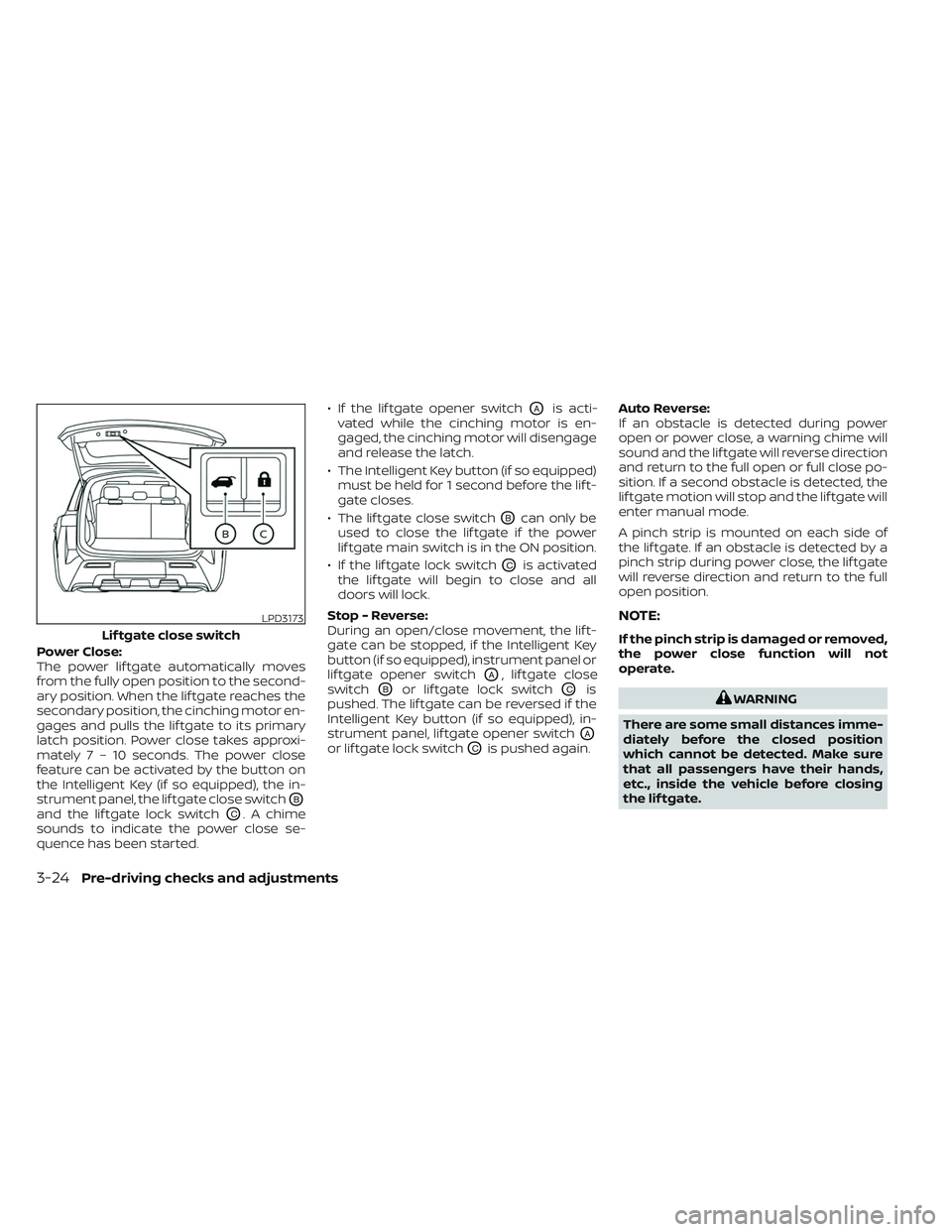
Power Close:
The power lif tgate automatically moves
from the fully open position to the second-
ary position. When the lif tgate reaches the
secondary position, the cinching motor en-
gages and pulls the lif tgate to its primary
latch position. Power close takes approxi-
mately7–10sec onds. The power close
feature can be activated by the button on
the Intelligent Key (if so equipped), the in-
strument panel, the lif tgate close switch
OB
and the lif tgate lock switchOC. A chime
sounds to indicate the power close se-
quence has been started. • If the lif tgate opener switch
OAis acti-
vated while the cinching motor is en-
gaged, the cinching motor will disengage
and release the latch.
• The Intelligent Key button (if so equipped) must be held for 1 second before the lif t-
gate closes.
• The lif tgate close switch
OBcan only be
used to close the lif tgate if the power
lif tgate main switch is in the ON position.
• If the lif tgate lock switch
OCis activated
the lif tgate will begin to close and all
doors will lock.
Stop - Reverse:
During an open/close movement, the lif t-
gate can be stopped, if the Intelligent Key
button (if so equipped), instrument panel or
lif tgate opener switch
OA, lif tgate close
switch
OBor lif tgate lock switchOCis
pushed. The lif tgate can be reversed if the
Intelligent Key button (if so equipped), in-
strument panel, lif tgate opener switch
OA
or lif tgate lock switchOCis pushed again. Auto Reverse:
If an obstacle is detected during power
open or power close, a warning chime will
sound and the lif tgate will reverse direction
and return to the full open or full close po-
sition. If a second obstacle is detected, the
lif tgate motion will stop and the lif tgate will
enter manual mode.
A pinch strip is mounted on each side of
the lif tgate. If an obstacle is detected by a
pinch strip during power close, the lif tgate
will reverse direction and return to the full
open position.
NOTE:
If the pinch strip is damaged or removed,
the power close function will not
operate.
WARNING
There are some small distances imme-
diately before the closed position
which cannot be detected. Make sure
that all passengers have their hands,
etc., inside the vehicle before closing
the lif tgate.
LPD3173
Lif tgate close switch
3-24Pre-driving checks and adjustments
Page 256 of 647

Manual Mode:
If power operation is not available, the lif t-
gate may be operated manually. Power op-
eration may not be available if multiple ob-
stacles have been detected in a single
power cycle or if battery voltage is low.
If the power lif tgate opener switch
OAis
pushed during power open or close, the
power operation will be canceled and the
lif tgate can be operated manually.
To open the lif tgate manually, push the lif t-
gate opener switch
OAand lif t the lif tgate.
To close, lower and push the lif tgate down
securely.
LIFTGATE POSITION SETTING (if so
equipped)
The lif tgate can be set to open to a specific
height by performing the following:
1. Open the lif tgate using the lif tgate opener switch or the Intelligent Key.
2. Pull the lif tgate down to the desired po- sition and hold the lif tgate (the lif tgate
will have some resistance when being
manually adjusted). 3. While holding the lif tgate in position,
push and hold the lif tgate switch
located on the lif tgate for approximately
5 seconds or until two beeps are heard.
The lif tgate will open to the selected posi-
tion setting. To change the position of the
lif tgate, repeat steps 1-3 for setting the po-
sition of the lif tgate.
MOTION-ACTIVATED LIFTGATE
(if so equipped)
The lif tgate can be operated using a quick
kicking motion under the center of the rear
bumper.
To operate, the Intelligent Key must be
within 31.5 in (80 cm) of the lif tgate.
LPD3162LPD3012
Pre-driving checks and adjustments3-25
Page 293 of 647

TURNING ON AND OFF THE SONAR
FUNCTION
When the “Sonar” key is selected, the indi-
cator will turn off and the sonar will be
turned off temporarily. The Moving Object
Detection (MOD) system will also be turned
off at the same time. For additional infor-
mation, refer to “Moving Object Detection
(MOD) in this section. When the “Sonar” key
is selected again, the indicator will turn on
and the sonar will turn back on.
In the below cases, the sonar will be turned
back on automatically:
• When the shif t lever is placed in the “R”(Reverse) position.
• When the CAMERA button is pressed and a screen other than the camera view is
shown on the display.
• When vehicle speed decreases below ap- proximately 6 mph (10 km/h).
• When the ignition switch is placed in the “OFF” position and turned back to the “ON”
position again. To prevent the sonar sys-
tem from activating altogether, use the
“Camera” menu. For additional informa-
tion, see “Sonar function settings” (P. 4-24).
Sonar function settings
To set up the sonar function to your pre-
ferred settings, press the MENU button, se-
lect the “Settings” key, select the “Camera/
Sonar” key and then select the “Sonar” key
on the center display.
Designs and items displayed on the
screen may vary depending on the
models.
Sonar: When this item is turned on, the rear
sonar is activated. When this item is turned
off (indicator turns off ), the rear sonar is
deactivated. The amber markers are dis-
played at the corners of the vehicle icon.
The next time the ignition switch is placed
in the ON position, “sonar is OFF” is dis-
played briefly.
Sonar Sensitivity: Adjust the sensitivity
level of the sonar higher (right) or lower
(lef t).
Sonar Volume: Adjust the volume of the
buzzer.
Towing mode (if so equipped): When this
item is turned on, only the rear sonar is off.
The amber markers are displayed at the
rear corners of the vehicle icon. Show Camera when Sonar Activate (if so
equipped):
When this item is turned on, the
camera view is automatically shown on the
display in the case that the distance to the
objects measured by the sonar is becom-
ing short.
SONAR SYSTEM LIMITATIONS
WARNING
Listed below are the system limitations
for the sonar function. Failure to oper-
ate the vehicle in accordance with
these system limitations could result in
serious injury or death.
• Inclement weather or ultrasonic
sources such as an automatic car
wash, a truck’s compressed-air
brakes or a pneumatic drill may af-
fect the function of the system, in-
cluding reduced performance or a
false activation.
• The system is not designed to pre-
vent contact with small or moving
objects.
• The system will not detect small ob-
jects below the bumper, and may not
detect objects close to the bumper or
on the ground.
4-24Monitor, climate, audio, phone and voice recognition systems