Page 357 of 647
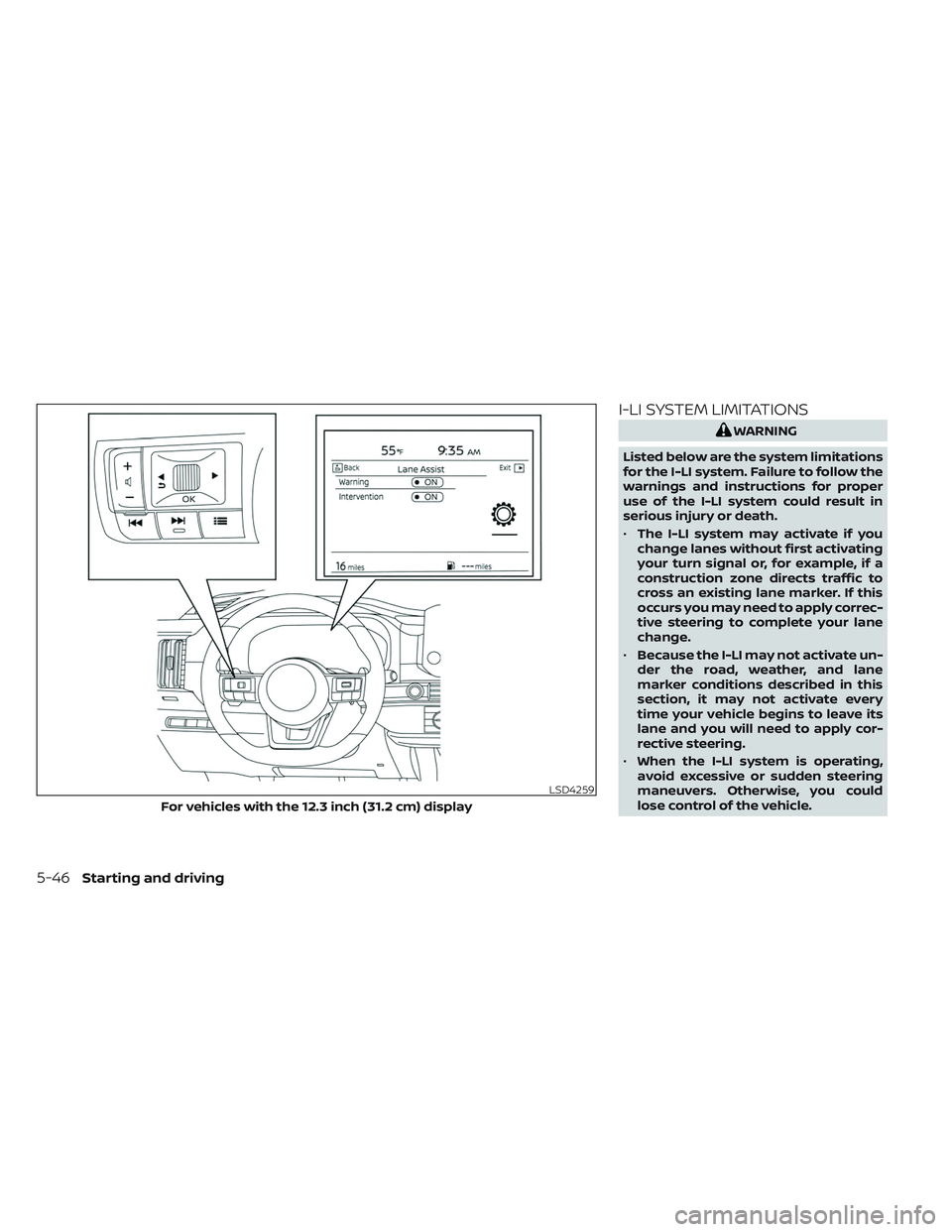
I-LI SYSTEM LIMITATIONS
WARNING
Listed below are the system limitations
for the I-LI system. Failure to follow the
warnings and instructions for proper
use of the I-LI system could result in
serious injury or death.
• The I-LI system may activate if you
change lanes without first activating
your turn signal or, for example, if a
construction zone directs traffic to
cross an existing lane marker. If this
occurs you may need to apply correc-
tive steering to complete your lane
change.
• Because the I-LI may not activate un-
der the road, weather, and lane
marker conditions described in this
section, it may not activate every
time your vehicle begins to leave its
lane and you will need to apply cor-
rective steering.
• When the I-LI system is operating,
avoid excessive or sudden steering
maneuvers. Otherwise, you could
lose control of the vehicle.
LSD4259
For vehicles with the 12.3 inch (31.2 cm) display
5-46Starting and driving
Page 359 of 647

SYSTEM TEMPORARILY
UNAVAILABLE
Condition A:
The warning and assist functions of the I-LI
system are not designed to work under the
following conditions:
•
When you operate the lane change signal
and change the traveling lanes in the direc-
tion of the signal. (The I-LI system will be
deactivated for approximately 2 seconds
af ter the lane change signal is turned off.)
• When the vehicle speed lowers to less than approximately 37 mph (60 km/h).
Af ter the above conditions have finished
and the necessary operating conditions
are satisfied, the warning and assist func-
tions will resume.
Condition B:
The assist function of the I-LI system is not
designed to work under the following con-
ditions (warning is still functional):
• When the brake pedal is depressed.
• When the steering wheel is turned as far as necessary for the vehicle to change
lanes.
• When the vehicle is accelerated during I-LI system operation. • When the Intelligent Cruise Control (ICC)
approach warning occurs.
• When the hazard warning flashers are operated.
• When driving on a curve at high speed.
Af ter the above conditions have finished
and the necessary operating conditions
are satisfied, the I-LI system application of
the brakes will resume.
Condition C:
If the following messages appear in the
vehicle information display, the I-LI system
will be turned off automatically.
• “Not Available Poor Road Conditions” When the VDC system (except Traction
Control System [TCS] function) or ABS
operates.
• “Currently not available”: – When the VDC system is turned off.
– When the SNOW mode, or the MUD/ RUT mode or SAND mode (4WD mod-
els only) is selected.
Action to take:
When the above conditions no longer exist,
turn off the I-LI system. Push the ProPILOT
Assist switch (for vehicles with ProPILOT
Assist) on the steering wheel again to turn
the I-LI system back on. Temporary disabled status at high
temperature:
If the vehicle is parked in direct sunlight
under high temperature conditions (over
approximately 104°F [40°C]) and then the
I-LI system is turned on, the I-LI system
may be deactivated automatically and the
following message will appear on the ve-
hicle information display: “Unavailable: High
Cabin Temperature.”
SYSTEM MALFUNCTION
If the I-LI system malfunctions, it will cancel
automatically. The LDW indicator (orange)
and the “Not Available System Malfunction”
warning message will display. If the LDW
indicator (orange) and the warning mes-
sage appear in the display, pull off the road
to a safe location and stop the vehicle. Turn
the engine/motor off and restart the
engine/motor. If the LDW indicator (orange)
and warning message continue to appear,
have the I-LI system checked. It is recom-
mended that you visit a NISSAN dealer for
this service.
5-48Starting and driving
Page 362 of 647
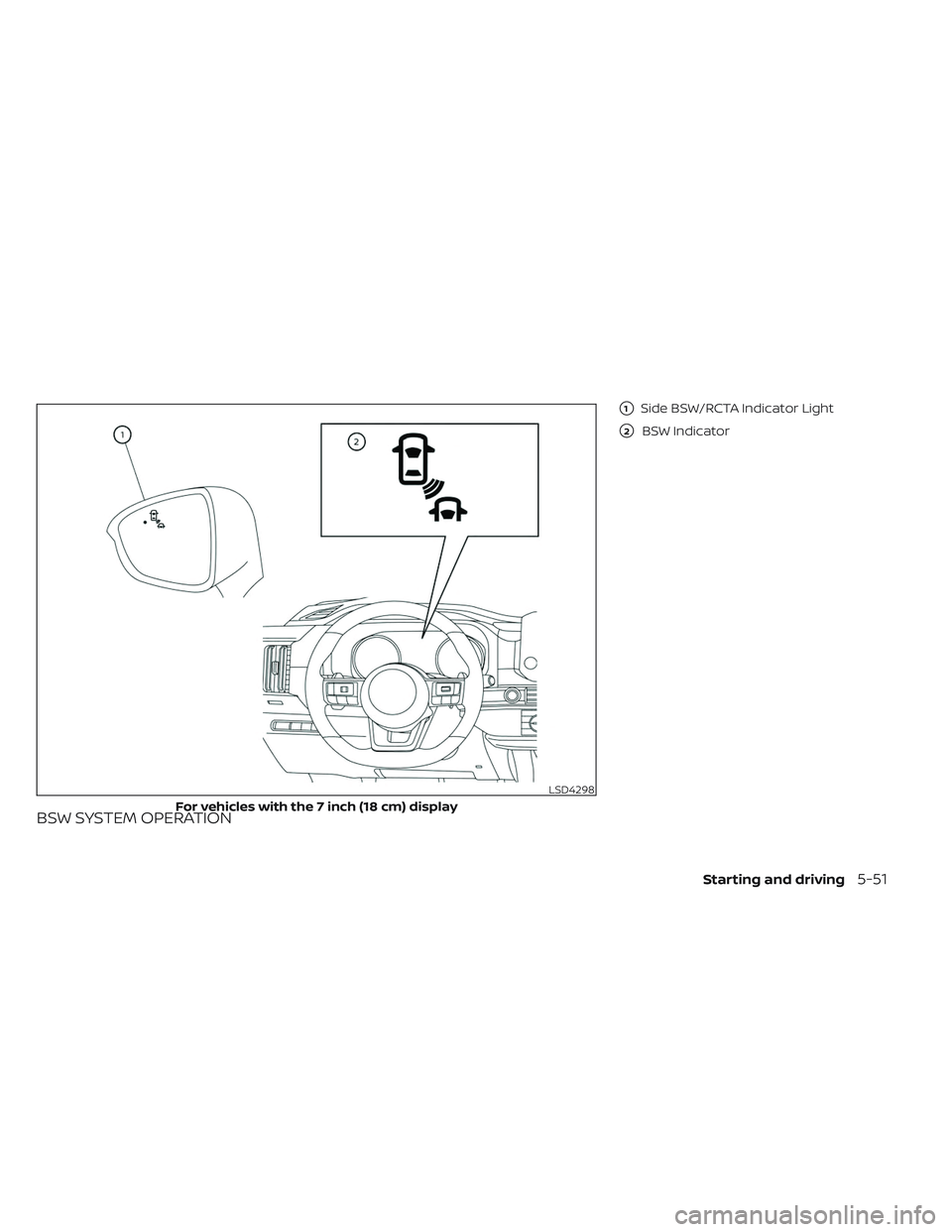
BSW SYSTEM OPERATION
�1Side BSW/RCTA Indicator Light
�2BSW Indicator
LSD4298
For vehicles with the 7 inch (18 cm) display
Starting and driving5-51
Page 363 of 647
The BSW system operates above approxi-
mately 20 mph (32km/h).
If the radar sensors detect a vehicle in the
detection zone, the side BSW/RCTA indica-
tor light (1) illuminates. If the turn signal is
then activated, the system chimes (twice)
and the side BSW/RCTA indicator light
flashes. The side BSW/RCTA indicator light
continues to flash until the detected ve-
hicles leaves the detection zone.
The side BSW/RCTA indicator light illumi-
nates for a few seconds when the ignition
switch is placed in the ON position.
The brightness of the side BSW/RCTA indi-
cator light is adjusted automatically de-
pending on the brightness of the ambient
light.
LSD4299
For vehicles with the 12.3 inch (31.2 cm) display
5-52Starting and driving
Page 364 of 647
HOW TO ENABLE/DISABLE THE
BSW SYSTEM
Perform the following steps to enable or
disable the BSW system.
1. Press the
button until “Settings” dis-
plays in the vehicle information display.
Use the scroll dial to select “Driver Assis-
tance.” Then press the OK button.
2. Select “Blind Spot Assist” and press the OK button.
3. Select “Warning” and press the OK but- ton to turn the system on or off.
NOTE:
• When enabling/disabling the system,the system will retain current settings
even if the engine is restarted.
LSD4263
For vehicles with the 7 inch (18 cm) display
Starting and driving5-53
Page 365 of 647
BSW SYSTEM LIMITATIONS
WARNING
Listed below are the system limitations
for the BSW system. Failure to operate
the vehicle in accordance with these
system limitations could result in seri-
ous injury or death.
• The BSW system cannot detect all ve-
hicles under all conditions.
• The radar sensors may not be able to
detect and activate BSW when cer-
tain objects are present such as:
– Pedestrian, bicycles, animals.
– Vehicles such as motorcycles, low
height vehicles, or high ground
clearance vehicles.
– Oncoming vehicles.
– Vehicles remaining in the detec-
tion zone when you accelerate
from a stop.
– A vehicle merging into an adjacent
lane at a speed approximately the
same as your vehicle.
– A vehicle approaching rapidly
from behind.
– A vehicle which your vehicle over-
takes rapidly.
LSD4262
For vehicles with the 12.3 inch (31.2 cm) display
5-54Starting and driving
Page 370 of 647
SYSTEM TEMPORARILY
UNAVAILABLE
When radar blockage is detected, the sys-
tem will be deactivated automatically.
The “Unavailable: Side Radar Obstruction”
warning message will appear in the vehicle
information display.
The system is not available until the condi-
tions no longer exist.
The radar sensors may be blocked by tem-
porary ambient conditions such as splash-
ing water, mist or fog. The blocked condi-
tion may also be caused by objects such as
ice, frost or dirt obstructing the radar
sensors.
NOTE:
If the BSW system stops working, the
RCTA and I-BSI systems (if so equipped)
will also stop working.
Action to take:
When the above conditions no longer exist,
the system will resume automatically.
LSD4264
For vehicles with the 7 inch (18 cm) display
Starting and driving5-59
Page 371 of 647
Malfunction
If the BSW system malfunctions, it will turn
off automatically. The system malfunction
warning message will appear in the vehicle
information display.
NOTE:
If the BSW system stops working, the
RCTA and I-BSI systems (if so equipped)
will also stop working.
Action to take:
Stop the vehicle in a safe location, place the
vehicle in the P (Park) position, turn the en-
gine off and restart the engine. If the mes-
sage continues to appear, have the system
checked. It is recommended that you visit a
NISSAN dealer for this service.
LSD4265
For vehicles with the 12.3 inch (31.2 cm) display
5-60Starting and driving