2022 NISSAN MURANO lane assist
[x] Cancel search: lane assistPage 264 of 508
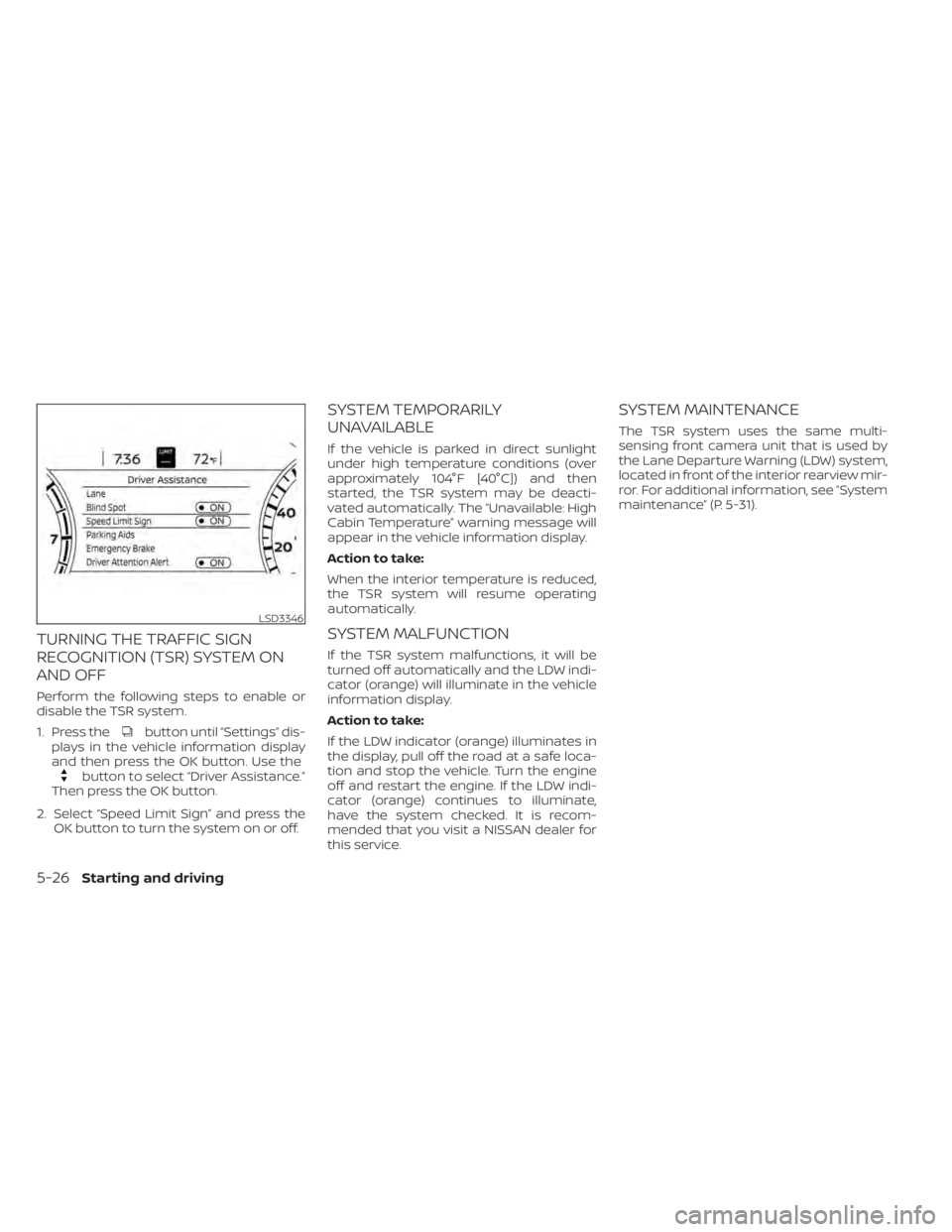
button until “Settings” dis-
plays in the vehicle information display
and then press the OK button. Use the
button to select “Driver Assistance.”
Then press the OK button.
2. Select “Speed Limit Sign” and press the OK button to turn the system on or off.
SYSTEM TEMPORARILY
UNAVAILABLE
If the vehicle is parked in direct sunlight
under high temperature conditions (over
approximately 104°F [40°C]) and then
started, the TSR system may be deacti-
vated automatically. The “Unavailable: High
Cabin Temperature” warning message will
appear in the vehicle information display.
Action to take:
When the interior temperature is reduced,
the TSR system will resume operating
automatically.
SYSTEM MALFUNCTION
If the TSR system malfunctions, it will be
turned off automatically and the LDW indi-
cator (orange) will illuminate in the vehicle
information display.
Action to take:
If the LDW indicator (orange) illuminates in
the display, pull off the road at a safe loca-
tion and stop the vehicle. Turn the engine
off and restart the engine. If the LDW indi-
cator (orange) continues to illuminate,
have the system checked. It is recom-
mended that you visit a NISSAN dealer for
this service.
SYSTEM MAINTENANCE
The TSR system uses the same multi-
sensing front camera unit that is used by
the Lane Departure Warning (LDW) system,
located in front of the interior rearview mir-
ror. For additional information, see ”System
maintenance” (P. 5-31).
LSD3346
5-26Starting and driving
Page 267 of 508
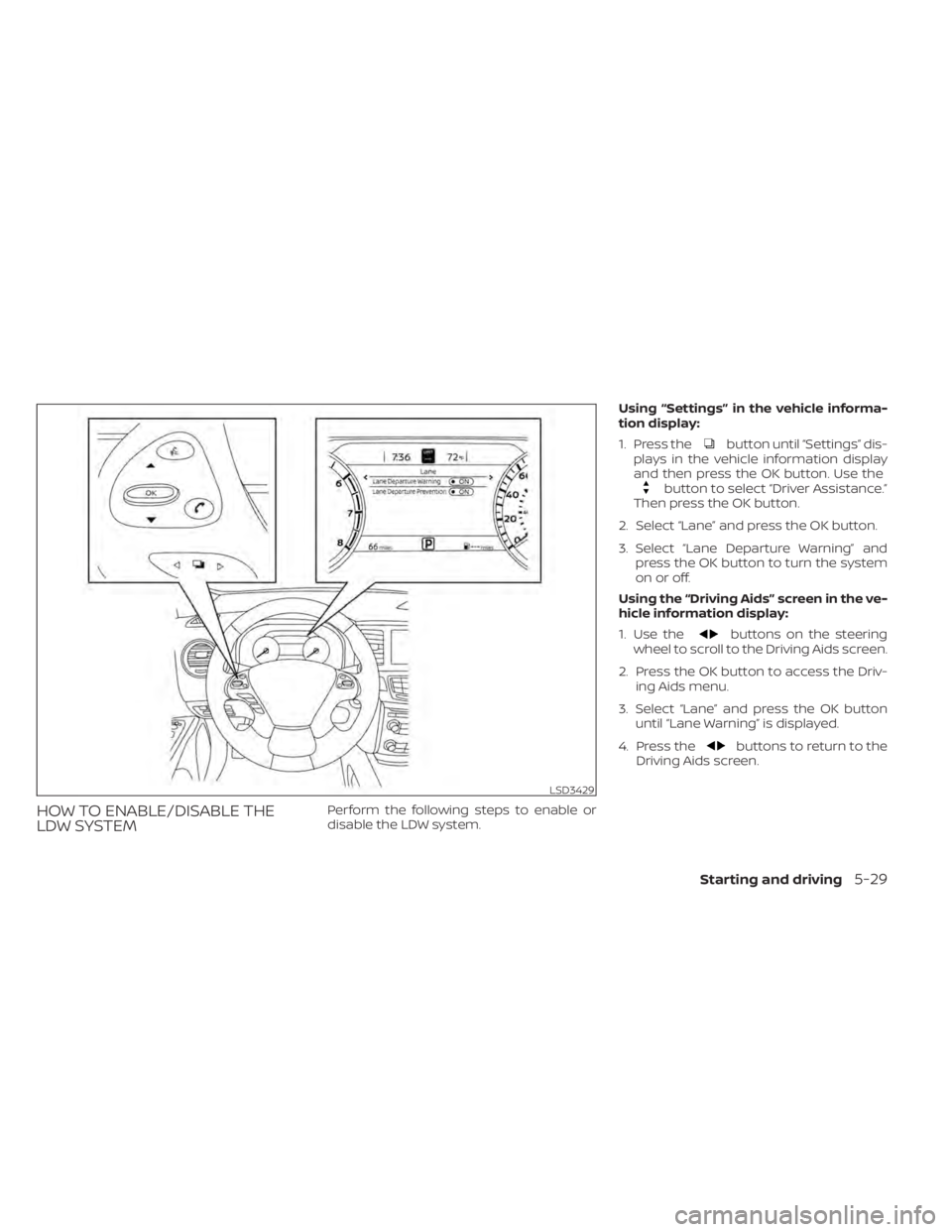
button until “Settings” dis-
plays in the vehicle information display
and then press the OK button. Use the
button to select “Driver Assistance.”
Then press the OK button.
2. Select “Lane” and press the OK button.
3. Select “Lane Departure Warning” and press the OK button to turn the system
on or off.
Using the “Driving Aids” screen in the ve-
hicle information display:
1. Use the
buttons on the steering
wheel to scroll to the Driving Aids screen.
2. Press the OK button to access the Driv- ing Aids menu.
3. Select “Lane” and press the OK button until “Lane Warning” is displayed.
4. Press the
buttons to return to the
Driving Aids screen.
LSD3429
Page 272 of 508
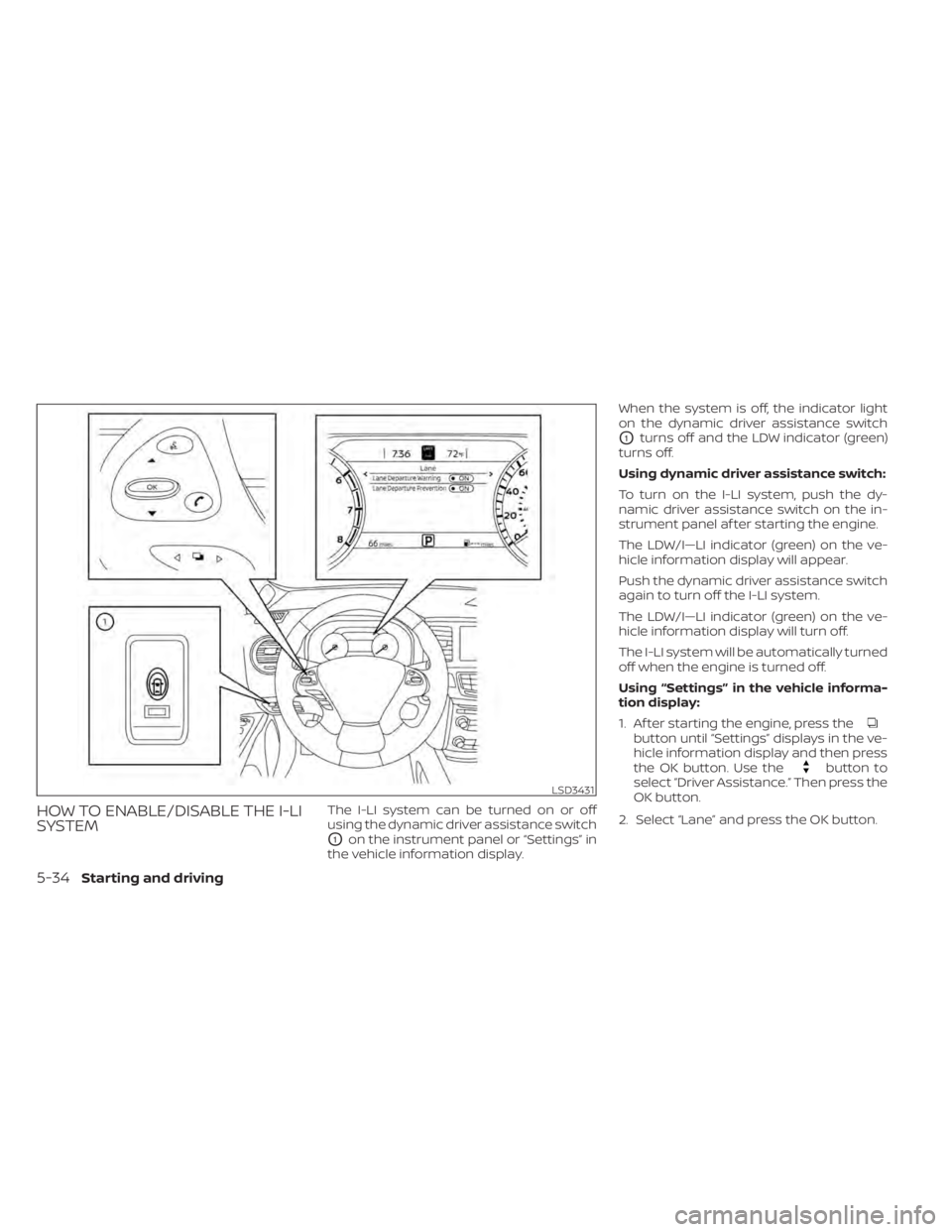
button until “Settings” displays in the ve-
hicle information display and then press
the OK button. Use the
button to
select “Driver Assistance.” Then press the
OK button.
2. Select “Lane” and press the OK button.
LSD3431
5-34Starting and driving
Page 274 of 508
–When traveling close to the ve-
hicle in front of you, which ob-
structs the lane camera unit de-
tection range.
– When rain, snow or dirt adheres to
the windshield in front of the lane
camera unit.
– When the headlights are not
bright due to dirt on the lens or if
the aiming is not adjusted
properly.
– When strong light enters the lane
camera unit. (For example, the
light directly shines on the front of
the vehicle at sunrise or sunset.)
– When a sudden change in bright-
ness occurs. (For example, when
the vehicle enters or exits a tunnel
or under a bridge.)
While the I-LI system is operating, you may
hear a sound of brake operation. This is
normal and indicates that the I-LI system is
operating properly.SYSTEM TEMPORARILY
UNAVAILABLE
Condition A:
The warning and assist functions of the I-LI
system are not designed to work under the
following conditions:
• When you operate the lane change signal and change the traveling lanes in the di-
rection of the signal. (The I-LI system will
be deactivated for approximately 2 sec-
onds af ter the lane change signal is
turned off.)
• When the vehicle speed lowers to less than approximately 37 mph (60 km/h).
Af ter the above conditions have finished
and the necessary operating conditions
are satisfied, the warning and assist func-
tions will resume.
Condition B:
The assist function of the I-LI system is not
designed to work under the following con-
ditions (warning is still functional):
• When the brake pedal is depressed.
• When the steering wheel is turned as far as necessary for the vehicle to change
lanes.
• When the vehicle is accelerated during I-LI system operation. • When the Intelligent Cruise Control (ICC)
approach warning occurs.
• When the hazard warning flashers are operated.
• When driving on a curve at high speed.
Af ter the above conditions have finished
and the necessary operating conditions
are satisfied, the I-LI system application of
the brakes will resume.
Condition C:
If the following messages appear in the
vehicle information display, the I-LI system
will be turned off automatically.
• “Unavailable Road is Slippery”: When the VDC system (except Traction
Control System [TCS] function) or ABS
operates.
• “Currently Unavailable”: When the VDC system is turned off.
Action to take:
When the above conditions no longer exist,
turn off the I-LI system. Push the dynamic
driver assistance switch again to turn the
I-LI system back on.
5-36Starting and driving
Page 497 of 508
Fog light switch................2-41Front air bag system
(See supplemental restraint system). . .1-57Front and rear sonar system.......5-124Front power seat adjustment........1-4Front seats....................1-2Front-door pocket..............2-52FuelCapacities and recommended
fuel/lubricants
...............10-2Fuel economy...............5-114Fuel gauge................. .2-6Fuel octane rating.............10-6Fuel recommendation..........10-4Fuel-filler cap................3-29Fuel-filler door lock opener lever. . . .3-29Fuel-filler lid.................3-29Loose fuel cap warning..........2-25Fuel efficient driving tips..........5-113Fuel gauge................... .2-6Fuel-filler door.................3-29Fuses.......................8-19Fusible links..................8-20
G
Garage door opener, HomeLink® Universal
Transceiver........2-66, 2-67, 2-69, 2-70Gas cap.....................3-29Gauge
Engine coolant temperature gauge. . .2-6Fuel gauge................. .2-6Odometer.................. .2-5
Speedometer................2-4Tachometer.................2-5Trip odometer................2-5General maintenance.............9-2Glove box................... .2-54Grocery hooks.................2-58
H
Hazard warning flasher switch........6-2Head restraints.................1-9Headlight and turn signal switch.....2-35Headlight control switch...........2-35Headlights...................8-25Heated rear seats...............2-45Heated seats..............2-42, 2-44Heated steering wheel............2-46Heater
Heater and air conditioner (automatic)
(if so equipped)
...............4-28Heater and air conditioner controls. .4-29Heater operation.............4-30Heater and air conditioner
(automatic)...................4-28Hill start assist system...........5-124HomeLink® Universal
Transceiver........2-66, 2-67, 2-69, 2-70Hood.......................3-21HookLuggage hook...............2-57Horn...................... .2-42
I
Ignition switch
Push-button ignition switch.......5-13Immobilizer system..........2-31, 5-16Important vehicle information label. . .10-12In-cabin microfilter..............8-17Increasing fuel economy..........5-114IndicatorNISSAN Intelligent Key® battery discharge
indicator
...................5-15Indicator lights and audible reminders
(See warning/indicator lights and audible
reminders)
................ .2-9, 2-11Inside automatic anti-glare mirror.3-34, 3-35Instrument brightness control.......2-40Instrument panel.............0-6, 2-2Instrument panel dimmer switch.....2-40Intelligent Around View Monitor......4-10Intelligent Cruise Control (ICC).......5-58Intelligent Drive Alertness (I-DA)......5-109Intelligent Forward Collision Warning
(I-FCW)..................... .5-97Intelligent Key system
Key operating range............3-8Key operation................3-9Mechanical key................3-3Remote keyless entry operation. . . .3-12Troubleshooting guide..........3-16Warning signals...............3-16Intelligent Lane Intervention (I-LI).....5-32Interior light................. .2-64ISOFIX child restraints.............1-29
11-3