2022 MERCEDES-BENZ S CLASS ECO mode
[x] Cancel search: ECO modePage 197 of 610
%
The prom ptappear son lyifth epr ev iousl y
act ive se ttings deviat efrom thest andar d
se tting s.
Fu nction off:thene xt time theve hicle isstar‐
te dth eA drive pr ogr am issetaut omaticall y.
The ECOstar t/ stop funct ionisactiv ated aut o‐
matically . Displa
yingvehicl edata Mul
timedi asy stem:
4 © 5
Info #
Select Vehicle.
The vehicle datais displa yed. Displa
yingengine data Multimedia
system:
4 © 5
Info #
Select Engine.
The engine datais displa yed.
% The actual (maximum) values that can be
ac hie vedfo rengine outputand engine tor‐
qu ema yde viat efrom thecer tified values wit
hin thecount ry-spe cificgu ideline sfo r
per missible toler anc es(basis: UN-ECE No.
85 orcount ry-spe cificgu ideline s).
Inf luenci ngvariables that can influen cethis
ar e, forex am ple:
R Sea leve l
R Fuelqu alit y
R Out side temp eratur e
R Oper ating temp eratur eof theengine
Please adjustyo ur drivin gst yle accor dingly.
The p warning lam pin theins trument
clus teris on until theengine hasreac hed
operatin gte mp eratur e.
% The values displa yedser veonl yas orient a‐
tion. Thevalues forengine outputand
engine torq ue show nin thecent raldispla y
ma yde viat efrom theactual values.
% p todispla yth epo we rre duction afte r
engine star tis no tav ailable inall vehicle
models. Calling
upthefuel consum ption indicat or Multime
diasystem:
4 © 5
Info #
Select Consumpt ion.
The current and average fuel consum ption is
displa yed. Au
tomatic trans mis sion DI
REC TSE LECT leve r Fu
nction oftheDIRECT SELECT leve r &
WARNIN GRisk ofacci dent dueto inc or‐
re ct gearshif ting
If th eengine speedishigher than theidle
speed andyouen gage thetransmission posi‐
tion 005Bor005E, theve hicle mayacceler ate
shar ply. #
Ifyo uen gage thetransmission position
005B or005E when theve hicle isat a
st ands till,alw aysdepr essthebr ak e
pedal firm lyand donotacc eler ateat
th esame time. Dr
iving andparking 19
5
Page 201 of 610
Using
kickdo wn #
Maxim umacceler ation:depresstheaccel‐
er ator pedal beyond thepr essur epoint .
To protect agains tengine overrev ,th eaut omatic
tra nsmiss ionshiftsup tothene xt gear when
max imum enginespee dhas been reac hed. Glid
emod efu ncti on Wi
th an ant icip ator ydr ivin gst yle, Glide mode
helps youto reduce fuelconsum ption.
Glide mode isch aract erize dby thefo llo wing:
R The com bustion engin eis disco nnect edfrom
th edr ivet ra in and continues torunin neu tral .
R The trans mis sion positio ndispl ay005B is
sho wningreen.
R Vehicl eswith 48Von-b oardele ctrical
sy stem (EQ Boos tte ch nology): Thecom‐
bus tion engine canbeswitc hedoff.All ofthe
ve hicle functionsremain active. Gli
de mode isactiv ated ifth efo llo wing condi‐
tion sar eme t:
R Drive pr og ram ; issele cted.
R The speed iswit hin asui table rang e.
R The road's courseissuit able, e.g.no steep
uphill ordownhill inclinesortight curves.
R Youdo notdepr esstheaccelera toror brak e
peda l(e xc ep tfo rlig ht brak eapp lications).
% Glide mode canalsobe activ ated ifyo uha ve
select edthe"Eco" setting forth edr ive in the
dr ive pr og ram =.
Gli de mode isdea ctivated again ifone ofthe
condi tions isno long erme t.
Gl ide mod ecan also be preve nted bythefo llo w‐
ing parame ters:
R Incline
R Downhill gradi ent
R Temp eratur e
R Height
R Speed
R Oper ating status oftheengine R
Traf fic situ ation Fu
nction ofthe4MA TIC
4MA TICensures that all four wheel sar edr iven .
To ge ther wit hES P®
and 4ETS,4MA TICimprove s
th etra ction ofyour vehicle whene vera dr iven
whee lspins duetoinsuf ficie nttracti on.
If yo ufa ilto adap tyo ur drivin gst yle, 4MA TICcan
neit her reduce therisk ofan accident norover‐
ri de thelaws ofphysics. 4MA TICcannotta ke
acc oun tof road, weather and traf fic condi tions.
4MA TICisonly anaid. Youar ere sponsible espe‐
cially formaint ainingasaf edis tance from the
ve hicle infront, forve hicle speed, forbr aking in
good timeandforst ay ing inlane.
% Inwint ryroad con dition s,themaximum
ef fect of 4MA TICcan beachie vedonl yif yo u
use wint ertires (M+ Stir es), withsn ow
ch ains ifnec essar y. Dr
iving and parking 19
9
Page 211 of 610

#
Select Manag eCo llisi on Pho tos. #
Select Copy (USB).
All collisio npho tosar ecopied totheUSB
fl ash drive.
% Toensur esecur eoper ation, onlyuse FAT32
or exFA Tfo rm atted USBstor ag ede vices.
Dele ting collis ionpho tos #
Select Manag eCo llisi on Pho tos. #
Select Dele te.
All collisio npho toswill bedele ted. No
teson par king theve hicl efo ran extended
per iod If
yo ulea vetheve hicle parkedfo rlong erthan six
we eks,itma ysuf ferdama gethro ugh disus e.
The 12Vbatt eryma yalso beimpair edordam‐
ag ed byhea vydisc harging.
% Further information canbeobt ained ata
qu alif ied spec ialistwo rkshop. St
andb ymode (ext ens ion ofthe star terbat‐
te ry 's per iod out ofuse) St
andb ymode function
% This function isno tav ailable forall model s.
If standb ymode isact ivat ed, energyloss willbe
min imiz eddur ing ex tende dpe riods ofnon- oper‐
ation.
St andb ymode isch aract erize dby thefo llo wing:
R The star terbatt eryis preser ved.
R The maximum non-opera tionaltime appear s
in thedr iver's displa y.
R The conn ection toonline services isint erru p‐
te d.
If th efo llo wing condition sar efulf illed, standb y
mode canbeact ivat ed ordeac tivated usin gth e
multime diasystem:
R The engine isswitc hedoff.
R The ignition isswitc hedon.
Ex ceeding theve hicle's displayednon -oper a‐
tion altime maycause inconvenie nce; i.e.it can‐
no tbe guarant eedth at thest ar terbatt erywil l
re liably star tth eengine. Charg
eth est ar terbatt eryin thefo llo wing situa‐
tion s:
R The vehicle's non-oper ational timemustbe
ex tende d.
R The star terbatt erych arge leve lis insuf ficie nt
fo rst andb ymode .
% Standb ymode isaut omat icallydeac tivated
when theignition isswitc hedon.
Ac tiv atin g/deac tivatin gst andb ymode (park‐
ing theve hicl efo ran extended period)
Re quirement s:
R The engin eis switc hedoff.
Multime diasystem:
4 © 5
Set ting s5
Vehicle
5 Openin g/closin g #
Activateor deacti vate Stand byMod e. Dr
iving and parking 209
Page 227 of 610
R
Variable limiter
Fu rther information aboutActiveDis tance
Assi stDIS TRONI C(/ page 220).
% Further information onspeed adaptatio n
(/ page 223) .
Fu nction ofActiv eSt op- and -Go Assis t
Ac tiveSt op-and-Go Assisthelps youwhen in
traf fic jams onmul ti-la neroads withseparat e
ro adw aysby aut omat icallypullin gaw ay wit hin up
to 60 seconds andwithmode rate steer ing
maneuv ers. Itor ients itself using theve hicle in
fr ont and lane markings. ActiveSt op-and-Go
Assis taut omaticall ymaint ainsasaf edis tance
fr om theve hicle infront and vehicles cuttingin.
Ac tiveSt op-and-Go Assistre qu ires you, as the
dr iver ,to keep your han dson thesteer ing wheel
at all times sothat youar eable tointerve ne at
an ytime tocor rect thecour seoftheve hicle and
ke ep itin lane.
Obser vetheno teson driving systems andyour
re sponsibili ty;yo uma yot her wise failto recog‐
nize dangers(/ page 210). Ac
tiveSt op-and-Go Assistactiv ates aut omati‐
call ywhen allofthefo llo wing condition sar e
me t:
R Youar ein atraf fic jam onafree wa yor high -
spe edmajorro ad.
R ActiveDis tance AssistDIS TRONI Cis acti va‐
te dand activ e(/ page220 ).
R ActiveSt eer ing Assis tis activ ated and activ e
(/ page22 7).
R Youar etrave ling nofaster than 35 mph
(60 km/ h).
When ActiveSt op-and-Go Assistis activ eth e
¬ status displa yappear sin thedr iver displa y.
Sy stem limit s
The system limit ations ofActiveDis tance Assist
DIS TRONI Cand ActiveSt eer ing Assis tapply to
Ac tiveSt op-and-Go Assist(/ page225). Ac
tiv eSte ering Assis t Fu
nction ofActiv eSte ering Assis t
Ac tiveSt eer ing Assis tis onl yav ailable uptoa
speed of130mp h(210 km/h) .The system helps yo
uto stay inthecent erofthelane bymeans of
moder atesteer ing interve ntio ns.Dep endingon
th espeed driven, ActiveSt eer ing Assis tuses the
ve hicles ahead andlane markings asare fer‐
ence.
% Dependi ngon thecount ry,in thelowe r
speed rang eAc tiveSt eer ing Assis tcan use
th esur round ingtraf fic as are fere nce. Ifnec‐
ess ary, Ac tiveSt eer ing Assis tcan then also
pr ov ide assis tance when drivi ng away from
th ecent erofthelane.
If th ede tection oflane mar kings andvehicles
ahead isim pair ed,ActiveSt eer ing Assis t
switc hestopassiv emode. Thesystem prov ides
no suppor tin this case.
Pe rm anen tst atus displa yon thedr iver dis‐
pla y
Ø Gray:acti vatedand passiv e
Ø Green: activated and activ e
Ø Red,fla shing: prom pttothedr iver to
act ivel ycon firm ortransition from activ e
to passiv est atus ,sy stem limit detected Dr
iving and parking 225
Page 228 of 610

%
During thetransition from activ eto passiv e
st atus ,th eØ symbol issho wnas
enlar gedand flashin g.On ce thesy stem is
passiv e,theØ symbol issho wnasgray
on thedr iver displa y.
Contact detection
The driver isrequ ired tokeep their hands onthe
st eer ing wheel atall times andbeable tointer‐
ve ne atanytime tocor rect thecour seofthe
ve hicle andkeep itin lane. Thedriver mus t
ex pect ach ang efrom active to passiv emode or
vice versaat anytim e. If
th esy stem detects that thedr iver has not
st eer edtheve hicle fora consider ableper iod of time
orhas remo vedth eir hands from thesteer‐
ing wheel, anoptical warning isgiv en firs t. Dis ‐
pl ay messa ge1 appear son thedr iver displa y.
If th edr iver still does notst eer theve hicle, or
giv es no conf irmation tothesy stem, awa rning
to ne sou nds inad ditio nto thevisual warning
mess age.
If th edr iver does notre act tothis wa rning fora
consider ableper iod, anemerg encystop isiniti‐
at ed (/ page22 7).
The warning isno tissued orisstopped assoon
as thesy stem detects that thedr iver has
to uc hed thesteer ing wheel.
To uc hde tection maybe limit edorinop erati ve in
th efo llo wing situat ions:
R The driver iswe aring glov es.
R Ther eis ast eer ing wheel coveron thesteer‐
ing wheel.
If Ac tiveSt eer ing Assis tde tects that asy stem
limit hasbeen reac hed, avisual warning is
issued andawa rning tone sou nds. Obs
erve theno teson driving systems andyour
re sponsibili ty;yo uma yot her wise failto recog‐
nize dangers(/ page 210).
Sy stem limit s
Ac tiveSt eer ing Assis thas alimit edsteer ing tor‐
qu efo rlat eral gui dance. Insome cases, the
st eer ing interve ntio nis no tsu fficien tto keep the
ve hicle inthelane.
The system maybe impair edorma yno tfunc tion
in thefo llo wing instances:
R The reispoor visibilit y,e.g. due tosno w,rain,
fo g, hea vyspr ay,gr ea tly varying ambien t
light orstro ng sha dows onthero ad.
R Ther eis glar e, e.g .fr om oncom ingtraffic,
di re ct sunli ght orreflect ions.
R Insuf ficie ntroad illumin ation.
R The wind shieldisdir ty,fo gg ed up, damag ed
or coveredin thevicin ityofthecamer a,e.g.
by ast icke r.
R No, orseveral,unc lear lane markingsare
pr esen tfo rone lane, orthemar king sch ang e
qu ickl y, forex am ple, inacon stru ction area
or atintersecti ons. 226
Driving and parking
Page 295 of 610

#
Todel etecum ulatedsug gestions: select
Reset Sugges tionHistoryand confirm Ja
(Y es).
Pr otecting user-specif iccont entand applica ‐
tions
If yo uadd ane wuser ,acc ess protect ion is
alr eady activated forth euser profile. The
Mer cedes mePIN and, depending ontheve hicle
eq uipment, biometric sensor sar eav ailable for
acc ess. Biometric sen sorsmus tbe taught inin
th eve hicle. Theauthenticat ionprocess then
ta ke sall taught -inand available sensorsint o
acc oun t.
The follo wing user-specificcon tent and applica ‐
tio ns arepr otect ed, forex am ple:
R User selectionand user profile setting s
R Biometric sen sors
The teac hin g-in of biom etric senso rsispro‐
te cted.
R Sug gestions
The dataand determ inat ionofthemos t
pr obable navig ation destinat ions, media sour
ces, radio statio ns,con tacts and mes‐
sag esarepr otect ed.
R ENE RGIZING COACH
The recorded health da ta and their evaluatio n
ar epr otect ed.
R Mer cedes meconnect stor e
The purchase ofser vices isprotect ed. #
Switc hProtec tConten ton oroff. #
Switc hAcc ess Protec tiononoroff.
% When access protect ion isswitc hedoff,yo ur
user profile can beacc essedand chang ed
fr om everyvehicle seat.
% Access protect ion isswitc hedonoroffon a
ve hicle-specif icbasis.
Te ac hing in,editi ngand deleting biometric
data
The biome tric dat amode lsaresa ve din thesen‐
sor sin theve hicle. Ifre cogni tionhasbee n
ta ught -in,th is sen sor servesas acont ribut ory
fa ct or forau thent ication onthemultimedia sys‐
te m. #
Select Protect Content . #
Select FacialRecog nition, Fingerpri ntRecog -
nition orVoice Recog nition.
% Ifnecessar y,aut hen ticateyo urself onthe
multime diasystem. #
Touse face recognit ion:closethedr iver's
door orfasten thedr iver's seat belt. #
Look atthedr iver displa yfo rabo utfive sec‐
onds.
Yo ur face isscanne d.Amess agein thedr iver
displa ysho wswhe ther facia lre cogni tionwas
successful ornot.Yo ucan unlo ckyour user
pr ofile and protect edapplications withth e
fa cia lscan. #
Touse fing erpr int :place andliftyo ur fing er
se veraltim eson thefing erpr int sens orund er
th eto uc hsc reen .
The fing er issca nned .If th escann ingproce‐
dur eis success ful,amessag eappear son the
centr aldispl ay.Yo ucan unlo ckyour user pro‐
fi le and protect edapplications withyo ur fin‐
ge rpr int. MBUX
multimediasy stem 293
Page 312 of 610
ment
forth is isthat themobile phoneandthe
mobil ephone networkpr ov ider oftheper son
yo uar ecalli ngsuppo rtHD Voice ®
.
Depe ndingon thequ alit yof thecon nect ion,the
vo ice qualit yma yfluct uat e.
Fu rther information canbeobt ained from an
aut hor ized Mercedes-Ben zCent eror at:
https: //www .mercedes-benz .com/connect Te
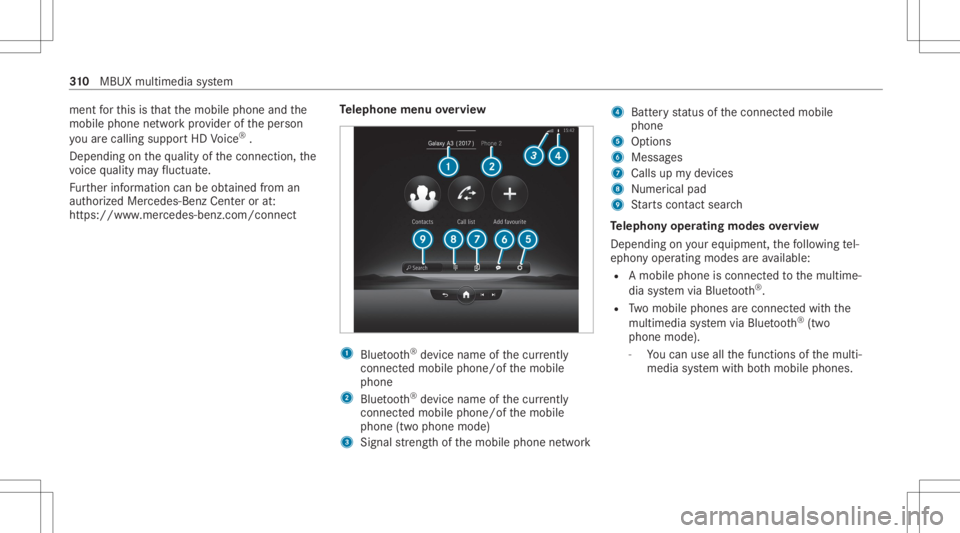
lephone menuoverview 1
Blue tooth®
de vice name ofthecur rently
conne cted mob ile pho ne/o fth emobile
phone
2 Blue tooth®
de vice name ofthecur rently
conne cted mob ile pho ne/o fth emobile
phone (twophone mode)
3 Signal stre ngt hof themobile phonenetwork 4
Batt eryst atus ofthecon nect edmobile
phone
5 Option s
6 Messag es
7 Calls upmy devices
8 Nume rical pad
9 Starts con tact sea rch
Te lephon yoper ating mod esove rview
Depen dingonyour equipme nt,th efo llo wing tel‐
ephon yoper atingmodes areav ailable:
R Amobi lephon eis con nectedto themultime‐
dia system viaBlue tooth®
.
R Twomobile phones areconn ectedwithth e
multime diasystem viaBlue tooth®
(tw o
phone mode).
- Youcan useallthefunc tionsof themulti‐
media system withbo th mobil ephones. 31
0
MBUX multimedia system
Page 319 of 610

We
bbr ow ser overview 1
Sear ch
2 Torefresh/s top
3 Prev ious websit e
4 Option s
5 Settings %
Und er0062 youha ve thefo llo wing option s:
R Book mark s
R Request MobileWebsite
R Tabs
% Websit escann otbe sho wnwhile theve hicle
is in mo tion. Ov
ervie wof smar tphone integratio n Wi
th Smar tphoneIntegr ation, youcan usecer‐
ta in func tionson your mob ilephon evia themul‐
timedia system displa y.
Onl yone mobile phoneatatime canbeconnec ‐
te dvia Smar tphon eInt egratio nto themultime‐
dia system. Also foruse withtw ophone mode
wit hsmar tphone integr ation, onlyoneadditional
mobil ephone canbeconnect edusing Blue ‐
to oth®
wit hth emultimedia system.
The fullrang eof func tions forSmar tphone Inte‐
gr ation isonly possi blewithan Interne tconnec‐
tion. Theappropr iat eapplication mustbe down‐
loaded onthemobile phonetouse Smartphon e
In te gr ation. Themobile phonemustbe switc hed on
and conn ectedtothemultimedia system via
th eUSB portusing asuit able cable.
Apps forSmar tphone Integr ation
R Mer cedes-Benz Link(implem entation ofthe
function using theMer cedes- BenzLinkcon‐
tr ol bo x)
R Apple CarPla y®
(wir eless connect ionvia
Blue tooth®
also possible)
R Android Auto (wir eless connection viaBlue‐
to oth®
also possible)
% Forsaf etyre ason s,thefirs tacti vatio nof
Me rcedes-B enzLink ,Apple CarPla y®
or
An droid Auto on themultimedia system
mus tbe car ried out when theve hicle issta‐
tio nar yand thepar king brak eis applied.
Yo ucan star tSm artphon eIn te gr ation using the
My Devices menu.
Yo ucan endSm artphon eIn te gr atio nvia theMy
Devic esorby discon nectingth econ nect ing
cable between themobile phoneandmultimedia
sy stem. MBUX
multimedia system 317