Page 288 of 557
#
Take cont rol of theve hicle and comple tethe
parking process.
% The vehicle path shown on the media display
may di�.er from the actual vehicle path. The
turn signal indicator is switched on automati-
cally when theex iting procedure begins.
Yo u are responsible for selecting the turn signal
indicator in accordance with the tra�1c condi-
tions. If necessar y,select the turn signal indicator
accordingl y.
P
P ausing A ausing A ctiv
ctive P
e Par
arking Assist
king Assist
Yo u can inter rupt the parking or exiting procedure
of Active Parking Assist byper form ing one of the
fo llowing actions, fore xamp le: #
Depress the brake pedal. #
Open the front passenger door, a rear door,
th e boot or the bonnet. #
Apply the electric parking brake or activating
th e HOLD function. #
T
To r
o r esume t
esume t he par
he parking or e
king or e xiting pr
xiting procedur
ocedure:
e:
ge ntly dep ress the accelerator pedal.
% Ifth e electric parking brake was applied
before Active Parking Assist was activated, depress
the accelerator pedal lightly tostart
th e parking or exiting procedure.
Check the area around your vehicle again before
re suming a paused parking procedure. Make sure
th at persons, animals or objects are no lon ger in
th e manoeuvring range. Also obser vethe system
limitations of Active Parking Assist.
A
A ut
ut omatic br
omatic br aking function of A
aking function of A ctiv
ctive P
e Par
arking
king
Assist
Assist
Pe rsons or objects de tected in the manoeuvring
ra nge could cause theve hicle tobrake sharply
and inter rupt the parking or exiting procedure.
The vehicle will then be held at a standstill. If you
depress the accelerator pedal, the parking or exit-
ing procedure is resumed.
Check the area around your vehicle again before
re suming the parking or exiting procedure. Make
sure that persons, animals or objects are no lon-
ge r in the manoeuvring range. Also obser vethe
system limi tations of Active Parking Assist. Manoeuvr Manoeuvr
ing assist
ing assistant
ant F
F
unction of Dr
unction of Dr iv
ive Awa
e Away Assi st
y Assi st
Drive Away Assist can reduce the se verity of an
impact when pulling away.If an obs tacle is de tec-
te d in the direction of tr avel, theve hicle's speed
is brie�0y reduced toappr ox. 2 km/h. If a critical
situation is de tected, theÉ symbol appears in
th e media displa y.
Drive Away Assist can be deactivated or activated
in theManoeuvring assistance menu
(/ page 287).
% You can cancel an inter vention byDrive Away
Assist at any time bydeactivating Parking
Assist PARKTRONIC (/ page 280). &
W
WARNI NG
ARNI NGRisk of accident caused bylimi-
te d de tection per form ance of Drive Away
Assist
Drive Away Assist cannot alw ays clear lyiden-
tify objects and tra�1c situations. #
Always pay careful attention tothe tra�1c
situation; do not relyon Drive Away
Assist alone. Driving and parking
285
285
Page 334 of 557
R
The camera is not functional, theCamera
unavailable message appears.
Ha ve the camera checked in a Mercedes-Benz
service centre. T
T
elephone
elephone T
T
elephony
elephony N
No
ot
tes on t
es on t elephony
elephony &
W
WARNING
ARNING Risk of dist raction from operat-
ing integ rated communication equipment
while theve hicle is in motion
If yo u operate communication equipment inte-
gr ated in theve hicle when driving, you could
be distracted from the tra�1c situation. This
could also cause youto lose control of the
ve hicle. #
Only operate this equipment when the
tra�1c situation pe rmits. #
Ifyo u cannot be sure of this, stop the
ve hicle whilst paying attention toroad and tra�1c conditions and operate
the
equipment with theve hicle stationar y. &
W
WARNI NG
ARNI NGRisk of accident from operating
mobile communication equipment while
th eve hicle is in motion
Mobile communication devices distract the
driver from the tra�1c situation. This can also
cause the driver tolose control of theve hicle. #
As a driver, only operate mobile commu-
nication devices when theve hicle is sta-
tionar y. #
As a vehicle occupant, use mobile com-
munication devices only in the designa-
te d area, e.g. in there ar passen ger com-
partment. Yo
u must obser vethe legal requ irements forthe
count ryin which you are cur rently driving when
ope rating mobile communication equipment in
th eve hicle. &
W WARNING
ARNING Risk of injury due toobjects
being st owed incor rectly
If objects in theve hicle interior are st owed
incor rectl y,they can slide or be thro wn around
and hit vehicle occupants. In addition, cup
holders, open st owage spaces and mobile
phone recep tacles cann otalw aysreta in all
objects within.
There is a risk of injur y,particular lyin the
eve nt of sudden braking or a sudden change
in direction. #
Always st owobjects so that they cann ot
be thro wn around in such situations. #
Always make sure that objects do not
pr otru de from st owage spaces, lug gage
nets or st owage nets. #
Close the loc kable st owage spaces
before starting a jou rney. #
Always st owand secure heavy, hard,
poin ted, sharp-edged, fragile or bulky
objects in the boot/load compartment. MBUX multimedia system
331 331
Page 375 of 557
Se
Se
tting up t
tting up t he w
he war
ar ning tr
ning tr iangle
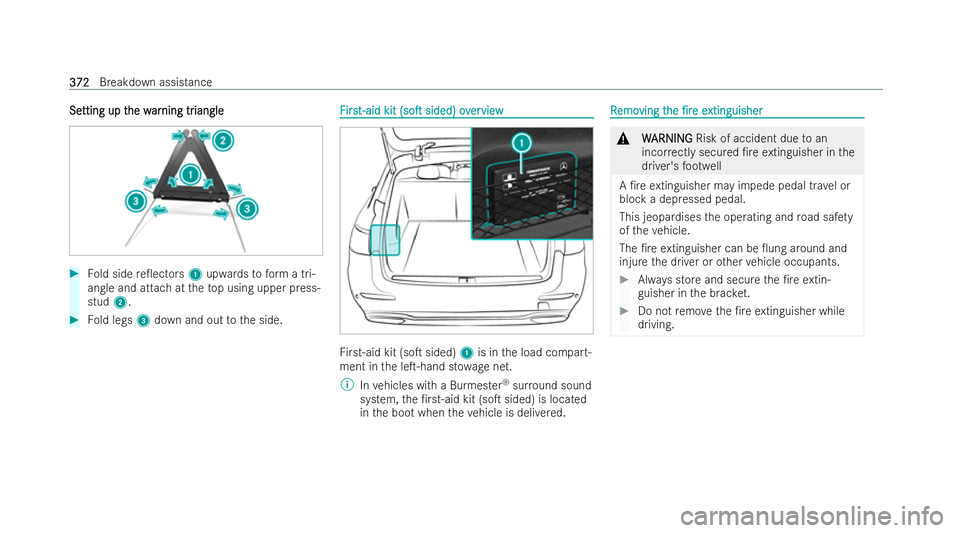
iangle #
Fold side re�0ectors 1upwards toform a tri-
angle and attach at theto p using upper press-
stud 2. #
Fold legs 3down and out tothe side. F
F
irs
irst-aid kit t-aid kit (so�T
(so�Tsided) ov
sided) over
erview
view Fi
rs t-aid kit (so�T sided) 1is in the load compart-
ment in the le�T-hand st owage net.
% Invehicles with a Burmes ter®
sur round sound
system, the �/rst-aid kit (so�T sided) is located
in the boot when theve hicle is deli vered. R
R
emo
emo ving t
ving t he
he�/re
�/re e
extinguisher
xtinguisher &
W
WARNING
ARNING Risk of accident due toan
inco rrectly secured �/re extinguisher in the
driver's foot we ll
A �/re extinguisher may impede pedal tr avel or
block a depressed pedal.
This jeopardises the operating and road saf ety
of theve hicle.
The �/re extinguisher can be �0ung around and
injure the driver or other vehicle occupants. #
Always store and secure the �/re extin-
guisher in the brac ket. #
Do not remo vethe �/re extinguisher while
driving. 372 372
Breakdown assistance
Page 406 of 557
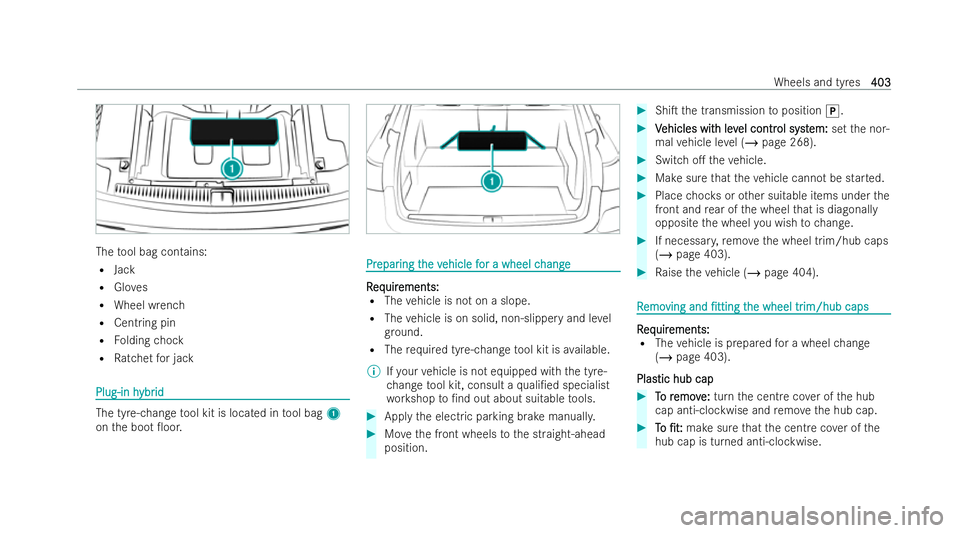
The
tool bag contains:
R Jack
R Gloves
R Wheel wrench
R Centring pin
R Folding chock
R Ratchet for jack Plug-in h
Plug-in h
ybr
ybrid
id The tyre-change
tool kit is located in tool bag 1
on the boot �0oor. Pr
Pr
epar
epar ing t
ing the v
he vehicle f
ehicle f or a wheel c
or a wheel c hange
hange R
R
eq
eq uir
uir ements:
ements:
R The vehicle is not on a slope.
R The vehicle is on solid, non-slippery and le vel
gr ound.
R The requ ired tyre-change tool kit is available.
% Ifyo ur vehicle is not equipped with the tyre-
ch ange tool kit, consult a quali�/ed specialist
wo rkshop to�/nd out about sui table tools. #
Apply the electric parking brake manuall y. #
Movethe front wheels tothe straight-ahead
position. #
Shi�T the transmission toposition j. #
V
Vehicles wit
ehicles wit h lev
h level contr
el contr ol syst
ol system:
em:setthe nor-
mal vehicle le vel (/ page 268). #
Switch o�. theve hicle. #
Make sure that theve hicle cann otbe star ted. #
Place choc ks orother suitable items under the
front and rear of the wheel that is diagonal ly
opposite the wheel you wish tochange. #
If necessar y,remo vethe wheel trim/hub caps
(/ page 403). #
Raise theve hicle (/ page 404). R
R
emo
emo ving and
ving and �/tting
�/ttingt
the wheel tr
he wheel tr im/hub caps
im/hub caps R
R
eq
eq uir
uir ements:
ements:
R The vehicle is prepared for a wheel change
(/ page 403).
Plas
Plas tic hub cap
tic hub cap #
T
To r
o r emov
emov e:
e:turn the centre co ver of the hub
cap anti-clockwise and remo vethe hub cap. #
T
To
o �/t:
�/t: make sure that the centre co ver of the
hub cap is turned anti-clockwise. Wheels and tyres
403
403