Page 284 of 537
Ov
Ov
er
ervie
vie w of ins
w of ins tr
trument display
ument display 1
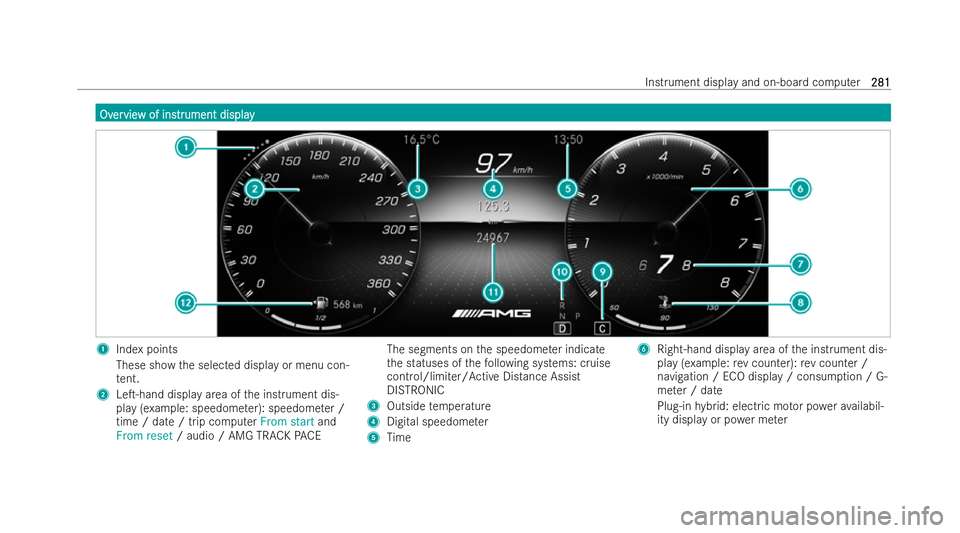
Index points
These show the selected display or menu con-
te nt.
2 Le�T-hand display area of the inst rument dis-
play (e xample: speedome ter): speedome ter /
time / date / trip computer From startand
From reset / audio / AMG TRACK PACE The segments on
the speedome ter indicate
th e statuses of thefo llowing systems: cruise
control/limiter/Active Distance Assist
DISTRONIC
3 Outside temp erature
4 Digital speedome ter
5 Time 6
Right-hand display area of the inst rument dis-
play (e xample:rev counter): rev counter /
navigation / ECO display / consum ption / G-
me ter / date
Plug-in hybrid: electric mo tor po werav ailabil-
ity displ ayor po wer me ter Instrument displ
ayand on-board computer
281 281
Page 285 of 537
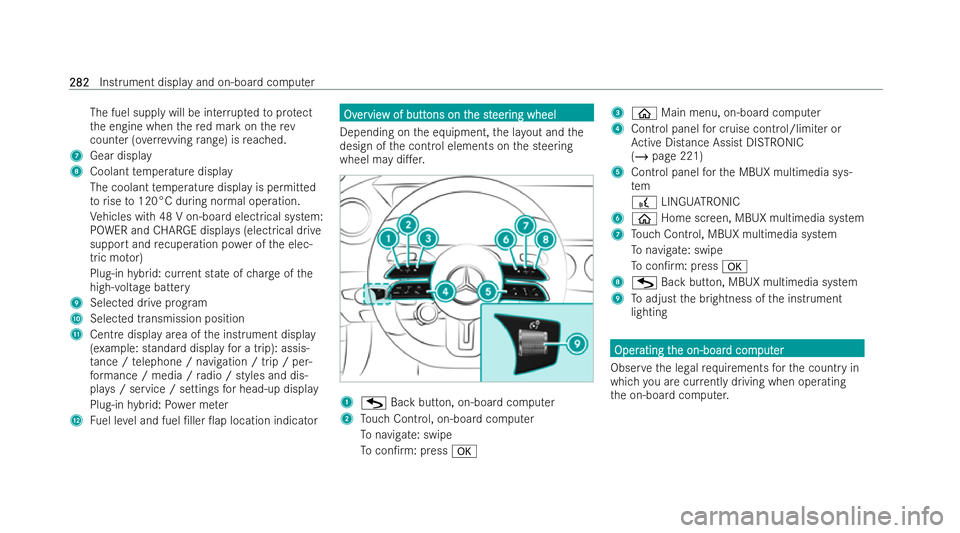
The fuel supply will be inter
rupted toprotect
th e engine when there d mark on therev
counter (o verrev ving range) is reached.
7 Gear displ ay
8 Coolant temp erature display
The coolant temp erature display is permitted
to rise to120°C during normal operation.
Ve hicles with 48 V on-board elect rical system:
POWER and CHARGE displa ys(electrical drive
support and recuperation po wer of the elec-
tric mo tor)
Plug-in hybrid: cur rent state of charge ofthe
high- voltage battery
9 Selected drive prog ram
A Selected transmission position
B Centre display area of the inst rument display
(e xamp le: standard display for a trip): assis-
ta nce / telephone / navigation / trip / per-
fo rm ance / media / radio / styles and dis-
pla ys/ service / settings for head-up display
Plug-in hybrid: Powe r me ter
C Fuel le vel and fuel �/ller �0ap location indicator Ov
Ov
er
ervie
vie w of butt
w of butt ons on t
ons on the st
he steer
eer ing wheel
ing wheel
Depending on the equipment, the la yout and the
design of the control elements on the steering
wheel may di�.er. 1
G Back button, on-board computer
2 Touch Control, on-board computer
To navigate: swipe
To con�/rm: press a 3
ò Main menu, on-board computer
4 Cont rol panel for cruise control/limiter or
Ac tive Distance Assist DISTRONIC
(/ page 221)
5 Control panel forth e MBUX multimedia sys-
tem
£ LINGU ATRO NIC
6 ò Home screen, MBUX multimedia system
7 Touch Control, MBUX multimedia system
To navigate: swipe
To con�/rm: press a
8 G Back button, MBUX multimedia system
9 Toadjust the brightness of the inst rument
lighting Oper Oper
ating t
ating t he on-boar
he on-boar d com
d comput
puter
er
Obser vethe legal requ irements forth e country in
which you are cur rently driving when ope rating
th e on-board computer. 282
282
Instrument display and on-board computer
Page 286 of 537
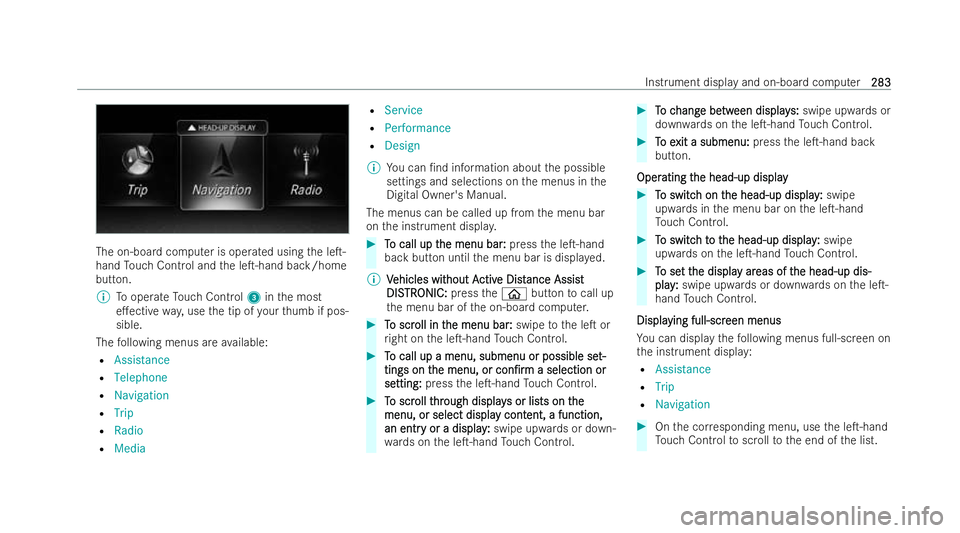
The on-board computer is ope
rated using the le�T-
hand Touch Control and the le�T-hand back/home
button.
% Tooperate Touch Control 3inthe most
e�.ective way,use the tip of your thumb if pos-
sible.
The following menus are available:
R Assistance
R Telephone
R Navigation
R Trip
R Radio
R Media R
Service
R Performance
R Design
% You can �/nd information about the possible
settings and selections on the menus in the
Digital Owner's Manual.
The menus can be called up from the menu bar
on the inst rument displa y. #
T To call up t
o call up t he menu bar:
he menu bar: pressthe le�T-hand
back button until the menu bar is displa yed.
% V
Vehicles wit
ehicles wit hout A
hout Activ
ctive Dist
e Dist ance Assis
ance Assist t
DIS
DIS TR
TRONIC:
ONIC: presstheò button tocall up
th e menu bar of the on-board computer. #
T
To scr
o scr oll in t
oll in t he menu bar
he menu bar :
:swipe tothe le�T or
ri ght on the le�T-hand Touch Control. #
T
To call up a menu, submenu or possible se
o call up a menu, submenu or possible se t-
t-
tings on t
tings on t he menu, or
he menu, or con�/rm
con�/rma selection or
a selection or
se
se tting:
tting: press the le�T-hand Touch Control. #
T
To scr
o scr oll t
oll thr
hrough display
ough display s or lis
s or lists on tts on the
he
menu, or select displa
menu, or select displa y cont
y content, a function,
ent, a function,
an entr
an entr y or a display
y or a display :
:swipe upwards or down-
wa rds on the le�T-hand Touch Control. #
T
To c
o c hang
hang e be
e betw
tween display
een display s:
s:swipe upwards or
down wards on the le�T-hand Touch Control. #
T
To e
o e xit a submenu:
xit a submenu: pressthe le�T-hand back
button.
Oper
Oper ating t
ating t he head-up display
he head-up display #
T
To switc
o switc h on t
h on the head-up display
he head-up display :
:swipe
upwards in the menu bar on the le�T-hand
To uch Control. #
T
To switc
o switc h t
h to t
o t he head-up display
he head-up display :
:swipe
upwards on the le�T-hand Touch Control. #
T
To se
o se t t
t the displa
he displa y ar
y areas of t
eas of t he head-up dis-
he head-up dis-
play
play :
:swipe upwards or down wards on the le�T-
hand Touch Control.
Displa
Displa ying full-scr
ying full-scr een menus
een menus
Yo u can display thefo llowing menus full-screen on
th e inst rument displa y:
R Assistance
R Trip
R Navigation #
Onthe cor responding menu, use the le�T-hand
To uch Control toscroll tothe end of the list. Instrument display and on-board computer
283
283