2022 MERCEDES-BENZ A CLASS service
[x] Cancel search: servicePage 36 of 426
and
your dat apr otect ion rights caneither be
fo und onthemanuf acturer'swebsit eor youwill
re cei vethis inf ormatio nas par tof theva rious
ser vices andservice offers .The reyouwill also
fi nd thecon tact informati onforth emanuf ac‐
tur erand itsdat apr otect ion officer s.
At awo rkshop, forex am ple, withth esuppor tof
a specialis tand possibly fora fe e, youcan have
dat are ad out whic his stor ed onlylocally inthe
ve hicle. MBUX
multim ediasystem/M ercedes me
connect If
th eve hicle iseq uipped withth eMBUX multi‐
media system orMer cedes meconnect ,addi‐
tion aldat aabout theve hicle's operation, theuse
of theve hicle incer tain situat ions,and theloca‐
tion oftheve hicle maybe com piled bythe
MBUX multimedia system orMer cedes mecon‐
nect .
Fo radd itional information, pleasereferto the
"MB UXmult imed iasystem" sectionand/or the
Mer cedes meconn ectTerm sand Conditions. Ev
ent data recor der s US
Aonl y:
This vehicle iseq uipped withan event data
re cor der (EDR ).The mainpu rpose ofan EDRis
to recor d,incer tain crash ornear crash-lik esit‐
uation s,suc has an airbag deployment orhitt ing
a ro ad obs tacle ,da ta that will assis tin unde r‐
st andi nghowave hicle's systems perform ed.
The EDRis designed torecor dda ta relat ed to
ve hicle dynamics andsafetysy stems fora shor t
per iod oftime, typica lly30 seconds orless.
The EDR inthis vehicle isdesigned torecor d
su ch dat aas:
R Howvarious systems inyour vehicle were
oper ating
R Whe ther or notth edr iver and front
passeng erseat belts werebuc kled/f astened
R Howfar(if at all)th edr iver wa sdepr essing
th eaccelera torand/or brak epeda land
R Howfast theve hicle wastrave ling
This datacan help prov ide abe tter under stand‐
ing ofthecir cums tances inwh ich acci dents and
inju ries occur .NO TE: EDRdat ais recor ded by yo
ur vehicle onlyif anon- trivial crash situation
occur s;no dat ais recor ded bytheED Runder
nor mal driving conditions andnoper sonal data
(e.g. name, gende r,ag eand acciden tloc atio n)is
re cor ded .Ho wever,ot her parties, suchas law
enf orcement ,could combine EDRdatawit hth e
typ eof personally identifying dataro utin ely
acq uired dur ing acr ash inve stigation .
To read dat are cor ded byan EDR,spec ialequip‐
men tis requ ired, and access totheve hicle or
th eED Ris needed. Inaddition totheve hicle
manuf acturer,ot her parties that have thespecial
eq uipment, suchas law enf orcemen t,can read
th einf ormation byacc essi ngtheve hicle orthe
EDR.
EDR data ma ybe used incivil andcrimina lmat‐
te rs as ato ol inaccident recons tructi on,acci ‐
dent claims and vehicle safety. Since theCr ash
Dat aRe trie va l(CDR) tool that isused toextract
da ta from theED Ris comm erciall yav ailable,
Mer cedes-Ben zUS A,LLC("MBUS A")expressl y
disclaims anyand allliability arising from the
ex tracti onofthis inf ormatio nby unaut horized
Mer cedes-Ben zper son nel. 34
Generalno tes
Page 153 of 426

St
andb ymode (ext ens ion ofthe star terbat‐
te ry 's per iod out ofuse) St
andb ymode function
% This function isno tav ailable forall model s.
If standb ymode isact ivat ed, energyloss willbe
min imis eddur ing ex tende dpe riods ofnon- oper‐
ation.
St andb ymode isch aract erised bythefo llo wing:
R The star terbatt eryis preser ved.
R The maximum non-opera tionaltime appear s
in themedia display.
R The conn ection toonline services isint erru p‐
te d.
R The ATA(anti-t heftal ar m system) isno tav ail‐
able.
R The interior motionsen sor and tow- aw ay
alar mfun ction sar eno tav ailable.
R The function forde tecting collisions ona
pa rked vehicle isno tav ailable. If
th efo llo wing condition sar efulf illed, standb y
mode canbeact ivat ed ordeac tivated usin gth e
multime diasystem:
R The engine isswitc hedoff.
R The ignition isswitc hedon.
Ex ceeding theve hicle's displayednon -oper a‐
tion altime maycause inconvenie nce, i.e.it can‐
no tbe guarant eedth at thest ar terbatt erywil l
re liabl yst ar tth eengine.
The star terbatt erymus tbe charge dfirs tin the
fo llo wing situat ions:
R The vehicle's non-oper ational timemustbe
ex tende d.
R The Batte ryCh arg eInsu fficie ntfor Stand by
Mod emes sage appear sin themedia display.
% Standb ymode isaut omat icallydeac tivated
when theignition isswitc hedon.
Ac tiv atin g/deac tivatin gst andb ymode (park‐
ing theve hicl efo ran extended period)
Re quirement s:
R The engin eis switc hedoff. Multime
diasystem:
4 © 5
Set ting s5
Vehicle #
Activateor deacti vate Stand byMod e. #
Select Yes. Dr
ivi ng and drivi ng safetysy stems Dr
iving systems andyour responsibility Yo
ur vehicle iseq uipped withdr iving systems
whic hassis tyo uin drivin g,par kingand man eu‐
ve ring theve hicle. Thedriving systems areonl y
aids. Theyar eno ta subs titutefo ryo ur att entio n
to thesur round ingsand donotre lie ve youof
yo ur responsibili typer tainin gto road traf fic law.
The driver isalw aysre sponsible formaint aining
a saf edis tance totheve hicle infront, forve hicle
speed, forbr aking ingood timeandforst ay ing
in lane. Payatt ention tothetra ffic con dition sat
all tim esand interve ne when nece ssary.Be
aw areof thelimit ations rega rding thesaf euse of
th ese systems.
Dr iving systems canneither reduce therisk of
accident ifyo ufa ilto adap tyo ur drivin gst yle nor
ove rride thelaws ofphysics. Theycan notalw ays Dr
iving and parking 15
1
Page 206 of 426

The
on-boar dcom puterisoper ated using the
lef t-hand Touc hCon trol and thelef t-hand back/
home button.
When theon- boar dcom puterisbeing operated,
dif fere nt aco ustic signa lswillsou ndasoperati ng
fe edbac k,e.g. when theend ofalis tis reac hed
or when youar esc rolling thro ugh alis t.
The follo wing menusareav ailable:
R Assist anc e
R Phon e
R Navi gation
R Trip
R Radio R
Media
R Design s& Dis p.
R Service
% Youcan find informa tionab ou tth epossible
se ttings andselect ionsonthemenus inthe
Dig ital Op erator' sMa nua l. #
Tocall upthemenu bar:press thelef t-hand
bac kbutt onuntil themenu barisdispla yed.
% Ve
hicl eswithout Activ eDi stance Assist
DI ST RO NIC :pr ess the00E2 buttontocal l
up themenu baroftheon- boar dcom puter. #
Toscr ollinthemenu bar:swipe leftor
ri ght onthelef t-hand Touc hCon trol. #
Tocall upamen u,sub men uor poss ible
se ttings onthemenu ,or conf irm aselec‐
tion orsetting: press thelef t-hand Touc h
Con trol. #
Toscr ollthrough displa ysorlists on the
menu ,or select displaycont ent,afun c‐
tion, anentr yor adisp lay: swipe upwards
or down wardson thelef t-hand Touc hCon ‐
tr ol. #
Toexitasubm enu:press thelef t-hand back
butt on.
Selecting theHead -upDispla y #
Toswitc hon theHead -upDispla y:switc h
on theHead-up Displayvia themultimedia
sy stem oractiv ateit in themenu barbyswip‐
ing upw ards on thelef t-hand Touc hCon trol.
The Head -upDisplaymen uwill besele cted
on theHead-up Display. #
Toswitc hto theHead -upDispla y:press
th elef t-hand Touc hCon trol or swipe
upw ards on thelef t-hand Touc hCon trol. #
Tosetth eth reedisp layra ng es ofthe
Head -upDispla y:swipe upwards ordown‐
wa rdson thelef t-hand Touc hCon trol.
Fu ll-scr eenmenu s
Ve hicl eswith aninstrument displayin the
widescr eencockpit:th efo llo wing menuscan
be sho wnfull-s creen ontheins trument display:
R Assist ance
R Trip 20
4
Instrument Displayand on-boar dcom puter
Page 212 of 426
%
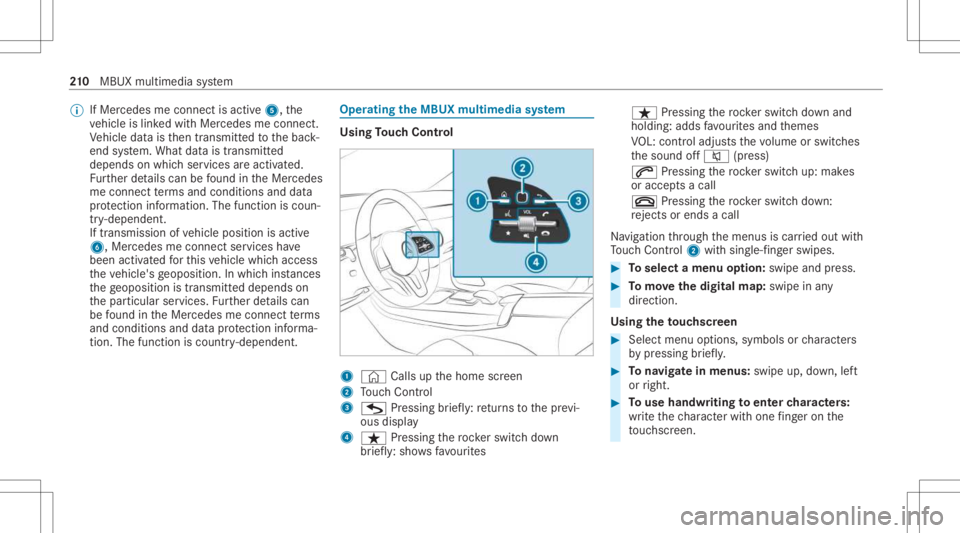
IfMer cedes meconnect isactiv e5, the
ve hicle islink edwithMer cedes meconn ect.
Ve hicle datais then transmit tedto thebac k-
end system. What datais tra nsmit ted
depends onwhic hser vices areactiv ated.
Fu rther details can befound intheMer cedes
me connect term sand conditions anddata
pr otect ion information .The func tion iscoun‐
tr y- dependen t.
If tra nsmis sionofvehicle position isactiv e
6, Mercedes meconn ectservices have
been activated forth is vehicle whichaccess
th eve hicle's geoposition. Inwhic hins tances
th ege oposition istransmitt eddepends on
th epar ticular services. Further details can
be found intheMer cedes meconnect term s
and condition sand datapr otect ion informa‐
tion .The func tion iscount ry-de pende nt. Ope
ratin gthe MBUX multimediasy stem Using
Touc hCon trol 1
© Calls up thehome screen
2 Touc hCon trol
3 G Press ing brief ly:re tur ns tothepr ev i‐
ous displa y
4 ß Pressin gth ero ck er switc hdo wn
br ief ly:sho wsfavo urites ß
Press ing thero ck er switc hdo wn and
holding: addsfavo urites and themes
VO L:contr oladjus tsthevo lume orswitc hes
th esound off0063 (press)
0061 Pressing thero ck er switc hup: mak es
or accep tsacall
0076 Pressing thero ck er switc hdo wn:
re jects orend sa cal l
Na vig ation thro ugh themenus iscar ried out with
To uc hCon trol 2 withsin gle-f ing erswipes. #
Toselect amenu option: swipe andpress. #
Tomo vethedigita lma p:swipe inany
dir ect ion.
Using theto uc hscr een #
Select menuoptions, symbolsorcharact ers
by pressing brief ly. #
Tonavig atein menus: swipeup,down, left
or right. #
Touse handwr itingtoent ercharact ers:
wr ite th ech aract erwit hon efing er on the
to uc hsc reen. 21
0
MBUX multimedia system
Page 226 of 426

#
Enterthedes tinat ionin2. The entries can
be made inanyor der .
The follo wing entries can bemade, forex am‐
ple:
R City ,st re et,house number
R Street,cit y
R ZIP code
R POI name orPOI categor y,e.g. Parkin g
R Cont actname #
Select asear chresult inlist3. #
Calculat eth ero ute(/ page22 4).
% Youcan find further information aboutdesti‐
nation entry,e.g. 3wo rdaddr esse s,in the
Dig ital Op erator' sMa nua l.
Ch ang ingco untr y #
Select theindicat orforfe der alstat eor prov ‐
inc e1. #
Selec tth efe der alstat eor thepr ov inc ein
1. #
Enterth ecount ryindic ator. #
Selec tth ecount ryon list3. #
Select thefe der alstat eor thepr ov inc efrom
lis t3.
Using online search
Des tinationentr yus es onl ine mapser vices. If
th eon- boar dsear chfinds nosuitab lede stina‐
tion sor ifyo uch ang ecoun tries, theonline
sear chisavailable.
Fo rth edes tinat ionyoucan enteran add ress, a
POI ora3 wo rdaddr ess. #
Select coun try ind icat or1. #
Select thepr ov ider forth eonline service
fr om thecount ries list.
or #
Ifth eon- boar dsear chdeliv ersno results,
ent erthedes tinat ionininput line 2. #
Select thedes tinat ioninthelis t.
The detailed viewforth ero uteis displ ayed. Calculating
aro ut eand using settings for
ro ut eguidanc e Re
quirement s:
R The destination hasbeen entered. R
The destination addressissho wn.
Multime diasystem:
4 © 5
Navigation 1
¥ Norouteye t.
¦ Aro utehas been mappe d. #
Select ¥.
The routeto thedes tinat ioniscalculat ed.
Ro uteguidan cebegin s.
or #
Select ¦. 22
4
MB UX mult imed iasystem
Page 227 of 426

#
Select Set asWa ypoint.
The destina tion address issetas thene xt
int ermediat edes tinat ion.
or #
Select Start New Route Guidance.
The destinat ionaddr essissetas thene w
des tinat ion.Theprev ious destination andthe
int ermediat edes tination sar edele ted. Ro ute
guidan cetothene wdes tinat ionbegins.
Selecting rout ese ttings #
Select Z. #
Select Advanced . #
Select Route. #
Select thero utetyp e. #
Take traf fic inf ormati onintoconsi deration
wi th Dyna micRoute Guidance 0048. #
Select routeop tio ns withAv oid Options. #
ActivateSug gest Alte rnative Route .
Alt ernati veroutes arecalc ulatedforev ery
ro ute. #
ActivateActiv ateCommu terRoute .
If th ere qu iremen tsareme t,th emultimedia
sy stem automaticall yde tects that theve hicle
is on acommut erroute. Ro uteguidan ce
begin swit hout voice output . Using
mapfunct ions Multim
ediasystem:
4 © 5
Navigation
Se tting thema pscale #
Tozoo min: taptwice quickl ywit hone fing er
on themedia display. #
Tozoo mout: tapwit htw ofing erson the
media display.
Mo ving thema p #
Moveone fing er inanydi re ction onthe
to uc hsc reen. #
Torese tth ema pto the current vehicl e
posi tion: press \ brief ly. Sel
ecting map orien tatio n #
Tapre peat edlyon theÄ compass symbol
on themap.
The viewch ang esintheseq uence 3D,2D
Heading Upto2D North Up.
Swi tching free wa yinf ormation on/off #
Select Z. #
Swi tchHig hway Inform ation onoroff. Usi
ngservices Re
quirement s:
R Ther eis an Interne tcon nection .
R Mer cedes meconnectis available.
R Youha ve setup auser account inthe
Mer cedes mePortal.
R The vehicle isconn ectedtoauser accoun t
and youha ve acc eptedth econ ditions ofuse
fo rth eser vice.
Fu rther information canbefound at:
ht tp s:// www .merced es.me
R The serviceis available. MBU
Xmult imed iasystem 225
Page 228 of 426

R
The service hasbeen activated atan aut hor‐
ized Mercedes-B enzCent er.
Multimedia system:
4 © 5
Navigation
Displa yingthetraf fic sit uation withLiv eTr af‐
fi c Inf orma tion #
Select Z. #
ActivateTra ffic. #
Select Adva nced. #
Select View . #
Select MapEle ments . #
Swi tchon Tra fficInci dents ,Fre eFlo wing
Tra fficand Delay.
If traf fic inf ormati onhasbee nre cei ved, then
tra ffic inc ident ssuc has roadw orks ,ro ad
bloc ks,local area repor ts(e.g. fog) and warn‐
ing mess ages aredispla yed.
The traffic dela yis displa yedfo rth ecur rent
ro ute. Traf fic del ayslas ting oneminut eor
long erareta ke nint oconsi deratio n. Di
spl aying hazardwa rnings withCar -to-X -
Comm unication
If hazar dwa rnings areav ailable these can be
sho wnassymbols onthemap. Thedispla y
depends onthese ttings forth eTraffic andTraf-
fic Incidents option s. #
Setth eop tion s.
If Traffic isswitc hedoffand Traffic Incidents
is switc hedon,thesymbols aresho wnon
th epr ospect ive ro ute.
Disp laying weather information andother
map contents #
Select Z. #
Select Advanced . #
Select View. #
Select MapElements . #
Scrollup and showtheONLIN EMAP CON-
TENT categor y. #
Swi tchon aser vice ,e.g. Wea ther.
Cu rrent weather informat ionisdispla yedon
th ena vig ation map,e.g.temp eratur eor
cloud cover. Te
lephone Te
lephon y No
teson telephon y &
WARNIN GRisk ofdist ra ction from oper‐
ati ng integr ated commu nication equip‐
ment whiletheve hicle isin mo tion
If yo uoper ateco mm unic ationeq uipme nt
int egrat edintheve hicle when driving, you
cou ldbe dist ra cted from thetra ffic situat ion.
This could alsocause youto lose control of
th eve hicle. #
Onlyoper ateth is eq uipmen twhen the
tr af fic situ ation per mits. #
Ifyo ucan notbe sur eof this, stop the
ve hicle whilstpa ying attention toroad
and traffic condi tions andoperate the
eq uipment withth eve hicle statio nary. 226
MBUX multimedia system
Page 232 of 426
R
Twomobile phones areconn ectedwithth e
multime diasystem viaBlue tooth®
(tw o
phone mode).
- Youcan useallthefunc tionsof themulti‐
media system withth emobile phonein
th efo re ground.
- Youcan recei veinc omin gcalls andmes‐
sag eswit hth emobile phoneinthebac k‐
gr ound.
Yo ucan interch ang eth emobile phonein
th efo re ground andbackground .
Connect ingamob ilephone
Re quirement s:
R Blue tooth®
is act ivat ed on themobile phone
(see themanuf acturer'soper ating instruc‐
tion s).
R Blue tooth®
is act ivat ed on themultimedia
sy stem. Multimedia
system:
4 © 5
Phone
Sear ching fora mob ile pho ne #
Select í. #
Select Connect NewDevice.
Co nnectin gamob ile pho ne
Au thor ization follo ws usin gsec uresim ple pair‐
ing . #
Select amob ilephon e.
A co de isdispl ayed inthemultimedia system
and onthemobile phone. #
Ifbo th code smatc h,conf irm thecode onthe
mobil ephone.
Fu nctions inthete lephon ymenu
In thete lephon ymen uyo uha ve thefo llo wing
func tions,forex am ple:
R Mak ingcalls ,e.g .:
- R Accep ta cal l
- k EndCall
- i Create Confer. Call -
Accep ting orrejecti ngawa itin gcall
R Managin gcon tacts, e.g.:
- Downl oading mob ile pho necont acts
- Managi ngthefo rm atofacon tact's name
- Saving acont actasafa vo rite
R Recei ving andsend ingmess ages, e.g.:
- Usingthere ad-al oudfunction
- Dictating ane wmes sage Mer
cede sme and apps Mer
cede sme connect Inf
ormation onMer cede sme connect
Mer cedes meconnect consistsof multi pleserv‐
ices.
Yo ucan usethefo llo wing service svia themulti‐
media system and theov erhead control panel,
fo rex am ple:
R Accid ent and Brea kdo wnManag eme nt(me
bu tton orsitu ation-de pendentdispl ayinthe
multime diasystem) 230
MBUX multimedia system