2022 MAZDA MODEL CX-5 power steering
[x] Cancel search: power steeringPage 206 of 723
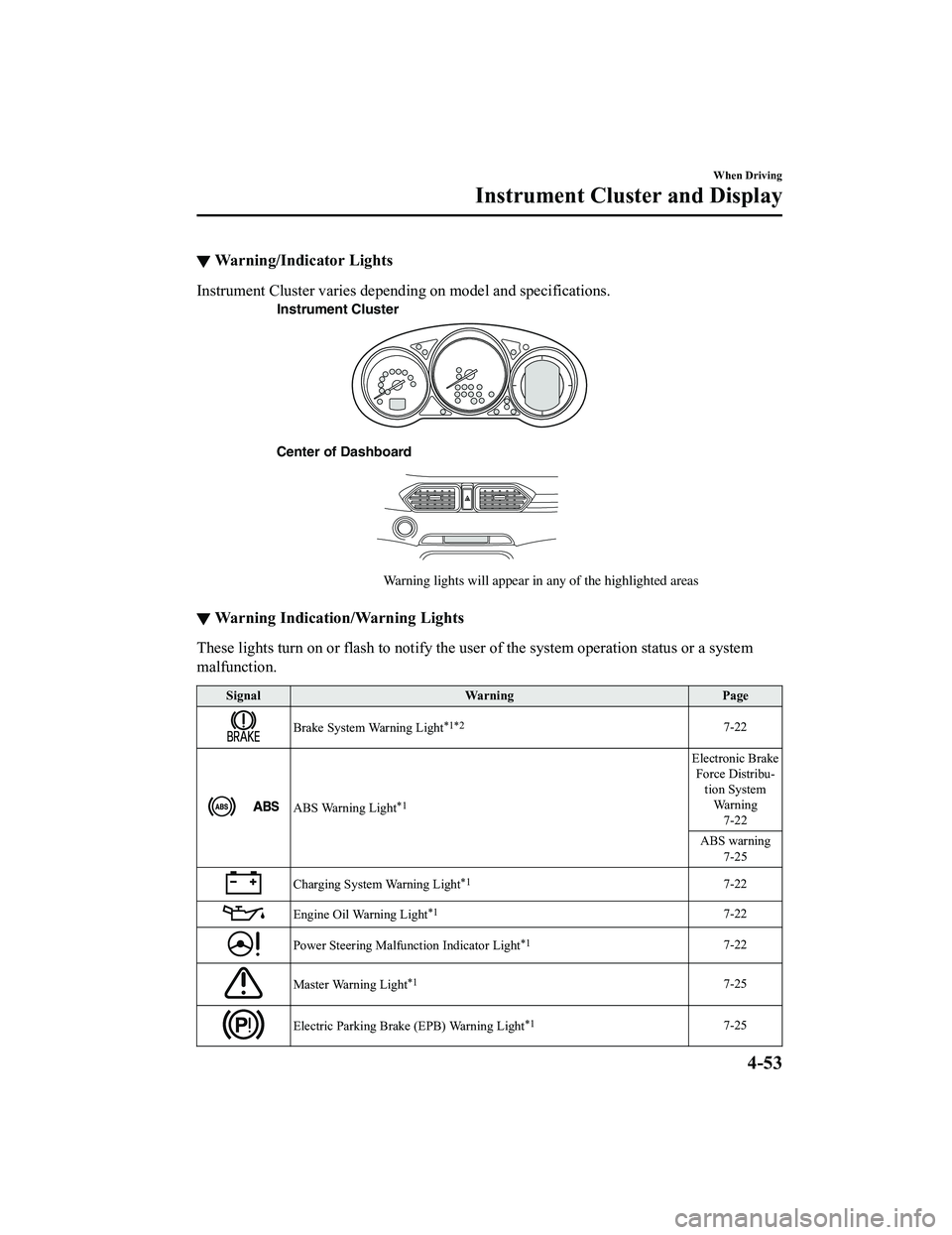
▼Warning/Indicator Lights
Instrument Cluster varies depending on model and specifications.
Instrument Cluster
Center of Dashboard Warning lights will appear in any of the highlighted areas
▼Warning Indication/Warning Lights
These lights turn on or flash to notify the us
er of the system operation status or a system
malfunction.
Signal Warning Page
Brake System Warning Light*1*27-22
ABS Warning Light*1
Electronic Brake
Force Distribu ‐
tion System Wa r n i n g 7-22
ABS warning 7-25
Charging System Warning Light*17-22
Engine Oil Warning Light*17-22
Power Steering Malfunction Indicator Light*17-22
Master Warning Light*17-25
Electric Parking Brake (EPB) Warning Light*17-25
When Driving
Instrument Cluster and Display
4-53
CX-5_8KN5-EA-21K_Edition1_old 2021-9-9 8:35:12
Page 223 of 723

Driving Tips
WA R N I N G
Do not let the vehicle move in a direction
opposite to the direction selected by the
selector lever:
Do not let the vehicle move backward with
the selector lever in a forward position, or
do not let the vehicle move forward with
the selector lever in the reverse position.
Otherwise, the engine may stop, causing
the loss of the power brake and power
steering functions, and make it difficult to
control the vehicle which could result in an
accident.
Passing
For extra power when passing another
vehicle or climbing steep grades, depress
the accelerator fully. The transaxle will
shift to a lower gear, depending on vehicle
speed.
NOTE
The accelerator pedal may initially feel
heavy as it is being depressed, then feel
lighter as it is depressed further. This
change in pedal force aids the engine
control system in determining how much
the accelerator pedal has been
depressed for performing kickdown, and
functions to control whether or not
kickdown should be performed.
While the selector lever is in the M
position and the TCS is turned off,
manual shift mode does not switch to
automatic shift mode even if the
accelerator pedal is completely
depressed. Operate the selector lever.
Climbing steep grades from a stop
To climb a steep grade from a stopped
position:
1. Depress the brake pedal.
2. Shift to D or M1, depending on the load weight and grade steepness.
3. Release the brake pedal while gradually accelerating.
Descending steep grades
When descending a steep grade, shift to
lower gears, depending on load weight and
grade steepness. Descend slowly, using the
brakes only occasion ally to prevent them
from overheating.
When Driving
Automatic Transaxle
4-70
CX-5_8KN5-EA-21K_Edition1_old 2021-9-9 8:35:12
Page 269 of 723

Power Steering
Power steering is only operable when
the engine is running. If the engine is off
or if the power steering system is
inoperable, you can still steer, but it
requires more physical effort.
If the steering feels stiffer than usual
during normal driving or the steering
vibrates, consult an Authorized Mazda
Dealer.
The warning indication/warning light
notifies the driver of system
abnormalities and operation conditions.
In addition, the buzzer may also activate
depending on the system abnormality or
operation condition.
Refer to Stop Vehicle in Safe Place
Immediately on page 7-22.
Refer to Power Steering Warning
Buzzer on page 7-44.
CAUTION
Never hold the steering wheel to the
extreme left or right for more than 5
seconds with the engine running. This
could damage the power steering system.
When Driving
Power Steering
4-116
CX-5_8KN5-EA-21K_Edition1_old2021-9-9 8:35:12
Page 329 of 723

Lane-keep Assist System (LAS) & Lane Departure
Warning System (LDWS)
*
The LAS & LDWS alerts the driver that the vehicle may be deviating from its lane and it
provides steering assistance to help the driver stay within the vehicle lanes.
The Forward Sensing Camera (FSC) detects the white lines (yellow lines) of the vehicle
lane in which the vehicle is traveling and if the system determines that the vehicle may
deviate from its lane, it operates the electric power steering to assist the driver's steering
operation. The system also alerts the driver by activating a lane departure warning sound,
vibrating the steering wheel, and indicating an alert in the display. Use the system when you
drive the vehicle on roads with white (yello w) lines such as expressways and highways.
Refer to Forward Sensing Camera (FSC) on page 4-256.
Forward Sensing
Camera (FSC)
WA R N I N G
Do not rely completely on the LAS & LDWS:
The LAS & LDWS is not an automatic driving system. In addition, the system is not designed
to compensate for a driver's lack of caution, and over-reliance on the system could lead to
an accident.
The detection ability of the LAS & LDWS is limited. Always stay on course using the steering
wheel and drive with care.
Do not use the LAS & LDWS in the following cases:
The system may not operate adequately accordin g to the actual driving conditions, resulting
in an accident.
When Driving
i-ACTIVSENSE
4-176*Some models.
CX-5_8KN5-EA-21K_Edition1_old 2021-9-9 8:35:12
Page 341 of 723

The rumble sound is a reproduction of the sound which occurs when a vehicle passes
over a rumble strip.
Rumble
Groove
▼ System Canceling
When the LAS & LDWS
is turned off,
press the LAS & LDWS OFF switch.
The LAS & LDWS OFF indicator light
turns on.
NOTE
When driving the vehicle while the TJA
function is in use, the LAS & LDWS
turns on automatically.
In the following cases, the LAS & LDWS
is canceled automatically and the LAS
& LDWS OFF indicator light turns on.
Have your vehicle inspected at an
Authorized Mazda Dealer.
There is a malfunction in the power
steering.
There is a malfunction in the TCS.
There is a malfunction in the Forward
Sensing Camera (FSC).
When the ignition is switched OFF, the
system status before it was turned off is
maintained. For example, if the ignition
is switched OFF with the lane-keep
system operable, the system will be
operable when the ignition is switched
ON the next time.
When the LAS & LDWS is turned off, the
vehicle lane line indication in the
When Driving
i-ACTIVSENSE
4-188
CX-5_8KN5-EA-21K_Edition1_old 2021-9-9 8:35:12
Page 479 of 723

WA R N I N G
Always adjust Mazda Connect while the vehicle is stopped:
Do not adjust Mazda Connect with the Commander switch while driving the vehicle.
Adjusting Mazda Connect with the Commander switch while driving the vehicle is dangerous
as it could distract your attention from the vehicle operation which could lead to a serious
accident.
Even if the audio remote control switches are eq uipped on the steering wheel, learn to use the
switches without looking down at them so that you can keep your maximum attention on the
road while driving the vehicle.
Do not allow the connection plug cord to get tangled with the selector lever:
Allowing the plug cord to become tangled with the selector lever is dangerous as it could
interfere with driving, resulting in an accident.
Do not adjust a mobile device or a similar product while driving the vehicle:
Adjusting a mobile device or a similar product while driving the vehicle is dangerous as it
could distract your attention from the vehicle operation which could lead to a serious
accident. Always adjust a mobile device or a similar product while the vehicle is stopped.
CAUTION
For the purposes of safe driving, adjust the au dio volume to a level that allows you to hear
sounds outside of the vehicle including car horns and particul arly emergency vehicle sirens.
NOTE
Do not use Mazda Connect for a long time with the engine stopped. Otherwise, the battery
power could be depleted.
If a mobile phone or CB radio is used in or near the vehicle, it could cause noise to occur
from the audio system. However, this does not indicate a problem.
Interior Features
Mazda Connect (Mazda Connect (Type A))
5-16
CX-5_8KN5-EA-21K_Edition1_old 2021-9-9 8:35:12
Page 620 of 723

SignalWarning
Power Steering Mal‐
function Indication*
The message is displayed if the electric power steering has a malfunction.
If the message is displayed, stop the vehicle in a safe place and do not operate the
steering wheel. There is no problem if the message in the display turns off after a
while. Contact an Authorized Mazda Dealer if the message is displayed continuously.
NOTE
If the message is displayed, the power steering will not operate normally. In this
case, the steering wheel can still be op erated, however, the operation may feel
heavy compared to normal, or the steer ing wheel could vibrate when turning.
Repeatedly jerking the steering wheel left and right while the vehicle is stopped or
moving extremely slowly will cause the power steering system to go into protective
mode which will make the steerin g feel heavy, but this does not indicate a problem.
If this occurs, park the vehicle safely and wait several minutes for the system to
return to normal.
Power Steering Mal ‐
function Indicator
Light
*
The light illuminates/flashes if the electric power steering has a malfunction.
If the light illuminates/flashes, stop the vehicle in a safe place and do not operate the
steering wheel. There is no problem if the light turns off after a while. Contact an Au ‐
thorized Mazda Dealer if the light illuminates/flashes continuously.
NOTE
If the indicator light illuminates/flashes, the power steering will not operate nor‐
mally. If this happens, the steering wheel can still be operated, however, the opera‐
tion may feel heavy compared to normal , or the steering wheel could vibrate when
turning.
Repeatedly jerking the steering wheel left and right while the vehicle is stopped or
moving extremely slowly will cause the power steering system to go into protective
mode which will make the steerin g feel heavy, but this does not indicate a problem.
If this occurs, park the vehicle safely and wait several minutes for the system to
return to normal.
▼ Contact Authorized Mazda Dealer and Have Vehicle Inspected
If any of the following warning lights or the indicator light turns on/flashes, the system may
have a malfunction. Contact an Authorized Mazda Dealer to have your vehicle inspected.
Signal
Warning
ABS Warning LightIf the ABS warning light stay
s on while you're driving, the ABS control unit has detected
a system malfunction. If this occurs, your brakes will functio n normally as if the vehicle
had no ABS.
Should this happen, consu lt an Authorized Mazda Dealer as soon as possible.
NOTE
When the engine is jump-sta rted to charge the battery, uneven rpm occurs and the ABS
warning light may illuminate. If this occurs, it is the result of the weak battery and does
not indicate an ABS malfunction.
Recharge the battery.
The brake assist system does not operate while the ABS warning light is illuminated.
If Trouble Arises
Warning/Indicator Lights and Warning Sounds
*Some models.7-25
CX-5_8KN5-EA-21K_Edition1_old 2021-9-9 8:35:12
Page 639 of 723

function does not operate even if
AUTOHOLD switch is operated.
If the warning light flashes/message is
displayed and the beep sound is activated
simultaneously, have your vehicle
inspected at an Authorized Mazda Dealer.
▼Power Steering Warning Buzzer
If the power steering system has a
malfunction, the power steering
malfunction indication/malfunction
indicator light turns on or flashes and the
buzzer operates at the same time.
Refer to Stop Vehicle in Safe Place
Immediately on page 7-22.
▼Tire Inflation Pressure Warning
Beep
The warning beep sound will be heard for
about 3 seconds if the tire pressures
decrease.
Refer to Tire Pressu
re Monitoring System
on page 4-273.
▼ Blind Spot Monitoring (BSM)
Warning Beep*
Driving forward
The warning beep operates when the turn
signal lever is operat
ed to the side where
the Blind Spot Monitoring (BSM) warning
light is illuminated.
NOTE
A personalized function is available to
change the Blind Spot Monitoring (BSM)
warning beep sound volume.
Refer to the Settings section in the Mazda
Connect Owner's Manual.
Reversing
The Blind Spot Monitoring (BSM)
warning sound is activated if there is a
possibility of collision with a vehicle
approaching from behind and from the
rear on the left and right sides of the
vehicle.
▼ Lane Departure Warning Sound*
While the system is
operating, if the
system determines that the vehicle may
depart from the lane, it sounds a warning
sound.
NOTE
The volume of the Lane-keep Assist
System (LAS) & Lane Departure
Warning System (LDWS) warning sound
can be changed.
Refer to the Settings section in the
Mazda Connect Owner's Manual.
The type of the Lane-keep Assist System
(LAS) & Lane Departure Warning
System (LDWS) warning sound can be
changed.
Refer to the Settings section in the
Mazda Connect Owner's Manual.
▼ Mazda Radar Cruise Control with
Stop & Go function (MRCC with
Stop & Go function) System
Wa r n i n g s
*
The Mazda Radar Cruise Control with
Stop & Go function (MRCC with Stop &
Go function) system warnings notify the
driver of system problems and precautions
on use when required. Check after hearing
a warning beep sound.
If Trouble Arises
Warning/Indicator Lights and Warning Sounds
7-44*Some models.
CX-5_8KN5-EA-21K_Edition1_old
2021-9-9 8:35:12